

Published on May 9, 2023
7 min to read
Can You See Who Views Your Instagram Profile?

Summarize with AI


Table of contents
Summarize with AI

ChatGPT

Claude

Perplexity
Share

Vista Social

X (Twitter)


Instagram users have plenty of burning questions. For example, can you see who views your Instagram profile?
Maybe you want better audience insights, or you want to sharpen the content you publish for client accounts, so understanding how profile views work helps you set the right expectations. Whatever your reason, you’re probably tired of guessing, so let’s answer the question once and for all.
Table of contents
Can you see who views your Instagram profile?
The short answer is no. You can’t see who views your Instagram profile. Online privacy rules keep tightening, and Instagram sticks to that direction by keeping profile views private. And, evidently, a lot of people believe that peeking into someone’s Instagram feed should be a private affair.
So how do you shape a strategy when you can’t pinpoint who’s checking out your content? You get something different instead because Instagram only shares aggregated stats. You see trends that help you decide what to post next, not the identities of the people viewing your profile.
Rather than focusing on individual account data, you can analyze data on users that view your (or your client’s) Instagram page as a whole. This provides valuable insights into the demographics you should be targeting on Instagram for maximum returns.
Once you zoom out, you start noticing patterns that guide what you should create next.
- What topics should you talk about?
- Which content types should you use?
- How should you communicate your message?
- When should you publish posts for maximum exposure?
To answer these questions in a real way, let’s walk through how you can study your audience.
How to analyze your Instagram audience
No matter what happens, there’s no special Instagram form you can use to uncover who viewed your page.
Here’s how:
Using the Instagram Insights reports
If you want to know more about your audience, the built-in “Insights” report on the Instagram app is a great place to start. On your profile, tap the “Insights” shortcut near the top if it’s available. If not, open “View tools” or tap the menu icon in the top-right corner to access your performance dashboard.
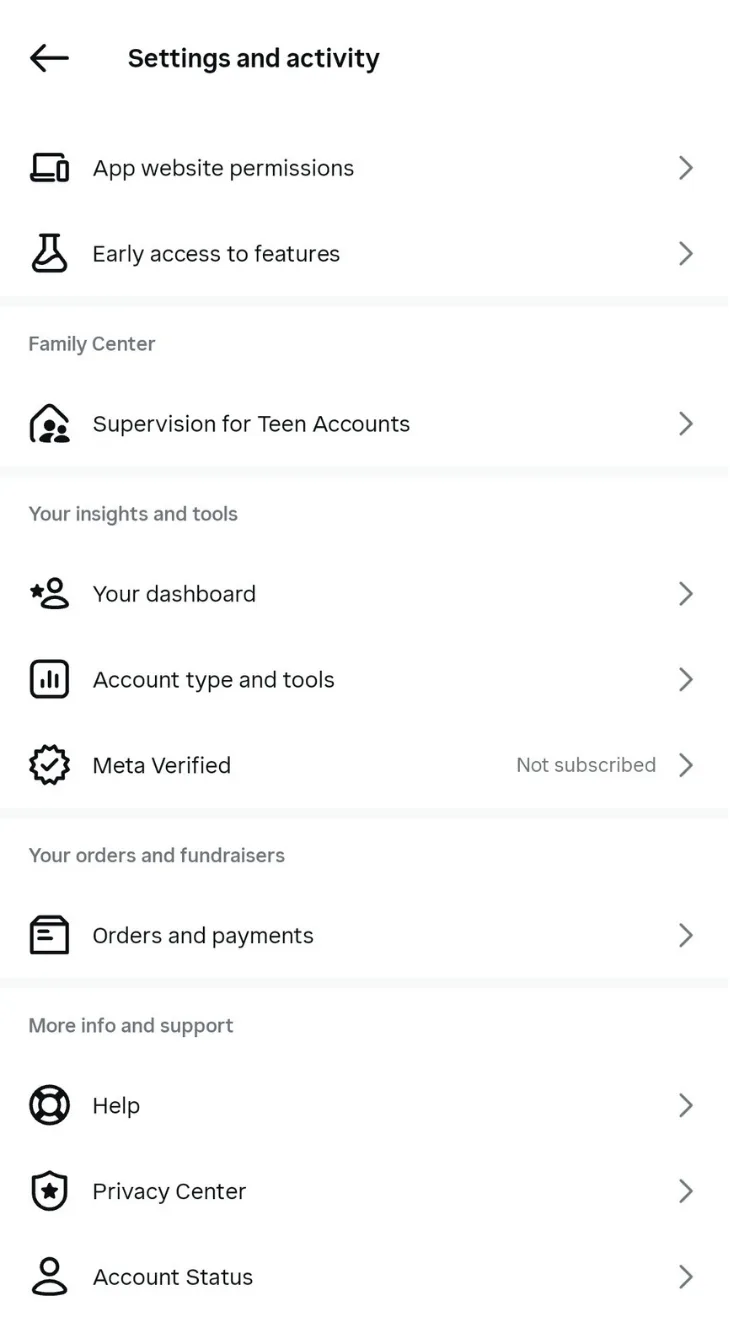
Most professional accounts still see an Insights shortcut on their profile, although the layout is no longer consistent across accounts. Tapping Insights opens your performance dashboard, but the report may appear as separate tiles such as Views, Interactions, New followers, and Content you shared. Instagram changes layouts often, so your overview may not match every guide exactly.
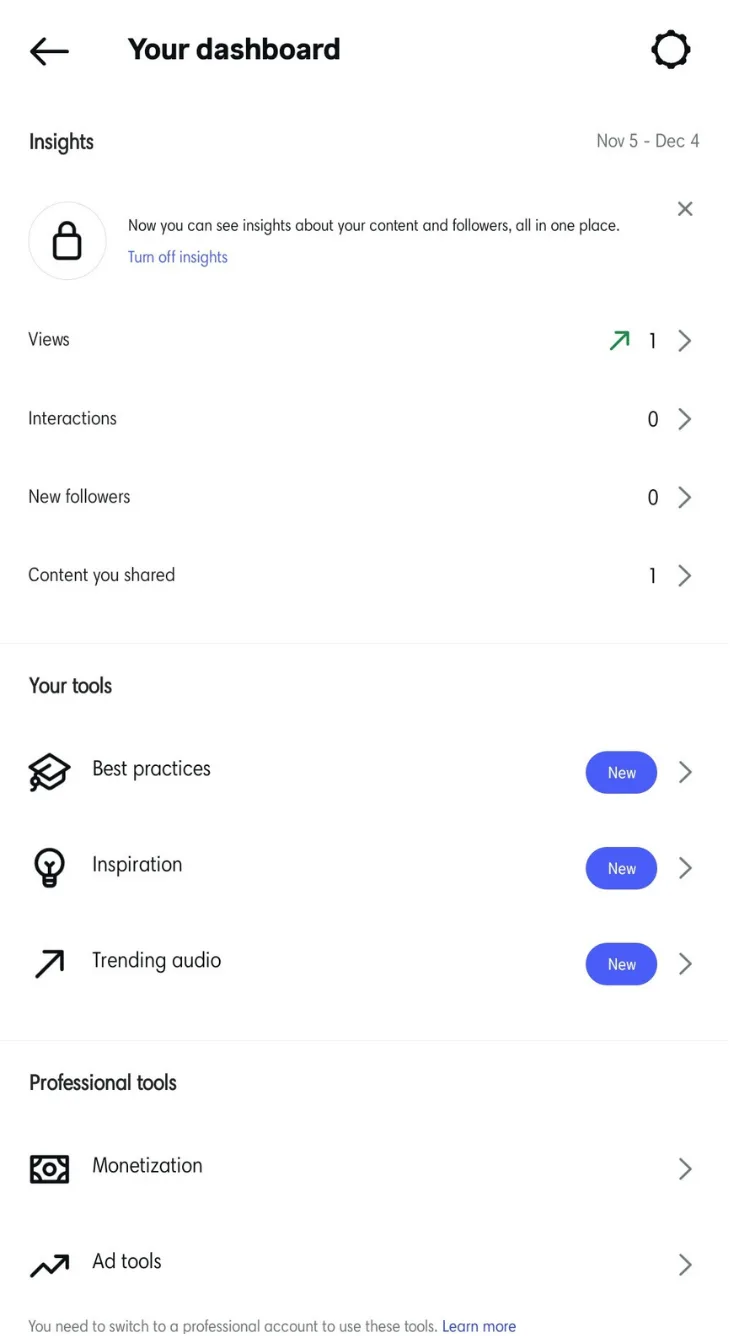
The Insights overview still opens with your most important metrics, although the layout can shift a bit depending on whether you use a Business or Creator account. Instagram also tests modular Insights tiles, so your sections may appear in a slightly different order.
- Accounts reached: The number of unique accounts that saw your posts, Reels, Stories, videos, or anything you published on Instagram.
- Accounts engaged: The sum of all users who interacted with your Instagram content. This includes comments, likes, Story replies, shares, saves.
- Total followers: “Total followers” measures the number of followers you gained throughout the selected time frame. A quick comparison of your current follower growth and that beyond the reporting period is shown just under “Overview.”
To help you track growth, each metric includes the percentage of growth or decline during the specified reporting period.
Okay, this looks helpful, but how does it help me understand my audience better? If you tap Accounts Reached, Instagram shows aggregated details about the accounts your content reached.
This includes:
- Gender distribution of viewers
- Age ranges with the highest activity
- Top cities where your viewers are based, though Instagram hides city-level data when the audience size is too small
- Top countries where your viewers are based, shown only when Instagram has enough data to anonymize results
- Ratios of followers to non-followers who viewed your content
At the bottom of the report, you’ll see your top-performing posts and Stories. Reels now show up inside your main Content Insights grid for most business and creator accounts, although some accounts still display them in a separate Reels tab.
Using Vista Social’s reporting tools
Proficiency in Social Media Management (SMM) tools is a great way to make your social media manager resume stand out or strengthen your agency’s value proposition. And, when it comes to SMM platforms, none come close to the value Vista Social provides.
To analyze your Instagram audience with Vista Social, go to ‘Reports.’
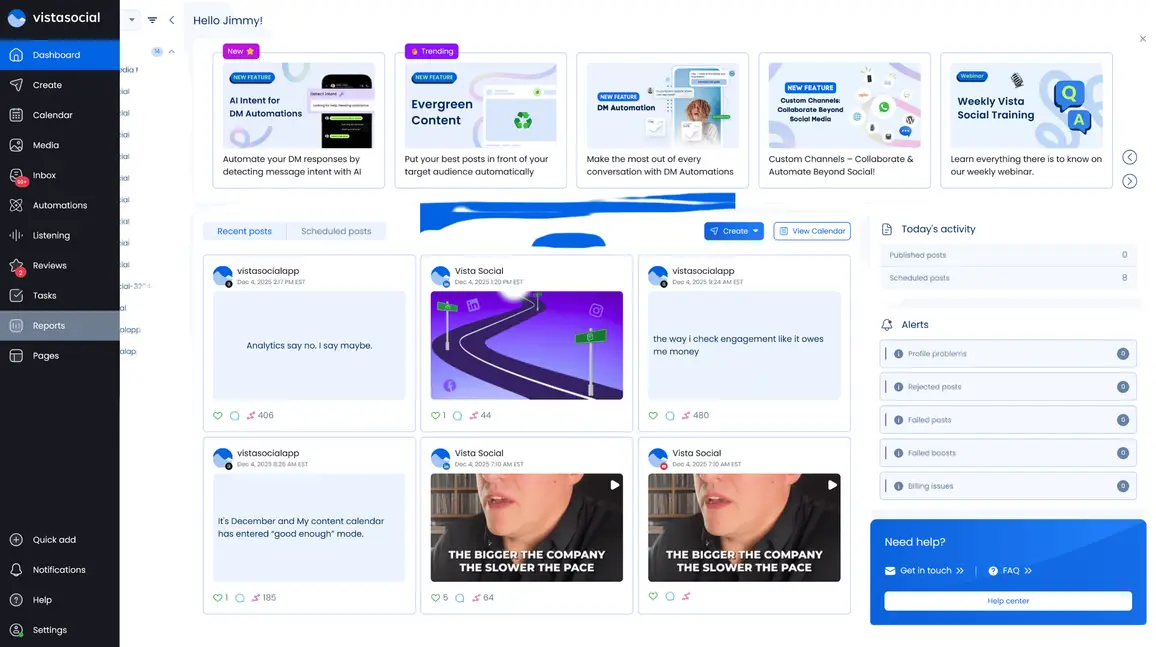
Select the Instagram account you want to manage under “Social Profiles.” Next, click ‘Run report’ in the top-right corner and select ‘Run report’ from the context menu.
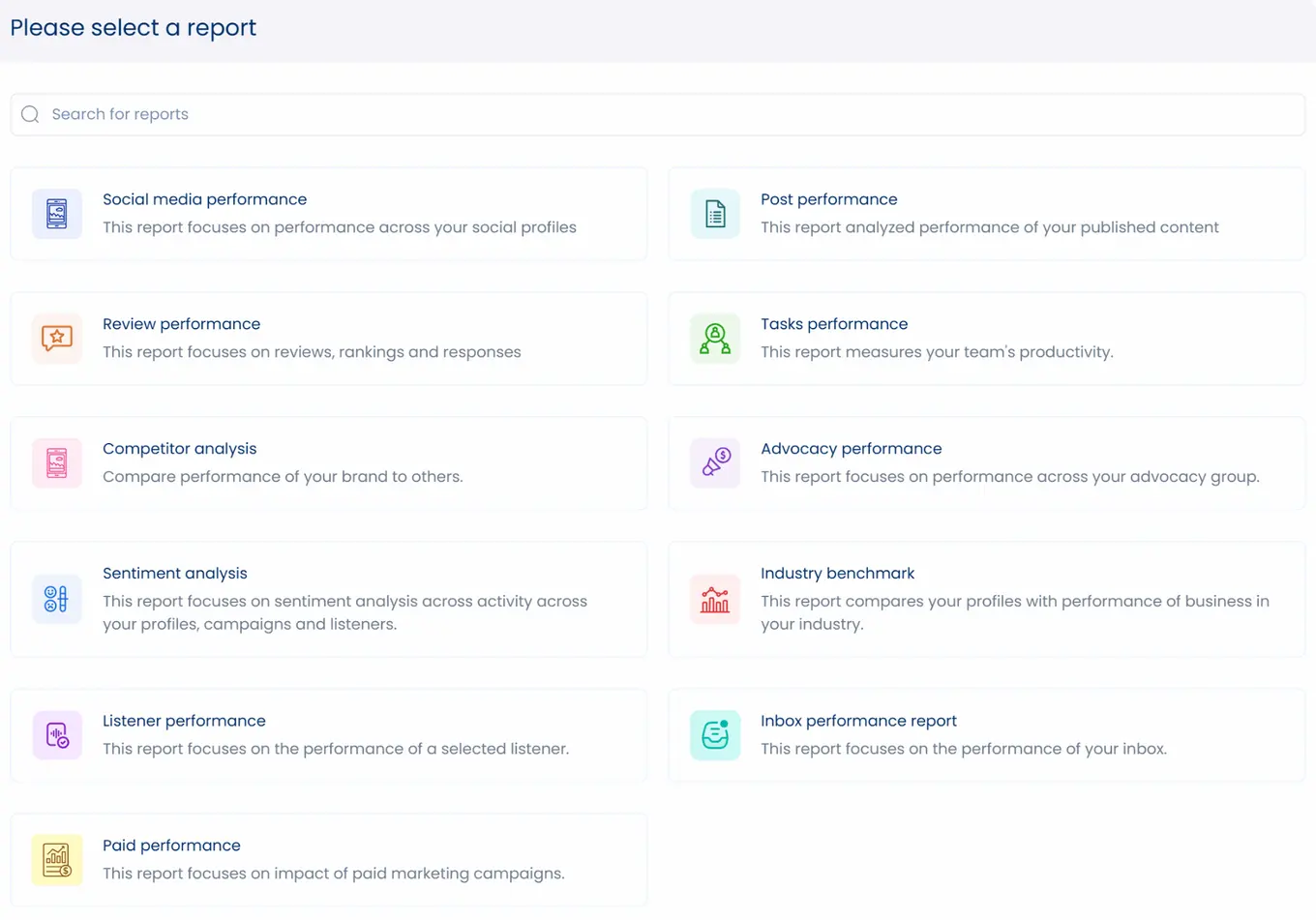
In the report selection window, click ‘Social media performance.’ This will allow you to monitor aggregate user engagement metrics for a linked Instagram business account.
Just be sure to select ‘Instagram reports’ in the drop-down menu at the top.
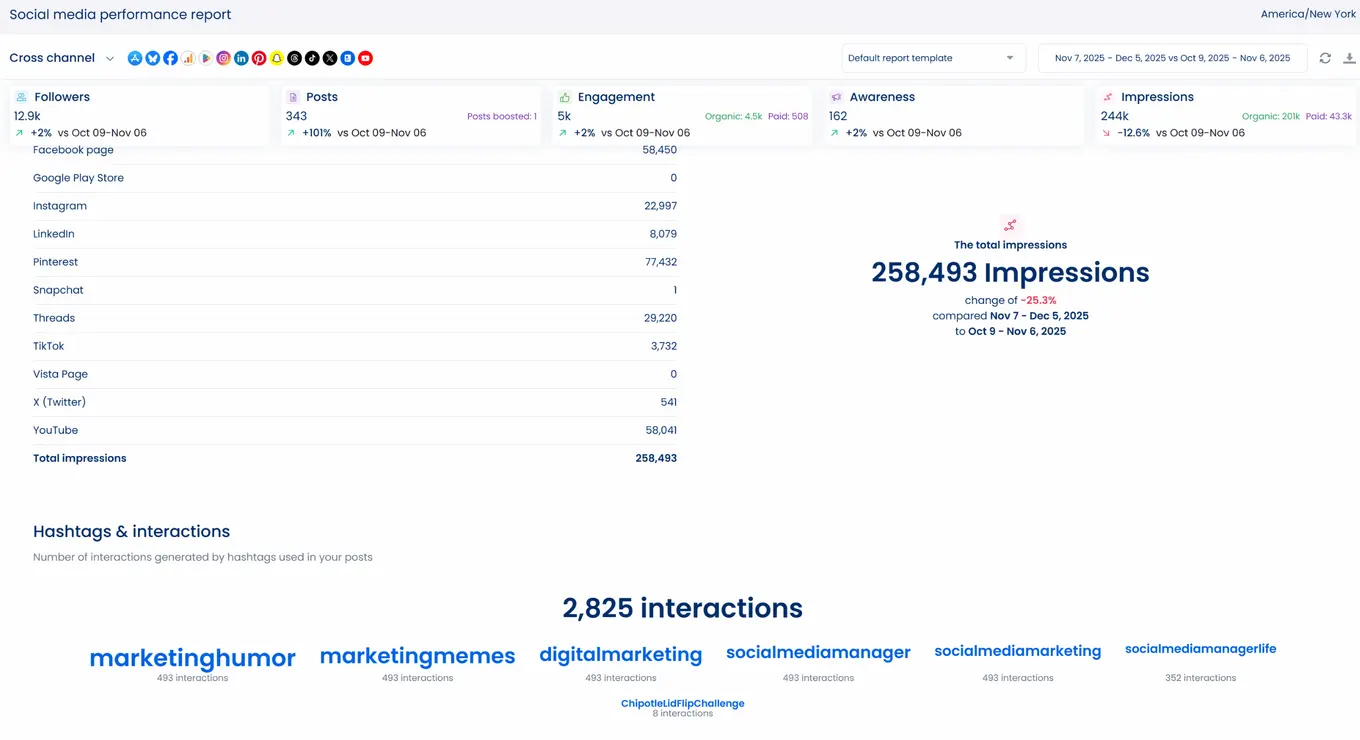
You can still track follower growth and see how often you published, although Instagram trimmed several charts inside Insights. That is why a tool like Vista Social becomes valuable because it gives you fuller analytics that the app no longer offers.
Here, you get the data that helps you understand how people actually interact with your content.
- Total engagement (likes, comments, messages, mentions, and clicks) over the specified period
- Total number of impressions and users reached
- Top hashtags that generated user interactions
How do you use these insights?
The plan is simple: test new Instagram marketing strategies and revisit your metrics to spot improvements or performance declines. For instance, you can play with various Instagram Reels dimensions, compare your results, and fine-tune your strategy over time.
When you spot hashtags that consistently bring engagement, keep them in rotation and test new ones around your main topics. You’ll eventually build a small set that supports your content instead of relying on random tags.
Simply handpick your top hashtags and keep them in your strategy while using new ones along the way. Experiment with hashtags in photo dump captions. Test different Story text overlays to shape the mood of each post. Add a few stickers to spark attention and keep the vibe playful. Vista Social tracks when your audience stays most active so you can build a posting schedule that fits their habits.
Direct publishing in Vista Social still works only for Business profiles since Meta does not allow Personal accounts to use API based publishing. Personal profiles remain restricted and miss out on key analytics and automation features that Business profiles can access.
If you want deeper analytics, switch to a Creator account or a Business account so you can unlock Instagram Insights and view more data about your audience.
How to check who viewed your Instagram Stories
Although you can’t see who viewed your Instagram profile, you can check who viewed your Instagram Stories. Here’s the thing: Story views don’t necessarily lead to Instagram profile visits. But they still let you gauge your overall reach and follower activity.
To check who viewed your Instagram Story, tap your profile photo and swipe up. This displays your real-time Story viewers list. You can check your Story viewers for up to 48 hours, which covers the 24 hours it stays live plus another 24 hours after it expires. Instagram no longer provides viewer lists for Highlights and does not show who viewed them after they expire. Only the view count remains available after the Story expires.
If your notifications feel nonstop, turn on Instagram Quiet Mode so you can stay focused on your work and give yourself a breather from constant alerts. This way, you can avoid the distractions and be able to focus on creating content and optimizing your IG marketing campaigns.
You might also want to learn how to save Instagram Story with music so you can repurpose it for more engagement, although some tracks may not download with audio due to Instagram’s current music restrictions.
Other ways to obtain more information about your Instagram audience
Check out the tips below to make the most out of Instagram audience insights:
- Run surveys or polls: Get your most active followers’ feedback by asking Instagram poll questions via Stories.
- Pay attention to your most active followers: Instagram no longer sorts your lists based on engagement, yet you can still spot your regular supporters by watching who reacts and replies on a steady basis.
- Create a simple social media approval process so your workflow stays steady: When you understand your audience’s tone and behavior, you shape captions and visuals that match what they want.
Can you see who views your Instagram videos?
Whether your Story is a video or a photo, the rule stays the same. You can see the viewer list only while the Story is still live. Once it expires, you only keep the total view count.
However, when you post videos as Instagram Reels or regular video posts, the rules are a little different.
You won’t know who viewed your video posts, but you can see the total number of views and track how those views grow. Each viewer adds one view to a standard video post, even if they watch it again. Reels behave differently because they track total plays, including loops and replays.
Get closer to your audience than ever with Vista Social
With the right tools and strategies, you can read your audience’s behavior more clearly and build stronger Instagram marketing plans that match what they respond to.
Vista Social gives you the audience insights you need and pulls everything into one clean dashboard so you can move fast when trends shift. It also helps you manage all your conversations in one place and build a publishing schedule tailored to your target audience.
If you want a smoother workflow and clearer reporting, help your clients grow on Instagram with a free Vista Social account!
Customers Also Ask
1. Can you see who viewed your Instagram profile?
No. Instagram doesn’t reveal who viewed your profile.
2. Can someone see that I viewed their Instagram Story if we are not friends?
Yes, their name still appears in your Story viewer list even if you don’t follow each other.
3. Can you see how many times someone viewed your Instagram page?
No. Instagram still does not offer a metric that tracks profile views or reveals who visited your page. Instagram only shows broad insights tied to how your posts perform. These numbers do not measure profile visits and do not identify viewers. Vista Social provides similar aggregated insights, but profile viewing stays private on Instagram.

Try Vista Social for free
A social media management platform that actually helps you grow with easy-to-use content planning, scheduling, engagement and analytics tools.
Get Started NowAbout the Author

Content Writer
Jimmy Rodela is a social media and content marketing consultant with over 9 years of experience, with work appearing on sites such as Business.com, Yahoo, SEMRush, and SearchEnginePeople. He specializes in social media, content marketing, SaaS, small business strategy, marketing automation, and content development.
Loading related tools...

The most complete social media management platform for teams who demand more.






Tools
PublishingAnalyticsEngagementIntegrations
FacebookInstagramLinkedInRedditSnapchatThreadsTikTokX (Twitter)YouTubeMCPVista Page (link-in-bio)All IntegrationsCopyright © 2026 Vista Social LLC. All Rights Reserved.