


Make Ask Vista Your Homepage: Conversational AI for Social Media
July 23, 2026
12 min read

Summarize with AI

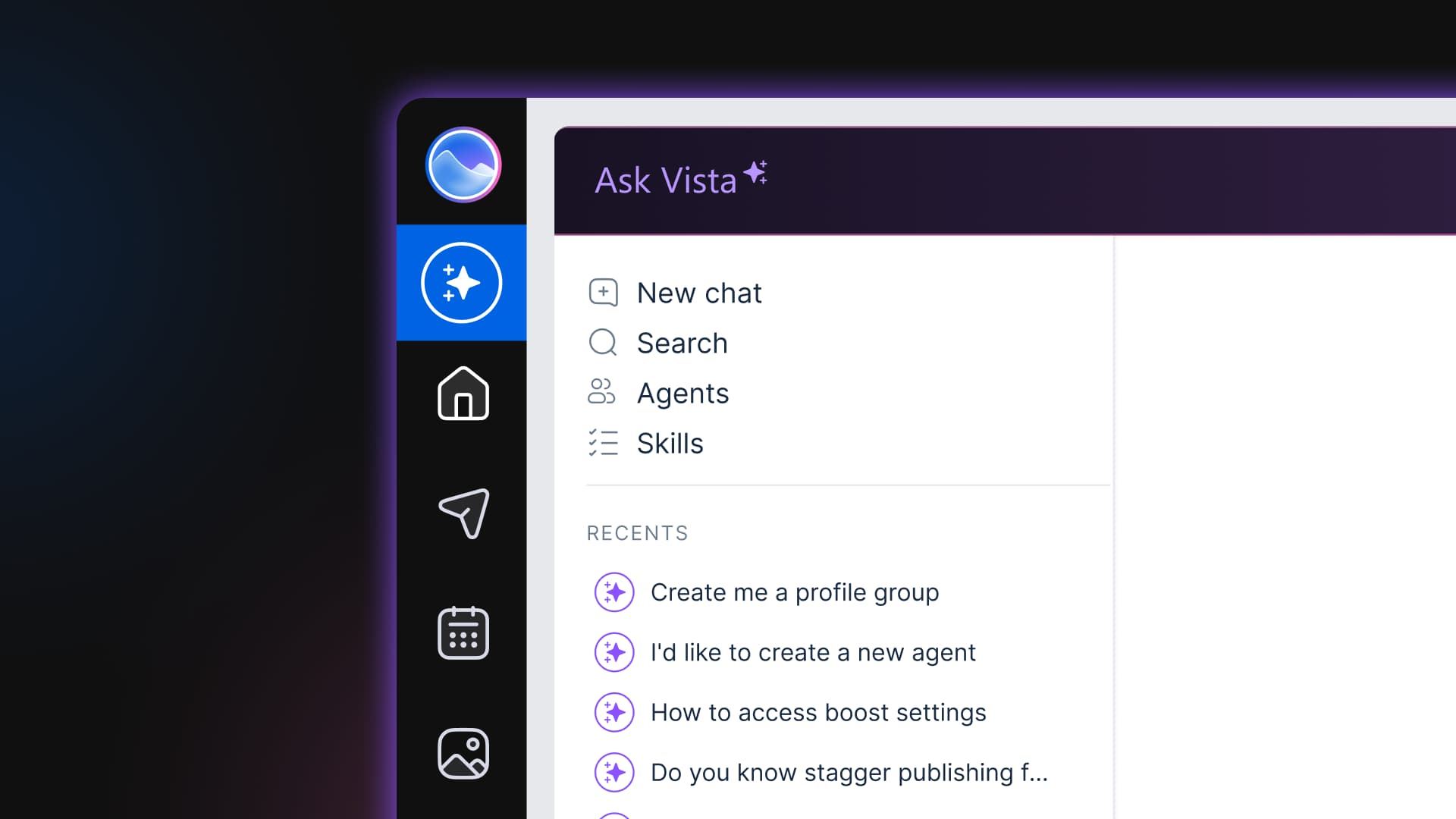
Table of contents
Share

Vista Social

X (Twitter)


What needs attention right now?
It is a simple question, but answering it can mean checking the calendar, approval queue, inbox, and reports one by one.
Ask Vista gives you a direct route to the answer. Tell it what you need in plain language, and it can pull the relevant information from the social accounts already connected to your workspace. It can also prepare the next step, from drafting a reply to creating a report, while you review every public action.
That is the practical value of conversational AI for social media. You reach the work sooner, with your judgment at the center of what happens next.
The five opportunities in this guide show where to begin. You’ll see how Ask Vista can support a normal workday, where a general chatbot still fits, and which decisions remain with the social media manager.
Table of contents
Key takeaways
- Start with the question: Conversational AI lets you ask for the schedule, inbox, reports, and drafts instead of hunting through separate menus.
- Use account context: Ask Vista can work from the profiles and performance data already connected to your Vista Social workspace.
- Keep approval visible: It confirms before publishing, sending, or changing anything on a live account.
- Build the habit: Open Ask Vista first, run one useful ask, and save repeated work as a Skill or scheduled agent.
What “ask” instead of “click” means
Conversational AI for social media is software you operate through plain-language requests. An account-aware assistant finds, drafts, schedules, and reports across your connected profiles. You describe the outcome in a sentence, review what it prepares, and approve any public action.
That connection is what separates Ask Vista from a blank chat window. A general chatbot works from the context you paste into it. An account-aware assistant pulls your schedule, inbox activity, and performance data from the workspace where they already live.
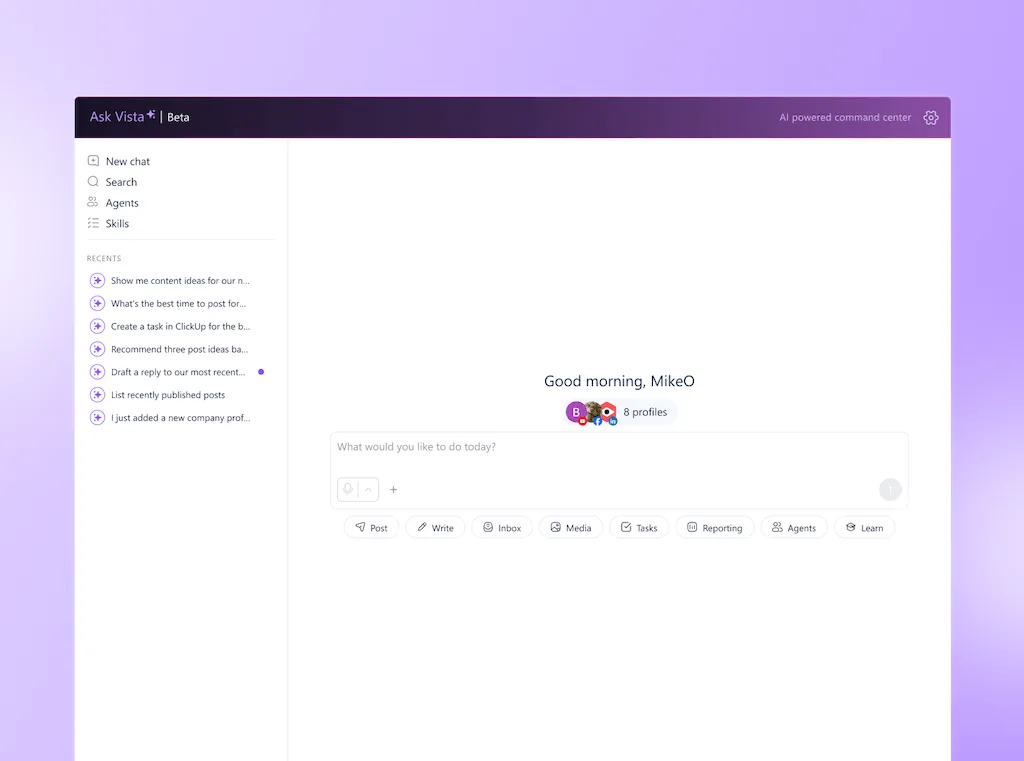
Ask Vista is the conversational layer inside Vista Social’s command center. Open it from the sidebar or press X anywhere in the dashboard. Then ask it to work across publishing, analytics, inbox, media, tasks, and reporting.
| What you need | The menu-first route | The Ask Vista route |
|---|---|---|
| Today’s publishing status | Open the calendar, filter profiles, and inspect each post | Ask what is scheduled and pending across the profiles you name |
| Messages that need attention | Open the inbox, filter unread items, and read them one by one | Ask for unread customer messages and draft replies for review |
| Last week’s performance | Set the date range, compare profiles, and collect the useful changes | Ask for three wins and one concern across the connected profiles |
| Platform-specific drafts | Open the composer, find the voice notes, and rewrite by network | Ask for the drafts in the profile group’s saved brand voice |
The fuller AI assistant guide explains what to look for when choosing this kind of tool. This playbook covers the working habit: ask first, inspect the answer, and open the menu when you need detail.
Why not use ChatGPT?
A general chatbot is valuable when the work begins with an open question, a blank page, or information outside your social accounts. It cannot see and take action in your Vista Social calendar, inbox, profiles, or analytics unless you carry that context into the conversation or connect it via MCP.
That makes ChatGPT useful for broad research, long-form writing, and early brainstorming. An account-level question and action works differently.
To ask, “Which LinkedIn posts drove the most clicks last month? Let’s use what worked and create new posts with images and videos that fit the context”, you must retrieve and paste the numbers first, usually.
Ask Vista starts from the connected workspace. It can retrieve the information, prepare the next action, and keep that action behind an approval step when publishing, sending, or changing data is involved.
Technology consultant and author Tom Goodwin reduced the wider product shift to one useful line in a 2024 edition of his Nowism newsletter:
“It’s about the interface between humans and technology.”
Tom Goodwin, author and technology consultant, Nowism (2024)
For social media managers, the interface is already changing. The dashboard remains available when you want detail, while the conversation becomes the quickest route to an answer or prepared action.
Our guide to specialist AI goes deeper on where each type of assistant fits. Keeping both is sensible when each has a clear job.
Your first morning run by asking
Use the walkthrough below as an illustrative dry run in your own workspace. Press X to open Ask Vista and type one question. Inspect the profiles and date range it used, then approve or revise any prepared action.
The prompts are deliberately plain. If an answer is too broad, add the account, network, and date range. You can also name the audience or output format instead of rebuilding the request.
1. Check the week, before opening the calendar
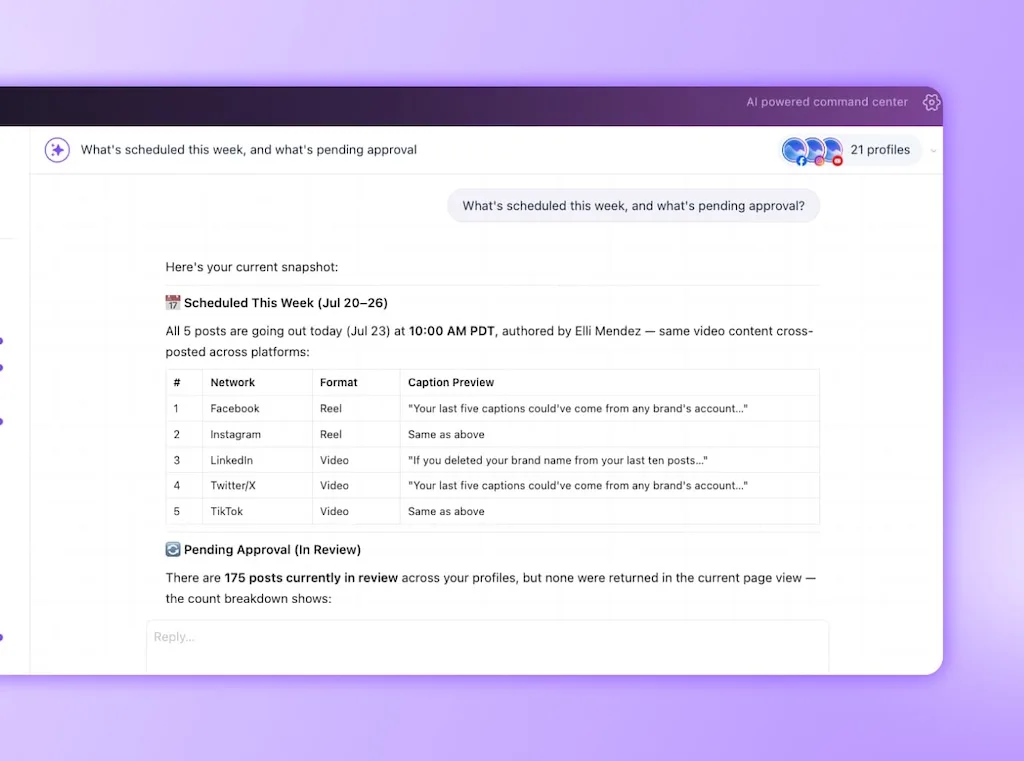
Type: “What’s scheduled this week for [social media platform], and what’s pending approval?”
This replaces the calendar sweep across profiles. Ask Vista can return the scheduled and pending posts in one answer, so you see the holes and bottlenecks before opening individual cards.
- Check the scope: Confirm that the answer covers the right profile group and week.
- Look for the blocker: Note which post is waiting, who needs to review it, and which day now has a gap.
- Open the card when needed: Use the calendar for the creative detail after the status question has narrowed your attention.
The Vista Social fast path: One ask collects the week’s publishing status across the profiles you name. You skip the first calendar flow without losing access to the underlying posts.
You’ll know it is working when the first thing you see is the decision that needs you. You no longer begin with a row of cards to inspect.
2. Triage the inbox before reading every message
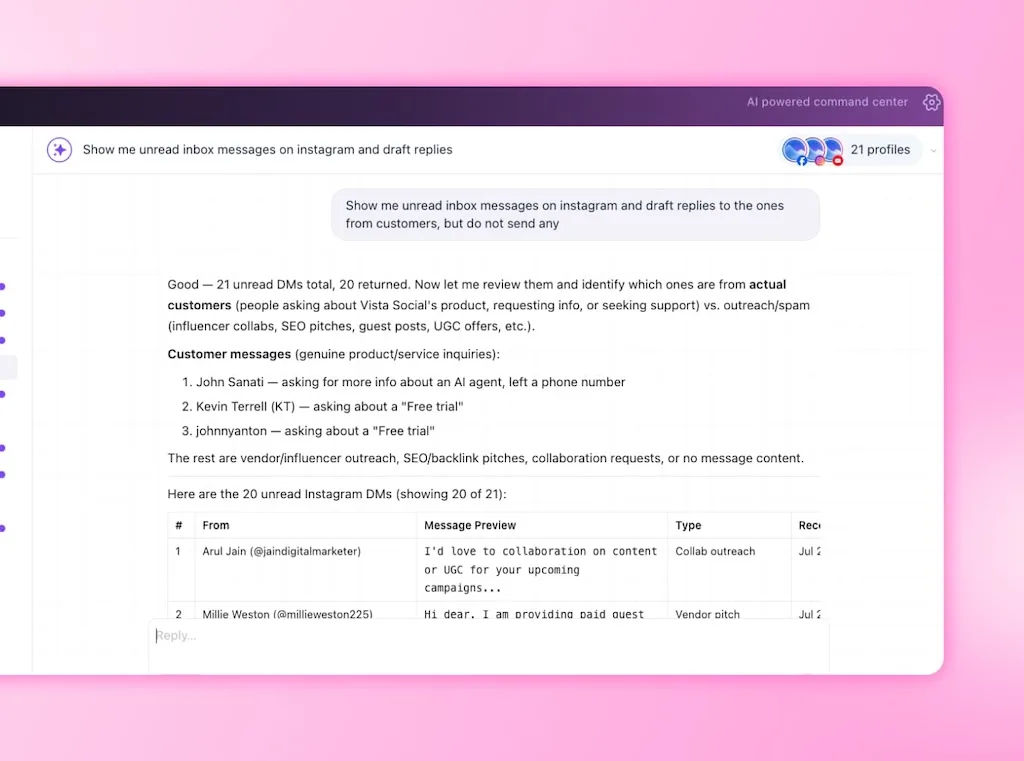
Type: “Show me unread inbox messages on [social media platform] and draft replies to the ones from customers, but do not send any.”
This ask brings the unread conversations into one view and separates reply work from messages that can wait. Ask Vista to prepare the drafts while you decide which responses need a personal touch or a handoff.
- Review intent: Check whether the message is a question, complaint, lead, or routine comment.
- Read the source: Open sensitive conversations before approving a draft.
- Escalate early: Keep billing disputes, legal concerns, and distressed customers with a person.
The Vista Social fast path: The assistant performs the first sorting pass and prepares routine replies. Your time goes to the conversations where context changes the right answer.
Ask Vista confirms before a reply sends. That pause belongs in the workflow because a well-written draft can still miss sarcasm, history, or the mood of the conversation.
3. Turn last week’s numbers into a usable briefing
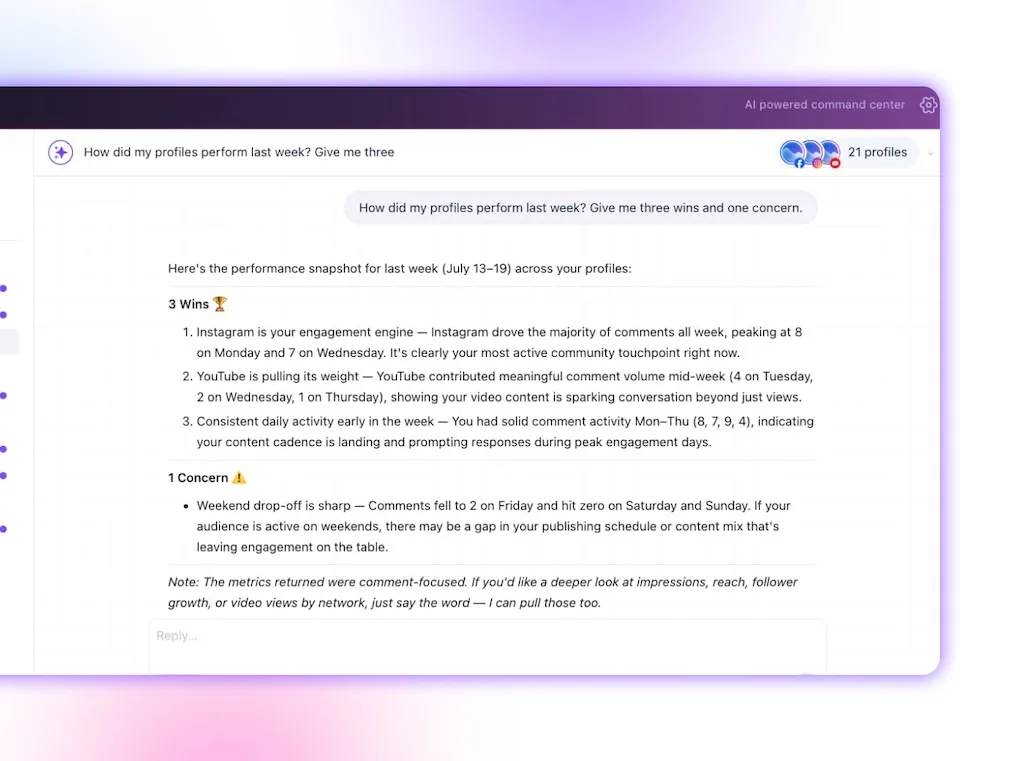
Type: “How did my profiles perform last week? Give me three wins and one concern.”
The request replaces the first reporting pass: date filters, profile switching, metric collection, and the blank summary box. Ask Vista pulls the relevant performance and returns a short briefing you can question further.
Follow with a narrower ask when a result deserves attention:
- “Which post drove the first win?”
- “Was that increase broad or driven by one profile?”
- “Compare the concern with the previous four weeks.”
- “What should I inspect before recommending a change?”
The Vista Social fast path: The numbers and first interpretation arrive together. You test the explanation and decide what the team should do next.
The briefing is a starting point for judgment. Campaign context, a creator mention, paid support, or an offline event can explain a movement the data alone cannot.
4. Draft for each network in your saved voice
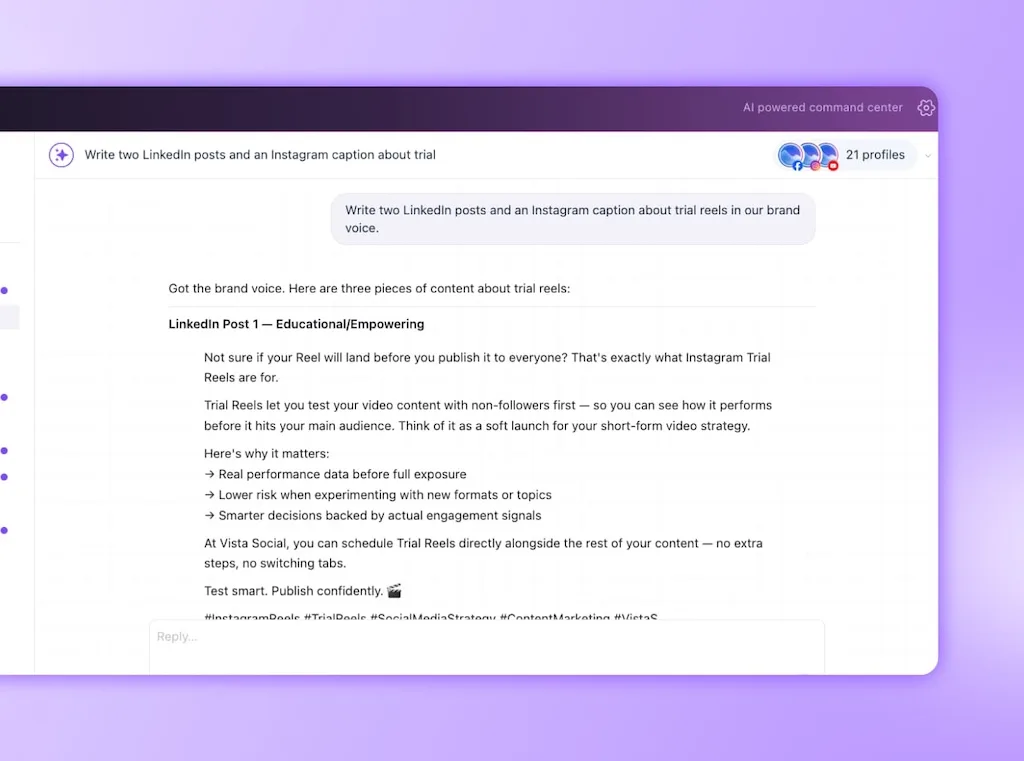
Type: “Write two LinkedIn posts and an Instagram caption about [topic] in our brand voice.”
The ask gives each network its own draft while keeping the idea connected. You still choose the angle and add the lived detail. You also verify every claim and decide whether the work is strong enough to represent the brand.
Vista Social applies the profile group’s saved brand voice to the drafts. On Advanced and higher plans, AI Training & Knowledge can also ground the work in selected documents, web pages, sitemaps, or support content.
The Vista Social fast path: Your tone and approved source material live beside the profiles, which cuts the repeated briefing before each platform draft.
If the first result feels generic, improve the assignment with a viewpoint, audience problem, example, and desired action. Better context sharpens the draft, but taste still decides which version has something worth saying.
5. Generate the supporting image in the same conversation
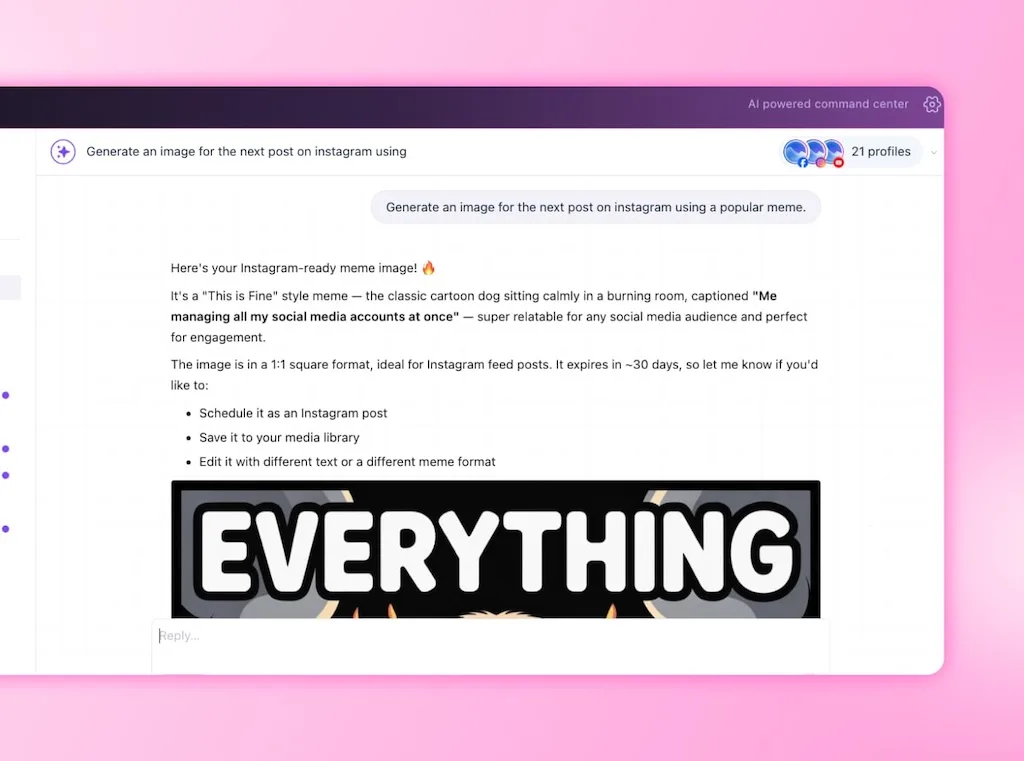
Type: “Generate an image for the next post on instagram using [visual direction].”
This keeps the first visual pass attached to the post instead of moving the idea into a separate design tab. Give the assistant the subject, composition, style, brand colors, and anything that must stay out of the image.
AI image generation uses credits, so vague requests can waste more than attention. Write the visual brief before generating, then review hands and text carefully. Keep real people, regulated claims, and sensitive events under stricter human review.
The Vista Social fast path: The draft and image stay in one working conversation, ready for your review before they move to the calendar.
You’ll know this morning routine is working when the schedule, inbox, and performance story are visible early. Your first drafts are also ready before you have toured the dashboard.
Run your first Ask Vista workflow free, with no credit card required.
Hand recurring work to agents
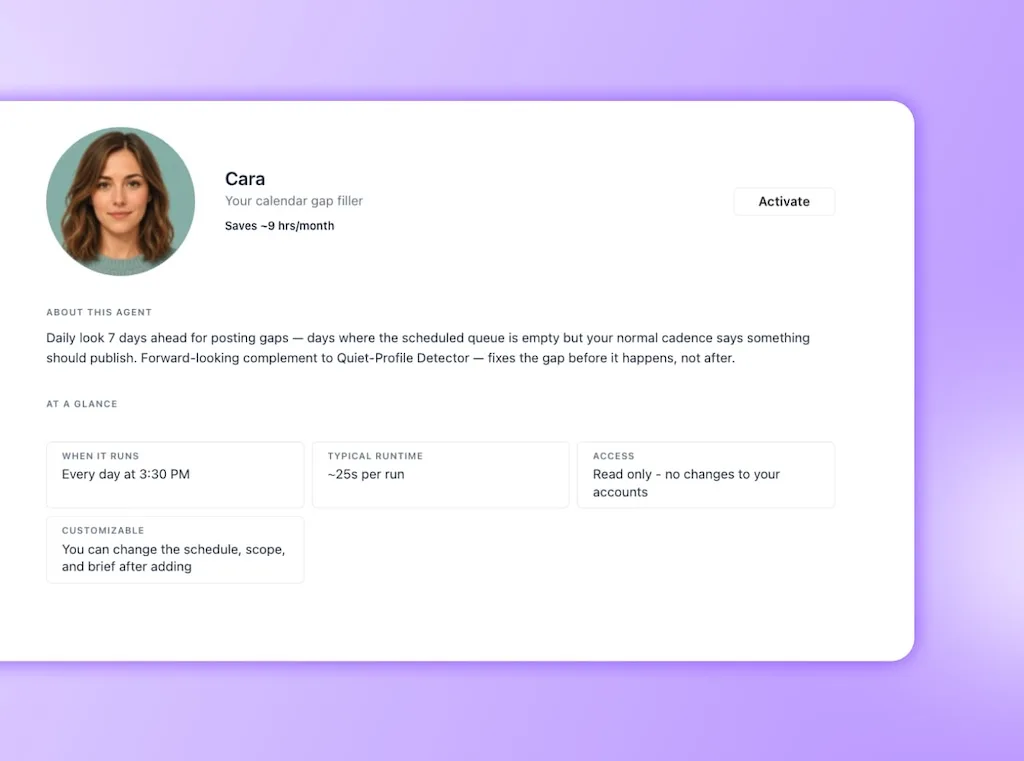
When an ask repeats on a dependable schedule, turn it into an agent so the first pass arrives without another prompt. A Monday performance email and a comment-sentiment check are good candidates because the source, cadence, and expected output stay stable.
Adobe’s 2025 creator survey found that 51% wanted agentic AI to automate repetitive tasks. That narrowly led to brainstorming at 50% and performance insights at 44%.
A scheduled agent can run while your laptop is closed, report what it completed, and record the result. Actions that publish, send, or change a connected account still stop for approval.
Try assignments such as:
- Monday briefing: “Every Monday at 9 a.m., email last week’s performance with three wins, one concern, and links to the posts behind each finding.”
- Comment watch: “Every 30 minutes, check new comments for negative sentiment and report anything that needs a human response.”
- Approval check: “Every weekday afternoon, list posts waiting for approval in the next 48 hours and name the reviewer.”
- Calendar watch: “Every Friday, find empty publishing slots for the following week and suggest approved evergreen posts that could fill them.”
The Vista Social fast path: The recurring request becomes a scheduled job with defined profiles and an expected report. It also carries an approval boundary, so you don’t have another item to remember.
Scheduled agents are available on Advanced plans and higher as of July 2026. Start with one read-and-report job, compare its output with your manual process, then widen the assignment once it has earned your trust.
How to make Ask Vista your homepage
Making Ask Vista your homepage is a working habit, not a browser setting. Begin with the question and use the response to decide where your attention belongs. Open the deeper dashboard view when the decision needs it.
Use this seven-day reset:
- Press X first: Open Ask Vista before the calendar, inbox, or analytics.
- Run one useful task: Start with the question you already planned to answer by clicking.
- Name the scope: Add the profile group, network, and date range when they matter.
- Inspect the answer: Check the source profiles, numbers, and assumptions before acting.
- Refine in place: Add missing context as a follow-up instead of restarting the task.
- Save the repeat: Turn a useful repeatable procedure into a Skill, then schedule it as an agent when the cadence is stable.
- Read before approval: Give every caption, image, reply, and public action the same professional review you would give a teammate’s draft.
Vague asks are the fastest way to become underwhelmed. “Help with social” gives the assistant very little to work with. “Compare LinkedIn clicks across the last four weeks and show the three posts behind the biggest changes” supplies a source, range, metric, and output.
Trying to automate the whole day at once causes a different problem. You end up reviewing five unfamiliar workflows instead of learning where one of them saves time and where your instructions need work.
Make Ask Vista your first tab free, and run one ask a day for a week.
Where asking is not the answer
Ask-first work pays off when you manage enough profiles, messages, approvals, and reports for finding to consume part of the day. If you publish to one profile a few times a month, the lag is short. A conversational layer may add more process than it removes.
There are practical limits to keep in view:
- Credits are metered: AI use draws from a monthly credit allowance that varies by plan, and media generation can consume more credits than text.
- Deeper tools have plan gates: Ask Vista chat is available across current paid plans, while scheduled agents, AI Training & Knowledge, and external connectors require Advanced or higher.
- Drafts need a reader: Generated copy, images, reports, and replies can miss context or use a weak assumption.
- Generalists still help: Keep ChatGPT or Claude for broad research, long-form exploration, and work that does not depend on live social data.
- Judgment stays human: Crisis responses, sensitive customer conversations, creative direction, and final approval still belong to a person.
This is also why the approval prompt should remain visible. An account-aware assistant can do more useful work because it has more useful context. That reach deserves a clear boundary before anything becomes public.
The safest setup gives AI room to find and prepare the work while a person stays accountable for what the audience receives.
Start Monday with one sentence
Open Ask Vista and start with one task that usually sends you searching through the platform. Ask for the scheduled posts, the messages that need replies, or a summary of last week’s performance.
Review what it brings back, refine the request, and save it as a Skill once it earns a place in your routine.
Ask Vista handles the searching and first-pass preparation. You have more time to shape the message, understand the audience, and make the final call.
Run your first ask in Vista Social free for 14 days, with no credit card required.
Frequently asked questions
Is conversational AI for social media the same as ChatGPT?
No, because ChatGPT works from the information available in its conversation and any tools you connect. An account-aware social assistant works inside your connected profiles. Ask Vista can retrieve your schedule, inbox activity, and analytics, then prepare actions inside the same platform.
Can Ask Vista post or reply without my approval?
Ask Vista confirms before it publishes, sends, or changes anything on a connected account. It can find information and prepare drafts, but you review the proposed public action before it proceeds.
Which Vista Social plan includes Ask Vista?
Ask Vista chat is available on Professional, Advanced, Scale, and Enterprise plans. Scheduled agents, AI Training & Knowledge, and external connectors are available on Advanced and higher as of July 2026. Monthly AI credit allowances vary by plan.
Does Ask Vista replace my social media management tool?
Ask Vista is a faster way to operate Vista Social through plain-language requests. The calendar, inbox, analytics, composer, approvals, and reports remain available when you need to inspect or edit the work in detail.
What can I ask Vista to do?
You can ask it to show scheduled posts, triage inbox messages, draft replies, and summarize performance. It can also create platform-specific posts, generate media, and prepare tasks. Follow-up questions can narrow the profiles, dates, metrics, or format without starting another workflow.
How is Ask Vista different from the in-Composer AI Assistant?
The in-Composer AI Assistant focuses on generating captions and replies, with the optional AI Training & Knowledge selected to ground the output. Ask Vista is account-aware and can work across your connected profiles, publishing workflow, inbox, analytics, media, tasks, and reports with your approval.
About the Author

Content Writer
Orion loves to write content that refuses to be boring. As part of Vista Social, he helps brands, creators, and agencies stop doom scrolling and start winning with social media. When he's not in front of a keyboard, he's watching films in IMAX with his wife, dissecting football tactics (the European kind), and getting lost in a good book.