


Social Media Governance: Managing Content Approvals Across Brands
October 26, 2026
8 min read

Summarize with AI

Table of contents
Share

Vista Social

X (Twitter)


Managing a company’s social accounts means answering for what gets posted, including work created by people outside your team. Regional marketers, product teams, and agencies can all contribute to the calendar, but their posts don’t all need the same review.
A regional lead can approve a local event post, while a new product claim needs someone who can verify it. Without a clear split, routine posts wait for headquarters while sensitive work risks missing the right reviewer.
The short version
- Delegate by risk: Let brand leads own routine posts. Name the specialist and final release owner for work that needs central review.
- Enforce the review: Give editors the right brand accounts and require approval where their work must be checked.
- Define the exceptions: Agree on who can hold a local version, settle a disagreement, or reopen a decision after an edit.
- Keep proof of release: Connect the approval record to the publishing outcome, including posts that were held or failed.
Table of contents
Where campaign approvals break down
“Approved” can mean different things. The campaign owner accepted the concept, the product reviewer cleared the claim, and the regional lead checked the local version. Your publisher needs to know which of those decisions are complete for the post in front of them.
- Routine work goes upward: Unclear local limits make brand leads ask headquarters about minor changes. Your queue grows while decisions needing specialist judgment wait too.
- Local concerns arrive late: A region flags availability or timing, but nobody knows who can hold that version. A resolvable concern becomes a launch-day dispute.
- Edits outgrow the sign-off: The wording, offer, or destination changes after review. The earlier yes remains, even though it may no longer cover the post.
In HubSpot’s 2026 research, 83.5% of surveyed marketers said they were expected to produce more content. More local versions make these gaps harder to manage through reminders alone.
Experiments need an owner too. In March 2024, LEGO removed a NINJAGO website quiz with AI-generated images. Its statement said the test happened “outside of our usual approval processes,” despite a policy against generating LEGO content with AI at the time.
This was with website content, but the lesson remains the same: a test or local adaptation still needs the review your policy requires.
Check what your approval record proves
Choose a recent post and ask a colleague to establish four things without interviewing its creators:
- Approved version: Which caption and asset did the reviewer accept?
- Approving person: Who gave the required sign-off, and what decision did it cover?
- Intended accounts: Which brand, market and social profiles were included?
- Final outcome: Was that version published, changed, held or unsuccessful?
If a colleague has to chase three people for these answers, identify which record is missing before adding another approval stage. Use that gap to assess the process you design below.
Choose who approves each type of post
Use the same risk levels across brands so regional teams can classify work consistently. Assign the relevant people for each market, rather than assuming one central reviewer understands every local requirement.
Approval responsibilities by risk level
“Decision rights” means who gets the final say. Replace the role labels below with named people or maintained reviewer groups, and appoint a backup.
| Risk level | What stays local | Required central decision | Final release owner | Release condition |
|---|---|---|---|---|
| Routine | Local events, approved evergreen content and standard replies | None unless the post introduces a new claim, offer or sensitive issue | Named brand or regional reviewer | Content stays within the agreed local limits |
| Elevated | Local execution of an agreed campaign or partnership | The named specialist clears the claim, terms or campaign change | One campaign release owner named in the brief | Required specialist and local checks are complete for this version and market |
| High risk | Local facts and advice about market context | The designated incident, legal or executive reviewer clears the statement | One release owner named in the crisis or executive protocol | Explicit sign-off covers the statement and its destinations |
Who approves a UK product-launch post?
Consider an illustrative example using a wireless headphone launch. The UK caption adds a noise-cancelling claim that wasn’t in the approved campaign brief.
- Destination: The brand’s UK Instagram account, for one English-language feed post.
- Claim reviewer: The global product marketing manager approves the exact claim and its required qualifications. That approval doesn’t cover local availability or timing.
- Regional reviewer: The UK social editor confirms the product is sold locally and checks the local wording, link, and launch date.
- Release owner: The UK brand lead gives the final yes after both checks. The publishing coordinator schedules that version and has no authority to waive either review.
- Approval scope: The sign-off covers the saved caption, asset, and UK destination for this launch. It doesn’t clear every use of the campaign creative.
Decide when a post needs another review
Set local editing limits in the campaign brief. Identify protected claims, mandatory qualifications, and fixed terms, alongside the timing, references, or approved assets a region can change.
Reopen the decision affected by an edit: new terms go to the offer owner, and a changed promise goes to the claim reviewer. A translation that changes the meaning needs another check too. Our approval-record guide covers connecting decisions to versions.
Resolve disagreements and missed deadlines
Agree who acts when a required decision is disputed or delayed:
| Situation | Decision owner | What happens to the post |
|---|---|---|
| Brand and campaign leads disagree | The campaign decision owner considers both reasons | Hold the disputed version until resolved |
| A local availability or timing issue affects one market | The regional owner and responsible product or offer specialist | Hold or adapt that market’s version; don’t assume all markets need the same change |
| A required reviewer misses the deadline | The coordinator contacts the approved backup | Keep the required review in place; silence isn’t consent |
| A specialist identifies a prohibited claim | The specialist states the restriction and acceptable correction | Correct or withdraw it; a launch deadline doesn’t override the restriction |
Record whether an exception applies to one post, one market, or the campaign. That stops a one-off concession becoming the assumed rule next time.
Enforce approvals in Vista Social
An agreed owner doesn’t stop an editor from bypassing review if their publishing rights allow it. Match the settings to the decision table, without rebuilding your whole account-access process.
Configure these three publishing controls together:
- Brand-level access: Profile-group permissions limit the groups a regional user can reach. Assign the brands they work on, not the whole portfolio.
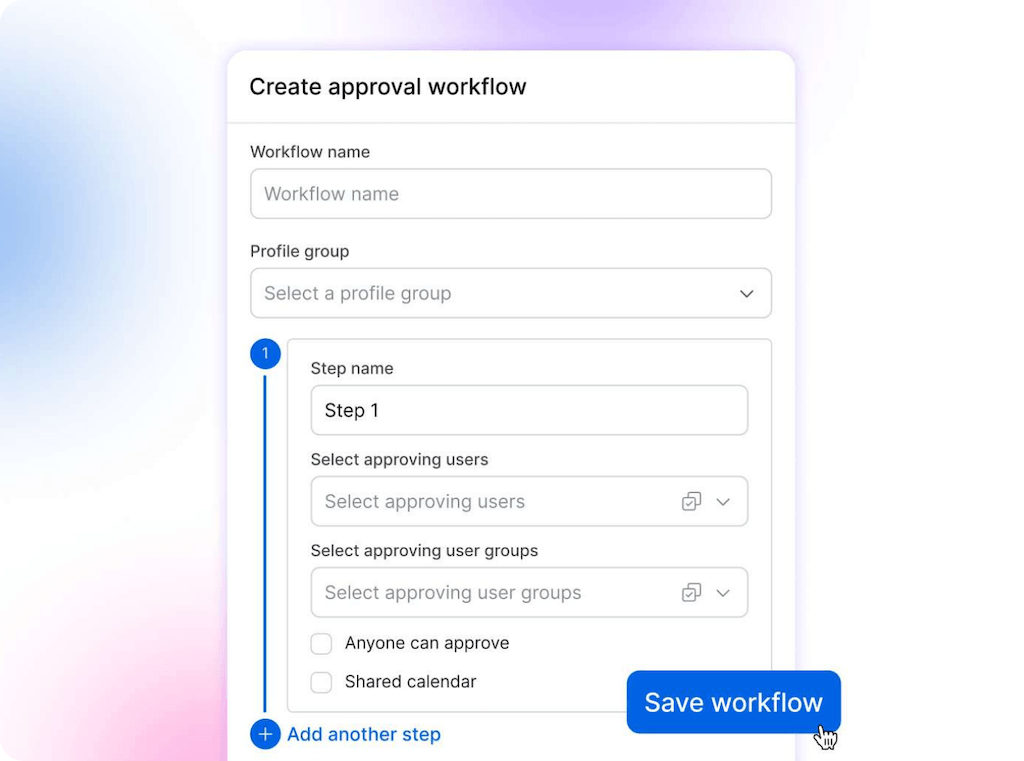
- Required review: In Vista Social, set Publish to Contributor when a user’s posts must always receive review. They can prepare and submit scheduled content, but it requires approval before publication.
- Named sign-off: Multi-step workflows let you assign named reviewers or groups. For the UK example, product review precedes the UK brand lead’s final stage.
One default workflow per profile group routes contributors’ submissions, but it doesn’t automatically classify posts by risk. Name who chooses a different route before submission. The workflow can’t be reassigned while a post remains in review.
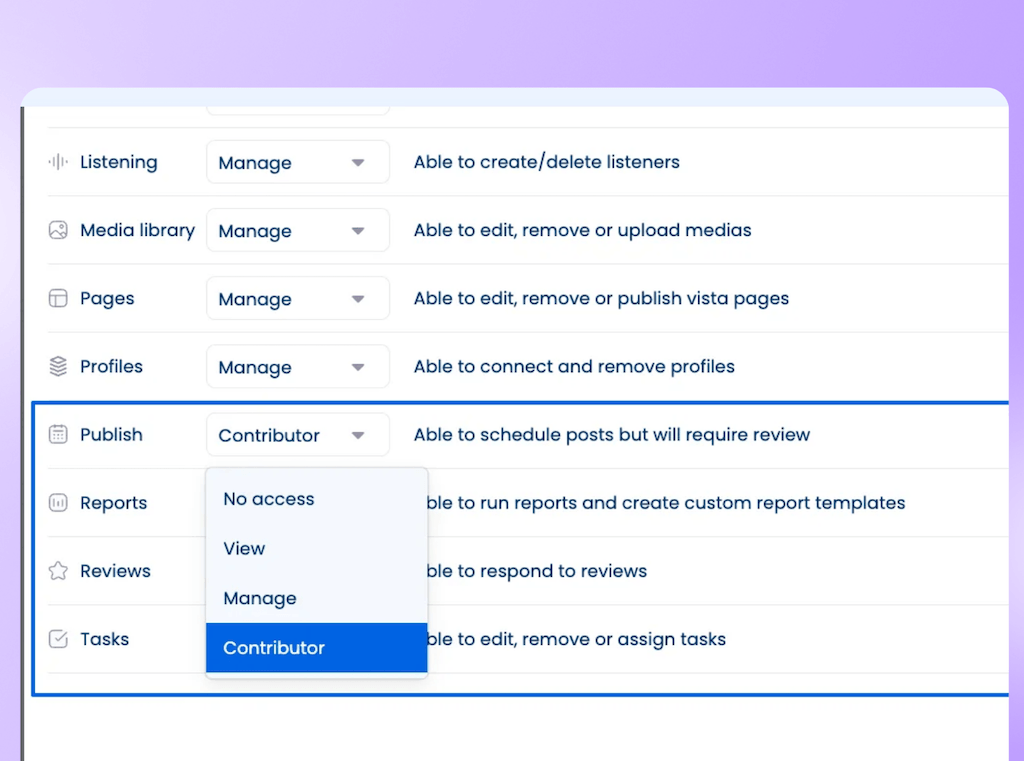
Contributor requires review before publication. The decision table still determines the specialist checks and final release owner.
For incidents, appoint the publishing manager responsible for stopping affected scheduled work, their backup, and the person who authorizes restart. Test the stop process in your actual setup; don’t assume an approval workflow pauses an already scheduled campaign.
Use the approval-process guide for configuration, then run the campaign tests below.
Review AI changes before publishing
In CMI’s 2025 B2B outlook, 38% of respondents said their organization had generative-AI usage guidelines. Your publishing rules also need to cover what happens after AI changes a reviewed draft.
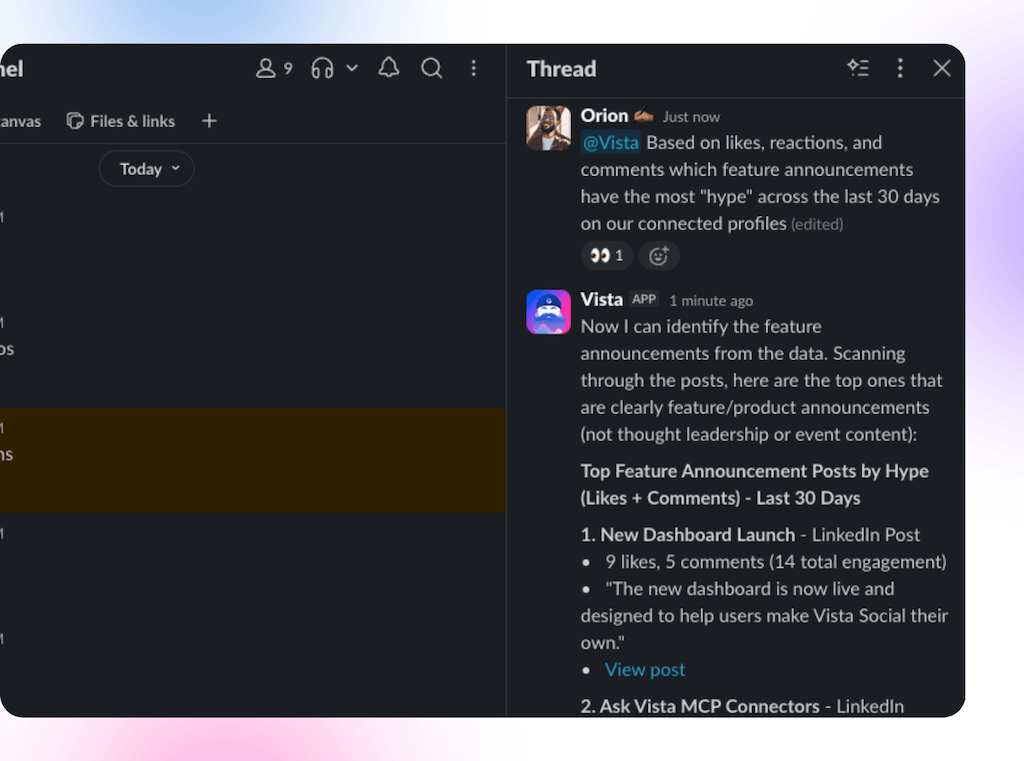
An editor can ask @Vista in an internal post comment to apply wording supplied by the product reviewer. Vista asks before editing; only the person who requested the change can confirm it.
- Check the result: Inspect the changed caption against the supplied wording and qualifications.
- Complete the review: Confirm the required approval status before release. The editor’s confirmation authorizes the AI edit, not the product or brand sign-off.
@Vista isn’t available on shared calendar links. Include AI credits, corrections, and reviewer effort when evaluating the workflow. Don’t assume an edit automatically resets earlier approvals.
Test approvals on one campaign
Use one campaign with local versions before applying the model across all 12 brands. Run these three checks with the campaign owner and a regional lead:
- Routine version: Submit an in-scope local post through the configured route. Done when it reaches the intended reviewer without an unnecessary central stage.
- Changed claim: Revise a claim after specialist review in an authorized test post. Done when the team can identify the new review needed and prevent release until it is complete.
- Control and proof: Test whether a contributor can bypass required review, then give a colleague the completed record. Done when the bypass is blocked and they can answer the four evidence questions above without help.
Vista Social’s post history shows dated edits, review activity, and publishing progress. Use it to check what happened after sign-off, including whether publication succeeded. Your process must retain the approved content and its scope; post history isn’t a substitute for any regulated archive your compliance team requires.
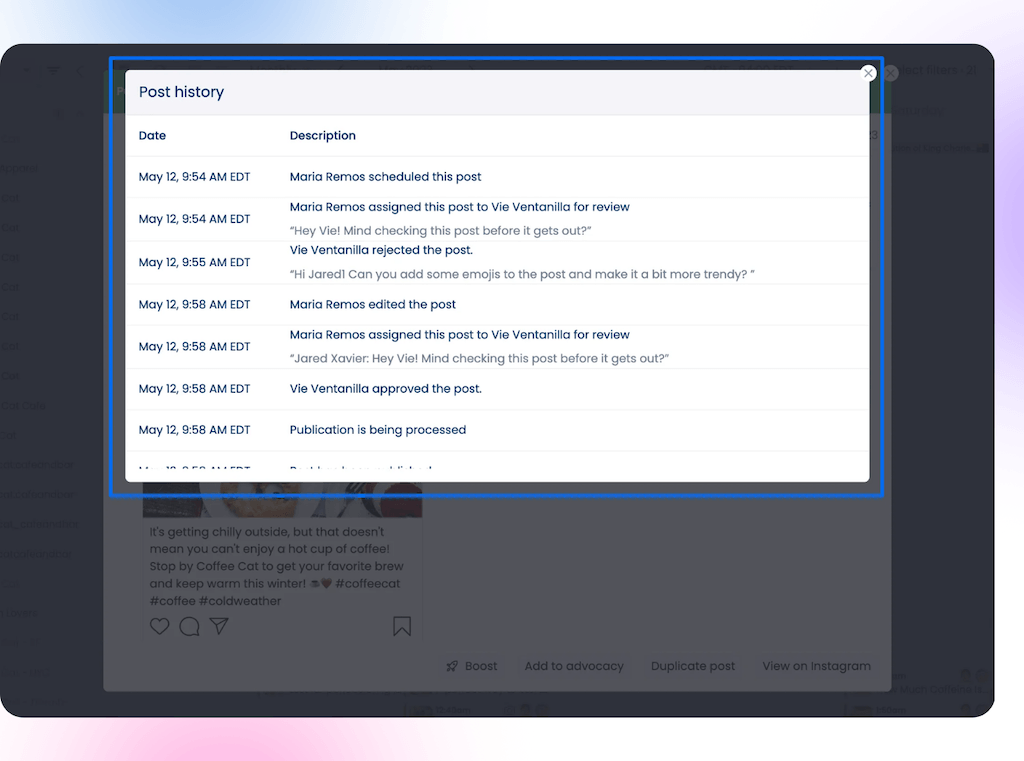
Post history connects named reviewers with dated actions. This reference shows rejection, edits, and later approval; check the final publishing status separately.
For a single stable brand, one review route may be enough. Add tiers where they change who decides, not to make the process look more thorough.
Make approvals clear across every brand
Give leadership the decisions still waiting for an owner, the deadline for each, and the recurring causes of rework. Use that review to change a route or clarify the next brief. Adding more reviewers won’t fix an unclear responsibility.
Book a Vista Social demo to work through your brand and specialist approval stages. Or start a free trial with one brand and test a routine post, a changed claim, and the record left after publishing.
Frequently asked questions
Should agency-created posts follow a separate approval process?
Use the post’s risk and destination to choose the review, not who wrote it. An agency-created caption needs the same claim and market checks as an equivalent in-house draft. Put those requirements in the agency brief so the submission arrives with the information reviewers need.
When should you update your social media governance rules?
Revisit them when you add a brand or market, change a campaign’s requirements or find a gap during an incident. Review recurring exceptions after campaigns too. If the same workaround keeps appearing, decide whether to make it an explicit rule or stop using it.
Who should own social media governance?
Give one senior social or marketing leader responsibility for maintaining the process across brands. That person coordinates input from regional leads, legal and product specialists, but doesn’t need to approve every post. Their job is to keep responsibilities clear and resolve gaps between teams.
How do you measure whether social media governance is working?
Track missed reviews, approval delays, repeated corrections and posts published outside the agreed process. Compare results by brand and risk level so routine content doesn’t hide problems with sensitive posts. Faster approval is useful only if the required checks still happen.
About the Author

Content Writer
Orion loves to write content that refuses to be boring. As part of Vista Social, he helps brands, creators, and agencies stop doom scrolling and start winning with social media. When he's not in front of a keyboard, he's watching films in IMAX with his wife, dissecting football tactics (the European kind), and getting lost in a good book.