


Why Social Media Approvals Keep Leaving Your Scheduler
August 11, 2026
10 min read

Summarize with AI

Table of contents
Share

Vista Social

X (Twitter)


A post can be ready to publish, but the approval you need is buried in an email thread. The scheduler still shows the post as waiting.
Your team then has to confirm which version the client saw and copy the decision back into the scheduler. Until somebody does that, the post can’t move.
A client may check content twice a month, while your team works in the scheduler every day. They won’t want another password just to approve a few posts.
A good social media approval workflow keeps the review easy and the answer attached to the exact post. When that connection is missing, approvals drift into email and chat or get marked in spreadsheets and PDFs.
The short version
- Review must reach the reviewer: A client or outside stakeholder won’t want a new account for a decision that takes seconds.
- Feedback needs one home: Comments and approvals become unreliable when they lose their connection to the exact post.
- A record needs detail: Teams need the reviewer’s name, decision, and place in the approval order.
- AI can watch the queue: Ask Vista and AI Agents can surface work that is stuck, while a person keeps final sign-off.
Table of contents
Why approvals keep leaving the scheduler
External reviewers don’t live in your social tool. A social media manager may open the publishing calendar every day. The client lead or compliance officer might review a batch twice a month.
Asking that person to learn a new dashboard and remember another password creates more work than the decision itself.
Because email and chat already have their attention, review drifts there. A caption gets pasted into the message, and the image arrives as an attachment. The answer comes back as “approved.”
That reply works for the reviewer, but the social media manager still has to update the live post.
The reply loses its connection to the post
The word “approved” has limited value because it lacks context. Your team still has to know which network version, creative, caption, link, and publish date the reviewer saw.
Revision rounds make that harder. A client can comment on the second slide in a PDF while a designer changes the carousel in Canva. The scheduler then holds one version, while the message thread discusses another.
The same problem also appears in a spreadsheet. A green cell can show that a row passed review. It won’t follow a new caption, swapped image, or moved campaign date unless someone updates it by hand.
Here are the signs that approval has slipped away from the work:
- Comments need translating: Someone copies feedback from email or chat into the post.
- Version questions linger: The reviewer asks whether the new link includes yesterday’s edits.
- The team checks two places: The scheduler shows the post, while a sheet or inbox holds the decision.
- One person knows the truth: Only the account manager can explain what the client approved.
So the fix begins by giving the reviewer a lighter way in. Vista Social’s shared calendars let an external reviewer open a link without an account. They can approve or reject a post and leave a note.
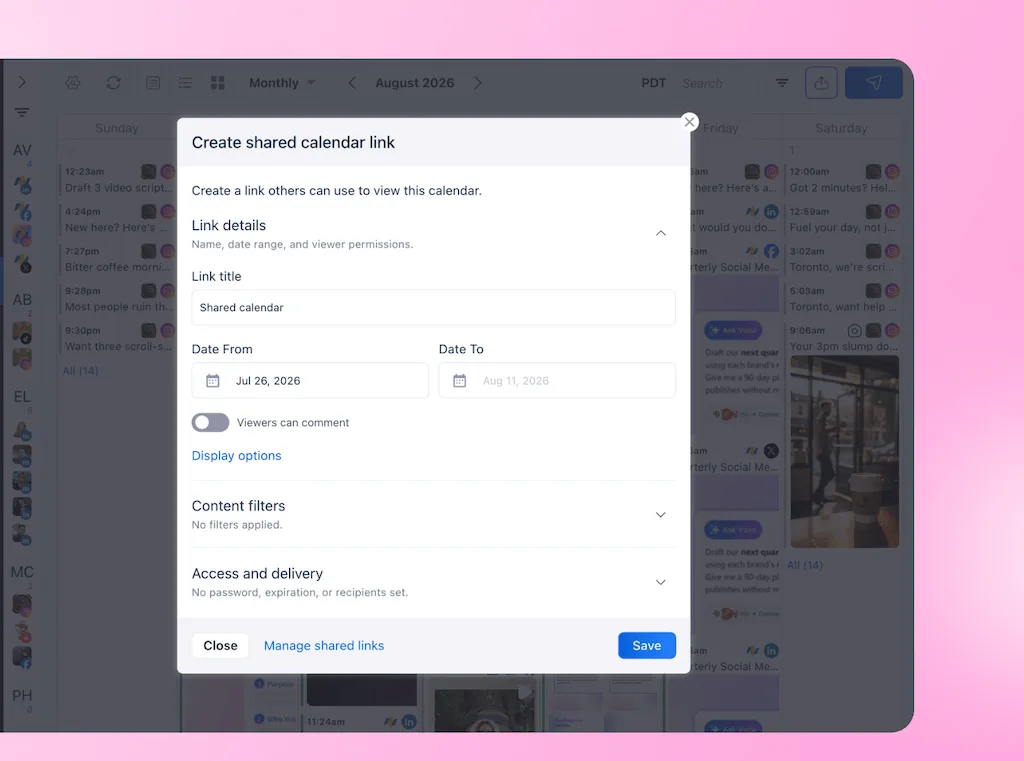
The reviewer also enters a name and email, so the social team can see who made the decision.
What a useful approval record shows
An approval status tells you where a post stands now, while an approval record tells you what happened during review.
That history also matters when a client disputes a post or a new teammate inherits an account. It helps when a compliance lead asks who cleared a claim.
A useful operational record answers four questions:
- Who reviewed it: The person or approval group that made the decision.
- When they reviewed it: The time the post moved through that step.
- What they decided: Approval, rejection, or a request for changes.
- What they added: The note or feedback that explains the decision.
Vista Social’s post history now covers much more than a green approval label. It shows when a post was submitted and who reviewed or approved it. You can also see rejection feedback and progress through a multi-step workflow.
The post also identifies the reviewer or step that currently has the work, along with its wait time.
| A status tells you | A record tells you |
|---|---|
| The post is pending or approved now | When it entered review |
| The current place in the workflow | Who reviewed or approved it |
| Whether it can move toward publishing | Which step is holding it |
| That a rejection happened | Why it was rejected |
| The latest state | How it moved through each approval step |
The stakes rise in regulated social media
For a small agency, a missing approval record can strain a client relationship. In financial services, weak review and retention can become a regulatory issue.
FINRA’s 2026 findings include firms failing to review and approve static influencer posts before they went live. The report also flags failures to keep posts made on a firm’s behalf. FINRA says firms retain business records based on content, not channel.
For example, FINRA fined M1 Finance $850,000 in 2024. Its findings included failures to review or approve influencer posts before use and keep the communications. The program used about 1,700 influencers and helped open more than 39,400 funded accounts.
FINRA enforcement chief Bill St. Louis explained why the channel deserves that level of scrutiny:
“As investors increasingly use social media to inform their financial decisions, FINRA’s rules on communicating with the public are especially critical.”
Bill St. Louis, Enforcement notice
The case shows why a regulated team needs documented review and separate record storage. Yet a scheduler still isn’t a compliance archive. Financial services teams should confirm those requirements with counsel.
Teams in healthcare or government should do the same under their own rules.
Which post changes need another approval
An approval applies to what the reviewer saw. The earlier decision may no longer cover a changed post. Review it again after a new claim, creative, disclosure, or destination link.
But timing changes need more judgment. For example, moving an evergreen tip from Tuesday morning to Thursday afternoon may leave its meaning intact. Moving an event reminder, earnings announcement, limited offer, or public response can change the context enough to deserve another look.
For that reason, your approval policy should name the line before the team is under pressure. A practical rule can separate changes into three groups:
- Always review again: Material caption edits, new claims, new creative, different links, changed disclosures, or a new target profile.
- Review when context changes: Date-sensitive posts, campaigns tied to news, offers with deadlines, event content, or statements responding to a live issue.
- Allow without another round: Small timing adjustments to evergreen content, but only when your rules allow it.
Because re-approval can feel repetitive, make the reason visible. A short note such as “The destination link changed after your approval” gives them something specific to check. Sending the whole post back with no explanation makes the second review feel like the first one didn’t count.
What does a social media approval workflow need?
A usable social media approval process has to work for the social team and the occasional reviewer. These four requirements are a practical way to audit the setup you have now.
| Requirement | What it needs to do | How Vista Social handles it |
|---|---|---|
| 1. No-login review | Let a client or external stakeholder see the post and decide without joining the workspace | A shared calendar link supports approval, rejection, notes, reviewer name and email, expiry, password, date range, and profile filters |
| 2. A clear signal | Show the team what is waiting and its age | Internal reviewers receive alerts, while the calendar and post display review status, current step, and wait time |
| 3. Post-level history | Keep decisions and feedback attached to the work | Post history records submission, reviewers, approvals, rejection notes, feedback, and multi-step progress |
| 4. Ordered sign-off | Move the post through the required people in the correct order | Multi-step workflows support internal, external, and hybrid approval steps before publishing |
Make review easy for someone outside the team
The reviewer should see the real post, not a caption divorced from its image or a slide that no longer matches the scheduler. A shared calendar gives them that view through a link, then keeps their note with the post.
You can also limit the link to certain profiles and dates, add an expiry, and protect it with a password. Vista Social limits the number of unique links an account can create. Each link can still go to any number of people.
An agency should plan one stable link per client or review group and check its current allowance before rollout.
Give every approval step an owner
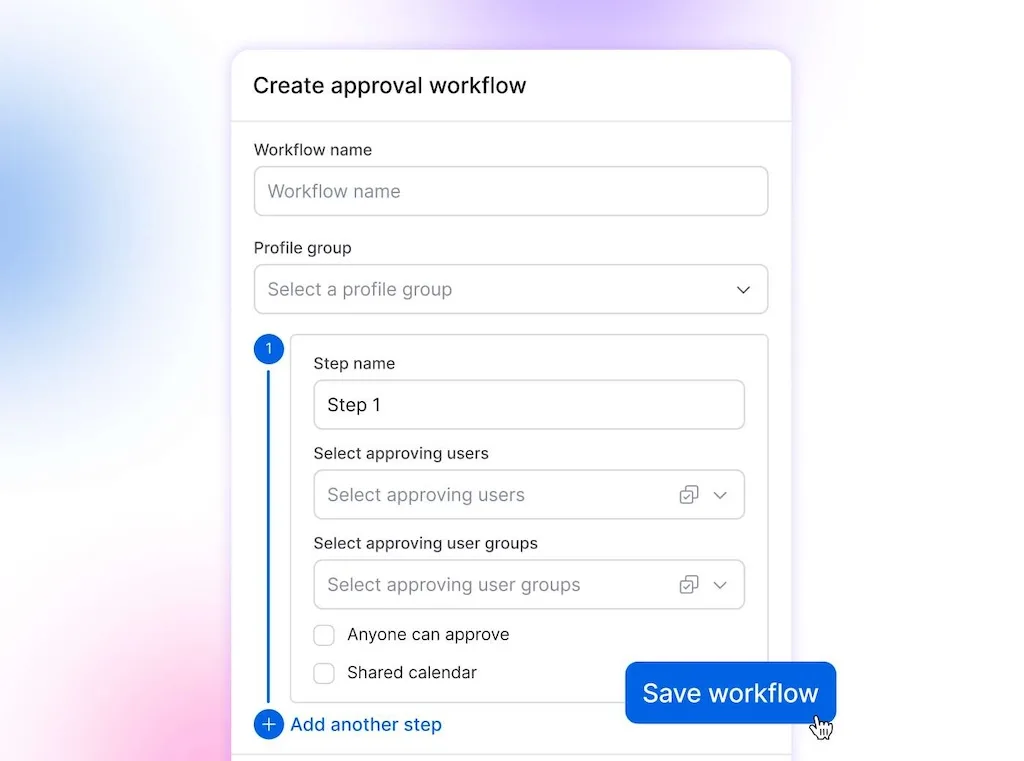
“Legal needs to review this” names a department, but it doesn’t tell the team which person has the post. A reliable workflow identifies the approver at each step and makes the order part of the system.
In Vista Social, an internal review can come first and the final step can go to an external shared-calendar reviewer. The post moves forward only after each required step is complete.
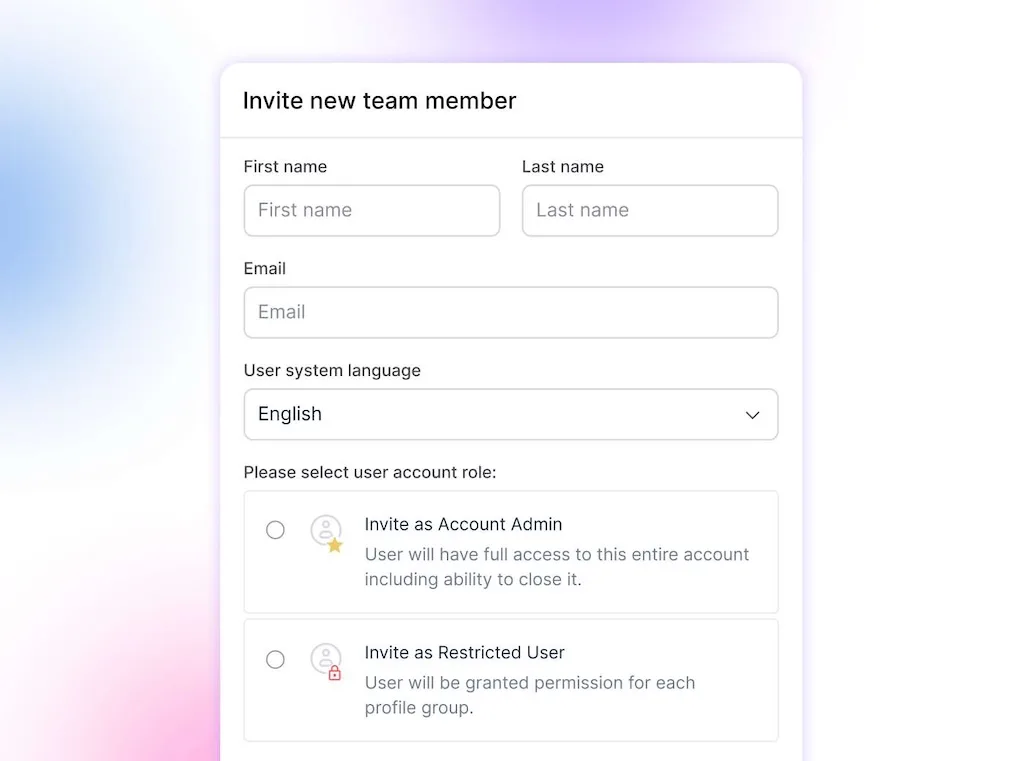
Teams can use contributor access for freelancers or junior creators whose posts should always enter the default workflow, so the required review can’t be skipped by accident.
If you want the full setup sequence, our software guide walks through it. This article stays focused on the decisions that make the workflow usable.
You can try Vista Social free and send your client a review link without adding another login to their week, with no credit card required.
Let AI watch the approval queue
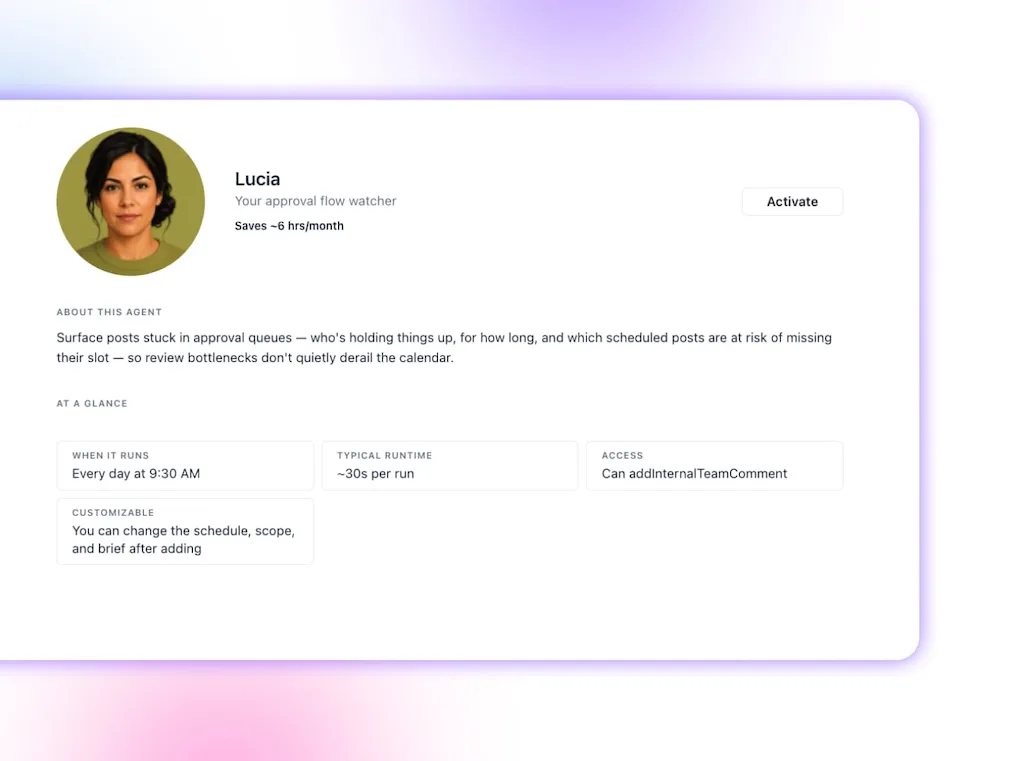
Approval chasing contains a lot of checking before the useful part begins. You open the calendar, filter for posts in review, work out what is due first, check which step is waiting, then decide whether anybody needs a reminder.
When you ask it, Ask Vista can search connected calendar data by status, profile, and date. It can also retrieve approval workflows and help you inspect what needs attention. A scheduled AI Agent can run that check on a cadence and report the result.
As a result, the social media manager starts with the stuck posts instead of hunting for them.
Keep the first version read-only. The Agent should name what is waiting, its age, and what is close to its publish date. A person can then review the context and decide how to follow up.
AI can also reduce avoidable revision before a post enters review. AI Training & Knowledge and Brand Voice give AI-assisted drafts approved facts and clearer brand guidance. A reviewer still checks every claim and makes the final decision, but they spend less time correcting information the team already had.
An AI Agent shouldn’t become the approver. Approval carries accountability, and a generated summary doesn’t create a legal signature or satisfy a retention policy. Let AI handle the repetitive check. Keep judgment with the person whose name belongs on the decision.
What regulated teams still need outside the scheduler
Vista Social provides an operational history for social publishing. It is not an e-signature platform or a regulatory archiving system, and using its approval workflow doesn’t prove that a firm has met every recordkeeping requirement.
For regulated teams, a second system may hold formal signatures, legal holds, or records that can’t be changed. The social workflow can remain the place where the post is created, reviewed, and scheduled. Approved content then moves into the archive named in the organization’s policy.
That boundary keeps the PDF or signed document where it earns its keep. Your everyday client approvals don’t need to live in a file because a formal regulatory approval sometimes does.
Frequently asked questions
How do clients approve social media posts without logging in?
A no-login review link lets the client open a shared calendar in their browser, preview the posts, and approve or reject each one with a note. Vista Social asks them to identify themselves, which helps the team see who made the decision.
Who should approve social media posts before publishing?
Give each stage one named owner or a clearly defined approval group. A common agency flow uses an internal content reviewer first, followed by the client or compliance owner who gives the final sign-off.
Why do social media approvals get lost in email?
Email holds the reply but doesn’t automatically connect that reply to the live version in the scheduler. The team then has to interpret which post was approved and copy any requested changes back by hand.
Is a screenshot or PDF enough for compliance?
That depends on the rules that apply to your organization. A screenshot or PDF may preserve useful evidence, but regulated teams may need identity, timestamps, retention controls, formal signatures, or an approved archive. Confirm the requirements with counsel or your compliance lead.
How many social media approval rounds should a team use?
Use as few rounds as the risk and working relationship allow. One internal quality check and one final client or compliance approval is a practical starting point. More rounds may be necessary for claims, disclosures, or campaigns involving several accountable teams.
Can an AI Agent approve social media posts?
AI can monitor the queue, summarize what is waiting, and surface posts near their publish date. A person should still review the content and give final approval because sign-off carries context and accountability.
Should rescheduling a post require another approval?
Require another review when the new timing changes the meaning or risk of the post. Event content, public statements, offers, launches, and date-sensitive claims deserve another look. An evergreen post may not need another round when your internal rules permit the timing change.
About the Author

Content Writer
Orion loves to write content that refuses to be boring. As part of Vista Social, he helps brands, creators, and agencies stop doom scrolling and start winning with social media. When he's not in front of a keyboard, he's watching films in IMAX with his wife, dissecting football tactics (the European kind), and getting lost in a good book.