


Social Media Lead Generation: Where Leads Go Missing
November 11, 2026
7 min read

Summarize with AI

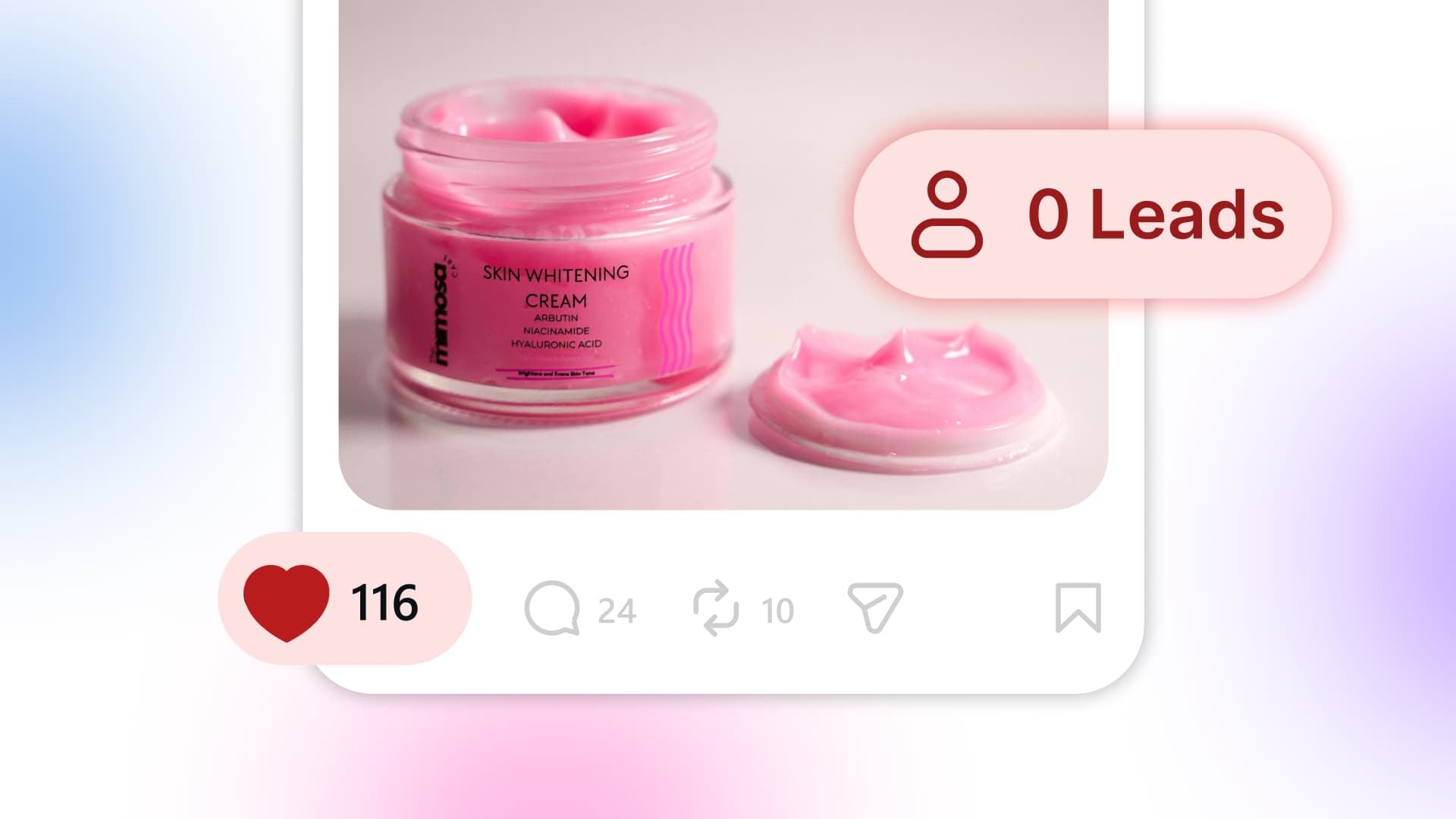
Table of contents
Share

Vista Social

X (Twitter)


After your last job on Thursday, you open Instagram to check the bathroom photos you posted on Tuesday. They’ve had more likes than anything you’ve shared in weeks. A few comments down, someone asks what a similar job would cost, and in your message requests there’s a question about whether you work in the next town over.
By the time you get back to them, one has already booked a visit with another contractor. You’d have made time for either question if it had come in by phone, but on a workday you might not open Instagram until you’re home.
Start with the part of social media lead generation you can check today: how easy it is to get a quote from a post you already have. Open it on your phone and see how far you get without hunting for a link or waiting on a reply.
The short version
- Check one post: Try to request an estimate from your phone. See what happens when you comment, message, or tap the link.
- Fix the first snag: Give customers one clear action, then make sure someone owns each inquiry.
- Count what moved: Track inquiries, useful replies, and bookings separately.
Table of contents
Where does social media lead generation break down?
Pick a recent post about a service you still offer, then try to request a quote from your phone. If an action works, move on to the next one. The first step that leaves you guessing is the one to fix.
| Checkpoint | What to check |
|---|---|
| 1. Post | Is the next action clear? |
| 2. Link or DM | Does it lead to what you promised? |
| 3. Answer | Does the customer get a useful reply? |
| 4. Follow-up | Who owns the inquiry? |
1. The post doesn’t tell people what to do next
“Loved how this turned out” is a fine caption when you’re sharing a project. But if you want estimate requests, give people a way to ask. Name what they’ll get in return, and make sure it’s something you can send.
| Caption | What the reader sees |
|---|---|
| Before | “Loved how this bathroom turned out!” |
| After | “Planning a bathroom remodel? Comment QUOTE and we’ll send you our estimate request link.” |
Use the second version only if you’re set up to deliver the link. If you already check your messages regularly, try a direct ask instead: “DM us your ZIP code to check if we cover your area.” Either way, stick to one action so customers aren’t choosing between a comment, a DM, and a link.
2. The link sends them back to square one
Someone who tapped through from a bathroom post shouldn’t have to start over on your homepage. Send them straight to the matching estimate form or appointment page instead.
If you use a link-in-bio page, make the action named in the post easy to spot. For example, you can add a Calendly block to a Vista Page so visitors can choose a time there.
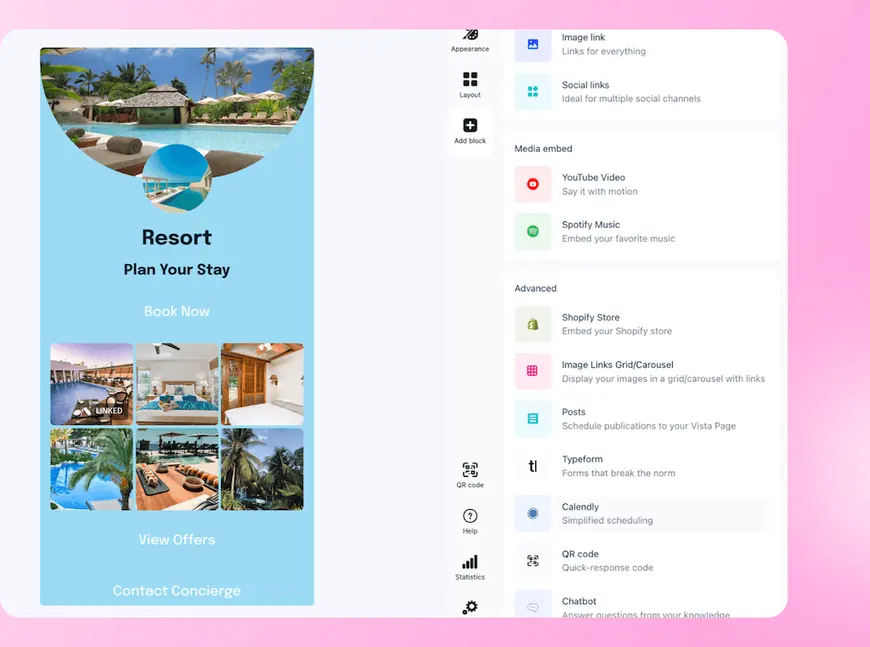
In the Vista Page editor, choose Calendly from Advanced blocks to put booking on the page.
Open the link on a phone while signed out, then try submitting an inquiry. Can you tell you’re in the right place and finish without looking anything up? A ZIP code and an email may be enough to start because you can ask for measurements later.
3. A real question gets buried in the inbox
“Do you work in our neighborhood?” can sit between a compliment and a mention, looking like any other notification. Check comments, DMs, and message requests once to see where those questions land. Then decide where you’ll pick them up during a normal workday.
Give the customer a useful answer or tell them when you’ll have one. “We cover your ZIP code. I’ll confirm site-visit times tomorrow morning” does more for them than “Thanks for reaching out!”
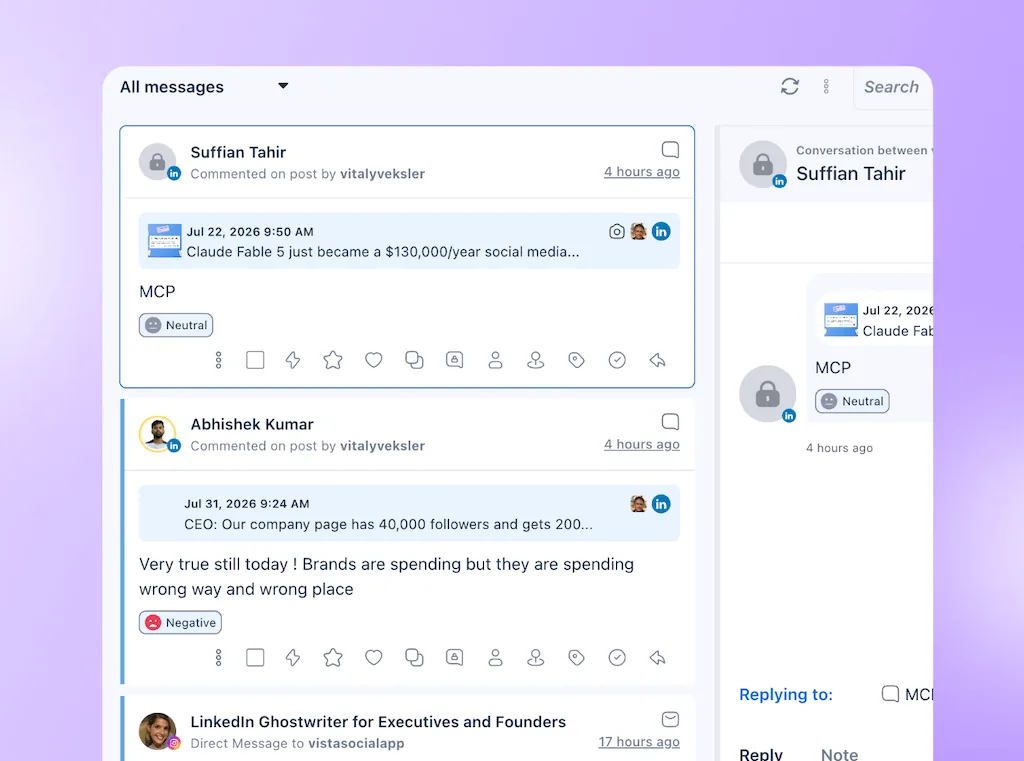
If you use Vista Social, select the profiles you want to check in Inbox and tag questions you need to return to. For a fuller routine, see how to spot buying intent in your social inbox.
Select the profiles you want to check, then use message filters to narrow the Inbox.
4. Someone replies, but nobody owns the follow-up
You sent the estimate form, the customer filled it out, and now the notification sits in an account nobody checks. Send completed inquiries somewhere you already look, such as a shared email inbox.
Record the person following up and the next step. Add the source post or profile when you know it, but leave it blank rather than crediting the last post you published.
If the same person comments and sends a DM, keep one record. Then update it when they book so you can distinguish a promising conversation from an appointment.
Set up one comment-to-DM test in Vista Social
Suppose the comments on your bathroom posts already include questions about quotes. Try an Instagram flow on one new post that invites people to comment QUOTE for your estimate request link. The automation can send the link while you’re on a job, but you’ll still decide whether the project is a fit and what to quote.
- Set up the trigger: Start from the comment-to-DM template. Or describe the profile, keyword, and link to Ask Vista and have it save the automation as a paused draft. Then verify the profile, limit the trigger to your test post, and check the link in the builder.
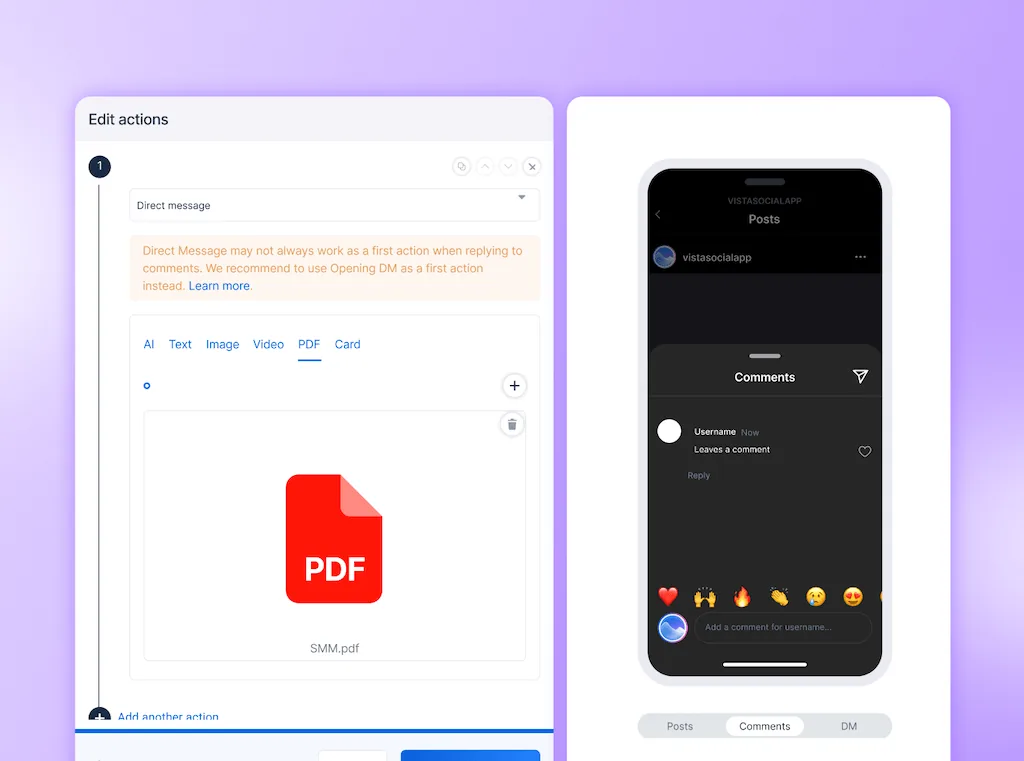
- Preview the reply and check the post: In Edit actions, open Test automation and try a comment with your keyword and one without it. The preview doesn’t send anything. But typed tests don’t check the post filter, so use Recent messages to check post targeting when there are comments to reply to.
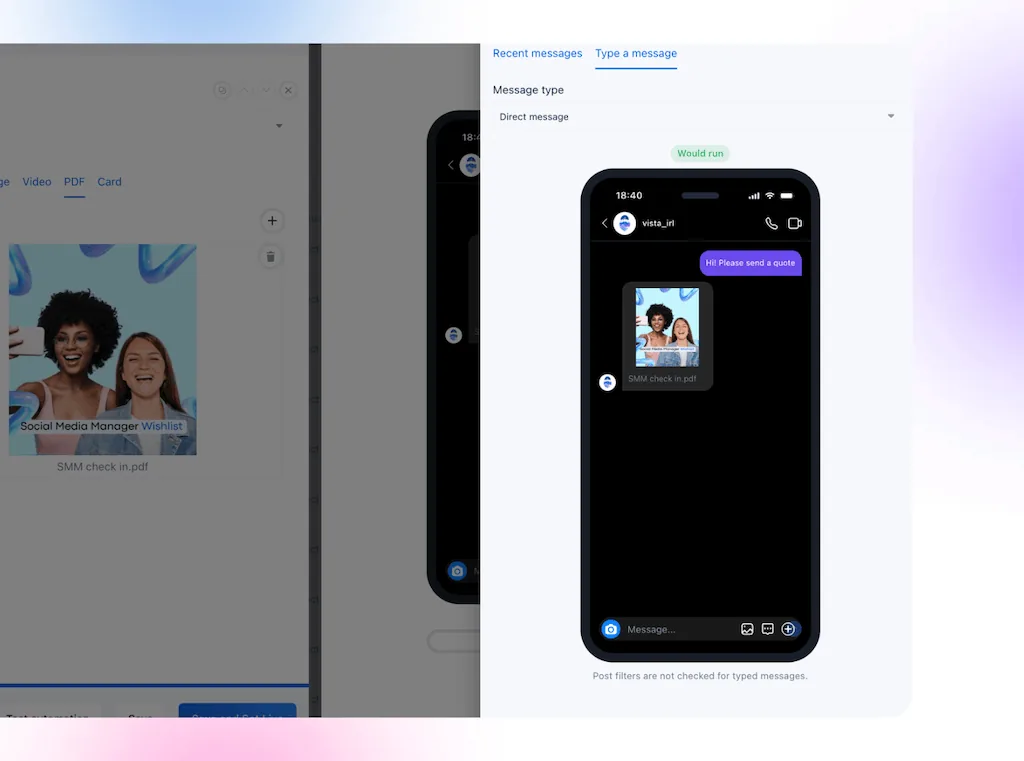
- Check where the inquiry lands: Submit your own test form and confirm it lands in the inbox you’ll check. If you’d rather collect details inside the DM, Vista Social can email completed submissions to an address you choose. Use an Opening DM to let people opt in before sending more than one automated DM from a comment on Instagram. Turn the flow on only after you’ve checked the reply and where the request goes.
Use the keyword from your caption in the includes field. For the remodel post, that’s QUOTE.
If it’s just you: Let the automation send the link, then route completed forms to the email inbox you already check. After the last job of the day, set aside time for quotes and questions that need your judgment. Tell people when you’ll reply so they aren’t left guessing while you’re on a job.
The keyword template is available on Professional and above. Building it with Ask Vista and collecting details inside DMs requires Advanced, Scale, or Enterprise. The template supports Instagram and Facebook; check which triggers and actions your network supports before copying the setup to another profile.
What to check after a week
Write down where the test started: the post, the offer, and the next step you changed. Leave the rest alone where you can, because changing the offer, link, and publishing time together makes the results harder to read.
| What you see | What to check next |
|---|---|
| People see the post but rarely take the next step. | Look at the ask and whether it matches what the post shows. |
| People ask or tap, but few finish the form. | Try the link on a phone and check that the page answers what the post promised. |
| Inquiries arrive, but people wait for answers. | Check where alerts land and whether you check that inbox often enough. |
| People get answers, but few book. | Review the questions they ask about price, availability, or fit before changing the post again. |
Copy this lead tracker
Use one entry per buyer and put it wherever you already keep job notes. Then give the next step a date so you can see who needs a reply without reopening every conversation.
| Field | Example entry |
|---|---|
| Inquiry | Bathroom estimate request |
| Source | Instagram bathroom reveal |
| Useful reply sent | Yes, confirmed service area on Tuesday |
| Owner | Me |
| Next step | Send two site-visit times by Thursday |
| Booking | Pending |
| Confirmed sale | Not yet |
At the end of the week, count inquiries, useful replies, bookings, and confirmed sales separately. Keep pending inquiries open so you can check them again after your usual sales cycle.
If only a handful of people saw the post, one quiet week doesn’t tell you much about the handoff. Work on reaching the right people, then run the check again.
Give the next person who asks a clear answer
The next person scrolling through those bathroom photos might be wondering what you could do with theirs. Give them a simple way to ask for an estimate, so when you sit down after work, you have something to go on. You can tell them whether you cover their area or suggest a time to come by.
If you’d rather not send the estimate link by hand, try Vista Social for free and test an automatic DM on one post.
Frequently asked questions
Can a post generate leads without getting many likes?
Yes. A post that answers a question for the right people can bring in an estimate request even if few people react publicly. Check inquiries and bookings alongside reach so you don’t discard a post that’s doing its job.
How quickly should I reply to a social media inquiry?
Pick a response window you can meet, then let people know when you’ll be back if they ask after hours. Sending an estimate link acknowledges the request, but you still need to answer questions the link can’t.
Which platform should I test first?
Start where customers already ask about your services, even if that profile has fewer followers than your largest one. If that’s Instagram, the Instagram lead generation guide covers more ways to give people a next step there.
About the Author

Content Writer
Orion loves to write content that refuses to be boring. As part of Vista Social, he helps brands, creators, and agencies stop doom scrolling and start winning with social media. When he's not in front of a keyboard, he's watching films in IMAX with his wife, dissecting football tactics (the European kind), and getting lost in a good book.