


AI Marketing Automation vs. AI Agents for Agencies
October 14, 2026
10 min read

Summarize with AI

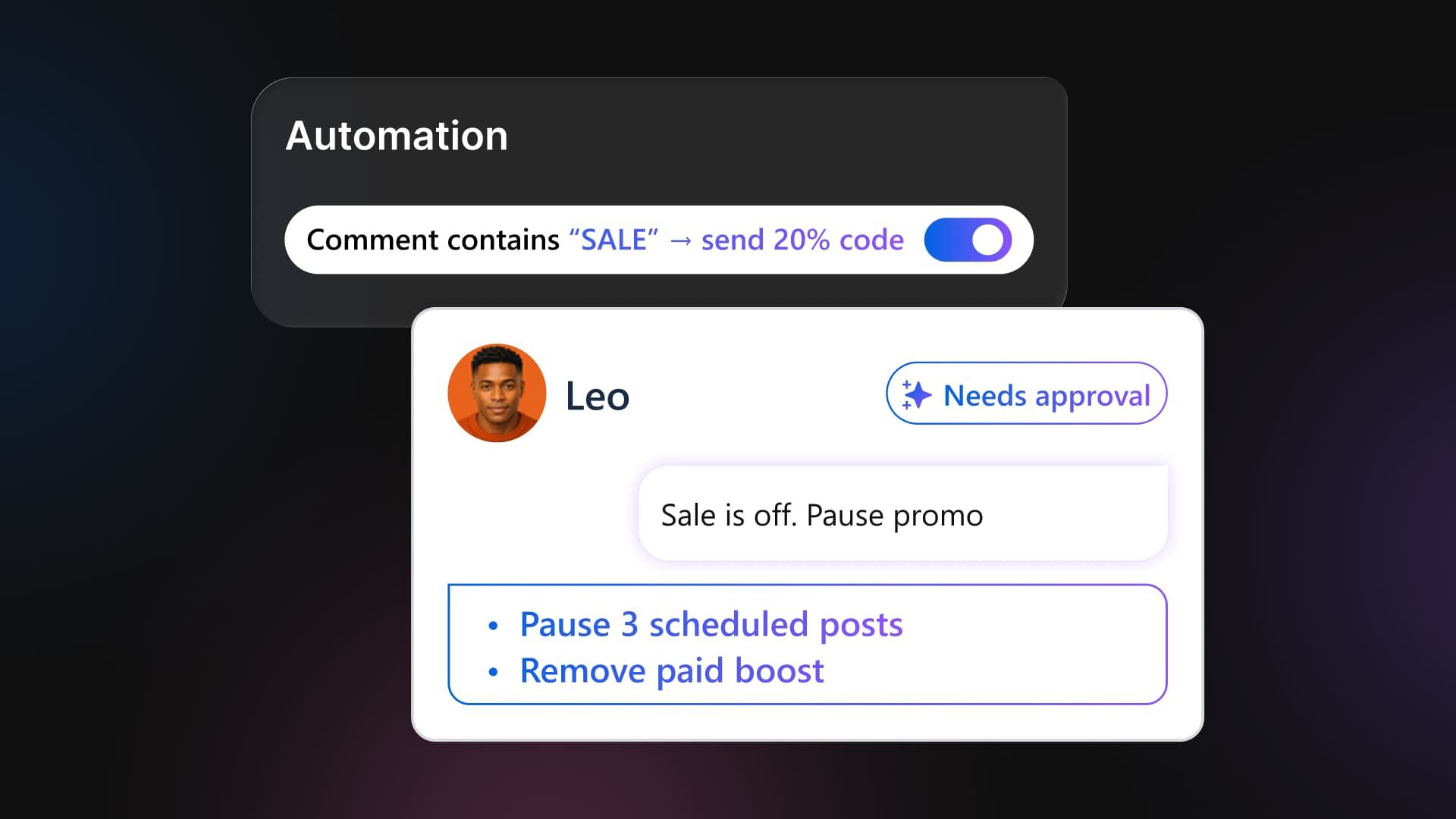
Table of contents
Share

Vista Social

X (Twitter)


Pulling a promotion from the calendar doesn’t stop the discount-code DM attached to last month’s Reel. That rule keeps answering new comments until someone pauses it, so your client can still be sending customers an offer you’ve already withdrawn.
Across several account teams, the maintenance behind AI marketing automation grows with every changed brief.
Someone has to check the posts, replies, approval queues, and campaign rules it touches. The client considers the request finished, while your agency is still finding the affected work and fitting the checks around everything else it promised to deliver.
With an agent, you can ask for an account review against the revised brief, inspect its findings, and approve the clean-up. You still need rules for routine responses and a way to track the cost of every recurring check.
The short version
- Keep stable work on rules: A live campaign DM with an approved link usually needs the same response each time.
- Give agents a specific investigation: Ask them to inspect current account data, prepare the affected work, and return a result you can check.
- Check the cost of delegation: Compare AI credits and review time with the manual work the workflow removes.
- Keep the client approval. An agent can prepare the work, but public changes still stop at the sign-off you agreed to.
Table of contents
Why changing client briefs create automation work
The rules you set up during onboarding can handle campaign DMs, review thank-yous, evergreen posts, and scheduled reports. The maintenance starts when the client changes something that those rules depend on.
- The instruction is scattered: A launch moves in a DM while the campaign sheet still shows the old date. You have to reconcile both before you can check the live work.
- The fix crosses several tools: A packaging change can affect queued posts, saved replies, and recycled assets. Each one needs a check, even if the client sent only one message.
- The extra work consumes the retainer: Multiply those checks across a dozen accounts and you have an operations job that was never scoped. Whoever remembers the old setup becomes responsible for finding every loose end.
How AI marketing automation differs from AI agents
AI marketing automation runs repeat tasks from rules you define in advance, even when AI writes or classifies one part of the workflow. An AI agent receives a goal, tools, and permitted account context, then chooses its next step from what it finds.
- AI inside a rule: An intent detector recognizes that “Can I get the offer?” means the same thing as “SALE.” It still sends the response you approved during setup.
- An agent choosing its next step: It can decide whether to inspect the calendar, check the approval queue, or compare results next. That flexibility makes its work less predictable and usually more expensive per run.
The Zapier article on managing agent teams describes the trade-off clearly: “Workflows are reliable, but they’re also brittle.” Keep a fixed path for work that needs consistency, and use an agent when the next step requires a fresh decision.
If you need the trigger, condition, and action basics, start with Vista Social’s marketing automation guide. The question here is what happens when the correct action changes after setup.
How agentic automation handles a changed client brief
Agentic automation gives software room to choose the steps needed to reach a goal. For the canceled sale, the work begins when your account manager records the change and identifies the client profiles and campaign:
- Record the change once: The account manager updates the client instruction to stop promotional content.
- Inspect the affected work: The agent checks scheduled posts and pending approvals for the selected client, then returns the posts that reference the withdrawn offer and the proposed changes.
- Approve and verify the clean-up: Your account lead reviews the proposed post changes, pauses the campaign’s DM rule, and checks the final post and rule status.
Ask Vista’s calendar tools can find posts by profile and status and retrieve their full details. Use that information to prepare the review list. Keep the DM-rule check with your account lead, who verifies the campaign, trigger, and response before pausing it.
The agent needs the updated instruction and access to the selected profiles. Give it a read-and-report task for this first check; your account lead handles the changes through the agreed approval process and pauses any related rule in the system where it runs.
McKinsey’s August 2026 survey found that 40% of respondents at organizations with more than $1 billion in annual revenue reported scaling AI agents, compared with 22% at smaller organizations. That’s a broad business comparison, rather than an agency benchmark. It shows why agency leaders serving large clients need a credible answer about delegation, access, and review.
AI agents vs. automation
| Decision | Rules-based automation | AI agent |
|---|---|---|
| Who picks the next step? | You define it during setup | The agent chooses within its goal, tools, instructions, and permissions |
| Best fit | Stable, repetitive work with a known response | Work where the correct response changes with context |
| Reliability | Predictable when the rule and inputs remain valid | Variable because the agent reasons from instructions and can be wrong |
| Updating it | Find and edit every affected rule | Update the goal or written playbook, then test the next run |
| Cost | Usually lower per execution | Usually higher because each run uses AI reasoning |
| Typical failure | Correctly follows a stale decision | Misreads incomplete context or chooses a weak next step |
| Required control | An owner, an end date, and periodic review | Scoped access, run history, and human approval for public or irreversible actions |
If the right action never depends on what changed this week, keep the rule. If it does, give the preparation to an agent and keep approval with a person.
Agency tasks to keep on rules
AI marketing automation still earns its place when the correct action is fixed. These jobs usually need a predictable path rather than a fresh decision on every run:
- Campaign keyword DMs: The offer is live, the link is fixed, and the active dates are known.
- After-hours replies: the message confirms receipt and sets a truthful response expectation.
- Positive review thank-yous: The allowed response is narrow, and sensitive cases take a different route.
- Evergreen recycling: The asset, claim, product, and link all have a review date.
Give campaign rules an owner and an end date, and set a review date for ongoing rules. When the brief changes, check the offer, campaign, product, and message they depend on. A temporary sale shouldn’t leave a permanent reply behind.
Set account access and approval boundaries
A client shouldn’t have to discover an agent’s mistake in a public post. Define the review boundary when you assign the job, and give your account lead enough information to check the recommendation.
DPD’s 2024 chatbot failure
In January 2024, a customer prompted DPD’s support chatbot to swear and write a poem criticizing the delivery company. DPD told Sky News that an error followed a system update and that it had disabled the AI element of the chat.
That example shows why adding AI doesn’t remove the need to test customer-facing behavior. For your agency, every changed instruction or workflow needs a clear review point, especially when the output goes straight to a client’s audience.
Define access, actions, and reviewers
As you add account teams, the owner’s job is to make exceptions visible across clients. Don’t make one experienced account lead the only person who knows what can go wrong. Decide these three things before the first run:
- Which accounts can it access? Limit the task to the client profiles and information it needs. A report for one client shouldn’t require another client’s data.
- What can it change? Separate inspecting and preparing work from publishing, sending, or changing an account. State which actions require approval.
- Who accepts the result? Name the account lead for internal checks and keep the client’s agreed sign-off for public work. Return post links, proposed changes, and status so the reviewer can verify the result.
Use an approval workflow to define the route before work starts. Agents checking each other’s work can add repeatable accuracy, voice, and claims checks, while the accountable approver keeps the final decision.
Build the client workflow in Vista Social
When you compare AI marketing automation tools, bring one changed client brief and follow it through to resolution. In Vista Social, use the agent to prepare the post review, let your account lead pause the affected DM rule, and keep the client’s sign-off visible in the same workspace.
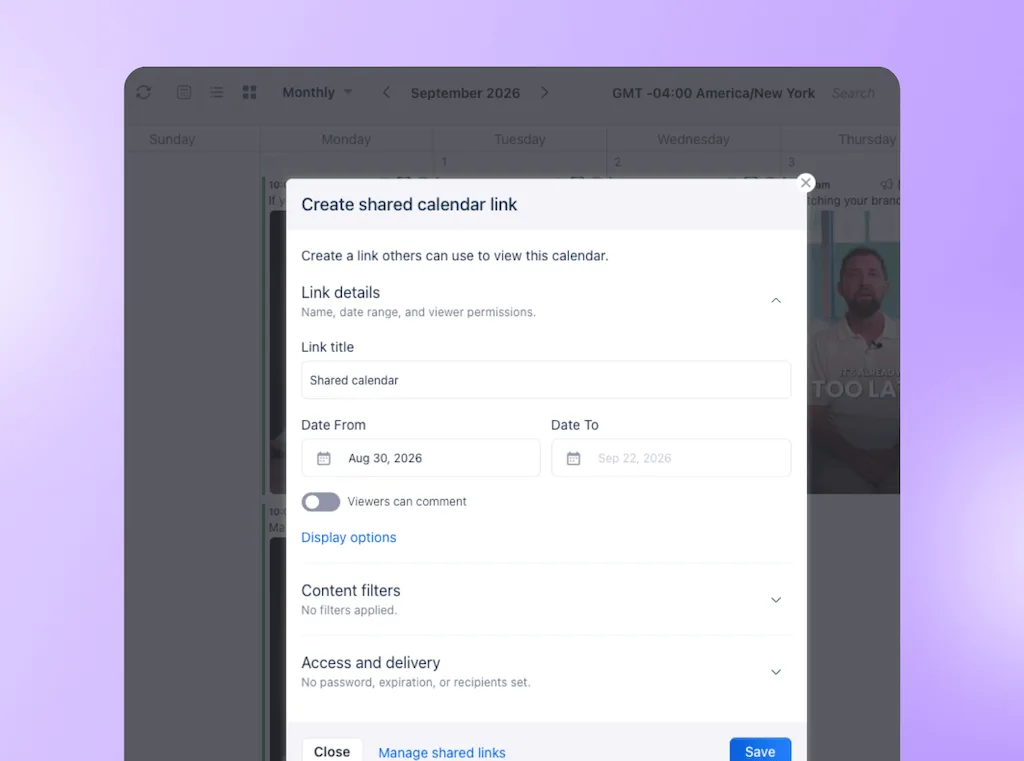
Client approvals without a login
On Advanced, Scale, and Enterprise, a client can approve or reject posts from a shared calendar link without joining your workspace. The agent can prepare the work, while the client keeps the sign-off they already expect.
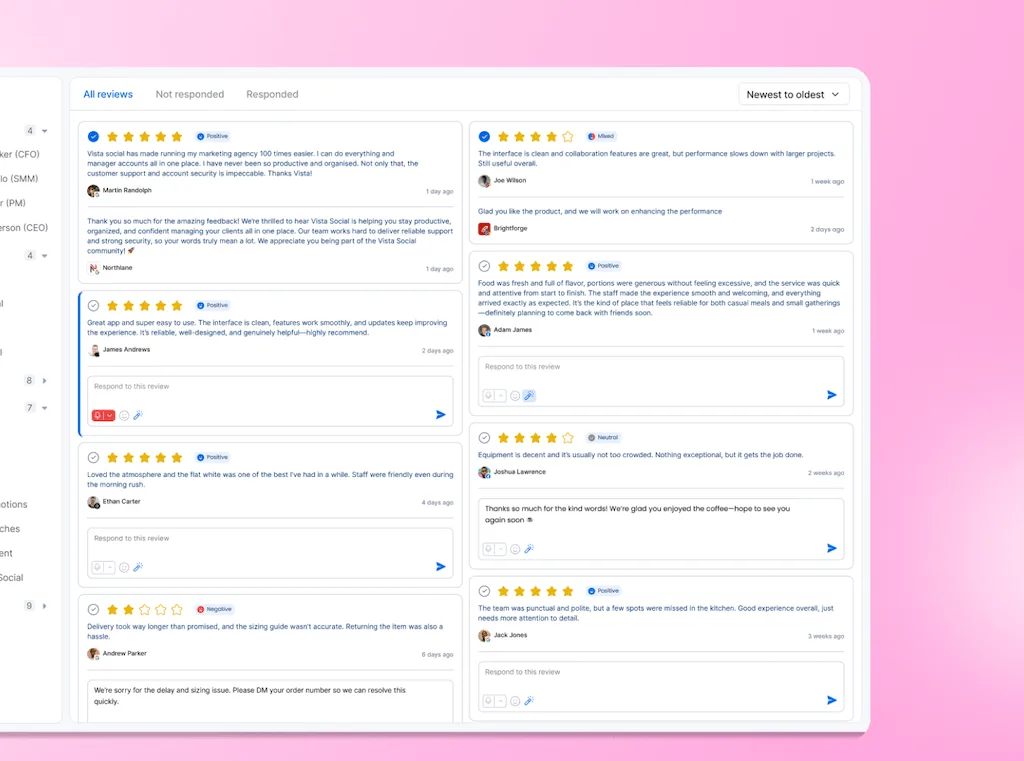
Inbox and review automations
Inbox and review automations can trigger from a keyword, detected intent, or review rating, on the dates and times you choose. AI message intent detection recognizes meaning beyond an exact phrase and is available on Advanced, Scale, and Enterprise. Use the intent-trigger setup guide to configure the match and approved response.
Scheduled agents for approval checks and reports
Ask Vista agents can monitor selected activity and prepare reports on a schedule. Two useful agency jobs are:
- Approval monitoring: Surface posts stuck in review so your account lead knows which handoff needs attention.
- Client reporting: Prepare the recurring report for your review before it goes to the client.
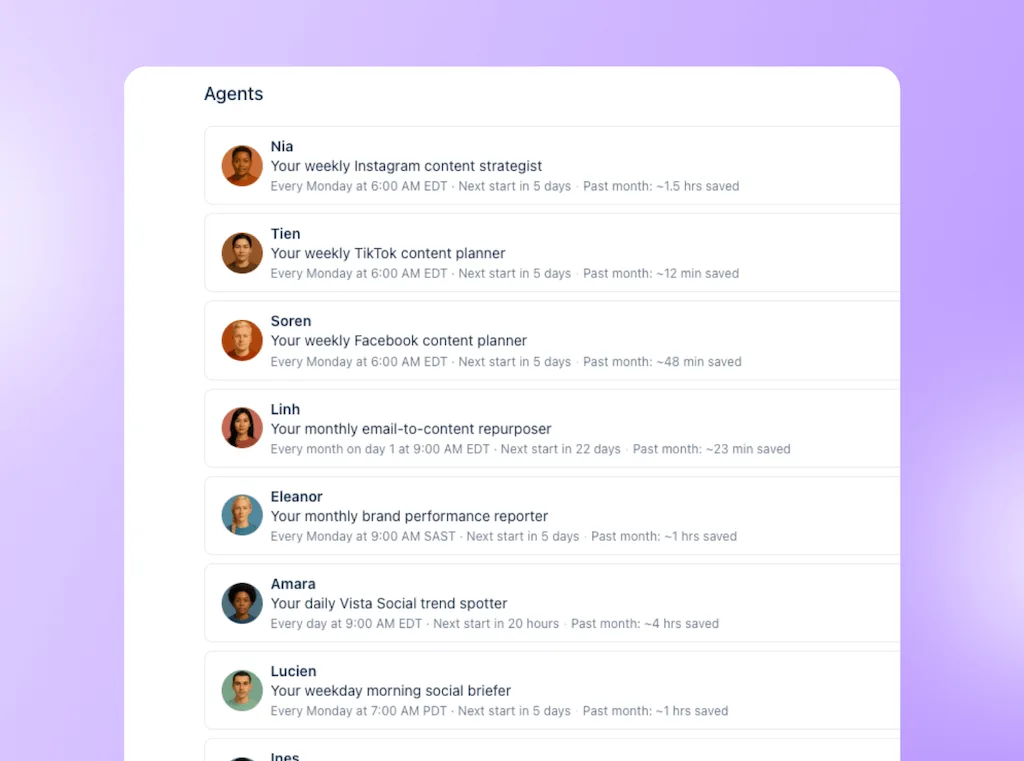
Agents are available on Advanced, Scale, and Enterprise. Follow the agent setup walkthrough to start with a prebuilt job, then review the outputs and credit use before expanding its scope.
Editable Skills for client instructions
Skills are written playbooks for a defined task. You can read the instructions, edit them to match your process, and run the Skill as a command. Vista Social’s custom Skill guide shows how to turn an agency process into instructions your team can inspect instead of hiding the logic inside a prompt.
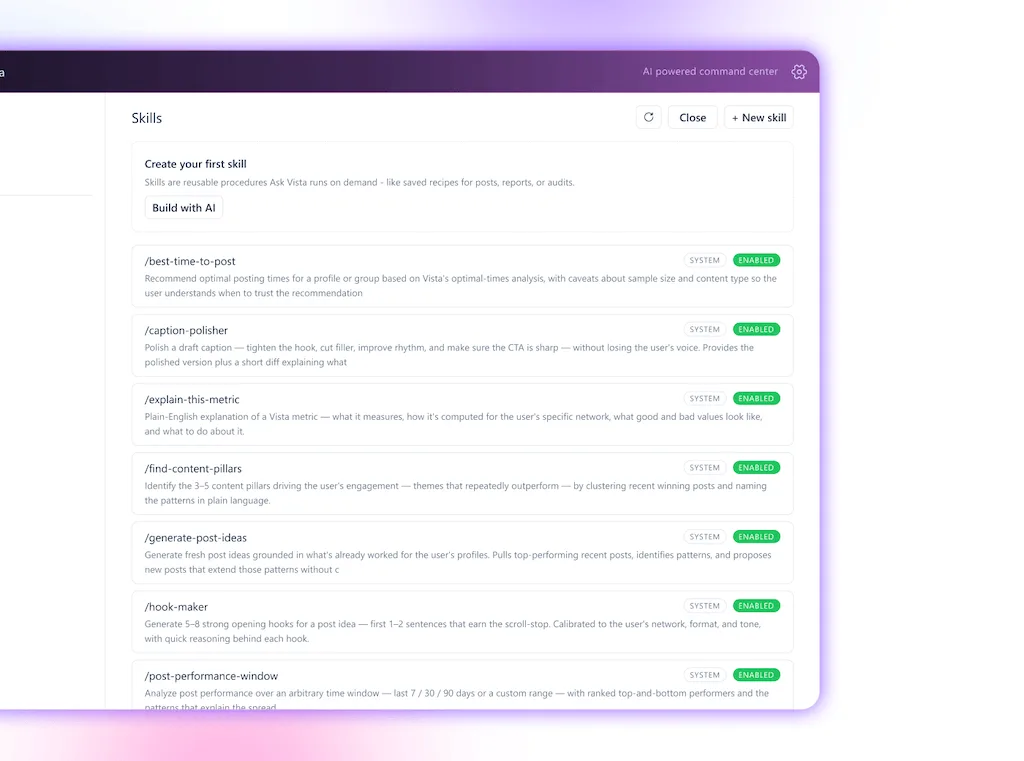
When you change a Skill, test the next run before relying on it. Updating one playbook is easier than hunting through ten scattered prompts, but it still needs version ownership and a clear effective date.
Track agent costs with AI credits
The same August 2026 survey found that about 20% of respondents said AI operating costs, including tokens, had constrained their organizations’ AI use. When you run agents across many client accounts, usage belongs in the delivery budget alongside review time.
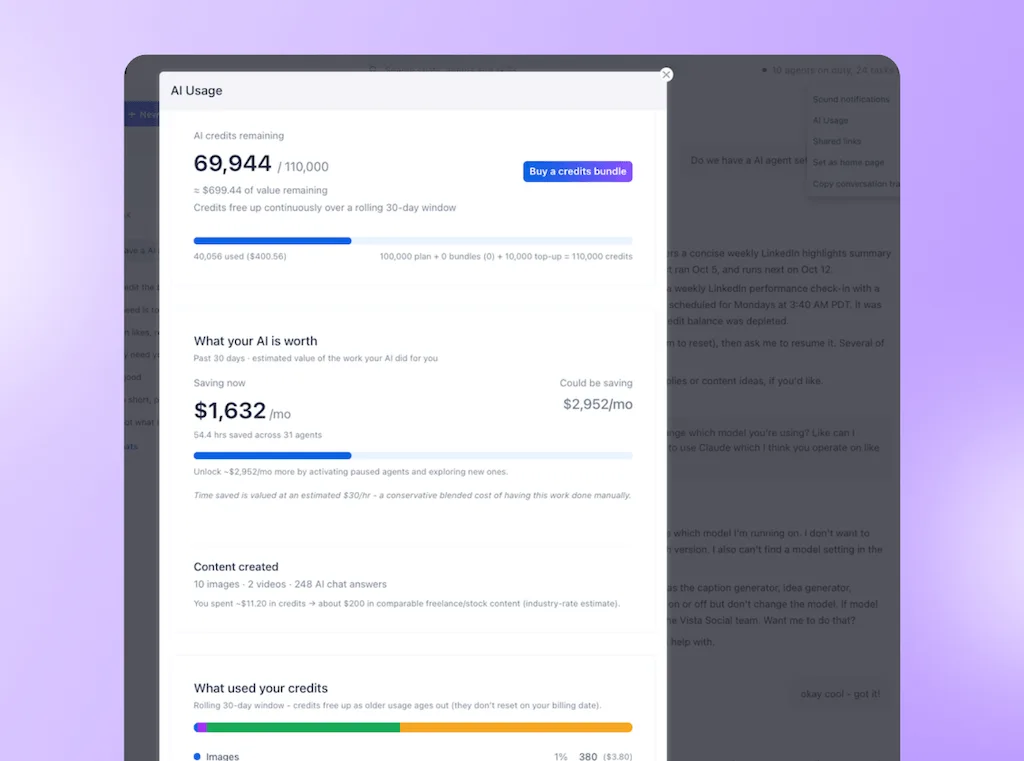
AI vendors often discuss tokens, the small units a model processes behind the scenes. Vista Social tracks customer usage in AI credits instead. Ask Vista conversations and agent runs don’t have one fixed credit cost: a run uses more when it handles more profiles or completes more complex work.
- Check the projected cost: The AI usage dashboard ranks agents by estimated monthly spend. Open an agent to inspect the cost of its individual runs.
- Compare cost with work removed: A recurring agent should save enough review or reporting time to justify its variable usage.
- Assign a budget owner: Vista Social can warn you as the account approaches or reaches its credit allowance. It doesn’t currently offer hard credit-limit controls, so somebody still needs to watch the balance.
Test one client workflow this week
Choose a client with frequent brief changes and test an approval watcher first. You can inspect everything it finds before anybody outside the agency sees it.
- List every automation for one client: Mark the owner, trigger, action, end date, and the part of the brief it depends on. You are done when every active rule has somebody responsible for reviewing it.
- Find one job where the next step changes with context: Approval monitoring and report preparation are safer first tests than public replies. You are done when the agent has a narrow goal, scoped access, and a visible result.
- Add the approval before expanding: Run the agent once, inspect what it found, and define who accepts its recommendation. You are done when a client-facing or public action cannot move without the required person.
An approval watcher setup example
| Field | What to define |
|---|---|
| Goal | Find posts that have waited for client approval longer than two business days. |
| Trigger | Run every weekday at 3 p.m. for the selected client profiles. |
| Context | Use the current approval queue, selected profiles, and the two-business-day threshold. |
| Allowed action | Inspect the queue and prepare a status summary. Don’t publish, reject, or change a post. |
| Owner | The account lead reviews the summary and decides who follows up. |
| Proof | The result names the post, current reviewer, time waiting, and next owner. |
Run the test long enough to include a brief change or a missed approval deadline. Before expanding, compare the result with the manual work: how many issues were missed, how long review took, and what each run cost. A useful pilot ends with a delivery decision, not just an active agent.
Give each client workflow a clear owner
When a client withdraws an offer, you should be able to confirm which rule was paused, which posts changed, and who approved the work. Build that visibility into AI marketing automation before expanding it across accounts.
Start a 14-day Vista Social trial, with no credit card required, and test whether one client workflow reduces the checks your account leads have to carry into the evening.
Frequently asked questions
Is an AI agent just a smarter automation?
No. Automation still follows a path you set beforehand. AI may interpret or draft one step inside that path, but an agent can decide what to inspect or do next, which is why its work needs review.
Will AI agents replace the automations I already built?
You shouldn’t need to rebuild most of them. Stable jobs such as campaign keyword DMs, after-hours acknowledgments, and fixed review thank-yous are cheaper and more predictable as rules. Move only the work where the correct next step depends on current context.
Can I trust an AI agent with a client account?
Trust it with a narrow job, only the access it needs, and a result you can inspect. Agents can be wrong, so a person should approve anything that publishes, sends, or materially changes a client account. Start with monitoring, reporting, or draft preparation before adding higher-risk actions.
What happens when a client changes the brief?
A person still has to record the change. Rules require somebody to find every workflow that depends on the old instruction. An agent can work from one updated goal or playbook on its next run, provided you test the result and review the work it prepares.
Do AI agents cost more than automation?
Usually, per run. Agents use AI reasoning to choose and complete steps, while a rule executes a fixed path. Vista Social meters Ask Vista and agent usage in AI credits, and the cost changes with the work completed, so reserve agents for jobs where current context justifies the additional usage.
About the Author

Content Writer
Orion loves to write content that refuses to be boring. As part of Vista Social, he helps brands, creators, and agencies stop doom scrolling and start winning with social media. When he's not in front of a keyboard, he's watching films in IMAX with his wife, dissecting football tactics (the European kind), and getting lost in a good book.