


Write Your Own AI Playbook: Turn a Repeatable Task Into a Custom Skill
July 9, 2026
10 min read

Summarize with AI

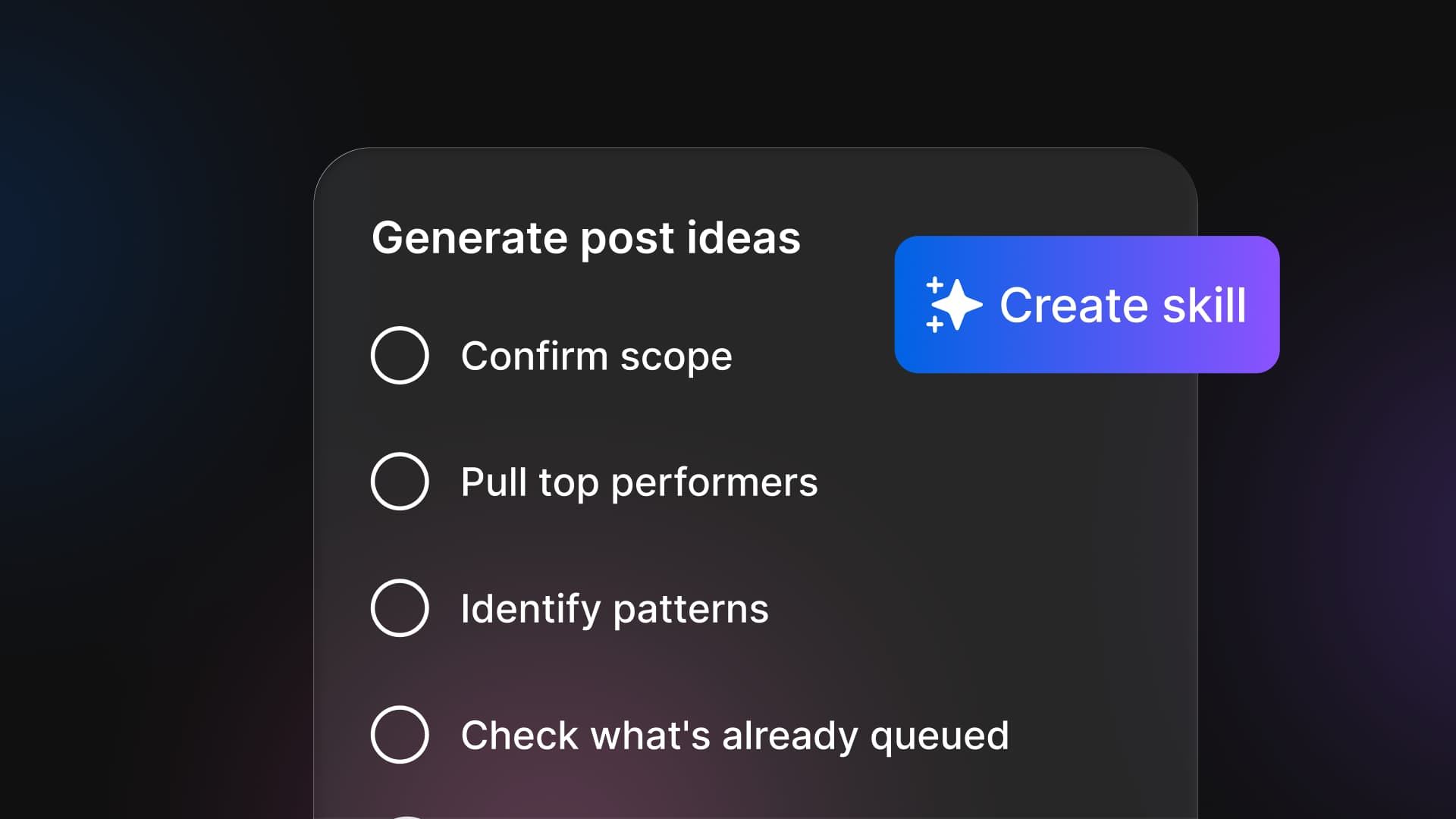
Table of contents
Share

Vista Social

X (Twitter)


Say you’re Dave, and you run social for six regional brands. It’s a Friday afternoon and a new coordinator pings you with a quick question about the monthly report: “which date range do we use for the paid breakdown again?”
You wrote this whole process up in a tidy Notion page last spring, partly so you’d never have to answer this exact question again. The page says “last full month.” But someone pulled it differently last time, so now he’s not sure, and honestly neither are you until you go back and check.
Someone like Dave in that moment might realize that while the Notion page documents the process well, he’d still have to do the report himself. And the last time he did, it took him two hours, because the reporting tool had updated and nothing was where it used to be.
This happens to anyone with a recurring task, even the ones organized enough to write SOPs. And let’s be honest, most of us aren’t.
The reason your SOPs never quite stick isn’t that they’re badly written. It’s that a document describes the work and then still leaves a person to do it. A Skill is that same document, rewritten so the AI can run it for you.
That’s the idea behind a marketing automation playbook that actually runs, and this piece walks you through building one from a procedure you already have. It’s plain language the whole way, no IT ticket involved.
The short version:
- What a Skill is: A runnable markdown playbook for one repeatable task, where you write the steps once and then call it on demand.
- How it differs: A plain SOP is a static doc that doesn’t run, and an agent is the worker that can run Skills on a schedule.
- No code needed: You write it in plain language, the same words you’d put in a shared doc.
- You stay in control: An agent can run a Skill for you on a schedule, and it asks for your approval before it publishes or sends anything.
Table of contents
What is a Skill, and how is it different from an SOP or an agent?
A Skill is a plain-markdown playbook for one repeatable task that you invoke as a slash command or hand to an agent. An SOP is that same procedure written as a static document that doesn’t run. An agent is the worker that can run one or more Skills on a schedule and report back.
So a Skill is an SOP that executes. Where an SOP documents how a task should be done, a Skill is written so the AI performs it the same way every time, for anyone who types one command.
If you’ve ever written a proper social media SOP, you’re most of the way there already. A Skill starts from that same procedure. The only real difference is that it doesn’t stop at the document. It runs the steps.
Skills live inside Ask Vista, the account-aware assistant wired into your connected profiles. That connection is what lets a Skill do the work instead of only describing it. It’s where you author a Skill, run it, and see the result.
Why does the AI you already pay for feel like a novelty?
Your team knows how to do the work, so that was never the problem. The trouble is that the “how” is scattered across a dozen places, and none of them actually run anything. A few you’ll recognize:
- The monthly report: A Notion page someone has to open and follow by hand every time.
- The one-star review reply: A pinned Slack message that only helps if you remember it’s there.
- The launch checklist: Living mostly in one manager’s head, which is a problem the week they’re on leave.
You’ve written these down before and it didn’t change much, because a document describes the work rather than doing it. It waits for a person to read it and do every step, and they rarely do it the same way twice.
And you’re already paying for the tool that could run all of it. In the CMI research, 81% of B2B marketers said their teams now use generative AI, up from 72% the year before. Nearly everyone has the AI. Almost nobody has it doing the repeatable work.
It writes a caption when you ask and then goes quiet, like a sharp intern you brief from scratch every morning, because the brief was never written down in a form it could keep.
That gap is a shift in what software is for, and Des Traynor, co-founder of Intercom, put it well:
“We’re witnessing a transition from ‘Software as a Service’ to ‘Service as Software’; instead of selling seats for humans to do a job, we’re now selling the product that does the work itself.”
— Des Traynor, co-founder of Intercom, Intercom blog (2026)
A Skill is where that idea lands for a marketing team. The procedure and the work become one thing you write once and run every time after. For teams that have all the automation tools but not the running processes, it’s the missing piece.
Which tasks belong in your marketing automation playbook?
The good candidates are stable, rule-based, and repeated often. The bad ones are one-off, judgment-heavy, or high-stakes on a live account. Getting your first pick right is what makes a marketing automation playbook feel like a relief instead of a chore.
| Good first candidates | Skip for now |
|---|---|
| Weekly or monthly reporting pull | Anything one-off, you will run once and never again |
| Inbound review or comment triage | A task that needs fresh human judgment on every run |
| A pre-publish QA checklist | High-stakes actions on a live brand account with no review |
| A recurring content-idea pass | A process that changes its steps every single time |
So a Skill is for stable, rule-based tasks. If a task changes every time, needs fresh human judgment on each run, or is a true one-off, it’s the wrong tool. Keep doing those by hand, and save Skills for the work that repeats.
Vista Social ships with more than twenty prebuilt Skills to start from, including /triage-inbox, /best-time-to-post, and /generate-post-ideas. Use those when they fit, and save the custom builder for the procedure no template covers.
Not sure where to start? Find the prebuilt Skill closest to a task you already run and adapt it, instead of writing your first one from a blank page.
How do you write your first Skill?
Take one SOP you already have, paste it in as plain markdown, name it, and run it as a slash command. Then refine the wording wherever the output drifts. It’s closer to editing a doc than building software. The steps below build one real “monthly report pull” Skill.
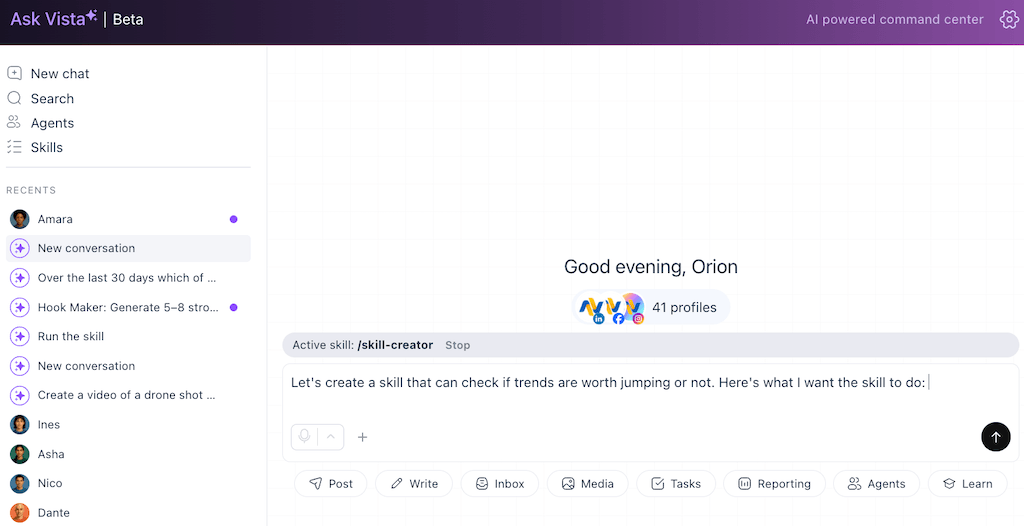
Step 1: Choose the task and open the Skills area
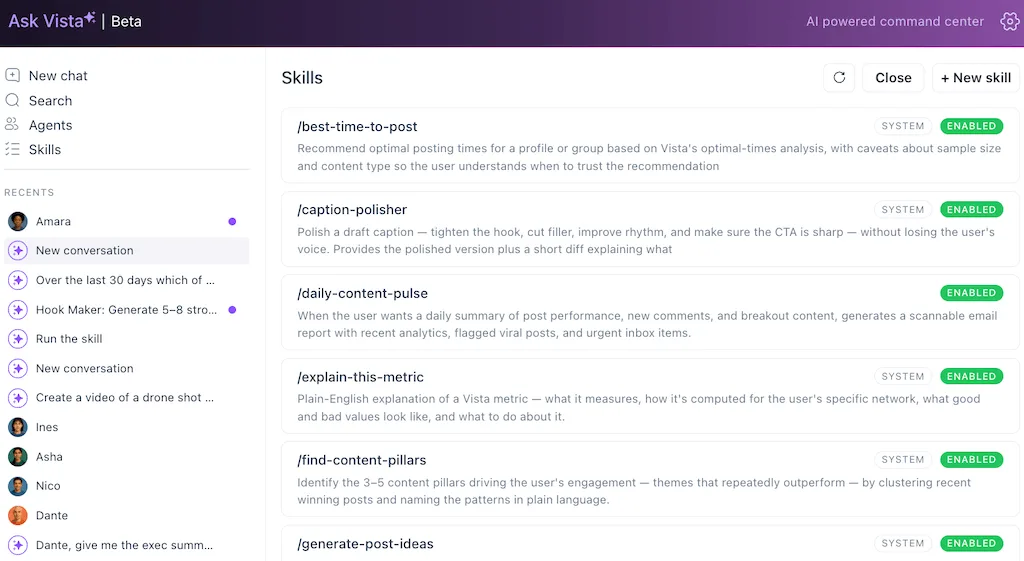
Pick one truly repeatable task from the good-candidates list, then open the Skills area inside Ask Vista where the prebuilt ones live. Seeing the existing Skills gives you a template for the shape of a good one.
Top tip: Pick the task that sits between you and a client-facing deliverable, like the monthly report. When the thing a client sees stops being late, renewals get easier to ask for.
Step 2: Name the Skill and write what it does in one line
Give it a short, verb-first name you’d actually type, like /monthly-report-pull. Then write a single line stating what it does. If you can’t say what the Skill does in one sentence, the task is too broad, so narrow it first.
Top tip: Name it after the outcome a stakeholder cares about, not the internal step. A Skill called /monthly-report-pull is easy to hand to a junior hire or show a client, which turns your process into something you can sell as a service.
Step 3: Write the steps in plain markdown
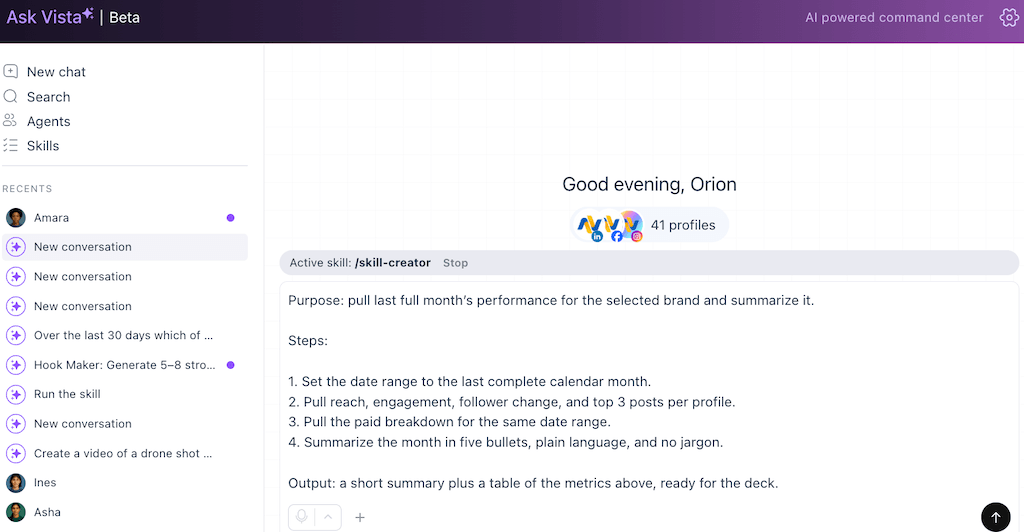
Now write the actual steps, the same words you’d put in your SOP: name the task, state what it does, list the steps in order, and state the expected output. Here’s the real markdown for a monthly report pull:
/ monthly-report-pull
Purpose: pull last full month’s performance for the selected brand and summarize it.
Steps:
1. Set the date range to the last complete calendar month.
2. Pull reach, engagement, follower change, and top 3 posts per profile.
3. Pull the paid breakdown for the same date range.
4. Summarize the month in five bullets, plain language, and no jargon.
Output: a short summary plus a table of the metrics above, ready for the deck.
No code, no special syntax, just the procedure spelled out. The date-range question that pinged Dave on a Friday is now written into the Skill, settled once instead of asked every month.
Top tip: Add a step that flags the best-performing post and why it worked. That one line turns a status report into a “here’s what we should do more of” recommendation, which is the part that wins budget and upsells.
Step 4: Save it and run it as a slash command
Save the Skill, then run it by typing its slash command. You read the output and see where it did what you wanted and where it drifted. Running it once teaches you more than any amount of pre-planning.
Top tip: Time the first real run against how long the task used to take by hand. That saved time is a number you can put in front of a client or your boss to justify the plan or to free up billable hours for higher-value work.
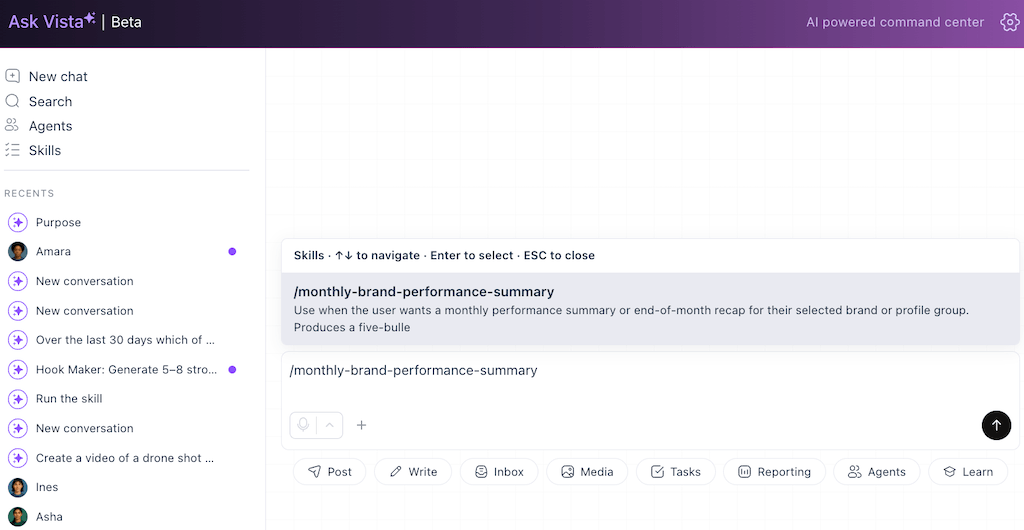
Step 5: Hand it to an agent to run on a schedule
Once the Skill is solid, hand it to an AI agent that runs it on a schedule, including overnight, and reports back. Scheduled agents sit on the Advanced tier and up, so reach for this once you’ve proven the Skill yourself.
An agent asks for your approval before it publishes, sends, or changes anything on a live account, and you set the control level. Treat that approval step as the safety feature it is, because it’s what makes an agent safe to point at a real brand account.
Top tip: Schedule the run for the morning it’s due, not the night before, so the numbers are as fresh as possible when a client opens them. Being the agency whose reports land first, without a chase, keeps accounts from shopping around.
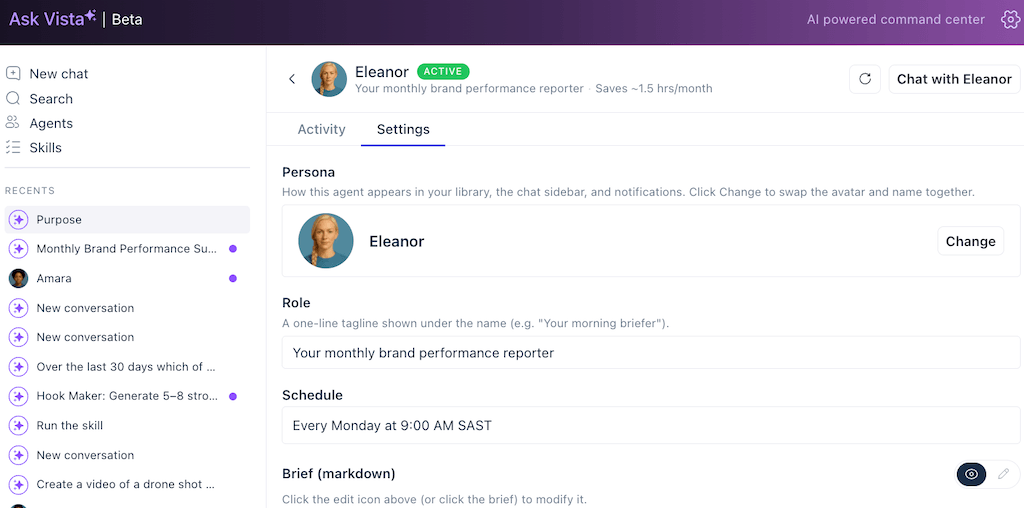
Step 6: Refine your marketing automation playbook
You’re never starting from a blank page again. Run the Skill, see where the output drifted, and tighten the wording in that exact spot. A vague step gets a rule, a missing detail gets added, and each run makes the next one a little sharper.
Top tip: Keep a short note of the edits you make, because the same fixes tend to apply to your next Skill. Over a few months that note becomes your own playbook-building method, the kind of repeatable process you can package and charge a premium for.
Take the task you run every month and write it up once as a Skill that runs on command inside Vista Social.
How do you keep it consistent and safe across the team?
The Skill becomes the standard. Everyone who runs it gets the same output, because they’re following the same written procedure instead of their own memory of it. That’s how a spread-out team stops producing one report a dozen slightly different ways.
It also takes you out of the bottleneck seat. The output arrives on-standard, so you review on-brand work instead of re-explaining the process to each new hire. Build your standard into the Skill the same way you’d protect your brand voice, by stating the tone and the non-negotiables right in the playbook.
For anything that touches a live account, the approval gate is your safety layer. An agent-run Skill passes through a review step before it publishes or sends, and you decide which actions need a human sign-off.
What trips people up (common mistakes)?
Most first-Skill problems come from a handful of avoidable mistakes, and knowing them up front saves you the frustrating runs it takes to learn them the hard way:
- A vague task: If the steps change every run, the Skill can’t hold, so pick something stable and rule-based.
- No approval gate on a live account: Let an agent post unsupervised and one bad run goes out under your brand, so keep the review on.
- One giant Skill: A Skill that tries to do five jobs is hard to run and harder to fix, so write a few sharp ones.
- Forgetting the plan gating: Running a Skill by hand is widely available, but scheduled agents sit on the Advanced tier and up.
Give the task somewhere to live that runs it
Back to Dave on that Friday. In the version where the monthly report is a Skill, the new coordinator doesn’t ping him about the date range at all. He types /monthly-report-pull, the procedure runs the way Dave wrote it, and the summary lands ready for the deck.
That’s what changes when a procedure stops being a description and becomes something that runs. The work leaves one person’s head, and Dave gets his time back for the strategy work he was hired to do.
Start your marketing automation playbook with the one SOP you re-explain the most, and turn it into a Skill anyone on the team can run.
Build your first AI Skill in Vista Social.
Frequently asked questions
How is a Skill different from an SOP or an agent?
An SOP documents how a task should be done, and a person still has to read it and do every step. A Skill is that same procedure written so the AI performs it the same way every time. An agent is the worker that can run one or more Skills on a schedule and report back.
Do I need to know how to code to write a Skill?
No. A Skill is plain markdown, the same plain text you’d put in a shared doc, and you describe the steps in your own words. There’s no code and no IT ticket.
Can a Skill post or send things on its own?
Only through an agent, and an agent asks for your approval before any high-stakes action like publishing or sending. You set the control level, so nothing goes live without the review you choose.
Which plan do I need?
Running a Skill as a slash command is broadly available. Scheduled agents that run it overnight sit on the Advanced tier and higher.
About the Author

Content Writer
Orion loves to write content that refuses to be boring. As part of Vista Social, he helps brands, creators, and agencies stop doom scrolling and start winning with social media. When he's not in front of a keyboard, he's watching films in IMAX with his wife, dissecting football tactics (the European kind), and getting lost in a good book.