


Published on June 25, 2026
13 min to read
Everyone’s Talking About AI Agents. Here Are 3 You Can Actually Use Tomorrow.

Summarize with AI

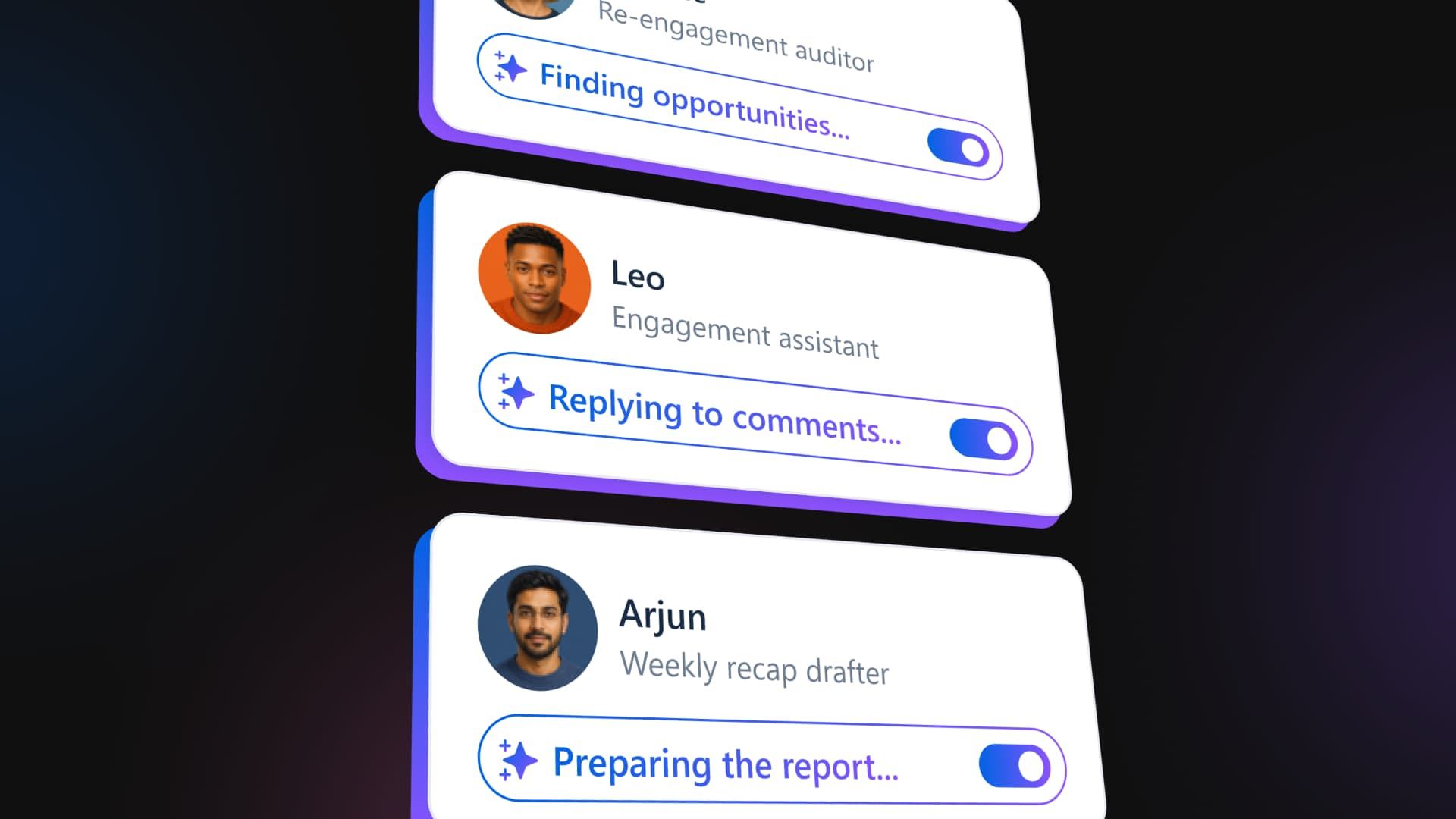
Table of contents
Summarize with AI

ChatGPT

Claude

Perplexity
Share

Vista Social

X (Twitter)


There’s a common worry among social media managers right now that AI agents are coming for their jobs. It’s an easy thing to think, given how they get talked about. Armies of bots running the whole show, software that replaces a marketing team, and the end of work. Big sweeping promises that never tell you what to do on Monday morning.
So here’s the smaller, more useful version nobody leads with. Strip away the mystique and an AI agent is a task you describe once that runs on a schedule and reports back to you. Not a sci-fi entity with a mind of its own, but more a tireless assistant doing one defined job, on a timer, inside limits you set.
Held to that definition, agents get a lot less intimidating and a lot more useful by tomorrow morning. The move is to pick one repetitive hour of your day and hand it off. Three small agents running overnight can cover that hour while you sleep. That is a far more realistic starting point than automating your whole role.
By the end of this you’ll have a plan for three agents you can set up in roughly fifteen minutes. They’ll handle yesterday’s comments, watch for crises and opportunities, and have a briefing waiting in your inbox before your first coffee, and you approve anything before it goes live.
Want to follow along in the product as you read? Start a free Vista Social account and set up your first agent in minutes.
Table of contents
What is an AI agent, in plain English?
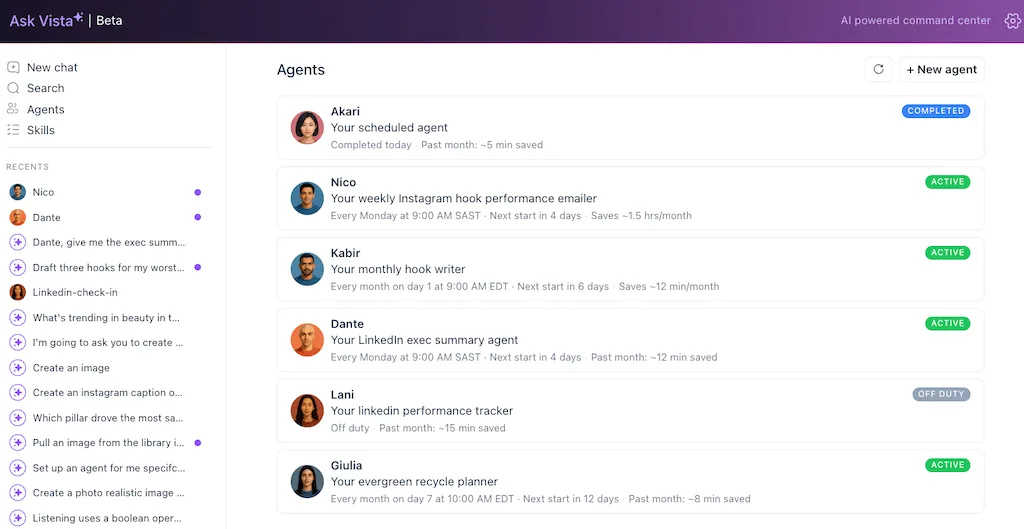
An AI agent is a virtual assistant you configure one time to do a specific job, then leave running on a schedule or trigger on demand. It does the work and hands you the result without you having to ask each time.
That’s the snippet-clean version, and it’s worth holding onto because most of the confusion comes from people describing agents as something grander than they are. An agent isn’t a robot with ambitions. A chatbot waits for you to prompt it every single time, while an agent already knows to show up Monday with the task done.
What makes it real for a skeptic, though, is that you can talk to it and tell it to report back. So unlike most “AI magic,” you can see exactly what it did. The value isn’t theoretical or buried in a dashboard somewhere; it’s sitting in your inbox when you wake up.
If you’ve read our piece on what AI agents for social media are under the hood, this is the hands-on follow-up. That one explains the concept; this one gets three of them running before lunch.
The mental shift is from “automate my whole role” to “automate one hour of it.” That smaller frame is where the people who stick with agents tend to begin.
The same mindset is spreading beyond social media into sales, customer success, and revenue operations. Teams are increasingly using and building AI revenue agent to automate repetitive workflows, surface buying signals, and help every customer-facing team focus on higher-value conversations instead of manual administrative work.
The same principle applies when social media overlaps with customer support, where AI agents in customer service can handle recurring requests, maintain context across conversations, and escalate more complex issues to human agents when needed.
Why start with three small agents instead of one big one?
On day one you’re after a quick win you can feel, not full coverage of your accounts. The reason for the caution isn’t that agents are dangerous; it’s that too much ambition kills the habit before it forms. If your first agent is “manage all my social media,” you’ll spend a week configuring it, never fully trust it, and slowly abandon the whole idea. Start with three jobs that are small, obvious, and overnight, and you wake up to proof instead of a project.
Gael Breton, co-founder of Authority Hacker, put the feeling of that gap well:
“The gap between ‘I wish I could do this’ and ‘I just did this’ is 30 minutes of setup.”
Gael Breton, Authority Hacker
Thirty minutes of setup is roughly what the three agents below ask of you, and it helps to know the work on the other side is worth it. McKinsey’s research, reported by Fortune, found that today’s tools could already automate about 57% of U.S. work hours. A big chunk of your day is repeatable, so the goal isn’t to hand all of it over today, just to claw back the first hour.
And the appetite is clearly there, even if the doing isn’t. In PwC’s May 2025 survey of U.S. executives, 79% said AI agents were already being adopted at their companies, yet most admitted fewer than half their employees use one regularly. Everyone’s talking; far fewer have deployed one well. The three below are how you join the smaller group this week.
Think of them as a little morning crew. Each one takes a chore off your start, each runs while you sleep, and each one you’ll meet by name: The Responder, The Watchdog, and The Briefing.
The playbook: your overnight morning crew
Here’s the crew at a glance before we get into each one:
- The Responder: Clears yesterday’s comments and DMs by drafting replies for your approval.
- The Watchdog: Scans overnight for crises and opportunities and pings you with anything that matters.
- The Briefing: Lands a performance recap and today’s relevant trends in your inbox before you log in.
Each agent below comes with what it does, why it saves you time, the plain-language prompt to set it up, how it reports back, the honest guardrail, and how you’ll know it’s working. You set each one up the same way, by describing the job to Ask Vista in a sentence and giving it a time, with no configuration screen to wrestle with and no code to write.
Agent 1: The Responder, for yesterday’s comments
What it does: Before you start, it reviews yesterday’s comments and DMs and drafts an on-brand reply for each. Then it flags the ones that need you personally, like complaints, sensitive issues, or a real sales conversation.
Why it saves time: The daily comment backlog is the classic morning time-sink. Walking in to a set of drafted replies turns thirty minutes of triage into a few minutes of approving and tweaking.
Set it up (paste this):
“Every morning at 7 AM, review yesterday’s comments and DMs across my connected profiles, draft a reply for each in my brand voice, and email me the drafts grouped by profile. Flag anything negative or sales-related so I handle it myself. I’ll do the final review. You’ll be The Responder.”
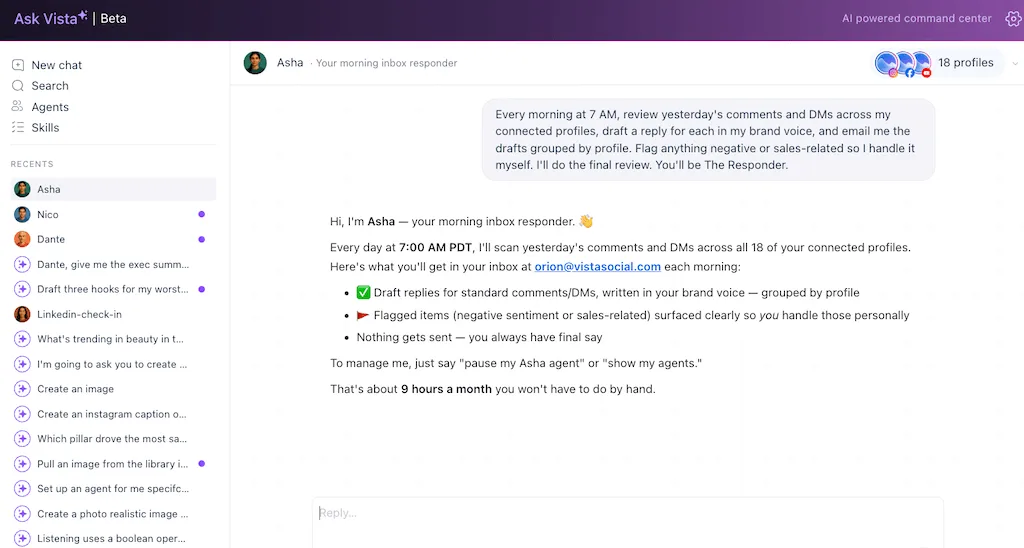
How it reports back: A single email, drafts grouped by profile, with a short “these need you” list at the top.
The honest guardrail, and read this one first: Replying publicly is a write action, so the safe default is draft-and-queue for your one-tap approval, not auto-send. The agent reads, analyzes, and drafts on its own, and it asks before anything posts. As you build trust, you can let it work with DM automations to reply to the simple, safe ones, but you graduate into that over time. Starting with drafts is enough to save you the time on its own.
You’ll know it’s working when: You open your inbox to a tidy set of ready-to-approve replies and a short list of the few that need a human.
Agent 2: The Watchdog, for crises and opportunities
What it does: It scans the previous day’s activity and mentions for two kinds of thing and then pings you with what it found. The first is trouble, like a spike in negative sentiment or an angry thread gaining steam. The second is upside, like a post taking off, a buying signal, or a creator or press mention worth jumping on.
Why it saves time: It replaces the anxious background scanning you do all day without realizing it, that low hum of “did I miss something blowing up?” One reliable overnight sweep covers it, and it catches the opportunity you’d otherwise scroll right past.
Set it up (paste this):
“Every morning at 7 AM my time, check yesterday’s comments, mentions, and post performance in my connected profiles for anything that looks like a crisis (a negative spike) or an opportunity (a post taking off, a sales signal, or a notable mention), and send me a short email/SLack message with what you found and why it matters. You’ll be the watchdog.“
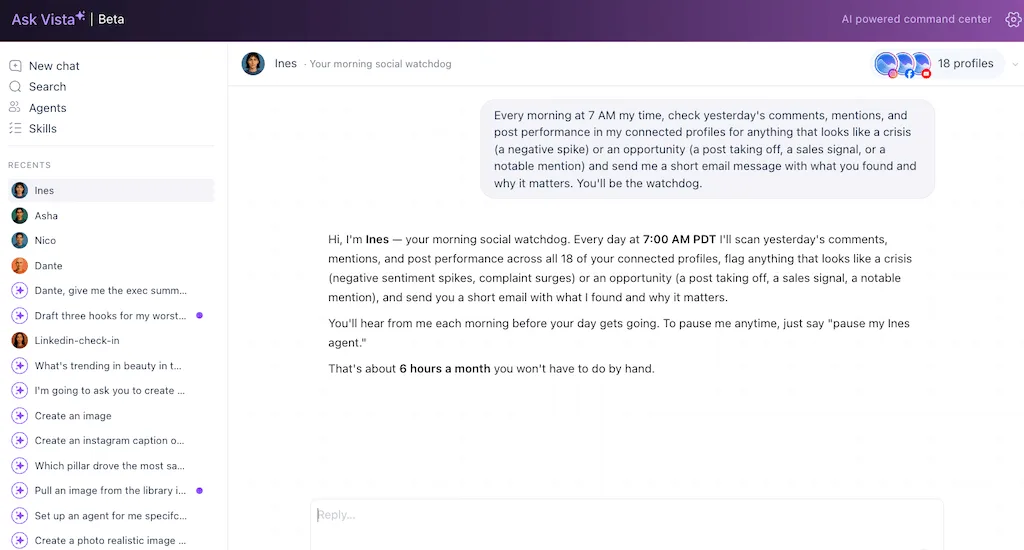
How it reports back: A short email/Slack message, usually “all clear,” occasionally “here’s the one thing to look at.”
The honest guardrail: This is a read-and-report agent. It watches and alerts but doesn’t act on your behalf, so it’s completely safe to run from day one and you stay the one who decides what to do with what it finds. This is the same idea behind good social listening, except it taps you on the shoulder instead of asking you to stare at a feed.
You’ll know it’s working when: You get a skimmable morning alert and you never start the day blind again.
Agent 3: The Briefing, for yesterday’s results and today’s trends
What it does: It combines two of the most useful morning reads into one email. A plain-English recap of yesterday’s performance, what moved, what didn’t, and what to do about it. Plus a summary of what’s trending right now that’s relevant and on-brand enough to ride today.
Why it saves time: Pulling numbers and scanning for trends are two separate chores that together eat the front of your day. This delivers both, already interpreted, before you log in.
Set it up (paste this):
“Every weekday at 7 AM, email me a short briefing: how my posts performed yesterday across all my connected social profiles (top and bottom, with a one-line why for each), plus the top trends relevant to my brand today and a suggested angle for each.”
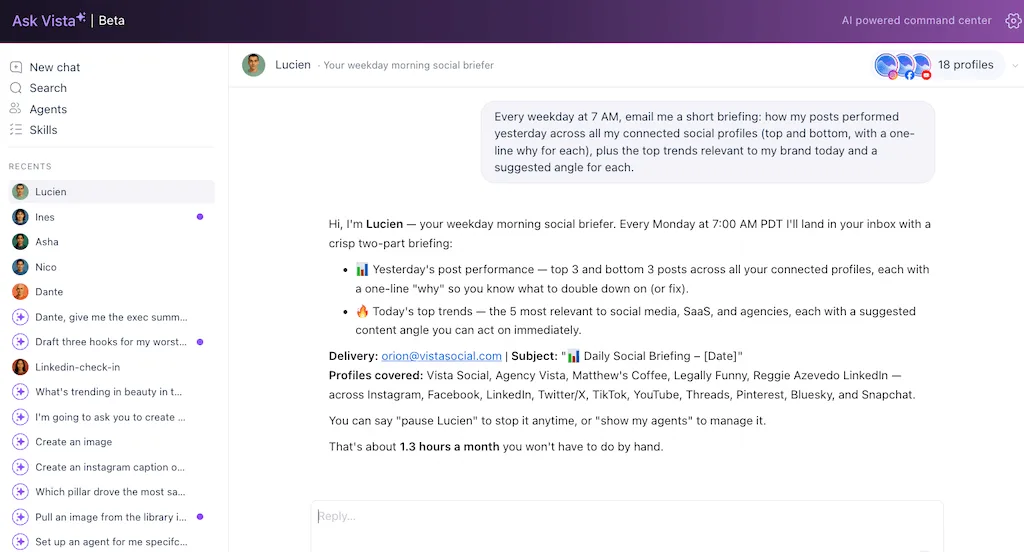
How it reports back: One email, performance up top, trends below, each with a next step you can act on.
The honest guardrail: Read-and-report again, pure intelligence delivery with no actions taken. If you later want it to draft a post from a trend, that’s a natural next step worth exploring once you trust the briefing, and our guide on how to use social media trends covers the move. For now, keep this one to the briefing so it stays simple. It’s your social media reporting running itself instead of waiting for you to build a deck.
You’ll know it’s working when: A single morning email tells you how you did and what to ride today, and you opened zero dashboards to get it.
A note that ties the three together: Each one took a single sentence and a time to create. You described the job in plain language rather than configuring anything. You can also talk to any of them afterward, asking “show me yesterday’s drafts again” or “why did you flag that post?” and telling them to report differently, so working with an agent stays closer to a conversation than to filling out a settings panel.
Ready to meet your crew? Open Vista Social free and deploy your first agent from a template.
What are the common mistakes when you start using AI agents?
Most of the ways this goes wrong are about pace and trust rather than technology. Here are five worth knowing before you start.
- Don’t automate sending before you trust it: Start The Responder in draft mode. Auto-send is something you graduate to once you’ve watched it draft well for a week, not something you switch on cold.
- Don’t try to automate everything on day one: Three small agents and one recovered hour is the win. Sprawl is what kills the habit before it forms.
- Don’t set vague scope: Tell each agent exactly which profiles it covers. Specific scope is what makes the results useful and trustworthy instead of noisy.
- Don’t expect a mind-reader: An agent does the job you described, inside the limits you set, and it asks before it posts, sends, or changes anything. That permission step is the reason you can hand it the keys overnight and still sleep fine.
- Do talk to them: If a report runs long or misses something, tell the agent in plain words and it adjusts. You’re tuning it by talking, not relearning a config file every time.
The honest framing underneath all five is that you’re not surrendering your account. You’re delegating specific, bounded jobs while keeping every irreversible action behind your own “yes.” This makes pressing “go” feel safe rather than reckless.
With the guardrails clear, the only step left is to build one. Create your first agent in Vista Social and keep every post behind your approval.
How do you set up your first three agents in 15 minutes?
The prompts above are the easy part. Where they turn into something that runs every morning, sees your live accounts, and reports back on its own is inside Vista Social. You build each one as a saved agent by telling Ask Vista what you want, and it keeps running on the schedule you gave it. Open Vista Social and work top to bottom.
- Pick your wake-up time: Set the agents to run about an hour before your day starts, so 7 AM for an 8 AM start. That hour of lead time is what makes the work feel already done.
- Build The Briefing first: It’s the lowest-risk, highest-payoff one, so it’s the best way to feel the magic. Tell Ask Vista the briefing job, point it at your profiles, and save it. About three minutes.
- Add The Watchdog: Describe the same monitoring job, pick Slack or email for delivery, and save it as its own agent. Another three minutes.
- Add The Responder in draft mode: Set it up the same way, then confirm it’s drafting rather than sending. About five minutes, since this is the one you’ll want to double-check.
- Wake up tomorrow: Open your inbox to drafted replies, an all-clear from the Watchdog (or the one thing to check), and your briefing. Approve, glance, and decide in minutes.
- Bank the hour: Spend it on the work that grows the brand, or close the laptop and enjoy it.
To make the change concrete, here’s the same morning, before and after.
| Your morning, today | Your morning, with the crew |
|---|---|
| Pull last week’s numbers by hand | The Briefing is already in your inbox |
| Scroll every channel checking for fires | The Watchdog already swept and reported |
| Triage 40 comments from scratch | The Responder has drafts ready to approve |
| Strategy starts whenever there’s time left | Strategy starts first, because the chores are done |
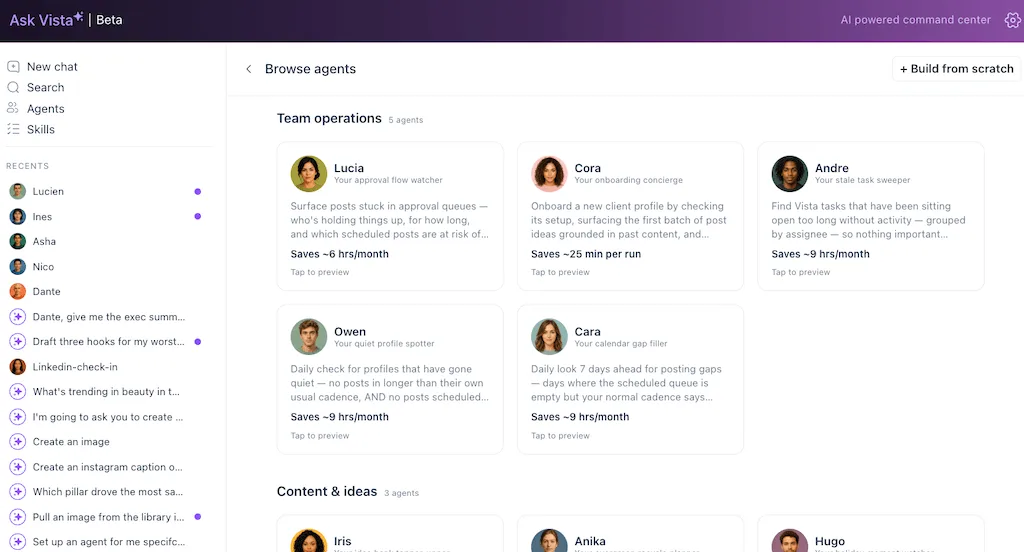
None of these jobs existed in your toolkit a month ago, and none of them ask you to lift a finger on a Monday. You don’t build them from a blank page, either. Vista Social ships ready-to-deploy agent templates for exactly these jobs, so you pick one, set the scope and schedule, and it’s working. Because they run server-side on a schedule, the work happens while your laptop’s closed, which is the whole idea behind an always-on assistant like Ask Vista.
What do you do with the hour you get back?
The productivity-hack crowd usually skips this question, so let’s be honest about it. The recovered hour is a choice about what your morning is for.
You can spend it on the high-value work that grows the brand and never fits in a normal day. Real outreach to the creators who keep mentioning you, better creativity instead of more of it, and the kind of conversations with customers in your comments that turn into case studies and loyalty. Perhaps even doing the strategic thinking you were hired for.
Or you spend it not working. Close the laptop an hour early, take the morning slower. The agents don’t mind, and the output still landed either way.
The usual “10x your productivity” pitch wants you to cram more into the day. This does the opposite: it gets the repetitive hour off your plate so the day belongs to you again.
You didn’t need to decode the hype. You needed three agents.
Think about tomorrow morning. Instead of opening six tabs, you open one inbox, and the crew has already reported in. Replies drafted and waiting, an all-clear from the overnight watch, and a briefing telling you how yesterday went and what’s worth riding today.
The hype was never the thing you had to understand, and the buzzwords didn’t matter. What mattered was three small, concrete agents and about fifteen minutes to set them up. Now the front of your day belongs to you instead of your backlog.
You can switch the first one on today. Start with The Briefing, feel what it’s like to wake up to work already done, and add the other two when you’re ready.
Set up your first agent in minutes and wake up tomorrow to work already done. Try Vista Social free.
Frequently asked questions
What is an AI agent, in simple terms?
An AI agent is a virtual assistant you set up once to do a specific job, then leave running on a schedule or trigger on demand. It does the work and reports the result back to you without you having to ask each time. The simplest way to think about it: a task you describe in a sentence, that runs on a timer inside limits you set.
What’s a good first AI agent to set up?
A read-and-report agent, like a daily briefing that recaps yesterday’s performance and today’s trends. It takes no actions on your behalf, so it’s completely safe to run from day one, and the payoff shows up in your inbox the next morning. Once you’ve felt that first win, you’ll know exactly what to automate next.
Are AI agents safe, and will they post without my approval?
No, not without your approval. Any write action that posts, sends, or changes data requires your consent up front, and every agent runs inside a scope you define. An agent will read, analyze, and draft on its own, but it asks before anything irreversible, so you stay in control of every action that touches your audience.
Do I need to know how to code to use AI agents?
No. You set up an agent by describing the job in plain language and choosing a schedule, often starting from a ready-made template. There’s no scripting involved, so if you can write a sentence describing what you want done, you can deploy an agent.
How long does it take to set up an AI agent?
A single agent takes a couple of minutes, since it’s a plain-language prompt plus a schedule. The three-agent morning crew described here takes about fifteen minutes total, with most of that spent double-checking the one that drafts replies.
Can an AI agent reply to my comments for me?
Yes, though the recommended way to start is in draft mode. The agent reviews your comments, drafts on-brand replies, and queues them for your one-tap approval rather than auto-sending. Once you trust how it drafts, you can let it reply to the simple, safe ones, and it will still ask before anything sensitive goes out.
Can agents really run while my computer is off?
Yes. Agents run on Vista Social’s servers on the schedule you set, not on your machine, so they work overnight whether your laptop is open, closed, or in a bag. That’s the whole reason the work is waiting for you in the morning.
How much time can a few agents actually save me?
It varies by how much of your day is repetitive, but the three agents here target the morning chores that reliably eat the first hour: comment triage, monitoring, and reporting. Research suggests a large share of the average workday is repeatable, so recovering the first hour is a realistic, repeatable starting point rather than a one-off.

Try Vista Social for free
A social media management platform that actually helps you grow with easy-to-use content planning, scheduling, engagement and analytics tools.
Get Started NowAbout the Author

Content Writer
Orion loves to write content that refuses to be boring. As part of Vista Social, he helps brands, creators, and agencies stop doom scrolling and start winning with social media. When he's not in front of a keyboard, he's watching films in IMAX with his wife, dissecting football tactics (the European kind), and getting lost in a good book.