


Published on June 26, 2026
13 min to read
AI Is Not Just a Caption Generator: 10 Ways Social Media Managers Actually Use AI

Summarize with AI

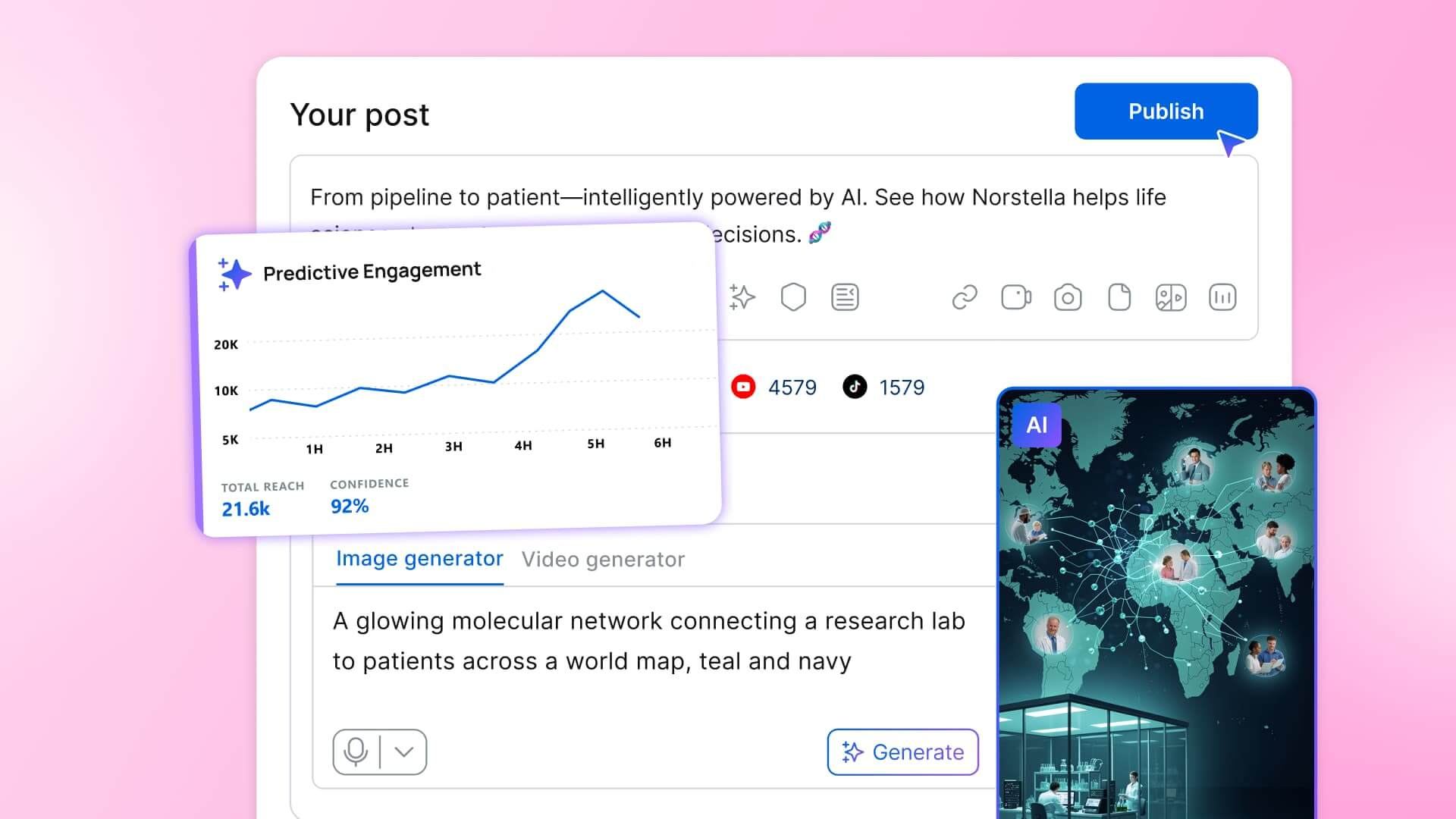
Table of contents
Summarize with AI

ChatGPT

Claude

Perplexity
Share

Vista Social

X (Twitter)


You already know AI can write a caption. You also know it can make an image, cut a video, and draft a reply, because you’ve watched the demos and probably tried half of them. The real question on your desk isn’t what AI can do for social media; it’s how much of the work you’re willing to hand over. Given how much of it still comes back sounding like every other AI post in the feed.
That hesitation is fair. The first wave of AI tools was happy to write your captions and leave you to clean up the generic results. Social media managers tried them, were not impressed, and went back to doing most of the job by hand. What’s changed is the range.
AI for social media now spots what’s trending before you do. It gives you a read on how a post will land before you publish it. Creates the image and the video seamlessly. And also answers questions about your connected accounts in plain English and runs whole stretches of the job overnight on a schedule you set.
Caption writing turns out to be a sliver of that, so think of this as a tour of the rest. Ten capabilities, organized the way you work: discover, create, manage, engage, plan, analyze, and automate. For each one you get the old way it used to eat your time, what AI does about it now, and how that looks inside Vista Social with one action you can take today.
The short version, if you’re scanning:
- AI now covers the whole workflow: Trend discovery, performance prediction, image and video generation, brand voice, inbox triage, repurposing, plain-language analytics, and overnight agents.
- The real decision is how much to hand over: The social media managers ahead delegate the repetitive reps and keep the strategy, taste, and final approval.
- The win is having all ten wired into one place: Connected to your real accounts, the tools hand off to each other instead of living in ten disconnected tabs.
- Every capability here ships today inside Vista Social: Each one comes with an honest note on where it still needs your judgment.
Want to try each of these as you read? Start a free Vista Social account and follow along in the product.
Table of contents
10 ways social media managers use AI today
A quick map before the detail: the first two help you discover what to post and the next three help you create it. From there, one keeps your library usable, one helps you engage, one helps you plan and repurpose, one lets you analyze, and the last one automates the repetitive parts.
1. Spot trends before they peak
The old way: You scrolled for hours every week across TikTok, Reels, and X, hoping to catch a sound or format while it was still climbing instead of three days after it crested and the moment was gone.
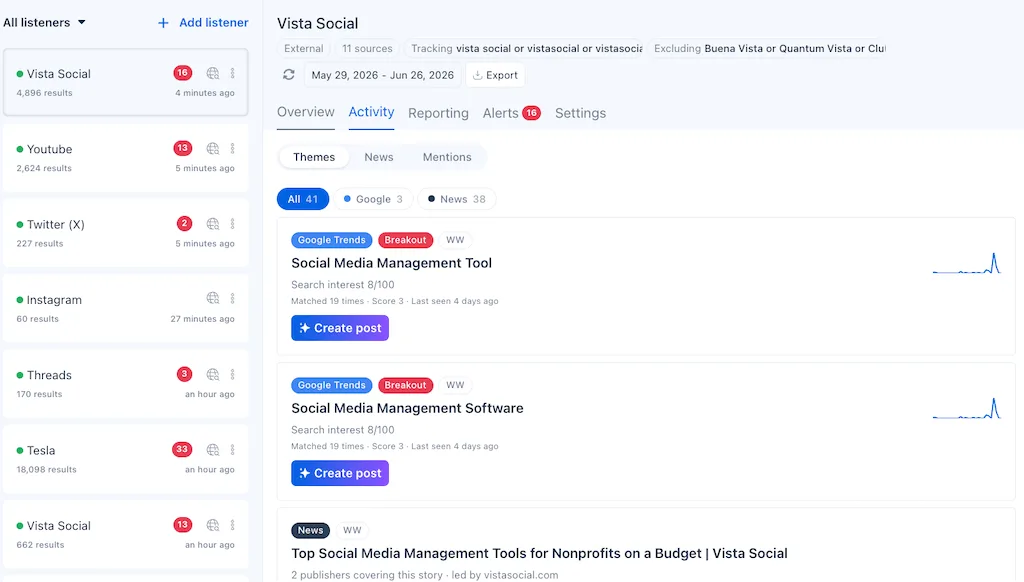
What AI does now: It watches the platforms for you. It surfaces the topics, sounds, and formats gaining speed inside your niche, scored by momentum so you can tell what’s rising from what’s already played out. Instead of guessing whether something has legs, you get a read on it before it peaks.
The Vista way: Vista Social’s listening turns a tracked topic into a Themes view. Each trend carries a search-interest score out of 100, a “last seen” date, and a rising indicator, so you can see at a glance what’s worth riding today. Our guide to using social media trends walks through turning one of those into a post.
The honest limit: AI tells you what’s moving, but whether a trend fits your brand is still your call.
2. Predict how a post will perform before you publish it
The old way: You posted and hoped, because the only feedback came after the fact in the analytics, by which point a weak post was already live and the moment was spent.
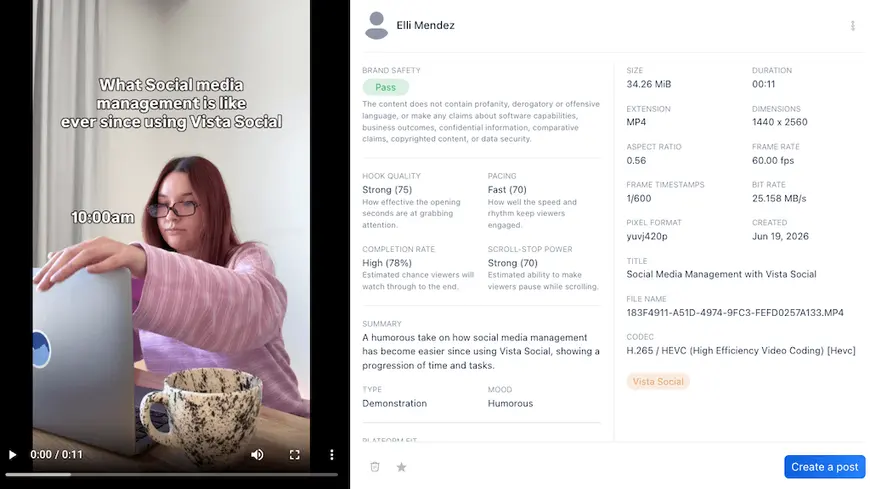
What AI does now: It reads your image or video and gives you a read on how it’s likely to land. You can fix the visual, the format, or the timing before it goes out rather than learning from the wreckage afterward.
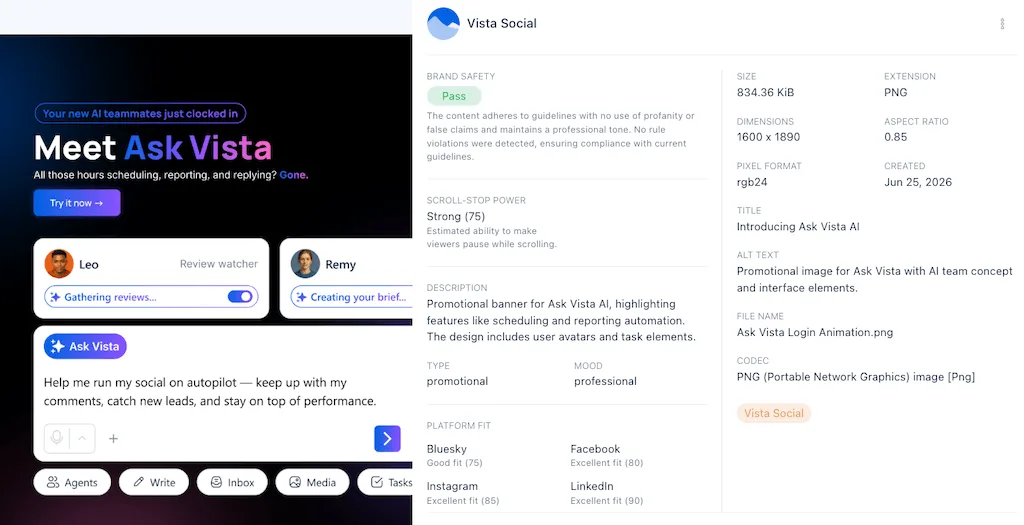
The Vista way: When you add an image or video, Vista Social’s Semantic Analysis reads the asset and predicts how it’s likely to land before you publish. Scoring scroll-stopping power, estimated completion rate for video, and platform fit, plus what’s working and what to fix, so a weak visual gets caught at the upload stage instead of after it’s already live. Our breakdown of how AI content analysis predicts performance covers what the signals mean.
The honest limit: It’s a directional read that tilts the odds and catches obvious misses, not a guarantee of a hit.
3. Generate original images from a sentence
The old way: Every post needed a visual, and you had three bad options. Dig through stock libraries everyone else also uses, wait on a designer who’s booked for a week, or build something yourself in a tool you half-know.
What AI does now: You describe the image you want in plain language and it generates one, on-brand and on-topic, in seconds. Net-new visuals for the posts that would otherwise have run with a tired stock photo or no image at all.
The Vista way: Vista Social includes AI image generation right in the composer, so you create the visual without leaving the post you’re writing. If you want sharper results, our library of AI image prompts gives you prompts worth stealing. No round trip to a separate design tool, no stock-photo subscription, and no waiting on the queue.

4. Create video without a camera or an editor
The old way: Video was the format you kept meaning to post more of and never had the time for. Every platform rewards it, but producing even a simple clip meant a shoot, an editor, or an afternoon lost to a timeline you didn’t enjoy, so it kept sliding down the list.
What AI does now: It turns a script or a concept into a finished short clip, handles the cuts and captions, and gives you something publishable without a single piece of equipment. The format that used to be the bottleneck becomes one of the faster things you make.
The Vista way: Vista Social supports AI image and video generation in the workflow, so a clip goes from idea to scheduled post without leaving the platform.
The honest limit: AI gets you a strong draft fast. However, the taste call, whether it’s good, on-brand, and worth your audience’s attention, is still yours. Treat it as a first cut, not a final one.
5. Write in your brand voice
The old way: The first wave of AI writing all sounded the same. Competent, bland, and unmistakably machine-made, the kind of copy that makes a follower’s eyes slide right past. So you rewrote most of it, which defeated the point.
What AI does now: You teach it your voice once, with examples and rules for tone, and it writes in that voice from then on instead of a flavorless default. The output starts sounding like your brand rather than like every other brand using the same tool.
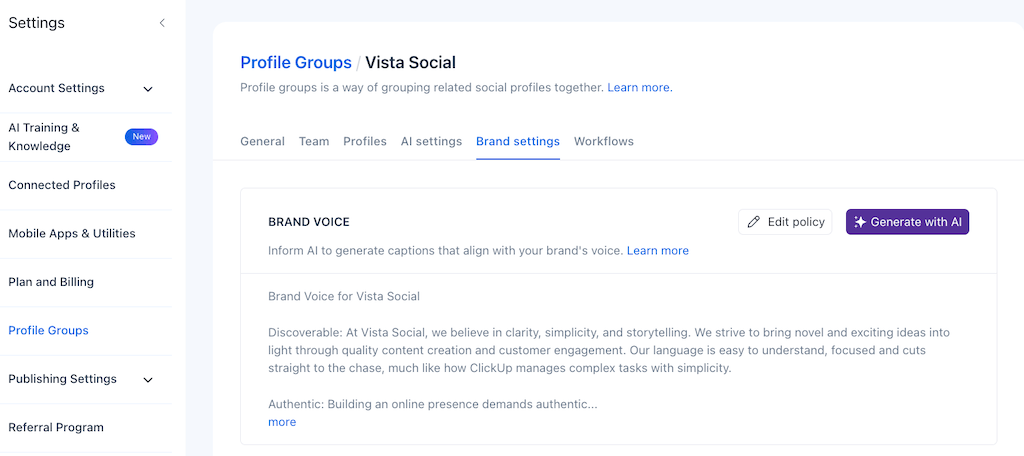
The Vista way: In Vista Social you set a brand voice per profile group, defining the tone and the rules once, and the AI applies it automatically to the captions and replies it drafts. A formal B2B account and a playful consumer one can each get copy that fits in the same workspace.
The honest limit: Voice training gets you most of the way. However, a final read by a human is what keeps it from drifting.
6. Make your whole media library searchable
The old way: Finding anything in your asset folder meant scrolling past thousands of images and clips named IMG_4821, with no tags and no alt text, so you’d lose ten minutes hunting or remake something you already had.
What AI does now: It reads your assets, understands what’s in them, and makes the library searchable by what an image shows rather than what its file is named. It can also write the alt text you’ve been skipping, which improves both accessibility and reach.
The Vista way: Vista Social’s AI can generate alt text and help you keep a media library organized so the right asset is findable instead of lost. The same content analysis that reads your posts reads your assets. It’s the unglamorous capability you’ll be most grateful for once your library passes a few hundred files.
7. Triage and reply to your inbox
The old way: Comments, DMs, and mentions piled up across every platform faster than you could clear them, most of them repetitive questions, a handful that needed you, and no fast way to tell which was which without reading all of it.
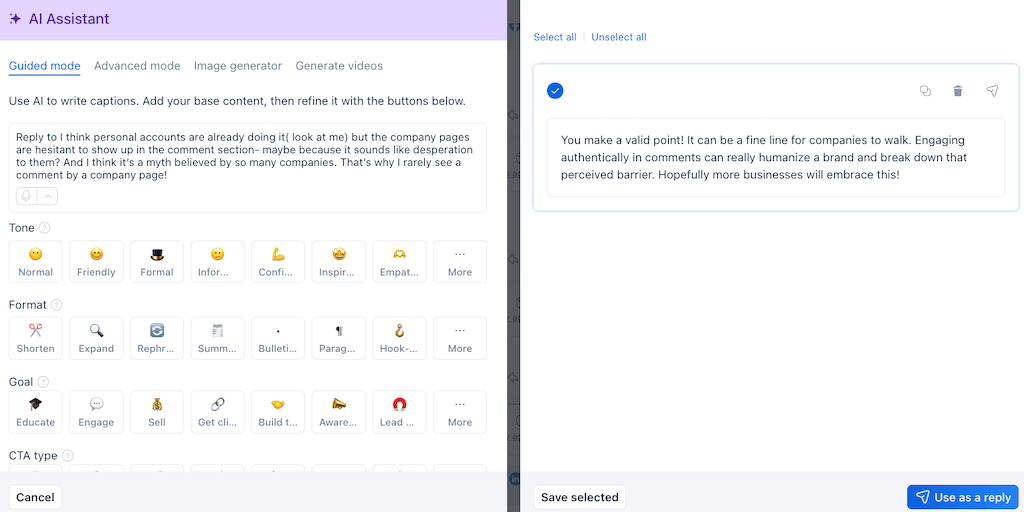
What AI does now: It sorts the incoming flood by intent, drafts on-brand replies to the routine ones, and flags the messages that need a human, so you walk into a sorted inbox instead of a wall. The volume stops setting the pace of your day.
The Vista way: Vista Social can draft replies in your brand voice and queue them for your approval rather than firing them off on its own.
The honest limit: Replying in public is an action with consequences, so the safe default is draft-and-approve. The AI does the reading and the drafting; you keep the final yes on anything that posts.
8. Turn one idea into a full multi-platform plan
The old way: You had the idea, then came the grind of stretching it. Rewriting the same concept for Instagram, LinkedIn, X, and TikTok by hand, adjusting length and tone for each, then slotting it all into a calendar one post at a time.
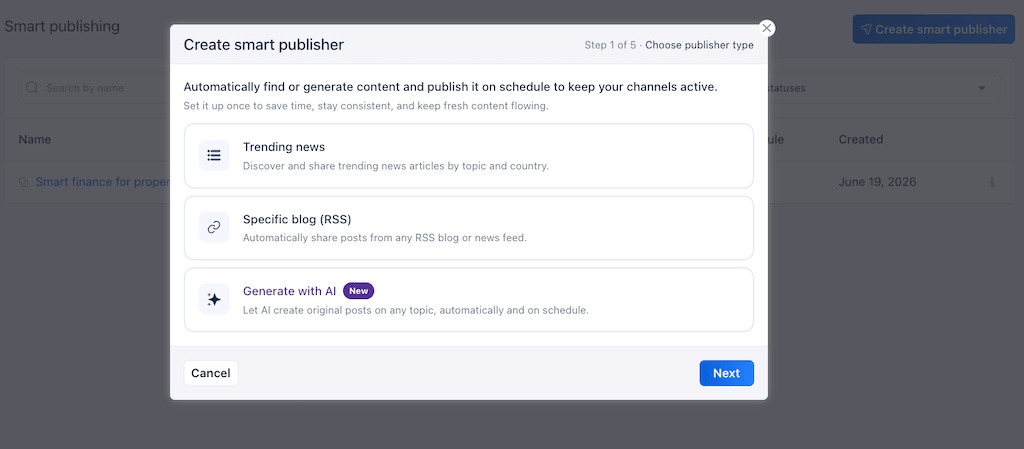
What AI does now: It takes a single idea and spins it into platform-native variations, each shaped for where it’s going, then helps you lay them across a schedule. One concept becomes a week of coordinated posts without you rebuilding it five times.
The Vista way: Pair AI drafting with Vista Social’s automated posting and one idea becomes a queued, multi-platform plan that publishes itself at the right times. You approve the lineup once and the platform handles the rest, so you plan a week ahead instead of scrambling to fill every day.
See how much of your week this clears. Open Vista Social free, no credit card required and turn one idea into a full posting plan.
9. Talk to your data in plain language
The old way: Answering “how did we do last month?” meant building a report. Exporting numbers, wrangling a spreadsheet, comparing periods by hand, and an hour later you had a chart that raised three more questions.
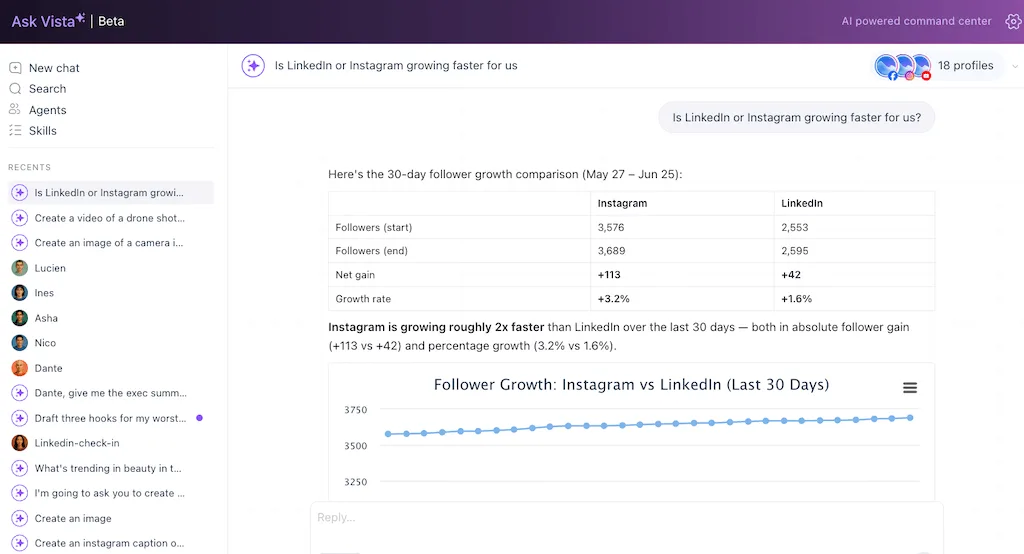
What AI does now: You ask the question in plain English and it answers from your data, no report-building in between. “Which posts drove the most engagement last week?” or “is LinkedIn or Instagram growing faster for us?” gets a straight answer instead of a dashboard you have to interpret.
The Vista way: Ask Vista lets you query your social performance conversationally and get answers back in plain language, which is a different thing from pasting numbers into a general chatbot that knows nothing about your accounts. Our piece on why a social media AI beats a general chatbot explains the gap. The reporting you used to dread becomes a question you ask in passing.
10. Deploy agents that work while you sleep
The old way: Even with every shortcut above, you were still the one pressing go on each one. The tools made each task faster, but you supplied all the labor, doing them yourself, in sequence, during your own working hours.
What AI does now: An agent is a job you describe once that runs on a schedule and reports back, so the work happens overnight without you in the loop. Comment triage, overnight monitoring, and a morning performance briefing, each handled and waiting for you before your first coffee.
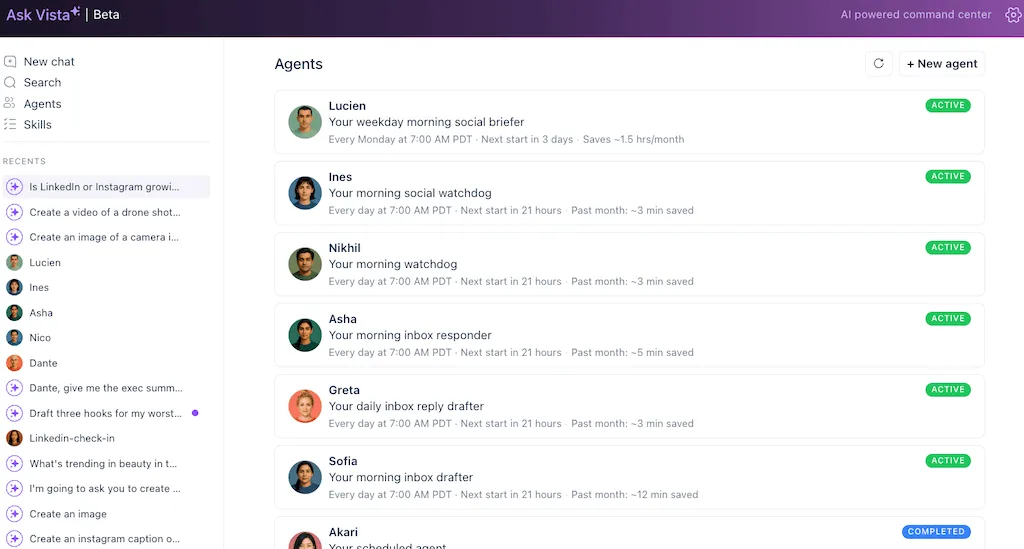
Agents are what close that gap. Doing the work instead of talking about it.
The Vista way: In Vista Social you set up an AI agent by describing the job to Ask Vista in a sentence and giving it a time, and it runs server-side on that schedule whether your laptop is open or closed.
The honest limit: An agent works inside the scope you define. It asks before anything irreversible goes out, so the public-facing actions still wait for your approval. You’re delegating bound jobs and not handing over the keys.
Ten capabilities in one teammate
Read that list back and a pattern shows up. The reason AI can still feel underwhelming, even when you use it, is that these ten capabilities usually live in ten disconnected tools. One for images, one for video, one for scheduling, and a chatbot for questions. Each in its own tab and knowing nothing about the others. You end up being the integration layer, carrying context between them by hand.
The unlock is having all ten of these wired into the same place. Making sure they’re connected to your actual accounts, rather than a “better” caption generator on its own. When trend discovery, drafting, prediction, the inbox, reporting, and overnight agents share one workspace and one view of your brand, AI stops feeling like a feature you bolt on and starts behaving like a teammate who already knows the accounts.
That’s the whole idea behind Ask Vista. AI chat, skills, and agents built directly into the platform where your social media already lives. The AI does the work instead of handing you suggestions to execute yourself. One operator can cover what used to take a team. The labor moves to the AI and the judgment stays with you.
Stop running ten tools that don’t talk to each other. Try Vista Social free and put all ten of these in one place.
The 95% is already here
None of this asks you to trust AI with the parts of the job you care about most. The social media managers getting the most out of it right now have handed over trend watching, performance prediction, inbox triage, and the morning report. While keeping the strategy, the taste, and the final call with themselves.
The reluctance is what’s kept a lot of good social media managers on the sidelines. They may feel the AI output sounds generic and the loss of control isn’t worth it. However, that’s the right instinct applied to the wrong era of the tools. Used in the Vista Social way, with you approving the work and the AI doing the reps, the trade stops being a control for convenience.
Pick one to start. Trend discovery or a plain-language question to your data are the easiest first wins. Once you’ve seen one of them work, the rest of the task list reads less like hype and more like next week’s to-do.
Put the other 95% to work. Start your free Vista Social account and pick one capability to try today.
Frequently asked questions
How do social media managers use AI beyond writing captions?
Captions are a small part of it, with the bigger uses spread across the whole workflow. Social media managers now use AI to spot trends before they peak. The AI predicts how a post will perform before publishing, generate images and video, write in a trained brand voice, and organizes and searches their media library. It can also triage and draft inbox replies, repurpose one idea across platforms, query their analytics in plain language, and deploy agents that run tasks overnight. The capability runs from research all the way to reporting.
Can AI predict how a post will perform before I publish it?
To a useful degree, yes. AI can read an image or video you’re about to post and give you a directional read on how it’s likely to land. Scoring things like scroll-stopping power and platform fit, so you can fix a weak visual or change the timing before it goes live. Treat it as a guide that tilts the odds and catches obvious misses, not a guarantee of a hit, and the judgment call stays yours.
Can AI create images and video for social media, not just text?
Yes. Image generation from a plain-language prompt is widely available now, and AI video tools can turn a script or concept into a short, captioned clip without a camera or an editor. The quality of the draft is high; the taste call on whether it’s good and on brand is still a human job, so use AI output as a strong first cut rather than a finished post.
Can AI manage or reply to my comments and DMs?
It can sort your inbox by intent, draft on-brand replies to routine messages, and flag the ones that need you. The safe default is draft-and-approve rather than auto-send, because replying in public is an action with consequences. The AI does the reading and the drafting at volume; you keep the final approval on anything that posts.
What’s the difference between an AI tool and an AI agent for social media?
A tool helps you do a task faster while you stay the operator, like generating a caption or an image when you ask. An agent is a job you set up once that then runs on its own on a schedule and reports back. It does things like a nightly inbox triage or a morning performance briefing. The tool waits for your prompt every time; the agent already knows to show up and do the work inside the limits you set.
Will AI replace social media managers?
No, but it changes the job. AI absorbs the repetitive volume. The triage, the first drafts, the reporting, and the monitoring, while strategy, brand judgment, creative taste, and real community relationships stay human. The social media managers who do well treat AI as a teammate. It handles the reps so they can spend their time on the work that needs a person.
What’s the best AI for social media management?
The most useful setup is an integrated platform where trend discovery, content creation, prediction, the inbox, analytics, and agents all run in one place and connect to your real accounts. A single clever tool leaves you stitching context by hand. Ten disconnected ones that don’t share context create more work than they save. AI built into the platform your social media already lives in, like Vista Social, is what turns scattered features into one teammate.
Try Vista Social for free
A social media management platform that actually helps you grow with easy-to-use content planning, scheduling, engagement and analytics tools.
Get Started NowAbout the Author

Content Writer
Orion loves to write content that refuses to be boring. As part of Vista Social, he helps brands, creators, and agencies stop doom scrolling and start winning with social media. When he's not in front of a keyboard, he's watching films in IMAX with his wife, dissecting football tactics (the European kind), and getting lost in a good book.