


Published on July 14, 2026
10 min to read
How to Build a Custom AI Agent for Social Media From One Sentence

Summarize with AI

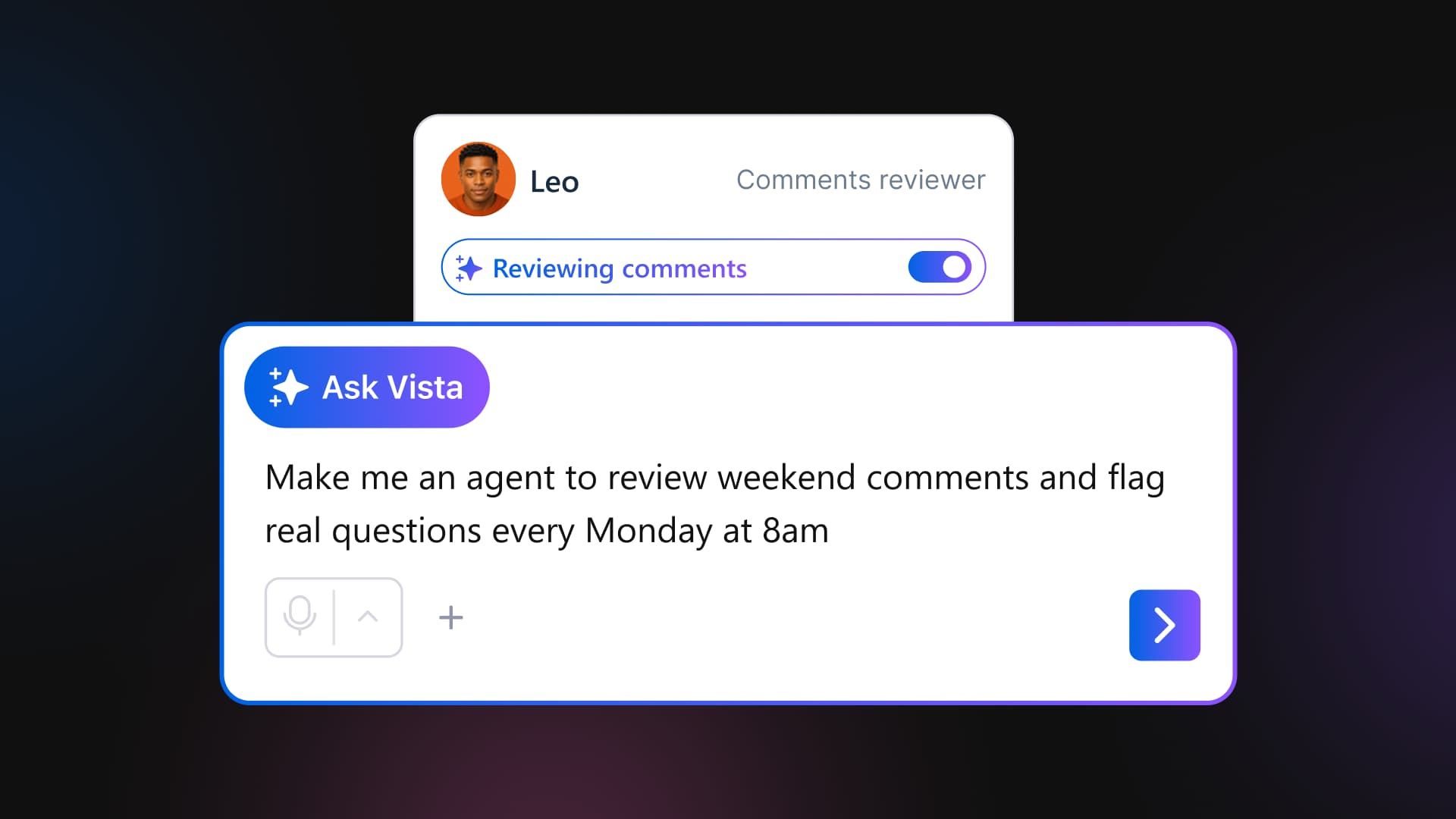
Table of contents
Summarize with AI

ChatGPT

Claude

Perplexity
Share

Vista Social

X (Twitter)


By now you’ve probably tried a ready-made AI agent or two. The kind that drafts replies or finds your best time to post. They handle the jobs every social media manager shares, and they handle them well.
But you’ve almost certainly hit the same wall the moment your work gets specific. There’s one recurring task that’s tied to your own accounts and your own clients, and no ready-made agent quite covers it.
So you keep doing it yourself. Every week, the same steps, in the same order, because you’re the only one who knows how it goes. That’s worth sitting with for a second. On that one task, you’ve become the automation. You’re the reliable machine running a script nobody ever wrote down, and it keeps you off the strategy work you actually want to be doing.
The good news is that the wall you hit isn’t the end of what AI can do for you. It’s the start of the part the ready-made agents can’t do. You’re about to build the one agent that fits your exact task, and you’ll do it by writing a single plain sentence and handing the job to a custom AI agent for social media.
And no, you’re not building software. You’re writing a job description and hiring for it. The rest of this piece is when a custom agent is worth building and exactly how to spin one up from a single sentence without touching a line of code.
The short version:
- Custom is for the task no template covers: If a ready-made agent already does the job, use it. Build your own only when your task is specific to how you work.
- The whole build is one plain-English sentence: You describe the recurring task in normal words, and the agent gets built from that.
- Every agent runs at a control level: It can watch and report, draft for your approval, or act with your consent, and it asks before it ever touches a live account.
- Start read-only, then tune: Let the first run just watch and report. Check its work, and then loosen the leash once you trust it.
Table of contents
What is a custom AI agent for social media?
A custom AI agent is a recurring task you describe once, in one plain-English sentence. It then runs on a schedule and reports back, without you asking again. You’re not writing a program. You’re telling a capable assistant what job to do and when to do it.
That’s what sets an agent apart from the AI most of us already use. A chat tool waits for you to open it and type a request. An agent already knows its job. It wakes up on its own schedule, does the work, and leaves you a result to review. You set it up once instead of prompting it every time.
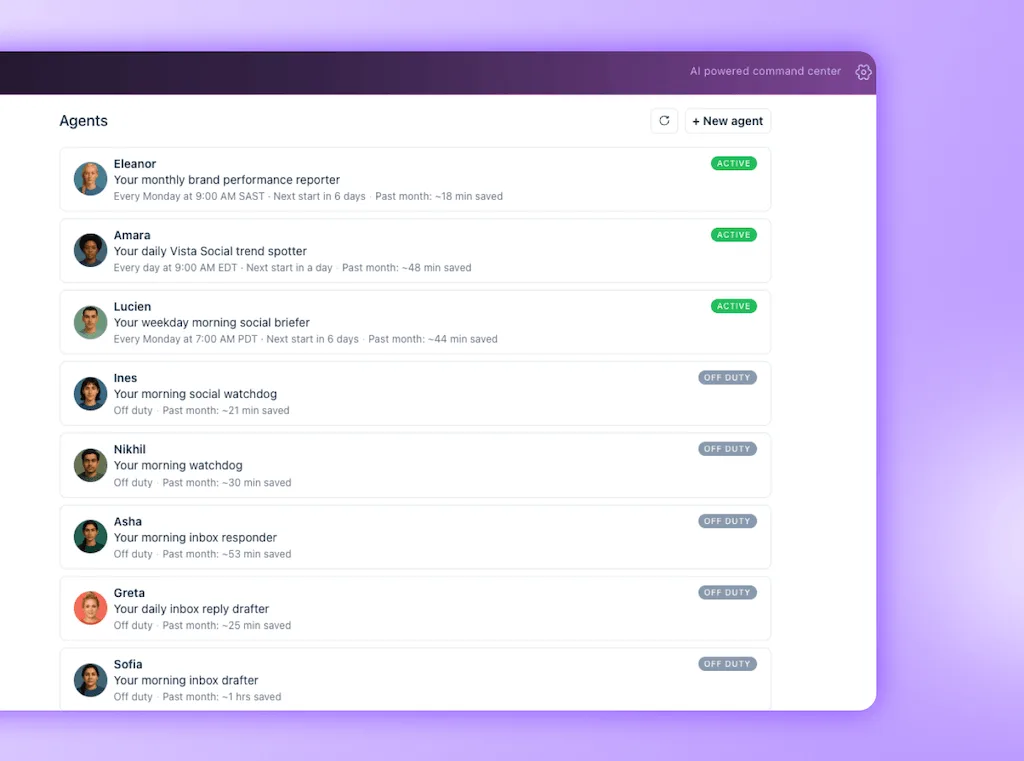
The word “custom” just means the job is yours. Scan this client’s weekend comments. Watch these three accounts. Pull together a Monday recap the way you like it. It’s the same idea behind any AI agent built for social media, just pointed at the one job only you do.
What stops most freelancers before they start is a simple assumption: that “build” means “code.” It doesn’t anymore. Michael Stelzner, founder of Social Media Examiner, puts the shift plainly:
“The biggest misconception about AI coding tools is that you need to know how to code to use them. Today’s models have become so capable that a coding background is no longer a prerequisite for creating automations.”
— Michael Stelzner, Claude Code for Everyone
That’s the whole reason one sentence is enough now. The tool handles the technical part. Your job is the part you’re already good at: knowing exactly what the task is and describing it clearly. The clearer you are, the better the agent that comes out the other side.
When should you build a custom agent instead of using a ready-made one?
Hitting the wall is the signal, but it’s worth being honest about when you’ve actually hit it. Most tools ship with ready-made agents for the jobs everyone shares, like drafting replies or finding the best time to post.
If one of those already does your task, just switch it on and move on with your day. Build your own only when no template fits.
A quick gut check. Is this task the same for every client, or does it depend on how you personally run things? If it’s the second, that’s exactly what a custom agent is for.
| Ready-made agent | Custom agent | |
|---|---|---|
| Best for | Common jobs everyone needs | A task specific to your workflow |
| Setup | Switch it on and tweak the settings | Describe your task in one sentence |
| Example | Draft replies and suggest posting times | Scan one client’s weekend comments your way |
| When to reach for it | A template already matches the job | No template covers how you work |
So start with what’s already available, not a blank page. It’s worth a minute to look through our 25+ ready-made agents first, because the fastest custom agent is the one you don’t have to build yourself.
And if you’ve never even turned a pre-built one on, this walkthrough on using them is the gentler first step. When nothing ready-made fits your task, that’s your signal to build your own.
Not sure whether a template already covers your task? Open the agent library in Vista Social and see before you build one from scratch.
How do you build a custom AI agent from one sentence?
The method is short. Pick the recurring task, describe it in one plain sentence, set the control level and schedule, point it at the right accounts, switch it on, and check the first result. That’s six steps, and only one of them takes any real thinking. Here’s each in practice.
Step 1: Pick the recurring task worth automating
Look for the job you do on repeat, the same way, on a schedule. The best candidates are boring by design. They’re predictable, they eat time, and they lean on your attention more than your judgment. Good ones to start with:
- The weekly comment scan: Reading a client’s comments to pull out the real questions from the noise.
- The mention watch: Keeping an eye on a few accounts or keywords so you catch the ones that matter.
- The Monday recap: Pulling last week’s numbers into the summary you send every client anyway.
If you catch yourself doing something every Monday and resenting it, that’s your first agent. Automating the grind of comment triage is a common place to start. It’s the task that scales worst as you add clients.
Step 2: Describe it in one plain-language sentence
This is the one step that carries the whole build, so it’s worth slowing down for. A vague sentence makes a vague agent. A specific one makes an agent that actually helps. The trick is to name three things in plain words: the when, the what, and the result. Compare these two:
- Too vague: “Keep an eye on my client’s comments and let me know if anything important comes up.” What counts as important? How often? Let you know how?
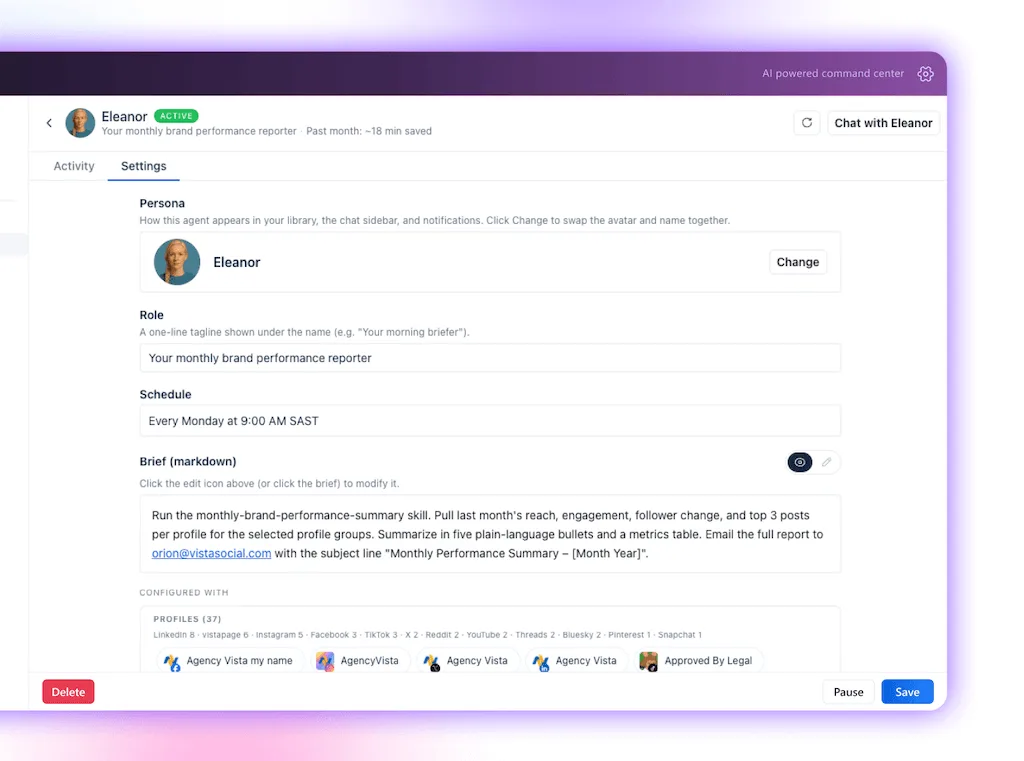
- Clear enough to run: “Every Monday at 8am, review this client’s weekend comments, flag the ones asking a real question, and add them as tasks for me to answer.”
The good sentence pins down a time, a source, a filter, and an output. You don’t need technical language. You just need to be specific about the job, the way you’d brief a new hire on day one.
Step 3: Set the control level and schedule
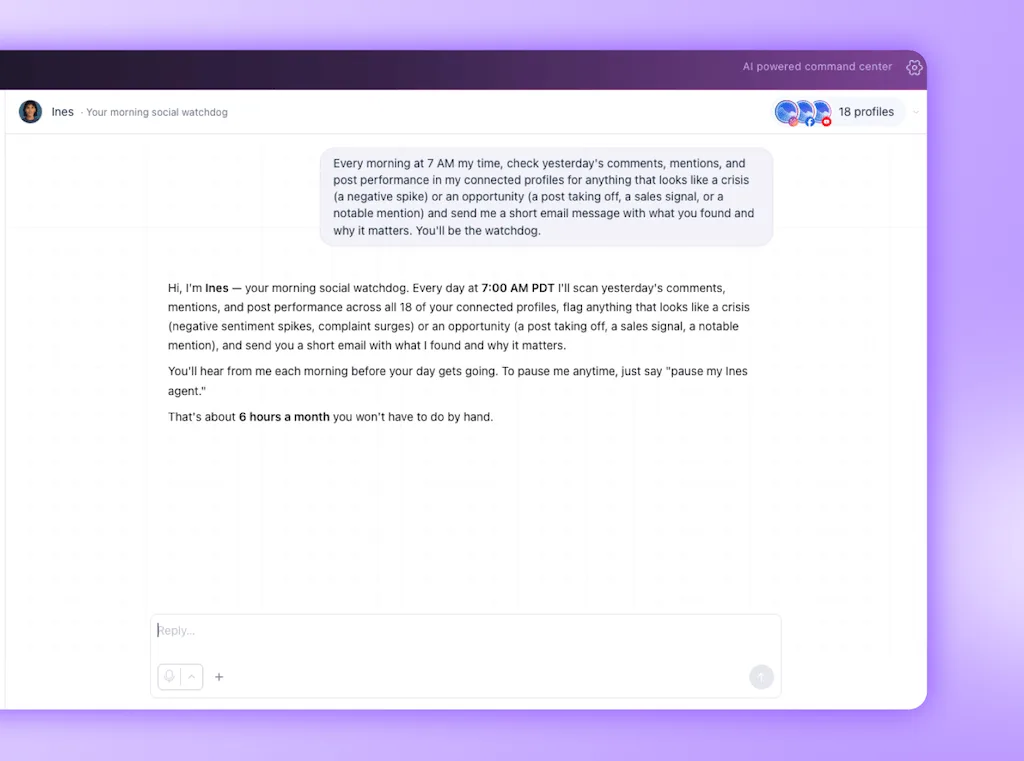
Before it runs, you decide how much rope the agent gets. This is your safety dial. Start it on the tightest setting and loosen it only once you trust the work. There are three levels to choose from:
- Watches and reports: The agent looks and tells you what it found and touches nothing. This is where every new agent should start.
- Drafts for approval: The agent prepares the reply or post and waits for your yes before anything goes out.
- Acts with consent: The agent can take the action itself, but only within the boundaries you set, and it still confirms before anything is public.
The schedule is the other half. Pick when it runs, whether that’s every Monday at 8am, every morning, or once an hour. You set this once and stop thinking about it. The agent shows up on time whether or not your week is on fire.
Step 4: Point it at the right accounts
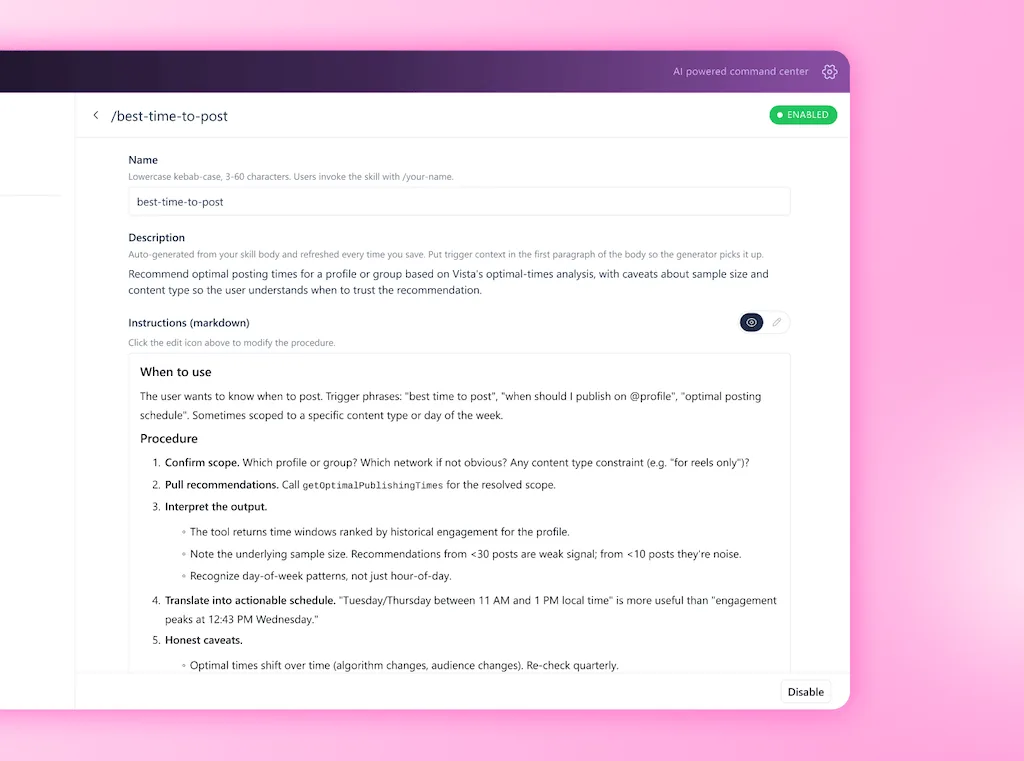
An agent should only see what it needs to. Scope it to one client’s profiles to start, not your whole roster. That way a first run can’t make a mess everywhere at once, and the results stay easy to check.
This matters most when the agent reads messages and has to judge intent. One account lets you confirm it understands what a message actually means for that client’s voice before you trust it anywhere else.
Step 5: Switch it on and check the first run
Turn it on, then treat the first run as a tryout, not a handoff. Because you started it read-only, the first result is a report you can grade: did it flag the right comments, miss any real questions, or trip on sarcasm and spam?
If it’s mostly right, you’re in business. If it’s off, you don’t reprogram anything. You just reword the sentence, which is the next step.
Step 6: Tune scope and schedule from the working draft
Now you refine, using the first run as a working draft instead of starting over. Tuning is mostly small edits to the same plain sentence. You loosen the leash as your trust grows:
- Sharpen the filter: If it flagged too much, add what to ignore. If it missed things, name them so it catches them next time.
- Adjust the timing: Move the run earlier or make it more frequent if once a week isn’t catching things in time.
- Loosen the control level: Once it’s reliably right on read-only, promote it to drafting replies for your approval.
A few rounds of this and you’ve got an agent that does the task the way you’d do it, without you in the loop until it hands you something to check.
You can write your first sentence and have an agent running before the end of the day. Build your first custom agent free.
The Monday comment-scan agent
Take the specific task we started with, the one no template covered, and put it on the other side of the build. Say it’s the weekend comment pileup on your biggest client’s account, the worst-scaling job on your roster.
One custom agent now handles it, and it runs from one sentence. “Every Monday at 8am, review this client’s weekend comments, flag the ones asking a real question, and add them as tasks for me to answer.”
It’s set to watch and report, scoped to that one client, running while Monday coffee is still brewing. And it has one honest limit worth naming. The agent doesn’t answer anyone.
It reads the weekend’s comments, separates the real questions from the emoji noise, and hands over a short list of tasks. You still write every reply in your own voice. What it gives back is the twenty minutes of scanning you used to do before you could even start.
Hand the agent the scanning and keep the judgment for yourself. Set up your Monday comment-scan agent.
What can go wrong, and how can it be avoided?
Most first agents underperform for the same three reasons. All three are easy to sidestep once you know them. Each one, with its fix:
- A vague sentence makes a vague agent: If the results feel random, the description was too loose. Rewrite it to name the exact trigger, filter, and output.
- Starting with too much freedom: If it acts on its own and surprises you, that’s a control-level problem, not a trust problem. Drop it back to watch-and-report until it’s reliably right.
- Scoping every client at once: If a first run gets messy, it was probably pointed at your whole roster. Scope it to one account, confirm it works, and then widen it.
None of these mean the agent was a bad idea. They’re just the normal shakedown of a new hire. The fix is almost always a clearer sentence or a tighter leash.
Custom agent vs. the developer route: which do you actually need?
To be fair, the one-sentence path isn’t the only way to automate. Workflow builders and developer tools can wire many systems together at once. For complex, cross-platform automation that spans your CRM, your billing tool, and three networks with custom logic between them, they’re the right call.
But most social tasks aren’t that. The comment scan, the mention watch, and the Monday recap all live entirely inside your social media work. They don’t need a flowchart or a developer. Here’s how the two paths compare:
| The developer route | The one-sentence custom agent | |
|---|---|---|
| Who it’s for | Technical users, complex multi-system flows | Freelance SMMs and small teams |
| What you build with | Connectors, logic steps, sometimes code | One plain-English sentence |
| Setup time | Hours to days, plus maintenance | Minutes |
| Best when | The task spans many tools with custom logic | The task lives inside your social work |
So the question isn’t which is more powerful. It’s which one fits the job in front of you. For the recurring social tasks that eat your week, the sentence is the right tool, and it leaves you glad you never had to open the other one.
Start with one boring task
You don’t have to automate your whole job, and you shouldn’t try to on day one. Pick the one boring, repeatable task that scales worst as you add clients. Write the sentence, and start it read-only.
You keep the judgment and the client relationships. Those were always the parts worth your time. You hand off the scanning that never was. That’s the trade worth making, and it starts with a single sentence.
Pick your most repetitive task and turn it into a custom agent today. Build your first custom agent free. No code, no credit card required.
Frequently asked questions
What is a custom AI agent for social media?
It’s a recurring task you describe once, in one plain-English sentence. It then runs on a schedule and reports back to you. Unlike a chat tool you prompt each time, a custom agent already knows its job and does it on its own, aimed at a task specific to how you work.
Do I need to know how to code to build one?
No. You describe the task in plain language and the tool builds the agent from your sentence. There are no connectors to wire, no logic steps to draw, and no code to write, which is the whole point of the one-sentence approach.
Will a custom agent post to my accounts without approval?
Not unless you allow it. Every agent runs at a control level, and the default is watch-and-report, which touches nothing. Even at higher levels it asks before it takes any public action, so nothing goes out without your say-so.
How is a custom agent different from a ready-made one?
A ready-made agent handles common jobs everyone needs, like drafting replies, and you just switch it on. A custom agent is for a task specific to your workflow, built by describing that task in a sentence.
What recurring tasks are worth turning into a custom agent?
The boring, repeatable ones that eat time and don’t need much judgment: scanning a client’s comments for real questions, watching a few accounts or keywords for mentions, or pulling a weekly recap together. If you do it the same way every week and resent it, it’s a good candidate.
Which Vista Social plan includes the custom agent builder?
The custom-agent builder is part of Vista Social’s AI agent features. Plan availability is listed on the pricing page, and you can start a free trial to build one before you commit.
Try Vista Social for free
A social media management platform that actually helps you grow with easy-to-use content planning, scheduling, engagement and analytics tools.
Get Started NowAbout the Author

Content Writer
Orion loves to write content that refuses to be boring. As part of Vista Social, he helps brands, creators, and agencies stop doom scrolling and start winning with social media. When he's not in front of a keyboard, he's watching films in IMAX with his wife, dissecting football tactics (the European kind), and getting lost in a good book.