

Published on May 4, 2026
10 min to read
AI Message Intent Detection: The End of Keyword-Based Social Media Automations

Summarize with AI

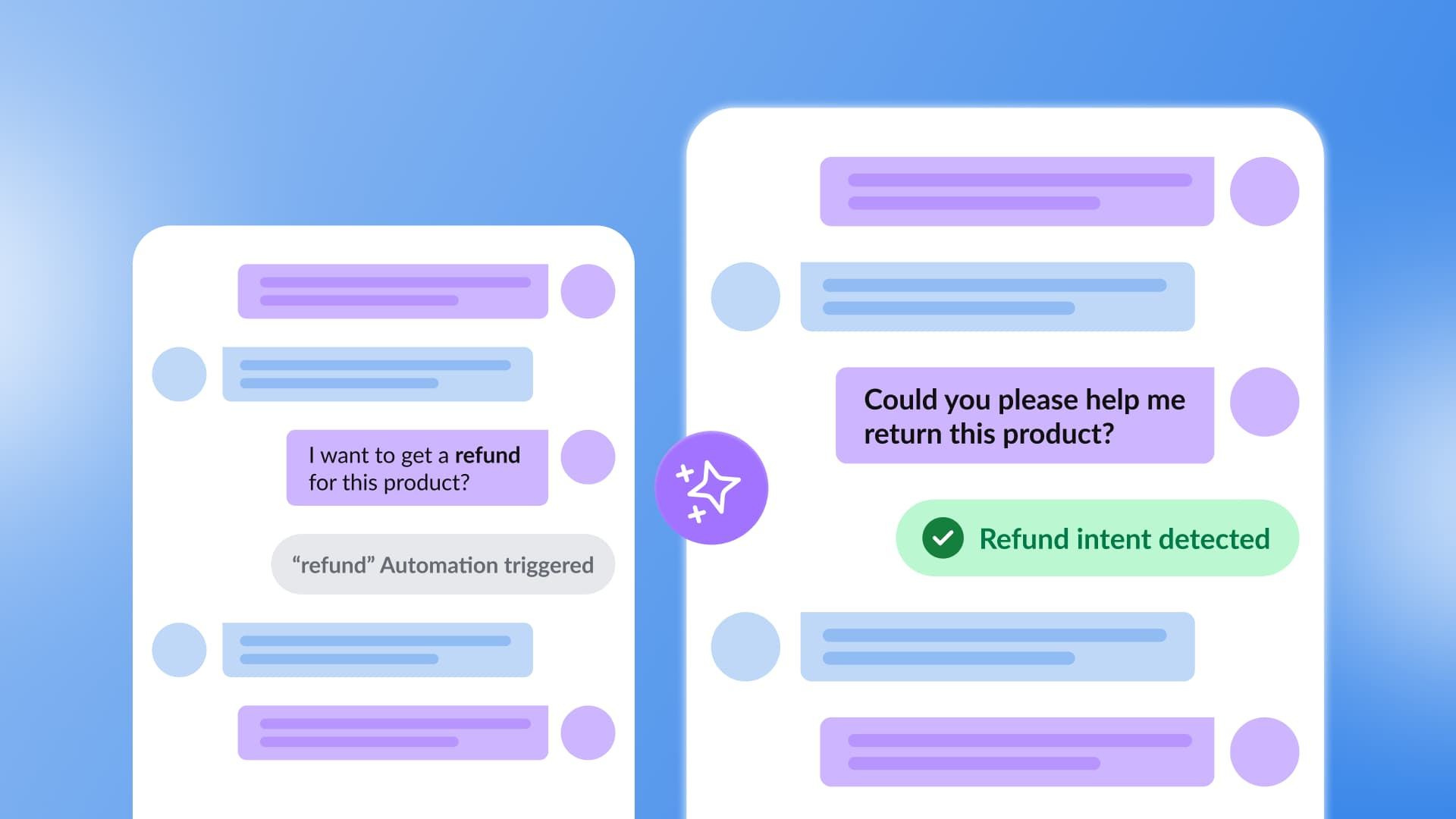
Table of contents
Summarize with AI

ChatGPT

Claude

Perplexity
Share

Vista Social

X (Twitter)


You’ve set up your DM automation. You’ve mapped out the keywords and tested the flow, and it works perfectly when someone messages, “Where can I buy this?”
Then someone DMs, “OMG I need this in my life,” and gets nothing back because they didn’t use the word “buy.”
That’s the frustrating reality of keyword-based automation. People don’t read your keyword list before they message you, they write the way they talk—and no one talks the exact same way as anyone else. Building automations around exact phrases means you’re always one step behind the actual conversation.
AI message intent detection solves this by flipping the model entirely. Instead of matching words, it reads meaning.
And this guide breaks down what that looks like in practice, why it matters for your brand’s inbox, and how to use it inside Vista Social to stop missing the messages that actually matter.
Table of contents
What is AI message intent detection?
AI message intent detection is the ability of an AI system to understand the purpose behind a message, regardless of the specific words used to express it. Rather than scanning for a list of pre-defined keywords, the AI reads the full context of an incoming message and classifies what the sender actually wants or needs.
These messages might all carry the same underlying intent:
- “How much does this cost?”
- “What’s the price?”
- “Is this expensive?”
- “Hit me with the pricing”
But keyword automation treats those as four completely different messages, while intent detection understands that they’re one and the same.
The underlying technology uses natural language processing (NLP) to analyze message meaning, tone, and context, then maps the result to a relevant intent category like “product inquiry,” “billing question,” “complaint,” or “purchase intent.”
Once the intent is detected, the right automation fires or the conversation gets routed to the right person, without anyone having to guess the magic word.
Keyword automations vs. AI message intent detection
Both tools have their place, but they serve very different jobs. Here’s how they stack up:
| Feature | Keyword automation | AI intent detection |
|---|---|---|
| How it works | Matches exact words or phrases | Understands message meaning and context |
| Coverage | Only triggers on pre-defined keywords | Catches intent regardless of wording used |
| Setup | Requires manual keyword lists | Requires defining intent categories via prompt |
| Flexibility | Rigid, needs regular updates | Adapts to natural language variations |
| Best for | Specific campaign triggers | Broad inbox management and routing |
| Miss rate | High, especially for casual language | Low, handles slang, variations, and context |
| Multilingual | One keyword set per language needed | Handles language variations more naturally |
Why is AI message intent detection such an important tool?
The volume problem in social media inboxes has quietly become one of the biggest operational headaches for brands and agencies alike.
According to Emplifi’s 2025 consumer research, 66% of consumers expect an immediate reply from brands on social media, and only 24% are willing to wait more than an hour. That’s an enormous volume of messages coming in fast, and keyword lists alone were never built to handle it at that speed or scale.
Here’s why intent detection specifically changes the equation.
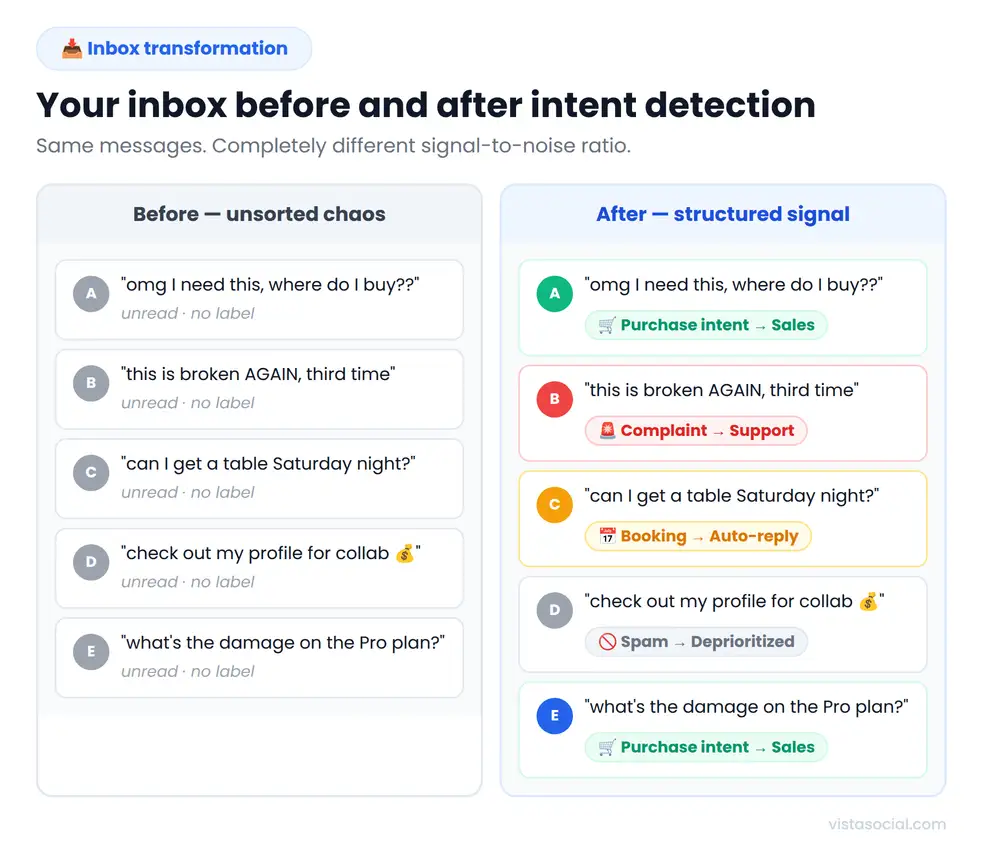
1. It tells a complaint from a question
“This product stopped working” and “how does this product work?” look completely different to an intent model. Keyword automation might catch neither or both depending on your setup, but intent detection reliably separates support issues from genuine questions, so a frustrated customer doesn’t get a cheerful FAQ response when what they actually need is a resolution.
2. It routes purchase-intent DMs differently than support
A message like “is this available in blue?” is a buying signal. A message like “my order hasn’t arrived in two weeks” is a support issue. Both could share keywords like “order” or “product,” but they need completely different responses from completely different people.
Intent detection makes that routing automatic and accurate, which means your sales team sees purchase-intent messages before they go cold and your support team sees complaints before they escalate.
3. It gets lead gen happening at the DM layer
High-intent DMs, like someone asking for pricing, a demo, or where to sign up, are the warmest leads your brand will ever see. They’re people who found your content compelling enough to actually reach out.
Letting those sit in an unread inbox or firing a generic keyword response is a conversion problem disguised as a communication problem. Intent detection identifies those messages on arrival and triggers an immediate, relevant response before the moment passes.
4. It improves crisis detection and brand safety
When a negative sentiment pattern starts appearing across dozens of messages simultaneously, keyword lists often can’t catch it because frustrated customers rarely use your pre-defined words.
Intent detection reads the emotional register of messages, so a spike in complaint-intent or crisis-intent DMs can surface as an alert before the situation escalates publicly.
5. It filters spam and noise automatically
Not every message deserves a response. With AI intent detection, your DM automations only fire on the messages that match the intents you define. So promotional noise and off-topic DMs never trigger a response in the first place.
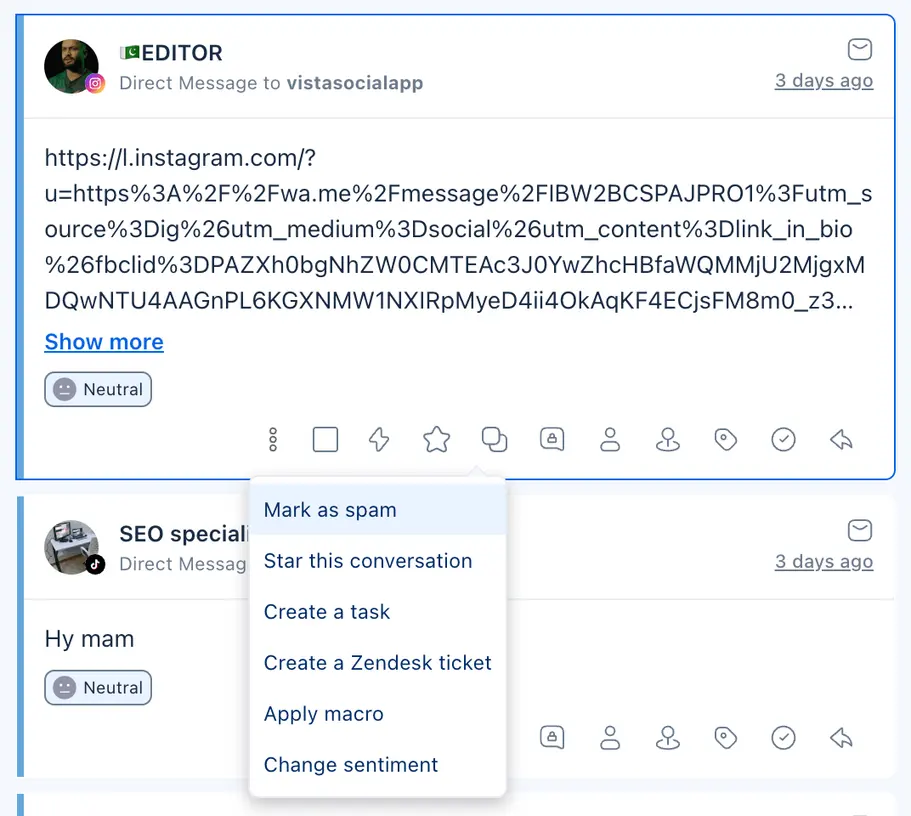
You can also manually mark those conversations as spam directly in the Social Inbox to keep your team focused on what matters.
What does AI message intent detection actually help your brand do?
The practical impact shows up across four areas where social media teams feel the most friction.
Smarter auto-replies
When automation matches intent rather than keywords, the response fits the message.
- A purchase-intent DM gets a helpful, action-oriented reply
- A complaint gets an empathetic acknowledgment with a path to resolution
- An FAQ gets a quick auto-response so your team doesn’t have to manually reply again and again
The brand looks like it’s paying attention, even when the response is automated, which is increasingly the bar customers hold brands to in 2026.
Real lead routing without manual triage
Right now, most social teams sort their inboxes by hand, reading each message, deciding what it’s about, and either responding or forwarding it to the right person.
Intent detection makes that sorting happen automatically before anyone opens the message, which means:
- Purchase-intent DMs go straight to sales
- Support issues go straight to the support team
- General inquiries get handled by automation
The team stops burning hours on inbox admin and starts spending time on the conversations that actually need a human.
Higher conversion from high-intent messages
According to Gartner’s 2025 CMO Spend Survey, 40% of marketing leaders are now using AI to automate key tasks as a top productivity action, and a big part of that push is closing the gap between high-intent signals and fast responses.
When someone sends a purchase-intent DM, they’re in the moment, and that window is short. Responding fast and accurately to those messages converts at a meaningfully higher rate than a delayed or irrelevant one.
Cleaner inbox analytics
This is the benefit nobody talks about enough. When messages are tagged by intent rather than sitting as raw volume, your reporting changes completely.
You move from “we got 4,300 DMs this month” to “we got 312 purchase-intent DMs, 847 support requests, and 204 complaint-intent messages and converted 18% of the purchase-intent ones.” That’s the kind of data that changes strategy.
How Vista Social’s AI message intent detection works
Vista Social’s AI intent detection lives inside the automation builder and takes about five minutes to set up. Here’s the exact step-by-step.
Step 1: Go to “Automations” in your Vista Social dashboard
Click Create automation, then select Create from scratch. You’ll be prompted to choose the social media platform you want this automation to run on.
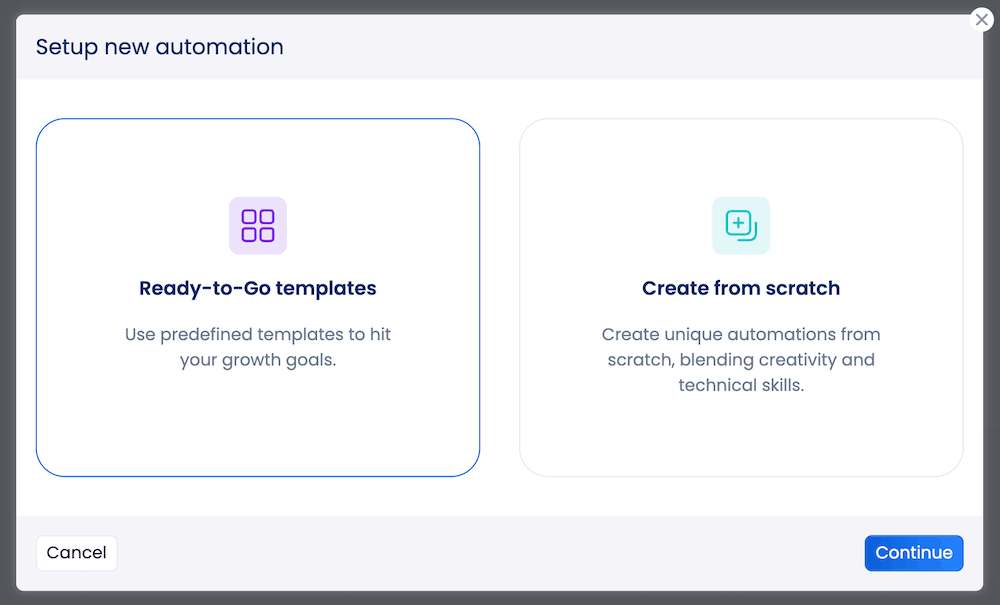
Instagram and Facebook offer the most flexibility, but AI intent detection works across TikTok, Google Business, and more.
Step 2: Choose your trigger
Select the type of engagement you want to catch. Your options vary depending on the platform you’re running your automation on, but they include:
- New direct message
- Comment/mention
- Story reply
- Comment on live
- New review
Step 3: Set your detection method to AI Intent
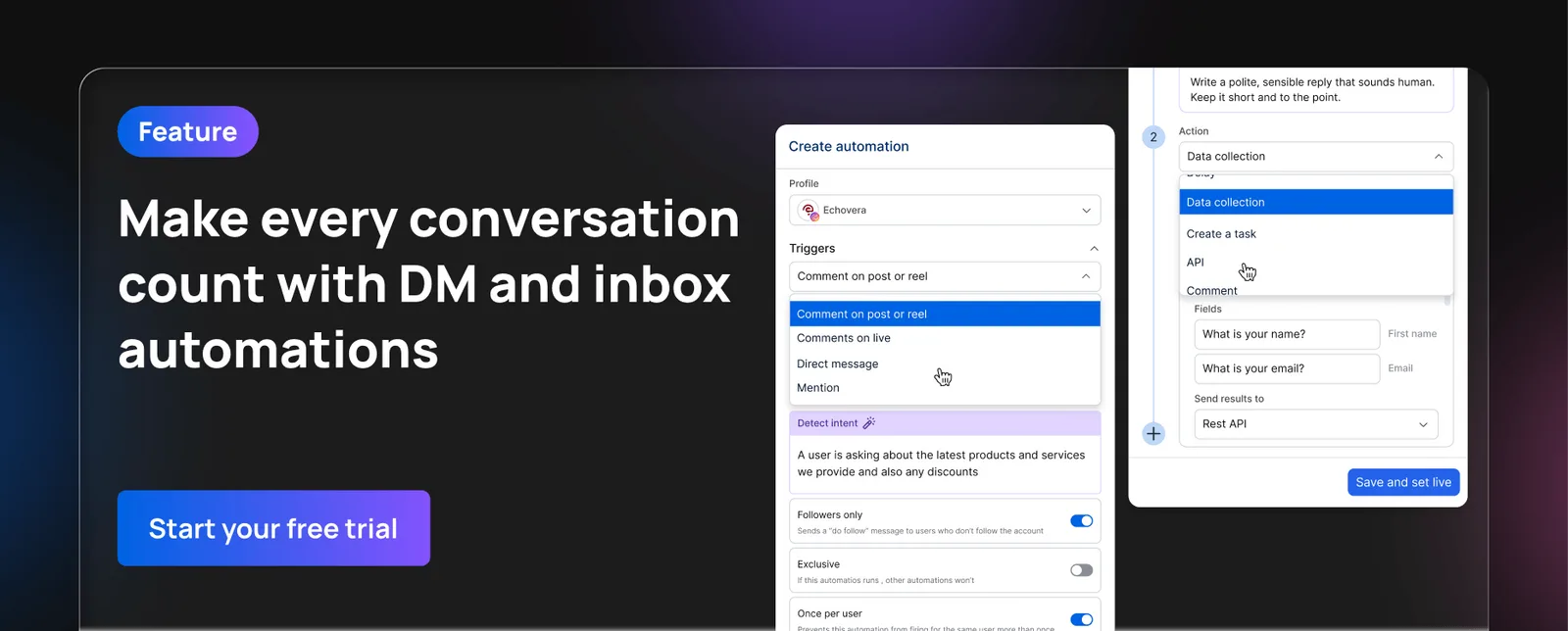
Instead of typing a list of keywords, start typing the message intent you want your automation to catch right into the Detect intent text box. You’ll use this area instead of the Must include keywords section.
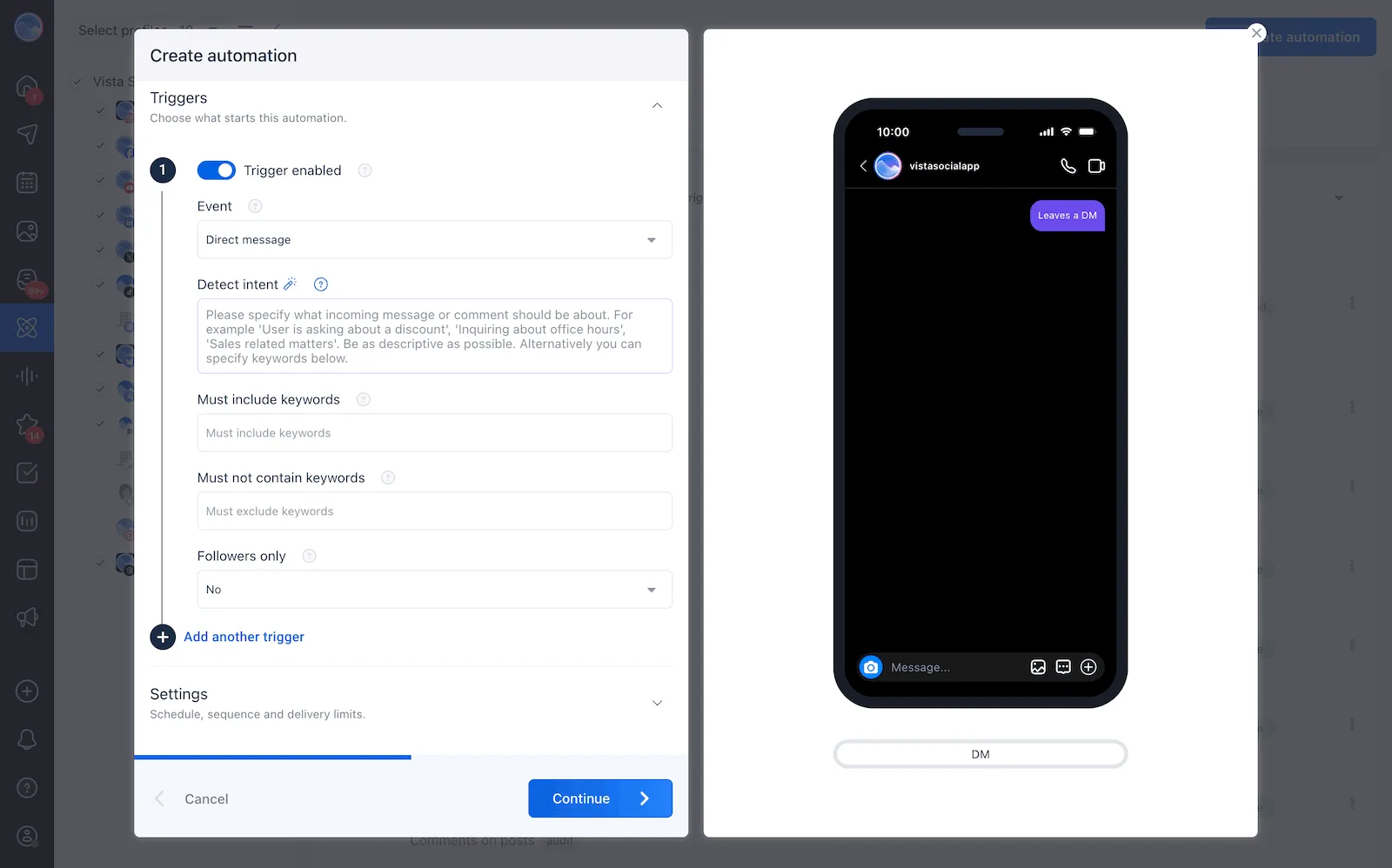
For example:
- “Customer is asking about pricing or how much the product costs.”
- “Customer is expressing frustration with an order or delivery.”
- “Customer wants to book a reservation or appointment.”
- “Customer is asking about product availability or stock.”
Vista Social’s AI reads every incoming message and fires the automation when the intent matches your description, even if the wording looks nothing like what you wrote.
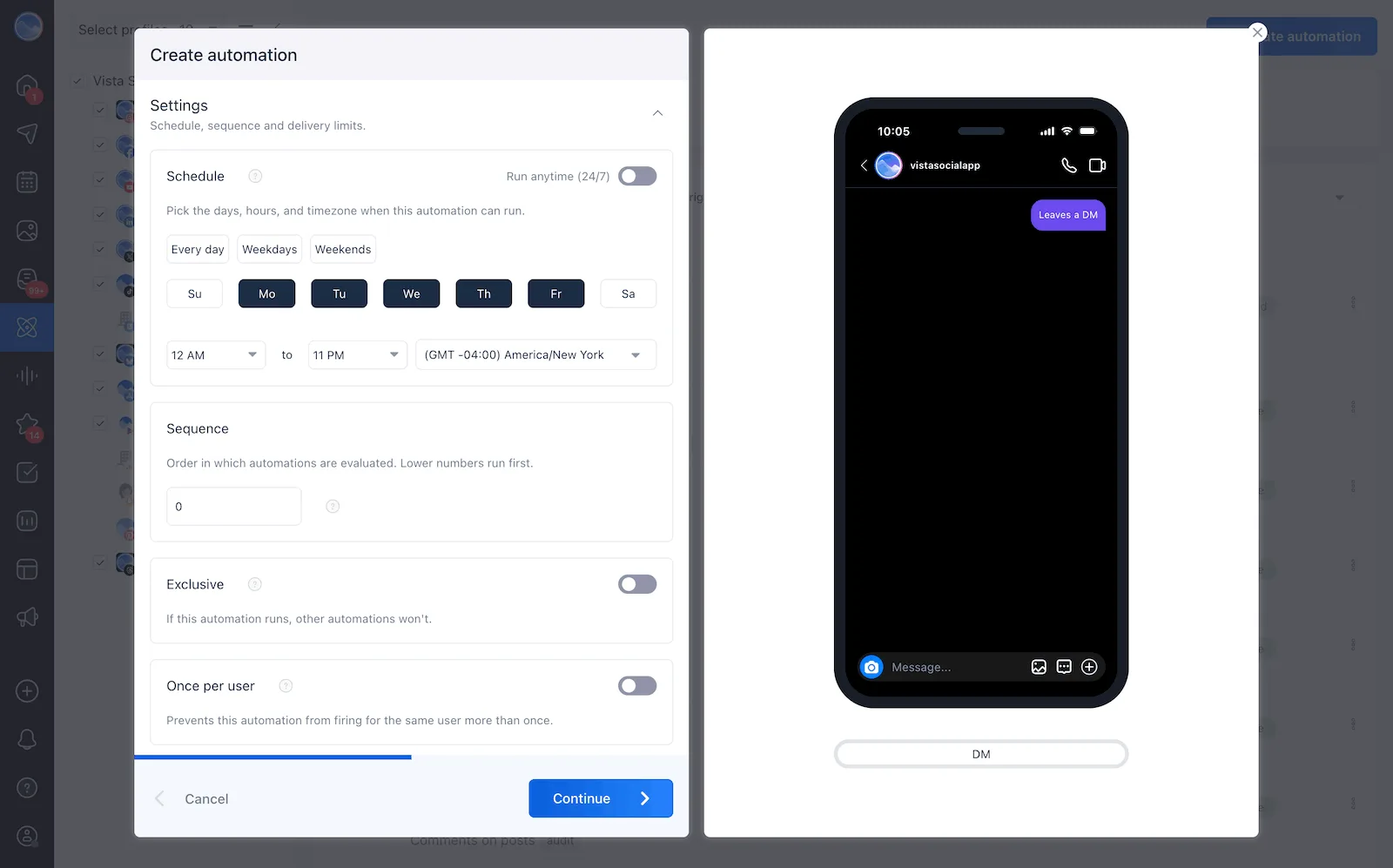
Step 4: Set your active hours
Choose whether this automation runs 24/7 or only during specific days and times. The after-hours use case is one of the most practical, because setting the automation to run overnight and on weekends means high-intent messages get an immediate response even when your team is offline.
Step 5: Add your action
When the intent is detected, choose what happens next:
- Send a direct message: Auto-reply with a response, a link, or an AI-generated reply pulled from your brand’s knowledge base
- Reply to a comment: Generate an auto-response to a comment on a post with an FAQ
- Assign a task: Route the conversation to a specific team member or group
- Apply a label: Tag the message for filtering and reporting (this is where your inbox analytics upgrade starts)
- Send an email alert: Notify a team member immediately for high-priority intents like complaints or crisis signals
A note on AI Training and Knowledge
Before your automations go live, head to Settings, then AI Training and Knowledge, and upload your brand’s FAQs, product details, pricing, and tone guidelines.
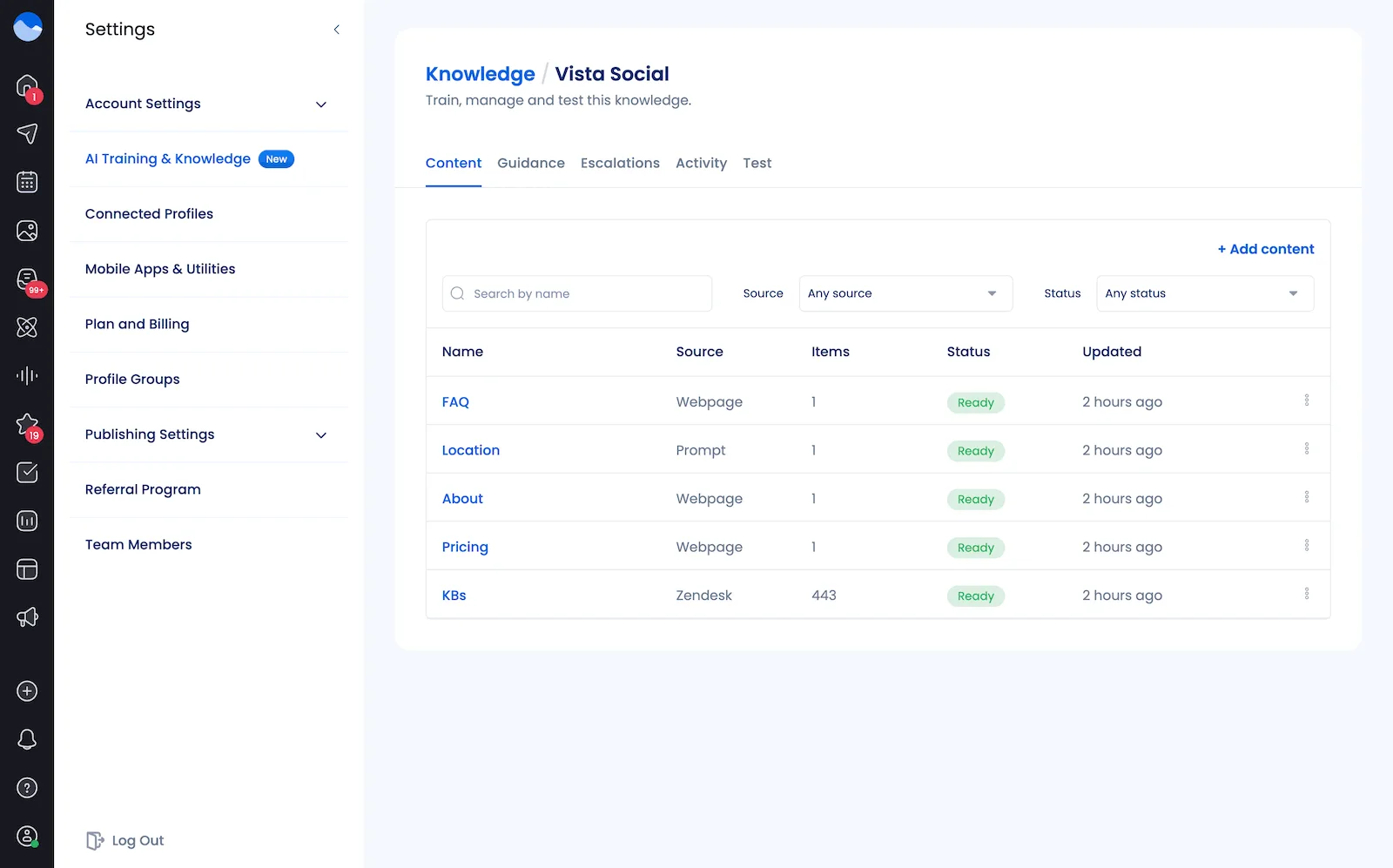
This is what separates a generic automated response from one that actually references your real products and brand voice, and it’s what makes the difference between automation that converts and automation that gets ignored.
AI intent detection is available on the Advanced, Scale, and Enterprise plans and works across DMs, comments, and review responses.
Real-world use cases
You might already have some ideas on how to use this, but let’s cover a few real-world use cases to showcase even more options this feature gives you.
- E-commerce brand on Instagram: Instead of building keyword lists for every variation of “how do I buy,” “is this in stock,” and “where can I get this,” one AI intent prompt catches all purchase-intent DMs and triggers a reply with the product link and a discount code. The messages that previously fell through the keyword gaps now convert.
- Agency managing a restaurant client: A prompt set to catch “reservation or booking intent” fires automatically for any message about booking a table, whether the person says “table for two,” “are you taking walk-ins,” or “can I book for Saturday.” The client’s staff stops manually sorting messages and only handles confirmed bookings.
- SaaS brand on LinkedIn: A “demo request or pricing inquiry” intent prompt identifies warm leads arriving via DMs from LinkedIn content, routes them to the sales team with a flag, and sends an immediate automated acknowledgment so the prospect knows they’ve been seen. Response time then drops from hours to seconds.
When using keywords still makes sense
Intent detection doesn’t replace keyword automation entirely. There are situations where keywords are genuinely the better tool.
These include:
- Single-purpose campaign automations: The classic use case. “Comment LINK to get the guide” or comment-to-DM flows built around a specific campaign keyword work exactly as intended with keyword matching because the specificity is the entire point.
- Hashtag-triggered flows: These work well as keywords because the hashtag itself is the signal. Someone using your branded hashtag in a comment is engaging in a specific, identifiable way that a keyword trigger handles cleanly.
- Compliance-required exact-match filtering: Necessary in regulated industries where flagging specific phrases verbatim is a legal requirement. Intent detection isn’t the right tool here because you need precision, not interpretation.
- Simple routing as a fallback: Makes sense when intent detection handles most of the meaningful traffic and keywords serve as a safety net for anything specific that might slip through. Running both layers together gives you the coverage of intent with the precision of keywords for edge cases.
Use AI message intent detection in your inbox management process
If you’re still managing your social inbox with manual sorting, keyword-only automations, or both, intent detection is the most significant upgrade available to you right now, and it doesn’t require rebuilding your entire setup from scratch.
Start with the highest-value intent categories for your brand. For most businesses that means purchase intent, support requests, and complaints. Build one automation for each, describe the intent clearly in the prompt field, and let Vista Social’s AI handle the matching. You’ll immediately see what was being missed.
From there, the inbox stops being a pile of messages to sort and starts being structured. Purchase-intent messages get routed and responded to fast, support requests go to the right person, and complaints get acknowledged before they escalate.
The brands and agencies staying ahead of their inboxes in 2026 are the ones who stopped trying to predict every word a customer might use and started letting AI read what the customer actually means. That shift is available inside Vista Social right now, and setting it up takes about as long as writing a single keyword list.
Explore Vista Social’s automation tools and see how AI intent detection fits into your inbox management workflow.
AI message intent detection FAQs
What is AI message intent detection?
AI message intent detection is a capability that allows an AI system to understand the purpose behind an incoming message without relying on specific keywords. It uses natural language processing to read message meaning and context, then classifies the intent so the right response or routing action can fire automatically.
How is intent detection different from keyword automation?
Keyword automation only triggers when a message contains a pre-defined word or phrase. Intent detection triggers based on what the message means, regardless of the specific words used. Someone saying “how much” and someone saying “what’s the damage on this?” both carry pricing intent, but only intent detection catches both.
Can AI tell the difference between a complaint and a question?
Yes, and this is one of its most valuable capabilities in a social media context. Messages like “this keeps breaking” and “how do I stop this from breaking?” look similar on the surface but carry different intents. Intent detection classifies the first as a complaint and the second as a product question, which means they get routed to the right responses rather than receiving the same generic reply.
Does intent detection work across languages?
AI intent detection handles natural language variations more flexibly than keyword matching, which typically requires a separate keyword list per language. Because the model reads meaning and context rather than specific strings of text, it generalizes better across different phrasings and some language variations, though performance across all languages depends on the underlying model.

Try Vista Social for free
A social media management platform that actually helps you grow with easy-to-use content planning, scheduling, engagement and analytics tools.
Get Started NowAbout the Author

Content Writer
Orion loves to write content that refuses to be boring. As part of Vista Social, he helps brands, creators, and agencies stop doom scrolling and start winning with social media. When he's not in front of a keyboard, he's watching films in IMAX with his wife, dissecting football tactics (the European kind), and getting lost in a good book.
Loading related tools...

The most complete social media management platform for teams who demand more.






Tools
PublishingAnalyticsEngagementIntegrations
FacebookInstagramLinkedInRedditSnapchatThreadsTikTokX (Twitter)YouTubeMCPVista Page (link-in-bio)All IntegrationsCopyright © 2026 Vista Social LLC. All Rights Reserved.