


‘Why Aren’t We Doing Video?’ How to Ship Reels Without a Production Day
July 17, 2026
8 min read

Summarize with AI

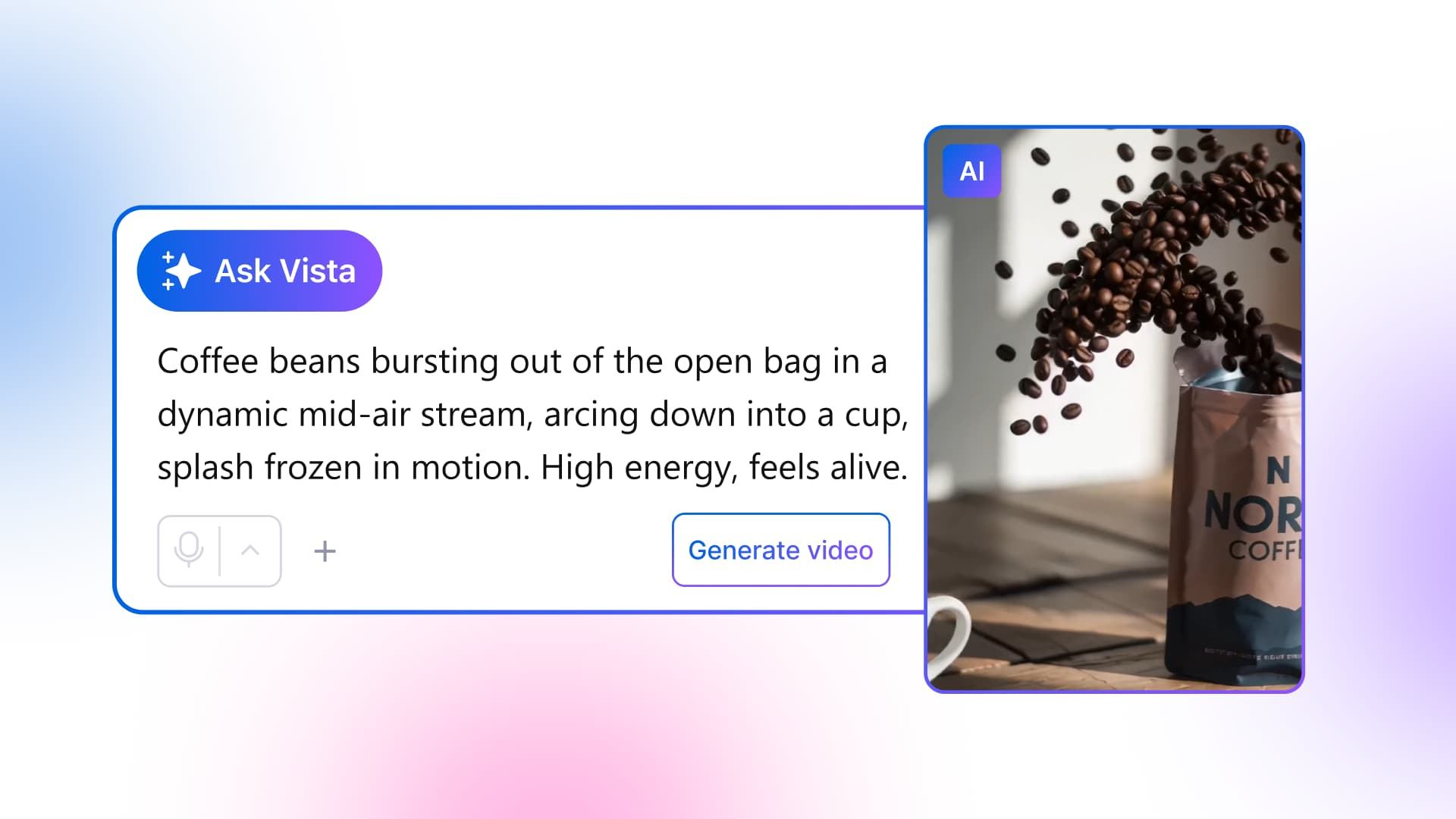
Table of contents
Share

Vista Social

X (Twitter)


It’s 3:40 on a Thursday when the message lands. “Everyone’s doing Reels. Why aren’t we?” You read it twice. You’re a team of one.
There’s no videographer down the hall, no budget for a shoot, no editor, and your calendar is already packed. The old answer forms in your head: we don’t have the setup for that.
But this time you open your scheduler instead. You click into a new post and type a different sentence, not to your boss, to the AI video generator built into your social media scheduler: a warm, slow pan across a coffee shop counter at golden hour.
A couple of minutes later, there’s a vertical clip on your screen. You didn’t film anything. You’re going to publish it before you leave.
All you need to do this yourself is a social media tool with an AI video generator built in, a rough idea of your post’s message, and about 20 to 30 minutes. You won’t need a camera, an editor, or any design software.
A production day was always just an excuse. AI video generation inside your scheduler took that excuse away.
In this article:
- You can make and publish a Reel today with no camera, crew, editor, or design app
- AI video generation built into your scheduling tool turns a prompt into a vertical clip, then lets you caption and schedule it in the same window
- It draws from a shared AI credit allowance, not an unlimited pool, and it’s best for B-roll and concept clips, not for replacing real on-camera content
- One Reel, start to scheduled, fits in a single sitting
Table of contents
Why is your boss suddenly asking about Reels?
Because that’s where the reach moved. Short-form video now delivers the highest ROI of any format of all content types with roughly half of marketers ranking it among their top performers. That’s not a small shift. It means budget, attention, and executive interest are all pointing at the same format.
Meta backs this up with its own numbers. Views and watch time on Reels roughly doubled in the second half of 2025 compared to the year before, tied to the platform’s push toward original, first-made content. An AI-generated clip you made yourself still counts as original. A clip lifted from someone else’s account doesn’t.
None of this happens by accident. Part of it comes down to how short-form video actually gets discovered.
Platforms test a new video with a small audience first, then widen its reach if people watch, share, or comment on it. Reels aren’t winning because the format is trendy. They’re winning because every major platform’s algorithm is built to reward exactly this kind of content, and there’s more of it published every week you sit out.
Your boss isn’t being unreasonable. The tooling just made it feel harder than it actually is.
How do you make a Reel without filming anything?
Closing that gap starts with a sentence. You describe the clip you want, let AI generate it, and attach it straight to your post, no camera, no editor, no separate app required.
AI video generation works by turning a text prompt, or a photo you already have, into a short video clip. Inside a social media tool, it happens right in the composer, so the clip can go on a scheduled post without exporting anything or switching tabs.
Text-to-video means you write a sentence describing the shot you want, and the tool generates footage that matches it. There’s no filming and no editing software involved at any point.
The old version of this looked very different. You’d find a stock clip, download it, open a separate editor, trim it, export it, then re-upload it to your scheduler and discover the aspect ratio was wrong. Twenty minutes became ninety, multiplied by every post you needed that week. When you generate the clip in the same window where you already schedule, you skip every one of those handoffs.
The 5-step way to ship an AI Reel in one sitting
Here’s what that looks like in practice. You write the prompt, generate the clip, attach it, add a caption and sound, then schedule, all in one window. Each step below covers the action and what you should expect to see.
Step 1: Write the one-sentence brief
Decide on your single message first. Then describe the clip you want in a sentence, something like “a cinematic sunset beach scene” or “a slow pan across a coffee shop counter at golden hour.” The more specific your prompt, the better the clip turns out. You should end up with a line you can paste straight into the generator.
Step 2: Generate the clip inside the composer
Open a new post, open the AI Assistant, and choose the video generation option. Paste your prompt and generate.
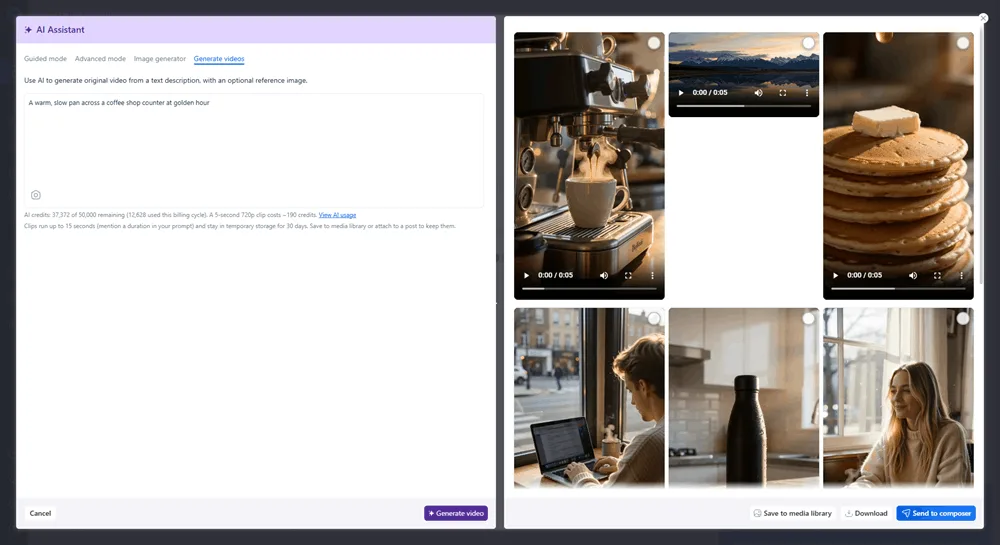
You’ll get one or more vertical clip options to preview. Generation takes a couple of minutes, so this is a good moment to grab coffee, not a good moment to assume something broke.
Step 3: Pick a clip and place it
Preview your options, then send the one you like straight to your draft, or save it to your media library for later. Either path keeps the clip inside your dashboard, so there’s no file sitting on your desktop to track down.
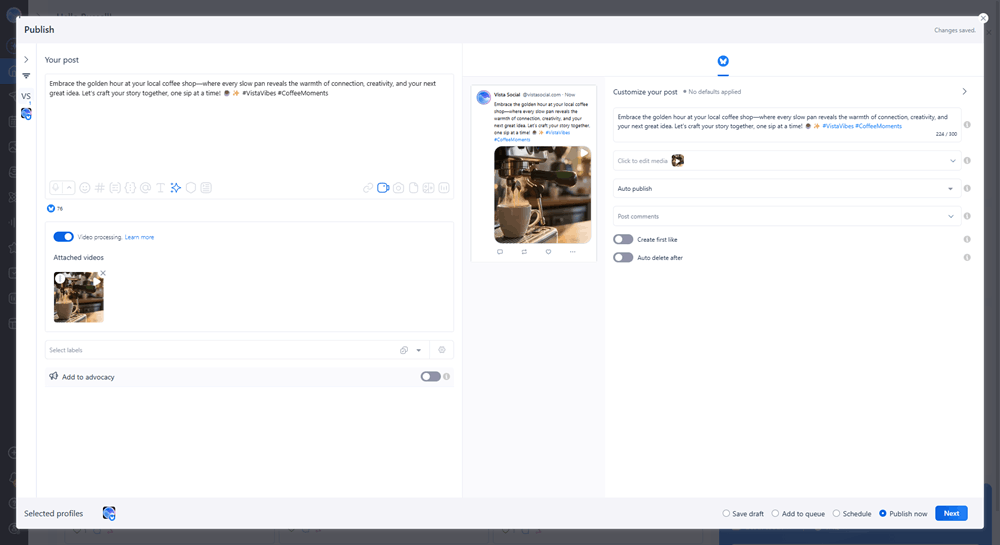
Nothing gets exported and re-uploaded. The clip just lands on your post.
Step 4: Caption it and add sound
Write your caption, or generate a first draft and edit it, keeping the captions in your brand voice so the post still sounds like you. Add trending or licensed audio to the Reel right in the composer. Now you have a publish-ready Reel.
Step 5: Schedule it
Set the time and schedule it the same way you schedule everything else. There’s no separate video step at this point, since it’s just another post waiting in your queue.
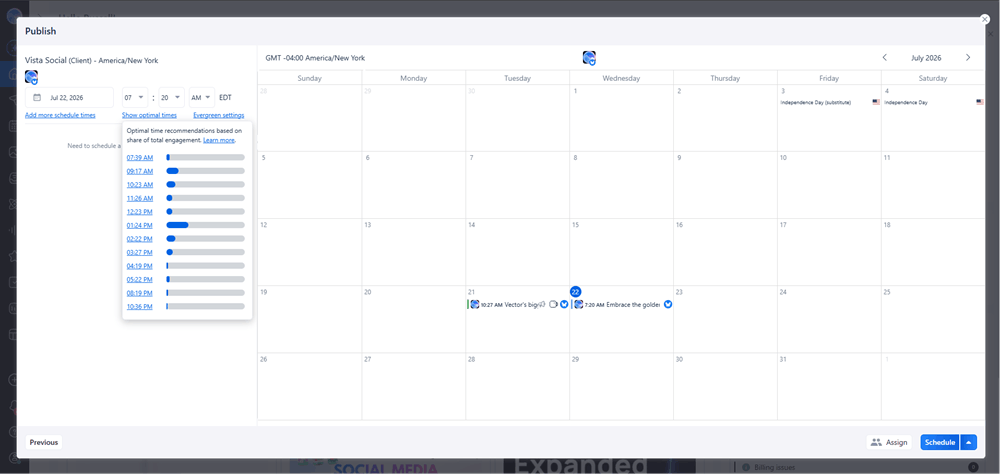
You’ve queued the Reel, and handled the boss ask before your next meeting. If you’re short on what to make next, here are ideas for what your next Reel should actually be about.
What is AI video actually good for (and what it isn’t)?
Once you’ve got the workflow down, the honest question is where AI video fits. It’s great for B-roll, concept clips, and atmospheric footage. It’s not a replacement for you talking straight to camera, or for showing your actual product in real use.
Standalone AI video tools like Canva, HeyGen, and InVideo make genuinely good clips too. The difference is that those tools stop at the file. You still have to carry the clip into your scheduler yourself. Generating inside your scheduler skips that handoff entirely.
Don’t oversell what AI video can do, either. Use it for a slow pan across a product, or an atmospheric backdrop. It also works well as a text-on-motion clip that fills space between real footage. Don’t use it to fake a founder talking to camera or a real product demo. Those moments need an actual human, because that’s exactly where your audience can tell the difference.
Podcaster and creator Pat Flynn argues the most valuable thing a creator can be right now is real. He points to live video as one format AI still can’t reproduce. The same logic applies here. AI can generate the B-roll around your message, but it can’t generate you.
This matters for where Reels fit in your funnel, too. Reels are almost always a top-of-funnel format. They’re built to get someone to notice you, not to close a sale on their own. An AI-generated clip is a fine way to do that job. It’s the wrong tool if your account’s whole appeal is a real person people already trust.
If your audience follows you specifically for your face and your voice, keep filming that part yourself. Generate the B-roll around it instead. AI video is a way to publish more without a studio, not a reason to stop being human on your own channel.
Does AI video eat into a budget or an allowance?
Being honest about what AI video can’t do is only half the picture. The other half is what it costs to use. It’s included in your plan, not billed as a separate add-on, but it isn’t unlimited either. Generation draws from a monthly credit allowance that covers video, image, and caption generation together, and the size of that allowance scales with your plan.
If your team also uses AI for captions or product photos, video generation pulls from the same bucket. Heavy use in one area leaves less room in another. Check your current plan’s allowance before you build a daily habit around this, since the exact numbers can shift as plans change.
If you’d rather compare standalone AI video generators side by side, or you want a shortlist of tools built purely for creation rather than publishing, a full shortlist of standalone AI video tools covers that ground. Just remember that any of those tools still leave you with a file you have to carry into your scheduler yourself.
Your first Reel with an AI video generator is one prompt away
That Thursday message doesn’t have to turn into a project anymore. Video used to mean a shoot you had to staff, schedule, and edit before anything went out. Now it means one sentence, typed into the same window where you already plan your week.
You’ve seen the whole loop by now. Describe the clip, generate it, attach it, caption it, and schedule it, all without leaving your dashboard. None of it needs a camera, a crew, or an editor, and the AI credits it draws on are already part of your plan.
The next time someone asks why you aren’t doing video, you’ll have an answer ready before the meeting even starts. Start your free trial and generate your first Reel today. It doesn’t take a credit card, a crew, or any editing software to get there.
Frequently asked questions
Can you make Reels with AI for free?
Many standalone tools offer limited free tiers. Inside a scheduler like Vista Social, AI video generation is available on a free trial, then it draws from a credit allowance on paid plans. “Free” usually means a capped number of generations, not unlimited use.
How do you make a video for social media without a camera?
You describe the clip you want in a text prompt, and an AI video generator produces it for you. From there, you caption it and schedule it the same way you would any other video.
How long does it take to make an AI Reel?
Generation itself takes about a couple of minutes. Add captioning and scheduling, and the whole task fits in well under 30 minutes.
Is AI video good for Instagram Reels?
It’s good for B-roll, concept clips, and atmospheric footage. It’s not a replacement for authentic face-to-camera content or real product demos, where a human presence is the whole point.
Do AI-generated Reels perform worse?
Not necessarily. Reach depends more on your skip rate, or how many people swipe past in the first three seconds, than on whether a clip was filmed or generated, according to Instagram marketing expert Jenn Herman. A strong hook still matters more than the source of the footage.
Does AI video generation cost extra?
It’s included in your plan and draws from a shared monthly credit allowance rather than billing as a separate add-on. Heavy use will draw that allowance down faster, so check your plan’s current limits before building daily habits around it.
About the Author

Content Writer
Russell Tan is a content marketing specialist with over 7 years of experience creating content across gaming, healthcare, outdoor hospitality, and travel—because sticking to just one industry would’ve been boring. Outside of her current role as marketing specialist for Vista Social, Russell is busy plotting epic action-fantasy worlds, chasing adrenaline rushes (skydiving is next, maybe?), or racking up way too many hours in her favorite games.