


Published on August 21, 2026
9 min to read
How to Get a Social Media Tool Through Your Organization’s AI Review

Summarize with AI

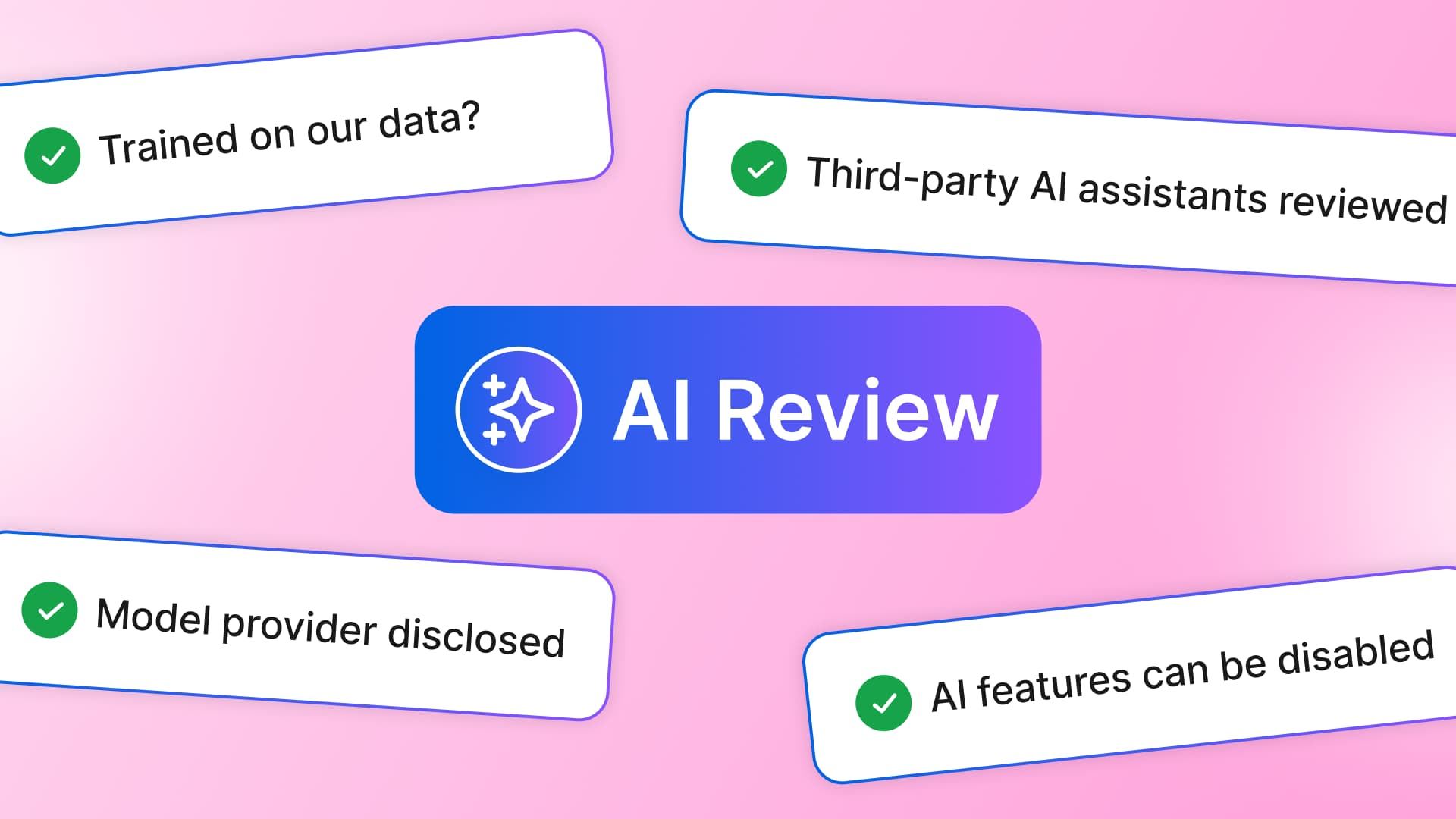
Table of contents
Summarize with AI

ChatGPT

Claude

Perplexity
Share

Vista Social

X (Twitter)


A social media tool can pass its trial, win budget approval, and clear the usual security checks. The team still cannot use it because the purchase has reached a newer gate: AI review.
The reviewers need more than a feature overview because they also want written answers about model training, subprocessors, and off-switches. Their questions may cover outside AI connections and controls across separate clients or business units too.
When answers arrive one at a time, the review can stretch across several meetings. Put the current DPA and a dated subprocessor list in one packet, then add screenshots of the relevant controls so the committee has a complete case to assess.
This guide gives you the six questions to send any social media vendor. It also shows what a useful answer contains and gives you a one-page checklist for the review packet.
The short version
- Collect answers early: Send the six questions to the vendor before you book the internal review.
- Ask for evidence: A setting, current contract clause, or dated vendor list carries more weight than a reassuring email.
- Separate the decisions: Training, feature access, outside AI connections, and per-client controls are different questions.
- Attach one checklist: Give reviewers every answer and document together so they can finish the review in one pass.
Table of contents
Why a tool you already chose is suddenly stuck
AI now helps with captions, media, reports, inbox analysis, and publishing workflows. Its wider role has changed how companies review the purchase because the AI features may need separate approval after the platform clears the standard security check.
Gartner described this buying shift in August 2026. Its procurement guidance says AI now enters a business through software, cloud services, and other purchases, which gives buyers a reason to set shared rules for data rights and governance.
In practice, the review can involve procurement, IT, legal, security, risk, data owners, and the team asking for the software. Katarzyna Fonteyn explained why AI needs its own buying discipline:
“Treating AI as a dedicated category management domain helps organizations improve visibility, strengthen governance and make more deliberate decisions about where critical capabilities should reside.”
Katarzyna Fonteyn, Gartner 2026 guidance
For a marketing buyer, that guidance becomes a practical job: explain what the software may do with company data, who receives it, and how the rules are enforced. The NIST framework helps teams manage those risks, while your internal process turns them into vendor questions.
That process often moves in cycles, and one missing answer can push the request into another meeting. Collect the full packet before the first review, including evidence of the vendor’s approval gates and support for its security claims.
A review is much easier to clear when every answer arrives with evidence the committee can keep.
The six questions your AI review team will ask
These six questions cover the AI issues a marketing buyer can ask without trying to become a security engineer. Send them together and ask the vendor to link each response to a current document or product setting.
1. Do you train your AI on our data?
A useful answer states whether the vendor uses your posts, messages, uploads, or feedback to train or improve a model. It should cover generative AI and predictive machine learning because a broad “we don’t train our AI on customer data” can leave other uses unclear.
Slack’s 2024 privacy debate showed why that distinction matters. TechCrunch reported that Slack’s terms allowed customer data in predictive models by default and required email opt-out, while Slack said its generative AI didn’t train on customer data.
The current Slack policy makes the distinction clear. Customer data can support predictive features, while generative model training needs clear opt-in consent, so one product can have different answers depending on the model and its use.
A data processing agreement, or DPA, is the contract covering how the vendor handles personal data. Ask legal to confirm that it contains a no-training clause covering the approved data and uses, including what happens after cancellation.
2. Who provides the AI?
The social tool may rely on other companies for model hosting, generated media, or cloud services. A subprocessor is a third party that handles customer data while helping the vendor provide part of the service.
Your reviewer needs that chain because each company can have its own location, data rules, and security controls. A feature page won’t answer those questions, so ask for a dated subprocessor list and the vendor’s process for notifying customers of changes.
The list may name several providers because captions, generated media, and analysis can take different routes. Reviewers need enough detail to trace where approved data goes and which agreement governs it.
Vista Social shows how several AI features can sit inside one social platform. Your contract packet should address the providers and data paths behind those features separately.
3. Can we turn the AI off completely?
An acceptable answer points to an admin control and states its scope. A promise that the team won’t use AI leaves the features available, which may fail a policy requiring the product to enforce the decision.
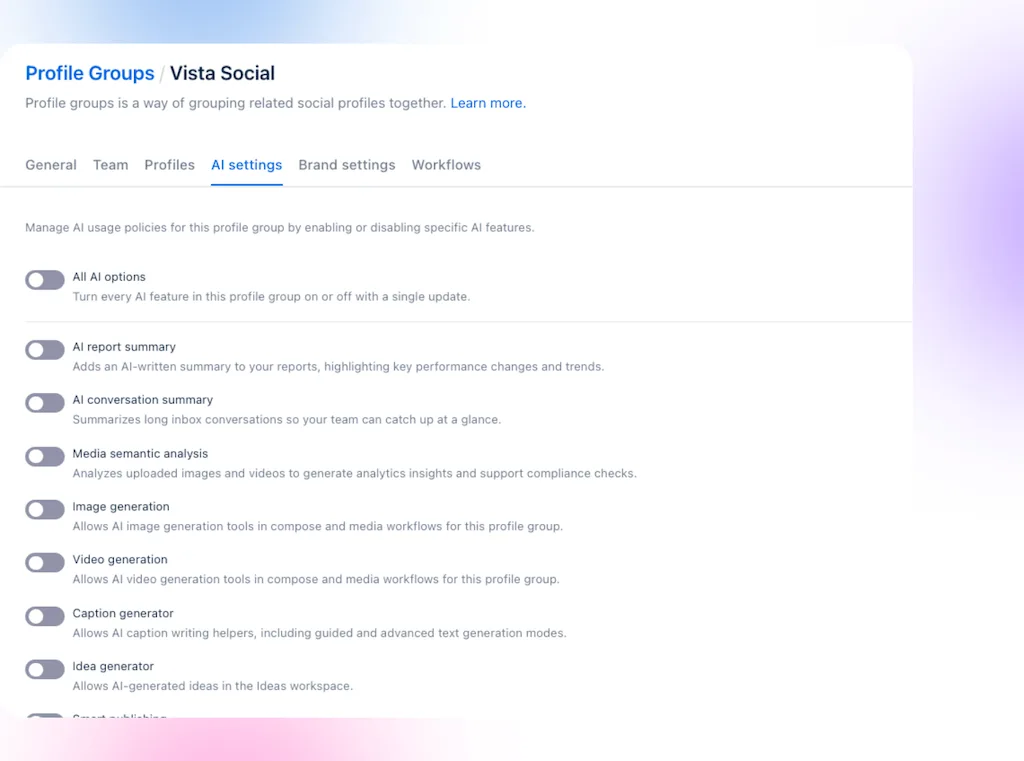
Ask whether the switch covers the whole account, a workspace, a client group, or one user. You should also confirm whether it disables generation, analysis, summaries, and automation together or through separate controls.
4. Can we turn it off selectively?
Selective controls matter when the team wants faster report summaries but can’t use generated images. They also help an agency follow one client’s ban on AI processing while another client allows caption drafts, so the answer should name each available control rather than promise “flexible settings.”
Ask the vendor to walk through each category:
- Generation: Captions, ideas, images, and video.
- Analysis: Sentiment, media analysis, and conversation summaries.
- Automation: Smart publishing, agents, and any workflow that acts on connected accounts.
- Scope: Account, client workspace, business unit, profile group, or user.
- Administration: Who changes the settings and what record shows the decision.
A mixed answer can still help your committee by showing which rules the product enforces and which ones rely on team process.
5. What happens if we connect our own AI assistant?
Connecting an outside assistant creates another route for your data. The social platform controls what it exposes, while the assistant’s provider sets its own storage, training, and admin terms. If your company chooses that assistant, its provider will often need a separate review.
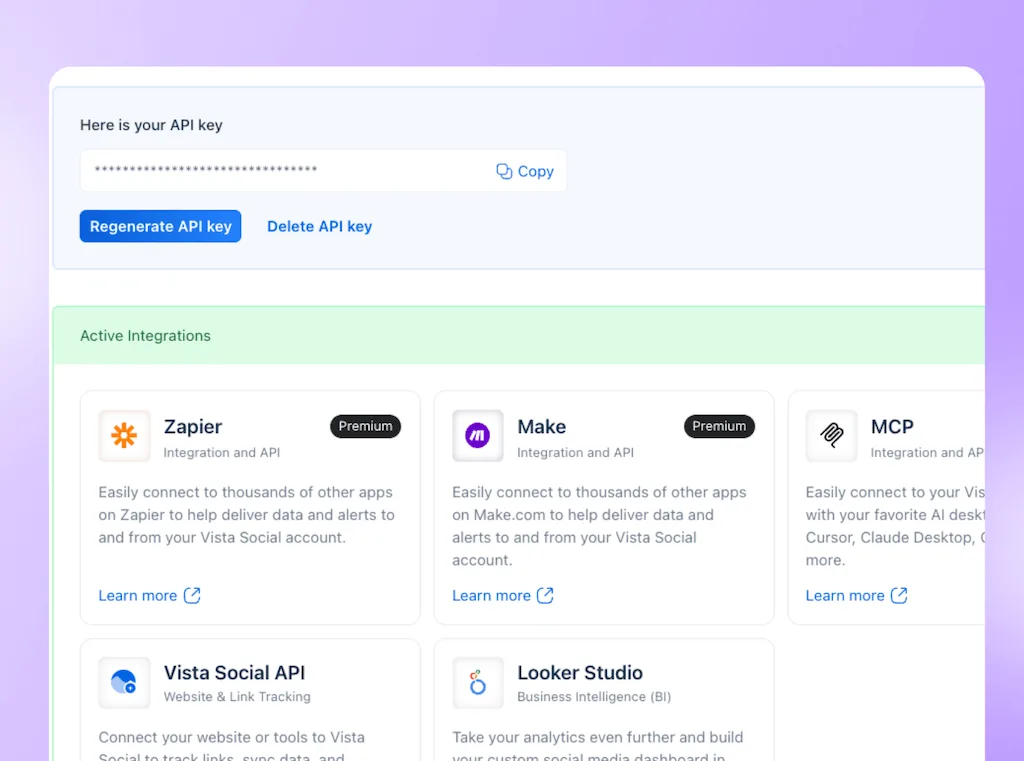
The social vendor should still explain what can leave the platform and show how your team can limit or revoke access.
6. Can we govern AI per client or business unit?
Separate settings matter when a university manages admissions and research accounts or when an agency serves a bank beside a retail client. Each client or business unit may need its own administrator and approved set of AI capabilities.
The reviewer will also ask whether permissions, approvals, and audit history follow the same boundary. A client-level switch offers little protection if any teammate can change it without leaving a record.
Get it in writing
A sales email can point you to the answer, but your reviewer may need a lasting record. Put key promises in the DPA or another signed document legal accepts. These include training, data use, subprocessors, deletion, and notice.
Check the date on your paperwork because an older agreement may cover data security but say nothing about model training. It may also omit generated outputs and outside AI connections.
Keep product controls and contract terms beside each other. The DPA records the vendor’s promise, while the settings show how your team applies it. Our guide to AI controls explains what to inspect in the product.
Use this contract check before you submit the packet:
- Training use: The clause covers prompts, content, messages, files, outputs, and feedback where relevant.
- Provider chain: The current subprocessor list is attached, dated, and paired with a change-notice process.
- Data lifecycle: Retention and deletion terms cover active use and what happens after termination.
- Control scope: The setting shown in the demo matches the client, brand, or business unit under review.
- Owner: Legal confirms the language, and the platform administrator confirms the settings.
The one-page checklist to take into your review
Copy this table into the review request, add the vendor’s answer, and link the proof. “Yes” without a document or setting still leaves the reviewer with work to do.
| AI review question | Vendor answer | Evidence attached | Received? |
|---|---|---|---|
| Does the vendor use our data to train or improve models? | Yes / No | Current DPA and no-training language | Yes / No |
| Which providers and subprocessors support AI? | Yes / No | Dated subprocessor list and change notice | Yes / No |
| Can all AI be disabled? | Yes / No | Admin setting showing the switch and its scope | Yes / No |
| Can features be controlled selectively? | Yes / No | Feature-control list or live settings capture | Yes / No |
| What data reaches an outside AI assistant? | Yes / No | Data-flow explanation, permissions, and revocation steps | Yes / No |
| Can settings differ by client or business unit? | Yes / No | Workspace-level controls, permissions, and audit evidence | Yes / No |
| Are the commitments contractually binding? | Yes / No | Signed DPA, addendum, or accepted contract schedule | Yes / No |
Pair the vendor packet with your internal AI policy. The vendor explains what the product can enforce. Your policy names the permitted uses, banned data, reviewers, and exceptions.
How does Vista Social support an AI review?
Vista Social gives reviewers a public starting point and a direct route for your organization’s needs. Our Security Center documents SOC 2 Type II, SAML 2.0 single sign-on, role-based access, and activity logs. Our subprocessor list names relevant providers and is effective April 11, 2026.
Inside Vista Social, administrators manage AI at the Profile Group level through a master switch and controls for individual features. An agency or enterprise can apply approved settings to each client, brand, or business unit while keeping a person responsible for public actions.
- Security evidence: The Security Center covers certifications, access controls, activity logs, and the route for requesting the SOC 2 report.
- AI controls: Profile Group settings let administrators switch all AI off or manage the listed capabilities individually.
- Procurement support: Enterprise services include custom security questionnaires, negotiated contracts, procurement portal support, and custom DPA terms.
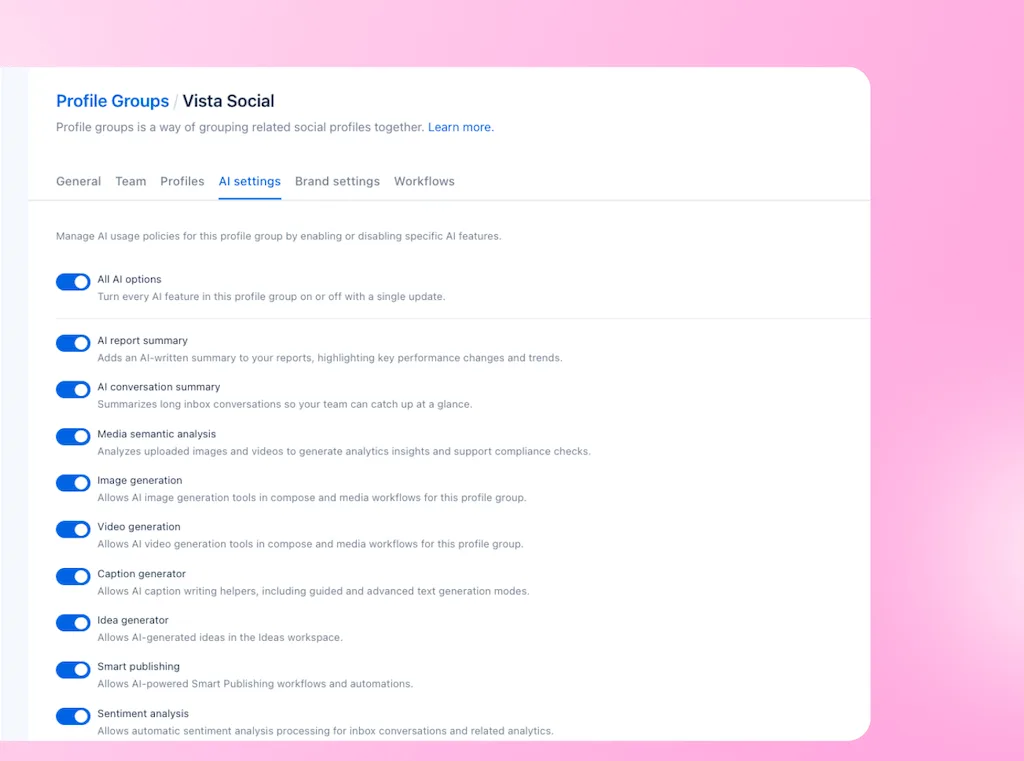
Applying one AI policy across every Profile Group
Set “All AI options” for each Profile Group based on the approved use case, then adjust the features that group can use. Save the settings with the review packet to give your committee a clear record for every client or business unit.
If your organization has a broader control requirement, bring it to the enterprise team before the review. They can work through your Profile Group structure, security questionnaire, procurement process, and contract requirements with the people who will approve the tool.
Legal can request specific contract support
Vista Social’s DPA page gives legal a standard starting point. Enterprise customers can also discuss custom DPA terms and negotiated contracts, so send the team your required language on training, retention, deletion, and subprocessor changes before the committee meets.
Vista Social supports customer security questionnaires and procurement portals, which lets your reviewers receive the evidence in the format their process requires. Sharing those needs early helps the account and security teams build one response instead of answering the same review across several email threads.
Review Vista Social’s security evidence before your meeting, then bring your organization’s contract and control requirements to our enterprise team.
What should you send before the AI review?
Share all six questions with the vendor before the meeting, then build one packet that links every answer to a setting, contract clause, or dated record. The committee can then assess the request without pausing the review to ask for another document.
Every claim should have current proof behind it, and any blank field tells you what to chase before the request reaches the agenda.
If Vista Social is on your shortlist, get started for free and request the current DPA and security packet before your AI review.
Frequently asked questions
My organization doesn’t have a formal AI review yet. Do I still need this?
Collecting the answers now strengthens your recommendation and prevents a scramble during procurement or renewal. Keep the checklist with the tool’s security file.
Why does a no-training clause matter more than a privacy policy?
A privacy policy explains general practices and may change under its own terms. A signed clause gives your company a contract promise for that approved purpose. Legal should check the wording and what happens after cancellation.
The vendor answered everything by email. Is that enough?
The email can help the first conversation, but reviewers may ask for a signed or public record. Use the reply to find the promise. Then ask where it appears in the DPA, addendum, settings, or dated vendor documents.
Who should own the AI review internally?
The marketing lead should collect the use case and vendor answers because they know the planned work. IT, security, privacy, procurement, and legal can then review the areas they own. One named owner should keep the packet current.
Try Vista Social for free
A social media management platform that actually helps you grow with easy-to-use content planning, scheduling, engagement and analytics tools.
Get Started NowAbout the Author

Content Writer
Orion loves to write content that refuses to be boring. As part of Vista Social, he helps brands, creators, and agencies stop doom scrolling and start winning with social media. When he's not in front of a keyboard, he's watching films in IMAX with his wife, dissecting football tactics (the European kind), and getting lost in a good book.