

Published on September 15, 2023
9 min to read
9 Epic YouTube Shorts Ideas to Go Viral This 2025

Summarize with AI

Table of contents
Summarize with AI

ChatGPT

Claude

Perplexity
Share

Vista Social

X (Twitter)


Studies show that YouTube Shorts gets a whopping 50 billion views d-a-i-l-y!
It’s mind-blowing, isn’t it?
Now imagine this…
What do you think will happen if your client gets a measly 1% cut out of that 50 billion daily views?
Scrap 1%. Let’s make it 0.01% instead.
If you do the math, 0.01% of 50 billion is still 5 million.
(We’re talking about daily views, mind you.)
And if you multiply 5 million by 30 (the average number of days in a month), you’ll get 150 million views.
That’s 150 million views month in, month out.
Pretty sweet, huh?
That’s the massive potential YouTube Shorts offers businesses.
The million-dollar question is, what type of YouTube Shorts content should your clients create to have a chance of going viral?
Get your answers from the YouTube Shorts ideas, tips, and tricks that can help boost your clients’ views, subscriptions, and engagement below.
Table of contents
What you’ll learn:
- What are YouTube Shorts?
- Benefits of publishing YouTube Shorts
- 9 YouTube Shorts ideas for viral-worthy content
- Streamline publishing YouTube Shorts
- People also ask
- Turn amazing YouTube Shorts ideas into reality
What are YouTube Shorts?
YouTube Shorts are vertical 60-second (or less) videos.
Shorts are bite-size and mobile-friendly with their vertical format and content that users can create with a smartphone and upload directly to YouTube.
The short-form video is designed to give instant entertainment or information to viewers.
Important considerations before creating YouTube Shorts
Consider these crucial factors before you run off to start creating your clients’ YouTube Shorts:
- Your clients must have a thousand subscribers before creating and publishing YouTube Shorts.
- Your clients’ 60-second Shorts can be a continuous video or several 15-second clips combined.
- YouTube Short videos should be in vertical format with 1920 pixels by 1080 pixels resolution and a 9:16 aspect ratio.
- Your clients can include audio from the YouTube Shorts library.
- Your clients need 1,000 subscribers and ten million Shorts views within 90 days to apply and earn from YouTube’s revenue-sharing program.
Additionally, ensure your clients’ Shorts follow the YouTube community guidelines and policies to avoid potential violations that can get their accounts banned.
Benefits of publishing YouTube Shorts
Creating Shorts on top of making long-form YouTube videos takes extra effort but also comes with additional benefits.
- Boost channel views. YouTube Shorts can help viewers discover more of your client’s content. Capture audience interest with a fun, interesting video and reel them into your clients’ channel, where they can watch other short and long-form content. It helps increase watch time and new subscription opportunities.
- Stay ahead of the game. Don’t let your clients get left behind in the dust by other creators. Help them jumpstart their YouTube Shorts content creation so they don’t miss opportunities to get more views, subscribers, and engagement.
- Establish a brand presence. Creating and sharing YouTube Shorts that align with your clients’ brand values, aesthetics, and messaging helps reinforce their brand identity and establish their online presence.
9 YouTube Shorts ideas for viral-worthy content
Your clients’ YouTube Shorts videos can depend on their goals, brands, and other factors.
But there are topics, elements, and content that have proven to be huge hits with viewers.
Check out the top YouTube Shorts ideas to inspire your client’ first or next video.
1. 60-second brand stories
Make your clients’ brand story exciting and compact by sharing it as a one-minute-long YouTube Shorts video.
For example, your client’s Shorts content can focus on their core values or how they maintain top service or product quality.
Warby Parker nails this with the brand’s version of The Real Housewives TV show.
The brand’s YouTube Shorts content focuses on The Real Store Advisors of Warby Parker and how they assist customers who buy the products at its new physical store.
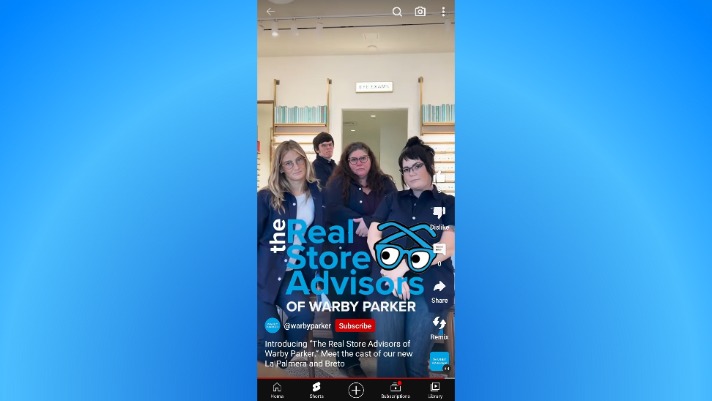
It’s a great way to showcase the service quality and values your clients’ brand upholds without taking itself too seriously.
Creating fun, bite-sized brand stories through Shorts also makes your clients’ videos more engaging and shareable, expanding their reach and visibility.
2. Make them laugh
Who doesn’t like getting instant laughs?
Not the surgeons currently doing brain surgery and need steady hands, but besides them, most people like to get a smile or a good laugh out of short content.
So, if we put two and two together, making funny YouTube Shorts can help your clients’ videos go viral.
Share popular meme videos, behind-the-scenes bloopers, silly skits, and even knock-knock jokes in your clients’ Shorts.
A great example is Oreo’s skit, which shows viewers what to do when you run out of Oreo cookies. It earned more than 41k views.
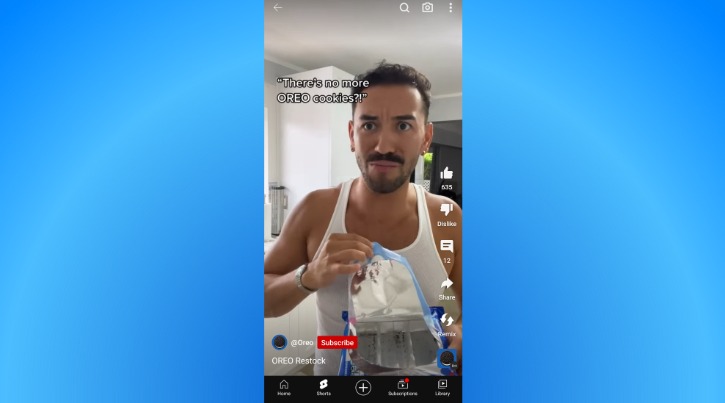
While the idea is to make your clients’ viewers laugh, remember to keep their Shorts videos classy, on-brand, and appropriate.
Don’t make rookie mistakes when your clients get started with creating YouTube Shorts to avoid potential disasters to their brand reputations.
3. Life hacks and pro tips
Share pro tips and life hacks, or show your clients’ viewers how to do something through Shorts.
It’s a great way to share valuable information and teach your clients’ viewers something new without boring them with long, drawn-out videos.
If you nail your clients’ content, the chances of the Shorts going viral go up.
The secret hack or tips and tricks don’t always have to highlight your client’s products or services front, right, and center.
For example, HP’s YouTube Shorts below shares Five Wellness Tips for Positive Mental Health at Work.
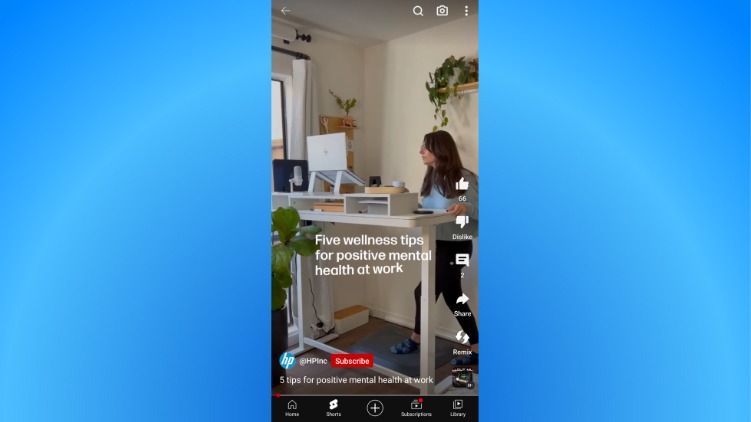
The content provides helpful tips that don’t mention or focus on the products but are still related to the brand’s niche.
It’s subtle yet effective since it can offer your clients’ viewers value without the obvious sales pitch.
The more value your clients’ content offers audiences, the higher the chances of it getting picked up by the YouTube Shorts algorithm, featuring it across more users’ feeds.
Must read: How the YouTube Shorts Algorithm Works.
4. Mini tutorials
Can you teach viewers something in a minute?
Absolutely.
You and your clients need to be creative and strategic with the content.
Creators who share quick recipes and DIY repairs use this tactic the most.
Take a look at the creator below. He shows viewers how to spray paint The Hulk with stencils to cover up a hole in the wall in a little under a minute.
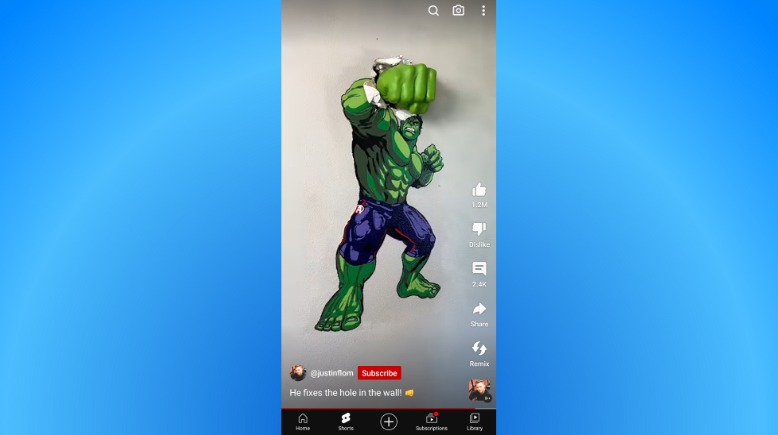
The video’s more than a million Likes prove how creative and well-created educational Shorts can easily go viral.
Your clients’ educational Shorts don’t always have to include the entire tutorial.
For instance, your clients can do a one-minute timelapse of redecorating a home office space and share quick tips.
Then, they can add a Call-to-Action (CTA) to their Shorts, inviting viewers to watch the longer and complete videos on their channels.
It’s one way of sparking viewer interest and enticing them to watch your clients’ long-form YouTube videos.
5. Behind-the-scenes sneak peek
Want to help your clients be more relatable to their audiences and subscribers?
Create YouTube Shorts that take your clients’ viewers behind the scenes.
BTS YouTube Shorts allows your clients to show off their brand’s more relatable, fun, and even “normal” side, helping them connect with their target audience better.
Share YouTube Shorts that show a typical day at the office or a sneak peek into your client’s product development process.
For example, small business YeeYeeApparel shares behind-the-scenes YouTube Shorts to take viewers along the brand’s new product development process.
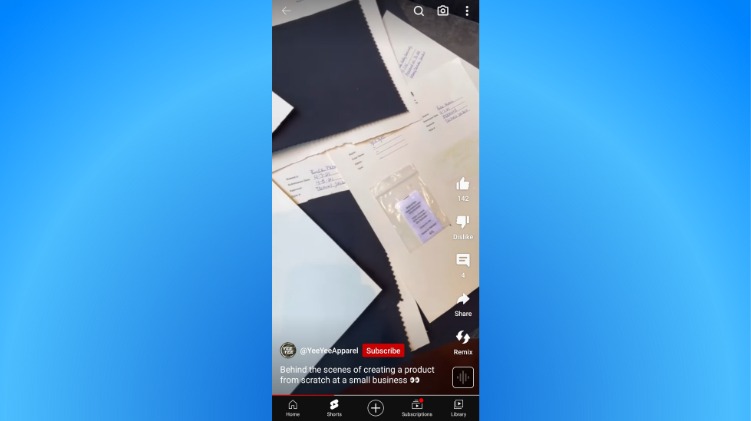
BTS Shorts gives audiences a more intimate look into your client’s business, humanizing their brand and helping them build trust with viewers.
6. Quick product reviews
YouTube Shorts that are too promotional or sales-y can cause viewers to swipe away.
After all, most YouTube Shorts viewers are there for entertainment, so a big sales pitch isn’t likely to go down too well.
A better approach is to share quick reviews of your clients’ products on YouTube Shorts.
No, we’re not saying your clients should review their products and toot their own horns.
Instead, your clients can collaborate with influencers and even other brands to share one-minute reviews of their products.
For instance, an influencer could highlight the top three benefits they experienced using your client’s product in a YouTube Shorts.
Or influencers could include your client’s product in a top products list, like the Top Eight Amazon Home Products review below.
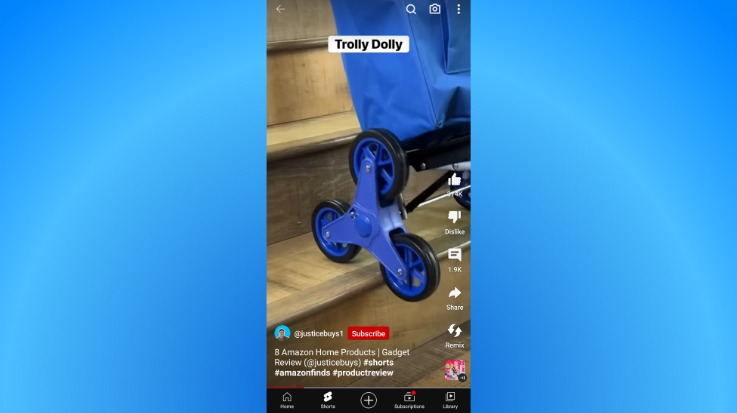
Sharing quick product reviews on Shorts helps put your client’s brand in a great light and builds trust with potential customers.
7. Before and after transformation
Another tactic to promote your clients’ products on YouTube Shorts more subtly is to share before and after videos.
It can be a perfect strategy to showcase how your clients’ products solve customer problems—minus aggressive selling or shameless self-promotion.
Check out the Dining room makeover below.
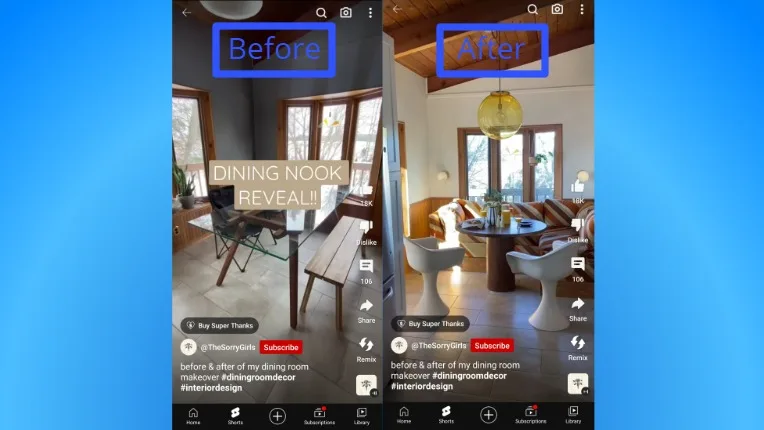
A quick before and after transition in a Shorts video gives viewers a great idea of what they can get from your clients’ products or services.
Add cool transition effects, trending music, cool captions, and other elements to help get more eyeballs on your clients’ Shorts and boost the chances of their content going viral.
8. Exciting unboxing
Get your clients’ viewers excited about new products and entice them to tune in with unboxing videos on YouTube Shorts.
It’s another subtle product promotion tactic because it can help spark an interest in your client’s product.
Think of it as a fun mini preview for your clients’ potential customers, giving them a good idea of what their purchase can include and look like.
For example, your clients can share unboxing videos from customers (with attribution and permission) as YouTube Shorts.
The golden retriever’s unboxing video of his pet subscription box below is a classic example.
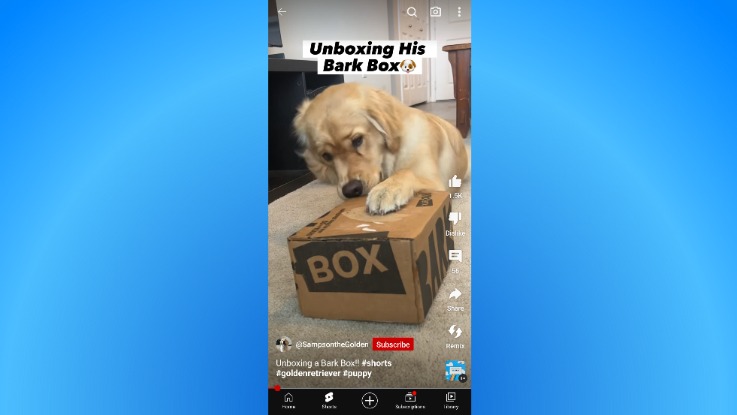
The video sparks excitement and brings out a little happy dance when you open a package.
It is also adorable and enjoyable—content qualities your clients can adopt to help their videos skyrocket to YouTube Shorts fame.
9. Repurpose popular videos
Squeeze the last bit of juice from your clients’ most popular long-form content by turning them into Shorts.
Repurpose your clients’ ebooks, blog posts, and full-length videos into bite-size Shorts that viewers can quickly and easily view.
It can help your clients reach new audiences who don’t usually consume long-form content.
Repurposing content and making it shiny and new as YouTube Shorts can save your clients time and effort since they won’t need to create content from scratch yet.
Your clients will have plenty of reusable, viral-worthy materials to fill their content calendars so they don’t miss opportunities to engage their audience.
Streamline publishing YouTube Shorts
Creating and publishing YouTube Shorts for multiple clients is no easy feat.
So, if you want to stay organized (and sane) and ensure you stick to important schedules and deadlines, harness the power of modern Social Media Management (SMM) platforms like Vista Social.
The platform has robust SMM features to help you plan, manage, schedule, and publish your clients’ YouTube Shorts and long-form videos, including other social media content.
Start by ensuring your clients’ content is the right YouTube video size and length for Shorts.
Next, upload YouTube Shorts to Vista Social and include the #shorts hashtag in the title and description.
Important note: You can’t select custom thumbnails for YouTube Shorts due to YouTube limitations.
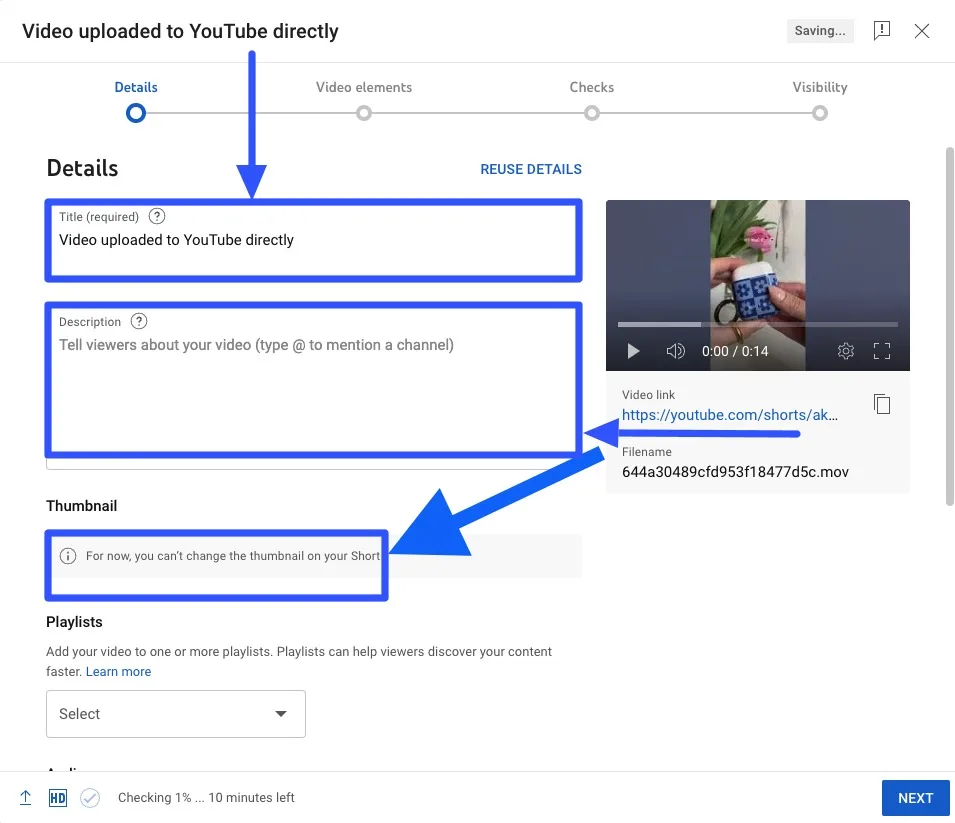
Once done, publish the videos, and you’re all set.
You can also schedule and publish YouTube content across other social media platforms, which is handy if your clients want to share a YouTube video on Instagram Story.
This way, you won’t need to log in to each client’s profile and share or repost content manually, saving you time and energy.
Leverage Vista Social’s other sophisticated YouTube management tools for business.
For instance, the platform’s social inbox helps you manage your clients’ subscriber comments, messages, mentions, reviews, and shares efficiently, especially if you work with a team.
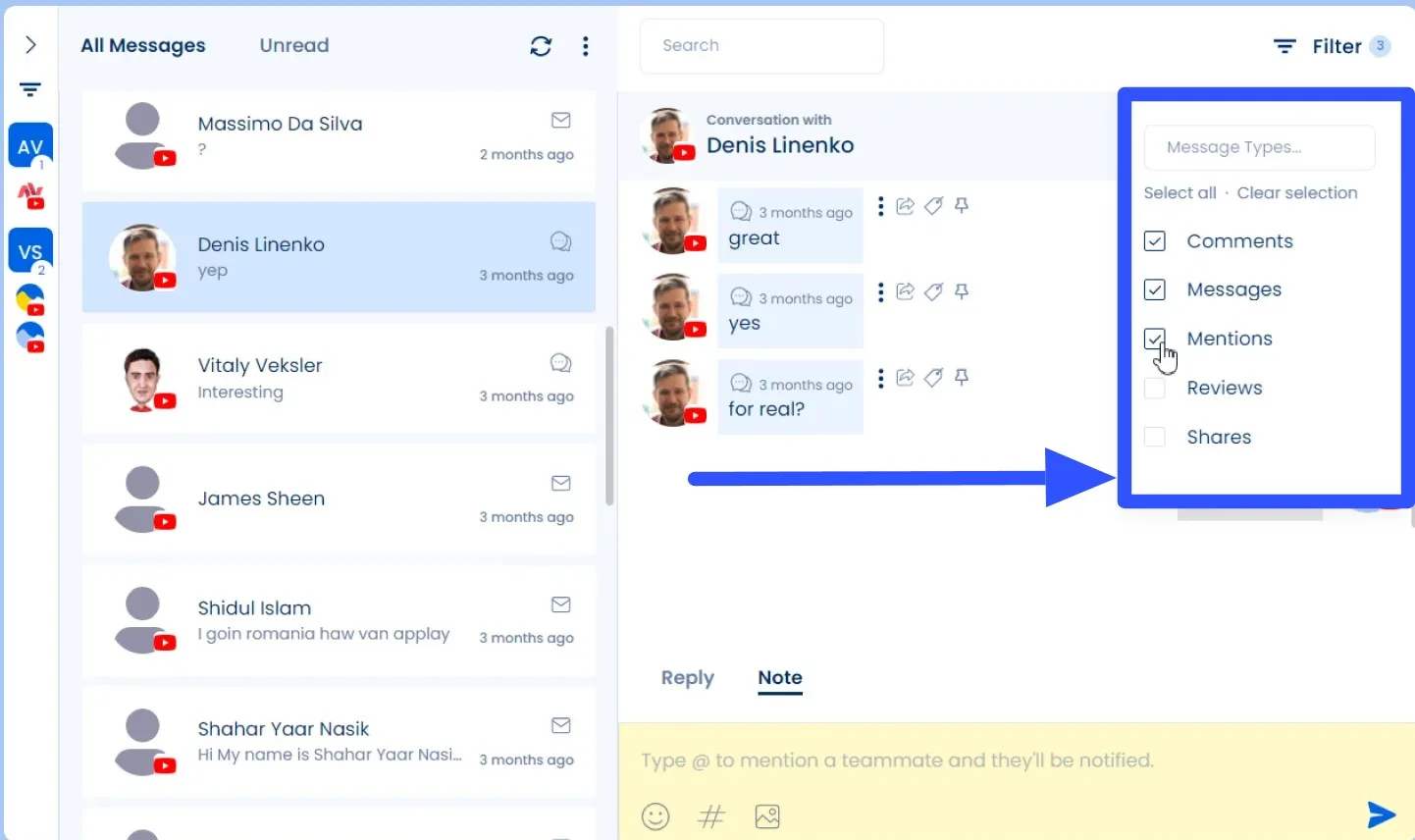
Vista Social’s content scheduler lets you create and schedule your clients’ YouTube videos for auto-publishing on optimal dates and times.
It saves you from the time and effort it takes to publish each client’s content manually.
You can also draft posts for your clients’ YouTube channels and keep track of all the content in a shared content calendar.
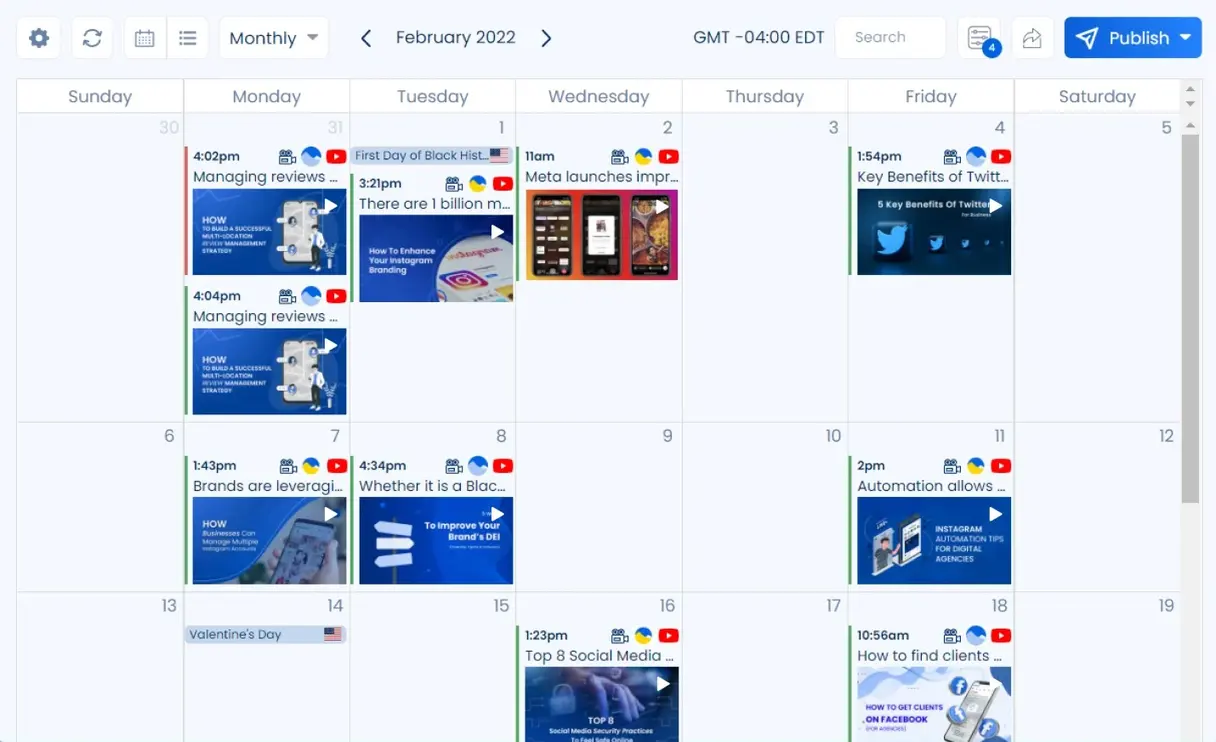
Vista Social simplifies and supercharges managing and publishing your clients’ YouTube and other social media content.
It makes life easier as a social media manager while helping your clients improve their content’s performance and drive better results.
People also ask
Can you monetize YouTube Shorts?
Yes.
YouTube pays 45% of the net revenue from YouTube Premium allocated to monetizing Shorts creators. A part of the YouTube Premium revenues are allotted to cover music licensing costs.
Each creator payment is based on their share of subscription Shorts views in each country.
If you’re a frequent viewer yourself, you might want to check out this VPNOverview guide on how to get a YouTube Premium discount – it could save you money depending on your location.
How many Shorts should you post a day?
The consensus is to post twice or thrice daily to help grow your client’s YouTube brand account quickly and make their content go viral.
Posting more frequently gives your clients better chances of achieving their YouTube Shorts goals.
How many hashtags should you include in Shorts?
YouTube lets creators add up to 30 hashtags per Short.
However, it’s vital to balance out hashtags by using enough to reach your clients’ audiences but not too many that the content looks suspicious and spammy.
The general rule is to use five to ten hashtags for each Short.
Turn amazing YouTube Shorts ideas into reality
There is no short supply of viral-worthy YouTube Shorts ideas that you can build upon to create winning content for your clients.
Start with the YouTube Shorts ideas in this guide.
The Shorts ideas are proven and tested to work and are used by influencers who are currently racking up massive views and engagements.
Also, make producing, distributing, and managing your clients’ YouTube Shorts videos smooth and easy with Vista Social.
Try Vista Social for free to see it in action.

Try Vista Social for free
A social media management platform that actually helps you grow with easy-to-use content planning, scheduling, engagement and analytics tools.
Get Started NowAbout the Author

Content Writer
Jimmy Rodela is a social media and content marketing consultant with over 9 years of experience, with work appearing on sites such as Business.com, Yahoo, SEMRush, and SearchEnginePeople. He specializes in social media, content marketing, SaaS, small business strategy, marketing automation, and content development.
Loading related tools...

The most complete social media management platform for teams who demand more.






Tools
PublishingAnalyticsEngagementIntegrations
FacebookInstagramLinkedInRedditSnapchatThreadsTikTokX (Twitter)YouTubeMCPVista Page (link-in-bio)All IntegrationsCopyright © 2026 Vista Social LLC. All Rights Reserved.