It gets brutal when you’re drowning in social media work. You jump from reports to replies while trying to create fresh content, all while hoping your calendar doesn’t collapse on you.
That kind of load builds pressure fast. When it hits, cracks in your workflow start to show. You feel the scramble, the guesswork, the moments where you wish the whole system held together better.
This is why social media SOPs matter. They give your team a clear baseline, so no one waits for direction or improvises the next step. With that foundation in place, the chaos softens. Your days feel steadier because every move follows a path you can trust instead of reactive choices that drain you.
In this guide, you’ll learn what a social media management SOP is and how to build the ones that fits your daily work. Once each piece connects, your workflow becomes easier to manage. You gain control over the pace, not the other way around.
Table of contents
What are social media SOPs?
Social media marketing SOPs are written instructions that outline how to handle recurring tasks. They outline each step so your workflow stays stable even when different people work on the same account.
This removes guesswork and keeps your quality steady across posts or replies. It also gives you a clearer path to manage multiple accounts without confusion.
A strong social media SOP sets firm expectations for how content moves from planning to approval. It also defines what a finished deliverable must include before it goes live.
Teams rely on SOPs for daily engagement, platform routines, reporting, or content production since these tasks never stop.
Why are social media SOPS so important?
Alexus Brittain, social media manager here at Vista Social, puts it this way: “SOPs give your social team the clarity they need to do their best work. When everyone knows exactly what ‘great’ looks like, you get consistency, stronger content, plus a workflow that supports creativity instead of slowing it down.”
Her insight highlights the real impact of SOPs. These benefits stand out once your workflow runs on documented steps instead of memory:
SOPs improve consistency: Tasks follow the same standard each time, which keeps your output steady even when multiple people rotate through the work
SOPs reduce pressure: Your team no longer scrambles to remember every detail because the process is documented, which steadies performance during tight deadlines
SOPs speed up decision-making: People stop asking for repeated clarification because they can reference a single source that removes uncertainty
SOPs strengthen training: New contributors ramp up faster because the process is clear, which cuts handholding and keeps your day from slowing down
SOPs protect quality: Steps stay intact even during busy cycles, which keeps mistakes low and keeps every deliverable on the same level
SOPs support growth: As your workload expands, you can shift tasks or add contributors without losing control of your operation
Each of these benefits builds a level of structure that gives your team more room to focus on the actual work. SOPs remove confusion, keeping your operation cleaner, faster, and far more manageable when things get busy.
Social media SOP use cases
Here are the common areas where SOPs have the greatest impact. Each one removes guesswork while giving your team a clear path to follow.
Team member or client onboarding
An onboarding SOP gives new contributors a clear path from the moment they join. Instead of guessing how things work, they see each tool or step laid out in front of them. That early clarity removes the usual hesitation that shows up on day one. New team members settle in faster because the process feels more predictable than overwhelming.
Vista Social helps you carry that momentum forward.
You can bring clients or contributors onto the platform with a simple setup, keeping the transition smooth. Once inside, roles control who can access each brand, so the workspace stays organized while your team gets comfortable with the tasks ahead.
What this SOP should include:
A short overview of the platforms or clients they’ll support
Access instructions for tools, folders, and shared assets
Role expectations and communication preferences
A checklist of early tasks to complete during onboarding
A link to the full SOP library they’ll follow in their work
Clear instructions for requesting support when they get stuck
An outline of the workflows they will participate in during their first week
Social media platform protocols
Each platform behaves differently. Documenting how to post or schedule content prevents uneven execution. This helps your team switch platforms without constant clarification.
Vista Social makes this even easier because contributors only need to learn one workspace to publish across various platforms. When publishing, you simply tick the social icons for the profiles you want to post on. This increases the efficiency of your process, making your workflows much quicker and clearer.
What this SOP should include:
Posting steps tailored to each platform’s interface
Rules for formatting captions, links, and hashtags
Guidance on handling comments or direct messages
Timing recommendations for publishing content
Notes on platform-specific limitations or quirks
Brand voice and messaging
A brand voice SOP serves as a guide that shows your team how the brand sounds when it speaks. Instead of guessing how a caption should land, your contributors know where to look the moment they sit down to write.
During busy cycles, this reference serves as a steady hand, keeping the tone from drifting. New people join the workflow feeling grounded because the SOP gives them a sense of the brand’s personality before they craft a single line.
When a team lacks clear voice rules, captions can shift without warning. One post feels calm while the next feels sharp, which makes the feed lose its identity. A strong voice SOP keeps that from happening by giving everyone the same starting point. Writers feel more confident because they know the voice they are stepping into, not the voice they have to invent.
What this SOP should include:
A simple description of the brand’s personality
Phrases that fit the brand and ones to avoid
Examples of approved caption styles
Guidelines for responding to common audience messages
Directions on how to adjust tone for different content formats
Rules for handling sensitive topics that require extra care
Reference examples of posts that reflect the brand voice accurately
Content creation processes
A content creation SOP shows how ideas move from concept to draft to design. It also highlights the checkpoints that keep production from stalling. You can reinforce this flow inside Vista Social by organizing your media library so raw files, approved assets, or design-ready materials stay in one place.
This gives your team a clean path from early concept to final creative since everyone works from the same pool of resources.
What this SOP should include:
A clear path from brainstorming to draft
Instructions for handing off copy to design
Requirements for asset dimensions and file types
Quality checks before content moves to approval
A list of tools used for writing or creative work
Compliance requirements
A compliance SOP acts like the quiet guide that keeps your team out of trouble before a post ever reaches the feed. Instead of wondering which rules apply, your contributors follow a path that keeps each step safe.
Reviewers lean on it during tight moments because it gives them one place to check what counts as compliant. With that clarity in hand, your team moves with calm confidence, knowing exactly what must be cleared before publishing.
What this SOP should include:
Industry or legal requirements tied to your content
Steps for reviewing sensitive or restricted topics
Rules for handling data or personal information
Required disclaimers for specific post types
Instructions for documenting compliance checks
Guidelines for using third-party assets without violating rights
Escalation steps for content that needs legal review
Content approval processes
An approval SOP specifies who reviews the work and when the review must occur. This removes roadblocks by giving your team a clear path that each piece must follow before publishing. A social media tool with a built-in approval flow helps you run this process with less friction.
Vista Social lets you create your own approval workflow so you only include what you need. Go to Settings → Publishing Settings → Approval Workflows. A simple pop-up walks you through the setup so you can build a flow without bloat.
Since you control each step, your workflow stays lean, easy to run, plus steady under deadlines.
What this SOP should include:
A sequence that shows each review step
Names or roles responsible for approval
Required feedback formats for reviewers
Rules for urgent or same-day approvals
Expectations for final sign-off before publishing
User-generated content (UGC) usage
A UGC SOP shows your team how to bring community content into your workflow without risking missteps. Instead of guessing which assets are safe to use, your contributors follow a path that keeps every choice clean.
The moment a post from your audience catches attention, the SOP steps in to guide the next move. Reviewers know when to ask for permission, when to hold off, or when something fits perfectly. This gives your creators confidence since they know the process treats community posts with respect.
What this SOP should include:
A method for identifying strong UGC
A message template for requesting permission
Storage rules for approved UGC assets
Requirements for crediting creators
Restrictions on modifying user content
Guidelines for verifying the authenticity of user submissions
Steps for documenting permission approvals for future reference
Rules for handling UGC that features minors or sensitive situations
Employee advocacy
When employees share branded posts, you want their voices to elevate the brand rather than send mixed signals. An advocacy SOP guides your employee advocacy program so each person knows how to contribute without second-guessing their choices.
Picture a team member who wants to celebrate a launch. With the SOP in place, they can open the guide, grab the right language, and then post with confidence. The brand stays consistent, the employee feels empowered, plus the message reaches your audience with clarity.
What this SOP should include:
A simple explanation of how employees can participate
Approved messaging they can use in their posts
Topics employees should avoid for safety or clarity
Instructions for handling questions they receive online
Visual guidelines for images or graphics
Crisis management
A crisis management SOP outlines who responds and which actions to take when something unexpected hits your feed. It gives your team a steady protocol so you can act with clarity instead of reacting on instinct. One of the strongest ways to improve this process is to leverage social listening to spot issues before they turn into public problems.
Vista Social helps with this by monitoring conversations that involve your brand. Its social listening tool tracks unusual activity or rising negative sentiment so you know when something needs attention.
Once you see a pattern, your team can review the situation, decide on the next step, then adjust your messaging. This creates a smoother response since you base your actions on real data instead of guessing what triggered the shift.
What this SOP should include:
A list of scenarios that qualify as a crisis
Roles responsible for communication during an event
A timeline for how quickly teams should respond
Escalation steps for issues that intensify
Instructions for pausing scheduled content
How to write a social media SOP
Writing a social media SOP becomes easier once you break it into clear steps. Each step shows you how to shape the process, document it cleanly, and then prepare it for your team. This keeps the final SOP tight, rather than bloated with details no one needs.
Your goal is to build a reference that stays simple to follow yet strong enough to support your workflow.
Define the purpose, task, or process
Start by clarifying what the SOP should help you accomplish. This could be a repeating task, a platform routine, or a workflow that needs structure before more people join in.
Define where the task begins or ends so unrelated steps do not slip in. This sets the scope and prevents the SOP from expanding beyond what your team actually needs.
Select your SOP format
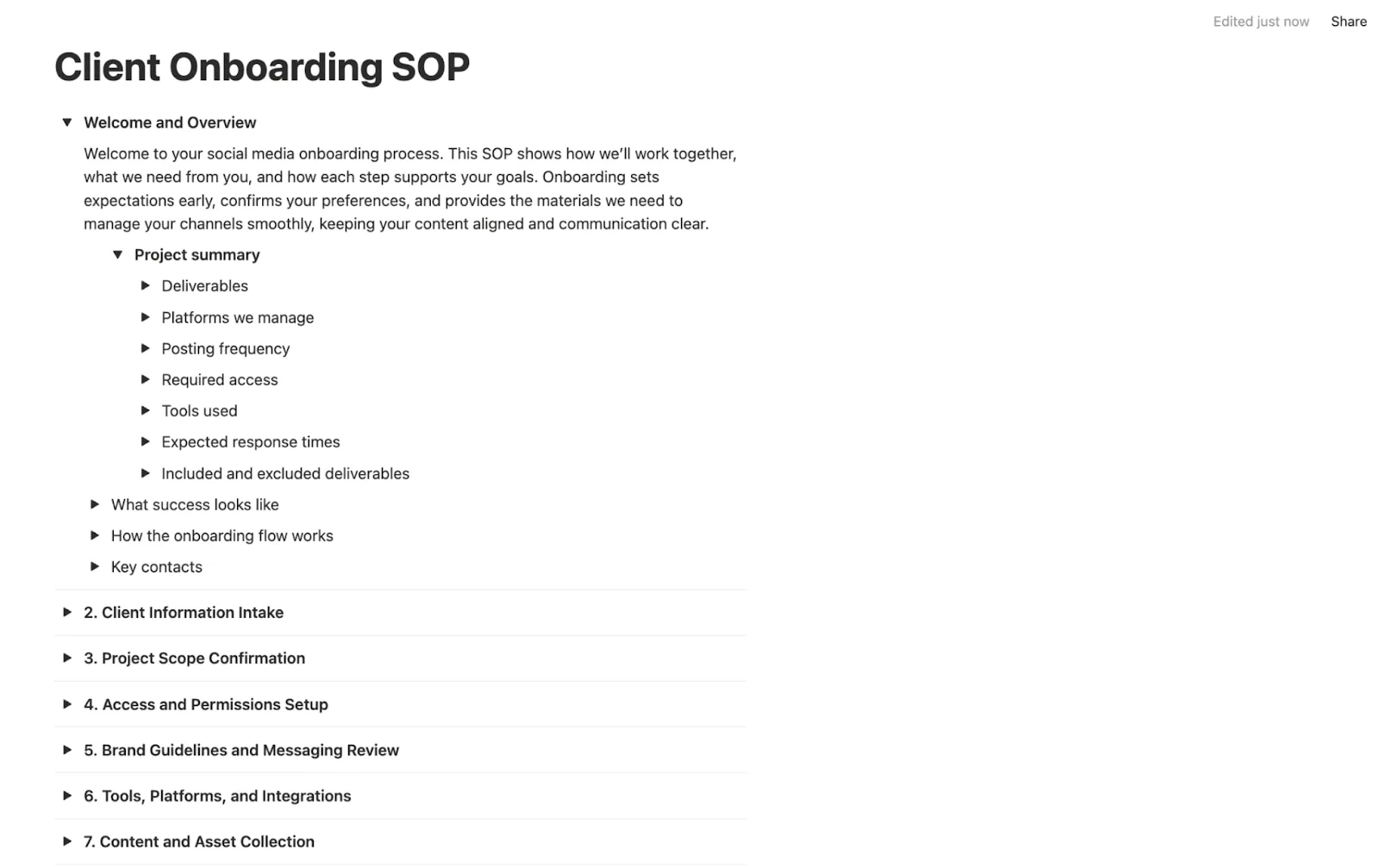
Choose a format that matches the task’s complexity and your team’s preferred way of working. An SOP can sit inside a document or a Notion board. It can also take the form of a flowchart or an infographic that lays out each step along a visual path. Some teams want checklists or layered steps that guide people through a task in a simple, sequential order.
Notion works well when you want a cleaner layout. You can collapse steps inside toggles so the SOP stays neat while giving people room to expand each part only when they need it. This keeps long procedures from looking overwhelming at first glance.
The best part is that Notion even has SOP templates that you can build upon so you don’t have to start from scratch.
Pick the format your team can follow without friction. The right layout helps the SOP blend into the workflow instead of getting in the way.
Write out the procedure
Once you know the steps, write them in the order they happen. Use short instructions that guide your team from one action to the next without confusion. Include only what matters so no one gets lost in extra commentary.
Your goal is to make the task feel predictable even when someone completes it for the first time.
Get input from stakeholders
Before finalizing the SOP, show it to the people who handle the task each day. They can spot missing details or steps that do not match how the work actually flows. Their feedback removes gaps that would have slowed your team later. This makes the document stronger and easier to trust.
Keep your SOPs up to date
Social platforms shift often, so your SOPs need updates to stay useful. Review them when tools change or a process starts to feel outdated. Small adjustments keep the SOP relevant, so your team does not drift into different routines. This also ensures your workflow stays aligned with your current goals.
Store your SOPs in an easily accessible place
Your SOPs only help if people can find them fast. Keep them in one shared space so contributors always know where to look before starting a task.
Choose a location your team already uses so you do not add another tool to learn. When access remains simple, the SOP becomes part of the workflow rather than an afterthought.
Social media SOP best practices
Your SOPs become far more useful when they follow a structure your team can recognize instantly. A clear naming system plus defined ownership help people find the right document without slowing down.
A shared storage location also removes friction since contributors know exactly where to look. These foundations turn your SOP library into something people rely on rather than avoid. When the setup stays simple, the workflow that follows becomes easier to maintain.
Name each SOP with a direct title: Make the title descriptive enough, so contributors know what the SOP covers before they open it. This keeps the library easy to scan as it grows. A clear title sets the tone before the first sentence, so people step in already knowing what journey they are about to follow.
Assign a single owner for updates: One person must handle reviews or revisions so outdated steps do not linger after the workflow shifts.
Store SOPs in one shared location: Keep them inside a central folder or workspace your team already uses. This lets contributors find the right file without having to search through scattered tools. When everything lives in one home, people develop the habit of checking it before taking action.
Use a consistent structure for all SOPs: A steady format helps people understand how each document flows. It also makes long-term maintenance easier when new SOPs join the library.
Add links to supporting materials when needed: Templates or brand assets should be easy to access inside the SOP, so no one wastes time hunting for them.
Review SOPs whenever processes shift: Update them when tools change or when a step no longer fits your workflow. This keeps the library aligned with how the team works today. Regular updates turn the SOP library into something that grows with your operation rather than stays stuck in the past.
Create your social media SOP library today
Building an SOP library improves your team’s workflow by ensuring each recurring task follows a clear path. Once the structure is in place, you feel a clear shift in how fast your team moves through planning or production.
Vista Social brings those steps to life by giving you one workspace where client accounts, approvals, media files, or performance data sit in a layout that matches how your team already operates. Agencies get the most value from this setup since everything they need to act on is in one place.
If you’re ready to build a workflow that holds up under pressure, now is the moment to bring your SOPs and tools together. Create your agency workspace in Vista Social and see how it fits the structure you already built.
Social media SOP FAQs
What is an SOP for social media?
A social media SOP is a documented set of steps that shows your team how to complete a repeating task from start to finish. It explains what must happen, who handles each part, plus what the final result should look like. This keeps your workflow steady even when new contributors join or responsibilities move. It becomes a guide your team can trust during busy cycles.
What are the main parts of an SOP?
A strong SOP includes the task’s purpose, the steps involved, and the roles responsible for each action. It also lists the tools people need, so nothing slows the process. Many teams add notes or links that support the task, which helps the SOP work as a daily reference. These elements keep the document predictable and simple to follow.
What are the most important SOPs for a social media team to have?
Most teams start with SOPs for content creation, approvals, engagement, plus platform routines since these tasks show up each day. These documents keep output steady while preventing confusion when roles rotate.
You might also add voice guidelines, compliance checks, or crisis procedures, depending on your workload. Together, these SOPs provide the foundation that keeps your social program running smoothly.
Try Vista Social for free
A social media management platform that actually helps you grow with easy-to-use content planning, scheduling, engagement and analytics tools.
Jimmy Rodela is a social media and content marketing consultant with over 9 years of experience, with work appearing on sites such as Business.com, Yahoo, SEMRush, and SearchEnginePeople. He specializes in social media, content marketing, SaaS, small business strategy, marketing automation, and content development.
Loading related tools...
By continuing to use this site you consent to the use of cookies in accordance with our cookie policy.









Social media SOP use cases
Here are the common areas where SOPs have the greatest impact. Each one removes guesswork while giving your team a clear path to follow.
Team member or client onboarding
An onboarding SOP gives new contributors a clear path from the moment they join. Instead of guessing how things work, they see each tool or step laid out in front of them. That early clarity removes the usual hesitation that shows up on day one. New team members settle in faster because the process feels more predictable than overwhelming.
Vista Social helps you carry that momentum forward.
You can bring clients or contributors onto the platform with a simple setup, keeping the transition smooth. Once inside, roles control who can access each brand, so the workspace stays organized while your team gets comfortable with the tasks ahead.
What this SOP should include:
Social media platform protocols
Each platform behaves differently. Documenting how to post or schedule content prevents uneven execution. This helps your team switch platforms without constant clarification.
Vista Social makes this even easier because contributors only need to learn one workspace to publish across various platforms. When publishing, you simply tick the social icons for the profiles you want to post on. This increases the efficiency of your process, making your workflows much quicker and clearer.
What this SOP should include:
Brand voice and messaging
A brand voice SOP serves as a guide that shows your team how the brand sounds when it speaks. Instead of guessing how a caption should land, your contributors know where to look the moment they sit down to write.
During busy cycles, this reference serves as a steady hand, keeping the tone from drifting. New people join the workflow feeling grounded because the SOP gives them a sense of the brand’s personality before they craft a single line.
When a team lacks clear voice rules, captions can shift without warning. One post feels calm while the next feels sharp, which makes the feed lose its identity. A strong voice SOP keeps that from happening by giving everyone the same starting point. Writers feel more confident because they know the voice they are stepping into, not the voice they have to invent.
What this SOP should include:
Content creation processes
A content creation SOP shows how ideas move from concept to draft to design. It also highlights the checkpoints that keep production from stalling. You can reinforce this flow inside Vista Social by organizing your media library so raw files, approved assets, or design-ready materials stay in one place.
This gives your team a clean path from early concept to final creative since everyone works from the same pool of resources.
What this SOP should include:
Compliance requirements
A compliance SOP acts like the quiet guide that keeps your team out of trouble before a post ever reaches the feed. Instead of wondering which rules apply, your contributors follow a path that keeps each step safe.
Reviewers lean on it during tight moments because it gives them one place to check what counts as compliant. With that clarity in hand, your team moves with calm confidence, knowing exactly what must be cleared before publishing.
What this SOP should include:
Content approval processes
An approval SOP specifies who reviews the work and when the review must occur. This removes roadblocks by giving your team a clear path that each piece must follow before publishing. A social media tool with a built-in approval flow helps you run this process with less friction.
Vista Social lets you create your own approval workflow so you only include what you need. Go to Settings → Publishing Settings → Approval Workflows. A simple pop-up walks you through the setup so you can build a flow without bloat.
Since you control each step, your workflow stays lean, easy to run, plus steady under deadlines.
What this SOP should include:
User-generated content (UGC) usage
A UGC SOP shows your team how to bring community content into your workflow without risking missteps. Instead of guessing which assets are safe to use, your contributors follow a path that keeps every choice clean.
The moment a post from your audience catches attention, the SOP steps in to guide the next move. Reviewers know when to ask for permission, when to hold off, or when something fits perfectly. This gives your creators confidence since they know the process treats community posts with respect.
What this SOP should include:
Employee advocacy
When employees share branded posts, you want their voices to elevate the brand rather than send mixed signals. An advocacy SOP guides your employee advocacy program so each person knows how to contribute without second-guessing their choices.
Picture a team member who wants to celebrate a launch. With the SOP in place, they can open the guide, grab the right language, and then post with confidence. The brand stays consistent, the employee feels empowered, plus the message reaches your audience with clarity.
What this SOP should include:
Crisis management
A crisis management SOP outlines who responds and which actions to take when something unexpected hits your feed. It gives your team a steady protocol so you can act with clarity instead of reacting on instinct. One of the strongest ways to improve this process is to leverage social listening to spot issues before they turn into public problems.
Vista Social helps with this by monitoring conversations that involve your brand. Its social listening tool tracks unusual activity or rising negative sentiment so you know when something needs attention.
Once you see a pattern, your team can review the situation, decide on the next step, then adjust your messaging. This creates a smoother response since you base your actions on real data instead of guessing what triggered the shift.
What this SOP should include: