


Paid Ad Management With AI: 20 Ask Vista Prompts for 10 Networks
November 27, 2026
10 min read

Summarize with AI

Table of contents
Share

Vista Social

X (Twitter)


Most teams that run ads on more than two networks spend their Monday the same way. Open Meta Ads Manager, export. Open LinkedIn Campaign Manager, export. Open Google Ads and export. Paste it all into a spreadsheet, then try to work out why one campaign stopped spending on Thursday.
Ask Vista Ads Manager handles that kind of paid ad management from one chat. It reads your connected ad accounts on Meta (Facebook and Instagram), LinkedIn, TikTok, Pinterest, Snapchat, X, Reddit, Google Ads, Microsoft Ads, and OpenAI Ads (ads in ChatGPT). It can also make changes, but only after you approve them.
Below are the 20 prompts from our own walkthrough of the feature, grouped the way you’d use them in a week. Copy them as they are, or swap in your own networks, budgets, and dates. Short on time? Start with #7, #1, and #18.
Table of contents
How changes work before you start
Reading is instant. Changing anything follows three rules:
- You approve every change: Before Ask Vista creates, pauses, or edits anything, it shows a Confirm card with the ad account, the items, the budget, the targeting, and the ad copy. Nothing happens until you confirm.
- New campaigns start paused: Campaigns, ads, and boosts made in Ask Vista are created paused. Turning one on is a separate step, with its own confirmation.
- Admins set the limits: In Settings > Profiles and Ads > Ad Accounts, an admin sets a daily budget cap per campaign, an optional monthly spend limit, and what Vista Social may do on each account: everything, pause and lower only, or read only.
With that in mind, here are the prompts.
Get everything in one place
These two show the thing no single network’s ads manager can do: report on all of your networks from one sentence.
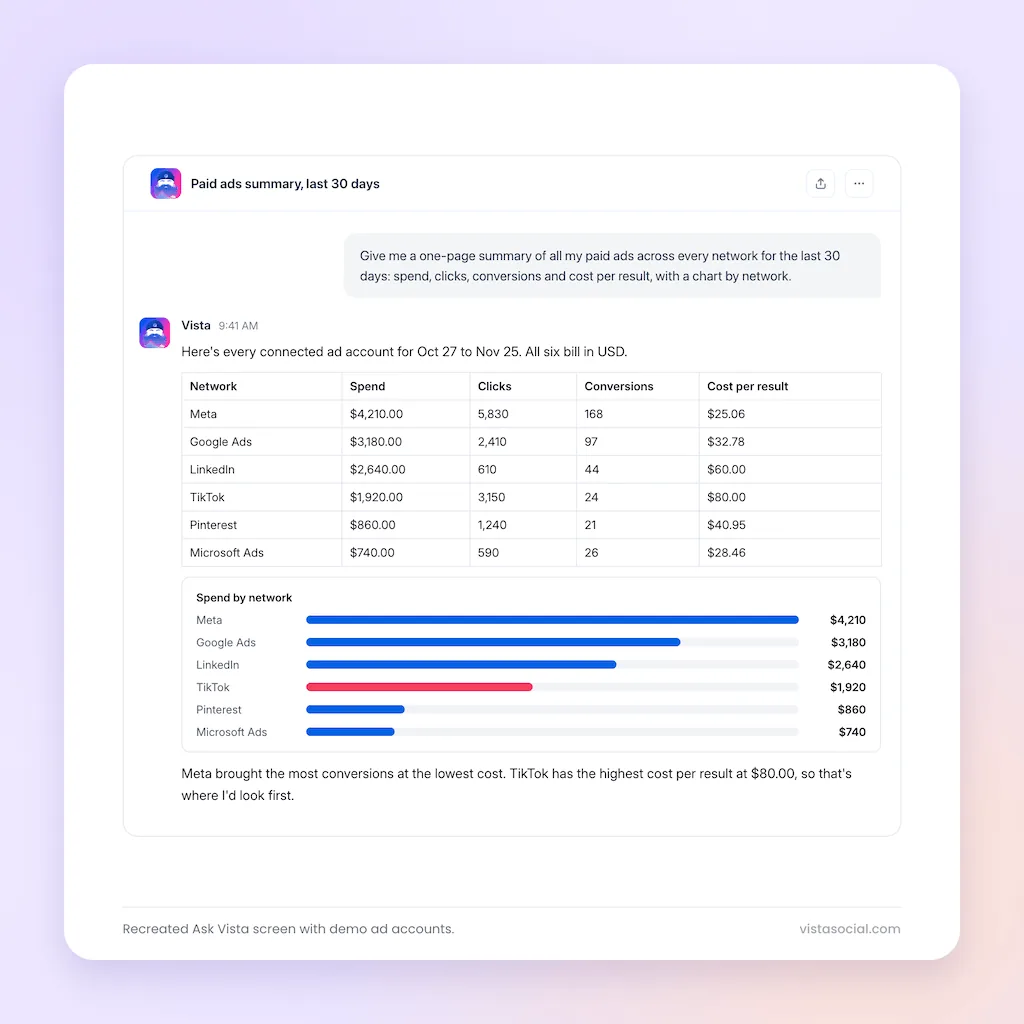
1. Summarize every network
You get one table and one chart instead of ten exports. Ask Vista pulls the numbers live from each network and says which dates it covered.
If your ad accounts bill in different currencies, each one is reported in its own currency. Ask Vista reads up to 10 ad accounts at a time, so if you manage more than that, name the accounts you want.
2. Find the cheapest clicks and the weakest spend
This is the question you’d normally answer with a spreadsheet and a VLOOKUP. Ask Vista compares cost per click and cost per result across networks and points at the campaigns spending without much to show for it.
Cheap clicks aren’t always good clicks, so check the results column before you move money.
Ask the questions an analyst would
3. Compare this month to last month
Ask Vista compares periods of the same length and leaves out the last few days, because conversions keep arriving for days after a click. Then it looks for the cause. A drop in click-through rate with steady spend often points to creative fatigue, so it checks the ads themselves.
4. See who’s clicking on LinkedIn
LinkedIn breaks results down by job title, job function, seniority, industry, company, and company size.
You’ll see whether your budget is reaching decision makers or interns. LinkedIn’s audience numbers are approximate, and Ask Vista says so. Our LinkedIn ads review guide covers what to do next.
5. Find Google searches that spend and never convert
The search terms report is where PPC budgets leak. Ask Vista reads it directly, along with keywords, Quality Score and impression share, on both Google Ads and Microsoft Ads.
Google hides some low-volume searches for privacy, so the report won’t account for every cent (Google explains why).
6. Break down Meta results by audience and placement
Meta’s breakdowns are exact and add up to the total, so you can trust the split. Ask Vista shows which age groups and placements (feed, Stories, Reels) bring results at the lowest cost, then suggests where to shift spending.
Meta doesn’t combine age with placement, so you get two views: age and gender together, then placement. Our Meta ads review guide goes deeper on reading these.
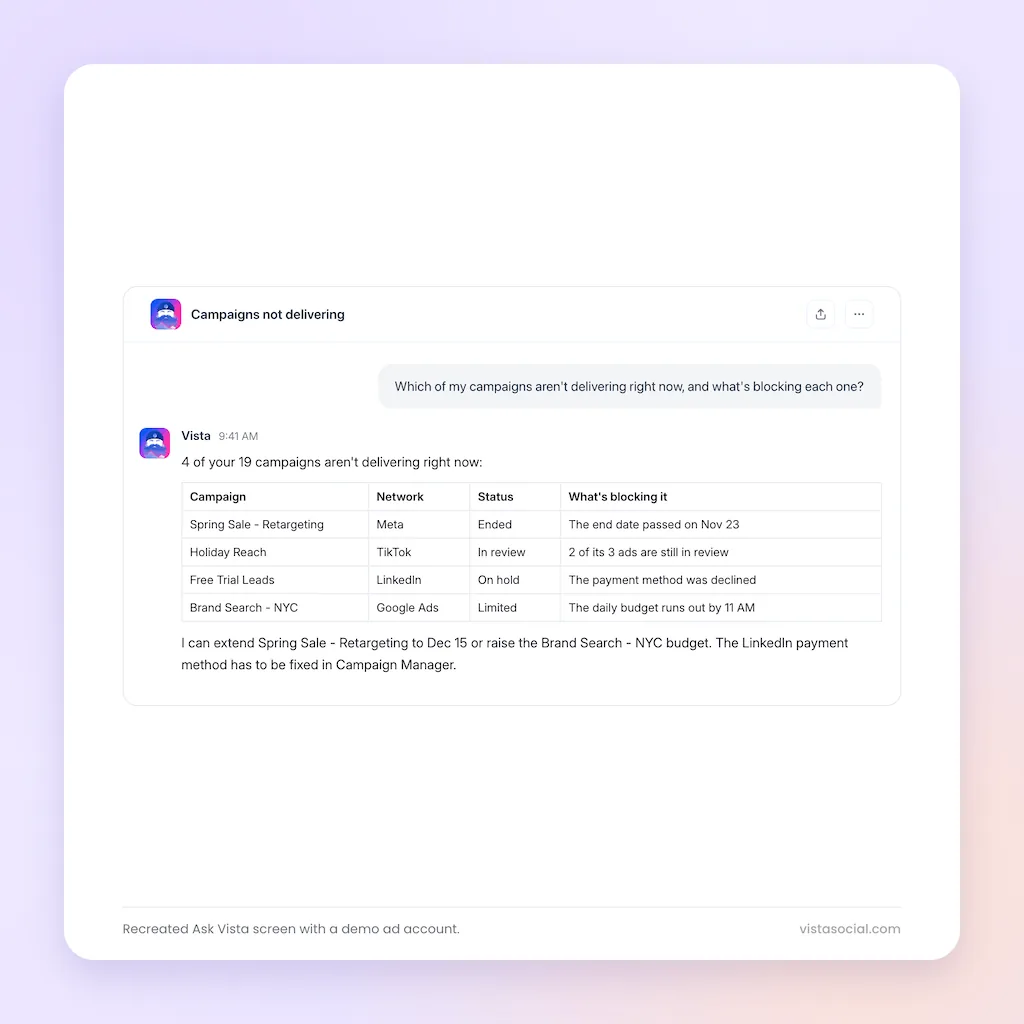
7. Find what isn’t delivering
If you only try one prompt from this list, try this one. Ask Vista checks every campaign’s status, dates, budget, and review state, plus the network’s own delivery reason, and tells you the cause in plain words: an end date that passed, an ad still in review, a billing problem, or an ad set with no budget.
Review your creative
8. Compare your best and worst Meta ads
You see the actual ads side by side with their results, not just ad IDs in a table. Ask Vista then looks for the pattern: the hook, the format, the offer, and the length of the copy. Treat what it finds as your next test, not a rule.
9. Write new variations from a winning Pinterest ad
The new copy is based on your own results, not a generic template. Ask for more if you want them, then put the ones you like into a campaign (see prompt 11).
Make changes, with a card first
Every prompt in this section ends with a Confirm card. The card shows the exact budget, targeting, and copy, and new campaigns start paused.
10. Boost your best Instagram post
Ask Vista finds the post by its organic results, then builds the boost. The 5 days start when you turn it on, not when it’s created. You can boost a published post on Meta, LinkedIn, TikTok, Pinterest, Snapchat, X, and Reddit. Each network is its own boost and its own card.
11. Create a LinkedIn campaign
Ask Vista sets the job titles and places, writes a new ad from your post’s copy, and runs it as your LinkedIn Page. If you want a lead campaign, point it at a lead form that already exists on your Page.
12. Build a Google search campaign
You get keyword suggestions with match types, a responsive search ad with headlines and descriptions written to Google’s character limits, and city targeting. Google builds the campaign in one step, so if anything is refused, nothing is half-built.
The keywords are suggestions, not Keyword Planner volumes, so check those in Google Ads if the budget depends on them.
13. Copy a Meta campaign for a new market
That’s two steps, each with its own card: first the copy, then the new location. Locations change one ad set at a time, so a campaign with three ad sets gets three location cards. The copy includes the campaign’s ad sets and ads, and the campaign starts paused.
The ad sets and ads inside keep the on or off state they had in the original. Copying works on Meta, LinkedIn, TikTok, Pinterest, Snapchat, and X.
14. Add negative keywords
Three words that stop paying for clicks from people who will never buy. Check your search terms first, though. If you sell training, “course” might be your best buyer. This works on Google Ads and Microsoft Ads at the campaign or ad group level.
Move budget to what’s working
These two turn analysis into action in a single sentence.
15. Pause expensive ads
Ask Vista finds the ads, lists them on the card with their cost per click, and pauses up to 50 at a time once you confirm. It’s a one-time action, not a standing rule. Pick a threshold that fits your account, since $3 is cheap on LinkedIn and expensive on Meta.
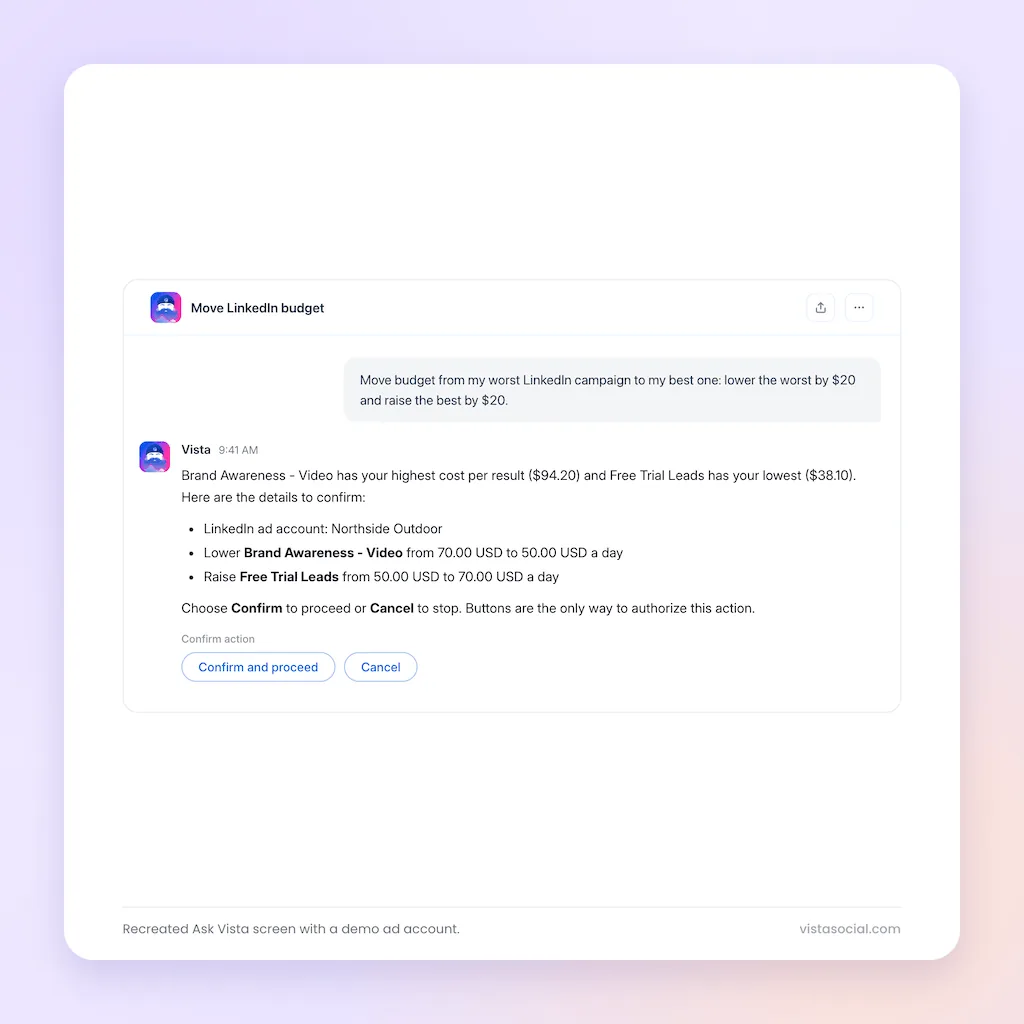
16. Shift budget between LinkedIn campaigns
Ask Vista picks both campaigns by cost per result and shows the old and new daily budgets. They’re two separate budget changes, so if the raise is refused (say it goes over your daily cap), the cut still goes through. Ask Vista tells you which ones landed.
Test the limits on purpose
This part matters most to agencies and to anyone handing ads to a junior teammate.
17. Try to break the cap
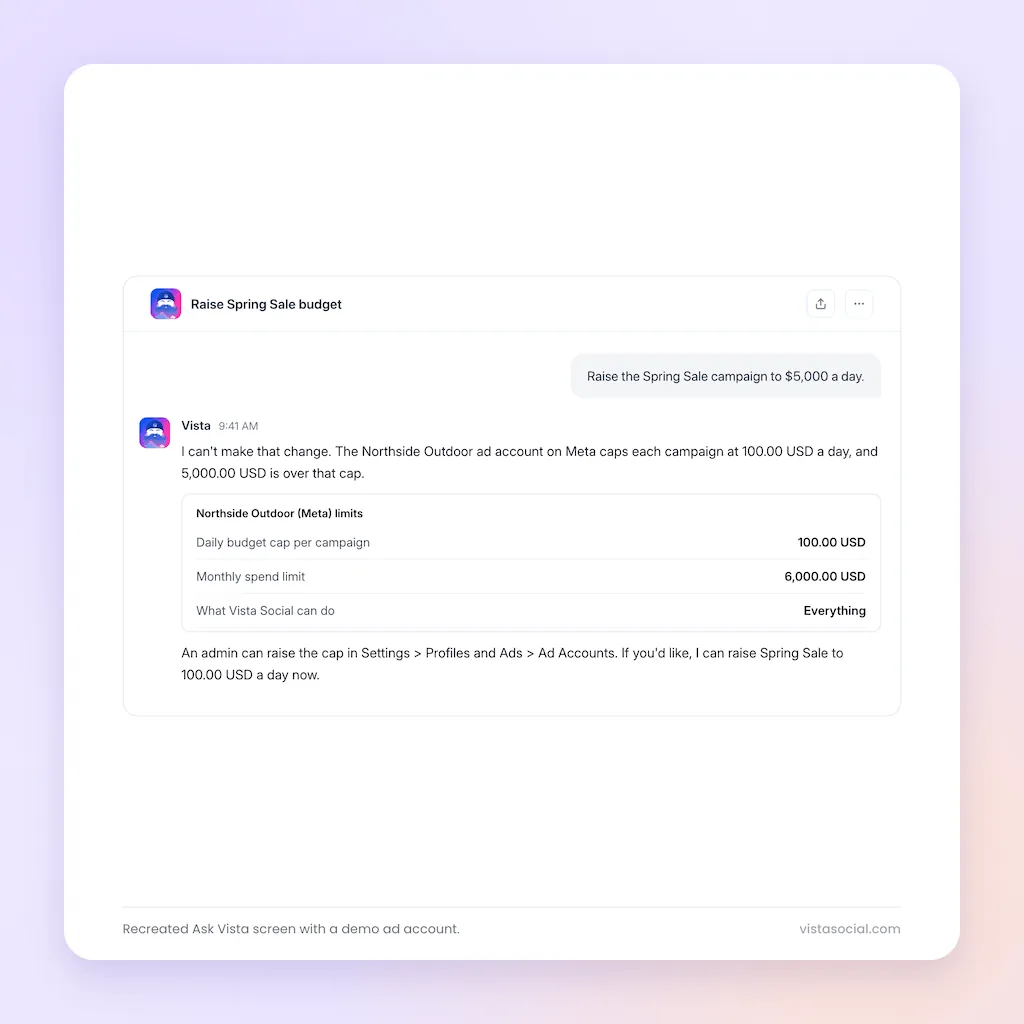
Try this on a test campaign, not a live client account. First set the account’s daily budget cap to $100 in Settings > Profiles and Ads > Ad Accounts. Ask Vista refuses before any Confirm card appears, and names the cap. Then switch the account to “Pause and lower only” and try to launch something. It can still cut budgets and pause ads, but it won’t raise, rename, or launch.
Permissions sit on each person too. A teammate with Ads View can read every number but never gets a Confirm card for a change.
Put the reporting on a schedule
Scheduled agents in Ask Vista can read and report. They can’t change your ads, so a schedule never launches or raises anything on its own. Campaigns that are already live keep running as usual.
18. Get a Monday summary
This replaces the Monday spreadsheet from the start of this post.
19. Watch your monthly spend
Once an account hits its monthly limit, Ask Vista stops making changes on it, but campaigns already running in the network keep spending. The warning gives you time to decide what to pause.
One more: connect paid and organic
20. Find posts you never boosted
Ask Vista already knows your published posts, not only your ads. It can see which posts did well organically, which of them were boosted, and what those ads spent. That’s the list of proven creative you haven’t paid to show yet. Pair it with prompt 10.
What it won’t do
Being clear about this saves you a support ticket:
- It won’t spend without your approval, and scheduled agents can’t make changes at all.
- Google Ads and Microsoft Ads campaigns are Search only. It doesn’t create YouTube, Display or Performance Max campaigns.
- Reddit is boosts and reporting. Full Reddit campaigns are built in Reddit Ads Manager.
- It can’t boost Facebook or Instagram Stories.
- It uses lead forms, pixels, and audiences you already have. It doesn’t build new ones.
- Billing, identity checks, and ad appeals still happen in each network’s own ads manager.
Start with three prompts
You don’t need all 20 on day one. Pick one account you know well and run these:
- #7 to find what isn’t delivering.
- #1 to see every network on one page.
- #18 so next Monday’s summary shows up on its own.
How to get it
You can set it up yourself in a few minutes. Connect your ad accounts in Settings > Profiles and Ads > Ad Accounts, set your daily caps, then open Ask Vista and start with prompt 7. Check the pricing page to see which plans include Ads Manager, or start your free 14-day trial.
The same tools also work in Claude and ChatGPT through the Vista Social connector. Those apps don’t show a Confirm card, so they ask for your go-ahead in the conversation instead. Your account’s caps and permissions still apply.
That means prompts 5, 12 and 14 work as ChatGPT prompts for Google Ads too, run against your real account instead of a pasted export.
P.S. If you’re new here, Vista Social is the social media management platform for enterprise brands, multi-location businesses, agencies and small teams.
More than 30,000 brands and agencies use it to publish, engage, listen, report and manage reviews across every network. Larger teams get the approvals, permissions and security they need, and small teams get AI agents that keep social running without a full-time hire.
About the Author

Content Writer
Orion loves to write content that refuses to be boring. As part of Vista Social, he helps brands, creators, and agencies stop doom scrolling and start winning with social media. When he's not in front of a keyboard, he's watching films in IMAX with his wife, dissecting football tactics (the European kind), and getting lost in a good book.