


Meta Ads Optimization With Ask Vista
November 24, 2026
9 min read

Summarize with AI

Table of contents
Share

Vista Social

X (Twitter)


When a Meta campaign isn’t bringing the results you expected, the next step isn’t always another creative or a higher budget. You might be comparing different conversion events, looking at a placement without its delivery context, or judging an ad set while it’s still learning.
Across several locations, those differences become harder to untangle. One team wants more inquiries, another says the leads aren’t booking, and finance sees a healthy-looking cost per result. You need to know whether the issue is delivery, measurement, or what happens after someone submits a form.
Ads Manager in Ask Vista lets you investigate connected Meta campaigns, ad sets, and placements in one conversation, then prepare a supported change for review. This guide shows how to use it for Meta ads optimization, from reading the setup to checking lead quality and choosing what to do next.
Work through it with the person running your ads. You’ll use two ad sets to make the comparison concrete, but the aim is to understand what’s happening in your Meta account, not to pick a winner from the lowest CPL.
Table of contents
Before you start
Have two Meta ad sets, the account name, their IDs, and a CRM export ready. Ads Manager is available on Advanced and higher plans. Your Meta ad account must be linked to a connected Facebook or Instagram profile.
- Set the roles: Ads View allows investigation. Changes require an Admin or Manager role and an account access level that permits the action.
- Read first: Keep the investigation read-only until you’ve decided which action, if any, the findings support.
- Keep gaps visible: Ask for unavailable fields to be named, not filled in or treated as zero. Check missing settings in Meta Ads Manager when they affect the decision.
1. Read the ad set setup
Ask Vista to read the settings alongside the results. On Meta, the optimization event, conversion destination, and attribution setting are part of the explanation, not background detail.
Cost per result is spend divided by the results counted for the chosen goal and reporting settings. Ask Vista distinguishes Instant Form leads from website conversion events, so don’t compare form submissions with a combined conversion total that also includes purchases or registrations.
Match these before comparing cost:
- Objective, optimization event, and conversion destination.
- Each ad set’s attribution setting and the reporting basis used for the returned results.
- Offer, locations, audience, placements, and dates.
Ask Vista
Compare [Ad set A ID] and [Ad set B ID] in [Meta ad account] for [start date] to [end date]. Show spend, Instant Form leads, website leads, and cost per relevant lead separately. Read each ad set’s optimization event, destination, attribution setting, audience, and placements. State the reporting attribution basis and any unavailable fields.
The attribution answer should identify both ad sets; an account-level summary isn’t enough.
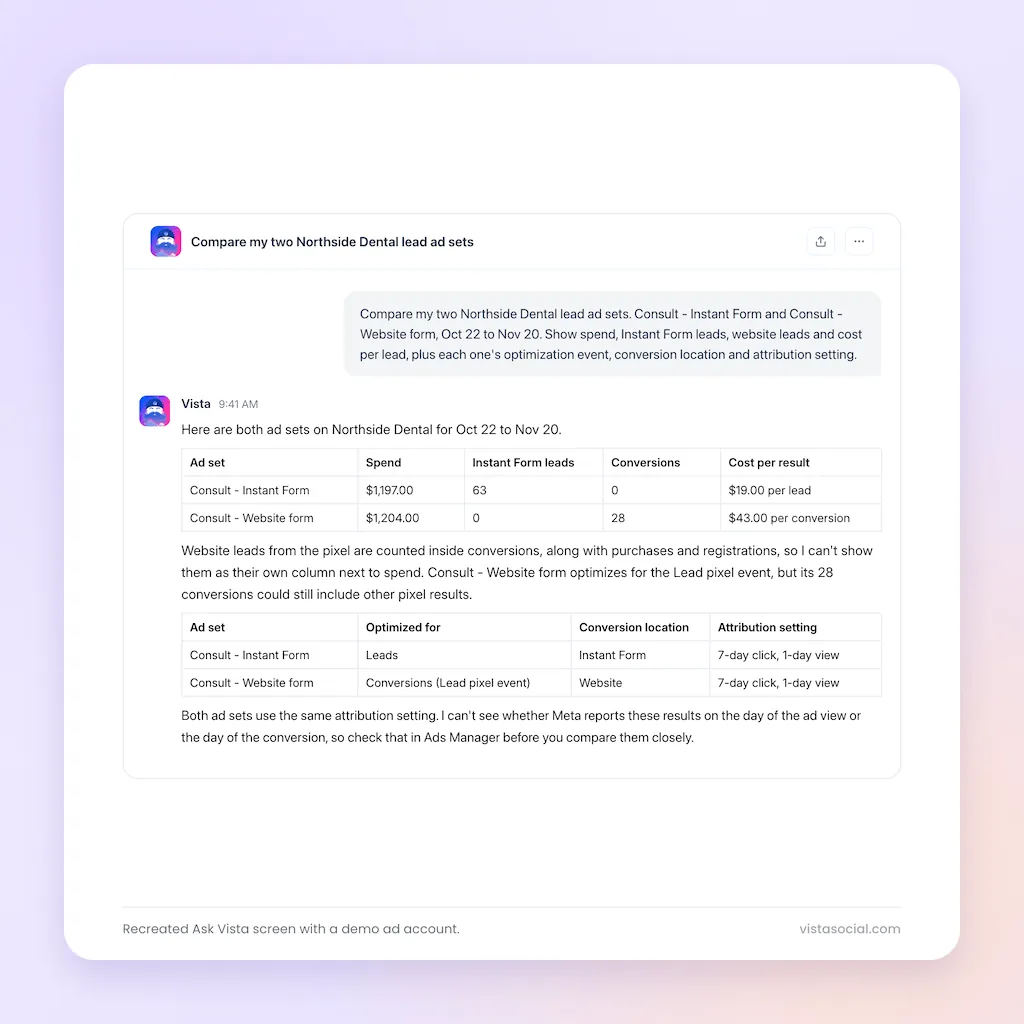
Two existing ad sets give you an operational comparison. Use Meta’s A/B testing tools when you need a controlled experiment.
Done when: You can explain what each result counts and which differences remain.
2. Check budgets and placements
A placement breakdown shows how delivery turned out, not a menu of guaranteed prices. A placement might have a low average cost on limited spend, while another supplies more results at a higher average. Moving money can change those averages.
That’s the point behind Meta’s breakdown effect. Judge the whole unit whose budget you’re considering, then use the breakdown to investigate.
| Budget setup | Start your decision here |
|---|---|
| Advantage+ campaign budget | Campaign results, then the contribution of its ad sets. |
| Separate ad set budgets | Each ad set, including the placements delivering within it. |
| Placement, device, or audience row | A diagnostic view, not a standalone budget recommendation. |
Ask Vista
For the same account and dates, show [Ad set B ID] by placement with spend, leads by type, and cost per relevant lead. Identify whether the budget is held by the campaign or each ad set.
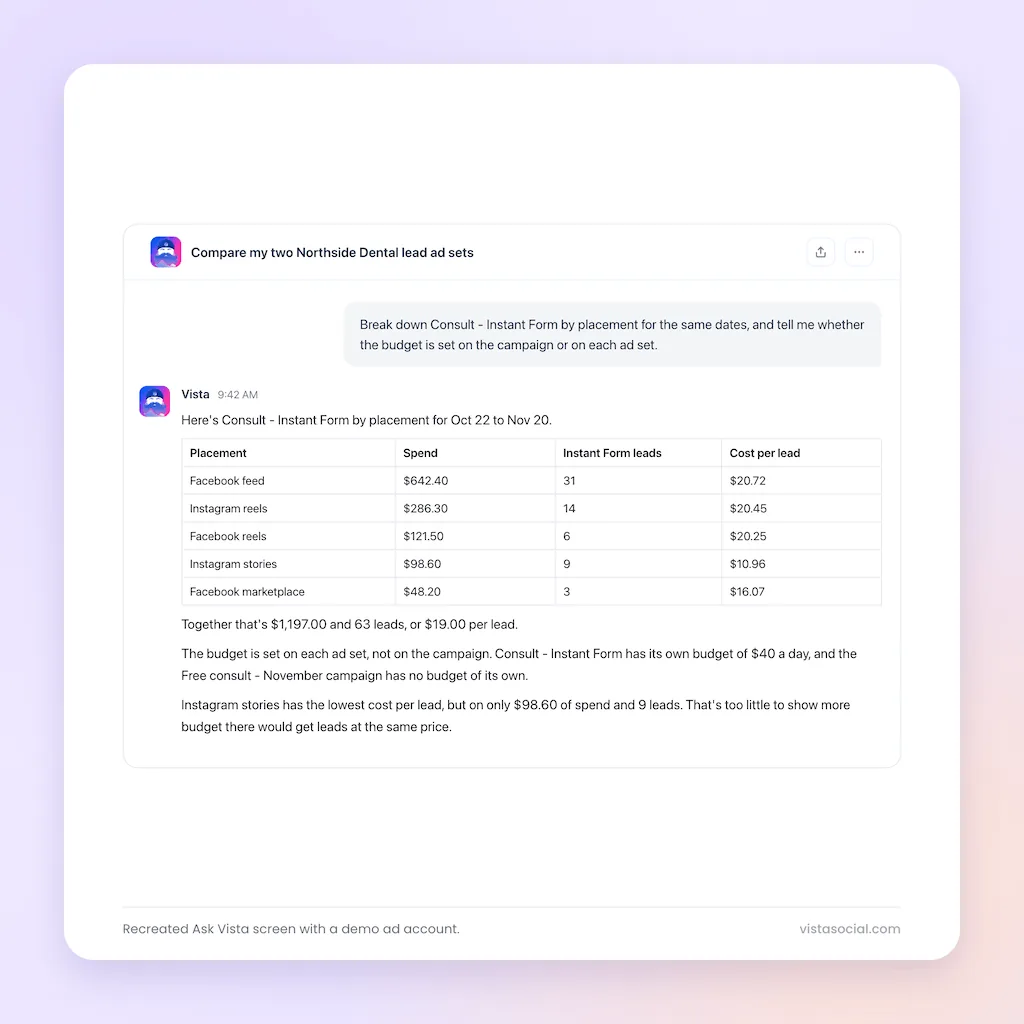
If Audience Network accounts for a large share, check those leads’ outcomes rather than assuming they are good or bad. Our Instagram advertising guide covers the wider placement context.
Done when: You know which budget could change and aren’t choosing a placement solely because its historical average is lower.
3. Check learning and reporting delay
A changing delivery pattern can make a short-lived gap look convincing. Meta’s advertising guidance says ad sets usually exit learning after 50 results and that major edits can restart it. Use the actual delivery status, not a calendar date alone.
Ask Vista
Show learning status and delivery issues for [Ad set A ID] and [Ad set B ID]. Compare relevant leads and cost per lead week by week. Exclude [number] recent days for our normal conversion delay, and mark incomplete weeks.
Three days can be an initial exclusion, but use a longer delay if your leads normally arrive later. Check more than one completed week. If an ad set remains learning limited, investigate the volume and delivery problem rather than waiting indefinitely or calling the number stable.
Investigate a suspected tracking break before interpreting the gap. Ask Vista’s Google Tag Manager checks require that connection. For the organic side of your reporting, see our Facebook analytics guide.
Done when: You understand learning status, reporting delay, and any tracking concern well enough to judge the comparison.
4. Follow the leads into your CRM
Delivery can be working as intended while the business gets the wrong kind of inquiry. To investigate, add the outcome Meta’s ad report doesn’t establish: which leads qualified or booked.
Cost per qualified lead is spend divided by leads meeting your agreed qualification rule in the CRM. Apply that rule across locations and compare leads with the same amount of time to qualify. Different follow-up speeds can otherwise make one location look stronger.
Attach a supported CSV or Excel export with a non-identifying lead key, acquisition date, ad set ID, location, status, and outcome date. Remove names, contact details, and sensitive notes unless your approved process requires them. Keep duplicates and unattributed leads visible instead of quietly assigning them to an ad set.
Ask Vista
Read this CRM export and show the columns and ad set IDs before calculating. Match only explicit ad set IDs to our Meta comparison. Using [qualification definition] and outcomes as of [date], calculate cost per qualified lead and booked appointment for each acquisition cohort. Show pending, duplicate, and unmatched records separately. If the mapping is missing, stop and tell me what is needed.
Ask Vista knows only the outcomes you supply. Review its mapping and totals before accepting the recommendation.
Example: Compare cost per qualified lead
In this illustrative example, both ad sets promote the same consultation offer. “Qualified” uses the same rule, and bookings are a separate outcome count.
| Measure | A: Instant Form | B: Website |
|---|---|---|
| Spend | $1,900 | $1,720 |
| Leads | 100 | 40 |
| Cost per lead | $19 | $43 |
| Qualified so far | 10 | 16 |
| Cost per qualified lead so far | $190 | $107.50 |
| Booked appointments so far | 5 | 8 |
| Cost per booking so far | $380 | $215 |
| Still awaiting qualification review | 30 | 4 |
The website cohort looks stronger so far, but 30 pending Instant Form leads could reverse that conclusion. Finish the follow-up before calling a winner.
To send downstream qualification signals back to Meta, investigate Conversions API for CRM and the conversion leads performance goal in Meta. An uploaded spreadsheet informs this review; it doesn’t configure that feedback loop.
Done when: The comparison includes lead quality, bookings, and enough follow-up to support a decision, or clearly records why it doesn’t yet.
5. Choose the next action
Use the finding to choose the work, rather than making every review end in a budget increase:
- Counting differs: Keep the result types separate and resolve the reporting comparison.
- Delivery is constrained: Investigate the status, schedule, or other issue Meta reports.
- Lead outcomes are still open: Finish qualification and set a recheck date.
- The case for more spend is supported: Consider a small increase if the campaign or ad set can use it.
For that last case, check delivery before preparing the change. Raising a budget that isn’t being spent doesn’t resolve the reason it isn’t spending.
Check delivery, then propose
Is [campaign or ad set ID] spending its available budget? Show any delivery issue and identify where its budget is held. If we proceed, prepare a daily-budget change for that exact item from [current amount and currency] to [proposed amount and currency]. Do not change targeting, placements, or dates.
Ask Vista can change supported Meta daily budgets at the campaign or ad set level. Lifetime campaign budgets stay in Meta Ads Manager; don’t switch budget types just to fit the workflow. No fixed increase guarantees that learning won’t restart, so choose the amount deliberately and check delivery afterward.
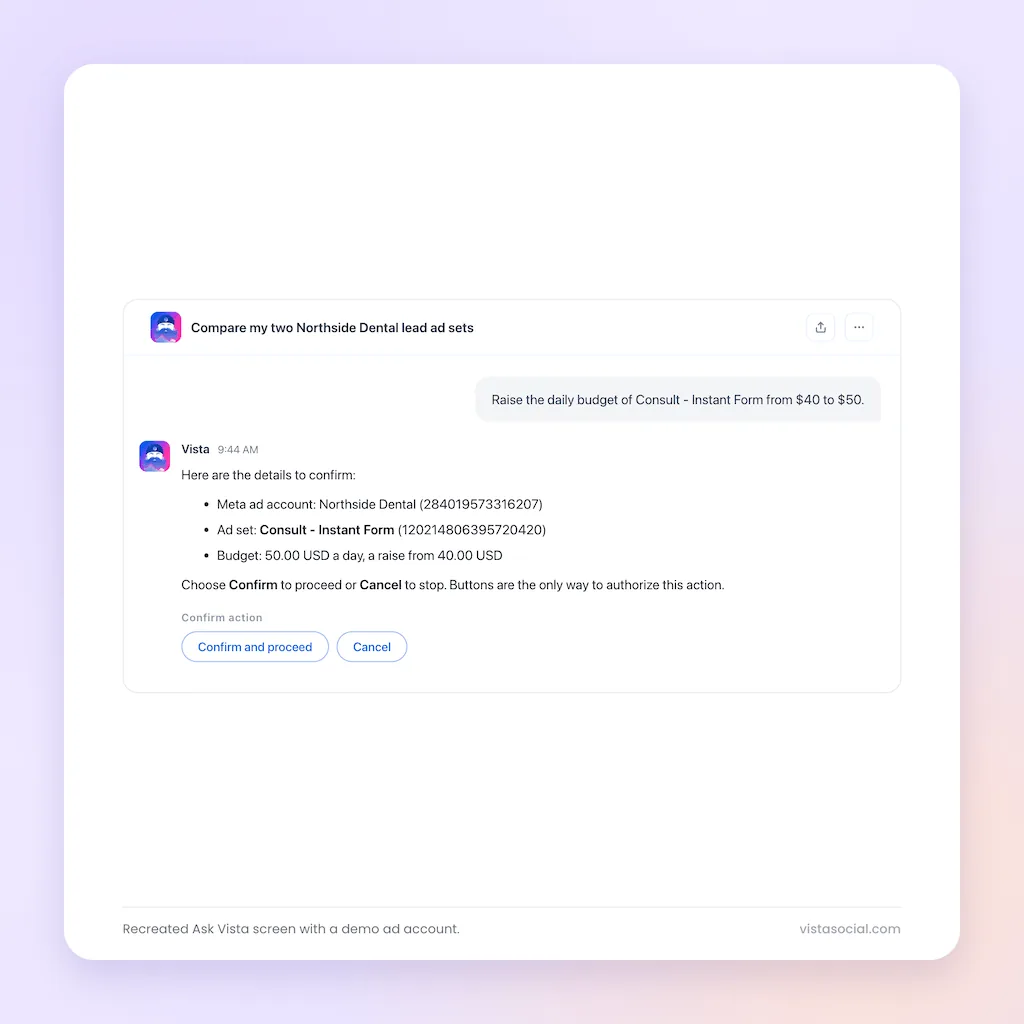
Check the card’s item, currency, and amount. It controls submission to Meta, not your organization’s budget approval. Get that sign-off before confirming, then verify the saved budget at the correct level.
Create a summary for finance and regional leads
When regional leads or finance need the explanation, use Ask Vista’s document tools to prepare a one-page summary:
Create the decision record
Create a one-page PDF for finance and regional leads. Include account and ad set IDs, dates, result definitions, attribution basis, spend, qualified leads, bookings, pending cases, and our decision. Label changes as proposed or confirmed. Name the budget owner and recheck date.
Inspect the file before sharing. Keep it with your broader paid performance reporting, so the reason for a change survives the conversation.
Done when: The next action has an owner and recheck date. Any budget change has been confirmed and verified at the correct level.
Set access before anyone changes spend
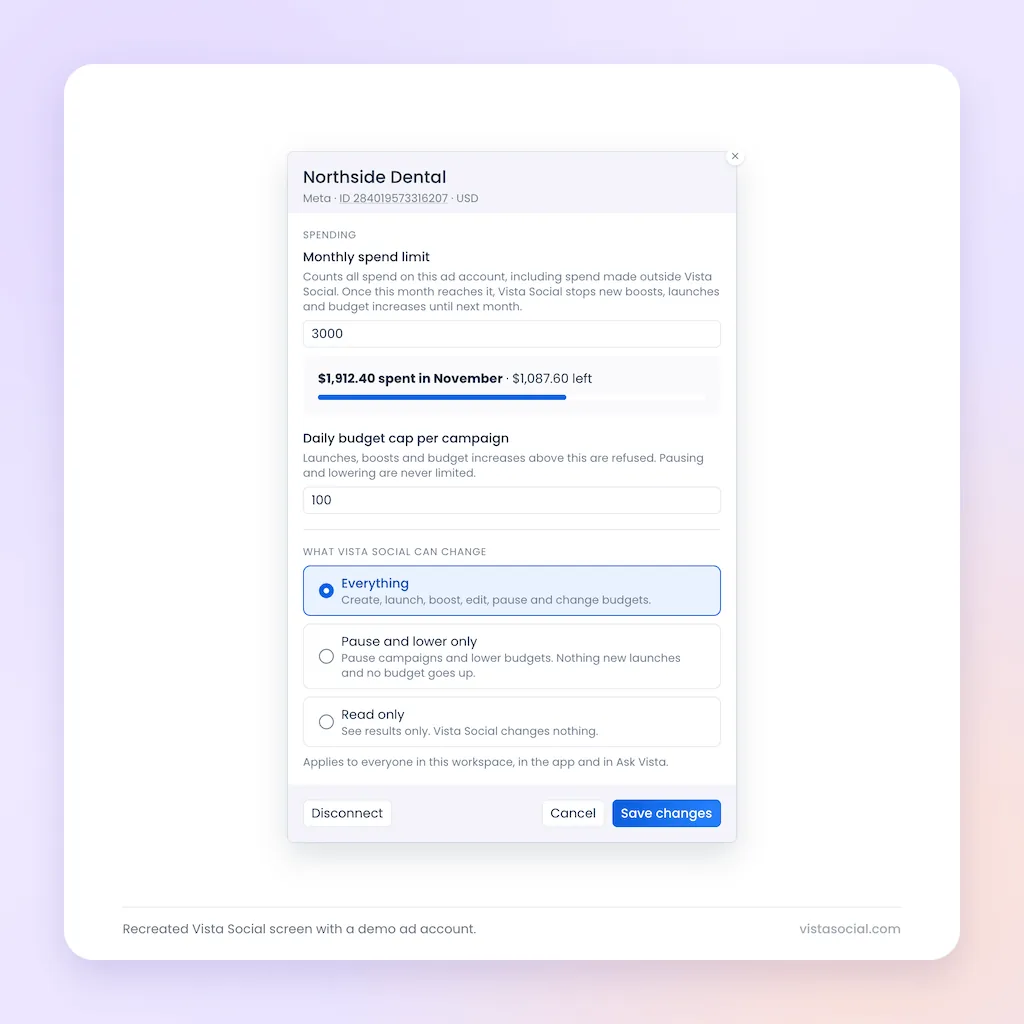
Alongside each person’s role, set what Vista Social can change on the account. This access level applies across the workspace:
- Everything: Allows supported changes within the configured limits.
- Pause and lower only: Allows reductions while blocking new launches and increases.
- Read only: Keeps an account available for review without changes through Vista Social.
Set a daily cap per campaign and, if needed, a monthly account limit. For split ad set budgets, the daily cap applies to their campaign total. The monthly limit blocks new launches, boosts, and increases once reached; it isn’t a hard stop on campaigns already running.
See the ads management guide for setup. If one specialist owns one account entirely in Meta, another place to edit may add little. This workflow earns its place when several locations need visibility and someone must explain the decision.
Your Meta ads review checklist
- Choose two ad sets and record their IDs, dates, and result definitions.
- Check attribution, budget level, placement delivery, and learning.
- Attach mapped CRM outcomes and resolve decision-changing gaps.
- Choose the next action: investigate, wait, or prepare a supported change.
- Share the finding with its owner and a recheck date.
Already connected? Start with the comparison prompt, not a budget instruction. If setup is still needed, link the account under Settings > Profiles and Ads > Ad Accounts.
Also responsible for LinkedIn? Our LinkedIn ads review guide covers the campaign checks for that network.
Give your Meta campaigns a clear next step
A useful Meta review should leave you knowing what to work on. That could be a reporting mismatch, a delivery issue, a follow-up backlog, or an ad set ready for a carefully reviewed increase. The value is being able to connect the settings and delivery to what your locations actually receive.
Bring a Meta campaign you want to understand better to a Vista Social Ads Manager walkthrough. See how Ask Vista can help you investigate the account and review a supported action without handing over the final call.
Frequently asked questions
Is a lower cost per lead on Meta always better?
No. Check what counts as a lead, how it’s attributed, and what happened afterward. Cost per qualified lead or booking gives you more business context than cost per submission alone.
Why does Meta spend more on a placement with a higher average cost?
The placement’s average describes past delivery, not the cost of its next result. Review the campaign or ad set that holds the budget before treating a cheaper breakdown row as a reason to move it.
How long should an ad set run before a comparison?
Check delivery status, learning, and your conversion delay rather than using a fixed number of days. Compare completed periods with enough outcomes, and investigate learning limited or persistent tracking gaps.
Will a budget change restart learning?
It can. Don’t promise a universally safe increase or assume the confirmation card validates performance risk. Check delivery after the change and give conversions time to arrive before judging it.
What is a good Facebook ads cost per lead?
Use your qualified-lead economics, offer, location, and sales outcomes to set the target. A broad industry benchmark can’t tell you whether your own leads are worthwhile or whether two ad sets count the same thing.
Can Ask Vista change the budget without confirmation?
In Ask Vista, supported ads changes wait for confirmation before submission. The account’s permissions and limits still apply. Assistants connected through MCP use their own conversation approval rather than Vista Social’s confirmation card.
What still belongs in Meta Ads Manager?
Billing, policy appeals, lifetime campaign budget changes, controlled A/B test setup, and unsupported settings stay in Meta. CRM conversion-feedback setup is also separate from reviewing an uploaded export.
About the Author

Content Writer
Orion loves to write content that refuses to be boring. As part of Vista Social, he helps brands, creators, and agencies stop doom scrolling and start winning with social media. When he's not in front of a keyboard, he's watching films in IMAX with his wife, dissecting football tactics (the European kind), and getting lost in a good book.