

Published on August 4, 2024
5 min to read
Social Media Audit Ultimate Guide: w/ Steps And Screenshots

Summarize with AI

Table of contents
Summarize with AI

ChatGPT

Claude

Perplexity
Share

Vista Social

X (Twitter)


Are you wondering if your clients’ social media marketing is actually making a difference?
To get a clear-cut answer to that question, you need to conduct a social media audit.
Here’s the deal…
Auditing your clients’ social media efforts helps you identify what’s working and what’s not, so you can adjust your strategies more effectively.
Rather than guessing where the gaps and strengths are, an audit provides a clear, data-backed picture of what’s really happening.
And so the question becomes… How do you do a social media audit?
That’s what we’ll cover in this guide.
Table of contents
What you will learn
- What is a social media audit?
- Important considerations before running a social media audit
- How to run a social media audit
- Conduct your social media audit effectively
How to run a social media audit
With the right steps, techniques, and tools, performing a social media audit doesn’t have to be complicated.
Start your social media audit with the following steps.
1. List all the social media accounts
The first step to auditing social media is easy: List all your clients’ social media handles or account names across the platforms they’re currently active on.
[Must read: Social Media Handles: How to Pick And Create One]
You can use a spreadsheet to do this, but you’ll need to check for fake, test, or duplicate accounts.
Make things easier and use a social media management platform.
For instance, Vista Social lets you connect all your clients’ Facebook, Instagram, TikTok, Snapchat, YouTube, and other social media profiles to the platform.
You can easily manage all your clients’ active social media profiles and posts on one platform.
The platform also lets you create profile groups to organize them and keep track of all active profiles.
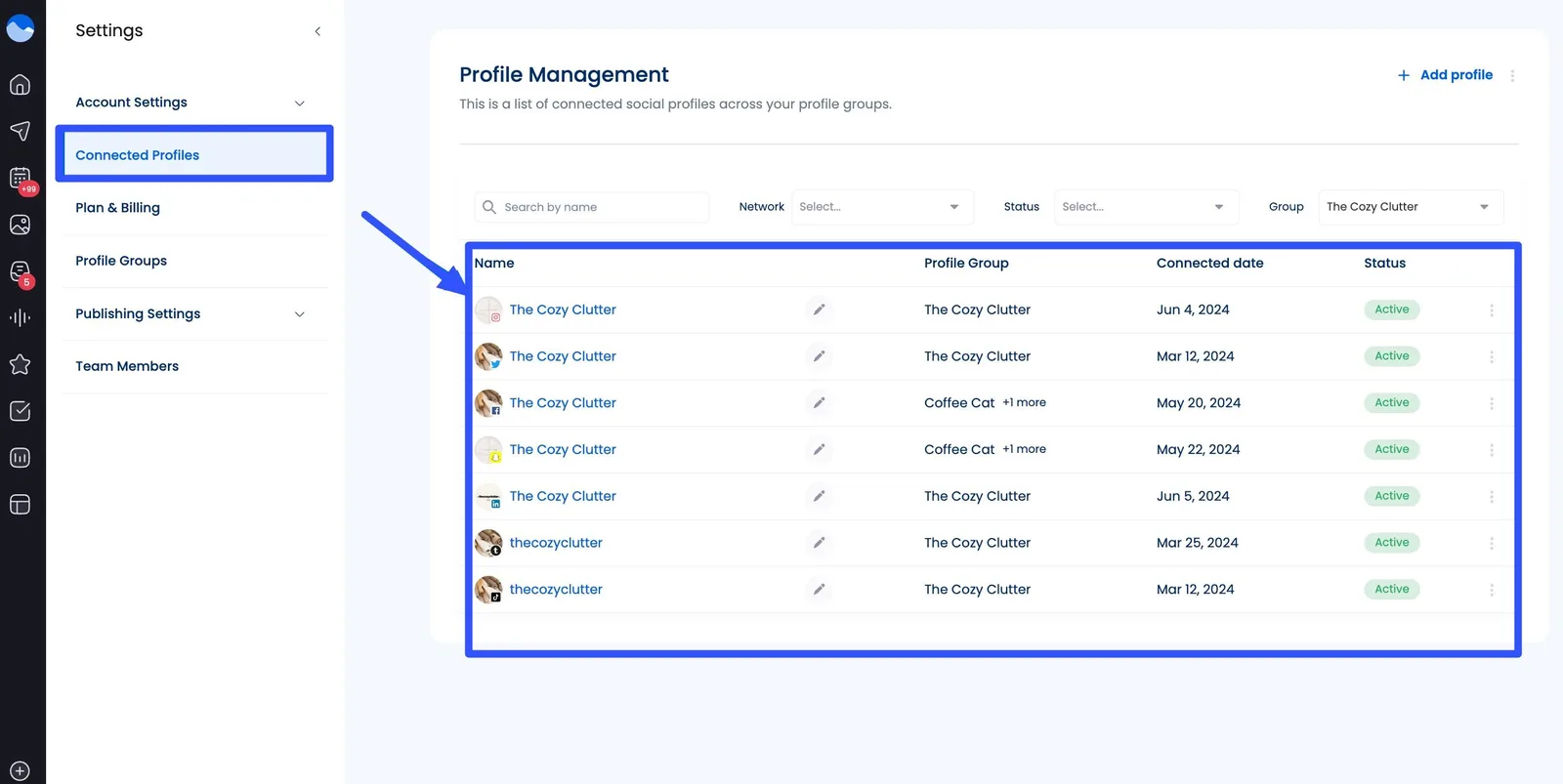
The best part? You won’t need to list and track Instagram and other social profiles individually, saving you a lot of time and effort.
[Must read: Must-Have Instagram Planning Tool For Your Agency]
2. Categorize and assess content
Organize and examine your clients’ social media content pieces to assess their performance.
Determine if they are:
- Relevant to your clients’ target audiences
- Consistent with your clients’ brand message
- Align with preferences and trends within your clients’ industries
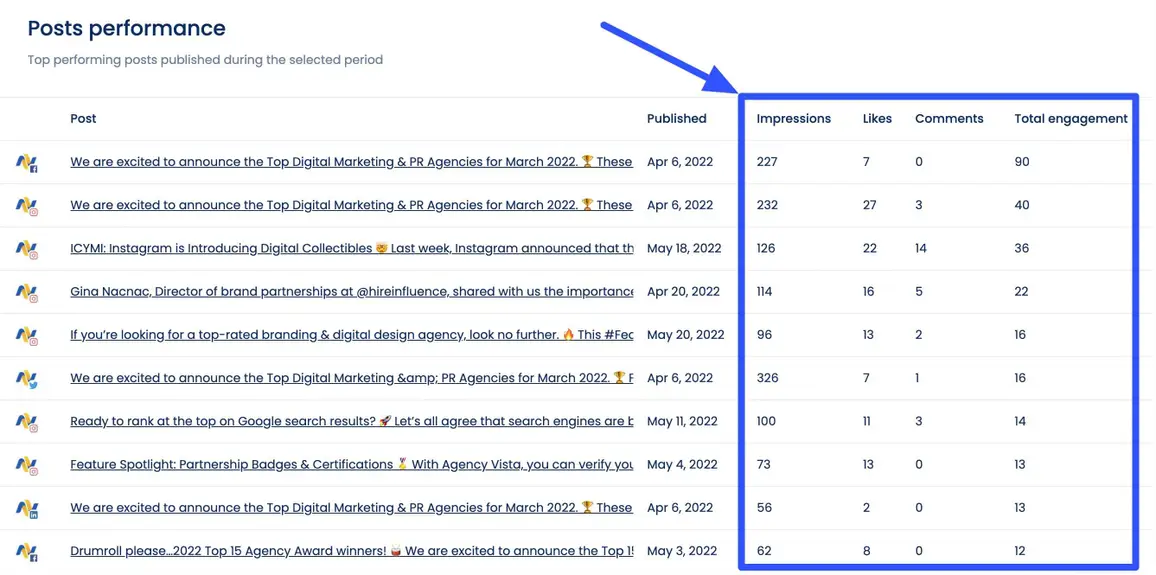
The best way to address these is to track and analyze Key Performance Indicators (KPIs), such as follower count, reach, engagement rate, impressions, and reach.
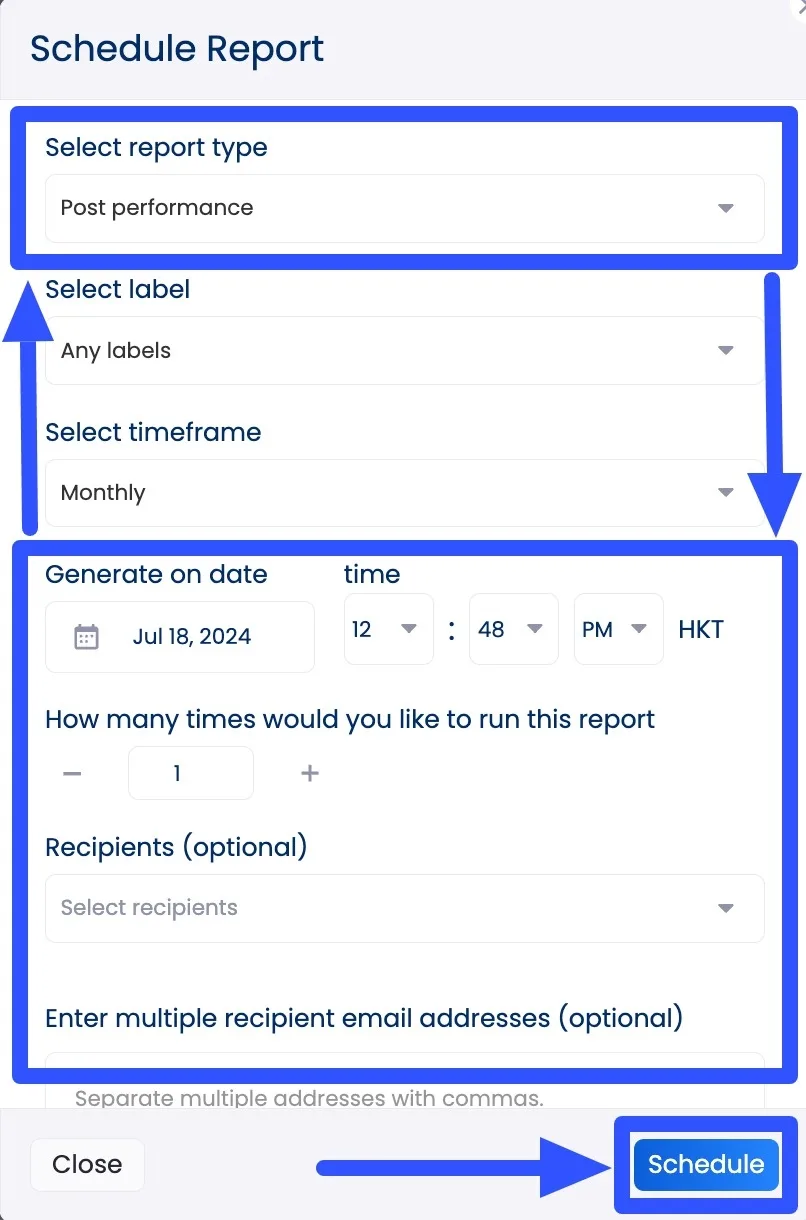
If you’re using Vista Social’s social media analytics feature, you can generate post performance reports with a few clicks.
You can even schedule the reports to automatically run and get shared with other users, such as your clients.
[Must read: How to Create Automated Social Media Reports]
Select your clients’ connected profile (or profiles) and provide the details and your preferred schedule and frequency.
The metrics included in the performance reports can vary depending on the social network. These usually include the number of posts, impressions, engagement rate, and top-performing posts.
Vista Social’s Report Builder lets you create and schedule custom reports, which you can save as templates for future use.
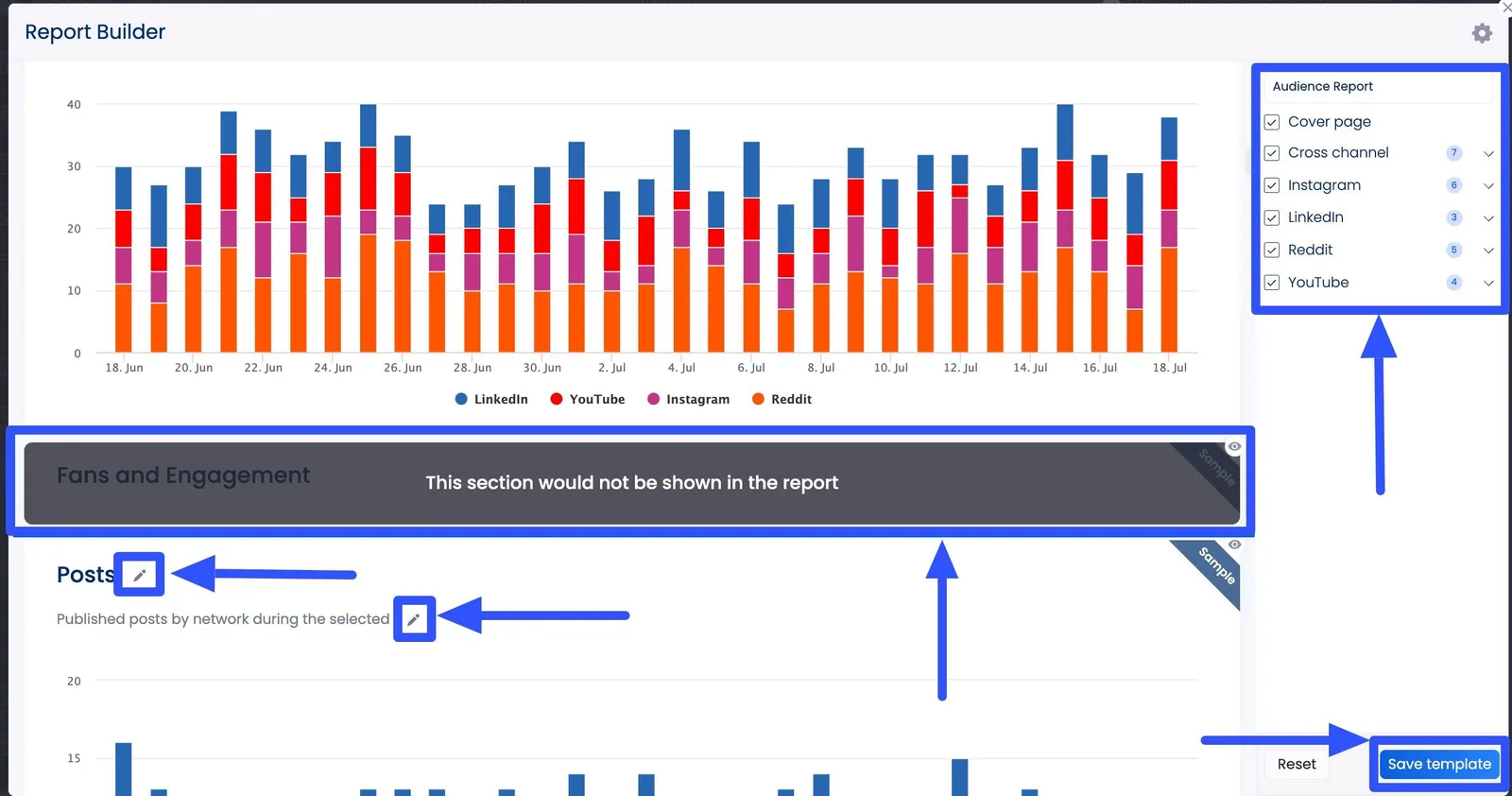
With the reports, tracking and assessing the performance of your clients’ posts is quick and easy, streamlining your social media auditing process.
3. Look into your target audience
Assess whether your clients’ content and engagement efforts resonate with their target audiences.
These can tell you if your clients’ content aligns with audience needs, preferences, and pain points.
It can also tell you if their social media strategies encourage interactions and whether their efforts pay off.
[Must read: Social Media Interaction Post Ideas This 2022]
Check demographic data to reevaluate whether your clients’ brand personas align with their target audiences’ buyer or user personas.
The audit can give you insights into pinpointing the content types that best engage audiences, effectively turning them into followers and customers.
4. Develop action points
Once you have your social media audit analysis results, leverage the insights to adjust your strategies and plan your next steps.
You can do a Strengths, Weaknesses, Opportunities, and Threats (SWOT) analysis to uncover valuable insights into your social media strategies, areas for growth, and opportunities for clients to outshine their competitors.
Create your own SWOT analysis matrix or use customizable online templates.
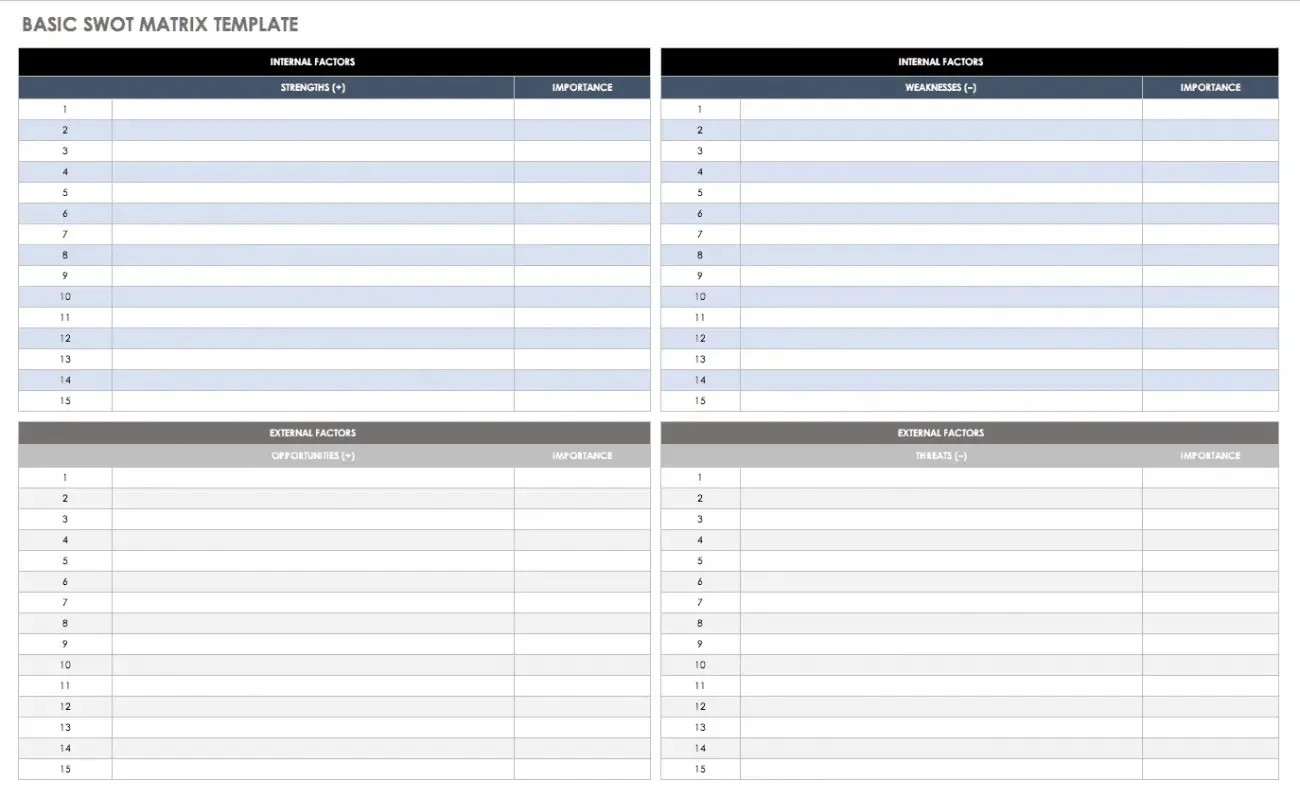
Image source: smartsheet.com
After drawing meaningful conclusions, create an actionable plan to improve your clients’ social media strategies and amplify their presence.
List actionable recommendations, such as optimizing your clients’ posting times and expanding their campaigns to more social media platforms.
For example, if your findings show that you need to optimize content, your social media audit’s recommendations can include:
- Increasing the posting frequency of your clients’ high-performing content types
- Repurposing or updating underperforming content with new messaging or visuals
- Developing content calendars to ensure consistent publishing and continuous audience engagement

Try Vista Social for free
A social media management platform that actually helps you grow with easy-to-use content planning, scheduling, engagement and analytics tools.
Get Started NowAbout the Author

Content Writer
Jimmy Rodela is a social media and content marketing consultant with over 9 years of experience, with work appearing on sites such as Business.com, Yahoo, SEMRush, and SearchEnginePeople. He specializes in social media, content marketing, SaaS, small business strategy, marketing automation, and content development.
Loading related tools...

The most complete social media management platform for teams who demand more.






Tools
PublishingAnalyticsEngagementIntegrations
FacebookInstagramLinkedInRedditSnapchatThreadsTikTokX (Twitter)YouTubeMCPVista Page (link-in-bio)All IntegrationsCopyright © 2026 Vista Social LLC. All Rights Reserved.