

Published on May 1, 2026
14 min to read
Instagram Story Viewer Order: How Does It Work?

Summarize with AI

Table of contents
Summarize with AI

ChatGPT

Claude

Perplexity
Share

Vista Social

X (Twitter)


Ever wondered if your Instagram Story viewers appear in a certain order?
It’s a burning question for most Instagram users and social media managers. Is there any kind of data we can glean from that Instagram Story viewer order?
So let’s talk about it. Read on to learn how Instagram sorts your Story viewers list, why it matters, and how to leverage the information.
Table of contents
What is an Instagram Story viewer?
An Instagram Story viewer is someone who viewed your Instagram Story. Instagram shows a list of all of the accounts that viewed your Story so that you can analyze regular viewers and monitor performance.
You can leverage this feature to develop strategic partnerships or collaborations with other IG users. For example, if certain users view your Stories regularly, you might consider contacting them to initiate a conversation and form meaningful partnerships.
Can you see who views your Instagram Stories?
Short answer: Yes, you can you see who views your Instagram Stories!
When publishing Instagram Stories, you can see the list of Instagram users who viewed your Story.
To check viewers on a live Story:
- Open your Story by tapping your profile picture
- Swipe up from the bottom of the screen, or tap the eye icon at the bottom left
- Instagram will display your full Story viewer list along with any reactions
- From this screen you can send a message to any viewer or manage your connection with them
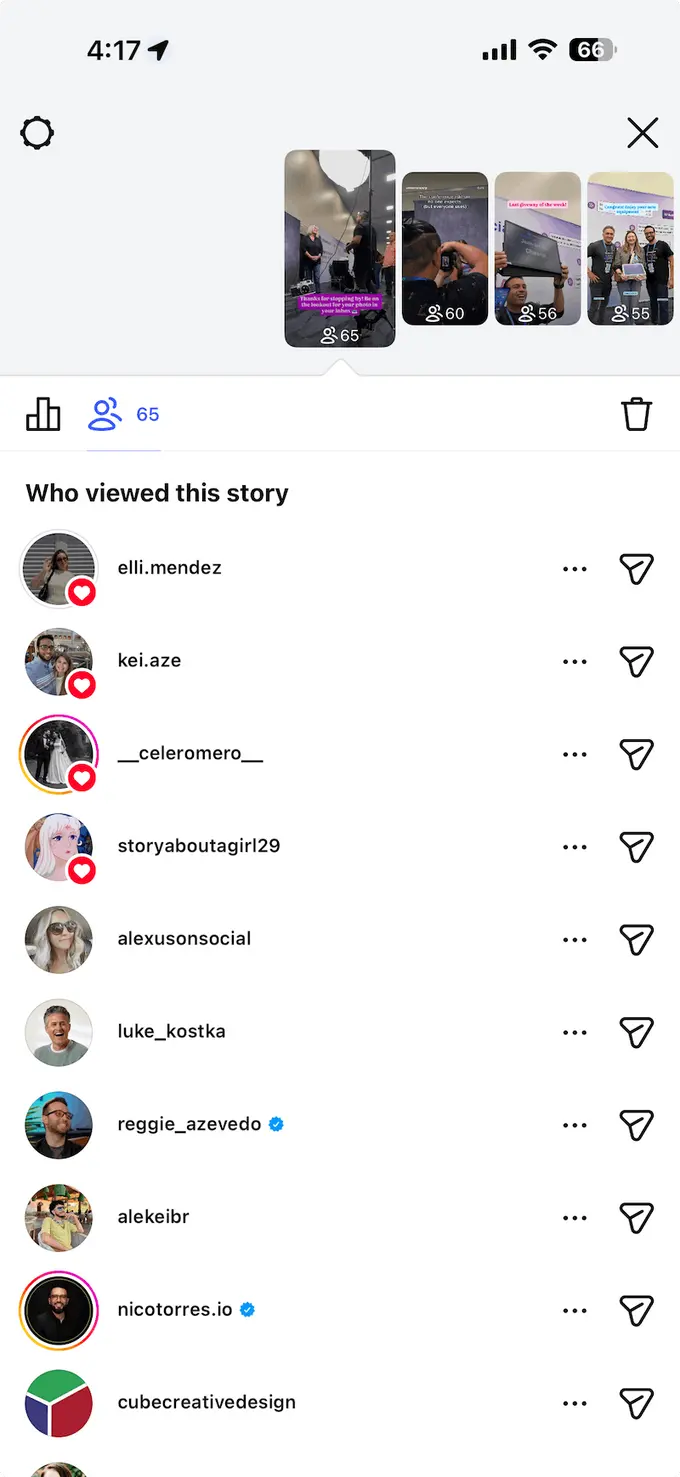
While it makes sense for this list to be in chronological order, Instagram sorts users based on other factors instead.
Once your Instagram Story is active, it’ll start gathering views over the next 24 hours. Unlike Instagram videos, which only show the total view count, Instagram Stories actually reveal who viewed your active Stories.
However, only you can see the list of Story viewers, and as of writing, there’s no counter that shows how often a user replayed your Story.
Can someone view your Story anonymously?
Yes, there are ways for people to view Instagram Stories anonymously. A quick Google search will pull up tools, dubbed “Instagram Story viewers,” that allow users to view Stories anonymously. Some even offer to download Stories for you—anonymously, as well.
Although Instagram introduced Stories to help regular users and businesses alike to connect and foster relationships within the platform (you could even argue that that’s the whole point of the Instagram Story viewers list), some people really value their privacy, and prefer to remain anonymous. And private accounts still show up on your Instagram story viewer list.
But there’s a small percentage of users who are going to go to this trouble. Most of the time, you’ll be able to see your full viewer list right inside the Instagram app.
After 24 hours, can you still see who viewed your Instagram Stories?
A quick answer is—YES, but act quickly.
You can still see who viewed your Stories up to 48 hours after you post them. Stories past 24 hours after posting will be saved in your archive folder. The archive will hold your viewer information for 48 hours, and after that, it’s gone permanently.
So, if you plan to investigate who checked your stories, do so within 48 hours.
To access your archived Stories and viewer list:
- Tap the three horizontal lines (hamburger menu) in the top-right corner of your profile page
- Tap Archive
- Make sure the dropdown at the top is set to Stories Archive
- Open any Story and swipe up to see the viewer list—but only within the 48-hour window from when it was originally posted
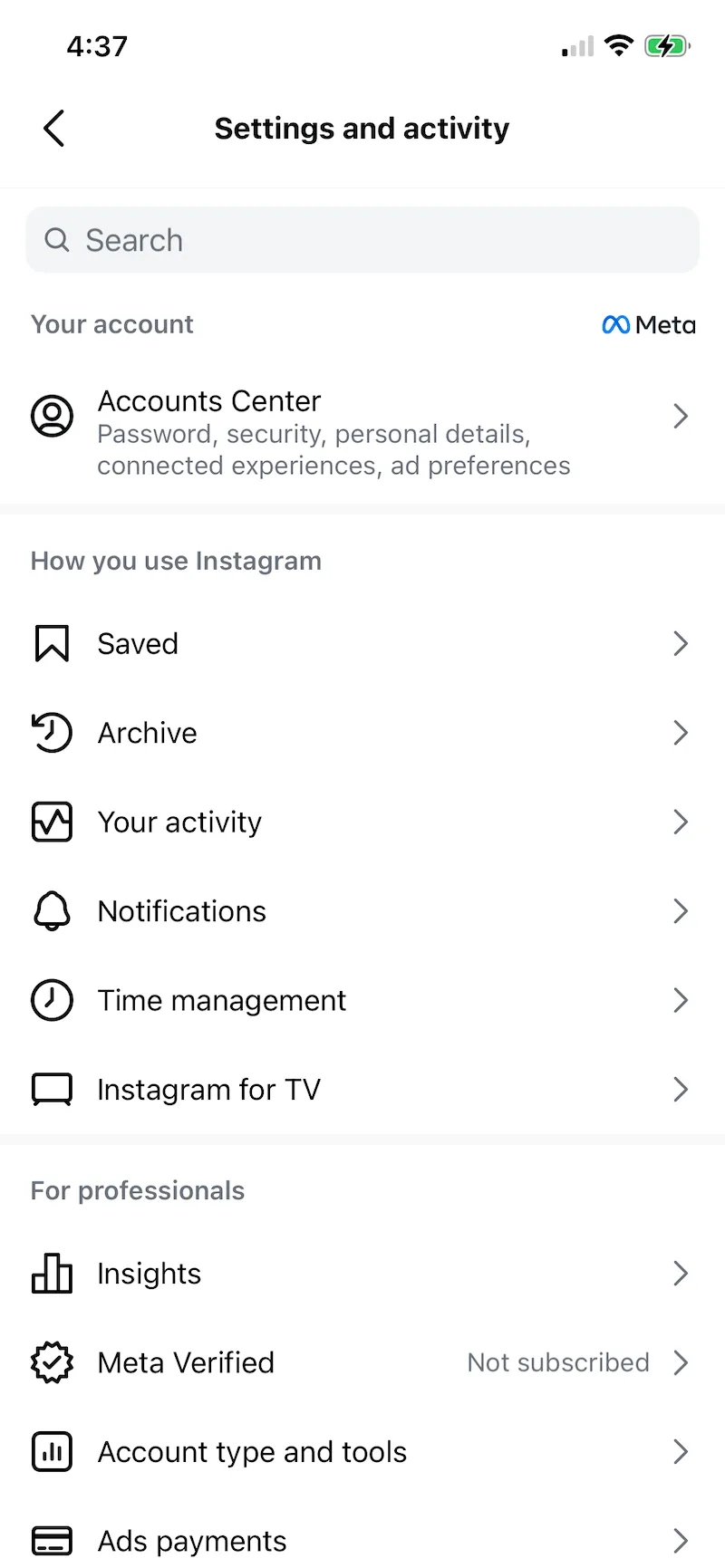
To make sure your Stories are auto-archived: go to Settings → Archive → Story Archive and ensure this is turned on.
Who appears at the top of your Instagram Story viewers list?
It’s easy to notice a pattern when observing your Instagram Story viewers list.
On a personal or creator account, you’ll probably find family members, close friends, and so on. For businesses, you’ll likely find your most loyal followers, customers, and potential business partners.
Long story short, the people at the top of your Instagram Story viewers list are some of the best people you should engage with.
Remember, Instagram Stories only last 24 hours. If users appear in your viewers list, your brand is still fresh in their minds.
There’s a good chance they’ll respond positively if you engage them directly—be it through a DM, comment, or post reaction. Just be sure to keep your language on-brand and stay on topic.
So, how does Instagram determine your most engaged Instagram audience?
What about those at the bottom of the list? Are they automatically your most disengaged followers?
Let’s explore this.
How does Instagram sort Story viewers?
Similar to your Instagram following list order, Instagram doesn’t fully disclose how the Story viewers list is sorted.
You can read the Instagram community guidelines, policies, and Help Center articles all you want. Instagram DOES NOT expressly state the rules on how Story viewers are sorted.
However, the Instagram algorithm takes into consideration a handful of factors when determining the Stories viewers list.
Here’s what we know so far.
1. Initial Instagram Stories viewers list order
If the Story has less than 50 views and zero interactions, the Instagram Story viewers list is in reverse chronological order.
This is actually pretty easy to verify.
Whenever you post a Story, new viewers will have their names displayed in bold. They also appear at the very top of the Instagram Story viewer list.
2. Reactions and replies
If someone reacts to your Instagram Story (like, emoji, or avatar), they will always appear at the top of the list alongside other users who reacted.
The same goes for those who reply to Instagram Stories via DM. In this case, a snippet of their reply will be visible in the Story viewers list.
3. Recent interactions
Past 50 viewers are where the Story viewers list goes haywire. However, there are still obvious patterns that everyone can easily confirm.
For one, you often see your most engaged users at the top of the Story viewer list. These are followers who frequently engage your Instagram content, be it through comments, likes, or DMs.
4. Profile views
While it’s hard to verify on your own, several reports—including countless independent experiments on Reddit—confirm that profile visits greatly impact the Instagram Story viewer order.
If you see an account that appears consistently at the top of the Story viewer list, they’re probably among your most engaged followers.
5. Facebook friends
Some users also notice that their top Instagram Story viewers are also connected to them on Facebook.
Ever since Instagram was acquired by Meta, the integration between the two social networks is more prominent than ever. You can sync profile photos between accounts, automatically cross-promote Stories, synchronize contacts, and more.
6. Non-followers
Accounts that don’t follow your account but view your Story are automatically placed at the bottom of the list.
This is something you can easily verify, especially if you have a public Instagram account. Just look at the bottom of your Instagram Story views list, and you should see unfamiliar non-followers.
Interestingly, there’s a high chance that these non-followers are fake accounts or “bots” intended for spam.
7. Instagram updates
If there’s one surefire factor that affects your Instagram Story viewers order, it’s the unpredictability of Instagram app updates.
Anything and everything you learn in this post may no longer be true a week, month, or even year from now.
As such, always be on the lookout for the latest Instagram updates. See if anything changes in your Instagram Story viewers list and try to work out which factors above remain relevant.
Why does your Instagram Story view order matter?
At this point, you should be more than equipped to make sense of your Instagram Story viewers’ order.
The question is, why does it matter in the first place?
Here are the top reasons why every agency or social media manager should pay attention to Story views:
- Optimize your content strategy for Instagram engagement: The users who consistently appear at the top of your Story viewers list are probably your biggest fans. Analyze them to learn their preferences—their profiles likely provide a goldmine of information about what they like.
- Win over disengaged audiences: Make your way to the bottom of your Story viewers list to find your not-so-engaged followers. Analyzing their profiles will tell you a lot about the content they enjoy, helping you tweak your strategy to increase your Story views and engagement.
- Land quality prospects: Being at the top of the Story viewers list is a strong indication of interest. These users are prime targets for your lead generation efforts.
- Create better Stories over time: Not only can you see specific viewers, but you also can see the total number of viewers. Pay attention to which Stories generate more viewers, and create more like that.
What you want are multiple names sitting at the top spot of the viewers’ list. Diversify your strategy until you find a set of repeatable Story ideas that cater to more followers.
Tips for creating awesome Instagram Stories
Getting to know your most engaged audience members and adapting your strategy to their preferences is just the beginning.
Below are additional tips to help you make the most out of Instagram Stories.
1. Use a social media scheduler with direct Instagram Story publishing
Vista Social is one of the first SMM platforms to ever offer direct publishing to Instagram Stories.
If you have an Instagram Business account, simply connect your profile to Vista Social, launch the publisher tool, and schedule a Story. Vista Social will automatically publish the Story on your behalf—no need to manually post it.
This is a HUGE advantage compared to other “scheduling” tools that can only set reminders for Instagram Stories.
To schedule a Story:
- Log in to Vista Social and click Create > New post
- Prepare your content as usual
- Select Publish as Story from the drop-down menu below the first comment field
- Schedule your content for when you want it to go live
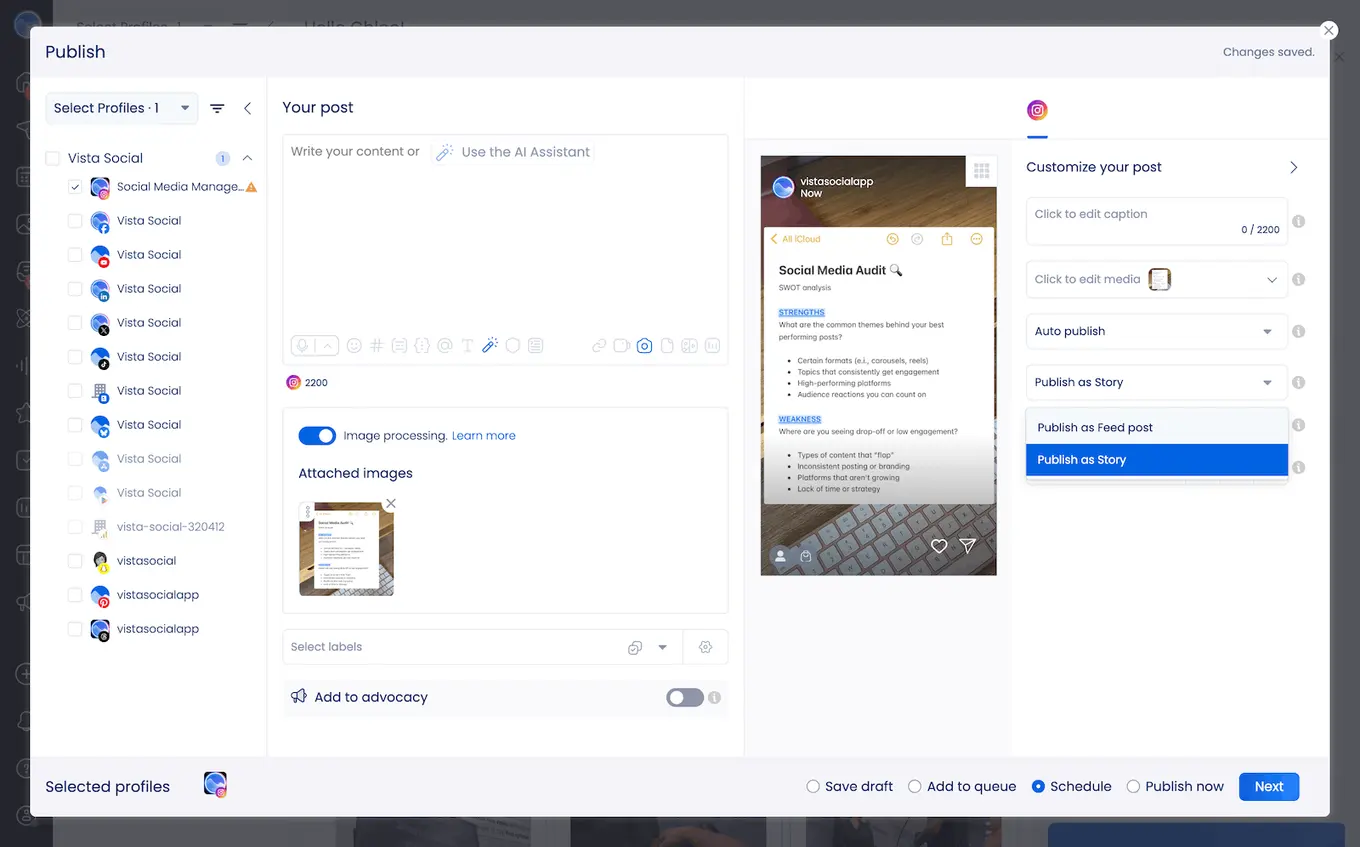
Why should you schedule Stories through Vista Social? Here are just a few reasons:
- Get posting time suggestions: By analyzing previous content performance, Vista Social determines the best posting times for maximum engagement. You can find and use posting time suggestions in the second step of the publishing process.
- Cross-promote in a snap: Want to share your Instagram Story with a wider audience? Vista Social’s unified publisher lets you schedule your Story content—be it a video or image—on multiple social media networks simultaneously.
- Stream content curation: With Vista Social, you can create “Smart Publishers” that automatically curate content from authoritative sources. Alternatively, use the bulk publishing option to source content from stock media sites, CSV files, blog RSS feeds, hashtag search results, and more.
2. Use the ideal dimensions for Instagram Stories
The ideal size for Instagram Stories is 1080×1920 px—that’s an aspect ratio of 9:16. Most modern phones can natively capture videos and photos with that aspect ratio.
However, Instagram Stories also have a “safe area” that ensures the visibility of important elements. This can be a CTA, interactive sticker, brand mention, or link.
If you add a sticker to your Story and drag it around, the Instagram app will automatically alert you when you’re starting to drag it into the area that either holds your profile photo at the top or the “Add comment” box at the bottom.
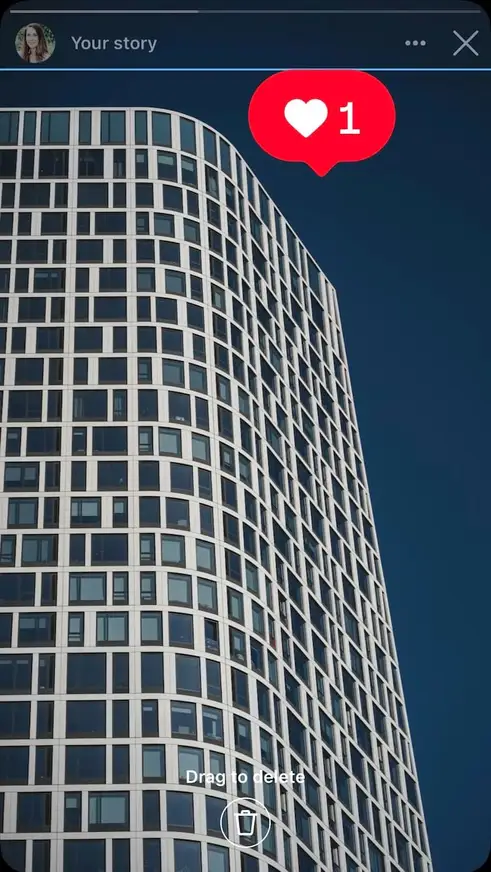
If you’re designing Story graphics, you essentially just want to make sure all of your important elements fall into the central 1080×1420 px area. Don’t place key text or logos into the top 250 px or bottom 450 px.
3. Repurpose old content into Stories
Stories are meant to show a brand’s human and relatable side.
And what can be more relatable than a short clip or photo dump with your “behind the scenes” shots?
The only rule here is to be as genuine and unfiltered as possible. Give the audience some context through captions or extra elements like text overlays, GIF stickers, and voiceovers.
4. Use geotags
Trying to reach a local audience? Use geotagging to make your Instagram Stories more searchable to users who are interested in a particular spot.
Simply use the “location” sticker, which is one of the first stickers you’ll find in the Story editor. The location sticker automatically detects where the content was originally captured.
5. Don’t be afraid to be in front of your audience
Keep in mind that one of the things that make Instagram Stories special is the sense of being “in the moment.”
Remember, showing your face and communicating with your audience directly is how you build deeper connections. The more you point your camera to your face and speak as if you’re talking to a friend, the faster you’ll build that connection.
6. Add subtitles
Here’s a quick tip that every social media marketer must know: Use subtitles when publishing video content.
A lot of people browse social media or use their phones in general while on mute. If your Story content includes a dialogue, you definitely need subtitles to communicate what your Instagram Story actually mean.
Start with a punchy statement or question to pique the viewer’s interest. You can also open Instagram Stories with mind-blowing statistics to keep them watching.
7. Save your top Stories as Highlights
Expiring after 24 hours is one of the fun quirks of Instagram Stories. But, sometimes, the content is simply too good to let go.
This is where Story highlights come in. A highlight is a collection of Stories that will remain permanent in your Instagram profile. They retain everything from the original Story, including the stickers, tags, duration, music, and other key elements.
To save a Story to Highlights:
- Open the Story you want to save
- Tap the Highlight button at the bottom of the screen
- Add it to an existing Highlight or create a new one
- The Story will now appear as a circular icon on your profile above the post grid
8. Use new Story features to stand out
Instagram has added several new Story features worth incorporating into your content strategy:
- Animated collages: Instagram now lets you select 5 to 20 photos and automatically combine them into an animated Story clip using AI-powered transitions. Find this option in the Story bar under Animated Collages.
- Custom Add Yours templates: You can now create your own Add Yours templates for Stories, making it easier to run branded interactive campaigns and viral content threads.
- Collaborative Stories: Brands and creators can now co-post the same Story content. Both accounts’ names appear at the top of the Story and it’s published to both profiles simultaneously. It’s ideal for brand partnerships and influencer campaigns.
- Resharing public Stories: Instagram now lets users reshare public Stories from other accounts. Tap the airplane icon on any public Story to reshare it to your own Story. This is useful for UGC campaigns and community building.
9. Check your analytics
Finally, no Instagram Story is perfect. Even the world’s top social media marketers don’t have a replicable blueprint that guarantees Instagram success.
But don’t worry—it’s more than possible to get positive results from Instagram marketing. All you have to do is ditch the guesswork and incorporate data into your decision-making process.
Instagram analytics reports provide all the information you need. It’ll help you identify the weaknesses and strengths in your strategy so you can make the appropriate adjustments.
Some of the analytics data you can obtain are:
- Accounts reached
- Impressions
- Engagement
- Story interactions
- Profile visits
- New follows
Instagram also lets you conduct a deep dive into your Instagram audience’s demographics. In the follower insights report, you’ll find details like your audience’s top cities, age ranges, and most active times.
One important update for 2026 is, as of July 2025, public Instagram posts are now eligible to appear in Google Search results. This means captions, hashtags, and metadata on your public content contribute to search discoverability outside of Instagram.
When reviewing analytics, consider tracking website referral traffic from Instagram alongside your in-app metrics to get a fuller picture of your content’s reach.
How does the Instagram Story viewer order impact your content strategy?
The Instagram Story viewer order can influence your content strategy in the following ways.
Understand audience insights better
Analyzing who views your Stories allows you to gain valuable insights into the interests and demographics of your audience.
The insights can help you tailor your content to better resonate with their top viewers, who are most likely the users who engage with your brand the most.
For example, if you see many viewers from a specific location or age group, you can create Stories, Reels, and posts that appeal directly to their cultural contexts and interests.
Plus, understanding the popular content types among your top and frequent Story viewers helps you focus on topics and themes that will more likely catch their attention and engage them.
Determine your most engaged followers
Identifying your top Story viewers helps you pinpoint your most engaged followers.
The viewers (engaged followers) interact consistently with your Stories and other Instagram content, which means they’re interested in or find value in your content.
Creating content that appeals specifically to this group of people can encourage more interactions, boosting your overall engagement.
It can foster a more active Instagram community for your brand while helping them form stronger relationships with their most loyal followers.
Knowing your most engaged followers can also highlight which of your Stories perform best, giving you the insights to optimize your content strategies.
Optimize Story and other Instagram post content
Understanding Story viewer behavior based on their order helps you optimize the type and timing of the content you share.
For instance, if audiences are most active during specific hours, you can schedule your Instagram Stories to be published during those peak times.
Doing so can maximize the visibility of your Stories and boost interactions.
Also, focusing on Story content formats and types that get the most views, likes, comments, and reposts can be your ticket to more engagement.
The key is regularly reviewing and adjusting your Instagram Story content based on these insights to ensure you provide content that resonates and tickles the audience’s fancy.
Fuel strategic planning
Insights from your Instagram Story viewer order can inform your broader content strategy. For example, if a specific Story consistently draws more viewers, you can focus on creating similar content.
The insights can help you plan a content calendar that balances effective content with fresh ideas to drive engagement continuously.
Analyze trends in your Story viewer order and behavior over time to predict the content types likely to resonate with viewers and perform well.
Planning your Stories and other Instagram content helps ensure that your content remains engaging and relevant, which can sustain and grow your audience.
Improve personalized viewer interactions
The Story viewer list order shows the users most interested in your content. You can leverage the information you gather from your most engaged viewers to provide more personalized interactions.
Plus, you can engage with your top viewers by responding to their comments and DMs. It can make them feel heard and valued, boosting loyalty and community.
Using the viewer list order insights, you can personalize your Stories by giving shoutouts to your top viewers, answering their questions in a Story, and even creating Stories and posts based on their comments and feedback.
Personalized interactions via Stories can strengthen your connections with your followers and encourage them to interact with future Stories and posts.
Leveraging your IG Story viewer order insights can help you develop a more engaging and effective content strategy that yields better results.
Make Stories a key part of your strategy with Vista Social
Stories are compelling, relatable, interactive, and definitely eye-catching. But for Stories to do their best, you need to be equipped with the right SMM solution.
Vista Social can help take your Instagram marketing strategy to the next level. With features like our AI assistant, optimal posting time suggestions, direct publishing to Stories, and automated content curation, your Instagram storytelling efforts are guaranteed to pay off.
Try Vista Social today by starting your free trial.
Instagram Story viewer order FAQs
What does the order of Instagram Story viewers mean?
The order of Instagram Story viewers can help you identify your most active followers. The more engagement and interactions, the higher someone will appear in your Instagram Story viewers list.
What does it mean if someone is at the top of my Instagram Story views all the time?
If the same person is always at the top of the Instagram Story viewers list, it could be because they engage with your client’s profile a lot. This may come in the form of profile visits, likes, comments, DMs, shares, and so on.
Can you see how many times someone viewed your Instagram Story?
No, there’s no way to check how many times a specific user views your Instagram Story. You can only identify who saw your Story first since the viewers’ list is sorted in reverse chronological order (this will only work if the Story has less than 50 views).

Try Vista Social for free
A social media management platform that actually helps you grow with easy-to-use content planning, scheduling, engagement and analytics tools.
Get Started NowAbout the Author

Content Writer
Orion loves to write content that refuses to be boring. As part of Vista Social, he helps brands, creators, and agencies stop doom scrolling and start winning with social media. When he's not in front of a keyboard, he's watching films in IMAX with his wife, dissecting football tactics (the European kind), and getting lost in a good book.
Loading related tools...

The most complete social media management platform for teams who demand more.






Tools
PublishingAnalyticsEngagementIntegrations
FacebookInstagramLinkedInRedditSnapchatThreadsTikTokX (Twitter)YouTubeMCPVista Page (link-in-bio)All IntegrationsCopyright © 2026 Vista Social LLC. All Rights Reserved.