


Table of contents
Summarize with AI

ChatGPT

Claude

Perplexity
Share

Vista Social

X (Twitter)


You’ve been posting consistently, putting real effort into your content, and watching your like counts climb. Then one day, you notice the numbers are slipping. Posts that used to pull in hundreds of likes are barely cracking double digits, and you cannot figure out what changed.
If this sounds familiar, you’re not alone. Dropping likes is one of the most common frustrations for brands and creators on Instagram right now, and there’s rarely a single reason behind it. The good news is that most of the causes are fixable once you know what to look for.
Below, we’ll break down the most likely reasons your Instagram likes have dropped and walk through what you can do to turn things around.
Table of contents
Instagram likes dropping? This could be the culprit
A sudden drop in likes rarely comes down to one thing. It’s usually a mix of factors working against you at the same time, some within your control and some driven by platform changes. Understanding which ones apply to your situation is the first step toward fixing them.
Algorithm changes
Instagram doesn’t use just one algorithm. It runs multiple ranking systems for Feed, Reels, Stories, and Explore, and each one weighs different signals. If you’ve noticed a dip in likes, the algorithm may have shifted what it prioritizes since you last checked.
Right now, Reels and carousels get priority over single-image posts in most parts of the app. Instagram has also started weighing saves, shares, and DM sends much more heavily than likes when deciding how far to push your content.
So even if people enjoy your posts, the algorithm may not be showing them to as many followers because the content isn’t generating the engagement types it cares about most.
On top of that, Instagram now places more weight on account-level authority. That means your overall posting patterns and engagement history across recent posts affect how your next piece of content gets distributed. A few underperforming posts can drag down your reach for the ones that follow, creating a cycle that feels hard to escape.
Posting consistency
Consistency is not just a nice-to-have on Instagram anymore. The platform now tracks how regularly you show up, and accounts with inconsistent schedules see a longer recovery window when they start posting again.
If you were posting three times a week for months and then went quiet for two or three weeks, your next post won’t just pick up right where you left off. Instagram needs to “re-learn” that your account is active and worth distributing, so your first few posts after a break will likely see lower reach while the algorithm catches up.
The best way to avoid this is to maintain a steady posting cadence, even during busy periods. A scheduling tool can help you build a content buffer so gaps do not tank your momentum.
Posting time
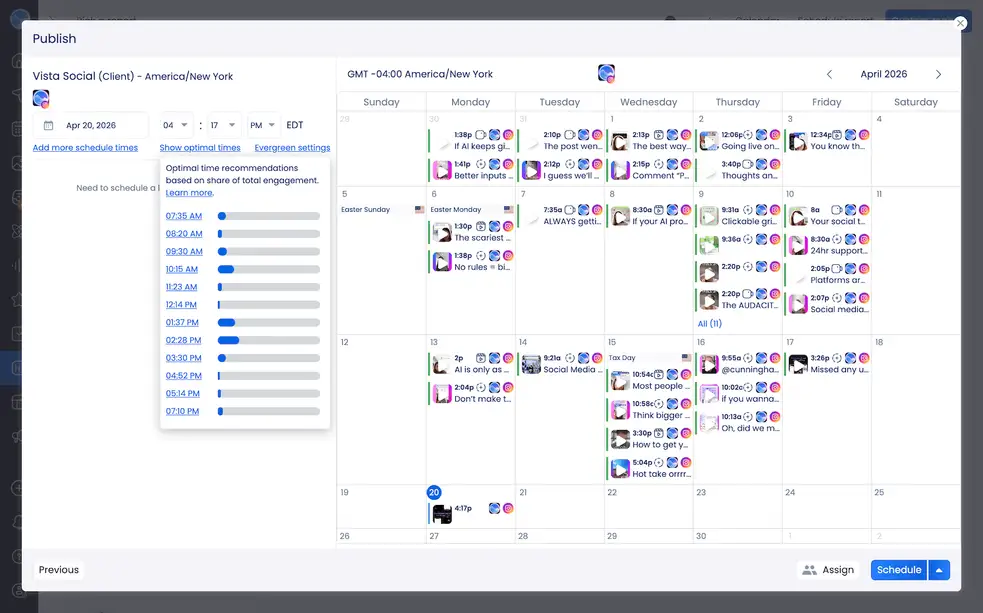
If your audience is asleep or away from their phones when you hit publish, your post misses the window where early engagement matters most. Instagram weighs how quickly a post picks up likes, comments, and shares within its first hour live. That early momentum signals to the algorithm whether the content is worth pushing to more people.
Posting at random times, or sticking to a schedule that worked a year ago without rechecking your audience’s habits, can quietly erode your reach. Your best bet is to check Instagram Insights regularly and schedule posts to land during those peak windows.
Content quality
This is the one nobody wants to hear, but sometimes the problem is the content itself. What worked six months ago might not land the same way today because your audience’s tastes, the competitive landscape, and platform trends have all shifted.
Take an honest look at your recent posts and ask whether they are giving your audience something they actually want. Are you solving a problem, entertaining them, or sparking a reaction? Or are you posting just to stay visible?
If your content ideas have gone stale, your audience will scroll right past. Pay attention to which posts still perform well and lean into those themes and formats.
Your account’s engagement
Instagram is a two-way street. If you’re only publishing posts and never engaging with other accounts, the platform takes notice. Replying to comments on your own posts, leaving thoughtful comments on others’ content, responding to DMs, and interacting through Stories all send signals that you’re an active member of the community.
Accounts that treat Instagram like a digital megaphone tend to see their reach shrink over time. Putting time into genuine engagement with your audience and your peers is not optional if you want your likes to recover.
Features like broadcast channels can also help you build deeper connections with your most loyal followers, which feeds back into stronger overall performance.
Content format
This ties back to the algorithm changes we covered earlier, but it’s worth calling out on its own. The format you choose for a post, whether it’s a Reel, carousel, or single image, directly affects how much engagement it gets.
- Reels currently generate the widest reach, especially among non-followers, because Instagram’s recommendation system pushes them harder
- Carousels tend to drive the highest engagement rate among your existing audience because they encourage swiping, which increases time spent on the post
- Single-image posts still have a place, but they get the least algorithmic support of the three formats
Beyond reach, though, the right format also depends on what you are trying to say. A product tutorial works better as a Reel than a static image, and a step-by-step guide is a natural fit for a carousel. If you’ve been defaulting to one format for everything, experimenting with the others could unlock engagement you have been missing.
The “like recession”
Here’s the bigger picture that a lot of people overlook. Likes across Instagram are declining industry-wide, and on a platform that reaches over 1.74 billion users through ads alone, even small shifts in user behavior show up fast in your metrics. This isn’t just happening to you.
People are interacting differently now. Instead of double-tapping, they’re saving posts for later, sharing them in DMs, or leaving longer comments. Instagram has responded by making saves, shares, and DM sends the strongest ranking signals, while likes have become the weakest engagement signal on the platform.
So before you panic about lower like counts, check your other metrics. Are your saves, shares, or comments trending upward? If so, your content might actually be performing better than the like count suggests. A post with 50 likes and 30 saves is outperforming one with 200 likes and 2 saves in Instagram’s eyes, because saves and shares carry far more algorithmic weight than likes ever did.
How to improve Instagram performance
Now that you know what might be dragging your likes down, the next question is what to do about it. The fixes below map directly to the problems we just covered, and most of them are things you can start testing this week.
Adjust your Instagram strategy
If your likes have dropped, resisting the urge to just post more is important. Posting more frequently without a clear plan often leads to content fatigue for your audience and burnout for you.
Review your top-performing posts from the last 90 days and identify patterns. Which topics, formats, and hooks got the strongest response? Build your content strategy around those insights rather than guessing.
Post at the right times
We touched on this earlier, but it’s worth repeating because it’s one of the easiest wins. Check your Instagram Insights to see when your followers are online, then schedule your content to go live during those peak windows.
General benchmarks suggest that midweek days, especially Tuesday through Thursday, tend to drive the highest engagement. Your specific audience may behave differently though, so treat those benchmarks as a starting point and let your own data guide you.
For this instance, Vista Social’s publishing tools make this easy by letting you schedule posts across your accounts and preview how your grid will look before anything goes live. We can also provide you with recommendations on what time is best to schedule your post.
Test different content formats
If you’ve been relying heavily on single-image posts, it’s time to branch out. Try trial Reels to test video content with non-followers before sharing it with your full audience. Experiment with carousels for educational or step-by-step content. Mix in Stories to stay visible throughout the day without cluttering your feed.
The goal isn’t to abandon what works but to diversify so you are not putting all your eggs in one format’s basket.
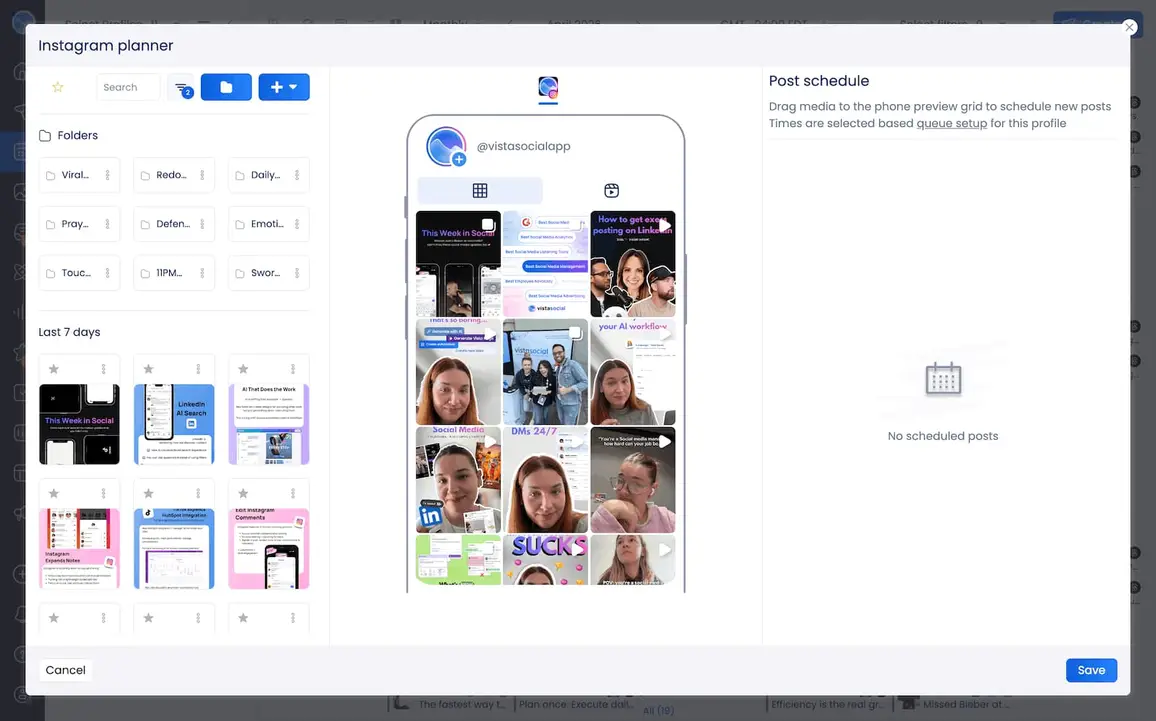
Vista Social’s Instagram Planner lets you see how different formats will look on your profile before you publish, so you can keep your feed cohesive while mixing things up. Track how each format performs over a few weeks and adjust your content mix based on what the data shows.
Use paid ads
Organic reach on Instagram has been tightening for years, and sometimes a small ad budget can go a long way. Boosting a high-performing organic post is one of the simplest ways to extend its reach to people who don’t follow you yet but match your target audience.
You don’t need a massive Instagram ads budget to see results, but the key is to boost posts that have already proven they resonate organically rather than throwing money at content that is underperforming.
Create compelling captions
Captions are doing more work than ever on Instagram. The platform now uses keyword-based discovery, which means the words in your caption help Instagram understand what your content is about and who should see it.
Write captions that invite a response:
- Ask a specific question
- Share a take your audience will want to weigh in on
- Tell a quick story that makes them want to comment
- Provide even more context in the caption to accompany your post
- Or just use it to be funny
Longer captions that spark real conversation signal to the algorithm that your content is worth promoting, while generic calls to action like “double tap if you agree” tend to generate shallow engagement that the algorithm no longer values.
Share your posts to your story
This is a small habit that can make a real difference. Every time you publish a new post, share it to your Story with a quick teaser or context that encourages people to tap through and engage with the full post.
Stories appear at the top of your followers’ feeds, so they are one of the most reliable ways to drive immediate visibility to a new post. You can also use interactive stickers like polls or question boxes to boost engagement on the Story itself, which strengthens your overall account signals. Organizing your best Story content into Highlights gives new profile visitors a reason to stick around, too.
Use the right Instagram analytics tool
You cannot fix what you cannot measure. If you are relying on Instagram’s native Insights alone, you might be missing the full picture of what is driving your performance up or down.
Vista Social’s Instagram reporting features give you a clear view of your engagement trends, audience growth, and content performance across formats. You can track which posts generate the most saves, shares, and comments, so you know exactly where to double down.
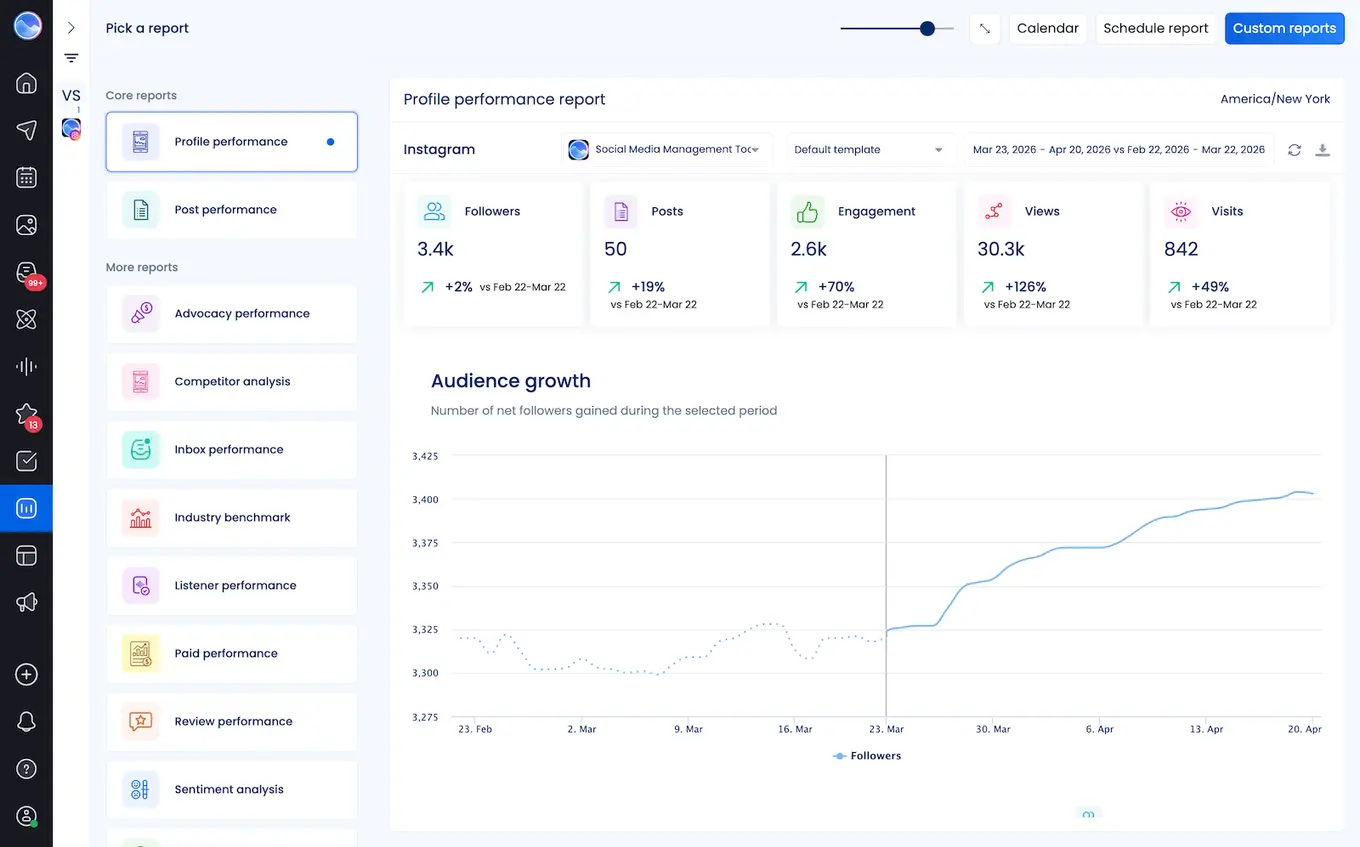
Having all your analytics in one place also makes it easier to spot patterns over time, like whether a shift in posting schedule or content format is moving the needle. When you can connect the dots between what you post and how your audience responds, you stop guessing and start making strategic decisions that improve your results.

Try Vista Social for free
A social media management platform that actually helps you grow with easy-to-use content planning, scheduling, engagement and analytics tools.
Get Started NowAbout the Author

Content Writer
Russell Tan is a content marketing specialist with over 7 years of experience creating content across gaming, healthcare, outdoor hospitality, and travel—because sticking to just one industry would’ve been boring. Outside of her current role as marketing specialist for Vista Social, Russell is busy plotting epic action-fantasy worlds, chasing adrenaline rushes (skydiving is next, maybe?), or racking up way too many hours in her favorite games.
Loading related tools...

The most complete social media management platform for teams who demand more.






Tools
PublishingAnalyticsEngagementIntegrations
FacebookInstagramLinkedInRedditSnapchatThreadsTikTokX (Twitter)YouTubeMCPVista Page (link-in-bio)All IntegrationsCopyright © 2026 Vista Social LLC. All Rights Reserved.