

Published on March 2, 2023
7 min to read
How to Use AI Caption Generators for TikTok and Instagram

Summarize with AI

Table of contents
Summarize with AI

ChatGPT

Claude

Perplexity
Share

Vista Social

X (Twitter)


AI caption generators are all the rage these days, and for good reason! Why spend hours coming up with witty or clever captions when you can generate dozens with the click of a button?
That said, prompting AI to get the captions you want is a skill in itself. If you’re ready to learn how to make the most of AI caption generators, we’ll walk you through the basics below.
Table of contents
What is an AI caption generator?
An AI caption generator is a tool that helps you quickly generate captions for your social media posts. You simply enter information about your post and get back an engaging caption in seconds.
Caption generators use artificial intelligence (AI) and natural language processing (NLP). They analyze your prompts and generate a caption based on a set of pre-programmed rules.
These AI-powered social media tools also work as translators, content improvers, paraphrasing tools, and more, giving you a full suite of options to create a captivating post.
Benefits of caption generators
Caption generators automate the caption creation process, saving you time, labor, and budget. With 82% of marketers actively investing in content marketing, those are some big-time savings on the horizon.
Using a caption generator for business can also help boost the performance of your posts, as the generated captions include keywords and hashtags that can make your post more visible. The AI technology is also trained to look for common spelling and grammar mistakes—saving you the embarrassment of error-ridden content.
Finally, caption generators help you get inspired if you’re stuck coming up with ideas. From posts about a new product to a caption for a funny meme, a caption generator can provide a spark of creativity to get your creative wheels rolling.
Who should use AI caption generators?
AI caption generators are a great tool for content creators and marketers who need to come up with captions quickly but lack the time or resources to do it on their own.
They are also perfect for anyone who might not be confident in their caption-writing skills. Or for anyone who needs help translating posts into multiple languages.
How do you make a unique caption?
Unique captions are built on a combination of keywords, descriptions, and story-telling. When you’re creating captions for your social media posts, you want to make sure the caption reflects the mood of the post but also clearly communicates what it is about.
For example, if you’re posting a picture on Instagram of your dog in a sunhat, an un-original caption would be something like, “Look at my dog wearing a sunhat.” A more unique caption might be, “This cutie loves to protect her head from the sun!”
Including keywords in your captions is also an important part of social media SEO, so don’t forget your SEO research before posting.
How to use AI caption generators
Now that you know the benefits of social media caption generators, why not try some out for yourself? Follow these steps to get started with your first AI caption writer.
1. Pick your platform
There are so many AI writing tools on the market these days it can be hard to keep up. Some of the most popular include Vista Social, Jasper, Copy.ai, and ChatGPT (and now ChatGPT Plus). Take some time to research each one and decide which platform is right for you.
If you’re looking for a social media-specific caption generator, Vista Social should be your first choice. Our AI Assistant is built right into our platform and infused with the latest GPT-4 technology.
With the AI assistant, you can access a fully formed TikTok caption generator, AI Instagram caption generator, translator, paraphrasing tool, stat finder, and so much more. Plus, you can generate, schedule, and analyze your posts all in one app!
2. Enter your prompt
Once you’ve chosen your platform, you’ll need to pick a template and enter your prompt.
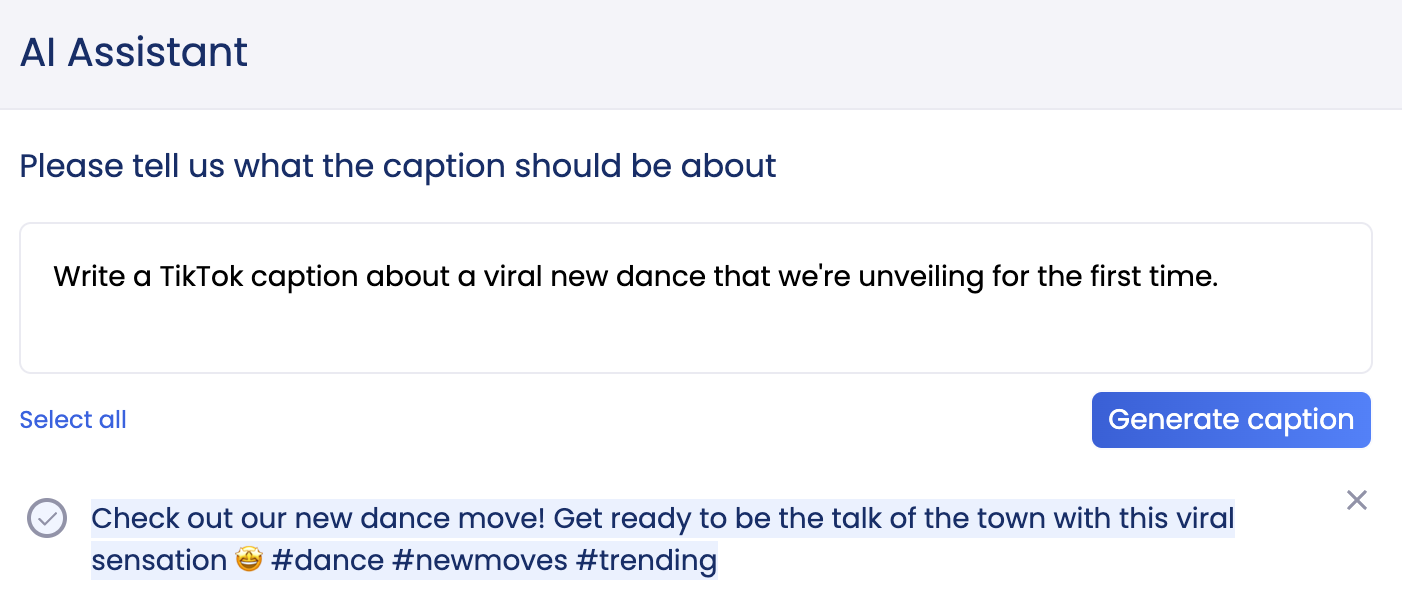
Vista’s AI Assistant is super easy to use. If you want to create a TikTok caption, just prompt the Assistant to: “Write a TikTok caption about a viral new dance that we’re unveiling for the first time.”
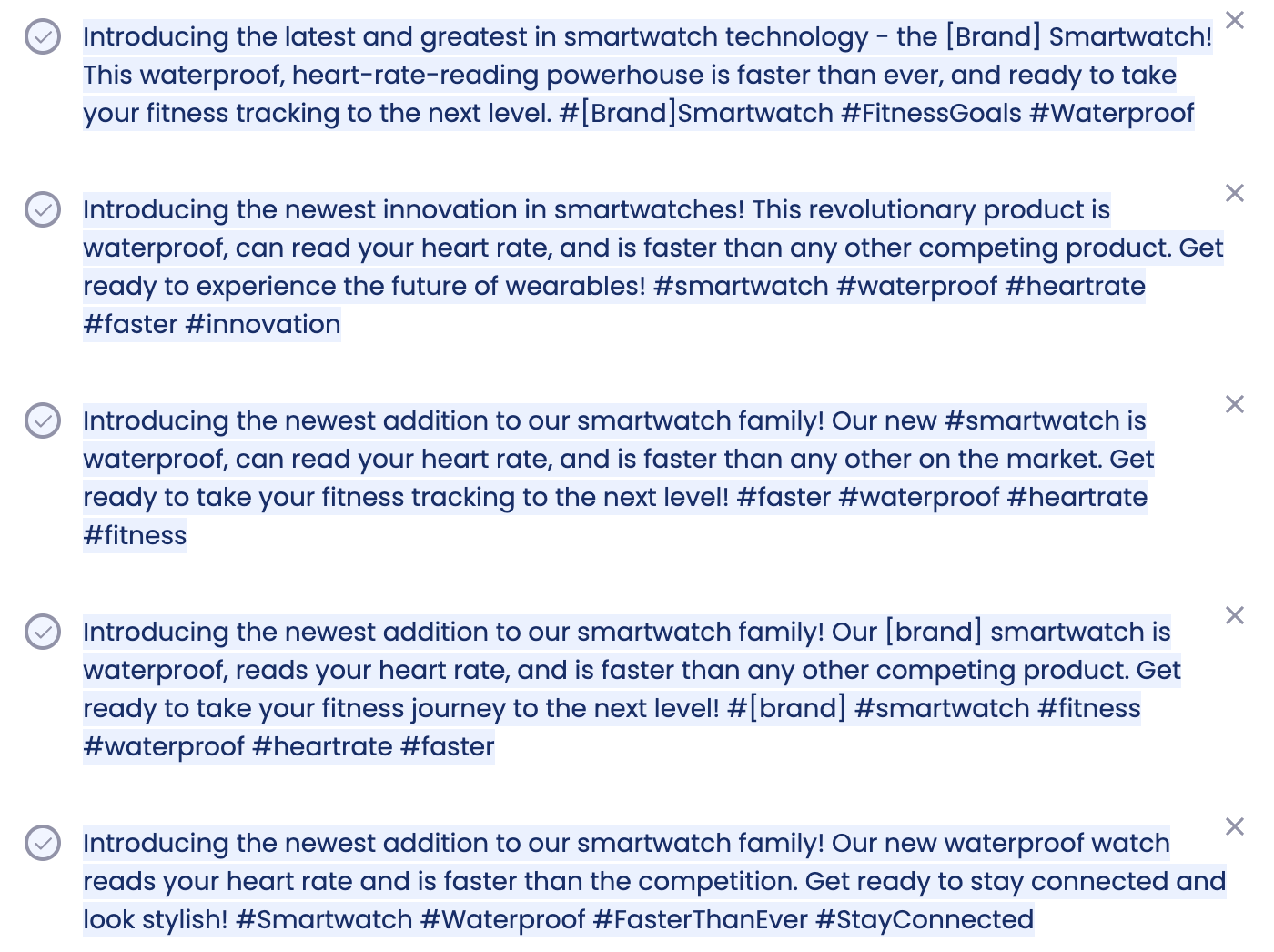
You could also use it as an IG caption generator like this: “Write an Instagram caption about the launch of a new smartwatch product. Mention that it’s waterproof, can read your heart rate, and is faster than other competing products.”
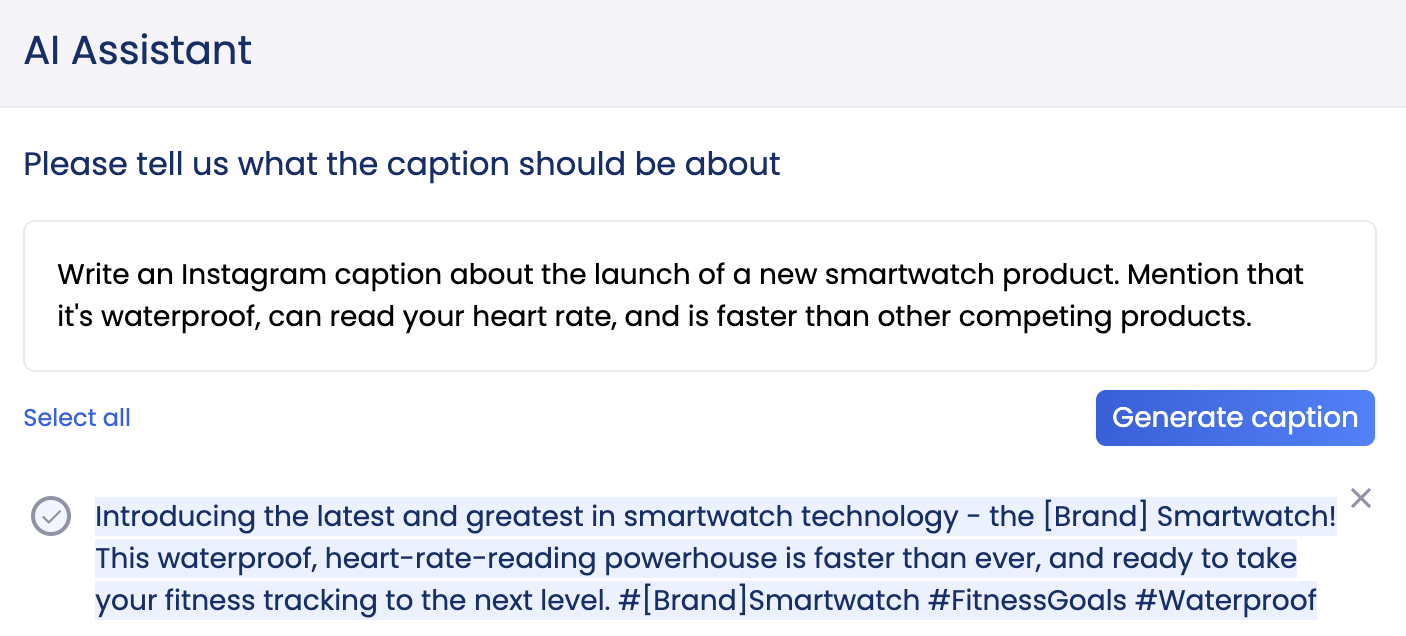
The best part? The AI Assistant even recommends hashtags to use in your post, so you can reach the widest audience possible.
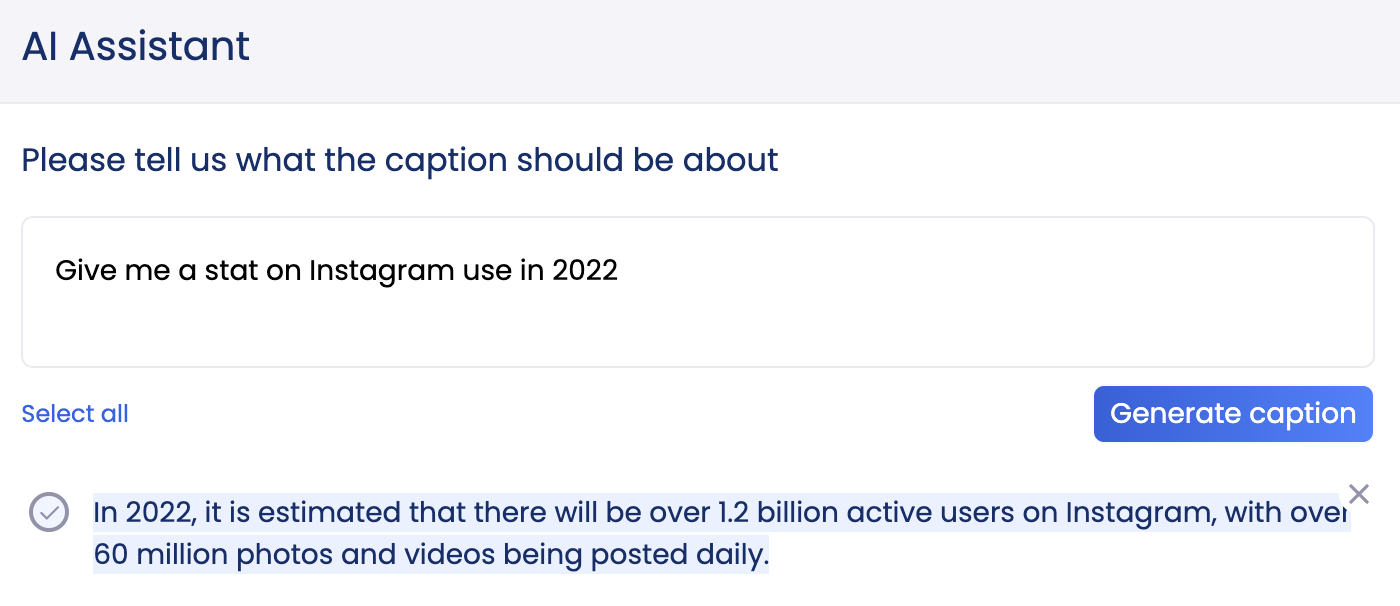
If you want to generate some quick stats, simply ask: “Give me a stat on Instagram use in 2022,” and the Assistant will provide you with the latest projections.”
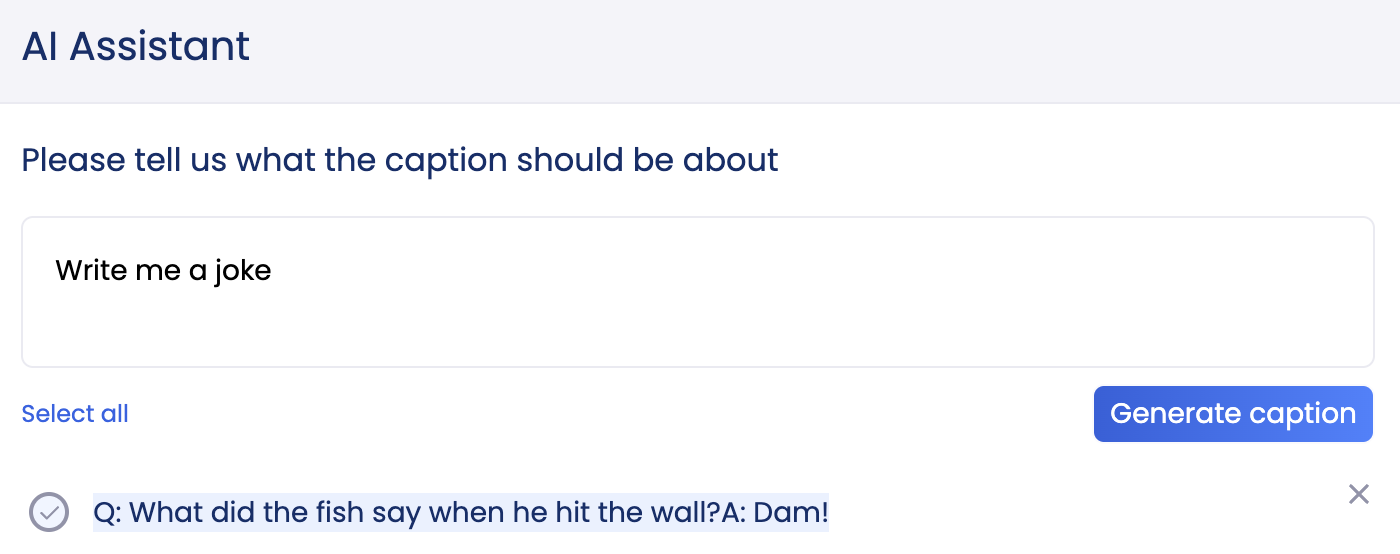
You can also prompt for jokes, translations, and customer service responses, all within the post-creation screen.
3. Choose from generated ideas
The AI Assistant will offer one generated post at a time–but don’t feel pressured to choose the first one. You can skip to the next post idea or even keep generating until you find something you really like.
Make sure the output you get is in line with your brand tone and any media included in your post.
4. Select and post
Once you’ve found the perfect post, give it one final read-through and choose the check mark on the left of the output. Then, choose Use selected to add it to your drafted post. From here, you can add copy, imagery, video, and other visuals to complete the post before publishing.
You can also schedule your content in advance, save it as a draft, or add it to your publishing queue.
When your post is live, use Vista Social’s advanced reporting features to track its performance. This is a great time to gather data and see how your AI-generated captions perform against your traditional ones. We recommend A/B testing your captions for at least a few months to get the best results.
What to look for in a caption generator
The best AI caption writers should offer easy-to-use features that make creating captions simple and hassle-free. Look for a caption generator with platform-specific content, suggested hashtags, and a simple prompting process. It should also provide scheduling and analytics software so you can track your post’s performance.
Price is also a factor to consider when choosing a caption generator. While many AI caption generators offer a free trial, you might need a paid subscription in order to access the features you need. Consider your budget and the features you’re looking for before deciding on a specific tool.
If you’re stuck, Vista Social’s free plan offers 50 AI-generated captions per month and unlimited captions on the Pro plan. You can also check out our blog on the best Jasper AI free alternatives.
Examples of great social media captions
Need help identifying the gruel from the cool? Check out these social media caption examples to get a better idea of how to create a captivating post.
Funny caption example
Sometimes your social media caption is less Batman and more Robin. Let it come in with the assist! The best captions know how to riff off the media they’re paired with and give users a giggle along the way.
Take this example from Vista Social’s IG, which jokes that Instagram’s Adam Mosseri is like a wild cat hunting down new social media features from other apps. It’s cute, it’s niche, and it’s tailored to the Vista Social audience.
Shopping caption example
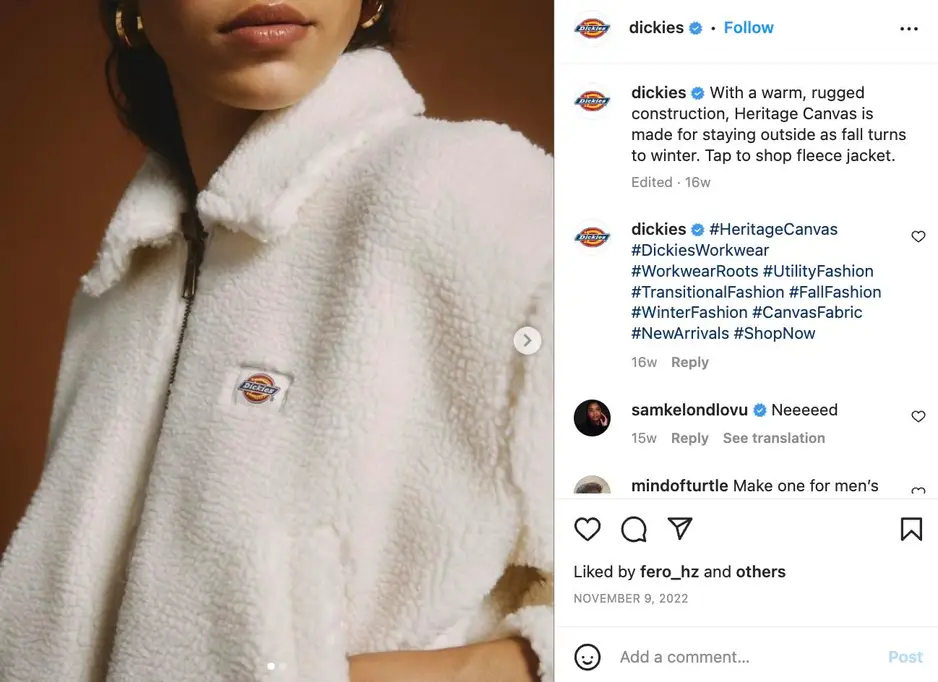
Converting customers in your online shop starts with savvy social media captions. Check out this pick from fashion and workwear brand Dickies, which offers a quick, precise, and engaging look at its staple fleece jacket.
Brand collab TikTok caption
TikTok is all about authenticity. In fact, 64% of global TikTok users say they can be their true selves on TikTok. So, make sure your audience feels connected to your content, even when you’re doing a branded post. TikTok user @elviraaventure managed to make their Cheetos partnership post feel like a conversation by adding a clever caption.
@elviraventura 2 gallons of hot cheetos just for ✨decoration✨ #fyp #foryou #hotcheetos #TikTokFood ♬ Drip Like ME – Kenndog
Sarcastic caption example
Sarcasm can be a tricky tool to wield, but when used correctly, it can add a dose of humor to a post that may otherwise have gone unnoticed. Canada’s favorite budget food brand, “no name,” is no stranger to sarcasm, and its playful Instagram captions help it stand out.
Travel caption example
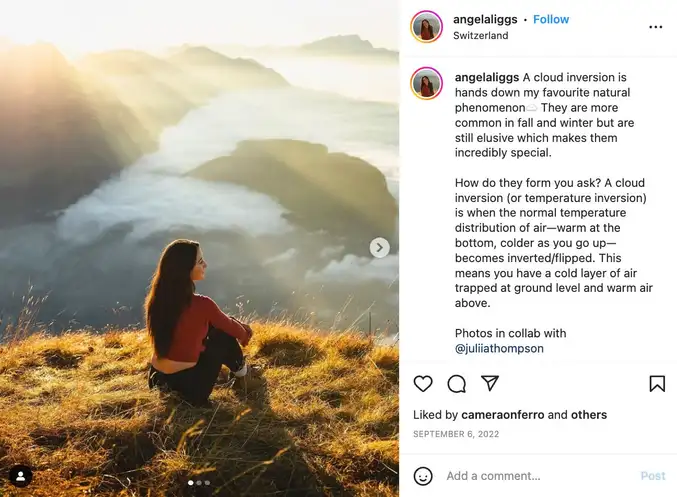
If you love bringing your social media followers around the world, a captivating caption can go a long way. Travel blogger Angela Liggs knows her followers want more than a pretty picture; they what to know the who, what, where, and why as well.
Funny TikTok caption
TikTok is here for humor, and your caption can go a long way in getting those LOLs. This caption example from Wendys is great because it actually has nothing to do with the content of the video, but it absolutely adds to the joke. Don’t be afraid to get weird with your captions if that suits your brand.
@wendys Next we’ll play egyptian rat slap.
♬ original sound – Wendy’s

Try Vista Social for free
A social media management platform that actually helps you grow with easy-to-use content planning, scheduling, engagement and analytics tools.
Get Started NowAbout the Author

Content Writer
Loading related tools...

The most complete social media management platform for teams who demand more.






Tools
PublishingAnalyticsEngagementIntegrations
FacebookInstagramLinkedInRedditSnapchatThreadsTikTokX (Twitter)YouTubeMCPVista Page (link-in-bio)All IntegrationsCopyright © 2026 Vista Social LLC. All Rights Reserved.