


Published on October 2, 2026
9 min to read
Vista Social vs Ordinal: Which Social Media Tool Fits Your Team in 2026?

Summarize with AI

Table of contents
Summarize with AI

ChatGPT

Claude

Perplexity
Share

Vista Social

X (Twitter)


Running executive LinkedIn accounts is one job, while owning comments, reviews, reports, and several networks is another. Both sit under social media management.
In practice, that divide shapes this Vista Social vs Ordinal comparison. Ordinal is the sharper LinkedIn specialist. Vista Social is the stronger all-around choice when publishing is one part of a wider social program.
Ordinal fits when LinkedIn reach is the program, while Vista Social fits when the team also owns replies, listening, reviews, reports, clients, or many networks.
The short version
- Pick Ordinal for executive social programs, LinkedIn-first content, automatic team engagement, and Slack-based amplification.
- Pick Vista Social for broad publishing, one inbox, listening, reviews, agency reports, and connected AI flows.
- Check the real cost against users and profiles. Ordinal Pro includes unlimited seats but only four profiles, while Vista Social bundles more profiles at each standard tier.
Table of contents
Quick verdict
Choose Vista Social when several people share the social operation. Publishing, replies, reviews, listening, reports, project work, and Ask Vista stay connected so the team can move from insight to action.
Choose Ordinal when executive content and LinkedIn reach drive the program. Its calendar stays focused, while Slack Boost, team amplification, and unlimited Pro seats support distribution.
| Platform | Best for | Standout reason | Check before choosing |
| Vista Social | Agencies and social teams managing several brands, locations, or networks | Publishing, inbox, reviews, reports, projects, and AI in one workspace | Check plan limits and add-ons for X, listening, and advocacy |
| Ordinal | B2B teams building founder and employee reach on LinkedIn | Executive content with built-in team amplification | Four profiles are included on Pro, and the public feature list does not show a unified inbox, listening, reviews, or white labeling |
Try Vista Social for 14 days and run one real workflow from draft to report.
Pricing comparison
The entry prices are close, but the plans count capacity differently. Ordinal includes more seats on Pro, while Vista Social includes more profiles across its standard plans.
Vista Social pricing
Because Vista Social covers more of the operation, each plan bundles several types of work:
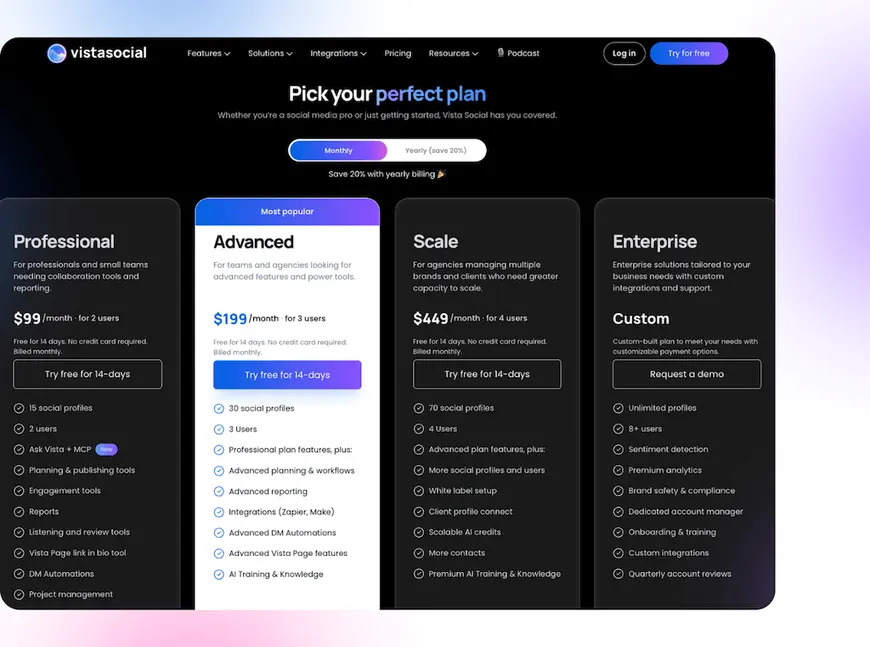
- Professional: $99 per month for two users and 15 profiles.
- Advanced: $199 per month for three users and 30 profiles.
- Scale: $449 per month for four users and 70 profiles.
- Enterprise: Custom pricing and capacity.
Annual totals are $950, $1,910, and $4,310 for the three standard tiers, while X and wider listening are separate add-ons.
Ordinal pricing
While Ordinal starts with four profiles, each tier adds more workflow depth:
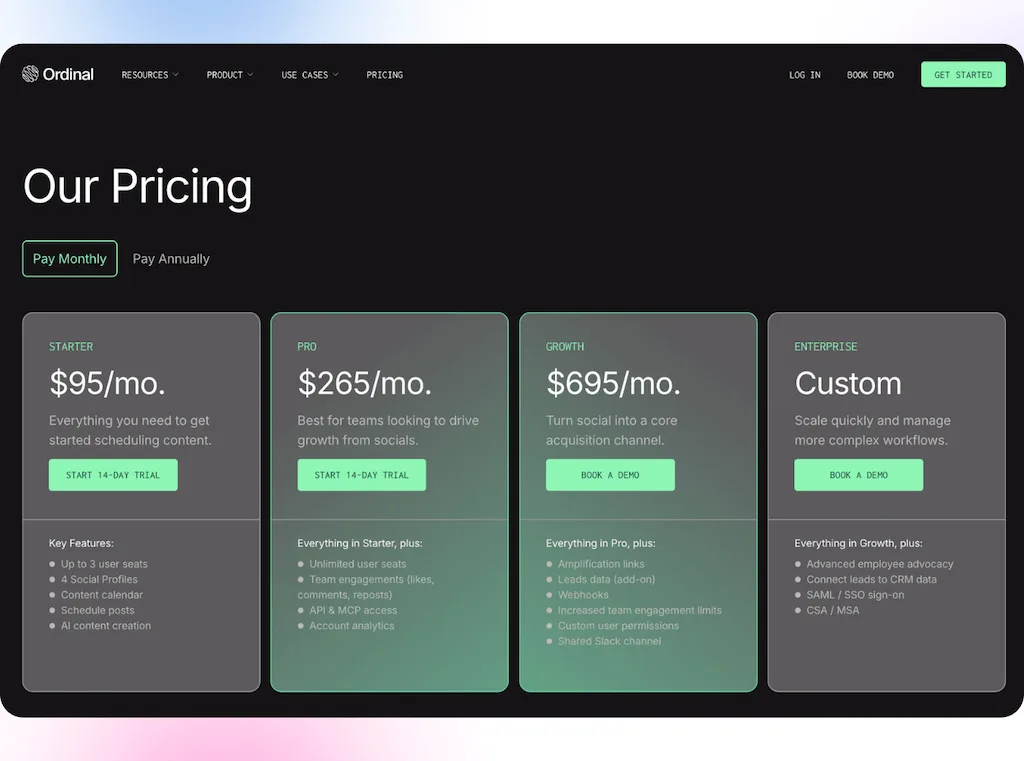
- Starter: $95 per month for three users, four profiles, 50 scheduled posts, and 14 days of analytics.
- Pro: $265 per month for unlimited users and posts, four profiles, all-time analytics, team engagement, API access, and MCP.
- Growth: $695 per month with amplification links, lead data, webhooks, custom permissions, and a shared Slack channel.
- Enterprise: Custom pricing with wider employee advocacy controls.
Extra profiles cost $20 each per month, while annual billing lowers Starter, Pro, and Growth to $85, $235, and $625 per month.
Platform support
Although both products publish beyond LinkedIn, Vista Social covers a wider social and reputation stack.
Each network controls the post types, metrics, comments, and messages a third-party tool can access, so test the exact formats and actions your team uses instead of buying from a logo list.
Scheduling and publishing
Vista Social
Vista Social keeps many accounts and review paths in one calendar, giving the team one source of truth.
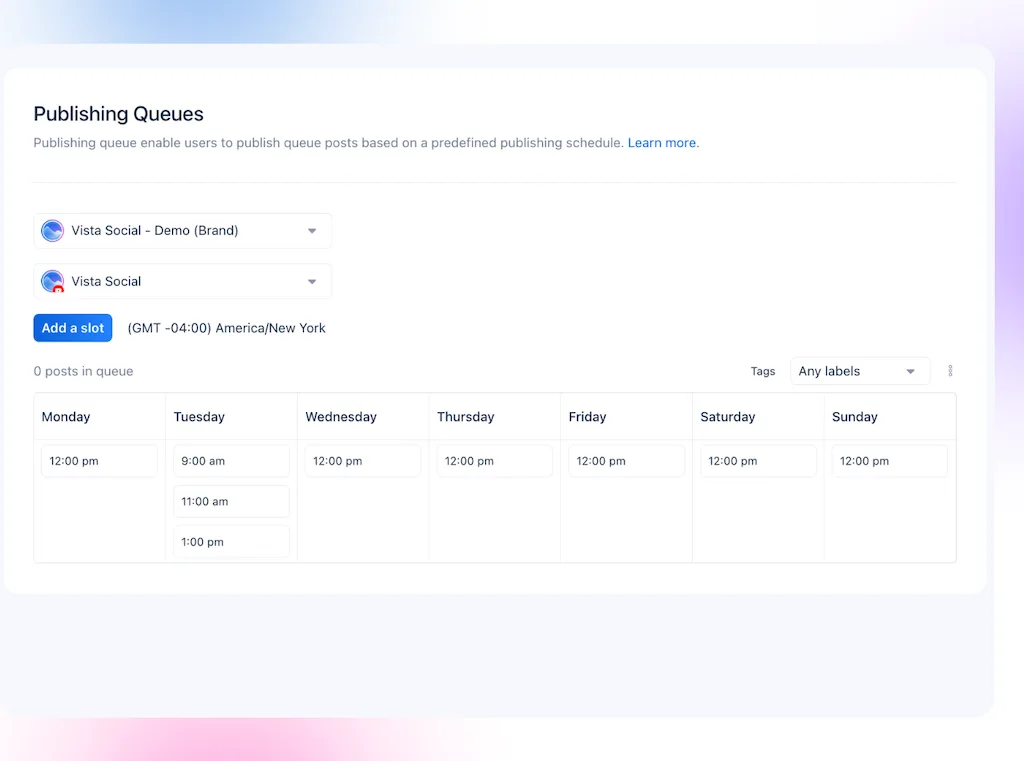
- Schedule without a monthly post cap on paid plans.
- Publish in bulk and build queues, while saved captions and network-level edits speed up repeat work.
- Route posts through one approval stage on Professional or several on Advanced and above. Outside reviewers can use a shared calendar without taking a normal seat.
Ordinal
Ordinal shapes the flow around leader posts and LinkedIn reach, keeping the workspace tight to that job.
- Draft, approve, and schedule from a calendar shaped around executive and LinkedIn content.
- Tag personal profiles and coordinate first comments or team support around a new post.
- Keep review notes, version history, public links, and blocking or non-blocking approvals beside the draft.
Best fit: Ordinal is stronger for LinkedIn reach. Vista Social is stronger across more brands, locations, post types, and networks.
Engagement and inbox
Vista Social
Vista Social handles the replies that arrive after a post goes live, so each message can get an owner.
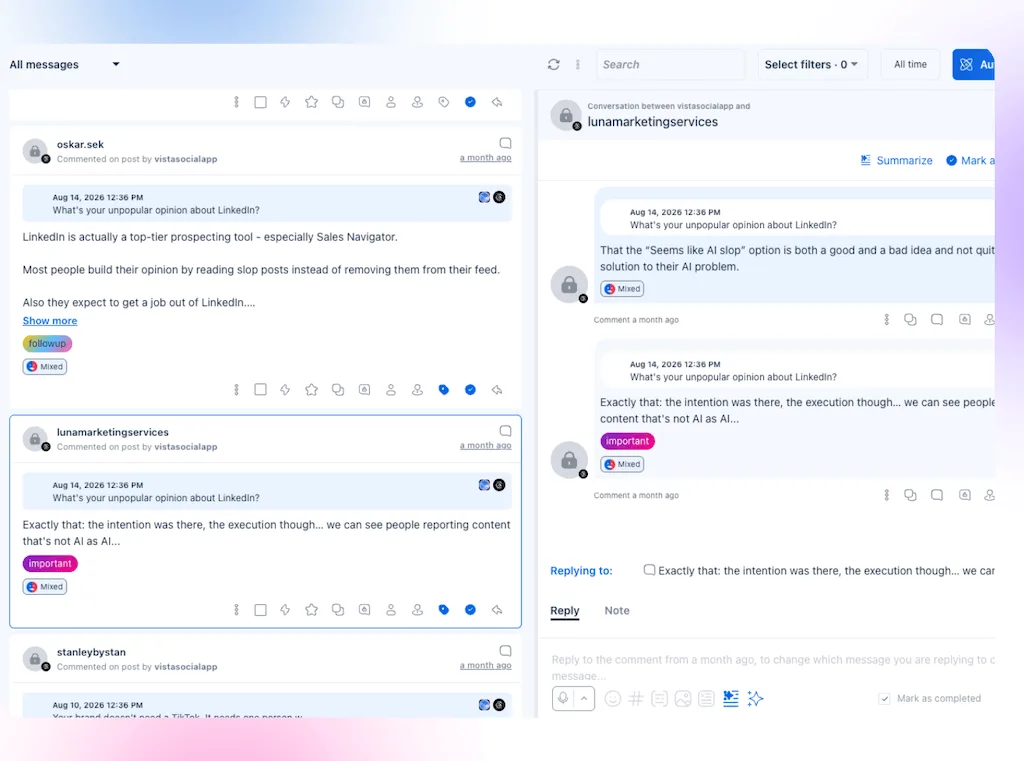
- Bring supported comments, DMs, mentions, shares, and reviews into one queue.
- Assign an owner, leave a note, label the thread, apply a macro, or create a linked task.
- Use Ask Vista to review unread items, draft replies, or apply inbox actions while a person keeps control of sensitive sends.
Ordinal
Ordinal helps staff boost company and leader posts, solving a different kind of engagement problem.
- Coordinate employee likes, comments, reposts, and first comments on supported networks.
- Use Slack Boost Channels to alert staff when a new post needs support, so the request does not rely on a manual reminder.
- Its feature list does not describe a unified social inbox, so confirm inbound coverage before buying.
Best fit: Ordinal organizes how employees support outbound posts. Vista Social organizes how the social team handles the conversations coming back.
Analytics and reporting
Vista Social
Vista Social links channel results with the inbox, reviews, listening, and teamwork, allowing reports to cover more than posts.
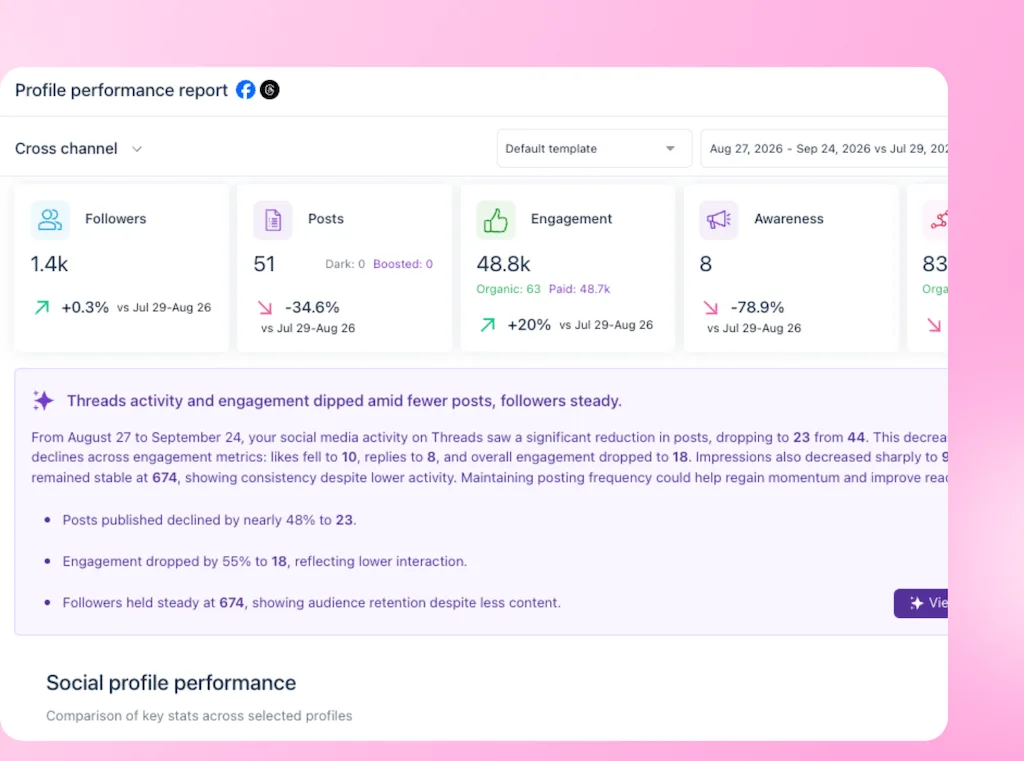
- Report on profiles, posts, inbox work, reviews, competitors, advocacy, listening, paid results, and teamwork.
- Schedule delivery, share a live link, or export a PDF.
- Use Ask Vista to summarize a change, find top posts, or turn live results into a report draft.
Ordinal
Ordinal keeps results close to each post and the staff support around it.
- Track content and team activity, while Starter keeps 14 days of data.
- Access all-time analytics on Pro and higher plans.
- Use AI reporting in beta to help interpret content results, so the team does not write every summary from scratch.
Best fit: Ordinal covers a focused content program. Vista Social gives multi-network teams a wider analytics view of results and operations.
AI tools
Both tools have useful AI, but Vista Social covers far more of the social manager’s actual day.
Vista Social
Ask Vista works with live social data, helping with both the task and the next step.
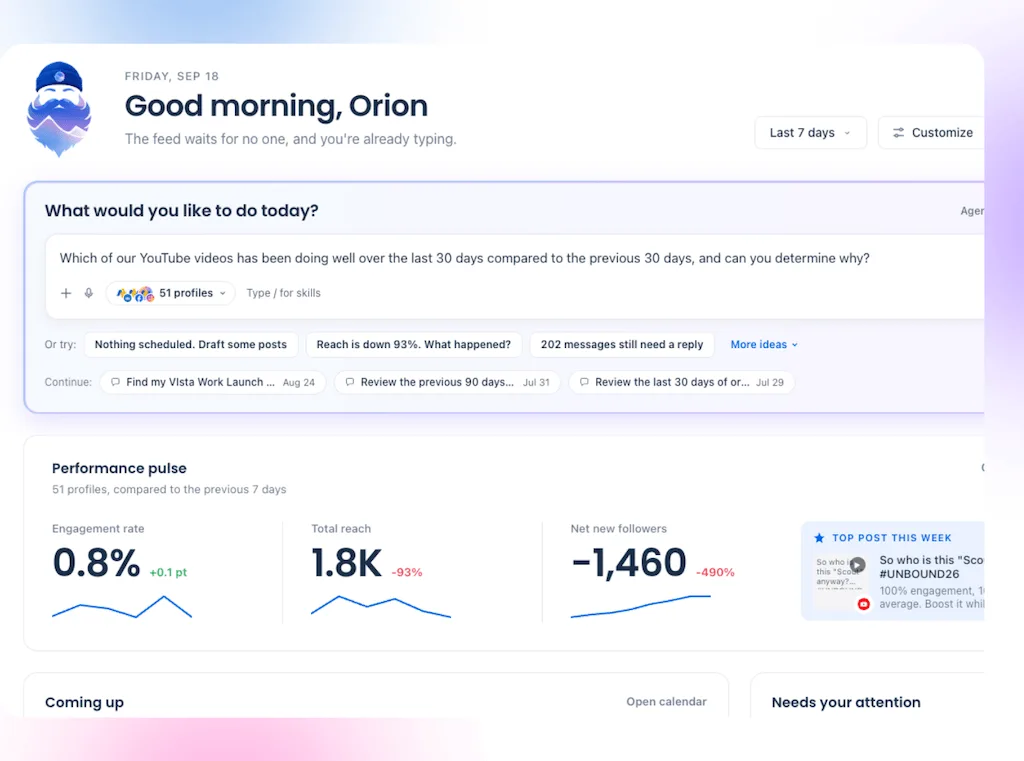
- Create: Draft and rewrite posts for different networks, generate ideas, and tailor content with saved brand context.
- Publish: Build drafts, check what is scheduled, find posts waiting for approval, and schedule approved content.
- Manage the inbox: Surface unread or high-risk conversations, draft replies, apply macros, and organize inbox work.
- Analyze: Read live account data, find top posts, explain performance changes, and generate reporting insights.
- Work with media: Search the media library, generate images, and edit images from a plain-language request.
- Organize the work: Create tasks, review due work, and keep the action linked to the post, conversation, or report.
- Save the process: Turn repeatable methods into Skills that the team can run again without rebuilding the prompt.
- Run recurring work: Use Agents to monitor activity or run a saved workflow on a schedule.
- Bring your own assistant: Use MCP on paid plans so supported AI assistants can reach Vista Social data and actions.
- Ground the output: Advanced and higher plans can use AI Training & Knowledge to add approved brand facts and guidance.
Ordinal
Ordinal uses AI for drafts, reports, and LinkedIn reach, but its scope is tighter.
- Draft and repurpose social posts with AI.
- Use beta AI reporting to interpret content performance.
- Access API and MCP on Pro for posts, analytics, approvals, teams, and auto-engagements.
- Bring LinkedIn content and distribution tasks into assistants such as Claude or ChatGPT, while Ordinal remains the system that performs the social action.
- Keep the strongest AI workflows close to content creation, reporting, and team amplification.
Best fit: Ordinal has credible AI for a focused LinkedIn content engine. Vista Social is the clear AI winner for a social team because Ask Vista can help create, publish, respond, analyze, organize, and repeat the work from the same live workspace.
AI can remove repeated setup and surface the next action, but the team should still review copy, media, replies, and high-impact actions before they go live.
Agency delivery and white labeling
Vista Social
Vista Social keeps each client’s work apart. It can also send reports under the agency’s brand.
- Separate each client or brand with Profile Groups.
- Limit team access without mixing calendars, inbox items, or reports.
- Add branded PDF reports on Advanced and above, with wider custom-domain and branding options where supported.
Ordinal
Ordinal gives clients a clean review path, but it lists fewer agency brand options.
- Share public approval links with clients or outside reviewers so they can review without joining the core team.
- Add custom permissions on Growth.
- Its feature list does not include branded reports or a white-label dashboard.
Best fit: Ordinal can suit an executive LinkedIn service. Vista Social is stronger for community care, listening, reviews, and branded reports.
Employee advocacy
Vista Social
Vista Social gives staff approved posts to share, but the social team still controls the program.
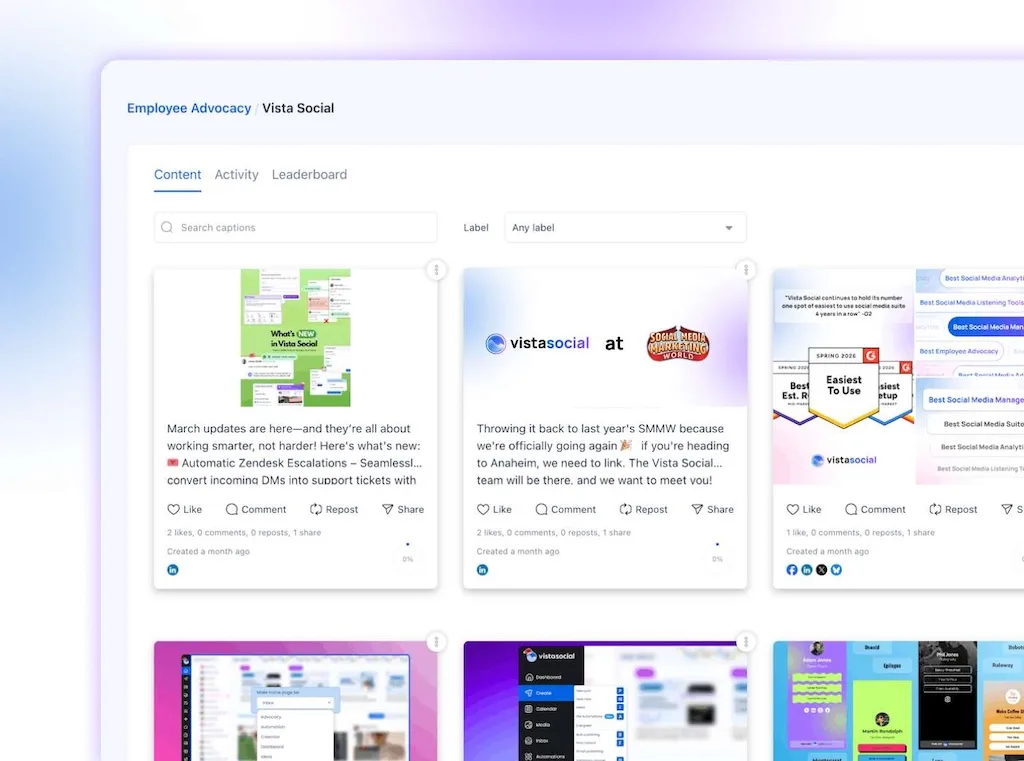
- Give employees a feed of approved posts to share, so they do not need to write from scratch.
- Track participation and results, so the social team can see which posts employees share.
- Start with three free advocates, then add 25 employees from $199 per month.
Ordinal
Ordinal places staff support inside the post launch flow, so it works well for leader posts.
- Build advocacy into LinkedIn distribution.
- Coordinate team engagement through likes, comments, reposts, and Slack requests while the post is still fresh.
- Add amplification links on Growth and broader controls on Enterprise.
Best fit: Use Ordinal for coordinated LinkedIn engagement. Pick Vista Social for an approved content feed with wider tracking. Our advocacy guide explains both models.
Which platform should you choose?
Who should choose Vista Social?
Vista Social is the stronger choice when social is a shared business function:
- Agencies or teams manage several clients, brands, or locations.
- Customer conversations need owners, notes, macros, and follow-up.
- Reviews, listening, and brand monitoring sit inside the social remit.
- Reports need scheduled delivery, agency branding, or wider operational context.
- AI should work across content, inbox, reports, media, tasks, Skills, and Agents.
Who should choose Ordinal?
Ordinal is the stronger choice when LinkedIn content and staff reach lead the decision:
- Founder or executive accounts drive the content program.
- Employees often like, comment on, or repost company content.
- Slack is the natural place to coordinate post amplification.
- Many teammates need access to a small number of profiles.
- API or MCP workflows will support content, approvals, and team engagement.
Use both free trials with one live flow. Link the real profiles and invite the people who do the work. Then route one review and send one report, so any missing step shows up within a week.
Our 2026 verdict
Ordinal is a sound specialist for LinkedIn-led firms because its executive content flow, team engagement, Slack links, and unlimited Pro seats solve a clear reach problem well.
Vista Social wins for agencies and teams with a wider social remit. Since posts, inbound replies, reviews, listening, reports, client branding, project work, and AI sit together, the team has fewer paid tools and handoffs.
Choose the specialist when LinkedIn reach is the main goal. Choose the wider platform when social touches clients, buyers, sites, and leaders across the firm.
Start a free 14-day Vista Social trial with your real profiles, approval path, and busiest inbox. No credit card is required.
Frequently asked questions
Is Vista Social better than Ordinal?
Vista Social is better for teams that need many networks, one inbox, reviews, listening, broad reports, and agency tools. Ordinal can be better for LinkedIn-first executive posts and planned staff engagement.
How does Vista Social pricing compare to Ordinal?
Vista Social’s Professional plan starts at $99 per month with two seats and 15 profiles. Ordinal Starter is $95 with three seats and four profiles.At $265, Ordinal Pro removes the seat and post caps but keeps four included profiles. Compare both counts before you choose.
Does Vista Social support LinkedIn like Ordinal does?
Vista Social supports LinkedIn posts, data, replies, approvals, and advocacy. Ordinal goes deeper on executive content, auto-engagement, and Slack Boost flows.
Can Vista Social do social listening that Ordinal cannot?
Vista Social can track terms on linked profiles, while broader external listening is available from $75 monthly. Ordinal does not list a listening product.
Is Vista Social good for agencies?
Yes. Profile Groups split clients, roles control access, shared calendars collect sign-off, and reports can be sent or branded. The inbox, reviews, listening, and project tools also support work beyond posts.
Does Vista Social have Ordinal’s auto-engagement features?
Vista Social offers employee advocacy and engagement flows, but it does not claim a direct match for Ordinal’s automatic staff likes, comments, and reposts. Ordinal is stronger when that exact flow is required.
Does Vista Social have a free trial?
Yes. Vista Social offers a 14-day free trial with no card. Ordinal advertises the same trial length and terms.
Try Vista Social for free
A social media management platform that actually helps you grow with easy-to-use content planning, scheduling, engagement and analytics tools.
Get Started NowAbout the Author

Content Writer
Orion loves to write content that refuses to be boring. As part of Vista Social, he helps brands, creators, and agencies stop doom scrolling and start winning with social media. When he's not in front of a keyboard, he's watching films in IMAX with his wife, dissecting football tactics (the European kind), and getting lost in a good book.
Social listening and review management
Vista Social
Vista Social also covers talk and feedback that may never appear below a post. Its workspace includes reviews and brand mentions too.
Ordinal
Ordinal stays focused on published posts and team reach.
Best fit: Vista Social wins for reputation and brand monitoring. Ordinal fits when LinkedIn post results are the main measure.