

Published on July 4, 2024
9 min to read
LinkedIn Marketing Tips: Tried And Tested Strategies

Summarize with AI

Table of contents
Summarize with AI

ChatGPT

Claude

Perplexity
Share

Vista Social

X (Twitter)


You need powerful LinkedIn marketing tips if you want people to actually notice your posts. The platform is packed with skilled marketers who know how to spark conversations and keep engagement flowing.
Some grab attention with bold headlines and strong personal brands. Others start discussions that make you stop scrolling and want to join in. That’s the kind of energy you want in your own LinkedIn strategy.
To make a real impact, you’ll need more than luck.
You need a clear plan that helps you stand out and show your expertise to the people who matter most. Once you know how to use LinkedIn strategically, it becomes one of the best places to build your network and attract clients.
TL;DR: Want meaningful results on LinkedIn? Know your strategy and own your space.
Table of contents
LinkedIn marketing tips for social media managers
Turn your LinkedIn page into a space that shows your expertise and attracts clients who truly value your work. These tips will help you strengthen your presence and project confidence in your skills.
When you use LinkedIn with focus and consistency, it becomes more than a digital résumé. It transforms into a living portfolio that proves how you start meaningful conversations and build relationships that lead to real opportunities.
Revamp your LinkedIn profile headline
Your headline is the first thing people see, so make every word count. Skip the plain job title and use that space to show how you help clients or what makes your approach stand out.
For example, try writing something like, “Helping brands grow loyal audiences and boost engagement 🚀 | Social Media Manager” instead of just “Social Media Manager.”
You can edit your LinkedIn headline anytime to reflect your current goals or highlight recent wins. Updating it regularly keeps your profile fresh and attracts the right kind of attention from clients who fit your expertise.
Share data-driven insights
People love numbers, but they remember stories. Instead of posting plain stats, turn your data into a quick narrative that shows what actually worked for you. For example, share how your last LinkedIn post gained stronger engagement after switching from static graphics to short videos.
If you ever run out of ideas, explore a few LinkedIn post ideas that encourage authentic interaction. Posts that highlight client wins or honest reflections from your daily work can feel relatable and real to your audience.
According to recent research, LinkedIn video posts can generate up to five times more engagement than static ones. Insights like that give your post more credibility and help your audience see that your advice is grounded in results, not guesswork.
You can manage and track all of this efficiently with Vista Social. The platform helps you schedule posts, reply to comments and monitor performance in one dashboard. It saves valuable time and keeps your content calendar organized without needing to jump between different apps.
The best part is that Vista Social supports both LinkedIn pages and personal profiles. That means you can schedule posts and reply to comments while checking your analytics from a single place. To connect your LinkedIn company page and personal profile to Vista Social, go to the Quick Add option on the left-hand menu and follow the prompts.
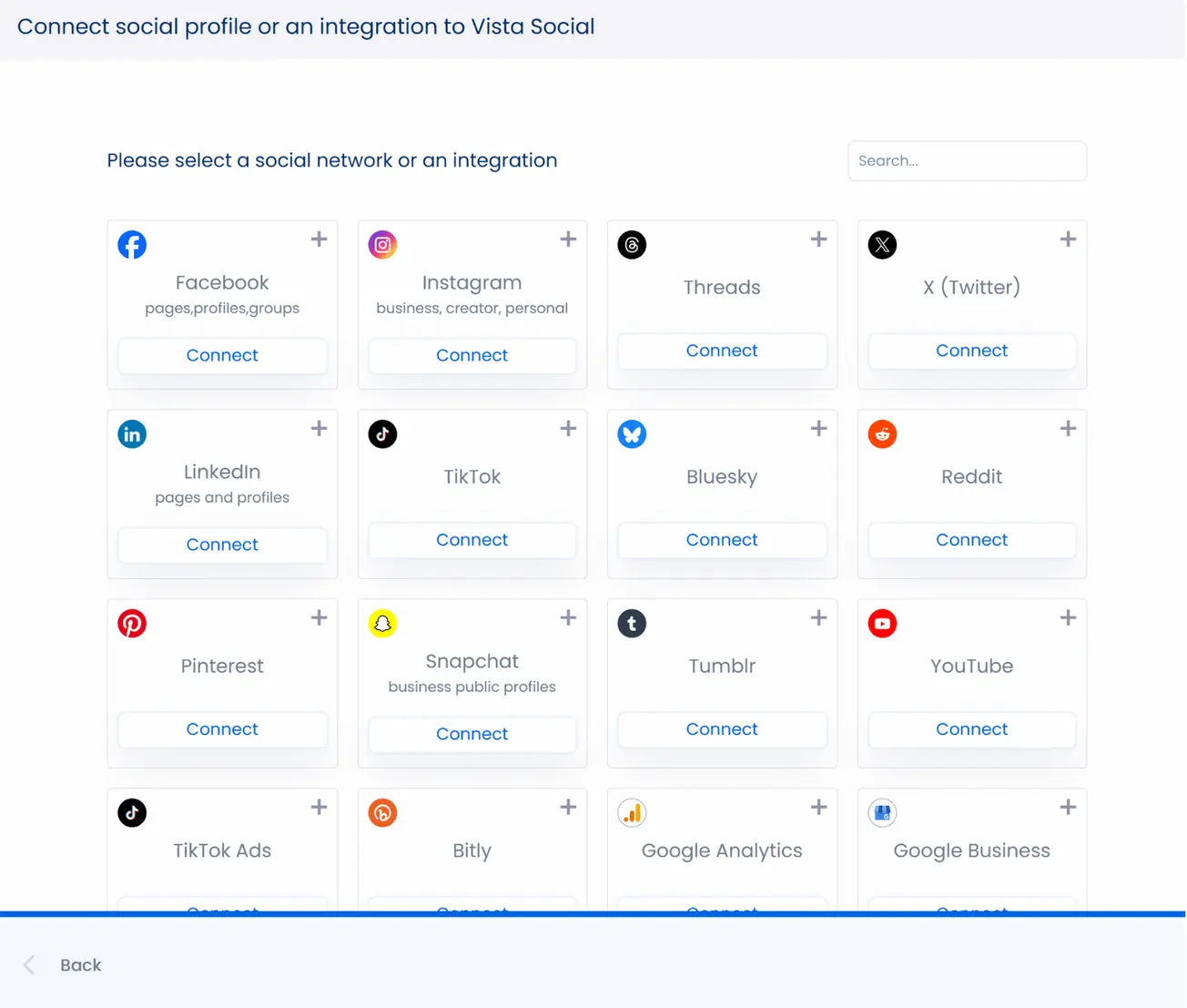
Once connected, you can easily:
- Create and schedule your LinkedIn posts via Vista Social’s social media publishing feature
- Manage all published, scheduled or drafted content through a single calendar
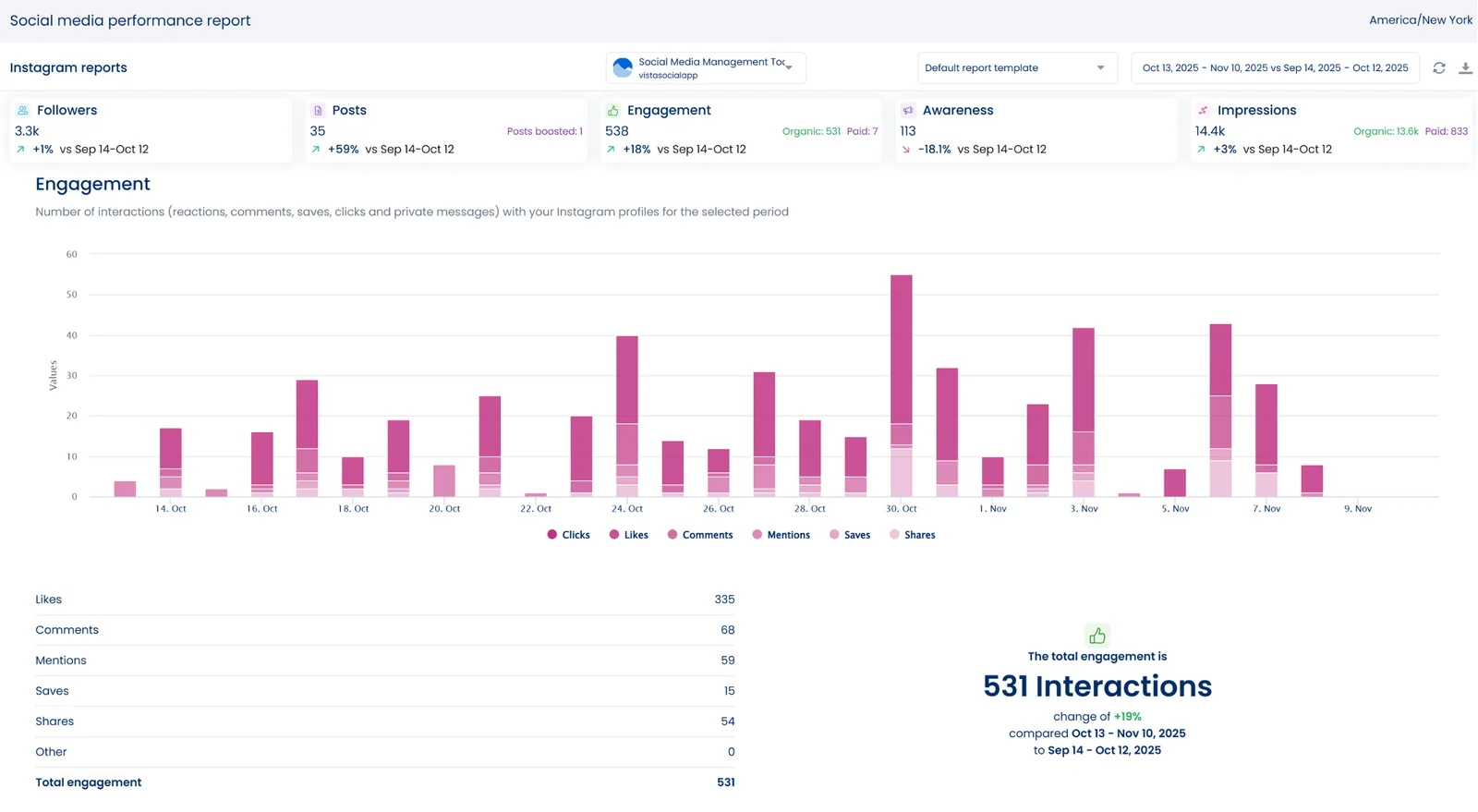
- Track and analyze performance using social media analytics feature then save reports as PDFs or images and share on your LinkedIn page
Offer mini consultations and free tips
Post quick, actionable social media tips or offer to review campaigns and profiles for free to entice potential clients to engage with your content and act on your offers.
Remember to include a Call-to-Action (CTA), such as “Comment your LinkedIn Profile below or send me a message, and I’ll give you one tip to boost your engagement.”
LinkedIn marketing tips for marketing agencies
Leverage your marketing agency’s LinkedIn page to stand out and draw in the right clients with the following best practices.
1. Create a killer company page
Optimize your agency’s company page to boost its chances of attracting potential clients. Use a compelling banner image and a high-quality logo. If you’re updating your visuals, check the recommended LinkedIn banner size so your cover photo displays perfectly on both desktop and mobile.
Write a tagline that clearly states your agency’s value proposition. This helps followers instantly see what your company does and the value it offers to potential clients.
2. Run LinkedIn ads
Reaching the right people on LinkedIn starts with smart targeting. Focus on decision-makers and professionals who fit your agency’s niche by running tailored LinkedIn ad campaigns.
You can run Message Ads, Sponsored Content, Video Ads, or Conversation Ads to reach people who matter most to your business. When planning your campaigns, remember that the average click-through rate for Sponsored Content in 2025 is about 0.56 percent. Use that number as your baseline and keep refining your visuals and copy until you see stronger results.
3. Leverage LinkedIn polls to boost engagement
Polls are one of the easiest ways to spark conversations on LinkedIn. Create polls that tap into your audience’s curiosity or experiences so they’ll want to share their opinions. It’s a quick way to boost visibility while learning more about what people care about most.
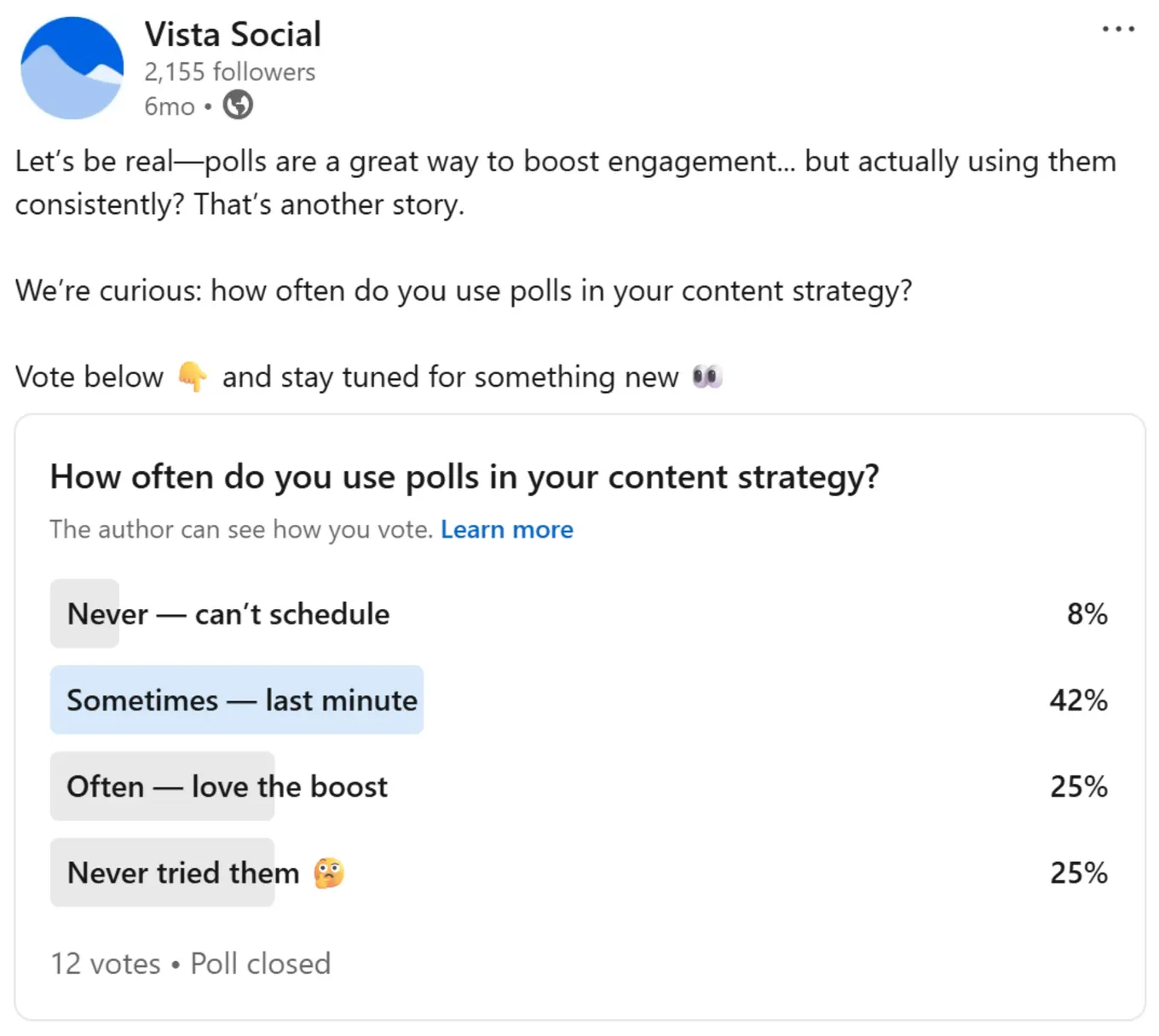
For example, you could ask followers about their biggest social media challenges or which type of content gets the best results. Questions like these help your agency gather insights and position your page as an active, listener-friendly presence.
To stay on top of all the activity your polls generate, manage engagement with Vista Social’s social media engagement feature. It includes a Social Inbox where you can track messages, comments or mentions from one dashboard. This helps you respond faster so you never miss a meaningful interaction with your audience.
LinkedIn marketing tips for B2C companies
If you manage an online retail store or an ecommerce brand, LinkedIn might not be the first platform that comes to mind, but it can be surprisingly powerful for building awareness and credibility. It’s a space where shoppers, suppliers or partners cross paths, giving you a chance to connect with people who influence purchasing decisions.
By sharing useful insights, showcasing your products and joining conversations, you can position your brand as one people trust. Use these LinkedIn marketing tips to strengthen your presence and build genuine connections that can lead to more sales over time.
1. Post high-quality product photos
One of the best ways to grab attention on LinkedIn is through strong visuals. Share high-resolution photos that show your products in real-world use or in creative settings that reflect your brand’s style.
Pair your images with captions that sound conversational and match your brand’s personality. Instead of sounding overly promotional, focus on what makes your products valuable or interesting to your audience. When your posts feel genuine, people are more likely to stop scrolling and take notice.
You can use Vista Social’s AI Assistant to help create or refine your captions. It’s a quick way to write posts that sound natural and stay consistent with your tone across every LinkedIn update.
2. Host product demos through LinkedIn Live
Go beyond static posts by hosting live product demos on LinkedIn. It’s one of the best ways to show your products in action and give potential customers a closer look at how they work.
Use your LinkedIn Live sessions to connect with viewers directly. Answer common questions, guide them through setup or usage tips, then highlight the value your product brings to their daily lives. The live format helps build trust and puts real faces behind your brand.
3. Share educational content
Educational content helps you build trust and keep your audience engaged. Share simple how-to posts, practical tips, or useful insights that connect to your products and the lifestyle they support.
For instance, if you run a home decor brand, you could post something like “Five Ways to Refresh Your Living Room Without Breaking the Bank.” Helpful content like this shows you understand your customers’ needs and gives them a reason to keep coming back to your page.
When you focus on teaching rather than just selling, your brand becomes a reliable source of inspiration. Over time, this approach can boost engagement and open more opportunities to turn followers into buyers.
LinkedIn marketing tips for B2B companies
If your goal is to attract other businesses, LinkedIn is where most meaningful conversations happen. Your company page can become a steady source of leads and valuable connections when you share the right kind of content and stay active with purpose.
Use these LinkedIn marketing tactics to showcase your expertise and nurture long-term relationships that eventually translate into measurable growth. With a clear strategy plus steady communication, your brand can stand out and build credibility even in highly competitive industries.
1. Showcase wins by posting case studies
Showcase your company’s success by sharing snippets or links to your in-depth case studies.
When you post case studies, make them feel real. Describe the client’s challenge and how your solution delivered meaningful results. If you can, back it up with a number that proves your point. LinkedIn drives 40 percent of all B2B website traffic and stays the top social channel for lead generation in 2025. Use that fact to remind readers why your results matter and why they should trust your process.
Put more weight on your claim by including specific metrics, such as “Increased client’s lead generation by 45% within six months.”
It’s a great way to highlight your company’s impact while reinforcing social proof. Sharing client testimonials and video reviews builds trust and visibility, particularly since video content now earns the highest engagement rate on LinkedIn. Pair your testimonials with behind-the-scenes visuals or brief case-study clips to humanize your brand and attract qualified leads.
You can also share client testimonials and reviews on your LinkedIn feed to spotlight your company and brand. Use Vista Social’s Review Management feature to simplify managing and responding to client reviews from various social channels from one platform.
2. Share the expertise of your team
Your team is one of your strongest marketing assets, so let their voices shine through your LinkedIn content. Featuring them helps humanize your brand and makes your posts feel more authentic and approachable.
Highlight team members through short articles, quotes, or behind-the-scenes updates that show their expertise and contributions to your company’s success. For example, your post might say, “Meet Matt, our lead developer who’s helping clients create more efficient software solutions.” Small spotlights like this build credibility and remind your audience that your business is powered by real people who care about their work.
3. Analyze your performance
Keeping an eye on your analytics helps you understand what’s actually working on LinkedIn. Check which posts spark the most reactions or bring visitors to your page, then use those insights to shape your next campaigns.
The more you study your data, the easier it becomes to fine-tune your content strategy and make smarter marketing decisions. Over time, you’ll start spotting patterns that show what resonates with your audience and where to focus your efforts for stronger results.
Common LinkedIn Marketing Questions
1. How do you get more people to see your posts on LinkedIn?
You can reach more people by posting consistently and writing in a way that feels natural. LinkedIn tends to reward content that starts conversations, so try asking for opinions or inviting people to share their experiences. When you reply to comments, your post stays active in the feed longer, which helps it reach even more people.
2. What should you avoid when marketing on LinkedIn?
You should avoid sounding too formal or sales-driven because people scroll past posts that feel stiff. Try not to post updates with no context or value. If you keep your content helpful and easy to read, people pay more attention and stay engaged.
3. Is LinkedIn still good for organic growth?
Yes, LinkedIn still gives you strong organic reach, especially when you show up consistently and stay active in conversations. You don’t need a huge audience to get traction. When your content feels relatable, the algorithm helps it travel beyond your immediate network.
4. Do hashtags still matter on LinkedIn?
Hashtags still help, but you don’t need many. Pick a few that fit your topic and your audience. Choosing broad hashtags can help you reach new people, while niche ones help you show up in more focused conversations.
5. Should I post the same content on LinkedIn and other social platforms?
You can repurpose content, but make sure it fits the tone of LinkedIn. A post that works on Instagram might need a little more context here. As long as the message feels natural for the platform, repurposing saves you time and keeps you consistent.
6. How do you turn LinkedIn engagement into real leads?
Start by keeping an eye on who interacts with your posts. When someone shows interest, send a simple message that feels personal instead of automated. If the conversation moves naturally, you can introduce your work or ask a quick question to learn what they need. When the timing feels right, share a link or resource that helps them take the next step.
Master LinkedIn marketing like a boss
To stand out on LinkedIn, you need a clear strategy and reliable tools that simplify your workflow. Once you understand what connects with your audience, you can start creating content that builds trust and opens doors to new opportunities.
There’s no universal formula for success, but the strategies in this guide give you a strong foundation to build on. Pair them with a dependable platform like Vista Social, which supports LinkedIn pages and personal profiles, along with other major social networks.
Create your Vista Social account today and see how its powerful features can simplify your social media management and help you grow your presence with confidence.

Try Vista Social for free
A social media management platform that actually helps you grow with easy-to-use content planning, scheduling, engagement and analytics tools.
Get Started NowAbout the Author

Content Writer
Jimmy Rodela is a social media and content marketing consultant with over 9 years of experience, with work appearing on sites such as Business.com, Yahoo, SEMRush, and SearchEnginePeople. He specializes in social media, content marketing, SaaS, small business strategy, marketing automation, and content development.
Loading related tools...

The most complete social media management platform for teams who demand more.






Tools
PublishingAnalyticsEngagementIntegrations
FacebookInstagramLinkedInRedditSnapchatThreadsTikTokX (Twitter)YouTubeMCPVista Page (link-in-bio)All IntegrationsCopyright © 2026 Vista Social LLC. All Rights Reserved.