


How to Use DM Automation to Convert Comments into Customers
July 9, 2025
12 min read

Summarize with AI

Table of contents
Share

Vista Social

X (Twitter)


Learning how to use DM Automation without sounding like a bot and actually convert comments into customers?
That’s the real challenge.
You’re posting great content, racking up likes and comments… but then what?
If your replies are slow (or, worse, non-existent), you’re letting hot leads slip through the cracks.
That’s where Direct Message (DM) automation comes in.
It’s your behind-the-scenes smart assistant that can automatically jump into your clients’ DMs the second someone comments “info,” “link,” or “🔥.”
In this post, we’ll break down the steps, tips, and tricks to using DM automation to engage your clients’ followers, deliver value, and drive sales—without the heavy lifting.
Let’s turn those “Where can I buy this?” comments into actual conversions.
Ready? Let’s go.
Table of contents
What you will learn
- Why learning how to use DM automation is important
- Mastering how to use DM Automation: 10 Tips to boost sales
- How to use DM automation like a pro with Vista Social
- What you can get wrong when learning how to use DM automation
- FAQs on how to use DM automation
- How to Use DM Automation to turn engagement into sales
Why learning how to use DM automation is important
Learning how to use DM automation can be your secret weapon for keeping up with all the social media madness (without you and your team losing your minds).
As a social media manager, you’re likely already spinning ten plates at once, replying to comments, planning content, watching analytics, and trying to keep your clients’ inboxes from becoming a digital dumpster fire.
Manually replying to every DM? Yeah… that’s not happening.
But ghosting your followers? Also, a hard NO.
That’s where DM automation can save the day.
With the right DM automation setup, you can:
- Reply instantly when your clients’ followers and potential customers are actually interested
- Answer Frequently Asked Questions (FAQs) before they flood your clients’ social inboxes
- Hand off hot leads to the relevant team members and departments (sales, customer service, etc.) using structured workflows such as lists of call dispositions to categorize conversations and ensure every inquiry is properly tracked and followed up.
- Buy back your time without dropping the ball on support
DM automation is not about replacing you and your team but about backing you up.
When bots handle the busy work, you get to focus on helping your clients build trust and real connections, and, in turn, drive conversions.
Mastering how to use DM Automation: 10 Tips to boost sales
Your clients have the followers, the comments are rolling in, and people are clearly interested.
So why aren’t more followers converting?
Spoiler alert: They’re likely getting lost in the DMs.
That is why mastering how to use DM automation is crucial.
Below are several creative and fun yet seriously effective tips to help you turn your clients’ casual comments into actual sales.
1. Start with a “Wow” welcome message
Don’t just say “Hi,” but instead, make your clients’ first impressions count.
A welcome message should feel warm, personal, and valuable.
Whether it’s a discount, exclusive content, or a simple thank-you, give your clients’ new followers a reason to stick around.
For instance, your clients’ automated DM can say, “Hey Sarah! 👋 Thanks for following! Here’s 10% off your first order just for being awesome.”
You can use dynamic fields, such as first names, and embed a link or button to guide people to your clients’ landing pages, product catalogs, or lead magnets.
2. Use keywords that drive action
Automated keyword triggers allow your clients’ followers to control the conversation.
For instance, when someone sends a message with keywords such as “pricing” or “menu,” you can set your automation workflow to respond with helpful info instantly.
Must read: How to Set Up Your DM Automation Workflow
Example: “DM us the word MENU and we’ll send over today’s specials.”
The message is effective because it feels interactive, immediate, and highly relevant, providing users with that quick “win.”
Additional tip: Test and track various trigger keywords in your clients’ automated DMs to see which ones convert best.
3. Answer FAQs Automatically
DMs are often flooded with the same few questions.
Take the pressure off your team (or your clients’ teams) by automating answers to their top FAQs.
Doing so provides instant answers to common questions while improving response times and user satisfaction.
You can set up automated quick replies for:
- “What’s your return policy?”
- “Do you ship internationally?”
- “What are your hours?”
Consider using tappable buttons to make it even easier for people to get the answers or help they need.
4. Turn comments into conversations
Use comment triggers to automatically slide into the DMs of your clients’ engaged followers and customers.
If someone comments “Info” or “YES” on your clients’ Reels or posts, that’s your cue to deliver something valuable.
For example, you can create an automated DM that says, “Want the full guide? Comment ‘YES’ and we’ll DM you the link.”
It takes the conversation from public to private, where you’ll have better opportunities to connect with and engage potential customers, making conversions more likely to happen.
5. Segment and personalize
Not all followers are at the same stage of the conversion funnel.
That is why it’s crucial to build flows that treat a first-time visitor differently from a loyal customer.
To ensure you’re engaging audiences effectively at each stage of the journey, start by segmenting them based on the following:
- Purchase history
- Content clicked
- Interest shown (via replies or keywords)
For example:
- Segment by purchase history (Returning customer). If the user has purchased before but hasn’t bought in a while, your automated response can be: “Hey Alex! We noticed you loved our energy blend last month. Great choice. Just a heads-up, we’ve launched a new flavor you may like! Want a sneak peek?”
- Segment by content clicked (Interest in a blog or video). If the user clicks on a post about “morning skincare routines,” your automated DM can be: “Hi, Taylor! Loved that you checked out our morning routine tips 💧. Want a personalized version based on your skin type? Just reply with your concerns—we’ve got recs ready!”
6. Use a conversational tone in your DMs
Automation doesn’t mean boring.
Your clients’ DMs should reflect their brands’ personalities, so let that shine by using emojis, casual phrasing, and real (human-sounding) talk.
For instance, your automated DM or chatbot can say, “Hey there! We saw you peeped our Reels. Wanna see what’s behind the scenes? Tap below and we’ll spill the tea. 🍵”
Why it works: People will more likely engage with brands that feel approachable, not robotic.
The higher your clients’ engagement, the more opportunities for audiences to convert from casual commenters into paying customers.
7. Deliver smart CTAs and not just links
Instead of dumping a raw link in your automated DMs, guide your clients’ followers more effectively with context and clear next steps.
The secret sauce? Create helpful Call-to-Action (CTA) buttons.
Instead of a boring, no-context link that says “Click here,” you can use buttons such as:
- “Yes, I’m in!”
- “Send me the coupon”
- “Show me the products”
Avoid using dead-end links or vague messages since this can mislead and frustrate people.
Make the CTA clear and benefit-driven to encourage clicks and conversions.
8. Follow up without being pushy
Automated DMs don’t need to be too sales-y or aggressive to convince people to act on your clients’ conversion goals.
The key to effective automated DMs is to send non-intrusive follow-ups for users who don’t respond right away.
For instance, you can send auto-DMs such as “Hey! Just checking in. Still interested in that free webinar? We saved your spot 😉.”
The message can reactivate the recipient’s interest without coming across as spammy or aggressive.
Additional tip: Add time delays between your clients’ automated messages to avoid overwhelming users.
9. Track and tweak your automated workflows
Don’t just set your DM automation flows and forget them.
Use your automation platform’s analytics to track key metrics to determine their performance and effectiveness in driving conversions.
Key DM automation metrics you can monitor and measure include the following:
- Open rates. The metric can tell you the number of people who open your clients’ automated DMs. A high open rate means your message is landing at the right time, and your trigger is effective (like a “Thanks for the comment!” auto-reply). If your open rates are low, it may be time to rethink your timing, triggers, or even the first line of your message (that preview text matters!)
- Click-Through Rate (CTR). CTR tracks the number of people who tap a link or button in your clients’ automated message. The metric helps you see if your CTA is compelling and if the content you’re offering (coupon, blog post, or product link) is useful to your clients’ audiences
- Response paths. Response paths show how users navigate through your message flow, such as what they clicked, replied to, or ignored. The metric helps you understand whether people follow your intended journey, get confused, or drop off mid-convo
Measuring these metrics can give you valuable insights into what’s working or needs tweaking.
10. Combine automation with a human touch
Automation is your first line, but humans close the deal.
That is why it’s vital to set triggers to notify your team (or your clients’ teams) when someone needs personalized help.
Here’s a sample automated DM you can send: “Need help picking a plan? Just reply ‘Talk to a human’ and we’ve got you.”
The hand-off to a human can be a great conversion helper since it shows that your clients care, and that there’s a real person ready to help them.
The level of care helps improve the customer experience, encouraging customers to come back and even become loyal to your clients’ brands.
How to use DM automation like a pro with Vista Social
Do you want a robust yet easy-to-use DM automation tool?
Social media management platform Vista Social has you covered.
The platform’s DM automation tools let you create seamless, strategic messaging flows that feel personal yet scale effortlessly.
Getting started with DM automation in Vista Social is refreshingly simple.
Must read: DM Automation Ultimate Guide: How to Get Started
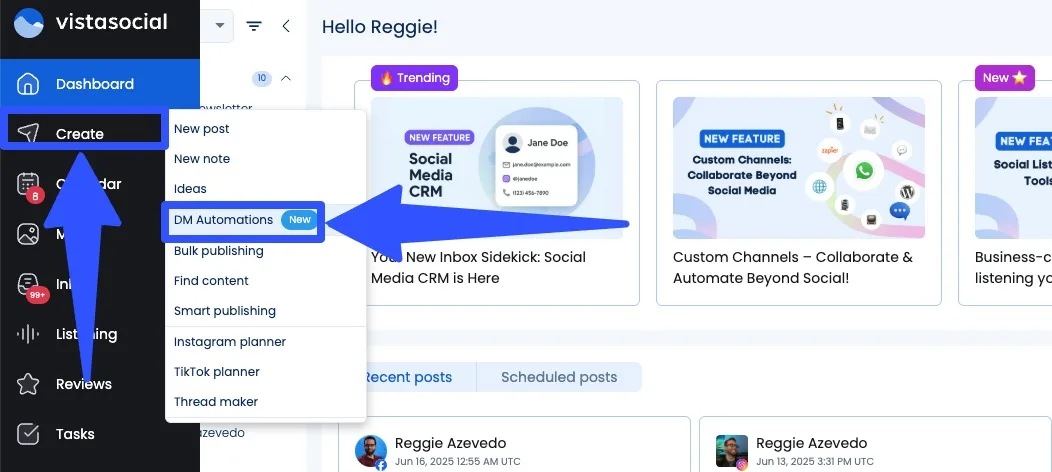
Head over to the Create option in your Vista Social dashboard and click DM Automations.
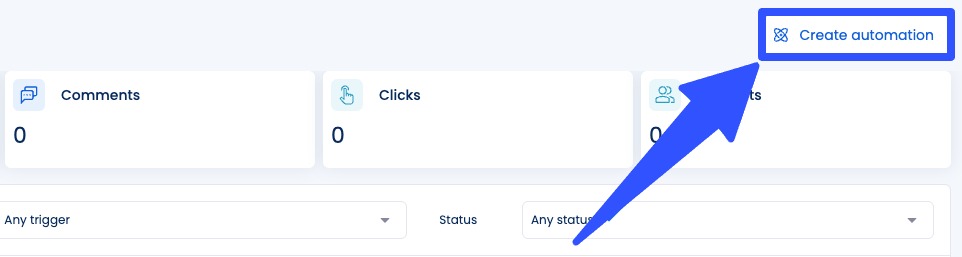
Select the Create automation button in the top-right corner.
Next, name your automation and select the social media profile for it.
You can set your trigger (the event that sets off your automation).
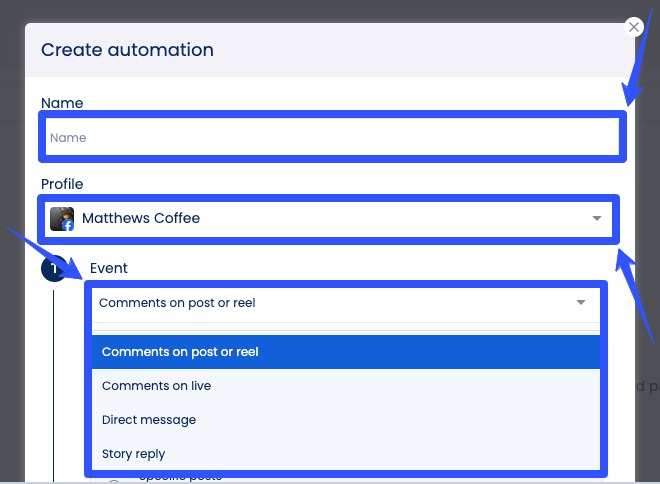
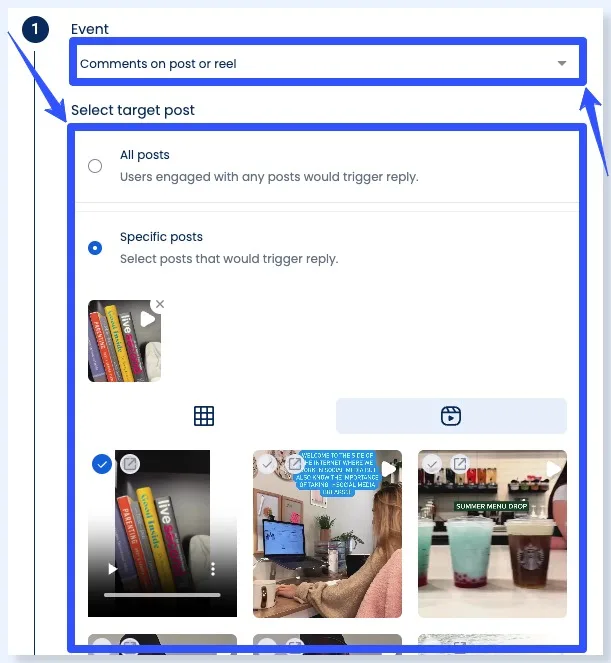
Your trigger can be a Story reply, a DM, comments on your client’s Live, post or Reel comments.
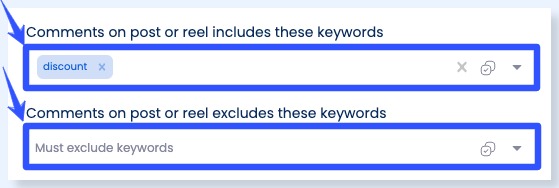
Then, set the keyword (or keywords) that will trigger your automation, such as “info,” “link,” or “discount code.” You can also exclude specific keywords.
For comment triggers, you’ll need to select whether your trigger applies to all posts and reels or just specific ones.
After setting up your DM automation trigger, you can configure your actions (what happens when the trigger is activated).
The trigger actions types can vary depending on the platform.
For Instagram DM automation triggers, your actions can be:
Must read: Instagram DM Automation: The Complete Guide
- DM received: Send automated DM (text + optional link, image, video, or card)
- Comment on post: Reply with a comment (text only) or send a DM (text + optional link, image, video, or card)
For Facebook DM automation triggers, your actions can be:
- DM received: Send automated DM (text + optional link, image, video, or card)
- Comment on post: Reply with a comment (text, image, or video) or send a DM (text + optional link, image, video, or card)
You can also send Opening DMs.
These are your first friendly messages, such as “Hi there! Want more info?” that include a button allowing recipients to click or tap to receive more messages within 24 hours.
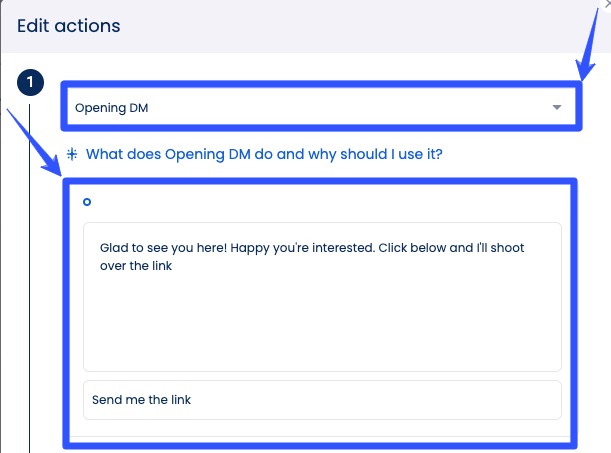
Once the recipient clicks through, you can send a custom follow-up message and add links (maximum of three).
Vista Social also offers auto-DM templates for turning comments into conversations seamlessly.
After selecting Create automation, click the Ready-to-Go templates option.
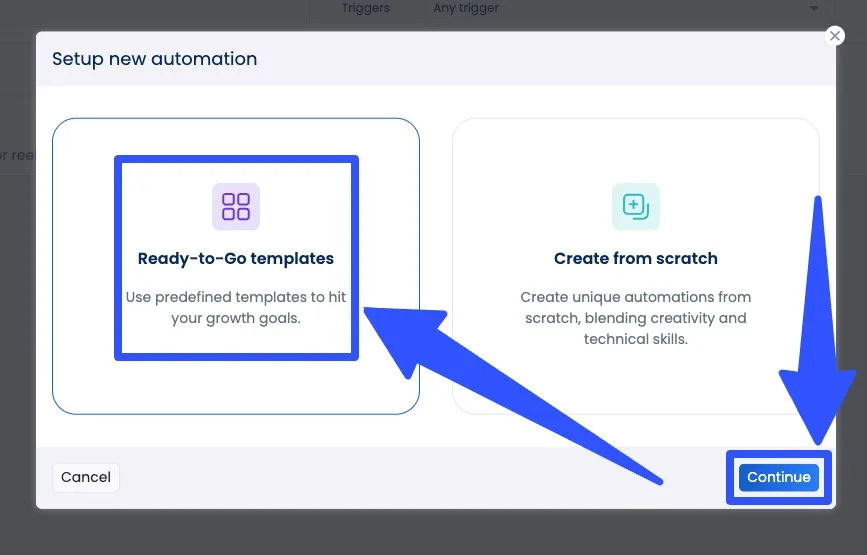
Choose the Auto DM Links from Comments option.
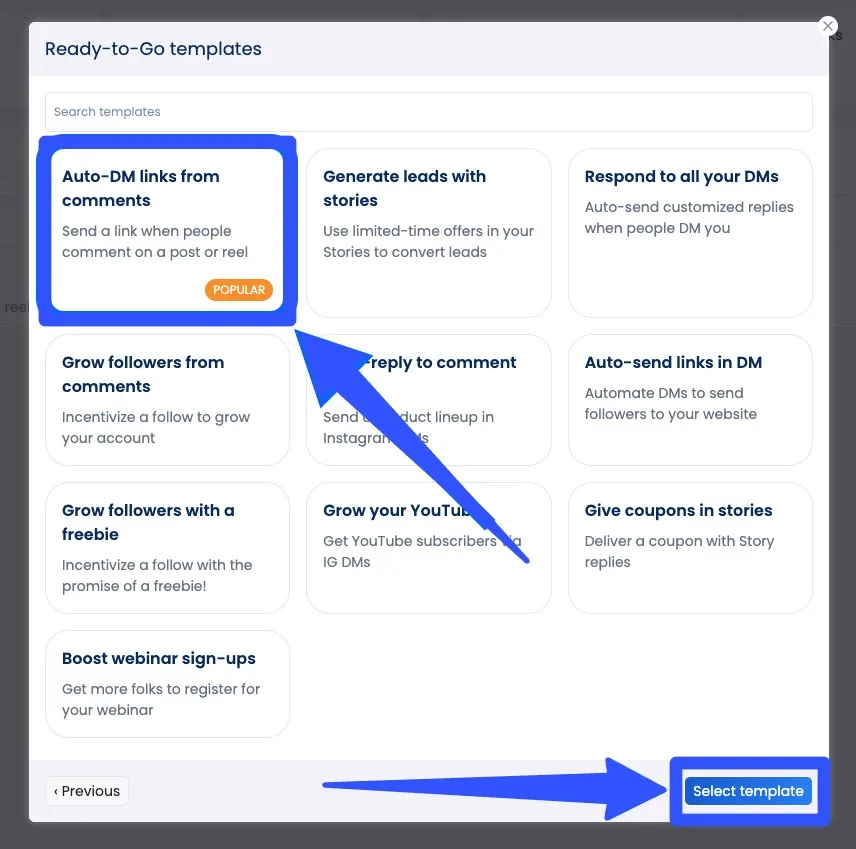
Select the social profile (Facebook or Instagram) you want to automate.
From here, you can set your triggers and actions accordingly.
The templates are ideal for fast deployment and come optimized for various goals such as lead nurturing, brand awareness, and promotions.
For example, if someone comments “I’m interested” on your client’s giveaway post, you can create a template that automatically sends the user a DM with contest details.
When setting your automation flows, remember to:
- Choose from multiple trigger types to suit your clients’ campaign goals
- Customize your message content with dynamic fields, such as the user’s handle or first name, for a personal touch
- Add rich media such as emojis, links, or hashtags to make your automated messages more engaging
Whether you’re welcoming new followers or initiating a sales conversation, these automated DMs help you capture every opportunity to engage followers and ensure positive experiences with your clients’ brands.
What’s more, Vista Social gives you the insights to improve your strategy continuously.
After launching your DM workflows, head into the analytics dashboard to see:
- Open rates and message delivery stats
- Click-through rates for links embedded in DMs
- Engagement patterns and user responses
You can test various message styles, trigger types, and delivery timing to fine-tune your results.
Vista Social’s reporting makes it easy to understand what’s working and identify new opportunities to engage your clients’ audiences more effectively.
Don’t miss out on Vista Social’s other core features, including the following:
- Content scheduling, including bulk publishing and post queueing
- Content calendar
- Automated post approval workflows
- Analytics and reports with custom report templates and report scheduling
- White labelling options
- Engagement management via a smart Social Inbox
- Social listening with sentiment analysis
- Link in bio tool with Vista Page (customizable landing pages)
- Review management
- Employee advocacy
What you can get wrong when learning how to use DM automation
DM automation is incredibly useful, but it’s not foolproof.
Whether you’re managing one brand or multiple client accounts, watch out for the following when setting up your automations.
Over automating without strategy
Jumping into automation without a clear plan can do more harm than good.
For instance, you could set up multiple triggers and messages across every post or interaction, hoping to boost engagement.
However, if you’re not personalizing, this can often result in a flood of impersonal messages.
It can irritate your audience and damage your client’s brand credibility.
If you’re new to DM automation, consider starting small.
Identify your goals, such as lead generation, customer support, and promotion, and design targeted automations around those outcomes.
The key is to use automation to scale smartly and implement your strategy effectively instead of spamming your clients’ followers.
Must read: DM Automation Strategies, Do’s And Don’ts
Ignoring platform limitations
Each social media platform can have different DM automation capabilities.
For example, Instagram only allows text replies to comments, while Facebook supports rich media such as images or videos.
Must read: Facebook DM Automation Guide: Steps, Tools, & Tips
If you try to apply the same automation rules across both, your automated DMs may break or behave unexpectedly.
To avoid this, customize your automations by platform.
Vista Social clearly labels which triggers and actions are supported for Instagram vs. Facebook.
Pay close attention to those distinctions when setting up your automation flows.
Missing personalization
One-size-fits-all messages tend to get ignored.
Sending generic DMs such as “Thanks for your message!” without a hint of your client’s brand voice doesn’t inspire much action or engagement.
Without personalization, your automation feels cold and transactional.
Instead of generic content, use dynamic variables (such as the first name or username) to make each message feel tailored.
A simple tweak, such as “Hi [Name], thanks for your comment!” can make a big difference in how people receive your clients’ messages.
Violating platform policies
Meta has strict guidelines about automated messaging.
Sending unsolicited promotional messages or over-messaging users can lead to penalties or account suspension.
So before launching your clients’ automated DMs, review Meta’s messaging policies and avoid aggressive outreach tactics.
Not testing your automation flows
Just because you set up your automation flows doesn’t mean that they will “just work” once they’re activated.
Typos, broken links, and misfired triggers are common if you skip testing, which can confuse users or result in missed opportunities.
So, before going live, run test interactions on each automation.
Comment on your own post or DM your clients’ profiles to ensure everything looks and functions as expected.
Not tracking performance
Without performance tracking, it’s impossible to know if your DM automation is effective.
Are people opening your messages? Clicking your links?
If you’re not checking the data, you’re flying blind.
Use Vista Social’s analytics to track key metrics, including open rates, response rates, and conversions.
Then, adjust your messages, timing, or targeting based on what the data shows.
FAQs on how to use DM automation
Can DM automation work across all platforms?
It depends on the platform, but many social networks have native features that allow this.
- Instagram (DMs, comments, Story replies)
- Facebook Messenger (Instant reply, FAQ flows)
- X (Twitter), WhatsApp, and other apps (using third-party APIs)
You can also use third-party tools such as Vista Social for seamless DM automation.
How can you make automated DMs feel personal?
Some of the best ways to ensure your clients’ automated messages feel personal and not robotic are to do the following:
- Use dynamic fields, such as the recipient’s first name
- Use a casual tone, short sentences, and emojis
- Include context triggers, such as mentioning what the recipient interacted with recently (like commenting on your client’s Instagram Reel)
What content types can you automate for DMs?
Popular automated DM content includes the following:
- Instant replies and saved responses
- FAQ menus and connectors
- Link delivery (such as links to your clients’ ebooks, discounts, and website pages)
- Lead qualification (asking questions to segment users)
How to Use DM Automation to turn engagement into sales
Being a pro at DM automation isn’t just about saving time, but also about showing up for your audience at the exact moment they’re ready to engage.
By setting up smart, personalized DM flows triggered by comments, replies, or interest signals, you can guide followers straight from curiosity to conversion.
Whether you’re answering an inquiry, delivering lead magnets, or dropping product links, the right DM automation setup keeps conversations flowing and sales growing, without sounding like a bot.
Want to put your strategy on autopilot (with a human touch)?
Use Vista Social’s DM automations feature to confidently turn comments into customers. Create your Vista Social account now.
About the Author

Content Writer
Jimmy Rodela is a social media and content marketing consultant with over 9 years of experience, with work appearing on sites such as Business.com, Yahoo, SEMRush, and SearchEnginePeople. He specializes in social media, content marketing, SaaS, small business strategy, marketing automation, and content development.