

Published on March 20, 2026
11 min to read
How to Increase Website Traffic With DM Automation

Summarize with AI

Table of contents
Summarize with AI

ChatGPT

Claude

Perplexity
Share

Vista Social

X (Twitter)


Most brands treat social media and website traffic like two completely separate things. You post content on Instagram or Facebook to build an audience, and then you hope (somehow) that those followers will eventually wander over to your website on their own.
But they usually don’t. Not because they’re not interested, but because there’s no clear bridge between the two. A “link in bio” buried under three taps isn’t going to cut it when someone’s already scrolling past your post.
That’s what makes DM automation so effective for driving website traffic. Instead of hoping people take four extra steps to find your link, you deliver it straight to their inbox the second they show interest.
And in this guide, we’re going to walk through exactly how to set that up, from choosing the right landing page to building the automation itself inside Vista Social.
Table of contents
What is DM automation?
If you’re not familiar with it yet, DM automation lets you send direct messages to people automatically based on triggers you define.
For example, someone comments a keyword on your post (like “GUIDE”) and they immediately get a DM with whatever you want to send them. A link, a resource, a discount code, you name it.
It runs through official platform APIs on Instagram and Facebook, so it’s fully above board when you set it up the right way. You can use it for everything from answering FAQs to sharing lead magnets to sending people directly to pages on your website. (That last one is where it gets really interesting for our purposes here.)
If you want the full rundown on how DM automation works, our complete guide covers it end to end. We also have platform-specific walkthroughs for automating Instagram DMs and setting up Facebook DMs.
What DM automation can do for your brand
Before we get into the website traffic piece specifically, it’s worth understanding the bigger picture. DM automation touches a lot of areas in your marketing, and the more you understand what it can do, the better you’ll be at using it for traffic specifically.
Grow followers
When someone comments on your post and immediately gets a thoughtful, helpful DM, that experience sticks with them. It makes your brand feel responsive and worth paying attention to, which naturally encourages follows. It also tells the algorithm that your content is driving real engagement (comments plus DMs), which can push your posts out to a wider audience.
👉 We have a full guide on using automation for growth if you want to dig deeper into this one.
Generate leads
You can build automation flows that collect email addresses, phone numbers, or other contact info before delivering a freebie or resource. So while someone thinks they’re just getting a free PDF, you’re also building a lead list. This is especially useful for coaches, agencies, and SaaS brands that rely on nurturing leads over time.
👉 Our post on capturing leads through DMs walks through the setup in more detail.
Make sales
Think about a product launch where your caption says “Comment SHOP for early access.” The DM sends a direct link to the product page with a discount code attached. You’ve just shortened the path from “oh, that’s cool” to “add to cart,” and the whole thing runs without anyone on your team having to lift a finger.
Increase website traffic
This is the main reason we’re here, so let’s spend some real time on it.
Every automated DM you send can include a link. That link can point to a blog post, a product page, a landing page, a feature walkthrough, literally any URL on your site.
And unlike feed posts where you’re competing with the entire scroll, a DM lands in someone’s inbox with a push notification. It gets seen.
The shift toward messaging isn’t just anecdotal, either. Meta’s Q4 2025 earnings report revealed that click-to-message ad revenue in the US grew more than 50% year over year. Businesses are pouring more money into messaging because it works.
When someone receives a DM seconds after engaging with your content, their interest is still fresh. They’re far more likely to tap a link in that moment than they would be scrolling past a “link in bio” hours later.
And the audience for this kind of outreach is huge. Over 150 million people message businesses on Instagram every month. These are people who are already comfortable having conversations with brands in DMs, so a well-timed link in that context feels natural, not spammy.
When you put all of this together, DM automation becomes a repeatable, scalable system for driving website traffic from social media. You’re not depending on the algorithm to surface your link in bio. You’re putting it directly into the hands of people who asked for it.
How DM automation can help you increase website traffic
Now let’s really get into it. If you want to boost your website traffic through social media, this is an absolute must-do strategy to implement.
Create a landing page
Before you touch any automation settings, figure out where you’re sending people. This might sound obvious, but it’s the step that a lot of brands skip, and then they wonder why their DM links aren’t converting.
Pick or create a landing page on your website that matches the specific offer you’ll be promoting on social media. It should focus on one thing. Not your homepage or a general “about us” page, but a page that delivers exactly what the DM promised.
Imagine you’re a fitness brand and you’ve just published “The 30-Day Home Workout Plan” on your blog. Your Reel teases the plan, and the DM sends viewers straight to that blog post.
The more specific the destination, the better it works. People clicked because they wanted something specific. Give them exactly that.
Craft your narrative
Now you need to figure out how to get people interested enough to engage with automation in the first place. This is the social content strategy piece: the story you tell on your feed that makes someone want to comment a keyword or send you a DM.
The most effective narratives give value upfront and then offer something more in the DMs.
A marketing agency, for instance, might post a carousel breaking down common social media mistakes, and then the last slide says “Want the full checklist? Comment CHECKLIST and we’ll DM it to you.”
The content already proves the brand knows what it’s talking about, so the resource offer feels like a natural next step. The DM delivers a link to a downloadable PDF on the agency’s website.
Or take a skincare brand that films a Reel previewing a new product line. The caption offers early access to anyone who comments “EARLY.” The DM sends a direct link to the product page with a limited-time discount code. Exclusivity plus instant delivery is a strong combo.
Even something as simple as a SaaS company sharing three quick tips in a video can work. The host wraps up with “I’ve got a deeper walkthrough on our blog. Comment GUIDE and I’ll send it over.” The viewer gets the blog link in their DMs a few seconds later.
In every case, the formula is the same: deliver value in the post, build curiosity, and give people a clear and easy next step.
Design your social media content
Your automation can be perfect, but it won’t matter if nobody sees the post that triggers it. So the content itself needs to pull its weight.
The format you choose depends on your audience and the platform, but you’ve got a lot of options:
- Reels and short videos tend to get the widest reach on Instagram and are a natural fit for teasing a resource. You can literally say “comment LINK below” at the end of the video.
- Carousels work well for educational content where the last slide becomes your DM call to action, and they tend to get strong save and share rates that extend their shelf life.
- Stories are great for triggering DM automations through replies, especially when you pair them with polls, quizzes, or question stickers.
- A bold static graphic with a clear headline and CTA still does the job on Facebook.
- The document post format on LinkedIn (where you upload a PDF that people can swipe through) is ideal for sharing guides or frameworks with a CTA that drives DM engagement.
The one thing all of these have in common: the call to action needs to be obvious and specific. Don’t make people guess. Tell them exactly what word to comment and exactly what they’ll get in return.
Build your DM automation
Time to wire it all up. Inside Vista Social, the process is pretty straightforward. Here’s how to build your first flow from start to finish.
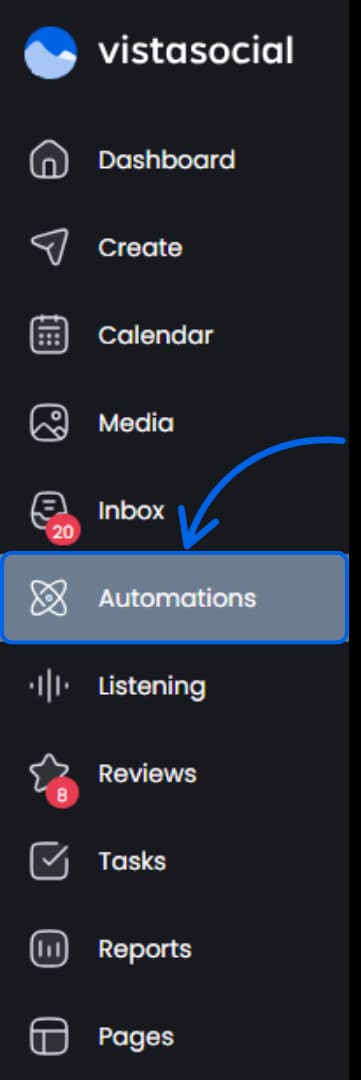
Step 1: Open the DM automation feature
Head to the DM Automations section in Vista Social and create a new automation flow.
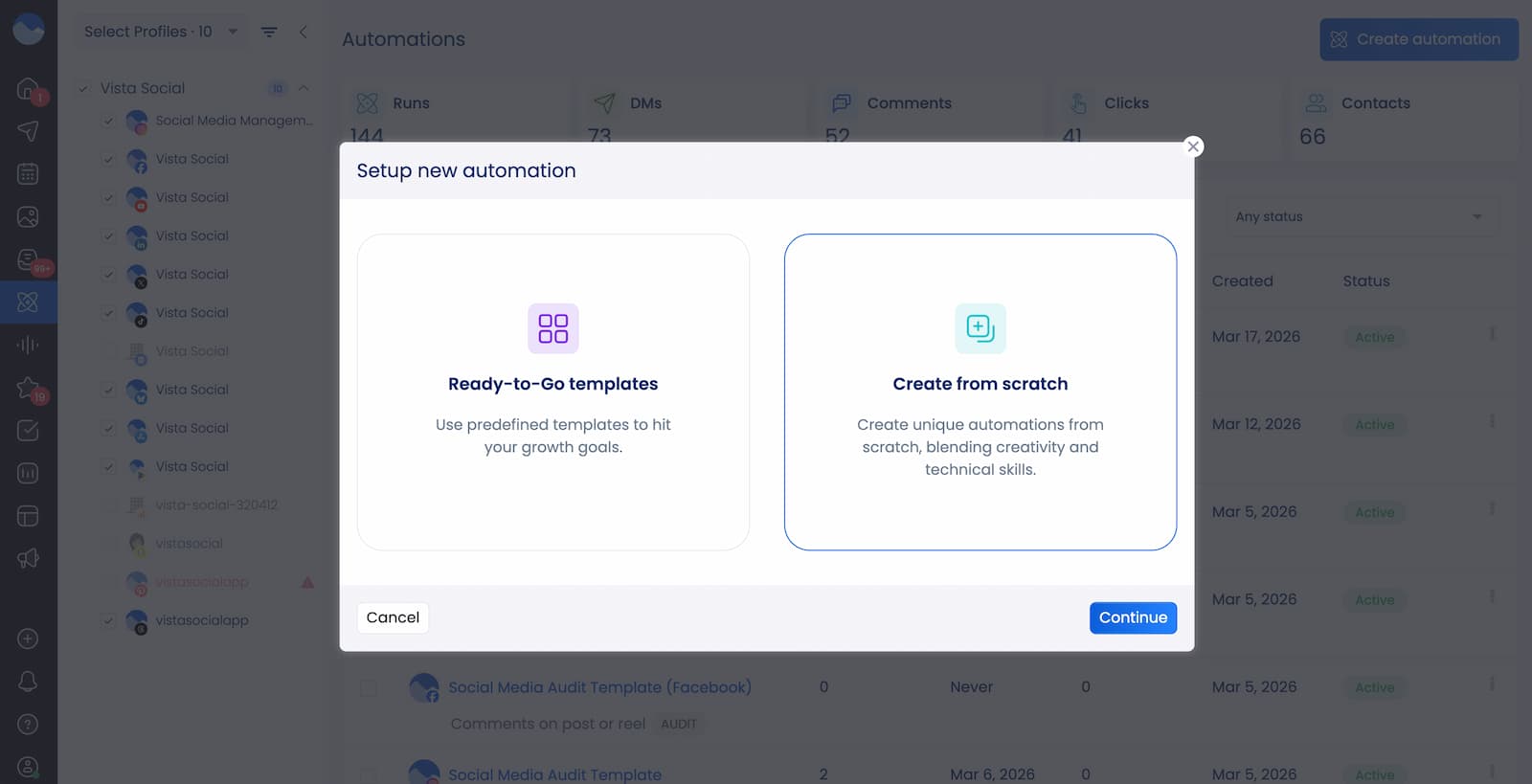
Step 2: Choose your type of automation
Choose between Ready-to-Go templates or Create from scratch.
If you chose the Ready-to-Go templates, these are your options:
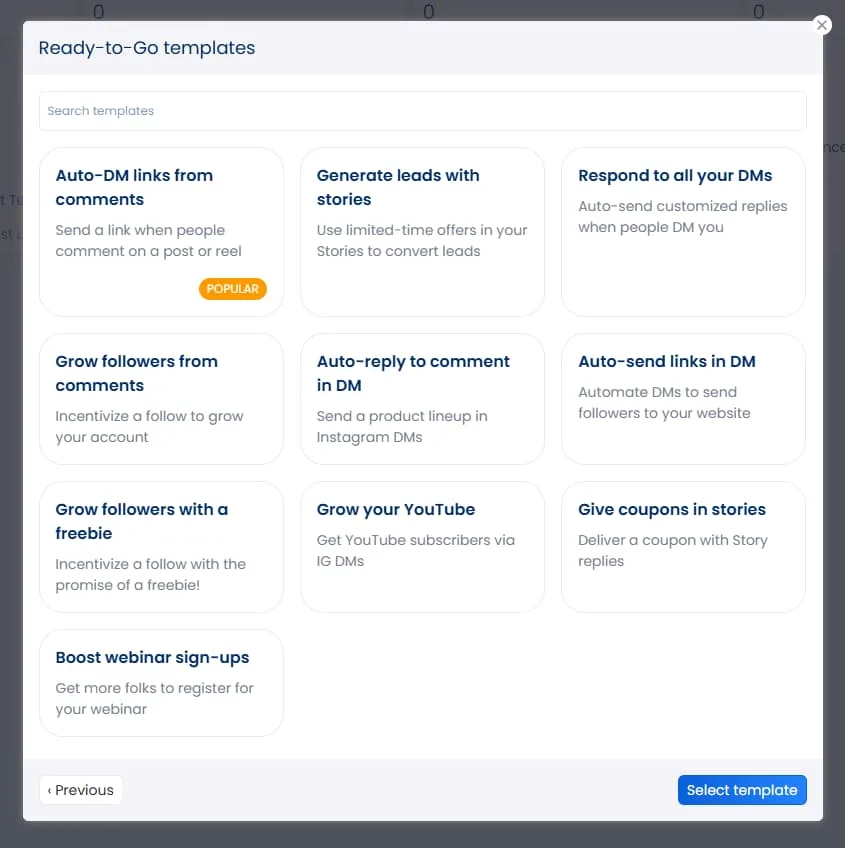
For this guide, let’s go with creating from scratch.
Step 3: Build your automation
First, decide on an automation name and select the profile you want your automation to fire on.
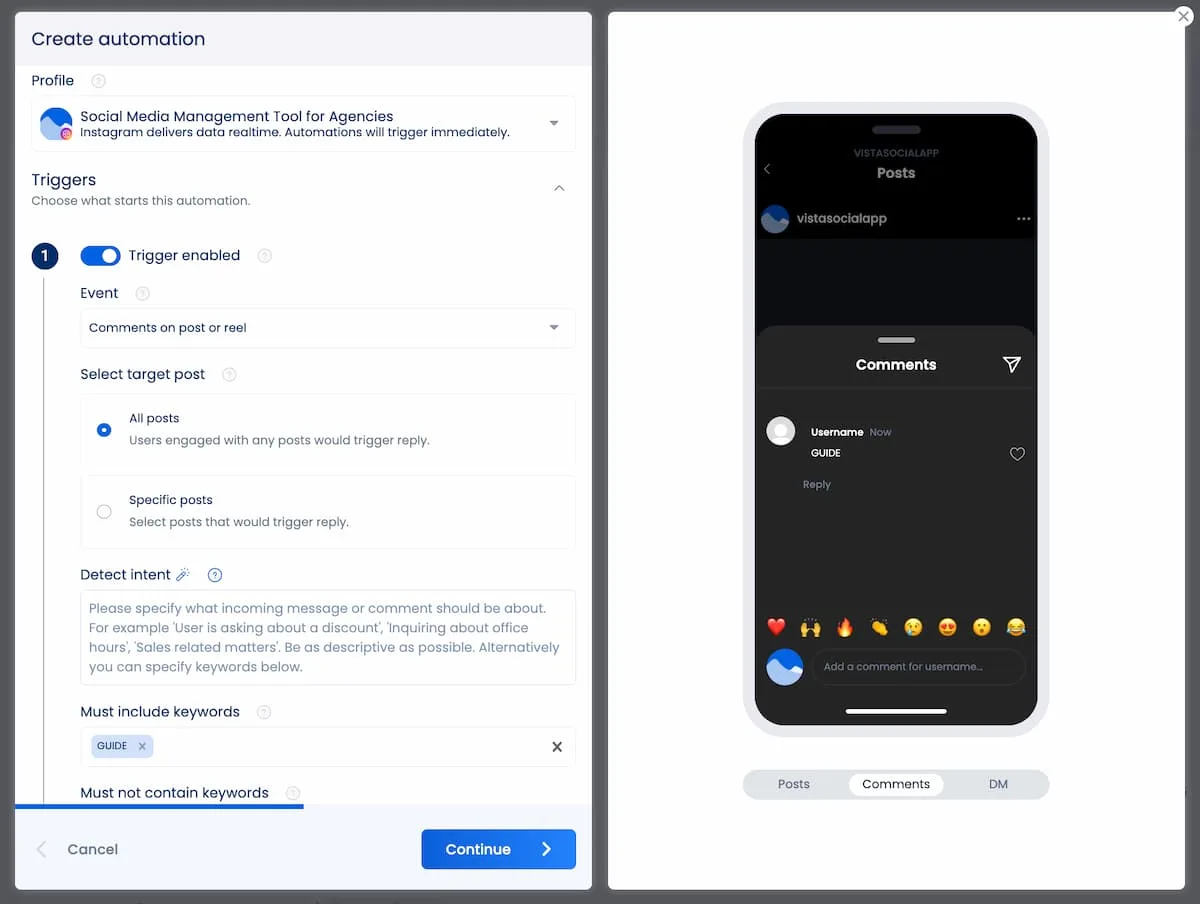
Then, set up the trigger. Your choices depend on the platform you’re using. (You can see our full list of automation triggers by platform here.)
But for this specific use case, you’re going to want to use Comments on post or reel as your trigger. You can then choose a specific post or let this automation work on any post.
Our AI intent detection is amazing for creating social inbox automations, but we’re going to use a good, old-fashioned keyword trigger. Input the word you want your audience to comment, like “GUIDE.”
Next, it’s time to edit actions, a.k.a. set up how your automation should respond to messages containing the keyword you just set up.
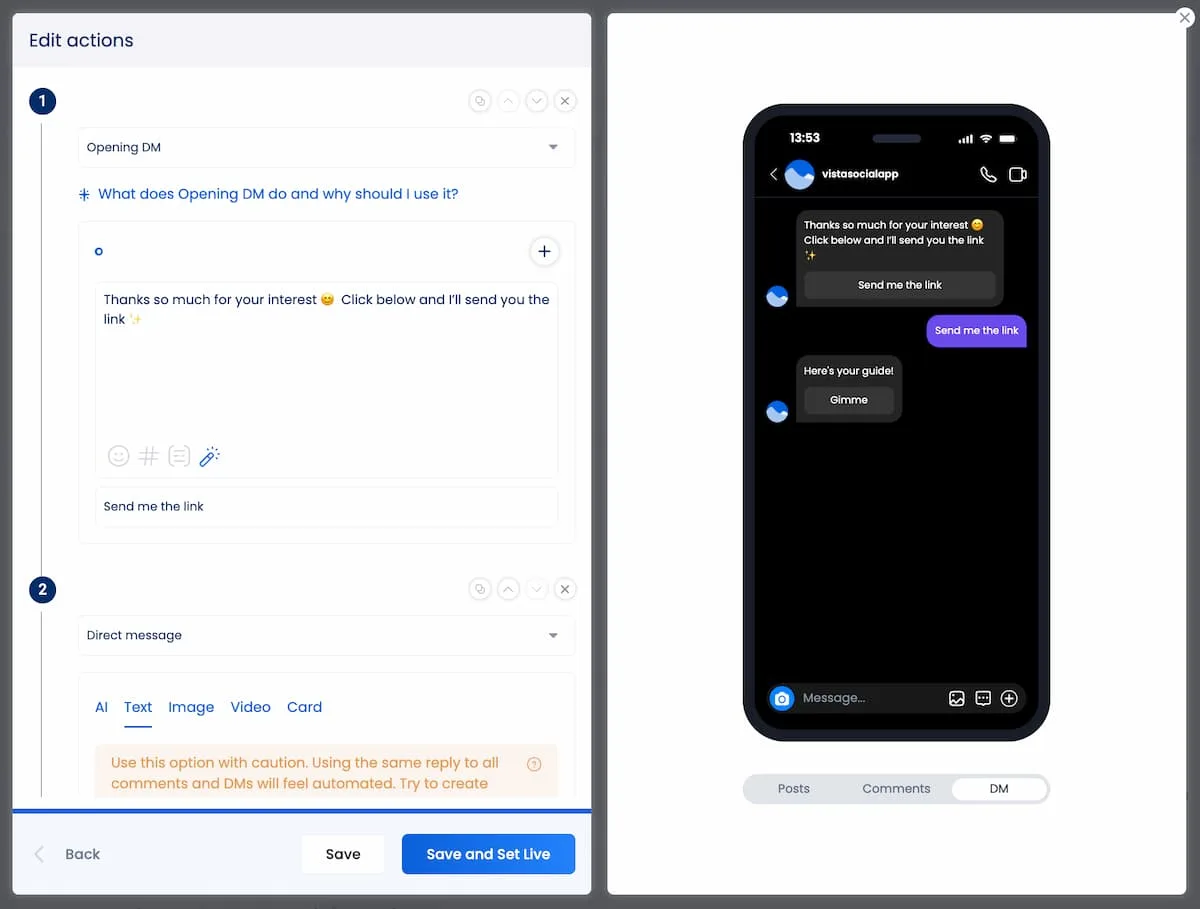
We’ll start with an Opening DM. This helps you get permission to send DMs to people who comment. Once they click the initial DM button, you’ll set up a second Direct message action that sends over the guide they requested.
Step 4: Set it live
Review everything, double-check that your link works, and activate the automation. From this point forward, every qualifying comment will trigger a DM automatically.
We recommend heading over to your Instagram account (or whatever platform you’re setting yours up on) and testing everything to make sure it fires properly.
Post and promote
With the automation live, publish your content and start driving engagement. You can schedule and publish directly through Vista Social’s publishing tools, which keeps your content and automation in the same place.
Once the post is up, keep tabs on the results:
- How many DMs are going out?
- How many people are clicking the link?
- How much traffic is actually landing on your page?
Vista Social’s analytics can handle the DM side, and your website analytics (Google Analytics, for example) will show you what happens after the click. Our guide on measuring your results can help you figure out exactly what to track.
And if a post takes off, consider putting some paid promotion behind it. Even a modest budget can push your DM-triggering content to a much larger audience. That means more comments, more automated DMs, and more traffic to your website, all running on the same automation you already built.
8 DM automation ideas for increasing website traffic
If you’re sold on the strategy but need ideas for what to actually promote, here are eight worth testing.
1. Send traffic to a new blog post
Every time you publish a blog post, you have a window where your audience is most likely to care about the topic. Create a Reel or carousel that highlights the key takeaway from the post, and tell viewers to comment “READ” to get the link. The DM delivers the URL instantly, which means your blog gets a burst of traffic right at launch instead of sitting there waiting for SEO to kick in.
2. Promote a free tool or calculator
If your website has something interactive, like an ROI calculator, a social media audit template, or a quiz, that’s prime DM automation material. Use a carousel to show what kind of results the tool provides, and let the DM send the link. Interactive tools keep visitors on your site longer, which helps with SEO and gives you a chance to capture leads.
3. Drive signups for a webinar or event
Post a countdown Story or a Reel hyping up what attendees will learn, and route replies to a registration landing page through DM automation. This approach cuts out the friction of asking people to find a link in your bio. You can even set up a follow-up DM closer to the event as a reminder, keeping registrants engaged.
4. Share a case study
Film a short video highlighting the key results from a client win, but don’t give away every detail. Let the DM link to the full case study on your website, where readers can see the full breakdown. This works especially well for service businesses and agencies because the video builds credibility while the case study page does the actual selling.
5. Launch a new product or feature
Announce the launch in a Reel and offer early access through a DM that links to the product page. The key here is making the DM feel like VIP access, not just another link drop. Include a line like “You’re one of the first to see this” to reinforce that the viewer is getting something special by engaging.
6. Deliver a discount code with a landing page
Rather than dropping a code in the caption for everyone to see, send it via DM alongside a direct link to your store. This does two things at once: it gets the user onto your website (not just browsing on Instagram), and it makes the offer feel exclusive because they had to take an action to receive it.
7. Promote a downloadable resource
Tease a checklist, template, or guide in your content, and use the DM to link to a gated landing page where users enter their email to download. This is one of the most effective setups for driving website traffic and building a lead list at the same time. The social post does the awareness work, and the landing page does the conversion work.
8. Push traffic to a comparison page
If you’re a SaaS brand, create a post that breaks down how your product stacks up against alternatives. People in the consideration stage love comparison content, and a DM that sends them to a detailed comparison page on your site catches them at exactly the right moment. The viewer is already thinking about their options, and you just made it easy to learn more.
For even more ideas, our roundup of use cases has plenty of inspiration.
Start increasing website traffic with DM automation
Social media managers spend a lot of time worrying about reach, impressions, and follower counts. Those metrics matter, but they don’t pay the bills on their own. What actually moves the needle for most businesses is getting people off the platform and onto your website, where they can read your content, explore your products, and convert.
DM automation closes that gap in a way that most other tactics can’t. It meets people at the exact moment they’re interested, delivers the link before they scroll away, and does it all without adding more manual work to your plate. Once the automation is live, every qualifying comment turns into a website visit on autopilot.
The best part is that this isn’t some advanced strategy that takes weeks to set up. You can go from zero to a fully running automation in minutes. Pick your landing page, write a post with a clear call to action, build the flow, and publish. That’s it.
If you’re ready to put this into action, try Vista Social’s DM automation and see how quickly your social media engagement starts turning into real website traffic.

Try Vista Social for free
A social media management platform that actually helps you grow with easy-to-use content planning, scheduling, engagement and analytics tools.
Get Started NowAbout the Author

Content Writer
Russell Tan is a content marketing specialist with over 7 years of experience creating content across gaming, healthcare, outdoor hospitality, and travel—because sticking to just one industry would’ve been boring. Outside of her current role as marketing specialist for Vista Social, Russell is busy plotting epic action-fantasy worlds, chasing adrenaline rushes (skydiving is next, maybe?), or racking up way too many hours in her favorite games.
Loading related tools...




Tools
PublishingAnalyticsEngagementIntegrations
FacebookInstagramLinkedInRedditSnapchatThreadsTikTokX (Twitter)YouTubeBlueskyVista Page (link-in-bio)All IntegrationsCopyright © 2026 Vista Social LLC. All Rights Reserved.