

Published on July 8, 2026
10 min to read
How to Manage Social Media for a Company: Week-1 Plan

Summarize with AI

Table of contents
Summarize with AI

ChatGPT

Claude

Perplexity
Share

Vista Social

X (Twitter)


It’s your first morning owning this. Someone forwarded you a spreadsheet titled “socials” and walked away. Now you’re staring at six accounts: Facebook, Instagram, LinkedIn, a TikTok nobody’s touched since last summer, an X account, and a Google Business Profile you didn’t even know was your job. Nobody handed you a manual for how to manage social media for a company, and you don’t have time to go find one.
You have three of the passwords, and one of those still has two-factor authentication tied to the phone of someone who quit back in March. There’s a red notification badge on the Facebook page too: a customer asked a question on Friday, and it’s Monday now.
Here’s a thought that changes everything: you don’t have a strategy problem yet, you have a triage problem. Week one has three jobs, in this order: stop losing access, stop missing messages, stop posting by hand. This guide walks you through that order instead of a strategy deck, and none of the six moves ahead require you to already know social media strategy since they just need you to follow the sequence.
In this guide:
- The first emergency is access, not content, since you can’t post to an account you can’t reach
- Pull everything into one dashboard and one inbox so nothing gets missed
- Schedule a week at a time instead of posting by hand every day
- Automate one repeatable task, then, and only then, start thinking about strategy
Table of contents
Why does inheriting a company’s social feel like drowning?
Every article on how to manage social media for a company starts with content: what to post, when to post, how to define your brand voice. That’s backwards for where you are right now.
Access is the real emergency
You can’t post to an account you can’t log into, and the accounts you have zero access to are the riskiest ones on the list. Those are the ones that get hijacked or locked out for good, sometimes permanently, if nobody catches it in time.
Every guide you’ll find skips straight to content because it assumes you already have access. You don’t, not yet, and that gap is the actual emergency on day one. It’s not what to say. It’s what you can actually reach.
The work won’t wait for you to catch up
The inbox keeps filling while you get organized, and the company still expects the accounts to look alive. So a lot of new owners start posting by hand, one platform at a time, logging in and out all day, and it eats the hours they need for the rest of their actual job.
You’re not behind because you’re slow. You’re behind because you’re doing six platforms’ worth of manual work with one pair of hands.
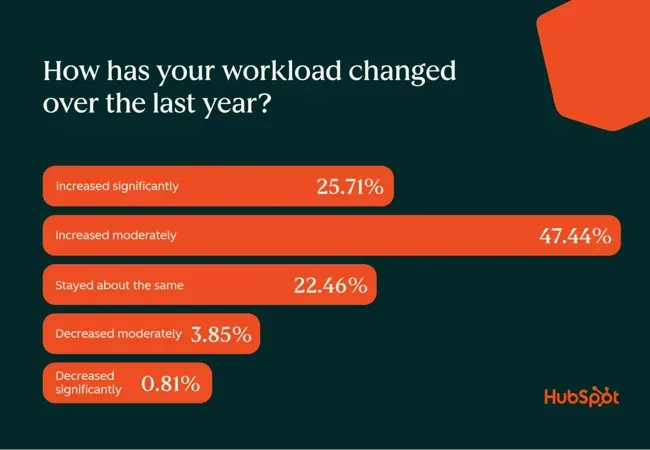
More marketers than ever are running into exactly this. According to HubSpot’s 2026 State of Marketing report, 25.7% of marketers report a significant increase in workload over the past year, with another 47.4% reporting a moderate increase.
At a small or midsize business, the new social owner is usually a team of one, soaking up all of that alone. Social media has become too central to ignore either way: 76% of respondents in Verizon Business’ 2025 State of Small Business Survey say it improves business performance.
“Doing it properly” backfires this week
Trying to do it “properly” only makes things worse. You search how to manage social media for a company, and every result hands you the same strategy framework: audit your brand, define your pillars, set SMART goals, map the funnel.
All of that might be correct, but none of it is useful this week. Strategy assumes a stable base you don’t have yet, and building one before you can even log in is a bit like redecorating a house that’s still on fire.
None of this requires you to already be a social media expert, either. The moves in this guide are follow-the-steps tasks, not strategic judgment calls, so you don’t need years of platform experience to get through them correctly.
You don’t have a strategy problem yet, you have a triage problem. Week one has exactly three jobs: stop losing access, stop missing messages, stop posting by hand. Do them in that order and you’ll be in control by Friday.
Strategy is month two, and once you’re there, the fuller strategy picture once you’re past triage is waiting for you.
The method: triage before strategy
Here’s the order that actually works:
- Secure access first
- Centralize everything into one dashboard
- Schedule a week ahead
- Automate one repeatable task
Strategy waits for month two, once the basics are running. Justin Welsh, a solopreneur and former SaaS revenue leader, makes a similar case about platform focus: “It’s better to excel in one place than to be mediocre everywhere.”
The same logic applies here. You’re better off getting one or two accounts genuinely under control first, rather than trying to make all six look equally polished.
Your first-week triage, step by step
This is the actual sequence. Each step tells you what to do and what you should be able to say once it’s done.
Step 1: Secure access to every account
Before anything else, find out exactly what you have access to and what you don’t. Build a simple inventory for each account:
- The platform name
- The login email tied to it
- Who currently holds admin rights
- Whether two-factor authentication is turned on
This happens more often than you’d expect: accounts get handed over with two-factor authentication still tied to a phone number belonging to whoever had the job before you. If that person’s gone, fix it immediately, because an account you can’t verify into is an account you can lose for good.
Once you have the list:
- Request admin access for every account from whoever’s above you
- Reset the passwords you’re able to reset
- Write everything down somewhere secure, ideally a password manager built for teams
Step 2: Connect everything into one dashboard
Manual posting is the first habit to kill, and that starts with moving every account you can reach off native apps and into one place. There’s also the alternative: posting through Meta Business Suite for Facebook and Instagram, then switching to LinkedIn, then TikTok, then whatever’s left. That’s logging in and out all day for work that should take twenty minutes.
Connect each account you have access to into a single social media management tool instead. Make sure the platform is built to handle scheduling, replies, and reporting for every platform from the same screen.
Cost tends to come up at this point too, so it’s worth addressing directly. Vista Social’s Professional plan runs $79 a month and covers 3 users and 15 connected profiles, which comfortably fits a single company’s account setup, with room to grow.
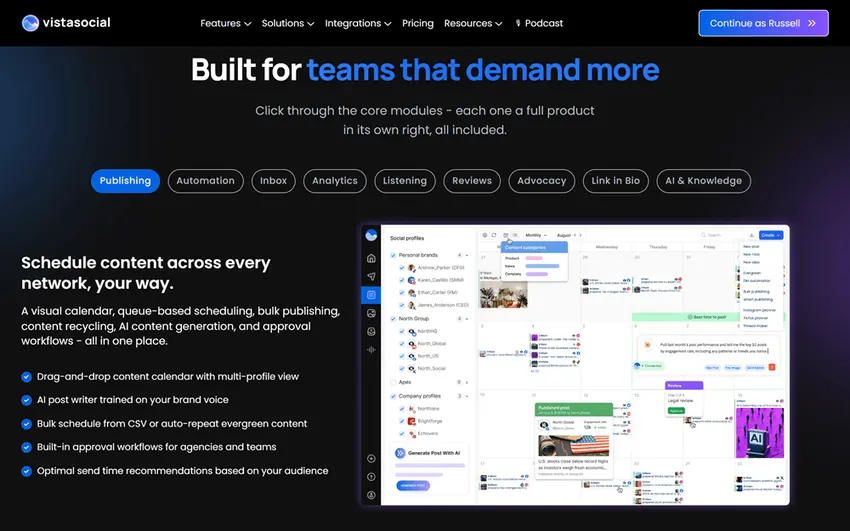
That’s usually well within a marketing manager’s own sign-off authority, and a free trial with no credit card required means you can get everything connected before you even have to ask.
Step 3: Address the inbox backlog
Message backlogs are the norm here, not the exception. Comments, DMs, and even Google Business Profile reviews pile up fast when nobody’s been watching them, and every one of them is a customer who noticed you didn’t respond.
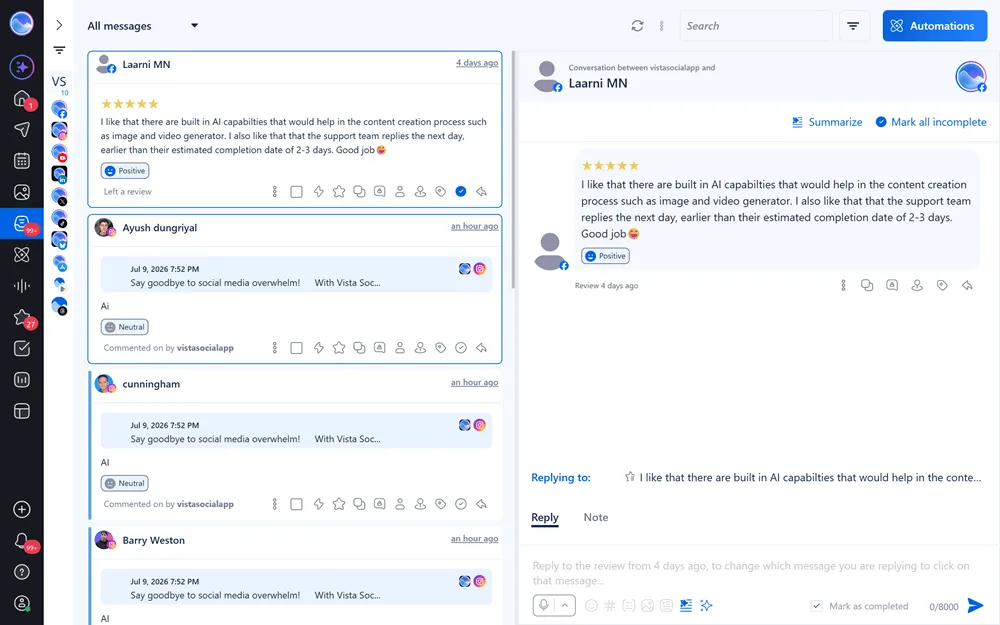
Route every comment, DM, and mention into one unified inbox, so you see everything in a single place instead of checking five different apps. Start with whatever’s oldest, like that Friday customer question still sitting on the Facebook page.
Fortunately, Vista Social has a unified inbox where you’re able to respond to every comment, DM, and mention in just one platform. Makes dealing with the backlog easier, and it also helps when you need to keep the inbox as your daily home base going forward.
Step 4: Schedule the coming week in one sitting
Once access is secure and the inbox is under control, stop posting daily and start posting weekly instead.
Sit down once and batch a week of simple, safe posts, then queue them from a single calendar so they go out on their own. You don’t need a finished content strategy to do this, just enough posts to keep the accounts looking active while you catch your breath.
Short on ideas for that first week or two? Check out where your first weeks of posts can come from before you sit down to batch.
Step 5: Automate one repeatable task
Once the first four steps are running, hand one recurring job to automation instead of doing it by hand every single time.
This could be a weekly draft queue that gets your next batch of posts ready for review, or a monthly performance report that used to eat an entire afternoon. Ask Vista, Vista Social’s account-aware AI assistant, is available on every plan, including the entry tier, and can:
- Draft posts
- Schedule them to the right queue
- Help triage the inbox
- Build reports based on your actual connected accounts
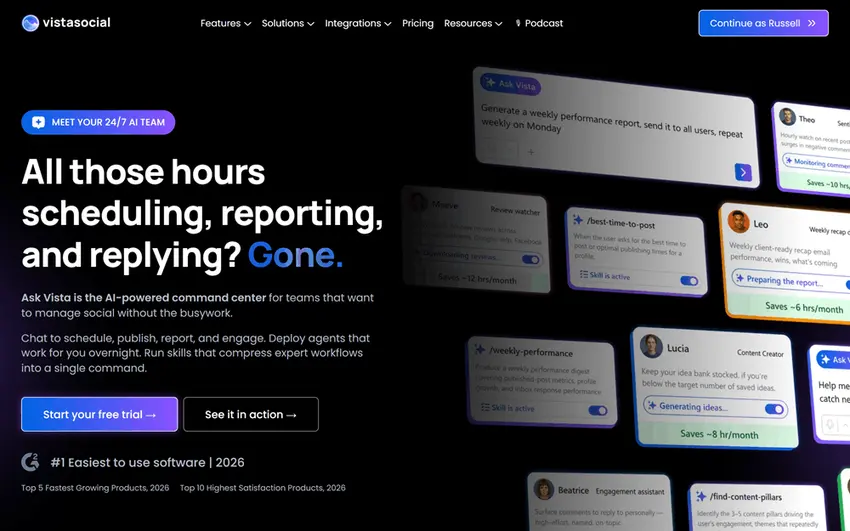
It takes high-stakes actions like publishing or sending only with your approval, so you stay in control of anything that goes live.
This kind of handoff is quickly becoming standard practice, not a shortcut. High-performing marketing teams using AI agents report reclaiming eight hours weekly, time they reinvest into higher-value work (Salesforce’s 2026 State of Marketing report).
Separately, knowledge workers already expect this to grow: within three years, they plan to delegate nearly half their work to AI agents. Automating one repeatable task in week one isn’t cutting corners, it’s catching up to where the rest of the industry is already headed.
Common mistakes new owners make (and what to do instead)
The three mistakes that trip up almost every new owner all come down to working out of order. Fix the sequence, and each one mostly takes care of itself.
Skipping access
If you haven’t secured every account yet, don’t skip ahead to posting or picking a tool. An account you can’t verify into is an account you can lose permanently, and no amount of good content fixes that after the fact.
Spreading too thin
Trying to be excellent on all six platforms at once is exactly how new owners burn out in week one, especially before any single account is genuinely healthy. Get one or two accounts running well first, echoing the same logic Justin Welsh applies to platform focus, and let the rest catch up once the basics hold.
Strategy too early
Brand pillars and content calendars matter, just not this week. Strategy needs a stable base to sit on, and you don’t have one yet, so building it now, before access and scheduling are handled, just means rebuilding it again later.
Your month-two move: now build the strategy
Once access, scheduling, and the inbox are handled, the hard part of how to manage social media for a company is behind you, and it’s time to think about strategy. That means defining who you’re talking to on each platform, what you want each account to accomplish, and what content gets you there.
This guide isn’t the place for that part, on purpose. Once the machine is running, block time to build an actual strategy using a proper framework built for it.
Doing this in month two means you’re building on something stable. Right now, you’d just be guessing while still underwater.
Frequently asked questions
How do I manage social media for a company if I just got put in charge?
Do it in order: secure access first, connect every account into one dashboard, and centralize the inbox. Then schedule a week of posts and automate one repeatable task, saving strategy for once the basics are running.
How do I get access to my company’s social media accounts?
Inventory every account, then ask the previous owner or an admin for login and admin rights. Reset the passwords you can, fix any two-factor authentication tied to someone who’s left, and store everything in a password manager built for teams.
Can one person manage all of a company’s social media?
For a while, yes, especially with the right tools: a single dashboard, a unified inbox, and automation for repeatable tasks like reporting. As the account list or workload grows, that’s a signal to bring in help, not a sign you’re doing it wrong.
How many social media accounts should a company have?
Only as many as you can keep active. It’s better to run one or two accounts well than to spread thin across every platform, adding channels as you build capacity, not just because they exist.
What should I do first when taking over social media for a business?
Secure account access before anything else. You can’t post to an account you can’t log into, and unsecured accounts are the real risk on day one, so content and strategy come after.
Do I need a paid tool, or can I just use the apps?
If you have one or two accounts and post lightly, native scheduling in the apps is genuinely fine. Once you’re juggling several accounts and an inbox you keep missing, a single management dashboard usually saves more time than it costs.
Try Vista Social for free
A social media management platform that actually helps you grow with easy-to-use content planning, scheduling, engagement and analytics tools.
Get Started NowAbout the Author

Content Writer
Russell Tan is a content marketing specialist with over 7 years of experience creating content across gaming, healthcare, outdoor hospitality, and travel—because sticking to just one industry would’ve been boring. Outside of her current role as marketing specialist for Vista Social, Russell is busy plotting epic action-fantasy worlds, chasing adrenaline rushes (skydiving is next, maybe?), or racking up way too many hours in her favorite games.
Loading related tools...

The most complete social media management platform for teams who demand more.






Tools
PublishingAnalyticsEngagementIntegrations
FacebookInstagramLinkedInRedditSnapchatThreadsTikTokX (Twitter)YouTubeMCPVista Page (link-in-bio)All IntegrationsCopyright © 2026 Vista Social LLC. All Rights Reserved.