

Published on December 15, 2025
10 min to read
Client Reporting: Metrics That Actually Matter to CMOs

Summarize with AI


Table of contents
Summarize with AI

ChatGPT

Claude

Perplexity
Share

Vista Social

X (Twitter)


Managing social media for clients comes with many challenges. But few tasks cause as much stress as client reporting.
You know the feeling—it’s report deadline week. You’re scrambling to pull data from five different platforms, trying to make sense of vanity metrics that don’t tell the real story, and hoping your client doesn’t ask the dreaded question: “What does this mean for our business?”
The truth is, most client reports miss the mark. They may be full of pretty charts and impressive-looking numbers, but they don’t answer the questions that actually keep CMOs up at night.
The stakes are high, and poor reporting puts client relationships at risk. When agencies can’t clearly show their value, clients start looking elsewhere.
This guide will change that. You’ll learn exactly which metrics matter to decision-makers. You’ll discover how to create reports that prove your value and drive smart business decisions. And you’ll see how the right tools can make reporting easier, not harder.
Table of contents
What is client reporting?
Client reporting is how agencies share social media results with their clients. These reports show what happened during a specific time period. They track progress toward goals. And they provide insights about what to do next.
Think of client reporting as your monthly (or quarterly) chance to tell a story. The story of how your social media work is helping their business grow.
Good client reports do three main things:
- Show clear results from social media efforts
- Connect social media activity to business goals
- Provide direction for future strategy
But here’s what most agencies get wrong. They focus on metrics that look impressive but don’t matter to business leaders. Follower counts and post likes might make you feel good. But they don’t help a CMO justify their marketing budget.
The best client reports focus on metrics that directly connect to business outcomes. Things like website traffic, lead generation, and revenue impact.
Why is client reporting so important?
Client reporting isn’t just a nice-to-have. It’s essential for building strong, long-lasting client relationships. The numbers tell the whole story.
Acquiring and retaining clients are both major agency challenges—and agencies that struggle with clear value demonstration are likely to see much lower rates for both.
When you can’t prove your worth through reporting, you become vulnerable to budget cuts and client departures. This makes client reporting your most powerful tool for protecting revenue.
Let’s dive into why client reporting matters so much.
Proves your value
Every marketing dollar needs to show results. Client reports are your chance to prove that social media investment is paying off. When you show clear connections between your work and business growth, you become an essential part of their team.
Builds trust through transparency
Regular reporting keeps clients informed about your work. They see exactly where their money goes. They understand what you’re doing and why. This transparency builds trust that leads to longer contracts and bigger budgets.
Harvard Business Review notes that “the rule of thumb that it costs five times more to win a new customer than to keep a current one becomes even more extreme in a downturn.” Strong reporting builds the foundation for lasting relationships.
Keeps everyone aligned
Good reports ensure you and your client are working toward the same goals. They help identify when strategy needs to shift. And they prevent misunderstandings before they become problems.
Guides future decisions
Reports aren’t just about what happened. They’re about what should happen next. The best reports use data to recommend specific actions that will improve results.
“Consistent reporting gives our clients a clear picture of what their investment is doing and how each campaign or channel is contributing to their overall goals,” says Audrey Bakhach, founder of digital marketing agency Custom Digital Solutions.
“It builds trust by making performance transparent, showing not only the wins but also the areas that need attention before they become bigger issues. Most importantly, strong reporting turns data into direction, helping clients (and our strategists) understand what to do next—not just what happened last month.”
Protects your agency
Well-documented results protect your agency when budgets get tight. When you can show clear ROI, you’re less likely to be the first expense cut. Your reports become your insurance policy.
This protection is especially important for agencies still learning how to find clients. Strong reporting helps you keep the clients you work so hard to acquire. It transforms you from a vendor into a strategic partner.
Elements of a good client report
Every effective client report includes several key elements. Each one serves a specific purpose in telling your success story.
Branded cover page
Your report should look professional from the first page. A branded cover page shows attention to detail. It reinforces your agency’s brand every time clients review results.
This branding becomes even more important when you’re using a social media management tool for your agency.
But Vista Social’s white labeling feature makes this easy. You can customize reports with your logo, colors, and branding. Your clients see your agency as the expert, not just another vendor using someone else’s tools.
Summary/overview
Start with the big picture. Your summary should highlight the most important results in 2-3 sentences. Busy executives often read only this section. Make it count.
Focus on business impact, not activity. Instead of “We posted 20 times this month,” try “Social media drove 150 new leads this month, beating our goal by 25%.”
KPIs/metrics
This is where you dive into the numbers that matter. But remember—not all metrics are created equally. Focus on metrics that connect directly to your client’s business goals. We’ll cover the most important ones in the next section.
Present your metrics clearly. Use simple language to explain what each number means. And always compare to previous periods or goals to provide context.
Data visualizations
Charts and graphs make complex data easy to understand. They help busy executives spot trends quickly. But don’t overdo it. Use visuals to highlight your most important points.
Keep visualizations simple and clean. Avoid cluttered charts that confuse rather than clarify. Each visual should tell one clear story.
Insights/analysis
Raw data is just the beginning. Your clients need you to interpret what the numbers mean.
- What trends do you see?
- Why did certain content perform better?
- How do results connect to broader business goals?
This is where your expertise shines. Anyone can pull numbers from a platform. But only you can provide the strategic insights that help clients understand their audience better.
Big wins
Highlight your biggest successes prominently. Did a post generate unusual engagement? Did social media drive a major sales lead? These wins reinforce your value and build confidence in your strategy.
More than that, be specific about wins. “Great engagement this month” is weak. “Our LinkedIn post about industry trends got 500% more engagement than usual and generated 12 qualified leads” tells a much better story.
Recommendations/next steps
End every report with clear recommendations. What should you do differently next month? Which content types deserve more investment? How can you build on current success?
Make recommendations specific and actionable. “Post more video content” is vague. “Increase video content to 40% of posts based on 3x higher engagement rates” gives clear direction and the a reason behind your recommendation.
8 metrics to include in your client reporting
Not all social media metrics matter equally to business leaders. Focus your reports on these eight metrics that directly connect to business outcomes.
Follower growth
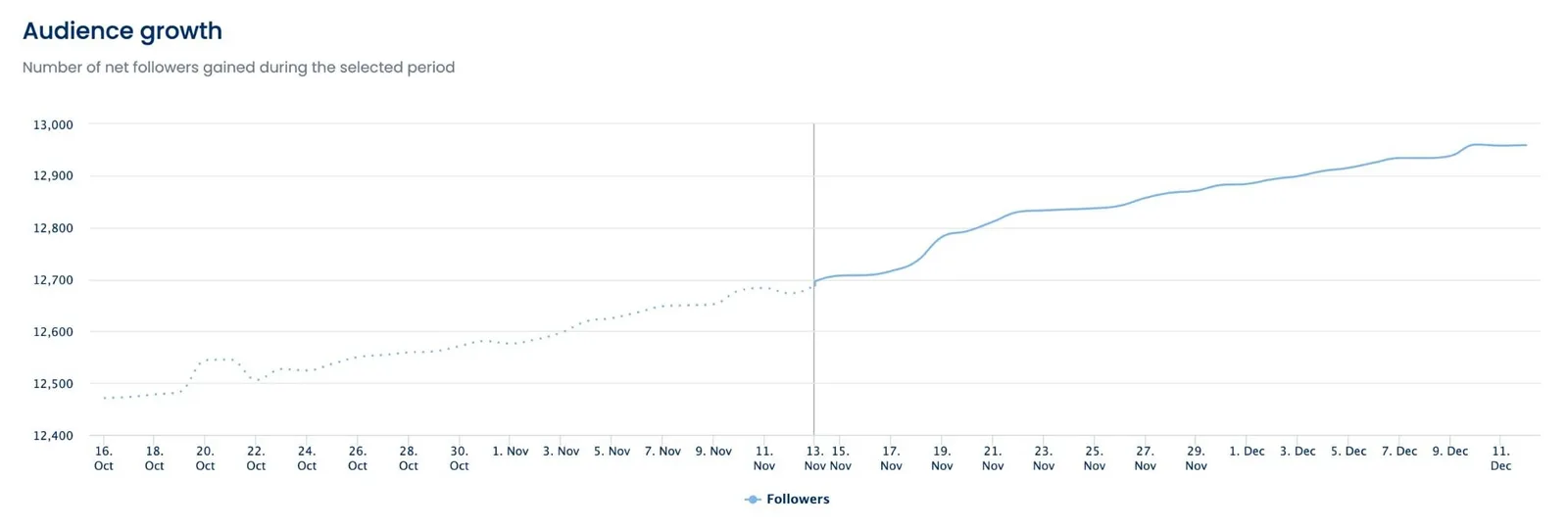
New followers represent potential new customers. But don’t just report raw numbers. Show follower quality and growth trends over time.
Track follower growth rate rather than absolute numbers. For example, a 5% monthly growth rate tells a better story than “We gained 100 followers.” Also note the source of new followers to understand which content attracts your ideal audience.
Post reach
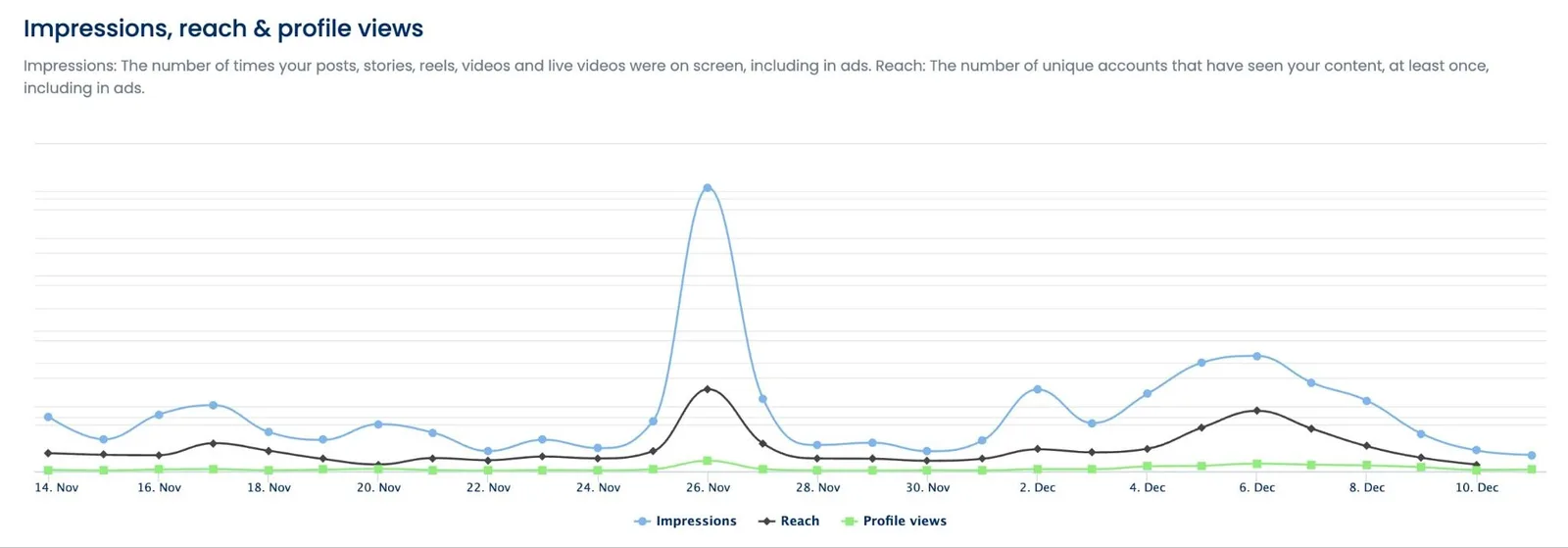
Reach shows how many people saw your content. It indicates brand awareness and content distribution effectiveness. But remember that reach without engagement rarely drives business results.
Compare reach across different content types. Which posts reach the largest audiences? How does organic reach compare to paid reach? This analysis helps optimize future content strategy.
Engagement rate
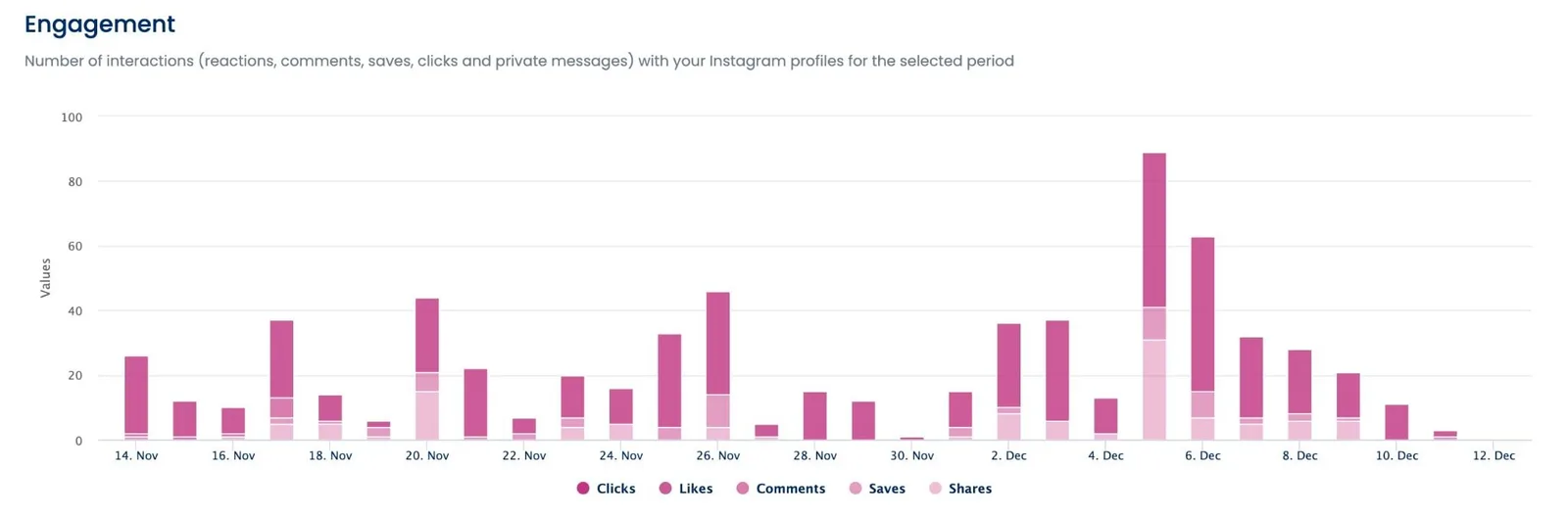
Engagement rate measures how actively people interact with content. It’s a better quality indicator than likes alone. High engagement suggests content resonates with your audience.
Calculate engagement rate using total interactions divided by reach (not follower count). This gives a more accurate picture of content performance. Track engagement trends to identify your most effective content approaches.
Conversations
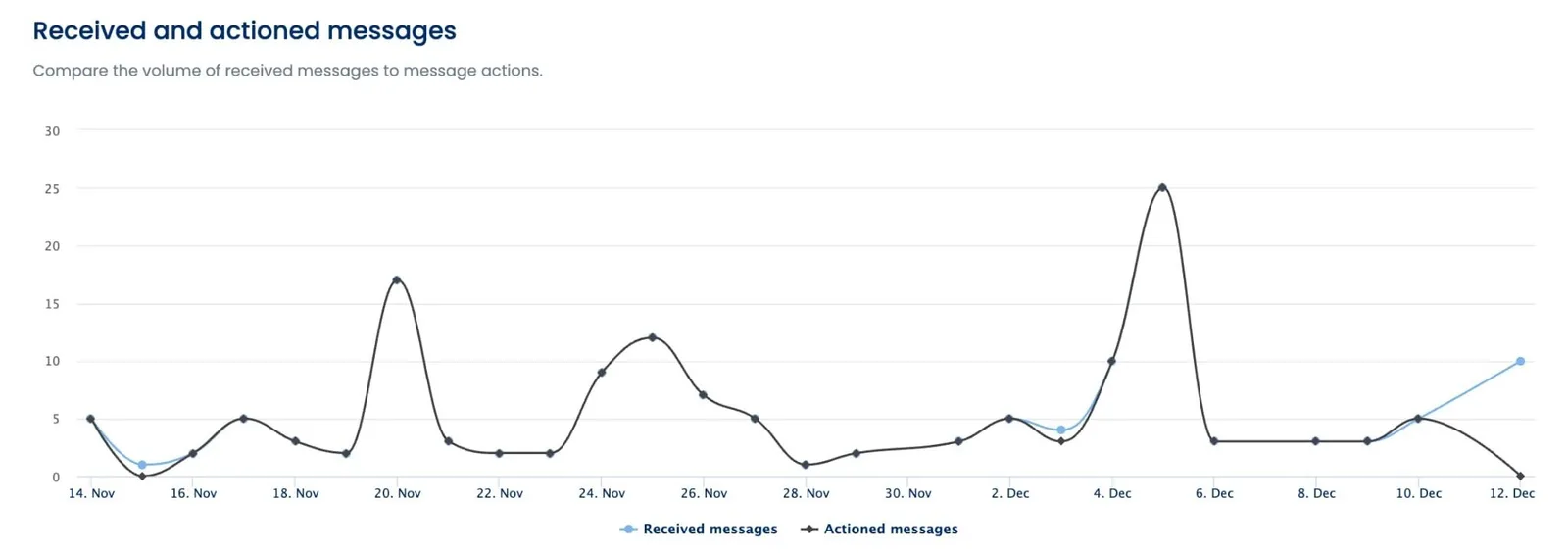
Track meaningful conversations, not just comments. How often are you engaging directly with followers? Are you answering questions and solving problems? This metric shows community building success.
Conversations often indicate strong brand loyalty. When followers ask questions or share experiences, they’re moving beyond passive consumption. These interactions can lead to sales opportunities and customer insights.
Website traffic
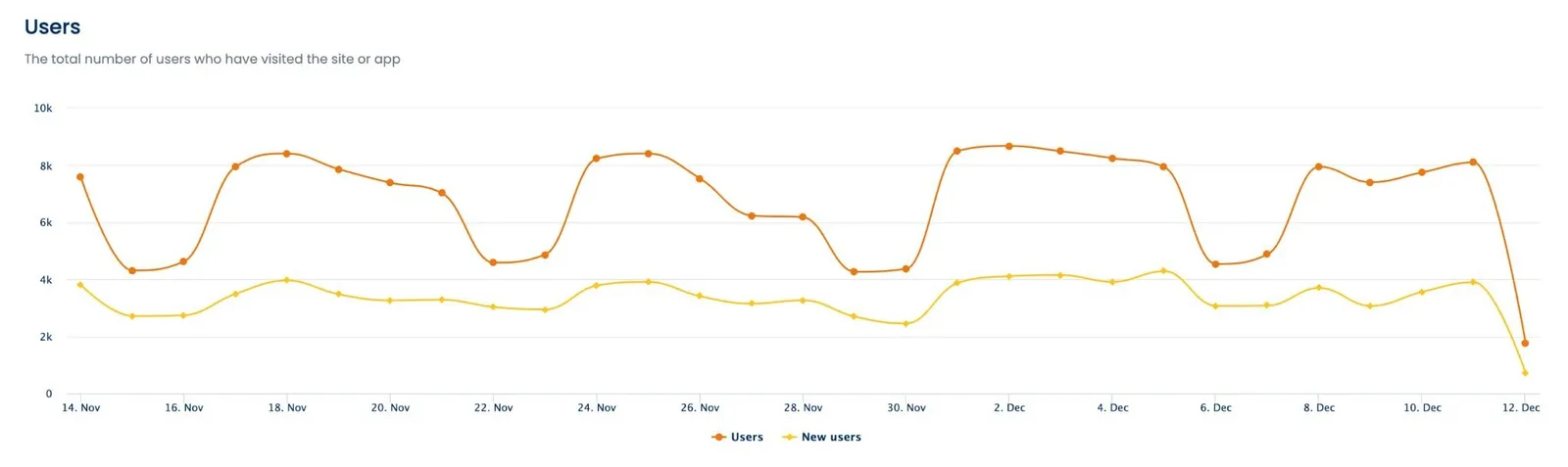
Social media should drive people to take action on your website. Track website visits from social platforms using UTM codes or social analytics tools.
Google Analytics documentation shows that proper attribution tracking helps agencies understand the true impact of social media on website conversions. Don’t just track total clicks. Monitor which posts drive the highest-quality traffic.
Plus, you can also take advantage of Vista Social’s Google Analytics integration to see basic website data right inside your Vista Social reports.
Leads generated
This metric directly connects social media to sales pipeline. Track form submissions, email signups, and other lead generation activities that start on social media.
Use tracking pixels and UTM codes to trace leads back to specific social posts. When possible, track leads through to closed sales. This creates the clearest connection between social media work and revenue.
Conversions generated
Conversions might include purchases, demo requests, or other valuable actions. They show how well social media moves people through the sales funnel.
Be specific about conversion types. An email signup is different from a product purchase. Report on conversions that matter most to your client’s business goals. If they use social commerce features like Instagram Shopping, track those sales separately.
Revenue generated
When possible, report actual revenue attributed to social media. This might come from social commerce, tracked conversions, or affiliate programs.
Revenue reporting provides the clearest ROI picture. Even if you can’t track every sale directly, estimate revenue impact using average customer values and conversion rates. This helps clients understand the true business impact of your work.
Client reporting best practices
Following these best practices will make your reports more effective and easier to create.
Keep goals in mind
Every metric should connect back to your client’s business goals. If they want to increase brand awareness, focus on reach and follower growth. If they want more sales, emphasize leads and conversions.
Review goals regularly with clients. Business priorities change, and your reporting should evolve accordingly. Quarterly goal reviews ensure your reports stay relevant and valuable.
This goal alignment becomes especially important when you’re working on social media management pricing. Higher-value clients expect reports that directly connect to their business objectives.
Stick to a consistent frequency
Most agencies report monthly or quarterly. Choose a frequency that gives enough data to show trends but isn’t overwhelming to create.
Monthly reporting works well for active accounts with daily posting. Quarterly reporting might be better for clients with longer sales cycles or seasonal businesses. Whatever frequency you choose, stick to it consistently.
Be clear and concise
Use simple language that non-marketers can understand. Avoid jargon and technical terms. Focus on insights rather than raw data dumps.
Write for busy executives who might scan your report in five minutes. Put the most important information first. Use bullet points and short paragraphs to improve readability.
Visualize your findings
Good charts make complex data easy to understand quickly. Use bar charts for comparisons, line graphs for trends, and pie charts for proportions.
Keep visuals simple and clean. Too many colors or data points create confusion. Each chart should illustrate one key point clearly.
Provide actionable insights and analysis
Don’t just report what happened. Explain why it happened and what it means. Connect data points to broader patterns and business implications.
Good analysis might explain why certain content performed well or poorly. It might identify seasonal trends or audience preferences. This analysis helps clients understand their market better.
Many agencies fail because they focus only on vanity metrics. Research shows common reasons why social media marketing agencies fail include poor reporting practices that don’t demonstrate clear business value.
Create custom reports
Generic reports feel impersonal and miss important details. Custom reports show you understand each client’s unique business and goals.
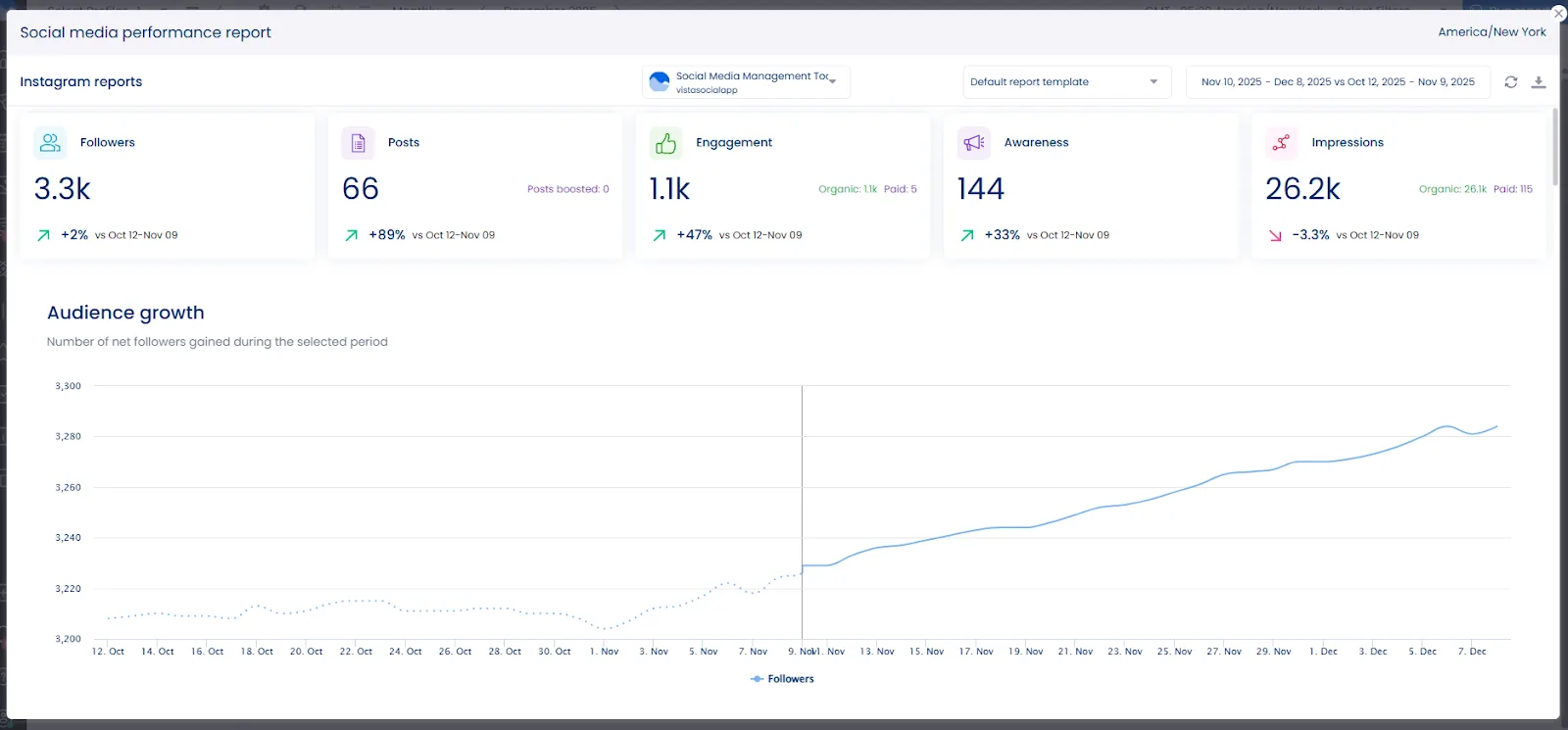
Vista Social’s custom reporting features let you create reports tailored to each client’s needs. You can highlight the metrics that matter most to them. You can include their branding and focus on their specific industry challenges.
Automate your reporting
Manual report creation takes too much time and creates opportunities for errors. Automation ensures consistency and frees your team to focus on analysis and strategy.
Vista Social’s automated reporting capabilities save hours every month. Set up templates once, then let the platform pull current data automatically. You can still add custom analysis and insights while eliminating manual data collection.
1. To set this up, click the Reports tab in your Vista Social dashboard.
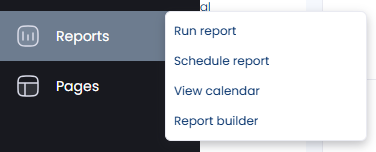
2. Click on Schedule report from the dropdown menu that appears.
3. Choose the timeframe, date to run the report, and how many times you’d like to run it. You can also add email recipients who will automatically receive the report once it is available.

4. Click Schedule and you’re all set!
Create reports your clients will love
Your next client report could be the difference between a contract renewal and a lost account. Every month, you have the chance to prove your value or watch a client question their investment.
The agencies winning long-term are those that have mastered the art of client reporting. They focus on business impact metrics—website traffic, leads, conversions, and revenue—not vanity numbers. They tell compelling stories with data. And they use reporting as their secret weapon for client retention.
Smart reporting isn’t just good practice—it’s your agency’s financial lifeline.
Stop sending reports that get filed away and forgotten. Start creating reports that get you invited to strategy meetings and secure your place in next year’s budget—and let Vista Social help.
Get started today so you can begin automating your reporting and making client retention your competitive advantage.
Client reporting FAQs
Why is client reporting important?
Client reporting proves your social media work drives business results. It builds trust through transparency and helps guide future strategy decisions. Regular reporting also protects your agency relationship during budget reviews.
What should a client report include?
Include metrics that connect to business goals like website traffic, leads, and revenue. Add context with insights and analysis that explain what the data means. Always end with specific recommendations for improving results.
How do you write a client report?
Start with a clear summary of key results. Present important metrics using simple language and helpful visuals. Include analysis that explains trends and patterns. End with actionable recommendations for future strategy.

Try Vista Social for free
A social media management platform that actually helps you grow with easy-to-use content planning, scheduling, engagement and analytics tools.
Get Started NowAbout the Author

Content Writer
Russell Tan is a content marketing specialist with over 7 years of experience creating content across gaming, healthcare, outdoor hospitality, and travel—because sticking to just one industry would’ve been boring. Outside of her current role as marketing specialist for Vista Social, Russell is busy plotting epic action-fantasy worlds, chasing adrenaline rushes (skydiving is next, maybe?), or racking up way too many hours in her favorite games.
Loading related tools...




Tools
PublishingAnalyticsEngagementIntegrations
FacebookInstagramLinkedInRedditSnapchatThreadsTikTokX (Twitter)YouTubeBlueskyVista Page (link-in-bio)All IntegrationsCopyright © 2026 Vista Social LLC. All Rights Reserved.