

Published on December 5, 2025
8 min to read
What Are Instagram Trial Reels & How They Can Boost Your Strategy

Summarize with AI

Table of contents
Summarize with AI

ChatGPT

Claude

Perplexity
Share

Vista Social

X (Twitter)


When was the last time you wanted to test out a totally new idea, but you were worried about how your current following would receive it? You’re not alone in this—and it’s exactly why Instagram launched Trial Reels.
Instagram Trial Reels give you the chance to experiment with new content ideas by testing it out with non-followers before deciding if you want to share it with everyone or not.
This feature gives you the freedom to try new things without worrying about what your followers will think. (And honestly, you really should be taking full advantage of this feature.)
Let’s dive more into what Instagram Trial Reels are, how they work, and how to share (or schedule!) them to the platform.
Table of contents
What are Instagram Trial Reels?
Instagram Trial Reels are a testing feature that allows you to share Reels exclusively with people who don’t follow your account. Unlike regular Reels, Trial Reels don’t appear on your profile grid, in your Reels tab, or in your followers’ feeds unless you decide to share them with everyone later.
As Instagram puts it, “We often hear from creators that they feel nervous about posting too much to their audience or trying out new content that’s outside of their niche on Instagram, for fear of it not resonating with their followers.”
Instagram Trial Reels alleviate this by pushing Reels to non-followers first as a way of testing new ideas without potential repercussions.
Should you give Instagram Trial Reels a go?
Short answer: Yes. Long answer: There are a lot of benefits that you can see when using Trial Reels, even if you’re just using them as a way to reach new people rather than testing new ideas.
Plus, Adam Mosseri from Instagram himself shared that Trial Reels are a great way to increase your reach:
In his words, “Use Trials. If you’re not comfortable posting a lot to your main grid and to all of your followers on a regular basis, Trials are a great way to see if something is working with the people who do not follow you at first. Then you can upgrade anything that you’re proud of to your followers and to your profile.”
Here are a few other benefits you can see when incorporating Trial Reels into your content strategy.
Test new content ideas without risk
The biggest benefit of Trial Reels is the freedom to experiment. Test new tactics like content formats, topics, editing styles, hooks, and music choices without worrying about confusing or alienating your current followers. If a trial doesn’t perform well, you simply move on—no harm done.
Reach new audiences
Trial Reels are specifically designed to help you move beyond your existing follower base. By showing your content to non-followers, you’re essentially getting free reach to potential new audience members. If your trial resonates, you can convert those viewers into new followers.
Make data-driven decisions
Instead of guessing which content will perform best, Trial Reels give you real engagement data from your target audience. You can compare metrics like sends, likes, and watch time across multiple Trials to identify patterns in what works and what doesn’t.
Avoid audience fatigue
Posting too frequently or sharing content that doesn’t align with your established niche can lead to audience fatigue. Trial Reels let you keep experimental content separate from your regular posts, so your followers only see your best work. Plus, it gives you the chance to post more often without annoying your followers.
Refine your content strategy
Use Trial Reels to answer specific questions about your content. Which hook drives more engagement? Does this new music style resonate? Will this product video convert? The insights you gather can directly inform your broader content strategy and help you create higher-performing posts in the future.
How to create and share Instagram Trial Reels
Creating a Trial Reel is nearly identical to creating a regular Reel, with just one additional step. Let’s go over how to do it.
First, ensure you meet the eligibility requirements. As of July 2024, Trial Reels are available to all public accounts with at least 1,000 followers. If you still don’t see the option in your app, make sure you’ve updated Instagram to the latest version.
Now there are two different ways you can share Instagram Trial Reels—by publishing one directly in the Instagram app or scheduling them ahead of time in Vista Social.
How to share a Trial Reel on Instagram
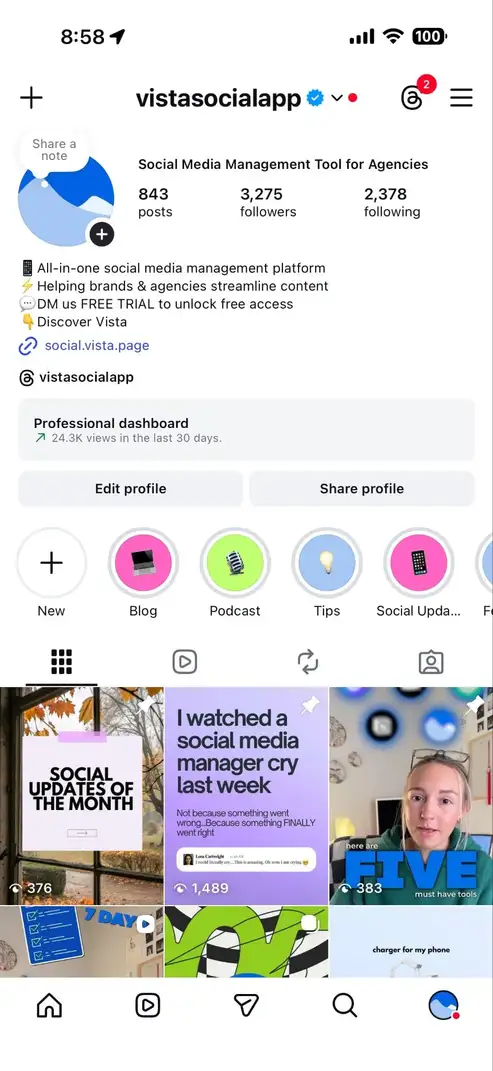
If you’ve ever shared a Reel on Instagram before, the process is almost identical. First, tap the + in the top left corner like you would each time you publish a new post, Reel, or Story.
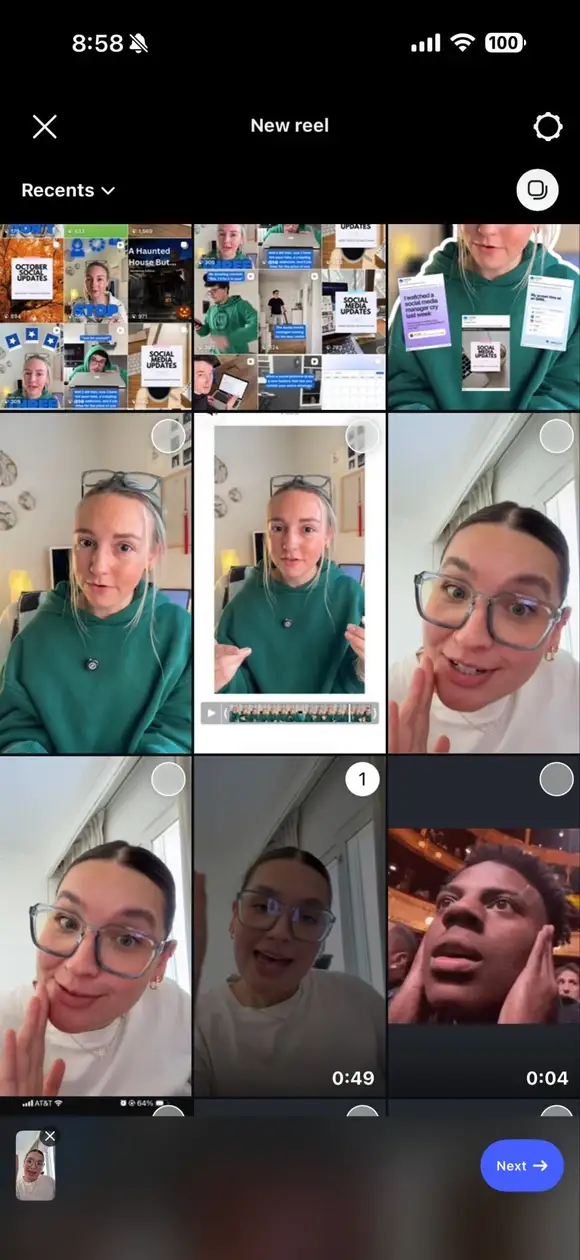
Then, select your video from your camera roll and tap Next.
Write your caption and add any other information you need for your Reel.
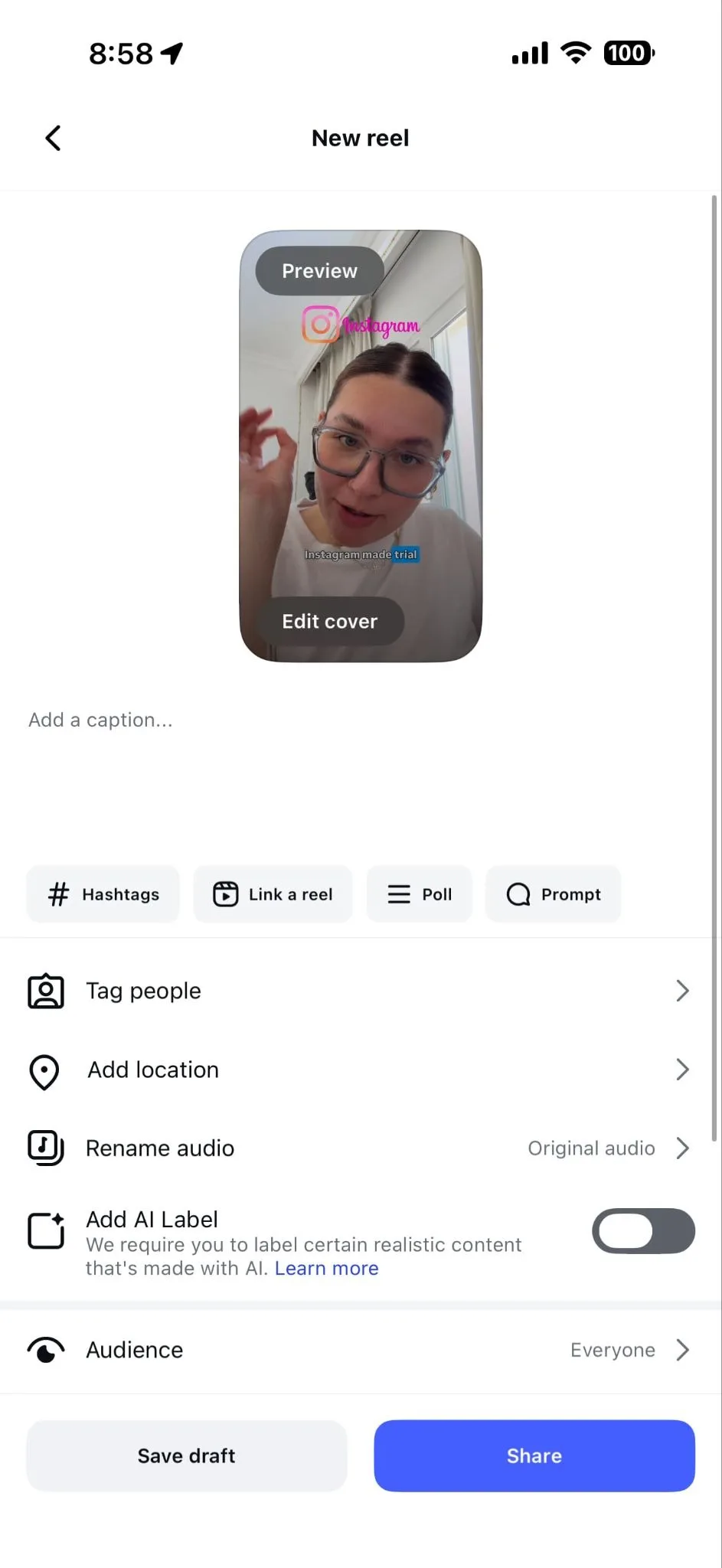
Then scroll down in the publisher to toggle Trial into the on position.
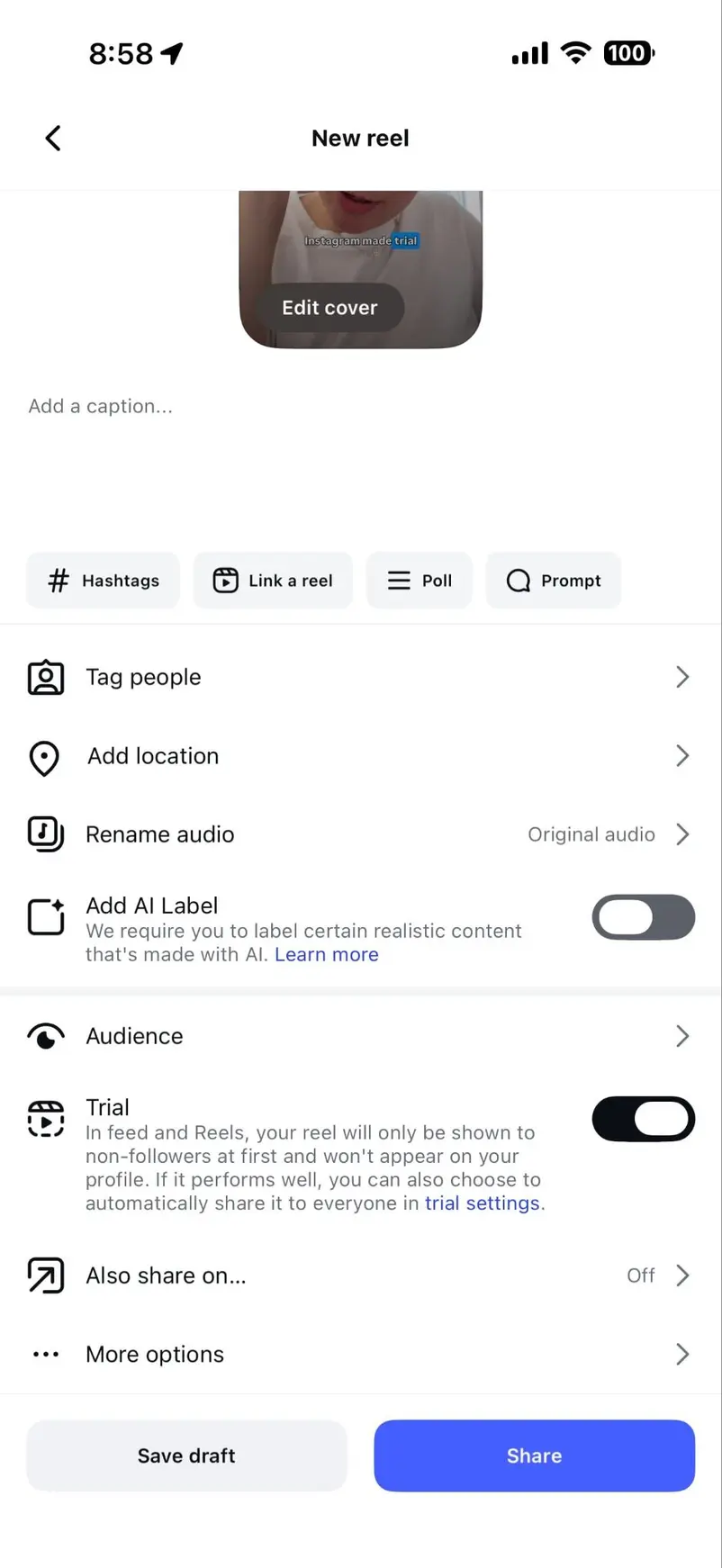
Once everything is good to go, tap Share and your Trial Reel will be shown exclusively to non-followers in the Reels feed. You can keep an eye on your analytics and if you’re happy with the performance, you can share it with everyone.
There are two ways to share your Trial Reel with more people.
First, before you even publish it, you can tap the blue trial settings link under the Trial toggle and set it to Share to everyone automatically. This means any Reels that got a significant number of views in the first 72 hours will automatically go out to the rest of your audience.
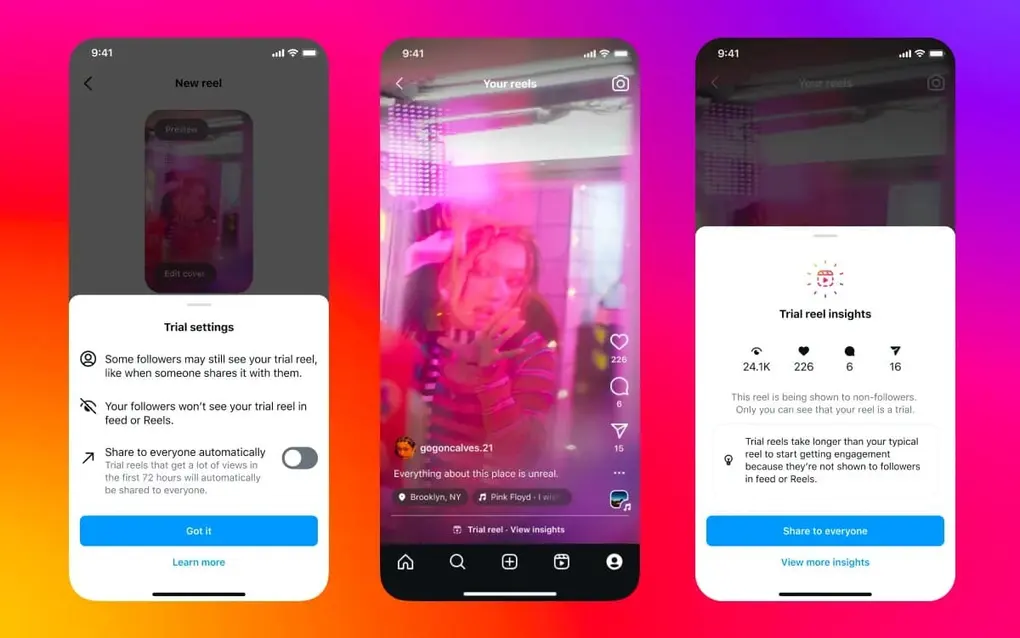
Or, you can open your Trial Reel, tap View insights, and if you’re happy with the results, you can tap Share to everyone manually.
Instagram notes that some of your followers may still see your Trial Reels. For example, if someone sends it to them via DM or it pops up in a feed with Reels using the same audio, location, or filter.
How to schedule Trial Reels with Vista Social
However, if you want to plan ahead and batch schedule a week or so’s worth of Trial Reels to test, you can easily do so in your Vista Social dashboard!
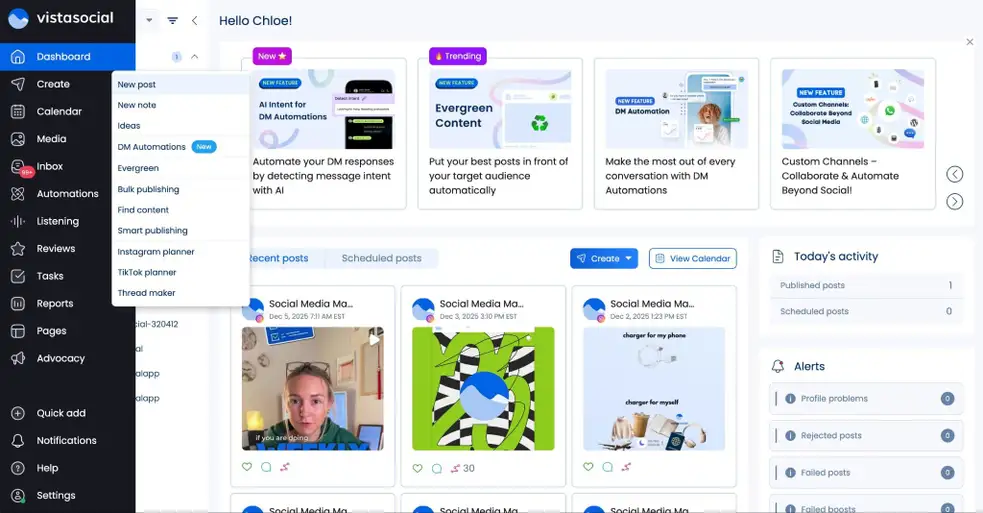
Log into your Vista Social dashboard and click Create > New post in the left hand sidebar.
Make sure you only have your Instagram account selected and upload the video you want to share as a Trial Reel. Then click the dropdown that says Publish as Reel and change it to Publish as Trial Reel. (Remember you must have at least 1,000 followers.)
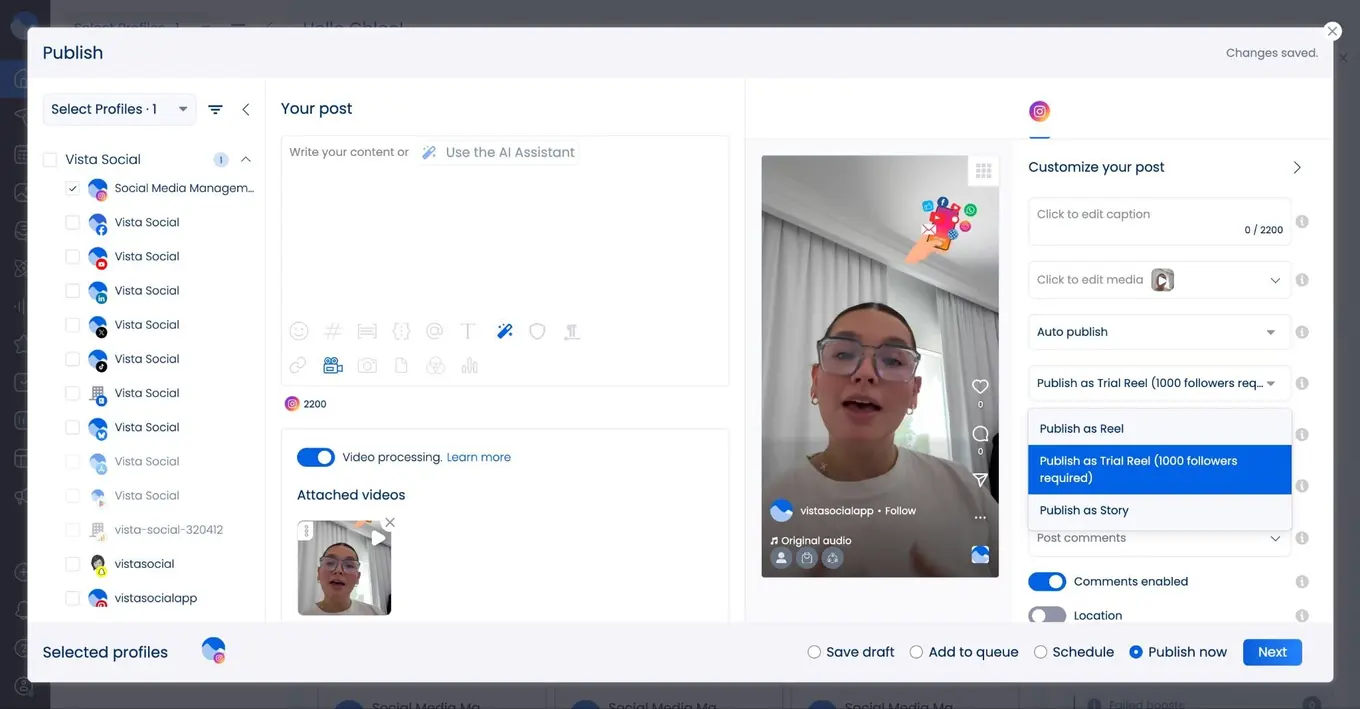
After that, you can decide whether to manually or automatically “graduate” your video (share to everyone based on performance).
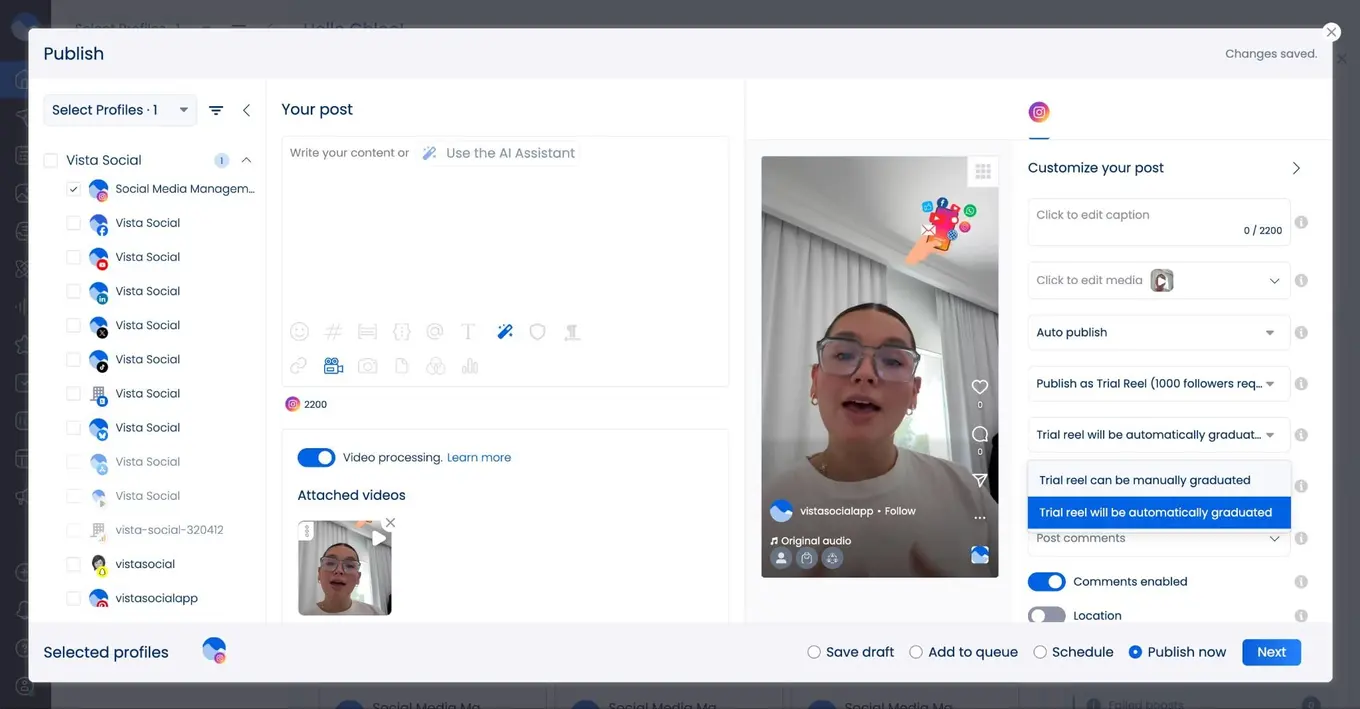
Then choose to publish now or schedule to go live at a later date. This is perfect for batch-creating different content tests to see how they do throughout the week or month, without having to manually upload it to Instagram each time.
Instagram Trial Reels best practices for maximizing performance
To get the most value out of Trial Reels for your business, follow these strategic best practices.
Don’t just try Trials once and forget them
Trials appear to compound results the more you create them. Kylie Vattimo, founder of social media agency The Inside Scoop, explains, “It looks like the more I’ve created, the more results come in.”
Even if you’re not thrilled with your results right off the bat, keep posting, keep testing, keep trying new things.
Use Trial Reels for A/B testing
The key to getting meaningful insights from A/B testing is controlling your variables, so you want to test just one new variable in your Reels at a time.
What does this mean?
Don’t test a new music style, a new posting time, and a new text overlay all in the same video. Instead, change one element at a time so you can clearly identify what drives performance differences.
For example, create two nearly identical Reels—same hook, same editing style, same caption—but use different trending audio tracks. The performance difference will tell you which audio resonates better with your audience.
Wait before analyzing performance
Don’t check your Trial Reel insights in the first 10 minutes. Early engagement is typically low because Instagram is still distributing the content.
Instagram doesn’t even decide to share your video with more people until after 72 hours. So wait at least a few hours, but ideally 24 hours, before diving into the metrics.
Focus on key metrics
When analyzing Trial Reel performance, pay special attention to three metrics: sends (how often people share the Reel), likes (direct engagement), and watch time (retention). These signals indicate how compelling your content is to new audiences.
High sends suggest your content has viral potential. Strong watch time means people are sticking around to view the entire video. Combined, these metrics tell you whether the content is worth sharing with your full audience.
Test trending audio before committing
Trending audio can significantly boost Reel performance, but not every trending sound fits your brand. Use Trial Reels to test whether a currently viral audio track resonates with your audience before investing time in a high-production video featuring that sound.
Experiment with content outside your niche
Trial Reels are perfect for exploring adjacent content areas or testing whether your audience would be receptive to a pivot in your content strategy. A travel creator could test food content. A B2B brand could experiment with behind-the-scenes employee stories.
These experiments help you identify growth opportunities without risking your established brand identity.
Try different video lengths
Test whether your audience prefers short, punchy 15-second Reels or longer, more detailed 90-second videos. You might find that certain content types perform better at specific lengths.
Repurpose older content
Here’s a lesser-known strategy: you can use Trial Reels to give older content new life. Since Trial Reels are only shown to non-followers, you can re-post your best-performing past Reels as trials to reach fresh audiences who never saw the original.
While Trial Reels were made for experimenting, they can also be used to simply reach more Instagram users. The platform doesn’t penalize this approach, and it’s an excellent way to maximize the value of content you’ve already created.
Start sharing Instagram Trial Reels today
Instagram Trial Reels represent a significant shift in how creators and brands can approach content experimentation on the platform. No longer do you need to choose between playing it safe and taking creative risks. With Trial Reels, you can do both.
Start planning your Trial Reels strategy today—and let Vista Social help. Create your account now so you can start scheduling your Trial Reels and making experimentation a key part of your strategy.
Instagram Trial Reels FAQs
Who has access to Instagram Trial Reels?
Trial Reels are available to all public accounts with at least 1,000 followers. The feature rolled out globally in 2024 and is now accessible to most eligible creators. If you don’t see the option, make sure your Instagram app is updated to the latest version.
Will my followers know I’m posting Trial Reels?
No. Only you can see that a Reel is marked as a Trial. To everyone else, it appears as a regular Reel. Your followers won’t see the Trial on your profile or in their feeds unless you later choose to share it with everyone.
How long does it take to see Trial Reel insights?
Instagram typically provides engagement metrics approximately 24 hours after you share a Trial Reel. You can view insights by tapping View trial insights in the Reels viewer.
Can I delete a Trial Reel if it doesn’t perform well?
Yes. If a Trial Reel doesn’t meet your expectations, you can simply leave it as a Trial (it won’t appear on your profile) or delete it entirely. Your followers will never know it existed.

Try Vista Social for free
A social media management platform that actually helps you grow with easy-to-use content planning, scheduling, engagement and analytics tools.
Get Started NowAbout the Author

Content Writer
Chloe West is a content marketing manager for Vista Social. She has over seven years of experience in digital marketing for B2B SaaS companies. When she's not working, you'll find her spending time with her family, reading a book, or watering her plants.
Loading related tools...




Tools
PublishingAnalyticsEngagementIntegrations
FacebookInstagramLinkedInRedditSnapchatThreadsTikTokX (Twitter)YouTubeBlueskyVista Page (link-in-bio)All IntegrationsCopyright © 2026 Vista Social LLC. All Rights Reserved.