

Published on December 4, 2025
12 min to read
Enterprise Social Media: Your Brand’s Go-To Strategy

Summarize with AI

Table of contents
Summarize with AI

ChatGPT

Claude

Perplexity
Share

Vista Social

X (Twitter)


Managing social media for a large company isn’t the same as running a small business account. Enterprise social media comes with unique challenges because teams work across different departments, approval processes can take weeks, and many people need access to the same accounts.
If you manage social media at a big company, you know these struggles well. You’re constantly juggling content calendars across different time zones while waiting for legal approval on simple posts. Meanwhile, you’re trying to keep your brand voice consistent across dozens of team members.
This guide will help you build a social media strategy that actually works for large companies.
Table of contents
What is enterprise social media management?
Enterprise social media management means handling social media for large companies with complex teams and processes. These businesses usually have over 1,000 employees, and multiple departments get involved in social media decisions.
Here’s what makes it different from regular social media management:
- Scale matters because large companies manage dozens of social accounts across different platforms and regions. They might have separate accounts for different product lines or geographical areas, which creates complexity.
- Many people are involved in every post, from legal teams who review posts for compliance issues to brand managers who check messaging consistency. Regional managers add local context while marketing directors approve campaigns.
- Strict processes govern everything since all content needs approval before going live. Posts must follow brand guidelines and require fact-checking and legal review to avoid problems.
- Higher stakes mean one wrong post can reach millions of followers and make headlines, so mistakes cost more money and cause bigger reputation problems than smaller companies face.
An example is how large technology companies manage their social media presence. They often maintain multiple LinkedIn pages for different product lines, regional offices, and business units.
Microsoft provides a great example of this. A quick LinkedIn search shows us that the brand has at least two dozen subpages for their different products.
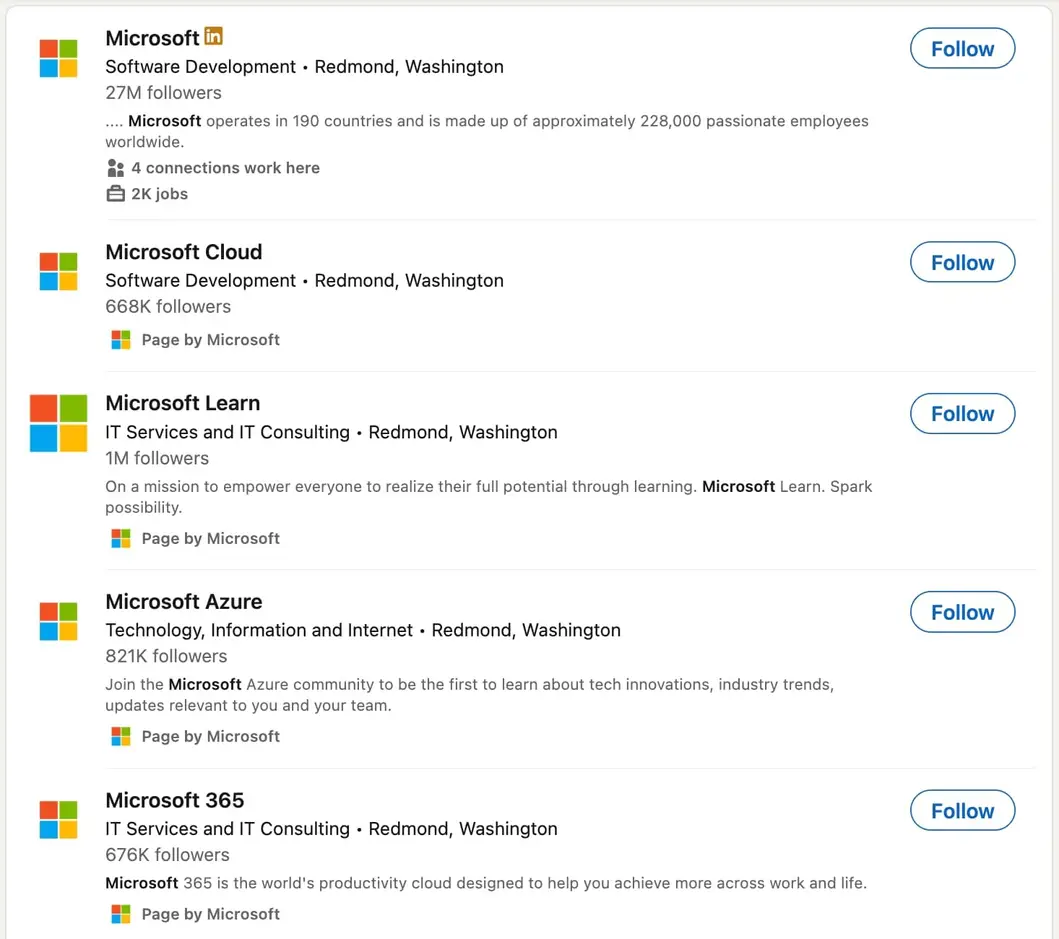
Each page follows the same brand guidelines but shares content tailored to its specific audience. This approach lets them reach different customer segments while maintaining brand consistency across all channels.
Components of a good enterprise social media strategy
Now that you understand what makes enterprise social media unique, let’s look at building an effective strategy. Creating an enterprise social media strategy requires careful planning and clear processes.
A comprehensive social media marketing strategy serves as the foundation for enterprise success. Here are the key components every large company needs to succeed.
Clear goals
Your social media goals must match your bigger business goals. Vague goals like “increase engagement” don’t drive real results. Instead, set specific targets like “get 500 qualified leads from LinkedIn in Q1” or “cut customer service response time to under 2 hours.”
Break down large goals into smaller steps. If you want to grow your LinkedIn following by 50,000 this year, aim for about 4,200 new followers monthly. Track progress often and adjust your strategy when needed.
Link every goal to a business metric. Brand awareness campaigns should track website traffic from social media. Lead generation efforts should measure conversion rates and customer costs.
Audience research
Enterprise companies often serve many customer groups. Each group has different needs, pain points, and platform preferences. Deep audience research helps you create relevant content for each segment.
Use your existing customer data to build detailed buyer personas. CRM systems, sales teams, and customer service departments have valuable insights about your audience. Survey customers about their social media habits and content preferences.
Platform analytics reveal which content works best with different audience groups. LinkedIn might work well for B2B decision-makers, while Instagram could reach younger consumers. Tailor your approach for each platform and audience.
Team structure
Organizations need clear roles and duties for social media management. Without structure, content approval becomes messy and response times suffer.
Your enterprise social media team should include:
- Content creators who develop posts, graphics, and videos. They understand your brand voice and can adapt content for different platforms and audiences.
- Community managers who respond to comments, messages, and mentions. They handle customer service issues and engage with followers in real-time.
- Strategists who plan campaigns, analyze performance, and adjust tactics based on results. They ensure social media efforts support bigger business goals.
- Approvers who review content before publication. This might include legal teams for compliance, brand managers for consistency, and regional managers for local relevance.
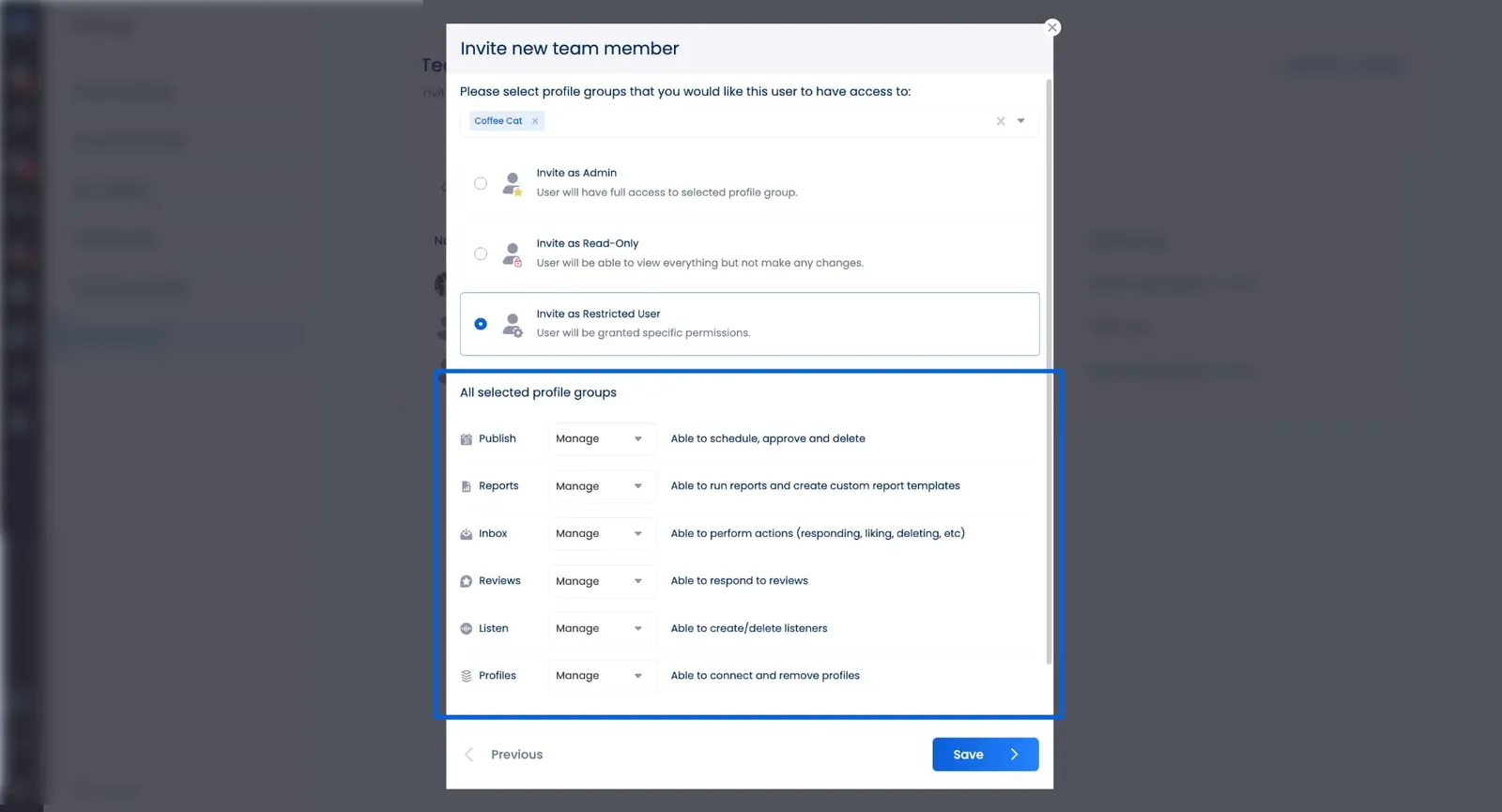
Vista Social’s user groups feature helps organize these roles effectively. You can assign different permission levels to team members and create smoother approval workflows that reduce bottlenecks.
Content strategy
Enterprise content strategy balances global brand consistency with local relevance. Your content must reflect company values while speaking to different market groups.
Create content pillars that support your business goals. A technology company might focus on industry insights, product updates, customer success stories, and thought leadership content. Each pillar serves a specific purpose in your overall strategy.
Develop a content mix that works across platforms. Share educational content that positions your company as an industry expert. Post behind-the-scenes content that humanizes your brand. Include user-generated content that builds community.
Plan seasonal and evergreen content. Seasonal posts tie into holidays, industry events, and product launches. Evergreen content stays relevant over time and can be reshared many times.
Vista Social’s content calendar helps enterprise teams plan and organize content effectively. You can visualize your posting schedule across multiple accounts and platforms, making coordination much easier.
Compliance guidelines
Enterprise organizations face strict legal and regulatory requirements, which means your social media strategy must include clear compliance guidelines to avoid costly mistakes. Understanding social media compliance is crucial for businesses operating in regulated industries.
Essential compliance components include:
- Legal review processes that ensure posts meet industry regulations. For example, financial services companies must follow SEC guidelines, healthcare organizations need HIPAA compliance, and government contractors have security clearance requirements.
- Brand guidelines that maintain consistent messaging across all social accounts. Define your brand voice, visual standards, and approved messaging frameworks while including examples of what to do and what to avoid.
- Crisis response procedures that help teams react quickly to negative situations. Outline who has authority to respond, establish escalation procedures, and create approved response templates.
- Data protection policies that safeguard customer information shared on social platforms. Train team members on proper data handling and privacy requirements to prevent violations.
What to look for in an enterprise social media management tool
With your strategy components in place, the next step is choosing the right technology to support your efforts. The right social media management tool makes the difference between chaos and smooth operations for enterprise teams. When evaluating social media tools for enterprise use, look for these key features.
Scalability to grow with your organization
Your social media tool must handle growth without breaking down. As your company expands into new markets or launches new products, you’ll need more social accounts and team members.
Look for platforms that support unlimited social accounts and users. Some tools charge per account or user, which becomes expensive as you scale. Others offer enterprise pricing with unlimited access.
Test the platform’s performance with your expected volume. If you plan to publish 100 posts daily across 50 accounts, make sure the tool can handle that load without slowing down.
Consider future needs when making your decision. Choose a platform that can grow with your company rather than forcing you to switch tools later.
Vista Social’s enterprise solution provides unlimited accounts and users, ensuring your tool grows with your business needs.
Multi-account management and unified dashboards
Enterprise teams manage dozens of social accounts across different platforms and regions. Switching between accounts wastes time and increases the risk of posting to the wrong account. Learning how to manage social media accounts for multiple clients provides valuable insights that apply to enterprise multi-account management.
A unified dashboard lets you view all accounts in one place. You can monitor mentions, track performance, and respond to messages without switching platforms or logging into many accounts.
Look for tools that group accounts logically. You might organize accounts by region, product line, or business unit. This organization helps team members focus on relevant accounts.
Don’t forget to make use of account-level permissions to prevent mistakes. Team members should only access accounts relevant to their role. For example, regional managers don’t need access to global corporate accounts.
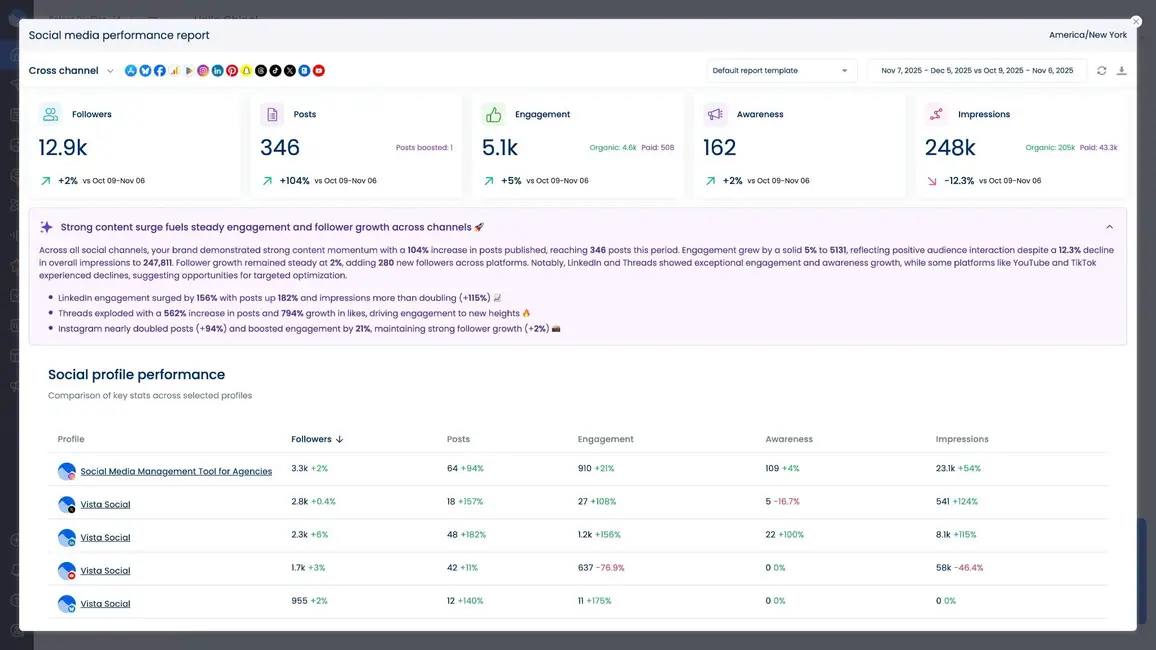
Advanced analytics and reporting capabilities
Enterprise social media management tools are growing rapidly, with the market expected to reach $16.0 billion by 2033. Analytics capabilities separate basic tools from enterprise-grade solutions.
Look for platforms that track metrics across all your accounts and campaigns. You need data on reach, engagement, clicks, conversions, and revenue attribution. Understanding social media ROI is essential for enterprise teams who need to prove value to stakeholders. Custom dashboards help different stakeholders focus on relevant metrics.
Automated reporting saves time and ensures consistency. Set up weekly, monthly, and quarterly reports that automatically compile data from all your accounts. Include executive summaries that highlight key insights and trends.
Competitor analysis features help you benchmark performance against industry leaders. Track competitors’ posting frequency, engagement rates, and campaign strategies to identify opportunities.
Vista Social’s analytics dashboard provides comprehensive reporting across all your social accounts with customizable views for different team roles.
Collaboration features for team coordination
Large teams need seamless collaboration to avoid duplicated work and missed opportunities. Your social media tool should help smooth teamwork across departments and time zones.
Key collaboration features include:
- Content approval workflows that route posts through appropriate stakeholders before publication. Legal teams review compliance, brand managers check consistency, and regional managers add local context.
- Assignment and notification systems that ensure nothing falls through the cracks. When someone mentions your brand, the right team member gets notified immediately. Customer service issues route to support teams automatically.
- Comment and feedback tools that let team members collaborate on content creation. Stakeholders can suggest changes, ask questions, and approve content without leaving the platform.
- Team activity tracking that provides visibility into who’s working on what. Managers can see workload distribution and identify bottlenecks in the content creation process.
Integration capabilities with existing business tools
Your social media tool shouldn’t exist alone. Integration with existing business systems creates smooth workflows and better data insights.
Important integrations include:
- CRM integration that connects social media activities to sales outcomes. Track which social campaigns generate leads and which content moves prospects through the sales funnel. This data proves social media ROI and informs future strategy.
- Analytics platform connections that provide deeper insights into customer behavior. Connect social media data with web analytics, email marketing metrics, and sales data for a complete view of the customer journey.
- Content management system links that make content creation smoother. Pull approved images, videos, and copy from your central content library without downloading and re-uploading files.
- Employee directory integration that helps with employee advocacy programs. Team members can easily find and share approved company content with their personal networks.
Security and compliance features
Enterprise companies face strict security and compliance requirements. Your social media tool must protect sensitive data and support regulatory compliance.
Key security features include:
- Role-based access controls that ensure team members only access relevant accounts and features. Junior team members might create content without publishing permissions, while senior staff can approve and schedule posts.
- Audit trails that track all user activities within the platform. Know who published what content, when changes were made, and which approvals were given. This documentation supports compliance requirements and internal audits.
- Data encryption that protects sensitive information during transmission and storage. Look for platforms that meet enterprise security standards like SOC 2 compliance.
- Single sign-on (SSO) integration that makes access smoother while maintaining security. Team members log in with their corporate credentials, and IT departments can manage access centrally.
Approval workflows and permissions management
Complex approval processes are a reality for enterprise social media. Your tool should make these workflows efficient rather than painful.
Key workflow features include:
- Multi-stage approval chains that route content through appropriate stakeholders in the right order. Legal review might come before brand approval, or regional managers might review content after global teams create it.
- Conditional approval rules that automate routine decisions. Simple posts might need only brand manager approval, while campaign content requires legal review. Emergency responses might bypass normal approval chains.
- Approval status tracking that provides visibility into where content sits in the review process. Stakeholders can see pending approvals and upcoming deadlines without constant email updates.
- Bulk approval features that help managers process many posts efficiently. Review similar content together rather than approving each post individually.
Vista Social’s approval workflow system makes even the most complex enterprise approval processes smooth while maintaining necessary oversight.
Customer support and dedicated success managers
When your social media operations support million-dollar campaigns, downtime isn’t acceptable. Look for platforms that provide enterprise-level support.
Key support features include:
- Dedicated success managers who understand your unique needs and help optimize your strategy. They provide training, best practices, and strategic guidance beyond basic technical support.
- Priority support channels that ensure quick resolution of critical issues. Enterprise customers should have direct access to support teams rather than waiting in general support queues.
- Service level agreements (SLAs) that guarantee response times for different types of issues. Critical problems should be addressed within hours, not days.
- Training and onboarding programs that help teams use the platform well. Look for comprehensive documentation, video tutorials, and live training sessions for new users.
Content libraries for asset management
Enterprise organizations create thousands of social media assets. Organizing and finding the right content becomes a major challenge without proper asset management.
Key asset management features include:
- Centralized content storage that keeps all approved images, videos, and copy in one searchable location. Team members can find brand-compliant assets without recreating content or waiting for approvals.
- Tagging and categorization systems that help organize content by campaign, product line, region, or content type. Advanced search features let users find specific assets quickly.
- Version control that ensures everyone uses the most current brand assets. Updated logos, product images, and messaging automatically replace outdated versions.
- Usage rights tracking that prevents legal issues with licensed content. Know which assets have usage restrictions and when licenses expire.

Try Vista Social for free
A social media management platform that actually helps you grow with easy-to-use content planning, scheduling, engagement and analytics tools.
Get Started NowAbout the Author

Content Writer
Russell Tan is a content marketing specialist with over 7 years of experience creating content across gaming, healthcare, outdoor hospitality, and travel—because sticking to just one industry would’ve been boring. Outside of her current role as marketing specialist for Vista Social, Russell is busy plotting epic action-fantasy worlds, chasing adrenaline rushes (skydiving is next, maybe?), or racking up way too many hours in her favorite games.
Loading related tools...




Tools
PublishingAnalyticsEngagementIntegrations
FacebookInstagramLinkedInRedditSnapchatThreadsTikTokX (Twitter)YouTubeBlueskyVista Page (link-in-bio)All IntegrationsCopyright © 2026 Vista Social LLC. All Rights Reserved.