

Published on December 22, 2025
8 min to read
Content Batching: The Ultimate Social Media Scaling Hack

Summarize with AI

Table of contents
Summarize with AI

ChatGPT

Claude

Perplexity
Share

Vista Social

X (Twitter)


What if you could stop scrambling for daily ideas and finally breathe inside your social media workflow?
If you run social media for a brand, you know the pressure that builds from constant posting and deadlines. Content batching breaks that cycle by giving you space to create without the daily rush, shifting your process from reactive to steady.
Instead of building each post one at a time, content batching lets you generate ideas, visuals, or captions in a single focused session. This unified burst of effort creates a smoother flow for your entire pipeline because everything moves with more direction. As the system takes shape, your workload begins to feel lighter.
Below, you’ll learn how content batching works, why it delivers such strong results, plus how to turn it into a dependable part of your process.
Table of contents
What is content batching?
Content batching is a workflow designed to help you plan and produce multiple social media posts within a single focused session. You collect ideas, create visuals, write captions, then schedule everything in clusters so you’re not not starting from scratch each day.
This approach gives your social media marketing strategy a smoother rhythm, saving time while also reducing mental load.
Instead of jumping between brainstorming, writing, or designing, you stay in one creative mode long enough to build momentum. That focus turns into a consistent process that supports you even during busy weeks. You get steady output that does not rely on daily bursts of inspiration.
How to content batch your social media posts
This section walks you through a step-by-step framework you can apply to any platform. Along the way, you’ll see real examples plus Vista Social workflows you can adopt right away.
Pinpoint your content pillars
Content pillars are the themes that shape everything you publish. They give your content direction and keep your batching sessions focused instead of scattered. With clear pillars in place, every idea has a natural home.
A strong example is Sephora. As you can see right in their Instagram story highlights at the top of their feed, a good bit of their content consistently revolves around the topics:
- Hair care
- Makeup
- Fragrance
- Skincare
- Guidelines
This structure creates familiarity while still leaving room for variety because each post fits within a defined theme.

Because Sephora sticks to its content pillars, its feed feels organized and consistent without ever feeling repetitive.
To build your own pillars, start by reviewing what your audience already engages with most. Look for patterns in questions, comments, or topics that consistently come up across your content.
Next, group those patterns into broad themes that can support many posts rather than one-off ideas. These themes become the framework that guides what you create and how you batch moving forward.
Choose three to five pillars that your audience comes to expect from you. Depending on the niche you are in, the examples below may work as a starting point or spark ideas you can adapt to your own brand:
- Tutorials
- Industry insights
- Product education
- Community stories
- Behind the scenes
Once these pillars are defined, batching becomes far easier. You no longer question what to create because you already know which categories need to be filled.
Audit your social media presence
Before you batch new content, pause and study what already works. Your past performance holds clear signals that should shape what you create next.
Look for patterns such as:
- Post formats that consistently earn strong engagement
- Content styles your audience responds to most, like Reels or carousels
- Topics that trigger replies, saves, or shares
You can pull these insights from native platform analytics or from your Vista Social dashboard. You can review your posts’ performance and even organize them by content type (e.g., video, carousel, image).
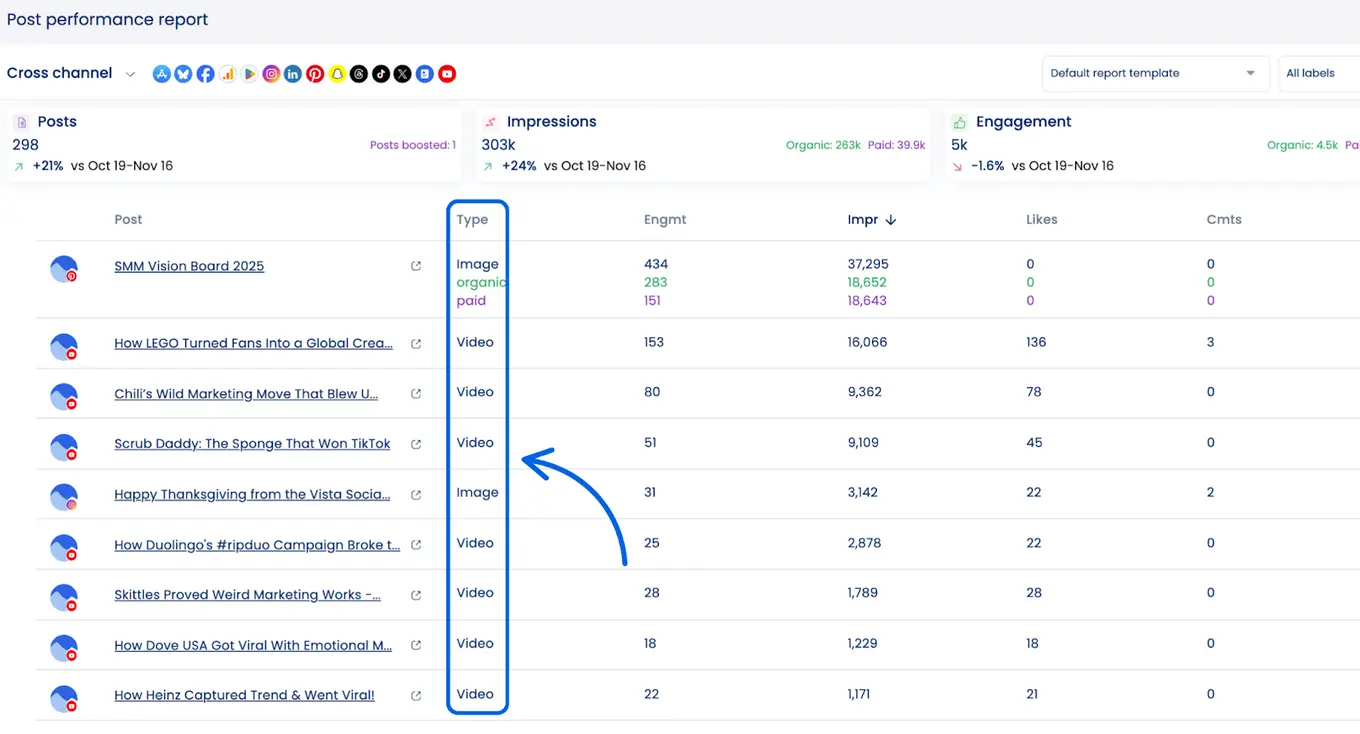
Auditing ensures you’re not batching more content for the sake of volume. You’re batching content that is informed, intentional, and aligned with what your audience already proves it wants.
Keep a log of content ideas
Your idea log powers effective batching. A deeper pool means faster sessions because you never start from zero.
The Ideas feature in Vista Social gives each spark a clear place to land. You can capture content ideas as they appear, save links tied to each thought, organize them by theme or campaign, then share inspiration with your team. Nothing gets lost or scattered.
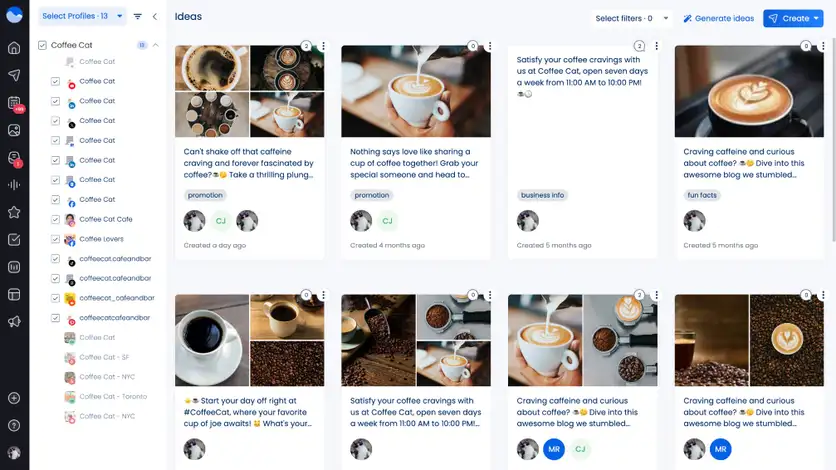
This habit keeps momentum between batching sessions. It protects ideas that show up during daily work so they are ready when creation begins.
Set aside time for more brainstorming
Batching works best when idea generation has its own dedicated space. Treat this phase as separate from writing or scheduling, so your focus stays on exploration rather than execution.
Use these sessions to stretch your content pillars in new directions. Look ahead for seasonal themes, revisit customer questions, scan community conversations, or map ideas around upcoming launches. This is where raw ideas take shape before becoming finished posts.
Some teams also bring AI content creation tools into this phase with the intention. These tools can help unlock new angles when creativity slows or when you need momentum to keep the session moving.
Here’s a simple set of steps you can use to guide your brainstorming sessions.
Step 1: Set a clear time block
Decide how long the session will run before you start. A defined window keeps momentum high and prevents overthinking.
Step 2: Choose one content pillar
Pick a single pillar to focus on so the session stays tight. This keeps your ideas aligned instead of scattered.
Step 3: List audience questions and pain points
Write down questions from comments, messages, reviews, or sales calls. These signals point directly to the content your audience already wants.
Step 4: Scan current conversations and timing
Look for seasonal moments, active discussions, or trends tied to your pillar. This helps your ideas feel timely rather than generic.
Step 5: Turn insights into post angles
Convert what you gathered into clear angles or working headlines. Each angle should be easy to expand into a post format later.
Step 6: Store and tag your ideas
Save the strongest ideas in your idea log or calendar. Tag them by pillar or intent so batching later feels fast and organized.
Create all of your captions
Now that your pillars are clear and your ideas are organized, it is time to start writing. This step brings your social media content planning into focused writing sessions, where your brand voice stays consistent across every post you create.
When your tone and rhythm are already top of mind, captions come together with far less effort. Writing them in one focused stretch keeps your voice consistent and prevents the mental reset that usually slows people down between posts.
Vista Social’s AI assistant supports this phase by helping you move from rough ideas to clear, on-brand captions. You can use it to expand short notes, tighten language, or rework lines that do not sound quite right. This keeps your momentum going because you are shaping content rather than starting from scratch.
Once you’re inside the tool, guided mode makes the process even easier. It walks you through the key inputs that matter, so you don’t have to guess what to prompt. That structure helps you produce captions that feel compelling while staying aligned with your brand voice.
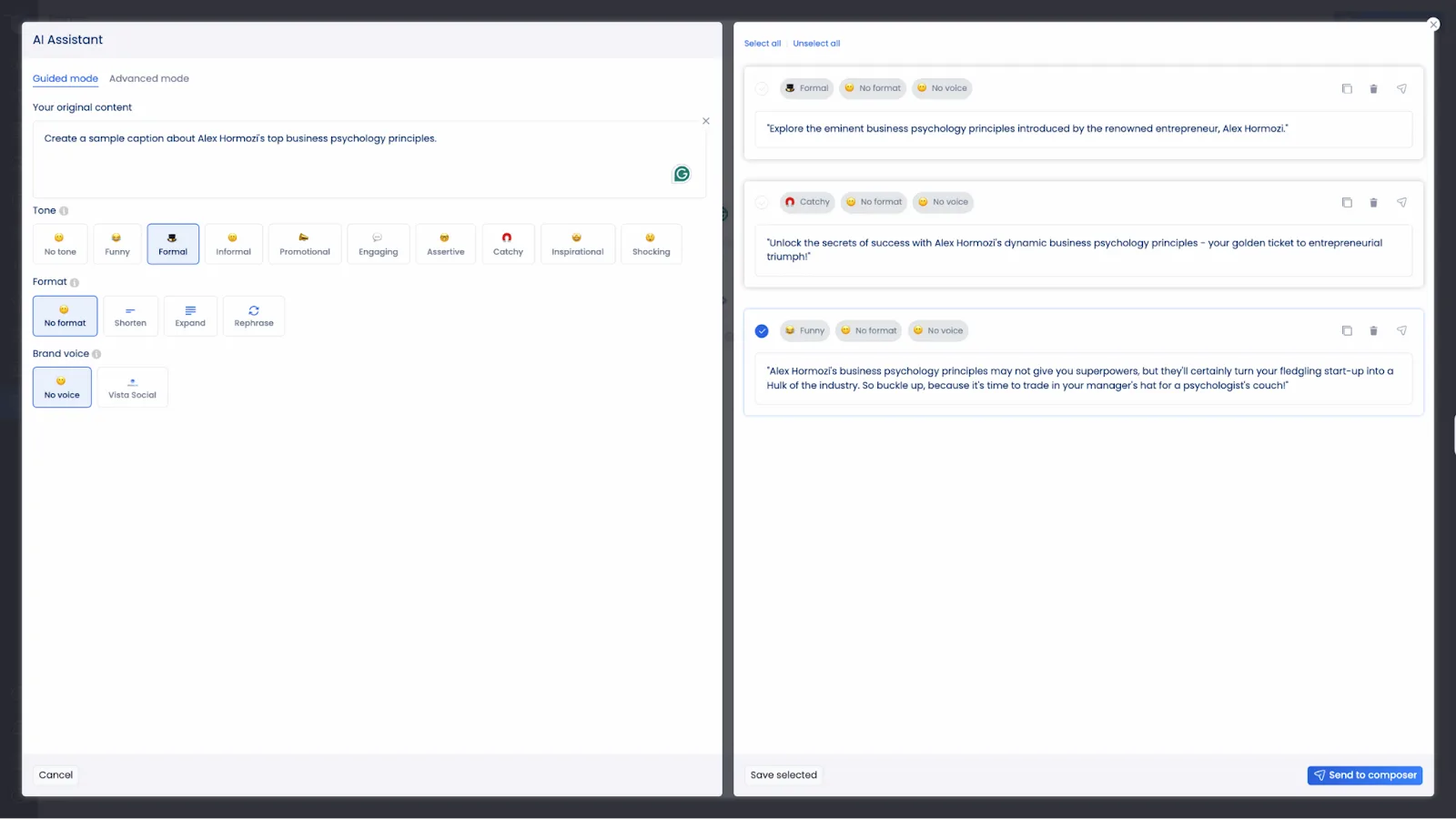
Instead of staring at a blank screen, your time goes into refining ideas and strengthening language. This shift alone makes caption writing feel lighter and far more efficient during batching sessions.
Gather your visuals
Once your captions are drafted, the next step is pulling together the visuals that support them. This gives your content context and makes each post feel intentional rather than rushed.
Your visuals can include product photos, stock images, designed graphics, short-form videos, behind-the-scenes shots, or approved user-generated content. Collecting these assets in advance keeps scheduling smooth and removes last-minute stress.
Vista Social helps streamline this step through its Canva integration, which lets you access your Canva media without leaving Vista Social.
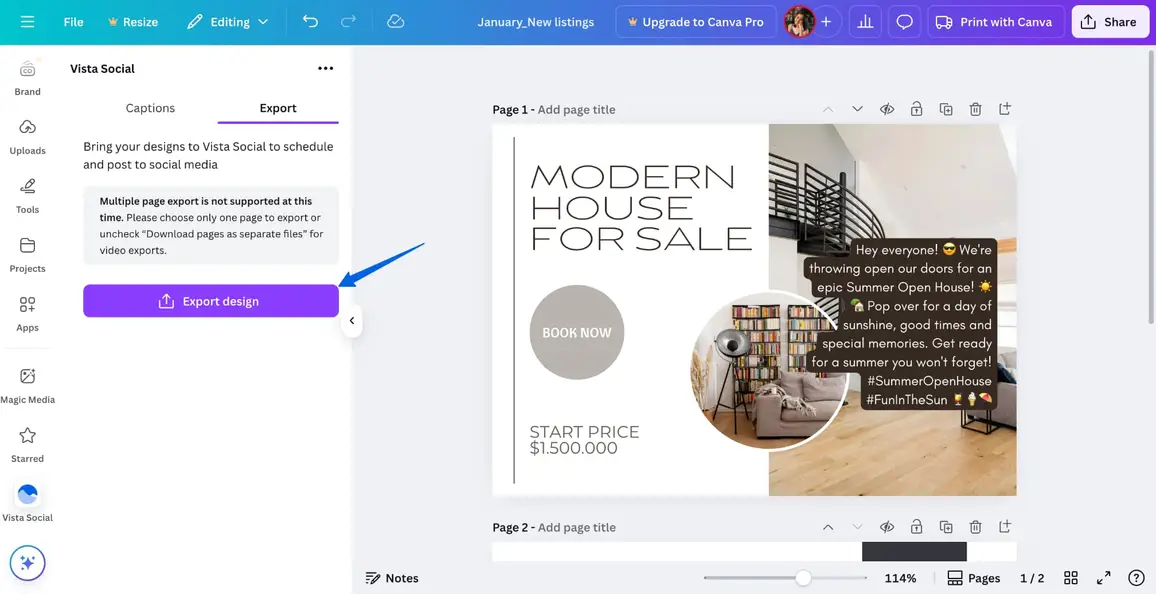
This setup keeps your creative flow uninterrupted because your visuals live alongside your captions and schedules. You make changes faster while reducing tool switching, which helps batching sessions move with far less friction.
Schedule your content
This is the stage where all your batching work locks into place. Your drafts move into a clear schedule, which replaces daily posting pressure with visibility and control. You’re no longer guessing what goes out next because the plan is already in motion.
Once everything sits on a calendar, the process shifts. You can see how content spreads across the week while formats rotate naturally. Timing issues surface early, balance becomes easier to manage, and adjustments feel calm instead of rushed.
This is the moment where a calendar view tells the full story.
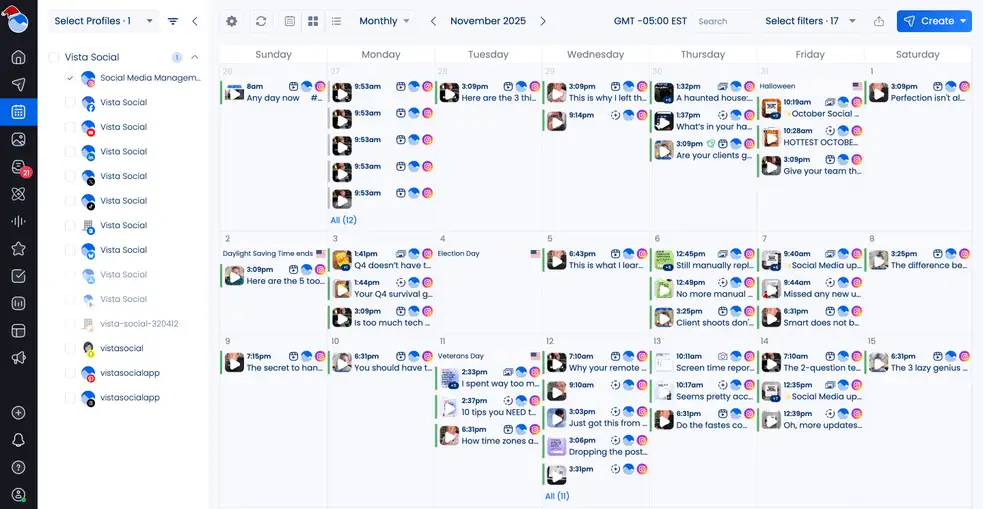
Inside Vista Social, scheduling stays flexible rather than fixed. You can add posts in batches, then adjust timing visually without breaking your flow. Managing multiple brands stays centralized, so you don’t have to jump between tools.
With content scheduled ahead, your queue stays full and your focus stays clear. You stop thinking about what to post next because the system already carries the plan forward.
Incorporate content batching into your planning process
Once batching becomes part of your routine, your approach to social media starts to shift. You move with more intention and stop creating under constant pressure. That change alone raises the quality of what you put out because your work comes from preparation rather than urgency.
If you want a publishing companion that fits naturally into this workflow, social media publishing with Vista Social brings everything together in one place. Your ideas and schedules stay connected, so batching flows straight into execution. This makes it easier to plan and scale your content without adding complexity.
Content batching FAQs
What is an example of batching?
A simple example: instead of creating one Instagram post per day, you sit down and create all 15 posts for the month in a single session. You write all captions, choose visuals, and schedule them at once.
How can you batch content in Canva?
Create a series of templates (for carousels, quotes, educational posts, etc.). Then duplicate and customize them in batches. If you’re using Vista Social, you can access Canva directly inside the platform to streamline the workflow.
How do you batch-create content for Instagram?
Start by defining your pillars, saving ideas, collecting visuals, then writing captions in focused groups. From there, use Vista Social’s visual planner, bulk scheduling tools, plus optimal posting times to map everything out for the month.

Try Vista Social for free
A social media management platform that actually helps you grow with easy-to-use content planning, scheduling, engagement and analytics tools.
Get Started NowAbout the Author

Content Writer
Jimmy Rodela is a social media and content marketing consultant with over 9 years of experience, with work appearing on sites such as Business.com, Yahoo, SEMRush, and SearchEnginePeople. He specializes in social media, content marketing, SaaS, small business strategy, marketing automation, and content development.
Loading related tools...




Tools
PublishingAnalyticsEngagementIntegrations
FacebookInstagramLinkedInRedditSnapchatThreadsTikTokX (Twitter)YouTubeBlueskyVista Page (link-in-bio)All IntegrationsCopyright © 2026 Vista Social LLC. All Rights Reserved.