

Published on July 3, 2026
9 min to read
Stock Photos Aren’t ‘Professional.’ They’re Invisible

Summarize with AI

Table of contents
Summarize with AI

ChatGPT

Claude

Perplexity
Share

Vista Social

X (Twitter)


It’s late afternoon and a post is due, so you open the stock library and type “team collaboration.” Up comes the same lineup you’ve scrolled a hundred times. Four coworkers laughing at a laptop that clearly has nothing on the screen.
You pick the one that feels the least fake, drop it into the graphic, and schedule it. It looks clean, and that’s sort of the problem, isn’t it? “Clean” is exactly what the reader’s thumb flies past.
You didn’t pick a bad image, but it was a forgettable one, and on a busy feed those are the same thing. In Salesforce’s 2026 State of Marketing report, 84% of marketers admitted their campaigns still feel generic, and a stock photo three rivals already run is a big part of why.
So this is about stock photo alternatives that don’t just look presentable but get seen. This fix is neither slow nor expensive and the answer is simpler than you think.
The short version:
- Stock photos read as generic: The same library everyone pulls from makes your client look like every other brand in the feed, and sameness is what gets scrolled past.
- “Professional” and “invisible” aren’t opposites: A polished stock image can be technically great and still do nothing because it doesn’t belong to this post or this brand.
- On-brief generation is the real alternative: An image built for one specific post, in the brand’s look, does the job stock only pretended to do.
- It’s no longer slow or costly: Generating an on-brief image now takes seconds inside your scheduler, so solo freelancers and enterprise teams alike get custom visuals without a designer in the loop.
Table of contents
Why ‘professional’ stock photos get skipped
Somewhere along the way, “professional” got confused with “safe.” A clean stock photo of a smiling team feels like the responsible choice. The one no client or boss will complain about, but “safe” and “invisible” sit right next to each other.
Your reader has seen that exact handshake, that exact laptop-and-coffee desk, that exact rooftop skyline a thousand times, so their eye has learned to slide right over it. There’s actually a name for that reflex.
“Banner blindness” is the habit of tuning out anything that looks like generic filler, without consciously deciding to, and social feeds trigger it hard. A stock image that screams “stock image” gets filed under noise before the caption gets a chance.
This isn’t only a small-brand problem, either. Enterprise teams pull from the same libraries as everyone else, so a Fortune 500 and a two-person agency can run the same photo in the same week.
Salesforce’s number lines up with the feeling. When 78% of marketers say they need more personalized content than they can produce, that gap tends to show up first in the visuals, the fastest corner to cut when a post is due.
If your feed is starting to blur into everyone else’s, that’s the signal to stop reaching for the library. See what an on-brief image looks like in Vista Social and put it side by side with your last stock pick.
Why safe visuals are the risky choice
The instinct to play it safe makes sense. You’re protecting the client’s image, and a polished stock photo won’t embarrass anyone. But on social, blending in is the actual risk, because attention is the whole game and the safe image loses it.
Devin Reed, who has built content strategies for some of the sharpest brands in B2B, puts it plainly:
“My goal is to earn attention and convert it into action. That requires breaking patterns—aka ‘the norm.’”
Devin Reed, Behind one of my most rebellious blog posts
Breaking the pattern is exactly what a stock photo can’t do, by design. It was built to sell to as many buyers as possible. Being broadly acceptable is its whole job, the opposite of being a pattern-breaker.
Teams get stuck here because polish gets treated as the goal when the goal is really recognition. Our piece on why polished might be hurting your brand helps when a client keeps pushing you toward the glossiest option in the folder.
A purpose-built image beat the stock photo
Researchers at the Technical University of Munich ran a live ad campaign that pitted an AI image built for the ad against a professionally crafted stock photo, same placement, same audience, running side by side.
The generated image won by a wide margin. It earned a 50 percent higher click-through rate than the stock photo, 0.80 percent against 0.53 percent, across more than 173,000 impressions. And it cost four cents to make. The stock photo cost nine dollars. That’s 225 generated images for the price of one stock shot.
The takeaway for your feed is the whole argument in one line. The stock photo didn’t lose because it was low-quality. It lost because it was generic. An image made for the exact placement stopped more thumbs than the polished library option that could have run anywhere. That’s the gap between ‘professional’ and ‘seen.’
So what are the real stock photo alternatives?
If stock is the easy default, the useful question is what you reach for instead. There are three honest options, ranked by how much lift they give per unit of effort.
1. On-brief generated images
This is the one that changed the math over the last year. Instead of searching a library and settling, you describe the image you need for this exact post and generate it, tuned to the brand’s colors, mood, and subject. It’s custom without the custom timeline or the custom invoice.
2. Real photography
Still the gold standard when the subject is real: your client’s actual product, their team, their space, their event. Nothing beats a true photo of a real thing.
3. Free stock images used sparingly
Unsplash and Pexels are fine for a texture, a background, or a slot where the image isn’t the point. The moment the image has to carry the post, free stock has the same sameness problem as paid, because everyone else pulls from those libraries too.
Here’s how the three stack up when you’re deciding under a deadline:
| Option | How distinct | Speed | Cost | Best for |
|---|---|---|---|---|
| Generated on-brief image | High, built for this post | Seconds | Built into your tool | Most feed posts, when the visual has to earn attention |
| Real photography | Highest, a true real thing | Slow, needs a shoot | Higher, shoot or license | Products, people, spaces, launches worth the effort |
| Free stock (Unsplash/Pexels) | Low, shared by everyone | Fast | Free | Backgrounds and filler, never the hero image |
The fastest of those to test today is on-brief generation, since it lives right where you already schedule. Generate your next post image inside Vista Social and compare it to what the stock image library gives you.
What ‘on-brief’ means and how to avoid the AI look
“Generate an image” makes some people picture the six-fingered, over-saturated mess that gave AI art its bad name, so let’s be precise about what on-brief means.
An on-brief visual is an image made to fit one specific post and one specific brand, matched to its palette, tone, and subject, rather than a generic picture grabbed to fill the slot. What separates slop from on-brief is the brief itself. A lazy prompt gives you the AI look, while a specific one gives you something that fits.

A vague prompt like “a cup of coffee at a cafe” gets you the generic AI café coffee shot everybody’s seen before. A brief prompt that’s more specific, like “Overhead shot of a flat white in a textured ceramic cup on a weathered matte-black wooden table. Realistic micro-foam bubbles, subtle latte art, sharp focus. Dramatic morning sunlight from the left, a muted color palette, and clean negative space at the top for text overlays,” gets you something that looks much better suited for the post.

You’re still the one with taste. The tool generates; you judge whether it’s on brand and regenerate the misses. This is why a skilled SMM gets far better output than someone shipping the first try.
Ali Abdaal, who has built an audience of millions, points at why the polished-perfect look isn’t even the target anymore:
“Right now, we’re in an era where less good production value is actually fine because it feels authentic — we have a crisis of authenticity.”
Ali Abdaal, Ali Abdaal on YouTube
The bar isn’t for the image to be flawless but rather for it to be real and specific. A briefed image clears far more easily than a stock photo pretending to be candid. Being honest about the limits, though: AI image generation is still weak at exact in-image text, precise brand logos, and the faces of specific real people.
If you want the full walkthrough of generating and refining an image, our explainer on AI image and video generation in Vista Social shows the step-by-step.
Once you’ve seen a briefed image next to a stock one, the difference is hard to unsee. Try an on-brief prompt for free in Vista Social and let the output make the argument.
What it costs to stop buying stock
The old objection to custom visuals was money and time, and both were legitimate. A designer costs a day rate, a shoot costs a booking, and a stock subscription is a recurring fee for the same library everyone else buys.
Generation resets that. In Vista Social, AI image generation is built into the plans, so you’re making on-brief visuals inside the same tool you already schedule in, with no separate design subscription on top. For a freelancer, that’s one fewer bill. For a brand or agency, it’s custom visuals across the whole calendar, and not just for those important posts you could afford to commission.
This isn’t a fringe experiment, either: Adobe’s 2025 Creators Survey found 52% of creators already use generative AI to make new assets like images and video.
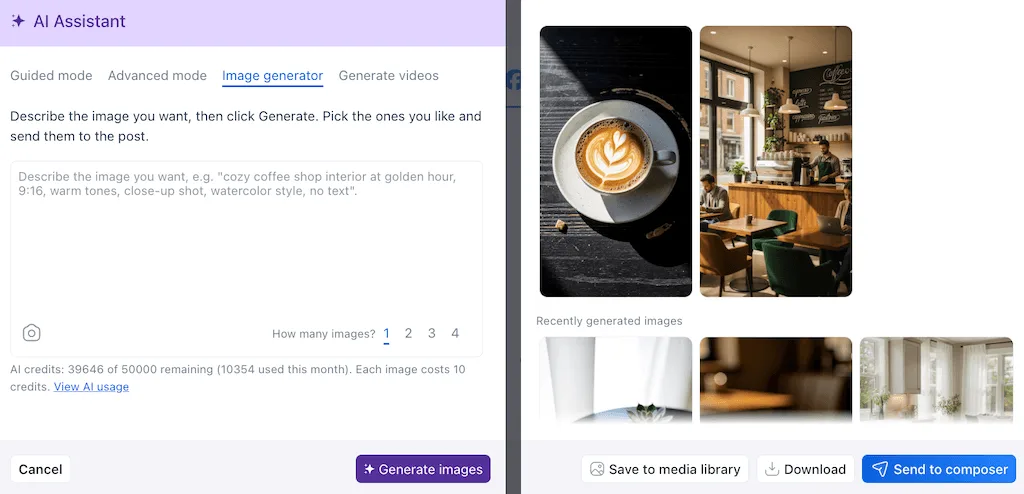
Because it lives in the composer, the image goes straight onto the post you’re building. You refine it in plain language, so “change the background to a plain studio wall” is a sentence and not a Photoshop session.
When you should still use a real photo
Generation isn’t the answer to everything. There are posts where a real photograph wins every time, so reach for one when the subject is genuinely real:
- The client’s actual product: People can tell a real product shot from a generated one, and for anything they’ll buy, authenticity matters more than polish.
- Real people on the team: Founders, staff, and customers should be photographed, not generated, both for trust and because inventing faces of a team crosses a line.
- Events and locations: A real venue, a real crowd, and a real space carry proof a generated stand-in can’t.
- Anything with exact logos or on-image text: Generation still fumbles precise brand marks and typography, so use a design tool there. Creative AI agents inside those tools can now handle layout, text placement, and brand-kit consistency for you.
Mari Smith, one of the most recognized voices in social media, draws the line cleanly:
“AI can replicate what is generic. It cannot replace what is authentic.”
Mari Smith, Why AI Is a Catalyst for a New Kind of Human
Use real photography for what’s genuinely yours and worth proving, and use on-brief generation to replace the generic stock filler that was never adding anything anyway.
The next time a post is due
So picture that late-afternoon deadline again. Instead of settling for the laughing-at-a-blank-laptop photo, you type what the post needs and get an image built for it in about the same thirty seconds the stock search would have taken.
It fits the brand and it doesn’t belong to three competitors. The best stock photo alternatives didn’t just become cheaper or faster. They slow the scroll when the feed is speeding it up, which is the whole point of putting an image on a post.
Stock photos made you look like everyone else, and that’s exactly what people skip. Make your next post image on-brief with Vista Social, no credit card required, and see the difference before you schedule it.
Frequently asked questions
Are stock photos bad for social media?
They’re not bad so much as invisible. A stock photo can be perfectly polished and still get scrolled past because your audience has seen the same library images across dozens of other brands and their eyes tune them out. Stock is fine for a background or a filler slot. When the image is meant to carry the post, a shared library photo works against you.
What are the best stock photo alternatives for social media?
The strongest stock photo alternatives are on-brief generated images, real photography, and free stock used sparingly. On-brief generation is the fastest to reach for day-to-day since you describe the exact image the post needs and get a custom visual in seconds. Real photography still wins for actual products, people, and places. Free stock from Unsplash or Pexels is fine for backgrounds you don’t want to be the focus.
Do AI-generated images perform better than stock photos?
A well-briefed, generated image tends to outperform generic stock because it’s distinct and built for that specific post. Distinct content is what stops the scroll. The key word is briefed: a lazy prompt gives you the generic AI look, while a specific one tuned to the brand gives you something that fits.
Is it cheaper to generate images than to buy stock?
Usually, yes, especially at volume. A stock subscription is a recurring fee for a library everyone else also pays for. Generating images inside a tool like Vista Social is built into the plans you already use to schedule.
Will AI images make my client’s brand look cheap?
Only if the images are lazy. The cheap look comes from generic prompts and shipping the first result without an editorial eye, not from generation itself. Brief the image to the brand’s palette and subject. Judge the output, and regenerate the misses, and the result looks intentional and on-brand.
Should I ever still hire a photographer?
Yes, for the things that are genuinely real and worth proving. The client’s actual product, their real team and customers, their events, and their spaces. A real photo of a real thing carries a trust a generated stand-in can’t. Use on-brief generation to replace the generic stock filler, and put your photography budget where authenticity moves the needle.

Try Vista Social for free
A social media management platform that actually helps you grow with easy-to-use content planning, scheduling, engagement and analytics tools.
Get Started NowAbout the Author

Content Writer
Orion loves to write content that refuses to be boring. As part of Vista Social, he helps brands, creators, and agencies stop doom scrolling and start winning with social media. When he's not in front of a keyboard, he's watching films in IMAX with his wife, dissecting football tactics (the European kind), and getting lost in a good book.
Loading related tools...

The most complete social media management platform for teams who demand more.






Tools
PublishingAnalyticsEngagementIntegrations
FacebookInstagramLinkedInRedditSnapchatThreadsTikTokX (Twitter)YouTubeMCPVista Page (link-in-bio)All IntegrationsCopyright © 2026 Vista Social LLC. All Rights Reserved.