

Published on March 17, 2026
14 min to read
How to Create a Social Media Customer Service Strategy

Summarize with AI

Table of contents
Summarize with AI

ChatGPT

Claude

Perplexity
Share

Vista Social

X (Twitter)


Most brands are well-versed in providing customer service on their website or over the phone. But providing customer service over social media is still a challenge some teams are struggling to overcome.
Do you need a separate social media customer service team? How can you follow privacy and security guidelines? How do you find and handle all customer questions and concerns, especially as your business grows?
You probably already know some of the ground rules. For example, everyone knows they should respond quickly. But most teams still don’t. And everyone knows unanswered complaints look bad. But plenty of brands still ignore them.
This guide is here to help brands master social media customer service, with the specific systems, real-world examples, and practical decisions that separate brands people love from brands people complain about publicly.
Let’s get started.
Table of contents
Why is social media customer service so important?
Your brand must have a strategy in place for handling customer service issues across your social media platforms. It’s simply not an option at this point. Let’s talk about why.
The cost of not responding is high
Your customers notice if their questions, complaints, or concerns go unanswered on social media—and in many cases, so do their followers.
Take this tweet for example. A professional tennis player tagged airline United about his lost bags. Thankfully, the airline noticed and was able to help him get his luggage (and his rackets) back in time for his match.
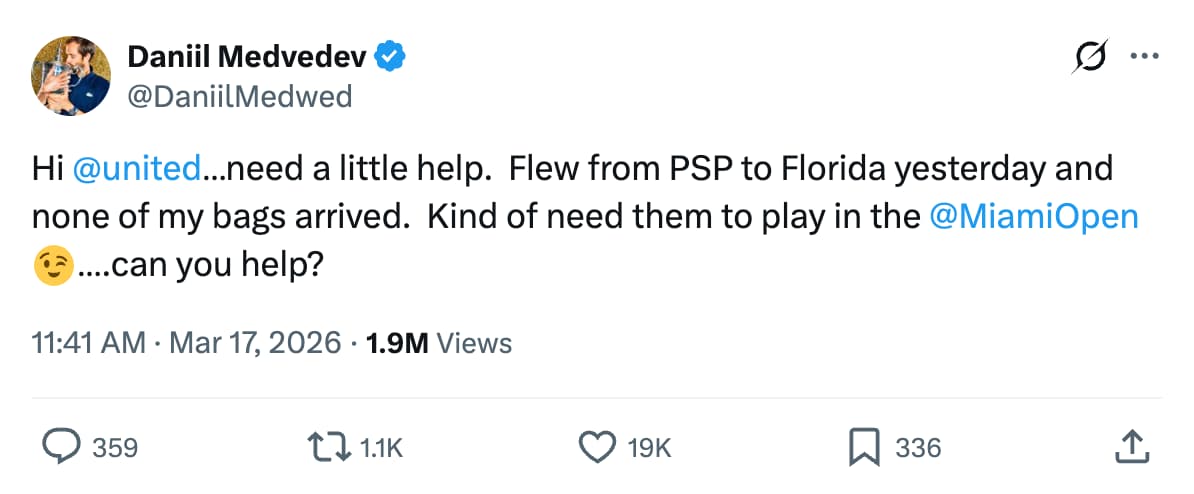
But can you imagine the backlash if United had simply ignored this? Being available to help your customers on social media is essential.
One bad experience costs more than most brands realize
According to Salesforce’s 2024 State of the AI Connected Customer report, poor customer service is the second most common reason consumers stop buying from a brand. Separately, PwC research found that 32% of consumers will stop buying from a brand they previously loved after just one bad experience.
Social is now a customer service search engine
Before a customer reaches out, they often check to see how you’ve handled other people’s problems. Your comment section, your public replies, and your review responses. These are all part of how new customers evaluate you before they ever click “buy.” How you treat dissatisfied customers publicly is part of your acquisition strategy whether you think of it that way or not.
Response quality directly affects brand trust
Customers don’t just want fast responses, they want accurate ones. Salesforce’s research found that personalized customer service has become one of the top expectations consumers place on brands in social channels. A canned reply doesn’t just fail to help, it signals to the customer that they don’t matter enough to get a real one.
How to create a social media customer service strategy
Now let’s start building out your own social media customer service plan. You may already have some of these in place, so just follow along with the steps that matter most for your business.
Step 1: Audit your current social media presence
Before you build anything new, get honest about what’s actually happening. Pull the last 30 to 60 days of comments, DMs, reviews, and mentions across every active platform.
You’re trying to answer a handful of questions:
- Which platforms are generating the most customer service traffic?
- What are the five to ten questions that come up most often?
- What’s your current average first response time?
- How many messages went unanswered, and for how long?
- What’s the general sentiment: mostly questions, mostly complaints, or mostly praise?
This audit almost always reveals two things.
First, the platforms where customer service activity is heavier than expected. Second, a cluster of recurring questions that could be handled systematically instead of manually every single time.
Both findings should directly shape your next steps.
Step 2: Choose the right platforms for support
You don’t need a dedicated support presence everywhere, but you need to be fully responsive on every platform you’re actively posting on.
If you’re posting on TikTok, people are already DMing you and commenting on your videos looking for help. Telling someone to email you in a TikTok comment is the fastest way to make them feel dismissed.
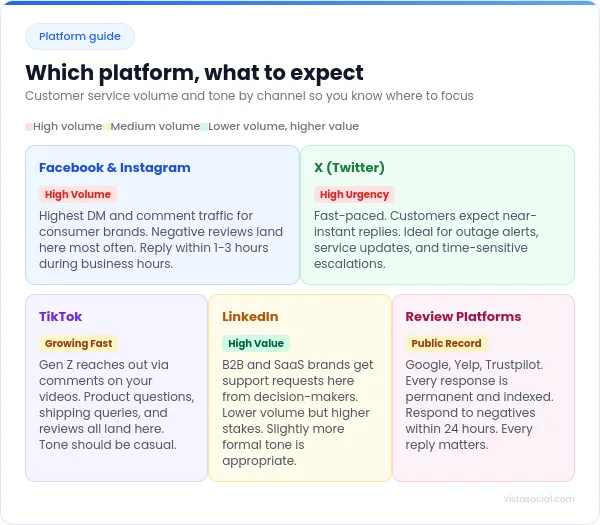
As a general guide:
- Facebook and Instagram generate the highest volume of customer service traffic for most consumer brands. Facebook is also where a significant portion of negative reviews land publicly.
- X/Twitter still functions as a fast-response channel for tech products, telecom, and services where outages or errors need quick acknowledgment.
- TikTok is growing fast as a service channel, particularly for younger audiences who comment directly on videos with product questions.
- LinkedIn matters for B2B brands and SaaS companies, where support inquiries tend to come from higher-value accounts.
Some high-volume brands run a dedicated support handle, separate from the main account.
Nike’s @NikeService, Amazon’s @AmazonHelp, and Spotify’s @SpotifyCares are all well-known examples of this approach done at scale.
Step 3: Set your social media support team
Vague accountability is where social customer service breaks down. When “the team” is responsible, no one feels personally responsible, and that’s why you need clear ownership.
Define the following:
- Who monitors each platform, and during what hours?
- Who handles routine questions vs. who escalates?
- Who has authority to offer refunds, exceptions, or workarounds?
- What does escalation look like: who gets notified, through what channel, and within how long?
- Who covers weekends and after-hours?
Vista Social’s social inbox supports task assignment directly from conversations, so when a message lands, you can assign it to the right person, add internal context, and track that it gets resolved.
Step 4: Develop your social media customer service policy
A policy doesn’t have to be long. It needs to be specific enough that any team member can use it to make a decision without asking a manager.
Cover the following:
- Expected response times by channel and message type (DM vs. comment vs. review)
- Tone guidelines, specifically what “on-brand” sounds like in a complaint response
- What team members can resolve independently vs. what needs approval
- When to move a conversation to a private channel
- How to handle hostile, abusive, or repetitive customers
- Topics that need legal or PR review before response
Write it in plain language. If someone new joined your team tomorrow and read this policy, they should be able to handle 80% of what comes in without asking anyone for help.
Step 5: Find the right social media tool
Trying to manage social customer service natively across five or six platforms is a recipe for disaster. You need a single place where all your inquiries live.
Vista Social’s unified inbox pulls messages, comments, mentions, and reviews from every connected platform into one dashboard. Facebook, Instagram, TikTok, LinkedIn, X, Threads, YouTube, Google, Yelp, and more, all in one view, with the ability to respond, assign, label, leave internal team notes, and mark conversations as resolved without leaving the platform.
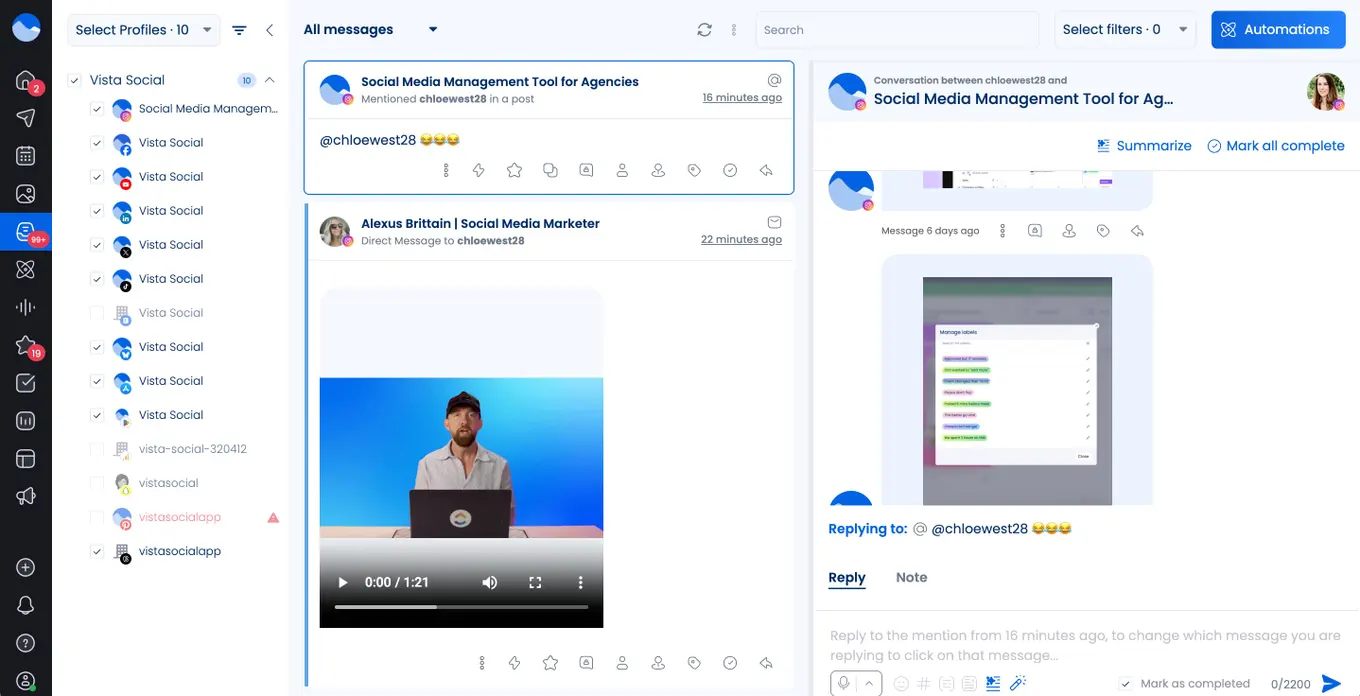
For teams handling repetitive workflows, inbox macros let you execute multi-step actions with a single click: apply a label, assign to a team member, send a saved reply, and mark as resolved all at once.
For larger volumes, inbox automations let you build rules that trigger when specific conditions are met, so common questions get handled instantly and high-priority conversations get flagged before anyone has to manually sort through everything.
Step 6: Implement your strategy and measure results
Once your strategy is in place, measure what’s actually changing. The four metrics worth tracking closely:
- Average response time: The gap between when a message arrives and when you first reply
- Action rate: The percentage of incoming messages that actually get a reply
- Sentiment trends: Whether the overall tone of incoming messages is improving over time
Vista Social’s inbox performance and sentiment reports give you this data by platform and time period.
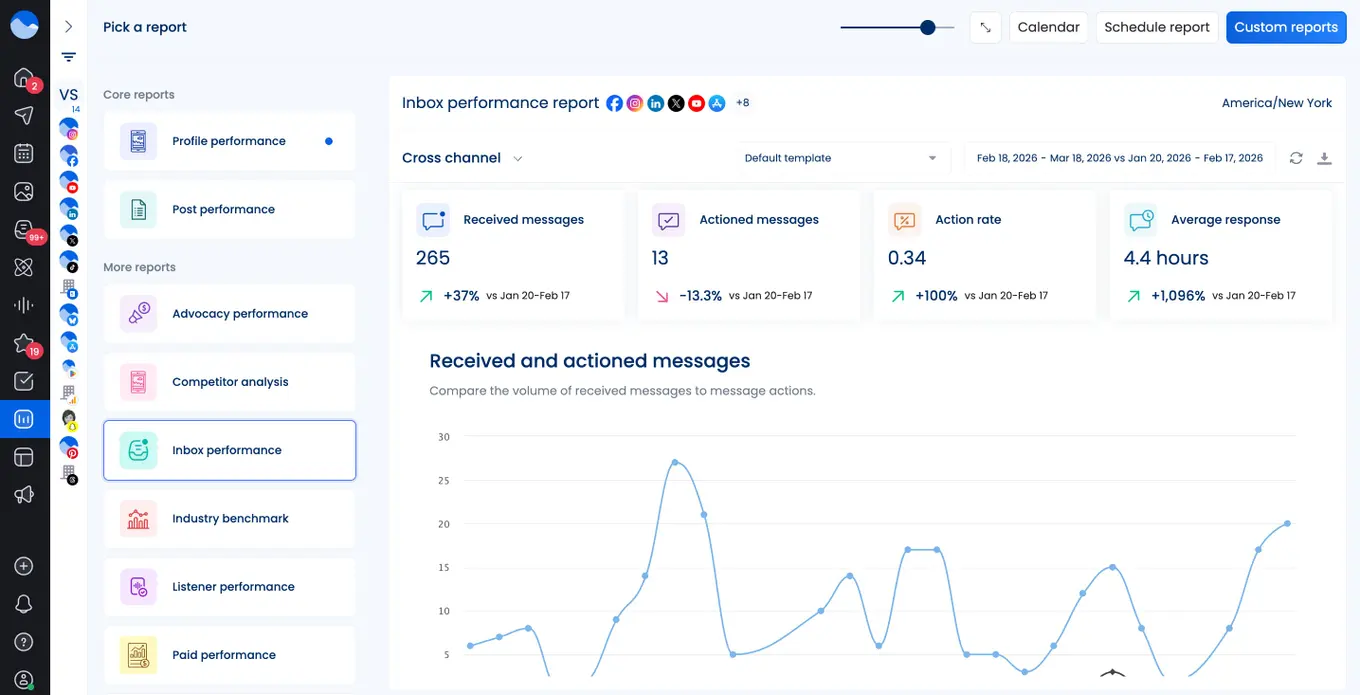
If your response time on Instagram is creeping up, you’ll see it early enough to act rather than finding out after a string of frustrated public comments.
How to provide great customer service on social media
The tips below are built from what’s missing in most guides on this topic: the specific, actionable things that actually change how your team operates. Each one is practical enough to implement this week.
1. Map your response to the urgency of the message, not just the order it arrived
Most teams reply chronologically, meaning first in, first out. The problem is that a billing complaint sitting in the queue for three hours while your team works through a collection of compliments is a gap the chronological approach can’t solve on its own.
Urgency-based triage means your team knows which message types get handled first, regardless of arrival time. A complaint about a charge, a product that arrived broken, or a reported safety issue goes to the top of the queue. General questions, praise, and low-stakes clarifications can wait their turn.
Vista Social applies sentiment analysis to every conversation automatically, positive, negative, mixed, or neutral, so your team can filter by negative sentiment and see what needs attention first without reading through everything manually.
When a fan posted on X in December 2024, “day 1 of requesting shirley temple flavor @drinkolipop,” OLIPOP didn’t treat it as a low-priority fan comment. They quote-tweeted it immediately, asking their entire community to reply if they wanted the same flavor.
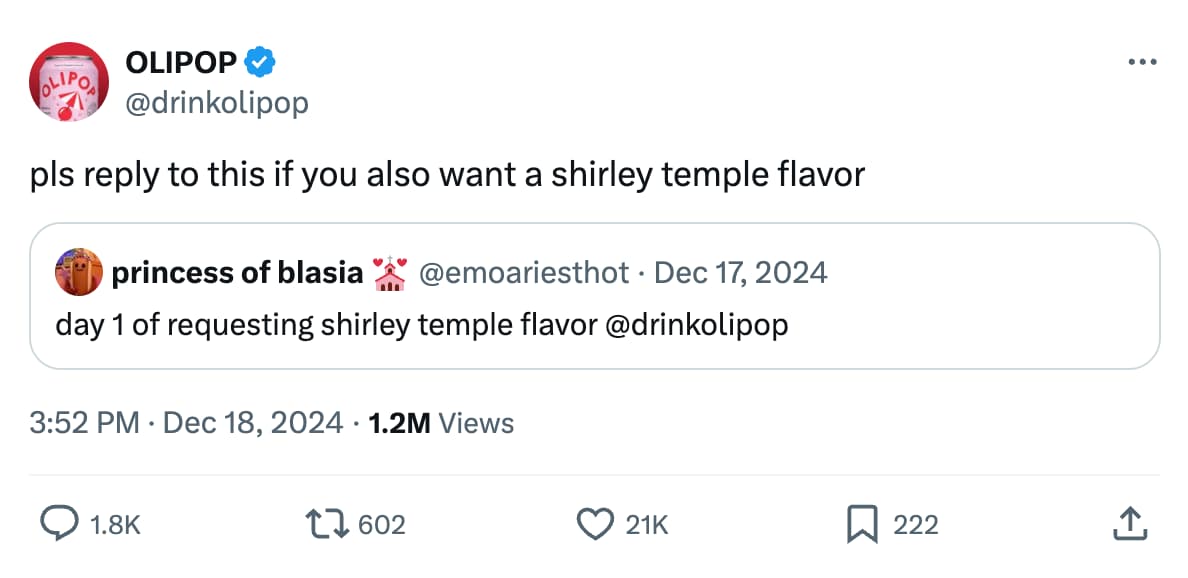
The thread reached 1.2 million impressions. OLIPOP turned a single comment into a product validation moment by treating it with urgency instead of filtering it into a “nice to have” pile. This resulted in them making it an actual fan favorite flavor, consistently selling out!
2. Set up acknowledgment automations for after-hours gaps
The biggest source of frustration in social customer service isn’t slow resolution. It’s actually silence. Someone messages you at 9pm and then hears nothing until 9am. They don’t know if their message was seen, whether someone is working on it, or whether to even bother waiting.
An automated first-response that confirms receipt, sets expectations, and gives a timeframe changes the entire emotional experience of waiting. “Hey, we got your message, and we’ll be back to you first thing tomorrow morning” lands very differently than nothing.
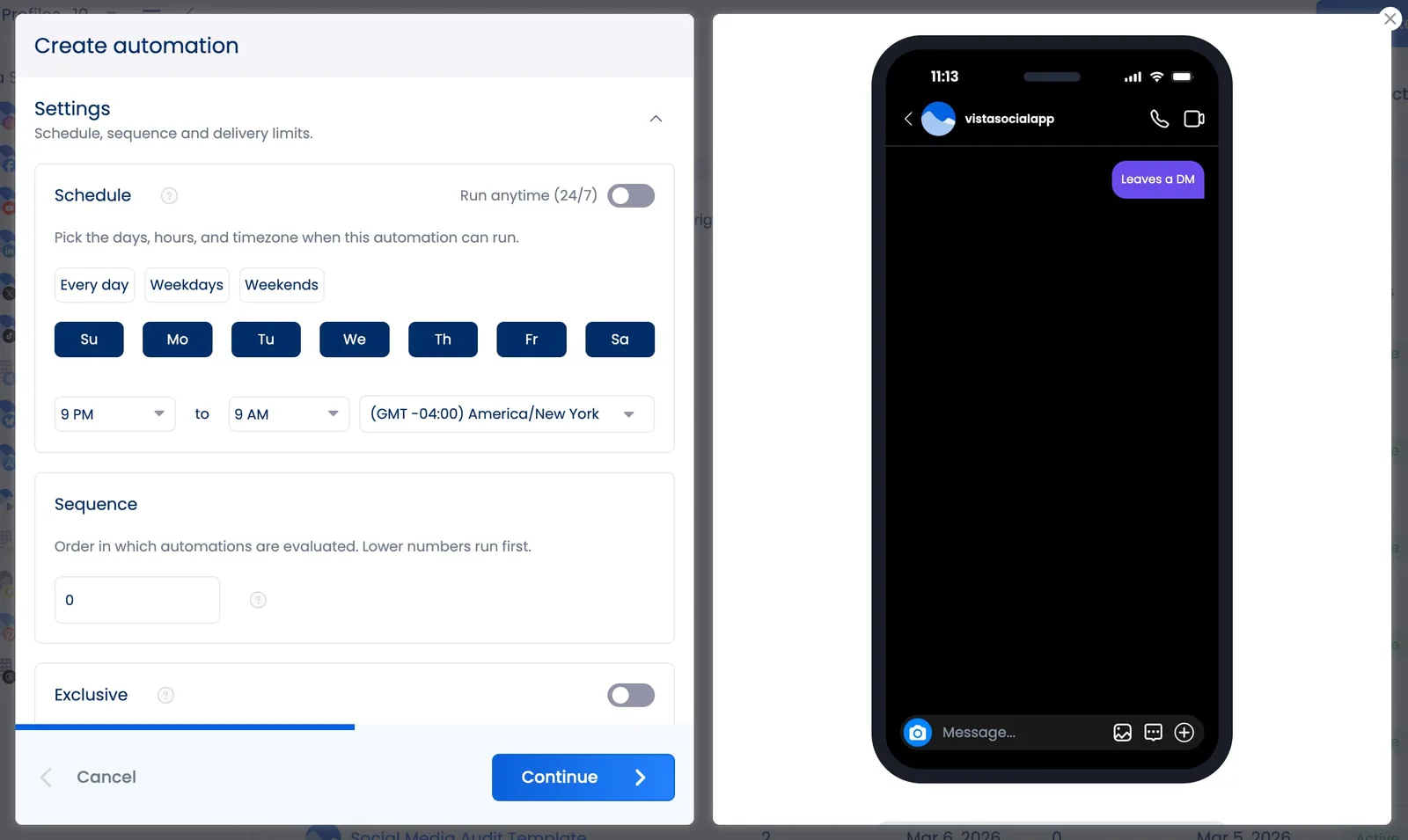
Vista Social’s DM automations let you configure time-based triggers so after-hours automations turn on when your team logs off and turn off when they’re back.
What solid acknowledgment automation looks like:
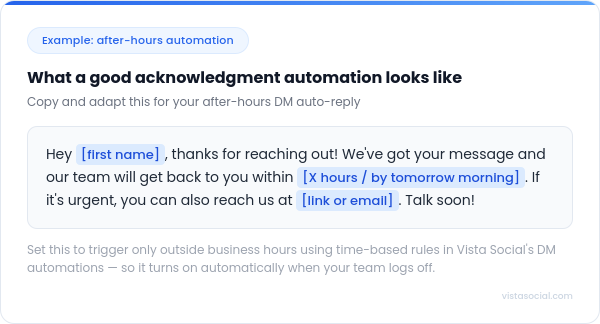
“Hey, thanks for reaching out! We’ve got your message and our team will get back to you by tomorrow morning. If it’s urgent, you can also reach us at [email]. Thank you!”
Set this to trigger only outside business hours using time-based rules in Vista Social’s DM automations, so it activates automatically when your team logs off.
3. Build your support AI on your actual brand knowledge
When automation responds to a customer question with incorrect information, wrong pricing, an outdated policy, or a feature that doesn’t exist, it doesn’t just fail to help. It actively damages trust. Generic AI replies are easy to spot, and they make the brand look like it doesn’t know its own product.
Vista Social’s AI Training and Knowledge feature lets you upload your brand’s actual information, like product details, pricing, FAQs, return policies, shipping timelines, and whatever customers ask about most, directly into the platform’s AI settings.
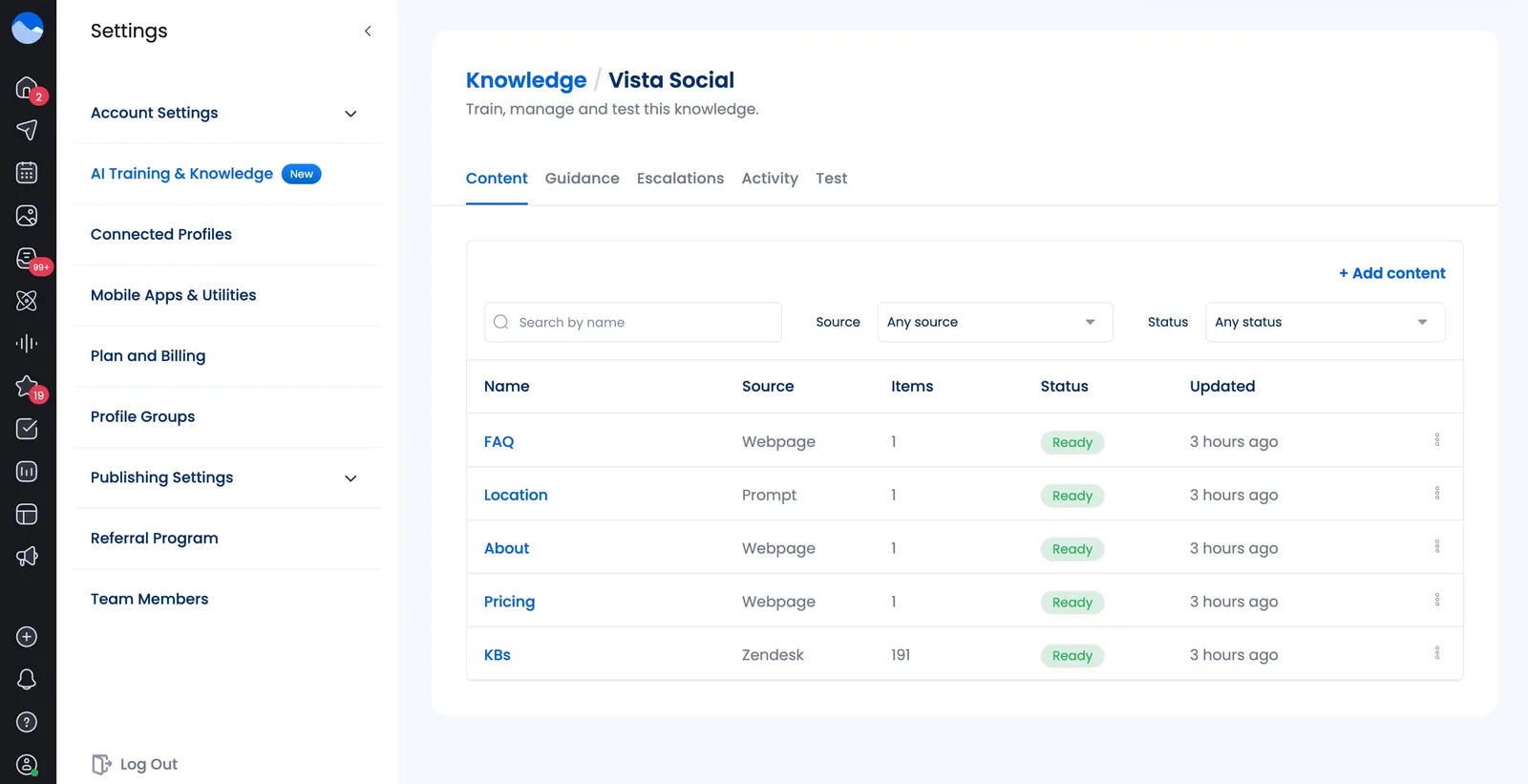
Automations then draw from that knowledge base instead of generating generic responses.
4. Use public replies to create social proof, not just to resolve issues
Every public response you write is visible to everyone who reads that thread, including people who were never part of the conversation. A well-handled complaint, answered with empathy and speed in public, is more convincing than any testimonial you could write yourself.
Stanley understood this perfectly. In November 2023, TikToker @danimarielettering posted a video of her car after a fire, showing her Stanley Quencher sitting intact in the cupholder, with ice still inside.
@stanley1913 #stitch with @Danielle ♬ original sound – Stanley 1913
She wasn’t tagging Stanley for help, but the video went viral on its own. Two days later, Stanley president Terence Reilly stitched the original video and offered to send her new Stanleys and replace her car entirely.
That response earned over 32 million views. The comments were flooded with people saying they were buying a Stanley right then. No ad campaign could replicate what a well-timed, human response created.
How you respond publicly matters to an audience far larger than the person you’re talking to.
5. Match your tone to the platform, not just your brand guide
Your brand has a voice. That voice should adapt to where it’s speaking. A response on LinkedIn can afford to be slightly more formal, while a reply on Instagram should feel casual and warm. On TikTok, a little humor and personality are expected, as opposed to X/Twitter, where brevity matters more than anywhere else.
Most brands write the same response regardless of where it lives. Learning what “on-brand” sounds like on each specific platform gives your team a real edge over the competition.
6. Know exactly when to move a conversation private, and say so out loud
Moving a conversation to DM is often the right call. But the way you do it matters enormously. If you respond to a public complaint with only “please DM us,” it looks evasive to everyone watching, as if you’re trying to make the problem disappear from view.
The right sequence is to respond publicly first, acknowledge the issue directly, then explain why you’re moving it to a private channel. That public acknowledgment shows the audience you’re taking it seriously.
When to take it private:
- Any issue that requires personal account info (order number, email, payment details)
- Complaints that are getting emotional and need real back-and-forth
- Anything with legal, safety, or privacy implications
- When someone is visibly upset and a public thread is making things worse
How to do it right:
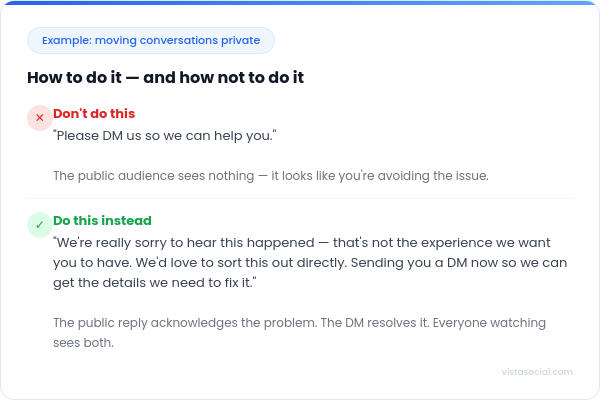
“We’re really sorry to hear this happened. That’s not the experience we want you to have. Sending you a DM now so we can get the details we need to fix it.”
The public reply acknowledges the problem. The DM resolves it. Everyone watching sees both.
7. Turn negative comments into retention moments
The goal when responding to a negative comment isn’t damage control, but recovery. Damage control is about protecting the brand’s image. Recovery is about making the customer feel heard, fixing the problem, and giving them a reason to come back. The recovery goal is almost always achievable, and it produces a far better outcome for everyone watching.
A few things that shift the dynamic in your favor:
- Use their name if you know it. “Hi Maria” immediately makes a response feel personal rather than templated.
- Reference what they said specifically. Restating the problem back to them proves you actually read it.
- Own the failure before offering a solution. “That shouldn’t have happened, and I’m sorry it did” lands better than “we apologize for any inconvenience.”
- Tell them the next step, not just that you’re looking into it. “I’m pulling up your order right now and will get back to you within 20 minutes” is more reassuring than “we’ll be in touch.”
Our guide on handling negative comments goes deeper on this if you need a framework for your team.
8. Respond to praise with the same intention you bring to complaints
Most brands treat positive comments as a checkbox, a quick like or a “thanks!” and move on. When someone takes the time to share genuine enthusiasm about your brand, a specific and personalized response shows them you were actually paying attention, and that’s the kind of moment that builds long-term loyalty.
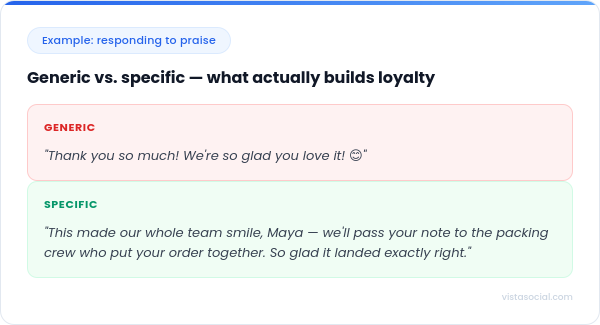
Generic: “Thank you so much! We’re so glad you love it!”
Specific: “This made our whole team smile, Maya. We’ll pass your note along to the packing crew who put your order together. So glad it landed exactly right.”
The second response takes 20 extra seconds to write and creates a completely different impression. Organic brand advocates are built through these small moments.
9. Monitor beyond your own tagged mentions
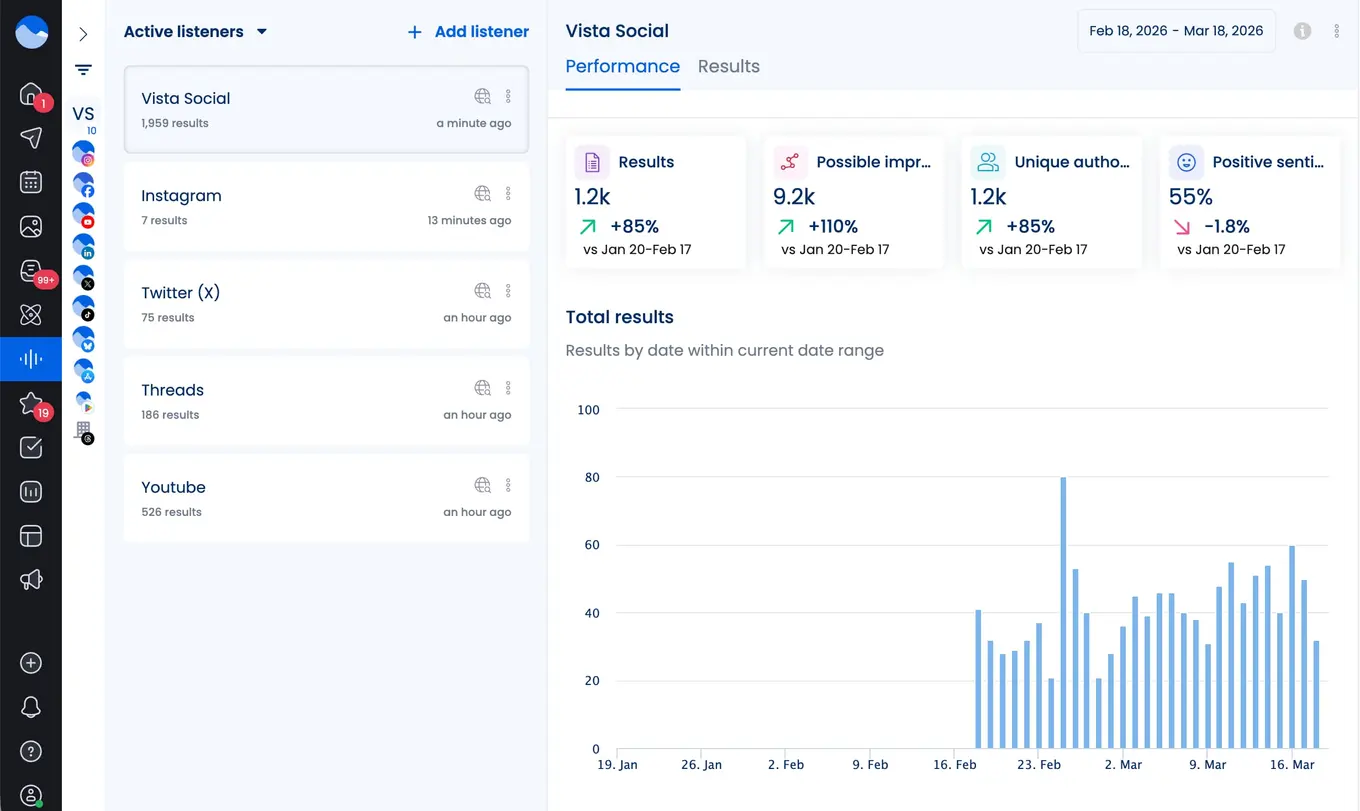
Most customer service activity on social doesn’t use your brand’s official handle. People post about their experience with your brand, name you without tagging you, or mention you in someone else’s comment thread. If you’re only monitoring your tagged notifications, you’re missing a significant slice of what people are actually saying.
Vista Social’s social listening surfaces brand mentions that happen outside your notifications, across platforms and across formats. This matters for two reasons: you catch complaints before they escalate, and you find opportunities to engage proactively with people who didn’t expect a response.
10. Treat every FAQ as important
If your team is manually answering the same shipping question 50 times a week, that’s a content and communication problem, not just a customer service workflow problem. The FAQ exists because something upstream is confusing: the policy page is buried, the checkout flow is unclear, or the product listing is missing information.
The strongest social media customer service teams use their inboxes as a real-time feedback loop. When a question repeats more than three or four times a week, someone should be asking why it exists and how to answer it before people have to ask.
Some of the most effective fixes:
- Add a pinned comment to high-traffic posts that preemptively answers the most common question
- Update product descriptions or FAQ pages based on what your inbox is telling you
- Create a saved FAQ highlight or Story on Instagram that customers can find before DMing
- Set up an inbox automation in Vista Social that handles the question automatically, with an answer trained from your actual knowledge base
This is how you reduce inbound volume over time rather than just getting faster at handling it.

Try Vista Social for free
A social media management platform that actually helps you grow with easy-to-use content planning, scheduling, engagement and analytics tools.
Get Started NowAbout the Author

Content Writer
Orion loves to write content that refuses to be boring. As part of Vista Social, he helps brands, creators, and agencies stop doom scrolling and start winning with social media. When he's not in front of a keyboard, he's watching films in IMAX with his wife, dissecting football tactics (the European kind), and getting lost in a good book.
Loading related tools...




Tools
PublishingAnalyticsEngagementIntegrations
FacebookInstagramLinkedInRedditSnapchatThreadsTikTokX (Twitter)YouTubeBlueskyVista Page (link-in-bio)All IntegrationsCopyright © 2026 Vista Social LLC. All Rights Reserved.
Social media customer service FAQs
How do you provide good customer service on social media?
Start with speed because the closer you are to real-time responses, the better. Then prioritize and focus on accuracy. One wrong answer delivered fast is worse than a correct answer with a slight delay. Build systems that support consistency: saved replies for common questions, clear escalation paths for complex ones, and a team that knows exactly who’s responsible for what.
How do you respond to customers on social media?
Address them by name if you know it. Reference the specific thing they mentioned, not a generic paraphrase, to show you actually read it. Keep public replies brief and focused; the goal is to acknowledge, inform, and move to the right next step. Avoid defensive language, corporate hedging, and copy-pasted scripts.
Which social media platforms should you use for customer service?
Be fully responsive on every platform where you’re posting content. If you have an active presence somewhere, customers will use it for support whether you planned for that or not. Facebook and Instagram generate the most customer service traffic for most consumer brands. X is still important for time-sensitive issues. TikTok is growing fast as a service channel, particularly for younger audiences. For B2B brands, LinkedIn is increasingly where support conversations start.
How fast should you respond to customers on social media?
Faster than you think is necessary. Salesforce’s research found that 77% of customers expect to interact with a brand immediately when they reach out, and consumers expect a response within six hours of posting to social channels. Automated first-response messages can bridge the gap when your team is offline, making sure customers feel acknowledged rather than ignored.
When should you take a conversation private?
Move to private any time you need personal information to resolve an issue, when the conversation requires back-and-forth that would clog a public thread, or when the emotional temperature is rising and a public exchange is making things worse. Always acknowledge publicly first before moving. A comment that just says “please DM us” looks like you’re hiding from the problem.