

Published on June 24, 2026
17 min to read
40+ AI Video Prompts for Brands (Copy, Generate, Post)

Summarize with AI

Table of contents
Summarize with AI

ChatGPT

Claude

Perplexity
Share

Vista Social

X (Twitter)


Last updated: June 2026. AI video models change fast, so we date this resource and refresh the prompts as the tools improve.
You type “professional product video,” hit generate, and wait. Back comes your product slowly melting, warping, and sprouting an extra handle over four seconds. You try again and get something equally broken, so you close the tab and decide AI video is a gimmick that isn’t ready yet.
What really happened is simpler than that. You didn’t fail, and the model isn’t broken. You just asked it to make a movie when it’s built to make a moment. Modern AI video is genuinely good at short, motion-driven, b-roll-style clips, which is most of what social feeds run on. So the trick is writing AI video prompts that play to what the model does well instead of fighting what it can’t do.
This guide hands you 40+ copy-paste video prompts sorted by what you post, plus the formula behind them and an honest map of where AI video shines. A single prompt fills one slot in your calendar. The formula lets you write your own whenever you need one. For the still images that pair with these clips, the AI image prompts library covers the same ground for photos.
Table of contents
Why your AI videos look warped (and the fix)
The warping isn’t random. It shows up when you ask the model to juggle too much at once: a long runtime, a full story, spoken dialogue, or text baked into the frame. Stack those demands and the model loses the plot halfway through, which is when faces droop and products grow extra parts.
The sweet spot is the opposite of all that. One clear subject, one simple motion, a defined camera move, and a short runtime you set in the tool. To see why that works, compare a vague ask with a specific one.
❌ “coffee product video”
✅ “A matte black cold-brew bottle sits on a sunlit concrete counter in a minimalist kitchen. Morning light streams in from the side, catching the condensation on the glass and casting warm tones across the surface. Shallow depth of field. The camera slowly pushes in from a medium shot to a tight close-up. Clean modern product aesthetic with a warm palette.”
The second prompt reads like a few plain sentences, gives the model a single job, and describes the camera move from start to finish. That specificity is the whole fix, and it matches what the platforms reward. Short-form video is now the highest-ROI content format, named the top performer by roughly half of marketers in HubSpot’s 2026 survey. The clips that win there are short and motion-led, which is what AI video is best at producing.
It’s also important to note that audiences have gotten sharp at spotting lazy AI, and they’re vocal about it. In Canva’s 2026 report, 70% of people say they can usually spot an AI ad because something about it feels off, and mentions of “AI slop” jumped ninefold. A warped, generic clip reads as slop and gets scrolled past, while a specific, intentional one earns the watch.
The AI video prompt formula
Video prompting builds on image prompting, then adds two levers that photos never needed: motion and camera. Write it as a few plain sentences rather than a string of comma-separated tags, and the model has far less to guess at.
[Subject] + [action or motion] + [camera movement] + [setting] + [lighting] + [style or mood]
Aim for roughly two to four sentences. That’s enough detail for the model to work with, without piling on conflicting instructions. Set the duration and aspect ratio in the tool itself rather than typing them into the prompt, since the model reads those from your settings. When you’re moving fast, these five details matter most.
- One clear subject: Name the exact thing, not a category. “Matte black cold-brew bottle,” not “drink”
- One simple motion: Pick a single action like a slow rotation, a pour, or a drift. Asking for several motions at once is how clips fall apart
- A defined camera move: Describe how the camera behaves and where it ends up, like “slowly pushes in from a medium shot to a close-up” or “holds steady”
- Lighting with direction: Say where the light comes from and how it feels, like “morning light from the side, warm and soft”
- A style reference: Anchor the mood at the end with a phrase like soft indie film aesthetic, clean product look, or candid UGC feel
Text-to-video vs. image-to-video
You have two ways into a clip. Text-to-video starts from a written prompt and lets the model imagine the whole scene. Image-to-video starts from a still you already have, like a product shot, a packshot, or a logo, and adds motion to it.
Reach for image-to-video when you want your real product moving rather than an AI-invented lookalike. The model animates what you give it, so the bottle in the clip is your actual bottle. That keeps the output on-brand and sidesteps the guesswork of describing your product from scratch.
Honest caveats before you generate
A few limits are worth knowing before you generate. Keep clips short, since one motion beats many and length invites drift. Skip dialogue and lip-sync, which models still handle poorly, and skip text baked into the frame because it tends to render as confident gibberish.
Don’t generate an AI video prompt for real or named people or brand logos either, since content-safety filters reject those. Generate a few takes and pick the best one, then add captions and music later in editing rather than in the prompt.
40+ AI video prompts brands can copy
Everything below is copy-paste ready and grouped by what you actually post. Jump to your category, grab a prompt, and swap in your own product or colors. Each one is written as a few plain sentences, the way the model reads best. Every prompt has a note on what it’s best for, plus a suggested aspect ratio and duration to set in the tool. Where a prompt works better as image-to-video, we say so.
Product in motion
These cover the everyday product posts that fill a brand feed. Keep it to a single hero product, one clean motion, and a camera move that shows it off.
“A matte black cold-brew bottle sits on a sunlit concrete counter in a minimalist kitchen. Morning light streams in from the side, catching the condensation on the glass. Shallow depth of field. The camera slowly pushes in from a medium shot to a tight close-up. Clean modern product aesthetic with a warm palette.”
Best for: Hero product reveal
Aspect ratio: 9:16
Duration: 6s
“A pair of white leather sneakers rests on a smooth pastel backdrop in a bright studio. Even, soft lighting wraps the shoes and casts a gentle drop shadow beneath them. The camera slowly circles from one side to the front, keeping the product centered. Crisp, clean e-commerce look with bright tones.”
Best for: Catalog feed post
Aspect ratio: 1:1
Duration: 5s
“A glass jar of honey sits on a wooden board as a wooden dipper lifts and a slow ribbon of honey drizzles down. Warm backlight makes the honey glow amber. The camera holds close and steady on the falling drip. Rich, appetizing style with a golden palette.”
Best for: Story product close-up
Aspect ratio: 9:16
Duration: 5s
“A wireless earbud case floats and slowly rotates above its open box on a dark surface. Crisp rim lighting traces its edges against a deep gradient background. The camera drifts gently upward as the case turns. Premium tech aesthetic in charcoal and electric blue.”
Best for: Tech launch teaser
Aspect ratio: 1:1
Duration: 6s
“A skincare serum bottle stands on a smooth marble surface as a single drop falls beside it and ripples outward. Soft, diffused daylight fills the scene. The camera holds close and steady on the bottle and the ripple. Spa-like minimalist style in sage and cream.”
Best for: Beauty product moment
Aspect ratio: 9:16
Duration: 5s
“A bright running shoe hovers and slowly turns mid-air against a bold, solid-color studio wall. Hard directional light throws a crisp shadow and sharpens the texture. The camera circles slightly as the shoe rotates. Energetic sport aesthetic with high contrast.”
Best for: Athletic brand post
Aspect ratio: 1:1
Duration: 5s
Image-to-video (animate your own asset)
This category keeps your real product on screen instead of an AI lookalike, which makes it the most brand-usable option here. Start from a still you already own, then describe only the motion you want so your product, packshot, or logo comes to life. Upload your image first, then use the prompt to direct the movement.
“Animate this product photo with a slow, subtle turn, as if it’s rotating gently on a turntable. Keep the product sharp and centered while soft studio light shifts across its surface. Hold the framing steady and let the motion stay quiet and premium.”
Best for: Turning a flat product shot into motion
Aspect ratio: 9:16
Duration: 5s
“Animate this packshot with a slow, gentle push-in toward the label. Let a soft bloom of light pass across the packaging as the camera moves closer. Keep the product crisp and the text readable throughout, with a clean premium feel.”
Best for: Packaging hero from a still
Aspect ratio: 1:1
Duration: 5s
“Animate this logo with a soft shimmer of light moving across it and a gentle scale-up from the center. Keep the shapes clean and unchanged on a plain background. Let it read as a calm, polished reveal with a faint glow.”
Best for: Logo sting for an intro or outro
Aspect ratio: 1:1
Duration: 4s
“Animate this lifestyle photo with subtle ambient motion, like faint drifting steam and a barely-there camera drift. Keep the scene calm, natural, and warm. Let the movement feel like a quiet living moment rather than a dramatic shot.”
Best for: Adding life to a static lifestyle shot
Aspect ratio: 4:5
Duration: 5s
“Animate this flat-lay with a slow top-down drift and a gentle shift in the shadows, as if the light is slowly moving. Keep every item in place and in focus. Hold the bright, even lighting and the clean, organized feel.”
Best for: Bringing a flat-lay to life
Aspect ratio: 1:1
Duration: 5s
Lifestyle and ambient b-roll
The candid, shot-on-a-phone feel that reads as real rather than staged. These fill a feed with relatable motion when you can’t run a shoot.
“A young woman in a cozy sweater laughs while holding a reusable coffee cup on a busy city sidewalk. Soft overcast daylight keeps the colors natural and true to life. The handheld camera follows her loosely with a slight, natural sway. Authentic UGC look with a candid feel.”
Best for: Relatable Reel cover
Aspect ratio: 9:16
Duration: 6s
“A pair of hands unboxes a skincare order at a kitchen table, lifting the lid and folding back the tissue. Soft window light falls across the table. The camera holds close in a first-person point of view as the hands move. Casual UGC style with a warm everyday palette.”
Best for: Unboxing content
Aspect ratio: 9:16
Duration: 6s
“A person works on a laptop at a small table by a coffee-shop window, steam rising from a mug beside them. Warm ambient light fills the corner. The camera sits slightly over the shoulder and drifts almost imperceptibly. Relatable everyday style in muted browns and creams.”
Best for: Remote-work lifestyle
Aspect ratio: 4:5
Duration: 6s
“Two hands clink glasses of iced tea over a balcony railing as the sun sets behind them. Golden backlight catches the condensation and throws a soft lens flare. The camera holds steady on the glasses. Warm summer-evening style with an amber palette.”
Best for: Beverage UGC
Aspect ratio: 9:16
Duration: 5s
“A pair of hands wraps a small parcel in kraft paper at a home studio table, smoothing the paper and tying twine. Warm light from a desk lamp pools on the surface. The camera holds close in a maker’s point of view. Cottage-business style in kraft and twine tones.”
Best for: Small-maker behind-the-scenes
Aspect ratio: 4:5
Duration: 6s
Food and beverage
Food in motion is hard to scroll past, which is why this category earns its place. Lean into sizzle, steam, pour, and slow-motion drops, with one clean action per clip.
“Espresso pours in slow motion into a tall glass filled with ice, swirling as it settles. Condensation forms on the outside of the glass against a minimalist marble background. The camera holds close and steady on the pour. Rich, appetizing style with a warm palette.”
Best for: Cafe or drink brand
Aspect ratio: 9:16
Duration: 5s
“A garnish drops in slow motion onto a finished cocktail, sending a gentle ripple across the surface. Moody bar lighting glints off the glass and the deep jewel tones of the drink. The camera holds close and steady on the moment of impact. Cinematic food style.”
Best for: Bar or restaurant Story
Aspect ratio: 9:16
Duration: 4s
“Steam rises slowly off a fresh bowl of ramen on a rustic wooden table. Warm, low light deepens the rich browns of the broth. The camera pushes in slowly from a medium shot toward the bowl as the steam drifts. Cozy, appetizing style.”
Best for: Food feed post
Aspect ratio: 4:5
Duration: 5s
“Honey drizzles in slow motion over a stack of pancakes, pooling and slowly running down the sides. Soft morning light makes the surface glossy and golden. The camera holds close on the drizzle. Indulgent breakfast style with a golden palette.”
Best for: Breakfast or dessert brand
Aspect ratio: 1:1
Duration: 5s
“A skillet of vegetables sizzles over heat, steam rising as the contents shift and settle. Warm kitchen light brings out vivid greens and reds. The camera holds steady and close on the pan. Fresh, appetizing style with a lively feel.”
Best for: Recipe or meal-kit brand
Aspect ratio: 9:16
Duration: 5s
Nature and atmosphere b-roll
Calming loops for wellness, travel, and real-estate establishing shots. One slow motion and a quiet camera do the work here.
“Gentle waves roll onto a quiet beach at sunrise, the water sliding smoothly over wet sand. Soft golden light spreads across the horizon. The camera pans slowly along the shoreline. Serene natural style with a warm pastel palette.”
Best for: Travel or wellness intro
Aspect ratio: 16:9
Duration: 6s
“Mist drifts slowly through a pine forest at dawn, weaving between the trunks. Cool, soft light filters through the canopy. The camera barely moves, holding the quiet scene. Calming atmospheric style with a muted green palette.”
Best for: Wellness or mindfulness Reel
Aspect ratio: 9:16
Duration: 6s
“Sunlight flickers through leaves as a gentle breeze stirs the branches. Warm, dappled light shifts across the frame. The camera holds steady and close on the moving leaves. Peaceful, organic style with a fresh green palette.”
Best for: Calming loop or backdrop
Aspect ratio: 9:16
Duration: 5s
“A calm lake mirrors the mountains behind it at golden hour, the surface barely rippling. Soft, warm light settles over the water. The camera drifts slowly across the wide view. Cinematic travel style in amber and blue.”
Best for: Real-estate or travel opener
Aspect ratio: 16:9
Duration: 6s
“Rain falls softly against a window with a blurred city glowing beyond the glass. Cool, moody light fills the room. The camera stays static, holding on the streaked window. Intimate atmospheric style with a muted palette.”
Best for: Cozy seasonal mood
Aspect ratio: 9:16
Duration: 5s
Abstract and conceptual motion
For B2B, SaaS, and finance, where literal subjects are scarce. Flowing shapes and gradients give you motion without a product on screen.
“Lines of glowing light flow smoothly across a dark background like streams of data. A soft glow trails behind them as they move. The camera drifts slowly to follow the flow. Modern tech style with an electric-blue palette.”
Best for: SaaS or fintech backdrop
Aspect ratio: 16:9
Duration: 6s
“A smooth gradient shifts slowly from indigo into teal, blending evenly across the frame. Soft, even light keeps the surface clean. The camera stays static as the colors move. Minimal style with a cool palette and subtle grain.”
Best for: Quote-card or title backdrop
Aspect ratio: 9:16
Duration: 6s
“Simple geometric shapes rotate and gently interlock against a clean background. Crisp light defines their edges as they move. The camera holds steady on the slow, looping motion. Modern brand style in a confident two-tone palette.”
Best for: B2B brand motion
Aspect ratio: 1:1
Duration: 5s
“Soft liquid ink blooms and blends in slow motion, spreading into smooth tendrils of color. Glossy light catches the surface as it diffuses. The camera holds close and still. Bold modern style with a vivid palette.”
Best for: Bold conceptual backdrop
Aspect ratio: 9:16
Duration: 5s
“Fine particles slowly gather and then disperse in a calm, weightless float. A soft glow surrounds them as they drift. The camera moves gently through the scene. Premium minimal style with a muted palette.”
Best for: Finance or consulting opener
Aspect ratio: 16:9
Duration: 6s
Cinematic brand moments
A single striking hero shot for an ad open or a campaign teaser. Give the model one subject and one cinematic camera move.
“A single sneaker sits on a pedestal under a slow-moving spotlight in a dark studio. Hard rim light traces its silhouette while the background stays deep and shadowed. The camera circles gently around the pedestal. Premium hype style with one accent color.”
Best for: Drop or campaign open
Aspect ratio: 9:16
Duration: 6s
“A luxury watch rests on a dark surface, catching the light as the camera slowly pushes in. A soft key light glints off the face and the metal. The motion stays smooth and deliberate. Refined premium style with a deep neutral palette.”
Best for: Luxury brand teaser
Aspect ratio: 1:1
Duration: 5s
“A perfume bottle stands on a reflective surface with a soft reflection beneath it. Gentle directional light wraps the glass. The camera arcs slowly around the bottle. Elegant style with a warm, muted palette.”
Best for: Fragrance campaign moment
Aspect ratio: 9:16
Duration: 6s
“A car silhouette sits in darkness as studio lights slowly rise to reveal its shape and contours. High-contrast light sculpts the body against a black background. The camera holds wide and still during the reveal. Bold premium style with a dark palette.”
Best for: Big-reveal ad open
Aspect ratio: 16:9
Duration: 6s
Seasonal and holiday
A reusable set that carries you across the big moments all year. Swap the colors and props to match your brand.
“A steaming latte sits beside scattered autumn leaves on a wooden table. Warm, soft light gives the scene a cozy glow as the steam rises. The camera drifts slowly from directly above. Hygge style in rust and cream tones.”
Best for: Fall post
Aspect ratio: 1:1
Duration: 5s
“Gold confetti drifts slowly down past a softly glowing background. Sparkling low light catches each piece as it falls. The camera holds static on the falling confetti. Glamorous style in black and gold.”
Best for: New Year Story
Aspect ratio: 9:16
Duration: 5s
“Shopping bags sit under dramatic, high-contrast light against a dark background. The camera pushes in slowly toward them. The mood feels urgent and bold. Retail-promo style in black and neon.”
Best for: Black Friday teaser
Aspect ratio: 1:1
Duration: 5s
“Pink roses and soft petals drift gently in warm, glowing light. The camera holds steady and close on the blooms. The motion stays slow and romantic. Sweet style with a blush palette.”
Best for: Valentine’s post
Aspect ratio: 4:5
Duration: 5s
“Candles flicker on a winter table dressed with pine sprigs and soft ornaments. Warm candlelight glows across the setting. The camera drifts slowly from above. Elegant style in deep green and gold.”
Best for: Holiday post
Aspect ratio: 4:5
Duration: 6s
Industry starter packs
Small sets built for specific verticals, so you can find your lane and start fast. Each one sticks to the sweet spot of one subject and one motion.
Ecommerce:
“A product rests on a clean pedestal in a bright studio as soft light slowly shifts across it. The camera holds steady while the product turns gently. Bright, neutral e-commerce style.”
Best for: Product page or feed
Aspect ratio: 1:1
Duration: 5s
SaaS:
“A clean dashboard interface animates gently, with simple charts and numbers easing into place. Soft light keeps the screen crisp. The camera pushes in slowly toward the display. Modern tech style in blue and white.”
Best for: Demo teaser or LinkedIn post
Aspect ratio: 16:9
Duration: 6s
Fitness and wellness:
“A single rolled yoga mat sits on a quiet beach at sunrise as gentle waves roll in behind it. Soft pink light fills the sky. The camera barely drifts, holding the calm scene. Serene style with a warm palette.”
Best for: Motivation Reel
Aspect ratio: 9:16
Duration: 6s
Beauty:
“A lipstick slowly turns up from its tube in a tight macro shot. Glossy studio light catches the smooth texture. The camera holds close and still. Luxe style with a deep berry palette.”
Best for: Cosmetics Story
Aspect ratio: 9:16
Duration: 4s
Hospitality:
“A table is set with soft candlelight as gentle steam rises from a plated dish. Warm, inviting light fills the scene. The camera drifts slowly across the setting. Cozy style with an amber palette.”
Best for: Restaurant or hotel post
Aspect ratio: 4:5
Duration: 6s
Real estate:
“Natural light streams into a bright, modern living room with clean furniture and large windows. The camera pans slowly across the open space. The mood stays airy and calm. Neutral palette with a cinematic feel.”
Best for: Listing or open-house teaser
Aspect ratio: 16:9
Duration: 6s
How to generate these in Vista Social
The point of a prompt library is to make “read a prompt” turn into “scheduled clip” without bouncing between tools. That whole path lives inside Vista Social, where AI image and video generation sit right in the composer.
1. Grab a prompt from the category that fits your post, and swap in your own product or colors. You can also create your own.
2. Head to the Vista Social dashboard, and create a new post.
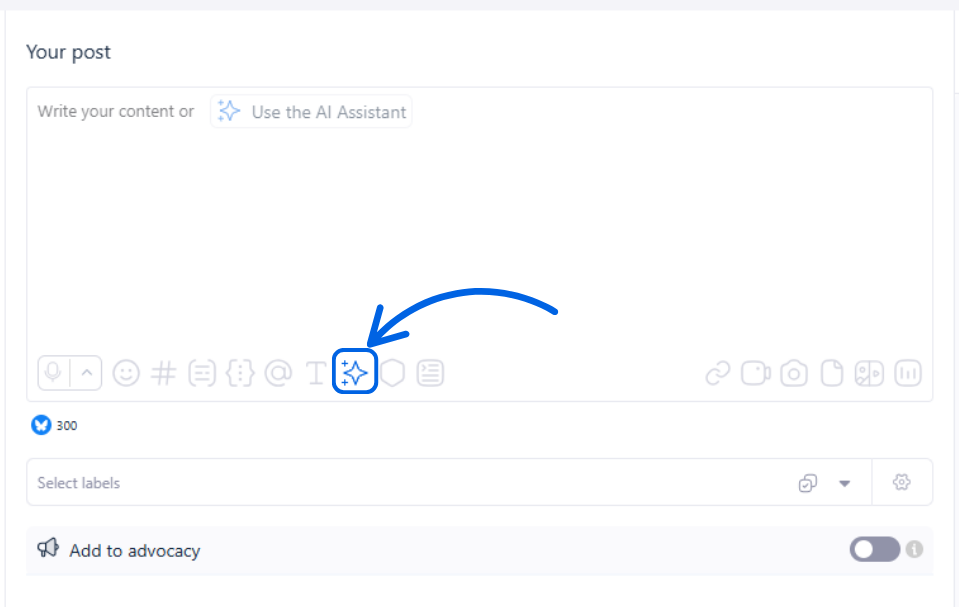
3. Click the star icon and you’ll be redirected to the AI Assistant.
4. Once you’re in the AI Assistant window, go to Generate videos and start creating content.
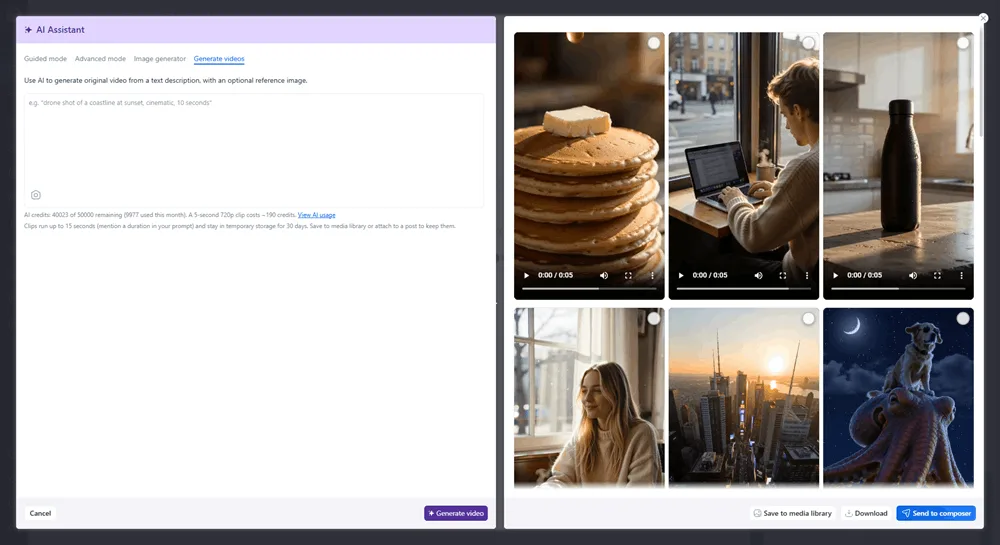
5. Drop in your prompt and wait for the AI to finish generating the video. The clip lands in your media library, ready to drop into a post. Add captions or music if you like, then schedule and publish across your networks from the same screen
No shoot, no editor, no second tool, which is what you need when you’re filling a feed that wants short-form video on repeat. Vista Social handles the raw clip, then adds the captions, scheduling, multi-network publishing, and analytics on what the clip drove. The video marketing strategy guide shows where clips fit in a bigger plan, and the roundup of AI video tools shows where generation sits in a wider workflow.
Tips for better results and common mistakes
A handful of habits make the difference between a clip you can post and one you scrap. None of them are complicated, and most come down to respecting what the model is good at.
- Keep it short: A few seconds beats a longer runtime, since length gives the model room to drift into warping
- Use one motion: One clean action looks far better than three competing ones in the same clip
- Define the camera move: Tell it whether the camera pushes in, pans, or stays locked, so the motion feels intentional
- Start from your own image when you can: Image-to-video keeps your real product on screen and skips the guesswork of describing it
- Skip dialogue and baked-in text: Models still fumble lip-sync and on-screen words, so add captions later in editing
- Avoid real people and brand logos: Content-safety filters reject these, so you’ll save time by leaving them out
- Generate a few takes: The second or third version is often the keeper, so don’t bet everything on the first
Never run dry on AI video prompts again
Think back to that melting, warping product from your first attempt. The reason your next clip looks different isn’t a better model, it’s a better prompt aimed at what the model already does well. Short, motion-led, single-subject clips are exactly what AI video nails, and you now have 40-plus starting points plus the formula to write your own.
So pick a prompt that fits your next post and put it to work. Copy a prompt, generate a clip free in Vista Social, and schedule it in minutes without ever leaving the tool.
Frequently asked questions
What is an AI video prompt?
An AI video prompt is the text description you give a video generator to create a clip. It tells the model what to show, how to move, and how to frame the shot. The more specific the prompt, the closer the result lands to what you pictured.
How do you write a good AI video prompt?
Follow a simple formula: subject, motion, camera movement, setting, lighting, style, duration, and aspect ratio. You don’t need every slot, but the more you give, the less the model has to invent. The biggest levers are one clear subject, one simple motion, and a defined camera move.
Why do AI videos look warped or morphing?
Warping usually means you asked for too much at once, like a long runtime, a full story, dialogue, or baked-in text. The model loses track partway through and starts distorting faces and objects. Shorten the clip, pick one motion, and the problem mostly disappears.
What’s the difference between text-to-video and image-to-video?
Text-to-video starts from a written prompt and lets the model imagine the whole scene. Image-to-video starts from a still you already have and adds motion to it. Image-to-video is the most brand-usable path, since it animates your real product instead of an AI lookalike.
How long can AI-generated videos be?
Today’s social AI video is best at short clips, often just a few seconds. Longer runtimes give the model more room to drift and warp. For social b-roll, short is also what the feeds reward, so the limit works in your favor.
Can AI video include dialogue, captions, or on-screen text?
Not reliably. Models still struggle with lip-sync and tend to render on-screen text as confident gibberish. The honest move is to skip dialogue and baked-in text in the prompt, then add captions and music afterward in editing.
Can I use AI-generated video for my brand commercially?
Usage rights depend on the tool you generate with, so check the terms of whatever platform you use before publishing. Most social-focused generators allow commercial use, but the details vary. When in doubt, confirm the rights rather than assuming them.
How do I generate these videos in Vista Social?
Copy a prompt, open the composer’s AI Assistant or ask Vista directly, then paste it and pick an aspect ratio and duration. You can also start from one of your own images for image-to-video. The clip saves to your media library, ready to schedule and publish across your networks.

Try Vista Social for free
A social media management platform that actually helps you grow with easy-to-use content planning, scheduling, engagement and analytics tools.
Get Started NowAbout the Author

Content Writer
Russell Tan is a content marketing specialist with over 7 years of experience creating content across gaming, healthcare, outdoor hospitality, and travel—because sticking to just one industry would’ve been boring. Outside of her current role as marketing specialist for Vista Social, Russell is busy plotting epic action-fantasy worlds, chasing adrenaline rushes (skydiving is next, maybe?), or racking up way too many hours in her favorite games.
Loading related tools...

The most complete social media management platform for teams who demand more.






Tools
PublishingAnalyticsEngagementIntegrations
FacebookInstagramLinkedInRedditSnapchatThreadsTikTokX (Twitter)YouTubeMCPVista Page (link-in-bio)All IntegrationsCopyright © 2026 Vista Social LLC. All Rights Reserved.