

Published on December 1, 2025
20 min to read
10 Ways to Use AI in Social Media

Summarize with AI

Table of contents
Summarize with AI

ChatGPT

Claude

Perplexity
Share

Vista Social

X (Twitter)


AI in social media sparks pretty strong reactions these days. However, AI doesn’t have to replace your creativity. When you use it right, it can actually give you more space to be creative by handling the repetitive stuff that drains your time and energy.
That content calendar you’re staring at with zero ideas? AI can help. Those three hours you spend every week figuring out which posts performed best? AI handles it. The 50 DMs waiting for responses? AI suggests replies that actually sound like you.
This guide breaks down 10 specific, practical ways to use AI in your social media strategy, with step-by-step instructions you can follow right now. Whether you’re managing social for one brand or juggling 15 client accounts at an agency, you’ll find strategies that save time without sacrificing the authentic voice your audience follows you for.
Table of contents
10 ways to use AI in social media
Let AI do the tedious work for you while you focus your efforts on the tasks that matter most. These 10 tactics can help you use AI as the assistant it’s meant to be.
1. Content ideation
That moment when you sit down to plan your content calendar and your brain just stops working. You know you need to post something. Your audience expects it. But the ideas aren’t flowing, and scrolling through your feed for inspiration just makes you feel more stuck.
Happens to literally everyone. Even the social media managers with picture-perfect content calendars have days when the well runs dry.
How to use Vista Social for content ideation
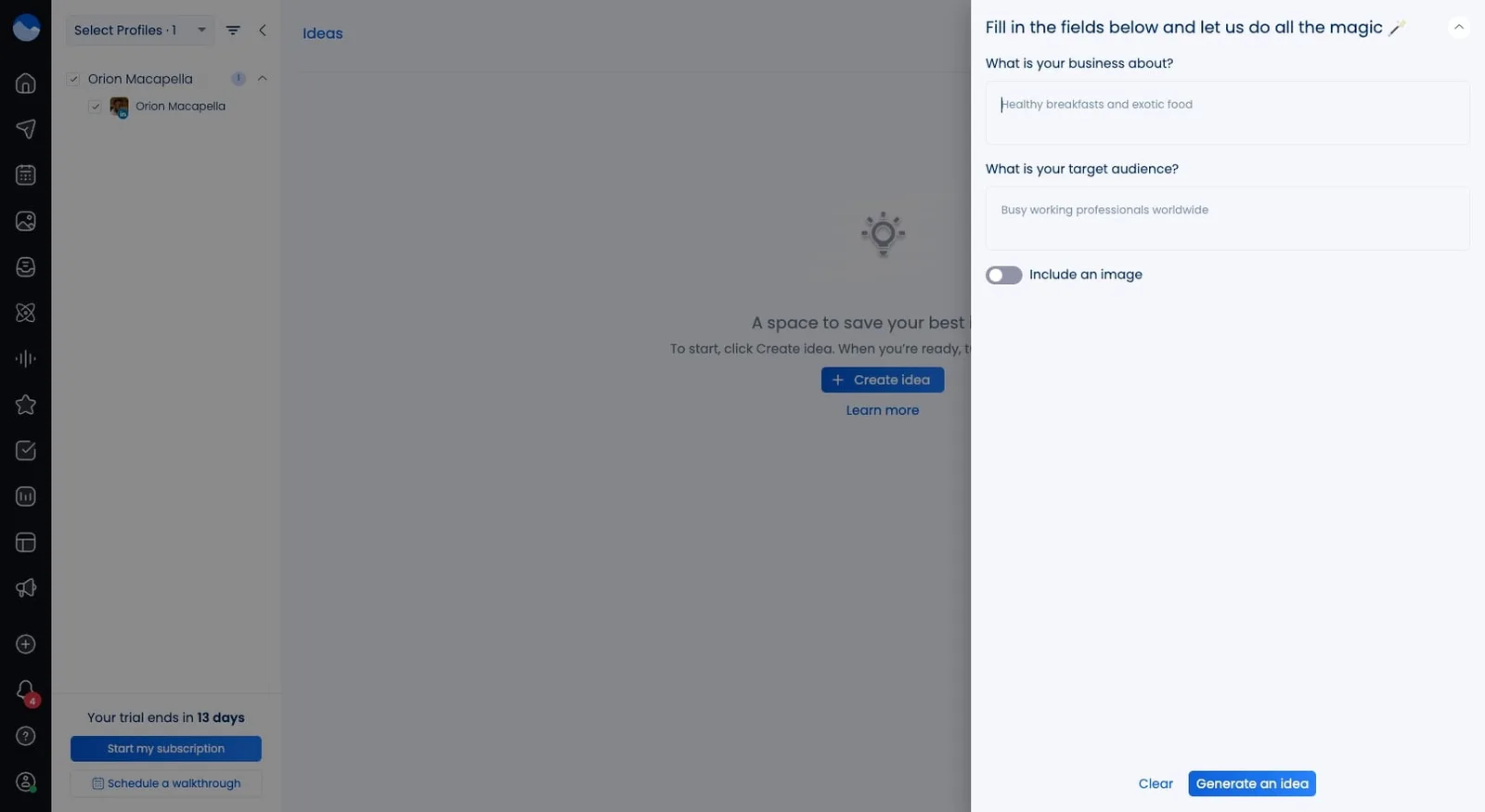
Vista Social’s AI Assistant sits right inside your dashboard, ready whenever inspiration decides to take a vacation. Here’s your exact process:
- Log into Vista Social and find the Ideas section in your navigation
- Click the AI Assistant icon (the magic wand) to open the prompt window in the top right hand section
- Get specific about your business and target audience
- Make sure to toggle to include an image to get the creative juices flowing
- Hit Generate idea (you can generate as many as you’d like)
- If you’re happy with the content, hit save and the idea will be added
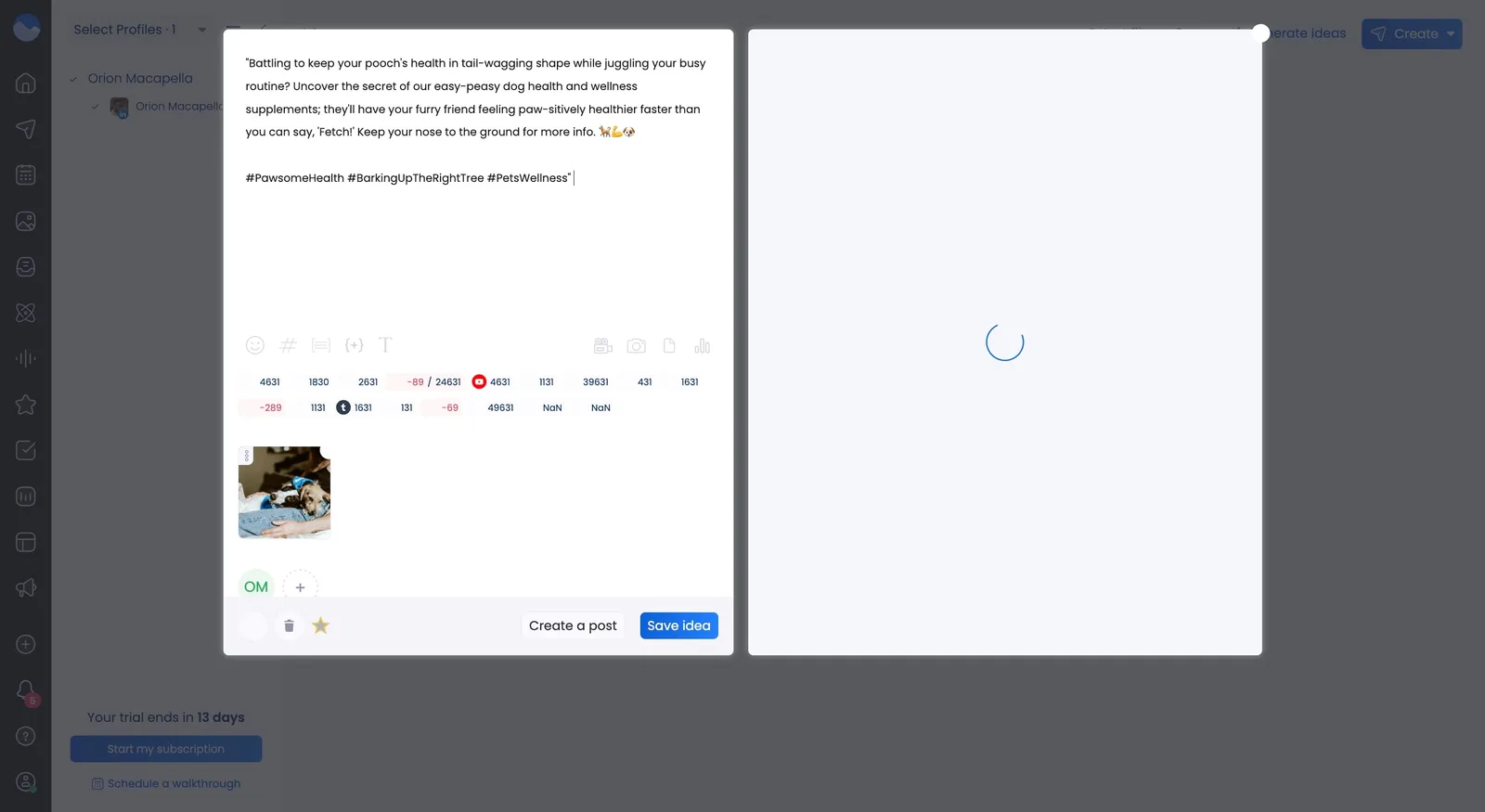
To further increase the chance of engagement on your post, you can always use the AI assistant to help craft an even better post. Here’s how you do it.
- Click into the newly created idea
- Copy the content of your post and select the AI assistant button
- Paste the copy in the box, and select a tone or format (Select them one at a time)
- The AI assistant will generate a caption based on either selected tone or format
- Select the “Send to composer” button and save the new caption
Generic prompts get you generic results. “Give me content ideas” returns suggestions so broad they’re basically useless.
Instead, try something like this for examples: “I’m looking to create an idea that will help to inspire young professionals to think about healthy dog food as the trend instead of popular dog food brands and wasting money on cheap ingredients rather reinvest in high quality dog food ingredients.”
The AI Assistant analyzes your prompt and generates ideas based on current trends, your industry norms, and content types that typically perform well. You get a list of concepts, often with angles you hadn’t considered.
How to use AI tools for content ideation
Beyond Vista Social, tools like ChatGPT, Claude, and Jasper can all brainstorm content ideas. The difference between useful suggestions and garbage comes down to how you prompt them.
Here are three templates you can copy, paste, and customize right now:
- For topic generation: “I run social media for [your business type]. My audience is [describe demographics, interests, pain points]. Suggest 10 content topics that address their biggest challenges around [specific issue]. Include a mix of educational posts that teach something valuable, entertaining content that makes them smile or relate, and promotional posts that showcase our solution without being pushy.”
- For format ideas: “I want to create content about [specific topic]. Suggest 5 different ways I could present this information on [platform name]. Consider what’s trending right now and what typically performs well, but also suggest at least one format most brands in my space aren’t using yet.”
- For campaign planning: “I’m planning a month-long campaign focused on [theme, product launch, or event]. My main goals are [list 2-3 specific, measurable objectives]. Create a content calendar with post ideas for each week. Include the content format, main message, suggested call-to-action, and which day of the week to post it.”
Traditional brainstorming sessions still matter for team alignment and creative sparks. But AI speeds up the process dramatically and helps you avoid the biases that come from always pulling from the same mental reference library.
2. Caption generation
Writing captions takes way longer than people think, because you’re trying to hook someone before they scroll, get your message across, add a call-to-action that doesn’t feel needy, maybe throw in hashtags, and still keep your brand voice intact while trying not to sound like every other company online. Do that across multiple posts and platforms every day and caption writing can easily chew up your entire afternoon.
Vista Social makes it easier to write and create captions that captivate your audience and helps you to turn something frustrating into something fun.
How to use Vista Social for caption generation
- Open the post creation interface
- Upload your image or video
- Click the AI Assistant icon
- Describe what you want the caption to accomplish
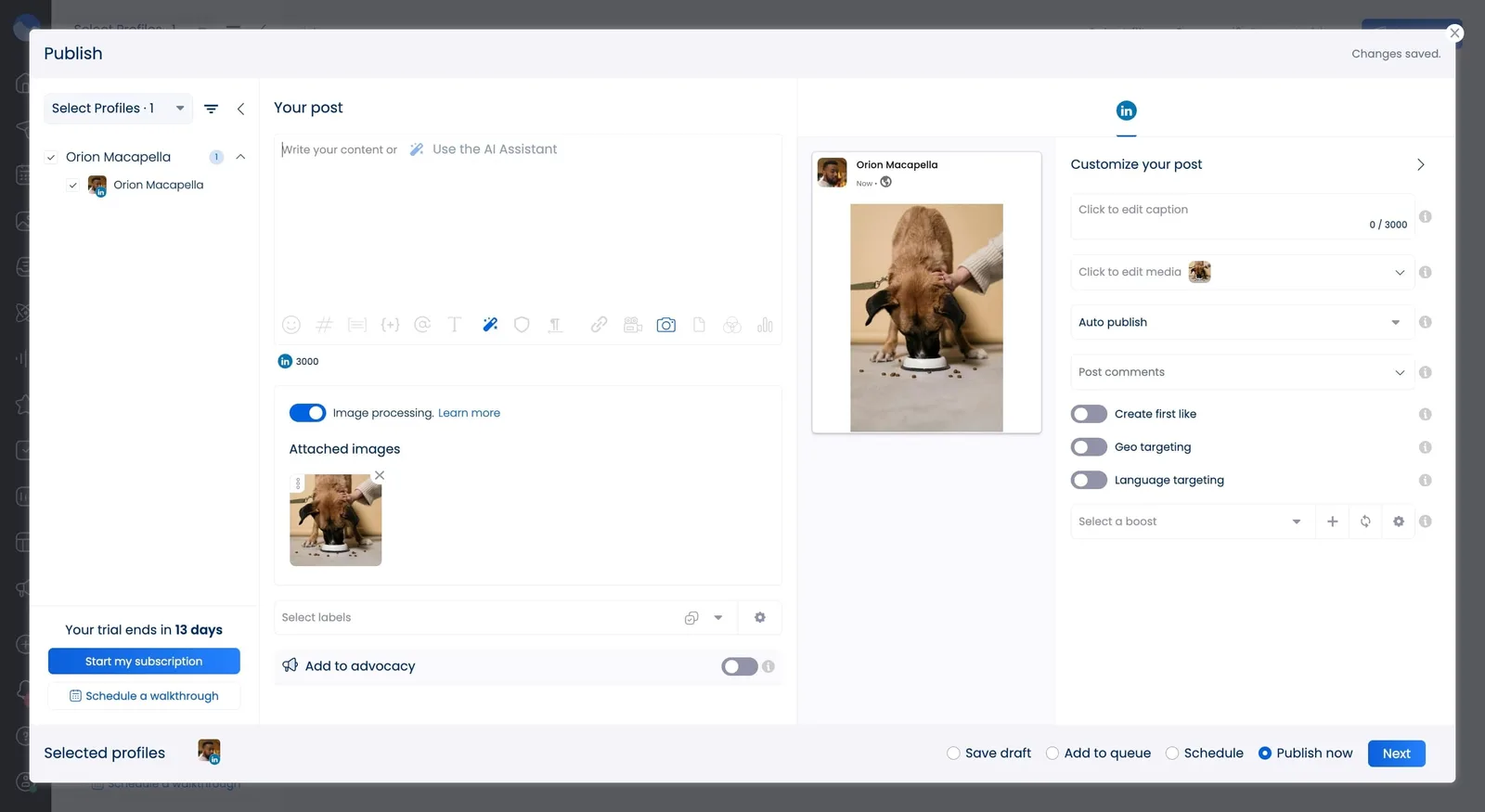
Try this level of detail: “Write an engaging caption for this photo of a dog eating our healthy treats. Tone should be friendly and conversational, like talking to a friend, not a sales pitch. Highlight that our products use natural ingredients without making it sound preachy. Include a call-to-action to check out the full range. Keep it under 300 characters since this is for LinkedIn.”
The AI generates several options. You can use one as-is, blend elements from multiple suggestions, or treat them as starting points.
But the real game-changer sits in Vista’s brand voice generator. Before you start cranking out captions, set up your voice profile:
- Go to Settings, then Brand Voice
- Upload 3-5 examples of your absolute best-performing posts (the ones that sound most like your brand)
- Describe your brand’s personality using specific adjectives (are you professional but approachable? playful and irreverent? educational and authoritative?)
- Add words and phrases you always use or always avoid (maybe you say “y’all” and never say “utilize,” or you love exclamation points but hate corporate buzzwords)
Now when you generate captions, the AI matches this voice profile. Your captions sound like you, not like every other AI-generated post on the internet.
How to use AI tools for caption generation
AI social media post generators beyond Vista Social can all write captions. ChatGPT, Jasper, Copy.ai, and dozens of others offer this feature. But they’ll give you bland, generic output unless you guide them properly.
Here’s a prompt template that actually works:
“I need a caption for [platform name]. The post features [describe the visual in detail, what’s in the image or video, the mood it conveys]. My brand voice is [describe your tone and personality with specific examples]. Here are three captions I’ve written that performed well:
[Paste your actual caption example 1] [Paste your actual caption example 2] [Paste your actual caption example 3]
Write a caption in this exact same style that [describe your specific goal]. Length should be [specific character or word count].”
Those examples are absolutely crucial. They show the AI your writing style, your typical structure, and how formal or casual you get.
Different platforms need different caption approaches:
- Instagram: Hook readers before the “more” cutoff. Use line breaks for readability. Include hashtags, but make them relevant.
- LinkedIn: Lead with value. Write in a professional but still conversational tone. Ask questions to drive comments.
- Twitter: Be concise. Make every word count. Include relevant handles for visibility.
- Facebook: Slightly longer captions work here. Use conversational language with clear calls-to-action.
- TikTok: Keep it short and complement your video. Use trending phrases when relevant.
Data shows 42% of marketing managers now use AI regularly for caption generation. Brands that adopted AI for captions saw an increased boost in brand recognition, mostly because AI helps them post consistently without quality dropping off when they’re busy.
One last tip that makes a huge difference: Always read AI-generated captions out loud before posting. If it doesn’t sound like something you’d actually say to a friend, edit it until it does.
3. Image and video creation
Visual content can often grab attention better than text-only posts, so you want to make sure visuals are a heavy part of your strategy. It’s the gap between being ignored and being noticed in someone’s feed.
Traditionally, creating professional-looking images and videos required design skills, expensive software, or paying freelancers. AI has genuinely changed this game.
Look at this example of a fully AI-generated video:
While creating something like that, as the poster said, can take a ton of time, it can also be more affordable for brands who can’t budget for that level of production.
But let’s address the elephant in the room first.
AI-generated images and videos have sparked real concerns about replacing creative professionals and reproducing artistic styles without permission. Let’s go over how to use these tools responsibly.
Use AI-generated visuals when:
- You’re working with a tight budget and need placeholder graphics
- You need quick mockups to test concepts before investing in professional creation
- Creating simple graphics like quote cards or statistics visualizations
Don’t use AI-generated visuals when:
- Your prompt asks the AI to copy a specific artist’s style by name
- Your campaign would genuinely benefit from human-made content
- You’re creating high-stakes campaigns where brand reputation is on the line
Work with human creators when:
- Your budget allows for it (and whenever possible, choose to pay creatives fairly)
- You need original, distinctive visuals that set your brand apart
- Authenticity matters more than speed
Don’t rely fully on AI when:
- You’re building a long-term brand identity that requires consistency
- Your audience specifically values craftsmanship
How to use AI tools for image and video generation
Several platforms make visual content creation accessible even if you have zero design training. Let’s dig into some of the great design tools that utilize AI for you to add to your content in Vista Social.
Canva
- Magic Resize adapts your design for every platform with one click
- Text to Image generates custom graphics from simple prompts
Animoto
- Choose from templates designed for social media
- Upload your footage or select from their stock library
Pixlr
- One-click background removal and replacement
- AI-powered filters and adjustments
Synthesia creates AI-generated videos with synthetic presenters:
- Type your script and choose an avatar
- The AI presenter delivers your script in 120+ languages
You can also take advantage of full AI image and video generation tools like Midjourney or Veo.
4. Influencer identification
Partnering with the right influencers exposes your brand to thousands of potential customers who already trust the person making the recommendation. But finding those right influencers feels like searching for needles in a haystack.
When you’re choosing influencers, don’t let follower count trick you into thinking bigger automatically means better. Micro-influencers (creators with 1,000-100,000 followers) actually have better engagement rates than larger influencers.
That’s why, at Vista Social, we push you to look past surface metrics and focus on the creators who actually move people, not just the ones who look popular. Engagement, authenticity, and audience fit always beat vanity numbers.
How to use AI tools for influencer identification
AI-powered platforms use machine learning to evaluate potential partners based on criteria that actually predict campaign success.
Here’s what these criteria look like in practice:
| Criteria | What AI analyzes | Why it actually matters |
| Audience authenticity | Follower growth patterns, engagement rate vs follower count, comment quality | Ensures you’re reaching real humans who might buy, not bots |
| Content themes | Topics covered consistently, hashtags used regularly, content categories | Confirms the influencer’s niche genuinely aligns with your brand |
| Tone and language | Writing style, vocabulary choices, level of formality | Matches influencer communication style to your brand voice |
| Audience engagement | Comment sentiment and depth, share and save rates, response frequency | Indicates how actively the audience trusts the influencer’s recommendations |
Platforms that use AI for influencer identification:
Upfluence
- Search by keywords, demographics, engagement rate, audience interests
- Track campaign performance in real time
AspireIQ
- AI matches you with creators based on genuine brand affinity
- Manage contracts, content approval, and payments in one platform
HypeAuditor
- Get detailed reports on audience authenticity and engagement patterns
- Perfect for vetting influencers before spending money
Prompt template for using general AI chatbots:
“I need to identify potential influencer partners for [your industry]. My target audience is [describe demographics, interests, pain points]. My brand values [list 2-3 core principles]. My budget allows for [micro/mid-tier/macro influencers].
Suggest 10 influencers who:
- Have an authentically engaged audience matching my target market
- Post regularly about [relevant topics]
- Maintain a [describe tone] communication style
- Have between [X] and [Y] followers
For each suggestion, explain specifically why they’re a potential fit and what metrics I should evaluate.”
This gives you a starting point. But you still need to vet every recommendation personally.
5. Strategy optimization
You can’t improve what you don’t measure. But measuring everything and somehow turning mountains of data into actionable insights can be a social media managers worst nightmare. Having to somehow turn into a data analyst when all you want to do is stick to the creative work can be tough but, that’s where AI can help with the heavy lifting. For those looking to build their analytical skills without abandoning the creative side, platforms like Coursiv offer AI-powered learning paths that teach data interpretation in practical, digestible modules designed for busy marketers.
How to use Vista Social for strategy optimization
Vista Social’s analytics dashboard consolidates performance across all your connected platforms into one view. Here’s your optimization process:
- Navigate to Reports in your dashboard
- Click on Post performance report
- Review engagement metrics (which posts drove the most likes, comments, shares, saves)
- Check audience activity patterns (when your specific followers are actually online)
- Use the AI Assistant for personalized posting time recommendations
Vista Social analyzes your actual audience behavior instead of industry averages. If your followers scroll at 9 PM on weekdays and Sunday mornings, you’ll see that reflected in your ideal posting windows. Way more valuable than blog posts telling everyone to post at noon on Tuesdays regardless of their audience.
Set up automated reports for weekly summaries delivered to your inbox. No more spending Friday afternoons building reports. Share these with stakeholders to prove value with actual data instead of vague claims about “building brand awareness.”
How to use AI tools for strategy optimization
Beyond Vista Social’s built-in features, AI can help you optimize nearly every aspect of your social strategy.
Key metrics AI helps you track and improve:
| Metric | What it actually measures | How AI helps you act on it |
| Conversion rate | Percentage completing your desired action after seeing content | AI identifies which content types and CTAs drive conversions |
| Customer acquisition cost | Average cost to acquire each new customer through social | AI finds cost-effective platforms and refines targeting to lower CAC |
| Return on ad spend | Revenue generated per dollar spent on social advertising | AI optimizes bid strategies and creative selection to maximize returns |
| Engagement rate | Likes, comments, shares, saves as a percentage of reach | AI personalizes content recommendations to increase interaction |
| Click-through rate | Percentage of viewers who click your links | AI refines ad placement and CTA language to capture more attention |
| Churn rate | Percentage of followers who stop engaging or unfollow | AI predicts churn risk and recommends retention strategies |
| Lifetime value | Total revenue expected from an average customer | AI helps you focus on high-value segments through optimized retention |
Practical application:
Ask AI tools for strategy recommendations with this type of prompt:
“Based on my last quarter’s performance [paste key metrics like engagement rate, CTR, conversion rate], what changes should I make to my posting frequency, content mix, and platform allocation to improve engagement by 20%?”
Note that while AI tools can give good general advice you should still trust your own experience and insight in conjunction with the ideas a tool would give.
6. Trendspotting
Remember when everyone was suddenly making whipped coffee during lockdown? Or when that “tell me without telling me” format took over Instagram? Trends move insanely fast on social media. Blink and you’ve missed it.
But catching trends early, and before they’re played out? That’s where AI becomes a great early detection system.
How to use AI tools for trendspotting
AI tools monitor millions of conversations across platforms to identify emerging trends before they turn into mainstream madness.
For current trends:
Ask AI: “What are the top trending topics on [platform] right now related to [your industry]? Identify emerging formats, hashtags, and conversations that brands in [your niche] should know about.”
AI scans recent posts, analyzes engagement patterns, and identifies what’s gaining momentum. You’ll see which formats are working (carousels vs Reels), which topics are sparking conversations, and which hashtags are trending upward.
For predicting upcoming trends:
AI analyzes historical data and current patterns to forecast what’s coming. Try this prompt:
“Based on past trends in [your industry] and current social media patterns, what trends are likely to emerge in the next 1-3 months? What should brands start preparing content around?”
Platform-specific trendspotting:
Different platforms have different trend cycles. TikTok trends explode and die within days. LinkedIn trends move slower but last longer. Instagram sits somewhere in the middle.
Use AI to monitor platform-specific trends: “What trending audio, formats, or topics are gaining traction on TikTok this week that would work for a [your brand type]?”
The key is acting fast once you spot a trend.
7. Performance analysis
Staring at analytics dashboards trying to figure out what actually worked and what flopped. Reading through rows of numbers that all blur together. Attempting to explain to your boss why last month’s content underperformed using data you don’t fully understand yourself.
Performance analysis is crucial, but it’s also mind-numbing.
How to use Vista Social for performance analysis
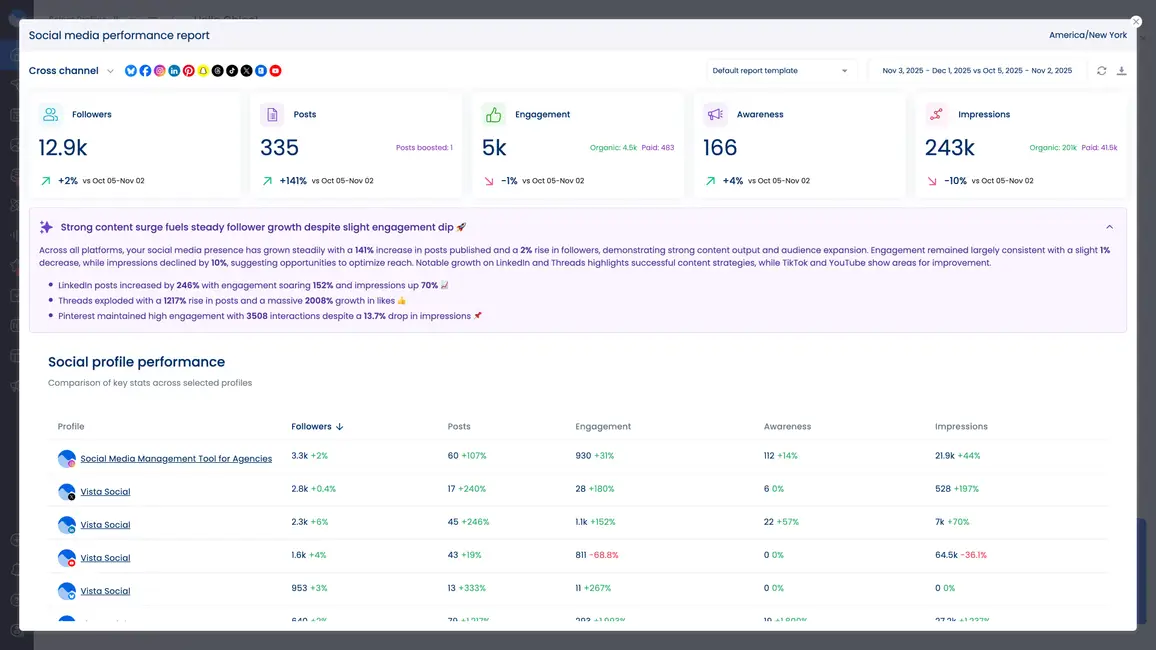
Vista Social’s AI report summaries take your raw data and turn it into actual insights you can act on.
For overall performance:
Navigate to your post performance report for example. As you scroll you’ll see an AI summary of the data in plain and easy to understand text. Instead of manually comparing metrics across platforms, you get a narrative explanation. This takes the time out of having to figure out complex numbers and analytical data by yourself.
For individual post performance:
Open your post performance report. The AI analyzes which posts succeeded and why. It could look something like this for example:
“Your top-performing post reached 15,000 people and generated 487 engagements. Success factors include: posted during peak audience activity (7 PM EST), used trending audio, included clear CTA, and featured user-generated content.”
Weekly or monthly performance emails:
Enable AI insights in your automated performance emails. Every week or month, you’ll receive summaries highlighting wins, identifying opportunities, and recommending adjustments.
How to use AI tools for performance analysis
Vista Social’s MCP (Model Context Protocol) integration takes performance analysis even further. You can connect Vista Social to Claude or ChatGPT and analyze your performance right inside an AI tool.
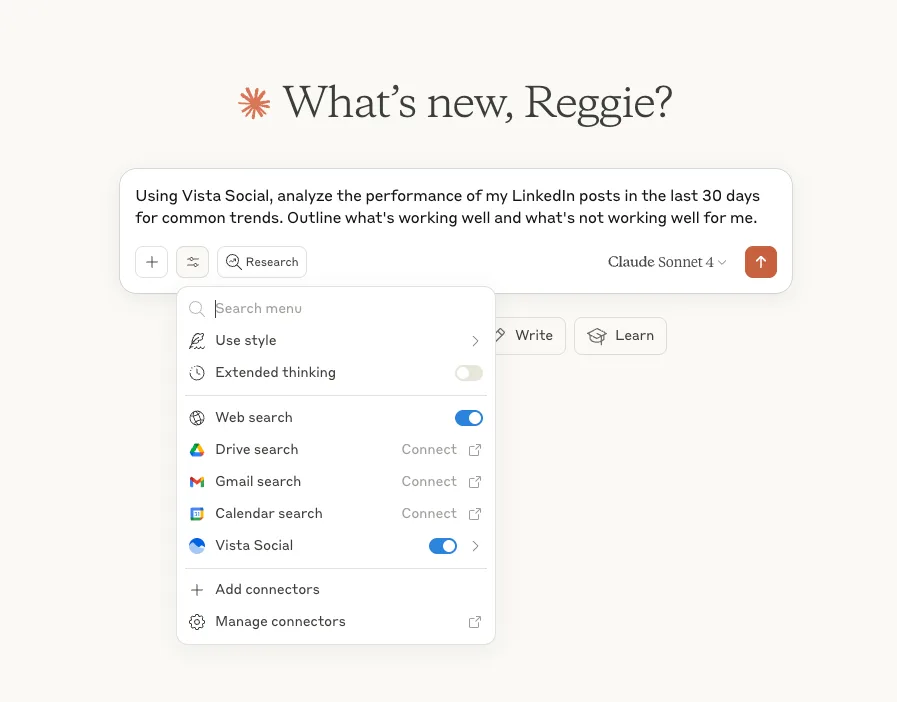
Here’s what this looks like in practice:
Connect Vista Social to your Claude account through the MCP integration. Then you can ask questions like: “Analyze my last 30 days of social media performance across all platforms. What content types performed best? What should I do differently next month?”
Claude accesses your actual Vista Social data and provides insights. You can also use it for real-time engagement. You can use the following prompt: “Read my recent Instagram comments and draft responses that match my brand voice.” Claude analyzes the comments, identifies which need responses, and suggests replies that sound like you.
This level of AI-powered analysis used to require hiring a data analyst. Now it’s accessible to any social media manager willing to connect their tools.
8. Social media engagement
Community management is one of those tasks that sounds simple but becomes overwhelming fast. One comment here, three DMs there, a question on Facebook, someone mentioning you on Twitter. Multiply that across five platforms and suddenly you’re spending three hours a day just trying to keep up with your audience.
How to use Vista Social for social media engagement
Vista Social’s AI Assistant helps you manage engagement without sounding like a robot.
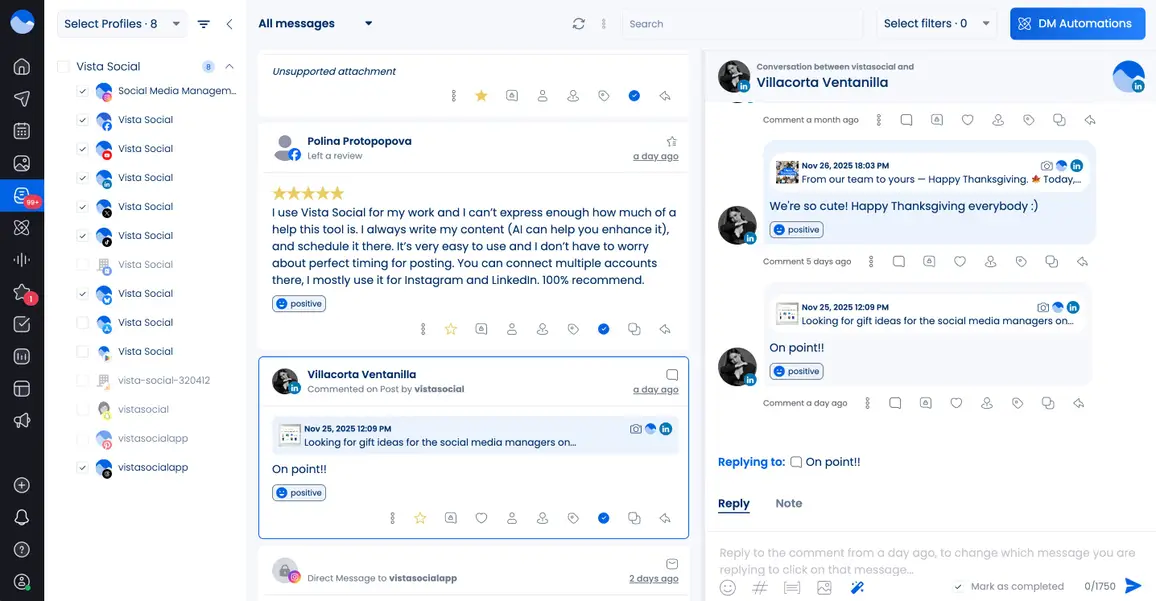
For comment responses:
Navigate to your unified inbox where all your comments across platforms appear in one place. Select a comment. Click the AI Assistant. It analyzes the comment and suggests a response that matches your brand voice.
Someone comments “This is exactly what I needed!” on your Instagram post. AI suggests: “So glad it helped! Let us know if you have any questions 💙” You can use it as-is, tweak it, or use it as inspiration.
For direct messages:
Same process works for DMs. Someone messages asking about your product’s ingredients. AI drafts a helpful response based on your product information and brand voice. You review, adjust if needed, and send.
The key is that AI handles the initial draft. You handle the final approval. This speeds up response time dramatically without sacrificing authenticity.
How to use AI tools for social media engagement
The MCP integration we mentioned earlier shines for engagement too. Connect Vista Social to Claude, and you can manage engagement conversationally.
Try: “Read my Instagram comments from the last 24 hours. Flag anything that needs my personal attention, draft responses for general comments, and identify any customer service issues that need escalation.”
Claude processes everything and can give you categorized responses:
Need personal attention (3 comments):
- User asking about collaboration opportunities
- Detailed product question requiring technical knowledge
- Complaint about shipping delay
General comments (drafted responses):
- 15 positive comments (responses drafted)
- 8 questions about availability (responses drafted with product links)
- 4 tag-a-friend comments (thank you responses drafted)
You handle the three that need your personal touch. The other 27 get thoughtful, on-brand responses you can send with one click after quick review.
This approach lets you maintain authentic engagement at scale. Your audience still gets timely responses that sound like you, but you’re not spending your entire day glued to your phone responding to every single comment manually.
9. Automation
Automation used to mean setting up rigid, robotic responses that made your brand sound like a call center. “Thank you for your message. Someone will respond within 24-48 hours.” Not exactly the most engaging way to connect with your audience.
How to use Vista Social for automation
Vista Social’s AI intent detection for DM automations is genuinely clever. Instead of matching exact keywords, it understands what someone is trying to accomplish.
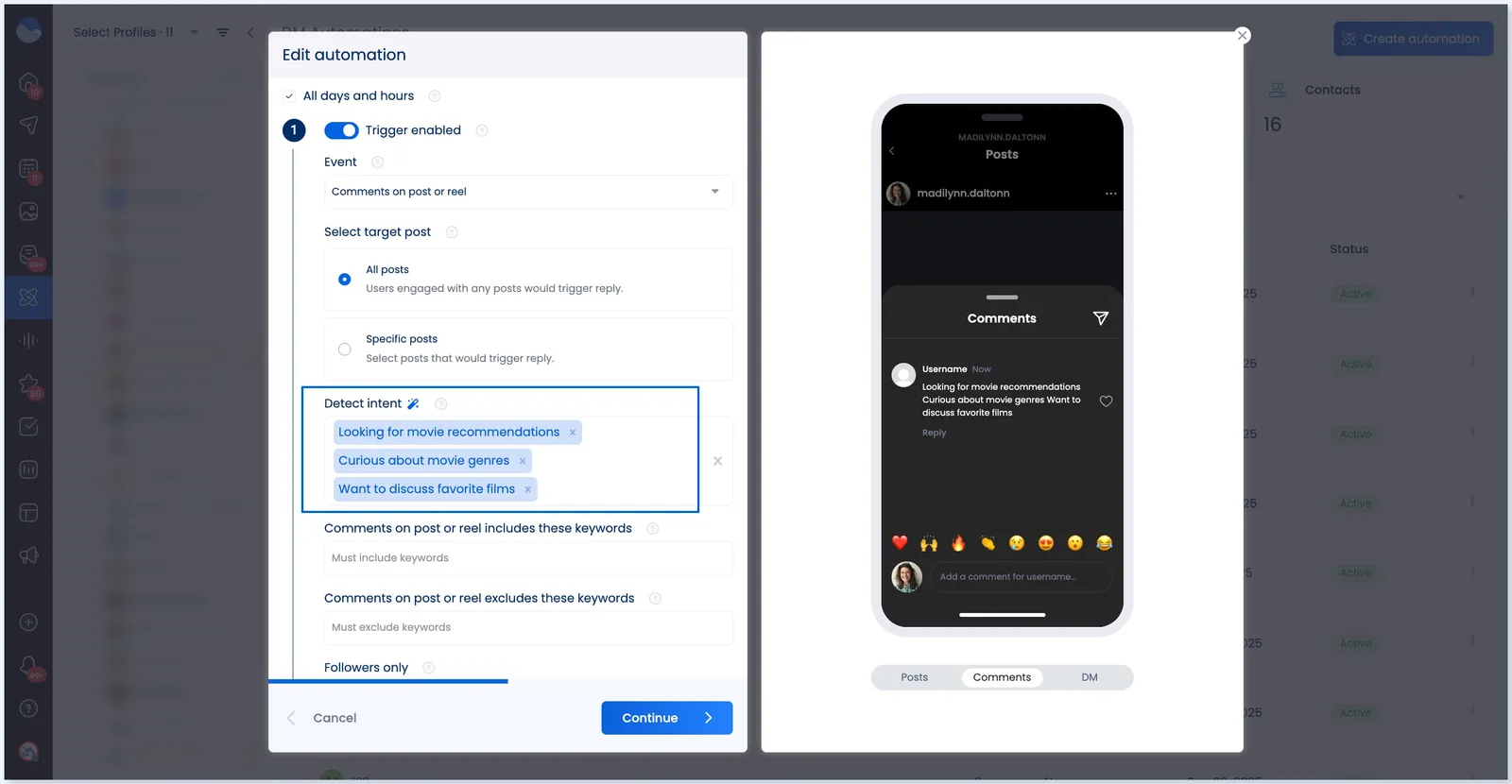
Setting it up:
- Navigate to Automation in your Vista Social dashboard
- Create a new DM automation rule
- Instead of listing every possible keyword someone might use, describe the intent
For example, instead of creating keyword triggers for “price,” “cost,” “how much,” “pricing,” “rates,” and every variation, you describe the intent: “Customer asking about pricing or cost information.”
The AI recognizes when someone’s question relates to pricing, regardless of how they phrase it. It then sends your pre-written response with pricing details and a link to your packages.
Common intents you can automate:
- Pricing inquiries (automatically send pricing info)
- Hours of operation (automatically share your schedule)
- Product availability (automatically check stock and respond)
- General information requests (automatically send relevant links)
- Appointment booking (automatically share booking link)
The magic is that AI understands context. Someone saying “Is this expensive?” gets the same automated pricing response as someone asking “What do you charge?” Even though they used completely different words, AI recognized the same intent.
How to use AI tools for automation
Beyond Vista Social’s built-in features, you can use tools like Zapier to create more complex automation workflows.
Example workflow:
When someone DMs you on Instagram → AI analyzes the message → If it’s a sales inquiry, it creates a lead in your CRM → Sends an automated response with relevant information → Notifies your sales team
Or:
When someone comments on your Facebook post asking about availability → AI detects the intent → Automatically responds with current availability → Creates a reminder for you to follow up
These workflows let you maintain responsiveness even when you’re not actively monitoring your accounts. Your audience gets helpful information immediately. You follow up with personal attention when needed.
10. Social listening
Social listening is monitoring conversations about your brand, your competitors, your industry, and relevant topics across the entire internet. Not just your own posts and comments, but everywhere people are talking.
Done manually, this is impossible. There’s simply too much conversation happening simultaneously across too many platforms. AI can make this more of a reality.
How to use Vista Social for social listening
Vista Social’s social listening feature monitors mentions of your brand, products, competitors, and keywords you care about across social platforms.
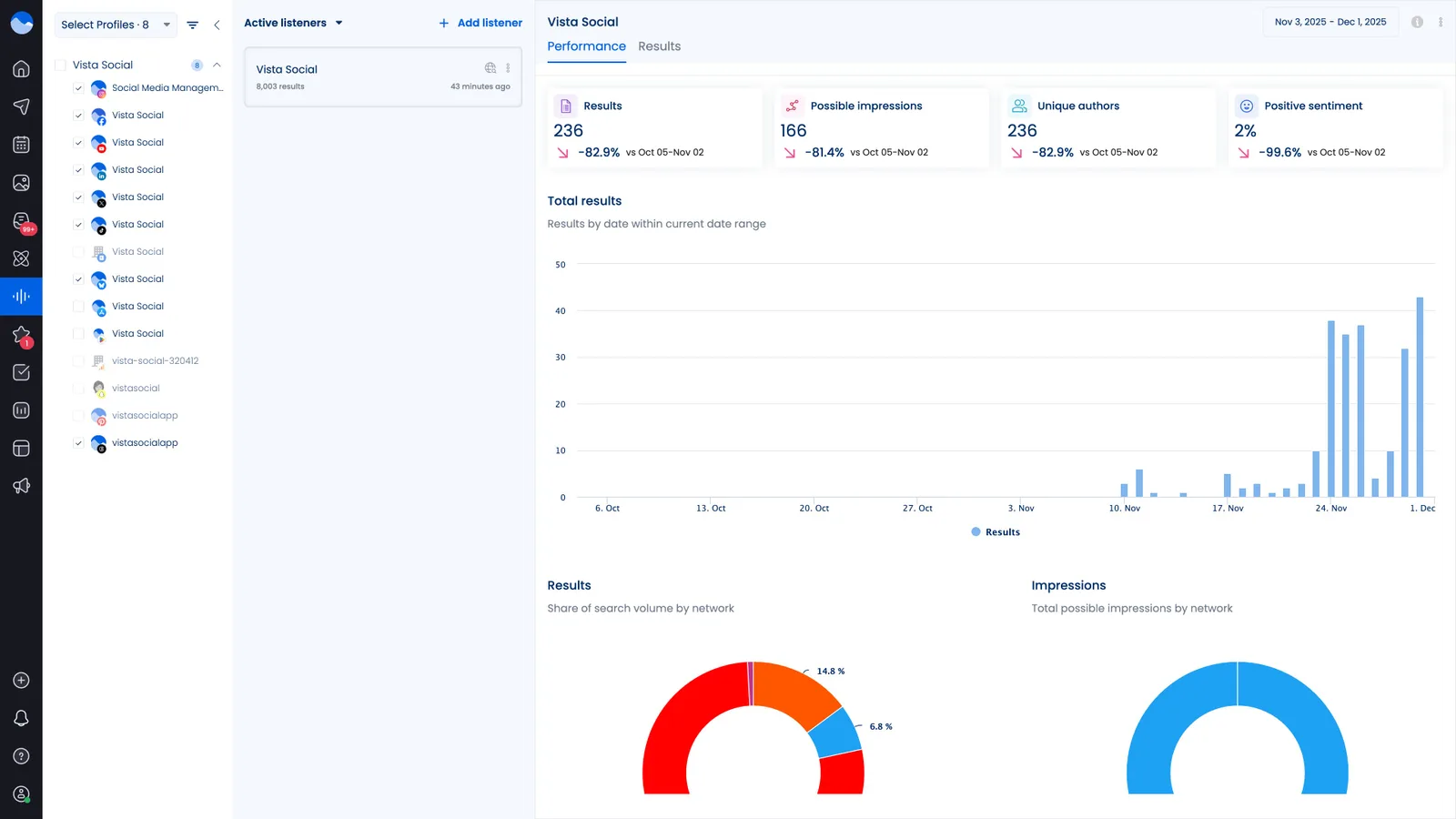
Setting up social listening:
- Navigate to Listening in your dashboard
- Add keywords to monitor (your brand name, product names, industry terms, competitor names)
- Set up alerts for specific conditions (sudden spike in mentions, negative sentiment, mentions from high-follower accounts)
Vista Social’s AI analyzes these mentions for sentiment. Is this a positive mention from a happy customer? A neutral industry discussion? A complaint that needs immediate attention?
You get a dashboard showing:
- Volume of mentions over time
- Sentiment breakdown (positive, neutral, negative)
- Top posts and conversations
- Trending topics in your industry
- Competitor mention comparison
How to use AI tools for social listening
Beyond Vista Social’s built-in features, AI tools can monitor broader conversations and provide deeper insights.
Ask AI:
“Monitor Reddit, Twitter, and LinkedIn for discussions about [your industry topic] over the last week. Summarize the main pain points people are discussing and suggest content topics we could create to address them.”
AI should scans thousands of conversations and synthesizes insights into an easy to understand summary like this example:
“Primary pain points mentioned: difficulty integrating tools (mentioned 47 times), confusion about pricing models (mentioned 32 times), lack of responsive customer support (mentioned 28 times). Suggested content: comparison guide for tool integrations, transparent pricing breakdown with real examples, behind-the-scenes look at your customer support process.”
You get actionable insights from data you’d never have time to process manually. This helps you create content your audience actually wants, address concerns before they become problems, and stay ahead of industry conversations.

Try Vista Social for free
A social media management platform that actually helps you grow with easy-to-use content planning, scheduling, engagement and analytics tools.
Get Started NowAbout the Author

Content Writer
Orion loves to write content that refuses to be boring. As part of Vista Social, he helps brands, creators, and agencies stop doom scrolling and start winning with social media. When he's not in front of a keyboard, he's watching films in IMAX with his wife, dissecting football tactics (the European kind), and getting lost in a good book.
Loading related tools...




Tools
PublishingAnalyticsEngagementIntegrations
FacebookInstagramLinkedInRedditSnapchatThreadsTikTokX (Twitter)YouTubeBlueskyVista Page (link-in-bio)All IntegrationsCopyright © 2026 Vista Social LLC. All Rights Reserved.