


Published on June 22, 2026
12 min to read
The 30-Day Consistent Content Playbook: Post Less, Post Better, Never Run Dry

Summarize with AI

Table of contents
Summarize with AI

ChatGPT

Claude

Perplexity
Share

Vista Social

X (Twitter)


The calendar says it has been eleven days since your last post. You know this because you just opened the app to publish something, anything, and the guilt arrived before the caption did. Three weeks ago you were on a roll: a post a day, a content streak, the feeling that you had finally cracked it. Then a launch landed, a client went sideways, your manager added a project, and the posting was the first thing to slide. It always is.
Here is the part worth hearing: you are not undisciplined, and you did not lose your touch. You were running social media on willpower, and willpower loses to a busy week every time. The fix is not more motivation or a stricter rule about posting daily, it is a system that keeps publishing even when you are slammed, so showing up stops being a weekly act of heroism and becomes the default.
Over the next 30 days you will pick your themes, set a cadence you can hold, build a queue that fills itself, batch a month of content in a couple of focused sessions, and run a weekly loop to keep what works. By the end you will know how to post consistently on social media without the daily scramble, with a full month already scheduled inside one tool.
Table of contents
Why consistency wins in 2026 (and why “post more” is the wrong goal)
Social media consistency is one of the most reliable growth levers, and one of the first to slip when a week gets busy. It matters more in 2026 because the bar for standing out has moved. In HubSpot’s 2026 Social Media Marketing Report, surveying more than 1,100 marketers, 41% said it is harder than ever to stand out organically. The brands that are winning are not the loudest, they just show up reliably with something worth seeing.
The audience is there. DataReportal’s Digital 2026 report counts 5.66 billion social media user identities, around 68.7% of the people on earth. A feed that goes silent for two weeks teaches the algorithm, and the audience, to stop expecting you. Reliable presence compounds, and silence erases the ground you gained.
The trap is reading “be consistent” as “post more,” and that is the path that leads to burnout. The same HubSpot report found 77% of marketers now say authenticity beats production value, and platforms increasingly reward saves, shares, and watch time over raw volume. The goal is fewer, better posts on a rhythm you can keep, not an unwinnable race to out-post everyone.
So consistency is not a willpower problem you fix by trying harder, it is a systems problem you fix by deciding once and letting a process carry it. The rest of this playbook is that process, and it runs inside Vista Social so the system holds when your week falls apart.
Build your self-sustaining content system in Vista Social. Start now for free.
What does consistent content mean?
Consistent content means publishing quality posts on a steady, sustainable cadence, reliably showing up for your audience instead of posting in unpredictable bursts. It is about reliability and quality, not maximum volume. A brand that posts three strong times a week, every week, is consistent. A brand that posts twice a day for a fortnight and then disappears is not, no matter how high the count climbs.
Every step below is built to make steady-and-good the path of least resistance, taking the manual upkeep off your plate so the cadence survives a bad week.
The 30-Day Consistent Content Playbook
Here is the system as a 30-day rollout. Each step gives you the action, a short how-to you can skim, the Vista Social fast path that removes the manual work, and a marker for how to know it is done. Work through it in order, because each step feeds the next.
Step 1 (Days 1–2): Pick your content pillars
Your content pillars are the three to five recurring themes you will post about, chosen so they map to what your audience cares about and what your business needs to say. They are the cure for the blank-page panic that kills consistency, because you never start from nothing. Here is how to build them:
- List what they come to you for: The questions, problems, and topics your audience already associates with you.
- List what you want to be known for: The things your business needs to say to win the sale, even if you do not post them yet.
- Find the overlap: Pick the three to five themes where those lists meet, and name each one specifically, since a tight theme is easier to generate ideas against.
- Give each pillar a couple of formats: Pin one or two repeatable post shapes to every pillar so it is ready to fill rather than a bare label.
| Pillar | What it covers | Example formats | In Vista Social |
|---|---|---|---|
| Education | Teach the thing you are expert in | How-to carousel, myth-buster, quick tip Reel | Tag the pillar and color-code it on the calendar |
| Proof | Show that it works | Customer results, before/after, case snapshot | Pull saved assets from the media library into the post |
| Behind the scenes | Make the brand human | Team moment, process clip, founder take | Draft on-brand with the AI assistant in seconds |
| Community | Turn followers into a room | Question prompt, poll, reply roundup | Track replies in the unified inbox so none slip |
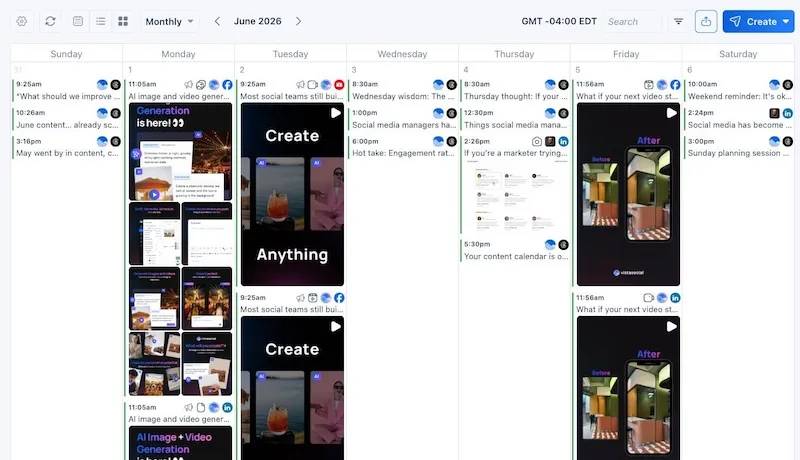
The Vista Social fast path: Map your pillars right inside the content calendar and color-code them, so a glance at the month shows whether one theme is crowding out the rest. In a spreadsheet the colors break every time a post moves; in the calendar they travel with the post.
You’ll know it’s done when you have three to five named pillars and at least one sample post idea for each.
Step 2 (Days 3–4): Set a sustainable cadence
Now choose how often you will post, per platform, and pick a number you could hold for twelve straight months, not the one you could manage on your most caffeinated week. An honest cadence you keep beats an ambitious one you abandon. Two rules keep it realistic:
- Set the floor low enough that a bad week cannot break it: If three posts a week is your reliable baseline, commit to three and treat anything extra as a bonus, not the standard.
- Match the rhythm to each network: Post where your audience already is, at the pace that network rewards, instead of forcing one cadence everywhere.
“The single best thing you can do is choose a pace you can sustain and ship content on a consistent basis.”
James Clear, author of Atomic Habits
| Platform | Sustainable starting cadence | In Vista Social |
|---|---|---|
| 3–5 posts/week | Reels, carousels, and Stories from one queue | |
| 2–4 posts/week | Schedule weekday slots and lead with a POV | |
| TikTok | 3–5 videos/week | Queue videos so volume never means daily effort |
| 3–5 posts/week | Auto-recycle top performers into open slots | |
| X/Threads | 1–2 posts/day | Fast-feed queue keeps the conversation going |
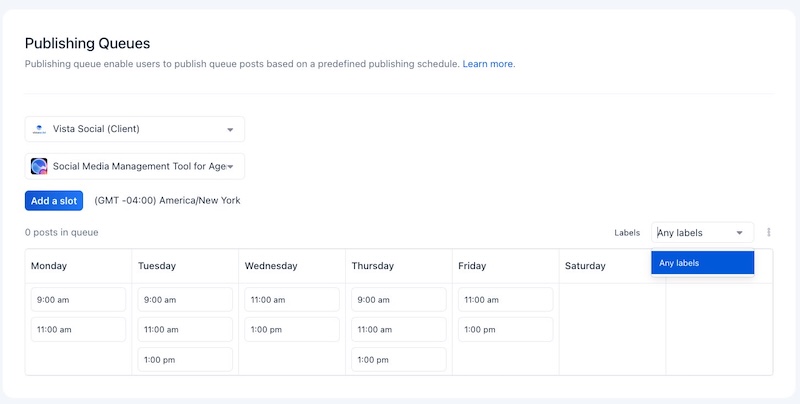
The Vista Social fast path: Once you settle on a cadence, it becomes the blueprint for your queue in the next step. Held by hand, a cadence is a promise you renegotiate every busy week until it drops to whenever you remember. Set the rhythm once in Vista Social and the queue holds you to it, so the number you committed to is the number that publishes, even on quiet weeks.
You’ll know it’s done when you have a per-platform posting rhythm written down that you are confident you can sustain for a year.
Step 3 (Days 5–7): Build your queue with labeled time slots
A queue is a set of fixed posting slots that you fill, rather than a calendar you fill in by hand every week. You set the slots once, label each by pillar, and new content drops into the next open slot on its own. It ends the daily “what do I post, and when” decision, because you made that decision once. Here is the setup:
- Match slots to your cadence: Create the same number of weekly slots as the rhythm from Step 2.
- Label each slot by pillar: A Monday education slot, a Wednesday proof slot, and a Friday community slot give you a balanced week before you write a caption.
- Let new posts auto-fill: Every piece you add flows into the next matching opening, so the feed stays varied instead of stacking three education posts in a row.
The Vista Social fast path: Build queues with labeled time slots so each pillar lands on the right day automatically. Set the slots and labels once, and your social media posting schedule maintains itself, instead of dragging posts around a calendar every week.
You’ll know it’s done when your weekly slot schedule exists, is labeled by pillar, and matches your chosen cadence. So you genuinely can say “Tuesday 9am is my Education slot” by labeling that slot.
Set up your labeled queue in Vista Social. Build your first queue for free.
Step 4 (Days 8–12): Batch a month of content
Content batching means producing a lot of content in a few focused sessions instead of one piece at a time, daily, under pressure. Consistency stops costing you a little stress every day and starts costing a couple of planned blocks a month. Block it out by job, not by post:
| Batching block | What you do | In Vista Social |
|---|---|---|
| Block 1: Plan | Generate ~30 ideas against each pillar | Brainstorm concepts with the AI assistant |
| Block 2: Write | Draft every caption in one pass | AI assistant writes on-brand, in bulk |
| Block 3: Create | Make or generate all visuals | Built-in image and video generation |
| Block 4: Load | Drop posts into the queue | Bulk-schedule into labeled slots |
The Vista Social fast path: Lean on the AI assistant and built-in image and video generation to draft on-brand captions and visuals in bulk during your batch blocks. Pair it with your saved brand voice so everything already sounds like you. A month of content comes out of one afternoon instead of thirty separate scrambles.
You’ll know it’s done when roughly 30 days of content is drafted and ready to schedule.
Step 5 (Days 13–14): Make every post platform native
Identical content pasted across every network is the fastest way to look like a brand running on autopilot. “Platform native” means adapting each piece to the place it lives: the aspect ratio, the hook, the caption length, the format people there expect.
The same core idea can become a LinkedIn take, a TikTok, and an Instagram carousel, beating the copy-paste version everywhere. You don’t start from scratch for each network:
- Keep the core idea, swap the hook: A line that lands on LinkedIn reads stiff on TikTok, so rewrite the opening per feed.
- Fit the format: Adjust the crop, caption length, and aspect ratio to what the platform expects.
- Do it from one draft: Tailor each version without rebuilding the post or juggling separate files.
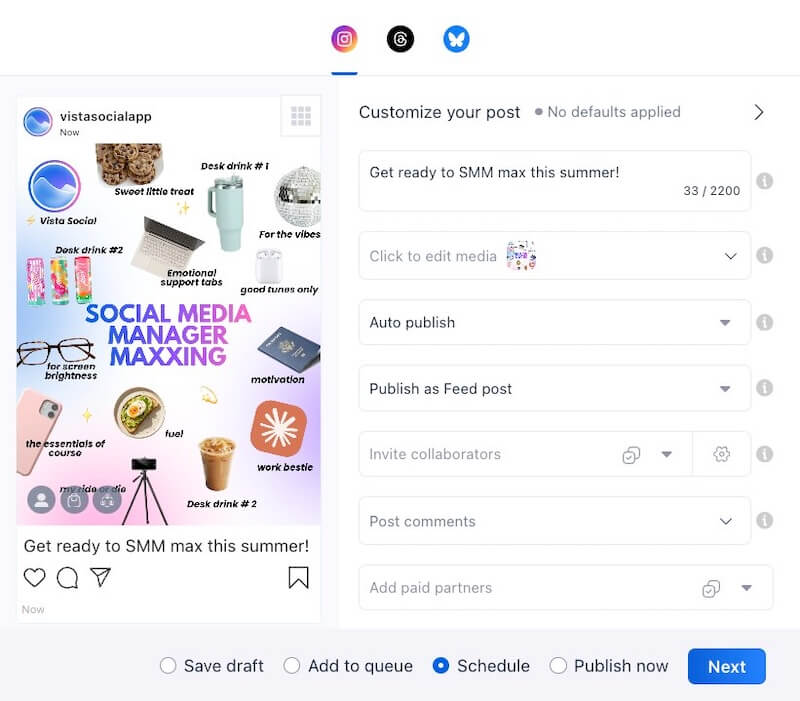
The Vista Social fast path: Customize each post per network from a single composer, tweaking the caption, crop, and format in one place, instead of maintaining a separate draft per network and hoping they stay in sync.
You’ll know it’s done when each post is tailored to the network it will publish on, not cross-posted identically.
Step 6 (Day 15): Fill the queue at the right times
With a month batched and tailored, load it into the queue and line each post up with the best time to post for your audience. Optimal timing will not save a weak post, but it gives a good one its best shot, and those small lifts add up over a month. Two moves lock in the baseline:
- Schedule at optimal times: Drop each post into the slot when your audience is most active, rather than guessing.
- Set evergreen recycling: Resurface your best-performing posts on a schedule with social media automation, so the feed never goes fully quiet between batches.
The Vista Social fast path: Schedule into your queue at optimal posting times based on when your audience engages, and use the Smart Publisher with evergreen recycling to keep the baseline full between batches. The result is a feed that stays alive even on the weeks you cannot get to it.
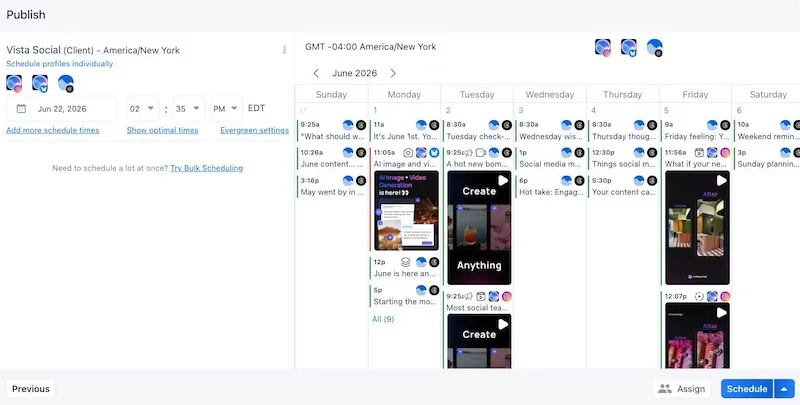
You’ll know it’s done when the next 30 days are scheduled and an evergreen baseline is set to fill any gaps.
Fill a month of optimal-time slots in minutes. Try it in Vista Social: no credit card required.
Step 7 (Days 16–30): Run the weekly measurement loop
The system is live. The last step is the habit that keeps it improving: a short weekly check of the numbers that matter. Watch saves, comments, shares, watch time, and community growth, because those signal that content landed, and skip follower count, which moves slowly and hides whether this week’s posts connected. Keep the loop light so you stick with it:
- Review the right metrics: Once a week, run a quick content analysis on saves, comments, shares, and watch time, not vanity numbers.
- Note the pattern: Spot what overperformed and why, in one or two lines.
- Feed it into the next batch: Make one adjustment a week, compounded over a quarter, and a decent content engine becomes a sharp one.
The Vista Social fast path: Use analytics to track saves, comments, shares, watch time, and growth in one view, so your weekly loop takes minutes instead of an afternoon of stitching spreadsheets across each network. The numbers are already in one place, tied to the posts that earned them.
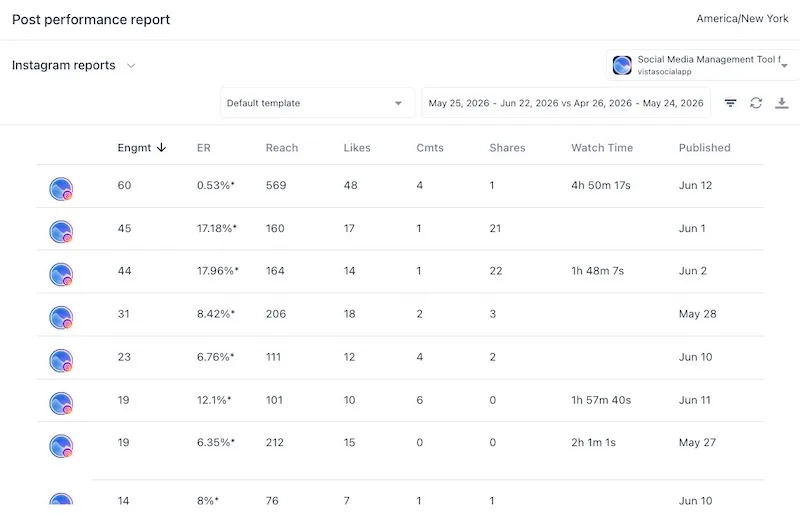
You’ll know it’s done when you have reviewed a week of results and made at least one change to your next batch based on the data.
Common mistakes to avoid
Even a good system can be undone by a few familiar habits. Watch for these as you roll the playbook out.
- Chasing maximal cadence: Picking the most aggressive schedule you can imagine, then flaming out in three weeks.
- Posting filler to stay consistent: Publishing something weak to keep a streak alive teaches your audience to scroll past you. Quality is part of the definition, not a trade-off against it.
- Deciding daily instead of batching: Making content choices under pressure every morning is the exact stress the system removes.
- Cross-posting identically: The same post pasted everywhere underperforms a lightly tailored version on every network.
- Measuring followers over engagement: Follower count flatters and misleads. Saves, comments, shares, and growth tell you what is working.
- Changing cadence every two weeks: Consistency needs time to compound. Give a rhythm a couple of months before you judge it.
Your 30-day consistency plan (copy this)
Here is the whole system as a checklist you can start today. Run it once inside Vista Social and you have a content engine already set up for your success.
- Define 3–5 content pillars and one sample post idea for each, color-coded on the calendar (days 1–2)
- Set a sustainable per-platform cadence you can hold for a year (days 3–4)
- Build your queue and label time slots by pillar so posts auto-fill (days 5–7)
- Batch about 30 days of content with the AI assistant and image and video generation (days 8–12)
- Tailor each post to its platform in the composer (days 13–14)
- Fill the queue at optimal times and set evergreen recycling as your baseline (day 15)
- Run a weekly analytics loop on saves, comments, shares, watch time, and growth, then adjust your next batch (days 16–30)
Keep the pillar grid and cadence table pinned somewhere visible. They are reusable, so next month you skip straight to batching.
Posting consistently, minus the willpower
Think back to that eleven-day silence and the guilt that came with it. It kept happening not because of a character flaw but because of a missing system, so every busy week knocked the posting over. With pillars chosen, a cadence you can hold, and a queue that fills itself, the silence does not get a chance to start. You are relying on a process that runs whether the week is good or not.
That is what consistent content buys you: not a heroic streak, but a steady machine that keeps showing up for your audience while you get on with everything else. Build the engine once in Vista Social, and a full month of content stops being a wish and becomes routine.
Turn this playbook into a self-sustaining queue. Build a month of content in Vista Social for free.
Frequently asked questions
How do I post consistently on social media?
Stop relying on willpower and build a system. Choose three to five content pillars. Set a cadence you can sustain, and load a queue that publishes on a fixed schedule. Batch a month of content in a few focused sessions instead of creating daily, then run a short weekly check on what is working. The system carries the consistency, so a busy week no longer breaks your streak.
How often should I post on each platform?
There is no universal magic number. Choose a cadence you can hold for a full year rather than the maximum you could manage on a good week. A sustainable start is around three to five posts a week on Instagram, TikTok, and Facebook, two to four on LinkedIn, and one to two a day on faster feeds like X and Threads. Match it to where your audience is most active and adjust as your data comes in.
Is it better to post more often or less but higher quality?
Higher quality on a steady cadence wins in 2026. Platforms increasingly reward saves, shares, and watch time over raw volume. A flood of forgettable posts buys fatigue, not reach. Pick a frequency you can keep without sacrificing quality, and treat fewer-but-better as the goal.
What is content batching and how do I do it?
Content batching is creating a large amount of content in a few focused sessions instead of piece by piece each day. Block your time by task. One session to plan ideas against your pillars, one to write captions, one to create visuals, and one to load everything into your queue. Working in one mode at a time is faster and far less draining than daily creation.
What are content pillars?
Content pillars are the three to five recurring themes your brand posts about, chosen where your audience’s interests overlap with what your business wants to be known for. Common pillars include education, proof, behind the scenes, and community. They end the blank-page problem, because every post starts from a theme instead of from nothing.
What metrics should I track instead of follower count?
Track engagement and community signals: saves, comments, shares, watch time, and steady audience growth. These tell you whether your content resonated, while follower count moves slowly and hides what is working week to week. Use them in a light weekly review to decide what to make next.
How does Vista Social help me stay consistent?
Vista Social runs the whole system in one place. Plan pillars in the content calendar, set labeled time-slot queues so posts auto-fill the right days. Use the Smart Publisher with evergreen recycling to keep the baseline full. The AI assistant and image and video generation speed up batching, multi-network customization keeps posts platform-native, and analytics power your weekly loop. The result is consistent, on-brand publishing without the scramble.

Try Vista Social for free
A social media management platform that actually helps you grow with easy-to-use content planning, scheduling, engagement and analytics tools.
Get Started NowAbout the Author

Content Writer
Orion loves to write content that refuses to be boring. As part of Vista Social, he helps brands, creators, and agencies stop doom scrolling and start winning with social media. When he's not in front of a keyboard, he's watching films in IMAX with his wife, dissecting football tactics (the European kind), and getting lost in a good book.