

Published on December 4, 2025
10 min to read
What is White Labeling and Why Does Your Agency Need It?

Summarize with AI

Table of contents
Summarize with AI

ChatGPT

Claude

Perplexity
Share

Vista Social

X (Twitter)


As an agency, you never want to hide the fact that you’re using professional third-party tools to be more efficient at your job of managing client accounts. But there’s a clear difference in providing a content calendar or report with the tool’s logo at the top versus your own branding.
White labeling solves this problem completely. It’s not about swapping logos or changing a few colors. When implemented properly, white labeling transforms how clients perceive your agency’s capabilities, positioning you as a full-service provider with consistent brand presence across the board.
Here’s everything you need to know about white labeling and why your agency can’t afford to ignore it anymore.
Table of contents
What is white labeling?
White labeling happens when you take a product or software someone else built and put your own branding on it. The original manufacturer or developer remains behind the scenes while your brand takes center stage in every client interaction.
Think about how grocery stores sell milk under their store brand. They didn’t own the dairy farm or process the milk themselves, but customers see the store’s name on every carton. That’s white labeling in its simplest form.
The software industry works the same way, just with more technical complexity. Instead of physical products, you’re rebranding digital platforms, tools, and services.
Your clients log into dashboards showing your logo. They receive reports generated under your brand name. Every automated email comes from your domain.
The underlying technology might be Vista Social or another platform, but your clients see only your agency’s fingerprints on everything. You’re not hiding that you’re using Vista Social, but you are improving your overall brand strength and recognition.
White labeling vs. reselling
White labeling differs fundamentally from reselling. When you resell, you’re marketing and selling someone else’s product for a profit. Your role is explicit. You’re the middleman, and everyone knows it.
With white labeling, you’re simply rebranding the third-party product to improve your own client experience. You’re not selling Vista Social. You’re putting your brand front and center at every client touchpoint. It boosts brand strength and creates a stronger agency-client relationship.
The technical distinction matters because it changes the entire client relationship dynamic. White label social media marketing strengthens your agency’s brand. Reselling is a business model.
White labeling applications span multiple categories:
| Industry | What gets white labeled | Technical implementation |
| Software & SaaS | Social media platforms, analytics dashboards, CRM systems | Custom domains, logo replacement, branded UI elements |
| Reports & analytics | Performance dashboards, PDF exports, data visualizations | Template customization, automated branding injection |
| Client communication | Login portals, email notifications, approval workflows | Domain masking, SMTP configuration, branded assets |
| Marketing tools | Content schedulers, automation platforms, campaign managers | API-driven branding, white-label modes |
| Digital products | Website builders, hosting panels, development tools | Multi-tenant architecture with brand separation |
For agencies specifically, white labeling applies to the tools powering daily client deliverables. Instead of clients seeing third-party platform names on every report, dashboard, and login screen, they encounter your agency’s brand consistently reinforcing your value and expertise.
What are the benefits of using white label software?
The advantages extend far beyond aesthetic preferences. White labeling fundamentally restructures the client relationship, changing perception, retention dynamics, and growth potential.
| Benefit | What it means for your agency |
| Boost brand equity | Every client touchpoint reinforces your brand identity |
| Increase client loyalty | Show that you’re using quality third-party tools without disruption the client experience |
| Enhance credibility | Professional presentation across all client interactions |
Boost brand equity
Consistent branding across every client touchpoint creates cumulative brand recognition that compounds over time. When clients log into your portal at clients.youragency.com rather than platform-name.com, they’re experiencing your brand.
When reports arrive branded entirely under your agency name, they’re associating that quality with your capabilities. When shortened links use your domain instead of a third party’s, every share reinforces your brand presence.
This consistency matters more than most agencies realize. You’re not just delivering services. You’re building brand equity with every interaction. Over time, clients stop thinking about individual tools and platforms. They think about your agency as a complete service provider.
Increase client loyalty
Your clients know you’re using third-party social media management software. That’s a given part of managing social media accounts.
But they’re still seeing your agency’s branding across the board. This ensures the overall client experience isn’t disrupted with a third-party logo.
Your clients know it’s not your software. But they don’t even have to think about what software it is because all they see is your branding at every touchpoint, reinforcing your professionalism and credibility, and making them want to stick around.
The psychology matters here. Clients stay not because they’re locked into contracts, but because you’ve established yourself as irreplaceable through consistent branded experiences that reinforce your expertise at every touchpoint.
Enhance professional credibility
Presentation quality directly impacts how clients perceive your agency’s capabilities and sophistication. Professional branding across all touchpoints creates an impression of established expertise and comprehensive capabilities.
Compare these two client experiences:
| Without white labeling | With white labeling |
| Email from: notifications@platform-name.com | Email from: reports@youragency.com |
| PDF footer: “Powered by XYZ Platform” | PDF footer: Your agency contact info only |
| Dashboard URL: platform-name.com/client/12345 | Dashboard URL: app.youragency.com |
| Third-party logo in header/navigation | Your logo throughout the entire interface |
| Generic platform colors | Your brand colors |
The difference isn’t subtle. And just guess which one supports premium pricing, easier upsells, and consistent referrals?
Professional presentation translates directly to client confidence. Client confidence translates to retention, expansion revenue, and word-of-mouth growth.
Essential white label features agencies should look for
White labeling implementation varies dramatically across platforms. Some providers slap “white label” on their marketing materials but only offer basic logo swaps. Others, like Vista Social, provide comprehensive customization that creates genuinely seamless branded experiences.
Here’s what actually matters when evaluating white label social media platforms:
| Feature category | Technical requirements | Business impact |
| Custom domains | DNS configuration support, SSL certificate management, subdomain routing | Clients never see platform brand |
| Branding | Logo injection across all UI elements, color palette customization, email SMTP configuration | Consistent brand experience |
| Reports | Template-level customization, automated brand asset insertion, white-label PDF generation | Most frequent client touchpoint |
| Integrations | OAuth support, webhook configurations, API access for custom workflows | Seamless operations without workarounds |
| Scalability | Multi-tenant architecture, unlimited client support, performance at scale | Supports agency growth trajectory |
| Support | Agency-specific support channels, technical documentation, integration assistance | Get unlimited help from high-quality customer support teams |
1. Custom domains across all client touchpoints
Domain control represents the foundation of effective white labeling. Every URL your clients encounter should reinforce your brand, not remind them you’re leveraging third-party technology.
Comprehensive white labeling requires custom domain support for:
Client login portals: i.e., clients.youragency.com instead of platform-name.com/login
- Requires DNS CNAME configuration pointing to platform infrastructure
- SSL certificates for secure connections under your domain
- Session management that maintains domain consistency
Shortened links: i.e., youragency.link instead of platform.link/abc123
- Custom domain registration and DNS configuration
- Link routing infrastructure that preserves your domain in click tracking
- Analytics tracking that attributes traffic to your branded domain
Link-in-bio pages: i.e., links.youragency.com instead of platform-bio.com/username
- Subdomain configuration for landing page hosting
- Custom CSS support for brand-consistent design
- Analytics integration tracking visitor behavior under your domain
Shared calendars: i.e., calendar.youragency.com instead of platform.com/shared/calendar
- Iframe embedding or direct hosting under your domain
- Responsive design that works across devices
- Permission management that maintains your branded interface
Report URLs: i.e., reports.youragency.com instead of platform.com/reports/view
- Secure access control under your domain
- PDF generation with your branding throughout
- Sharable URLs that reinforce your brand
The technical implementation matters. Poor white labeling shows the underlying platform domain in URLs, creating confusion and undermining brand consistency. Proper implementation maintains your domain throughout the entire client experience.
2. Complete logo and branding customization
Logo replacement represents just the starting point. Comprehensive white labeling requires control over visual identity across every interface element:
- Dashboard header: Your logo replaces platform branding in primary navigation
- Reports and exports: Automated insertion of your logo in headers, footers, and cover pages
- Email notifications: Your logo in email headers with your color scheme
- Custom email addresses: SMTP configuration allowing reports@youragency.com instead of noreply@platform.com
- Full color palette control: Brand colors applied to buttons, links, charts, and UI elements
3. Branded PDF reports and exports
Reports represent your most frequent client-facing deliverable. Every PDF export needs to look like it came directly from your agency’s design team, not a generic platform template with your logo hastily inserted.
Comprehensive report white labeling includes:
- Header customization: Your logo, agency name, and report title in brand-consistent layout
- Color scheme application: Charts, graphs, and visual elements using your brand colors
- Footer customization: Your agency contact information, website, social media handles
- Zero platform mentions: Complete removal of any “Powered by” or platform attribution
- Custom cover pages: Professional report covers matching your existing collateral
- Template control: Ability to modify layout, typography, and visual hierarchy
4. Seamless integrations
White label software needs to connect smoothly with the tools your clients already use. If you’re constantly explaining workarounds, managing data exports, or building manual processes, the white label experience falls apart under technical scrutiny.
Look for platforms offering:
- Native social platform integrations: Direct API connections to major networks without middleware
- CRM connectivity: Bi-directional data sync with popular CRM systems
- Analytics platforms: Integration with Google Analytics, Adobe Analytics, and similar tools
- Project management: Connections to Asana, Monday, ClickUp for workflow management
- Reporting tools: Data export to popular BI platforms for custom reporting needs
5. Scalability for agency growth
Your white label solution should grow alongside your agency without forcing platform migrations or imposing artificial restrictions. Evaluate the following:
- Client capacity: Can you add unlimited clients or does the platform impose restrictions?
- White label feature access: Are white labeling capabilities locked to expensive enterprise tiers, or available at reasonable price points?
- Team member support: Can you onboard new employees as you grow without per-user penalties?
- Performance at scale: Does the platform maintain speed and reliability as your usage increases, or do you encounter slowdowns and bottlenecks?
Choose platforms designed specifically for agencies, not generic tools that happen to offer some white labeling features as afterthoughts. Purpose-built agency solutions understand your growth trajectory and provide infrastructure that scales appropriately.
6. Dedicated support for your team
When technical issues arise or you need help configuring features, you want to make sure you have easy access to customer support.
Look for providers offering:
- Agency-specific support channels: Direct access to support teams familiar with white label implementations
- Technical documentation: Comprehensive guides for configuration, troubleshooting, and optimization
- Implementation assistance: Help setting up custom domains, configuring DNS, and optimizing the white label experience
- Response time commitments: SLAs that ensure you get help quickly when client deliverables are at stake
Support quality matters more with white labeling because you’re the front line for all client questions. You need reliable backup that understands your unique positioning and is readily available to help.
How your agency can use Vista Social’s white labeling capabilities
Vista Social provides comprehensive white labeling specifically designed for agencies managing multiple social media accounts. The implementation goes beyond basic logo swaps to create genuinely seamless branded experiences.
White label setup overview:
| Configuration step | Technical complexity | Client impact |
| Custom login domain | Moderate (DNS configuration) | High – First impression |
| Logo and color scheme | Low (file upload) | High – Visible everywhere |
| Branded report templates | Low (template customization) | Critical – Most frequent deliverable |
| Custom link domains | Moderate (DNS + verification) | Medium – Ongoing reinforcement |
| Shared calendar branding | Low (toggle settings) | Medium – Content approval workflow |
| Email notification setup | Moderate (SMTP + verification) | High – Every automated communication |
1. Set up your custom domain for login
You can replace the Vista Social login/dashboard URL with your own subdomain (like dashboard.youragency.com). Vista Social requires you to add a CNAME record in your DNS and then contact support to verify it.
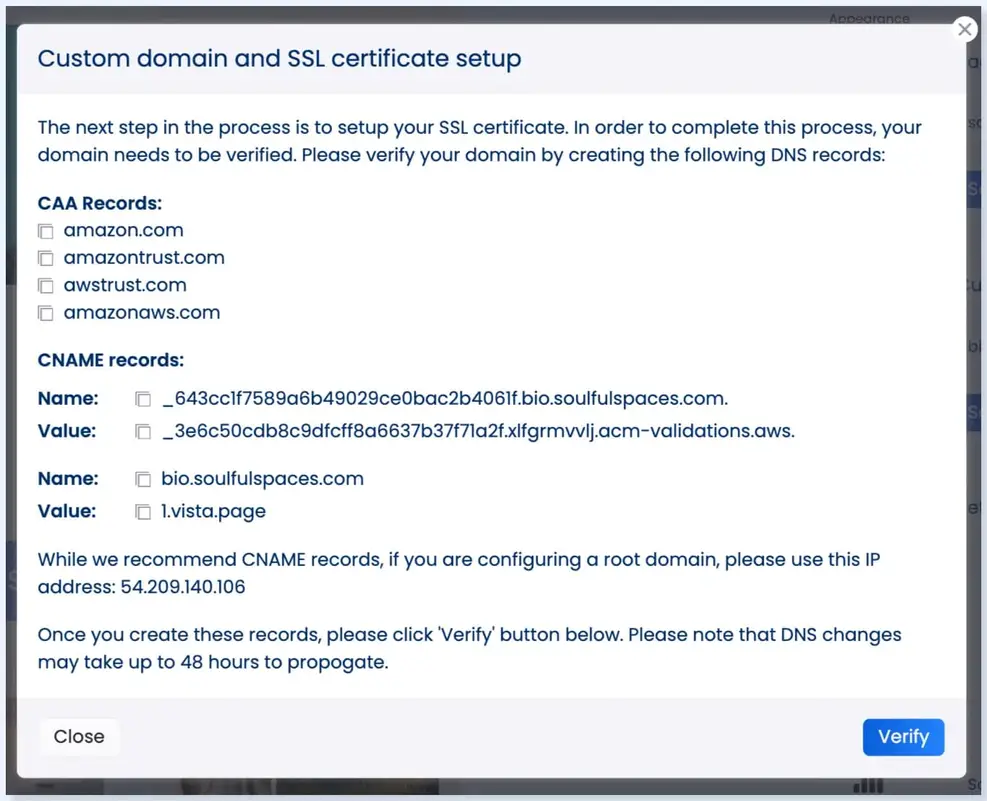
Steps:
- Choose your subdomain (e.g., dashboard.youragency.com)
- Create a CNAME record in your DNS pointing that subdomain to the Vista Social target provided in your white label settings
- Once the CNAME is added, contact Vista Social Support so they can verify the domain and issue the SSL certificate
- After verification, clients will log in through your custom domain, not vistasocial.com
This also applies to shared calendars, which can be white-labeled using a separate subdomain (e.g., calendar.youragency.com).
2. Upload your agency’s logo
Vista Social replaces their logo with yours across the dashboard and login page. The logos must be uploaded through their support team, not manually in the interface.
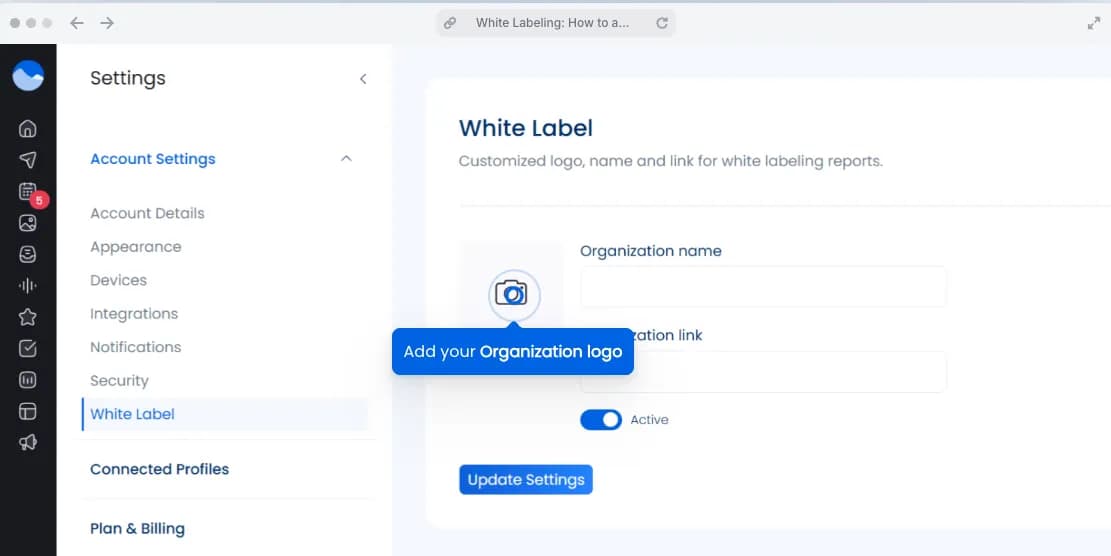
Required assets:
- Login page logo: 814 × 527 px (PNG with transparent background recommended)
- Dashboard header logo: 500 × 108 px
- Favicon: 32 × 32 px
Steps:
- Prepare your logo files in the required sizes
- Go to Settings → White Label → Logo Setup to submit them
- Vista Social Support applies the branding across your dashboard, login page, shared calendar, and emails
Your logo now appears throughout the interface: dashboard header, report headers and footers, email notifications, and shared resources. Vista Social automatically applies your logo to new features and interface updates, maintaining branding consistency without manual adjustments.
3. Configure branded report templates
Reports can be white-labeled so they display your logo and your agency name in the header/footer.

Steps:
- Go to Reports → Settings
- Upload your report header logo (different from the dashboard logo if you prefer)
- Edit the footer with your contact details
- Toggle off any Vista Social branding if your plan includes full white labeling
- Save and preview
All PDFs generated afterward will appear fully branded as your agency.
4. Set up custom domains for shortened links
Vista Social link shortening can use your own custom domain or subdomain instead of vist.ly.
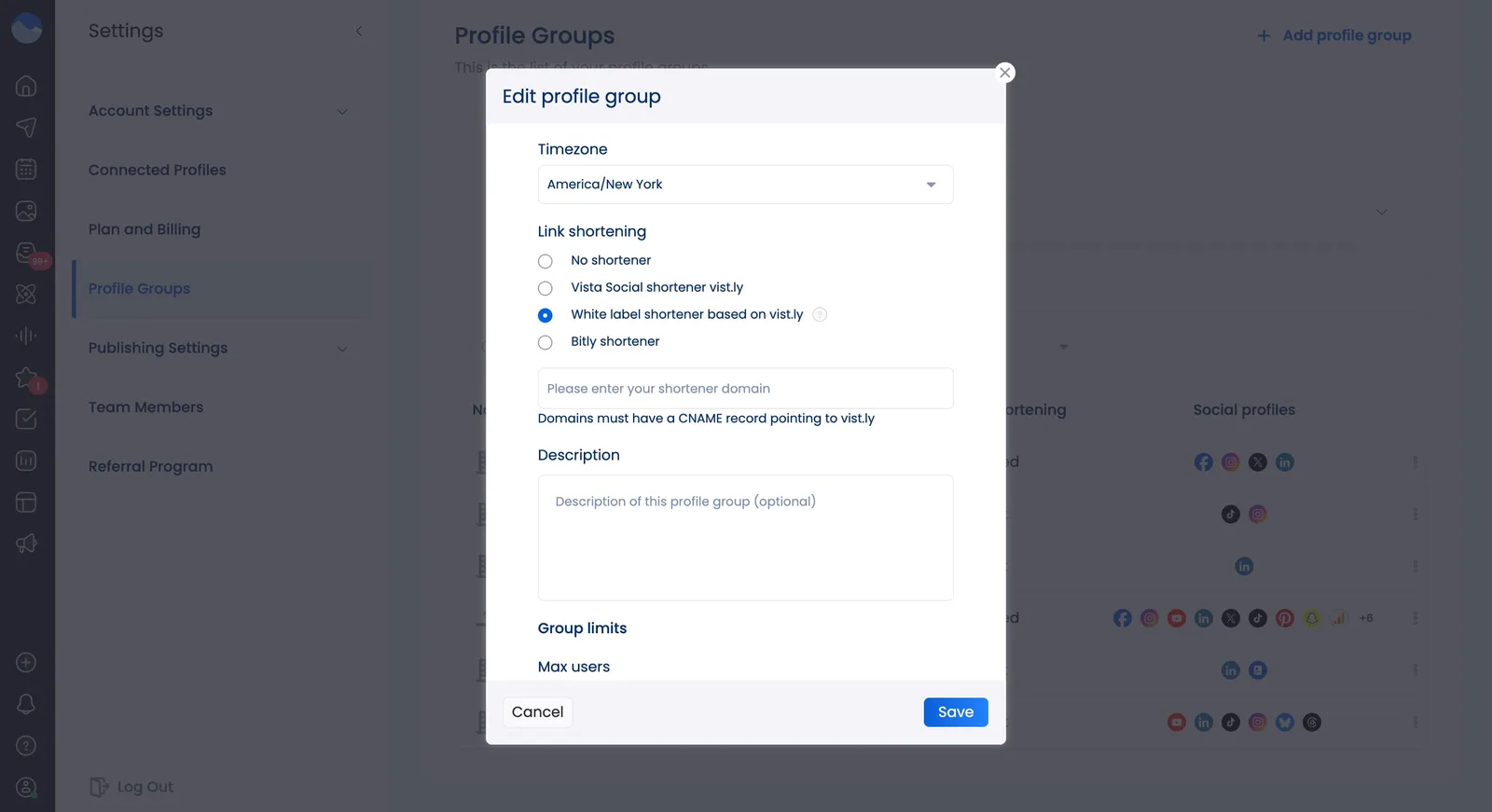
Steps:
- In Vista Social, go to Settings → Profile Groups
- Click on the three dots next to your chosen profile group and select Edit
- Scroll down to the Link shortening section and select White label shortener
- Enter your chosen domain or subdomain (e.g., go.youragency.com)
- Add the DNS records they provide:
- CNAME if using a subdomain
- A record if using the root domain
- Contact Vista Social Support — they’ll install the SSL certificate
- Test new shortened links to confirm they use your domain
Clients will then share links that show your brand, not Vista Social’s. Or, you can always provide an extra service that rebrands short links under your client’s domain.
5. Configure white-labeled shared calendars
Vista Social allows you to white-label shared content calendars so clients never see any Vista Social branding.
Steps:
- Choose a subdomain (e.g., calendar.youragency.com)
- Add the CNAME record Vista Social provides
- Contact Support to verify it and enable SSL
- Share calendars normally — clients see only your logo + your custom domain
6. Set up branded email notifications
Vista Social lets you use your own “From” email address for all automated notices (reports, approvals, system updates).
Steps:
- Go to Settings → White Label → Email Notifications
- Add your custom email (e.g. reports@youragency.com)
- Follow the domain verification steps they give you (TXT record in DNS)
- Vista Social Support confirms and applies your email + logo branding
All notifications will then show your email + your logo—no Vista Social branding.
Get started with white labeling for your agency
White labeling solves the retention problem that keeps agency owners up at night. When clients are getting a clean and cohesive experience across all touchpoints with your agency, they feel safe and secure in your professional partnership.
The growth trajectory speaks for itself. Agencies using white label social media management platforms scale faster. They’re closing deals, delivering work, and building recurring revenue streams that compound month over month.
Vista Social’s white labeling gives you the infrastructure to compete at that level. Custom domains across every client touchpoint, fully branded reports that clients actually want to share with their executives, and the professional polish that justifies premium pricing. You focus on strategy and relationships while we handle platform maintenance and feature updates.
Ready to see how white labeling transforms client perception of your capabilities? Explore our white label options and start building the professional presence your agency deserves.

Try Vista Social for free
A social media management platform that actually helps you grow with easy-to-use content planning, scheduling, engagement and analytics tools.
Get Started NowAbout the Author

Content Writer
Orion loves to write content that refuses to be boring. As part of Vista Social, he helps brands, creators, and agencies stop doom scrolling and start winning with social media. When he's not in front of a keyboard, he's watching films in IMAX with his wife, dissecting football tactics (the European kind), and getting lost in a good book.
Loading related tools...




Tools
PublishingAnalyticsEngagementIntegrations
FacebookInstagramLinkedInRedditSnapchatThreadsTikTokX (Twitter)YouTubeBlueskyVista Page (link-in-bio)All IntegrationsCopyright © 2026 Vista Social LLC. All Rights Reserved.