

Published on May 14, 2024
10 min to read
How to Manage Multiple Social Media Accounts

Summarize with AI

Table of contents
Summarize with AI

ChatGPT

Claude

Perplexity
Share

Vista Social

X (Twitter)


Is it really possible to manage multiple social media profiles without losing your mind?
When I say “multiple,” I don’t mean a few pages here and there. I’m talking about handling dozens, sometimes hundreds, of accounts for different brands or clients. Just thinking about it can make your head spin, right?
Managing even a small batch of profiles can be chaotic if you don’t have a proper system. Between content creation, scheduling, engagement, and reporting, it’s easy to feel buried under endless notifications and deadlines.
The good news is, managing that chaos is completely doable once you have the right setup. With the right workflows and tools, you can simplify your process and finally feel in control of every account you manage.
Table of contents
Content creation
Content creation takes time. You’re constantly juggling ideas and visuals while trying to craft the right message. Without a clear process, it can quickly start to feel overwhelming. One simple way to make content creation easier is by using task batching. Task batching means grouping similar work so you can stay focused and get more done without constant distractions.
Instead of bouncing between creative work and performance tracking all day, try dedicating a full block of time to one type of task. You’ll notice how much easier it is to stay in the zone. Task batching works because it reduces the mental strain that comes from jumping between unrelated tasks. Research shows that frequent task switching can lower productivity by as much as 40 percent, so staying focused helps you get more done in less time.
AI can also make content creation faster and more consistent. Vista Social’s AI tools can generate captions, refine tone, and offer platform-specific suggestions based on your prompts. Many marketers now rely on generative AI to keep their content flowing without losing creativity.
Vista Social’s AI assistant makes it easy to produce multiple captions in seconds. Just type a prompt, click Generate caption, and you’ll instantly get ideas ready to post or customize.
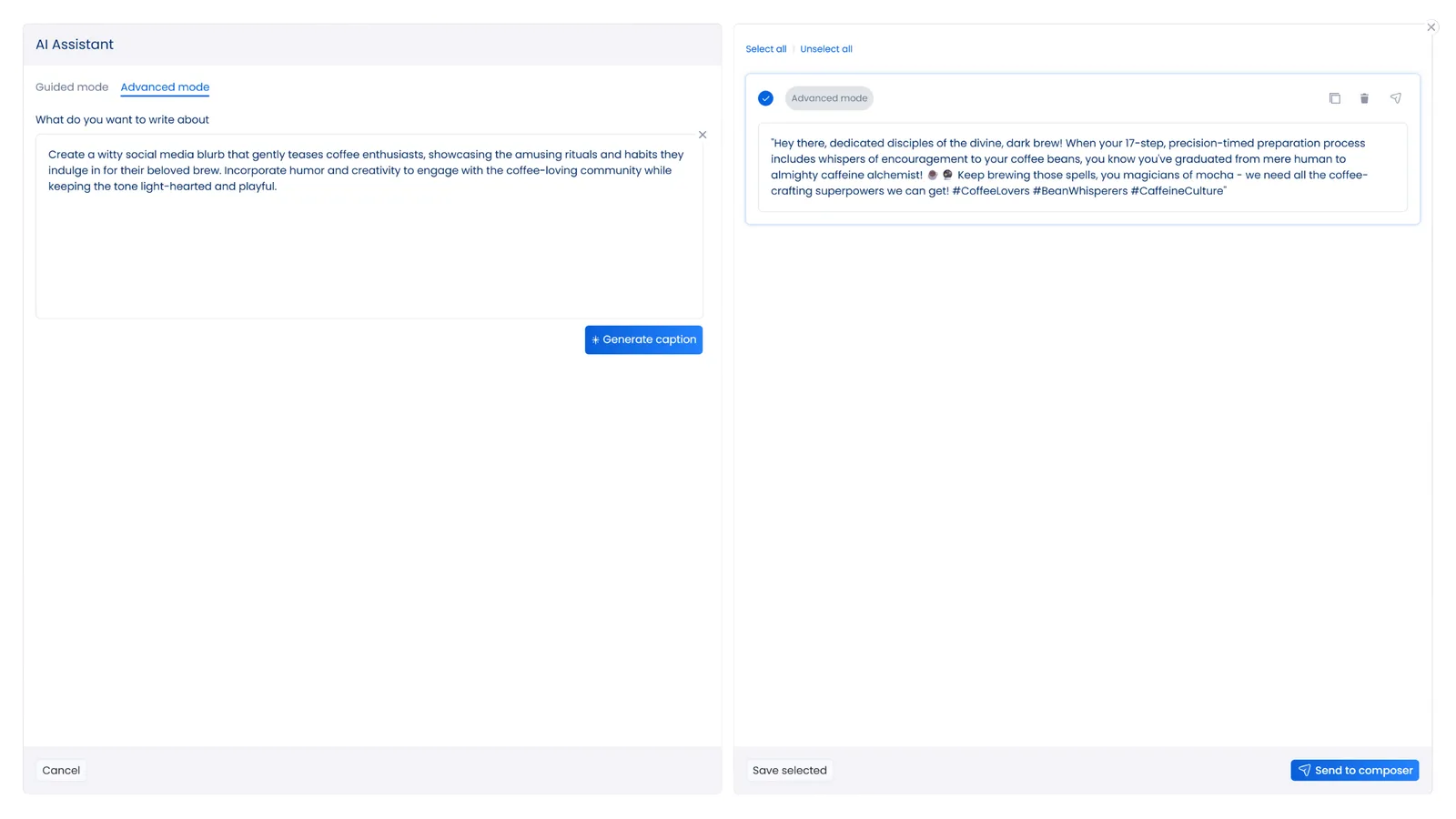
The captions it creates often have a fresh and authentic tone that matches your brand’s personality. If you want new options, click again to generate fresh variations until you find the perfect one.
For better results, tell the AI which platform your post is for. That helps it adjust the tone and structure so your message fits each audience naturally.
Try prompts like “Write a caption that fits Instagram’s engagement style” to make sure your post connects with the right audience.
Once you start batching your work and using AI support, you’ll find that content creation feels smoother and more enjoyable. You’ll spend less time guessing what to post and more time fine-tuning ideas that actually work.
Scheduling and publishing
If you want to simplify your social media scheduling and publishing, the easiest way is to use a management tool that keeps everything in one place.
Vista Social helps you plan, schedule, and publish content across major platforms like Instagram, Facebook, TikTok, YouTube, Pinterest, LinkedIn, and Threads. It’s built to evolve with you, adapting quickly as new networks emerge so your brand always stays visible.
With the Publisher feature, you can connect your clients’ social profiles, create unique posts, and choose the best times to share them for stronger engagement. You can test different post formats and templates to see what performs best on each network, whether that’s a single image or a carousel post.
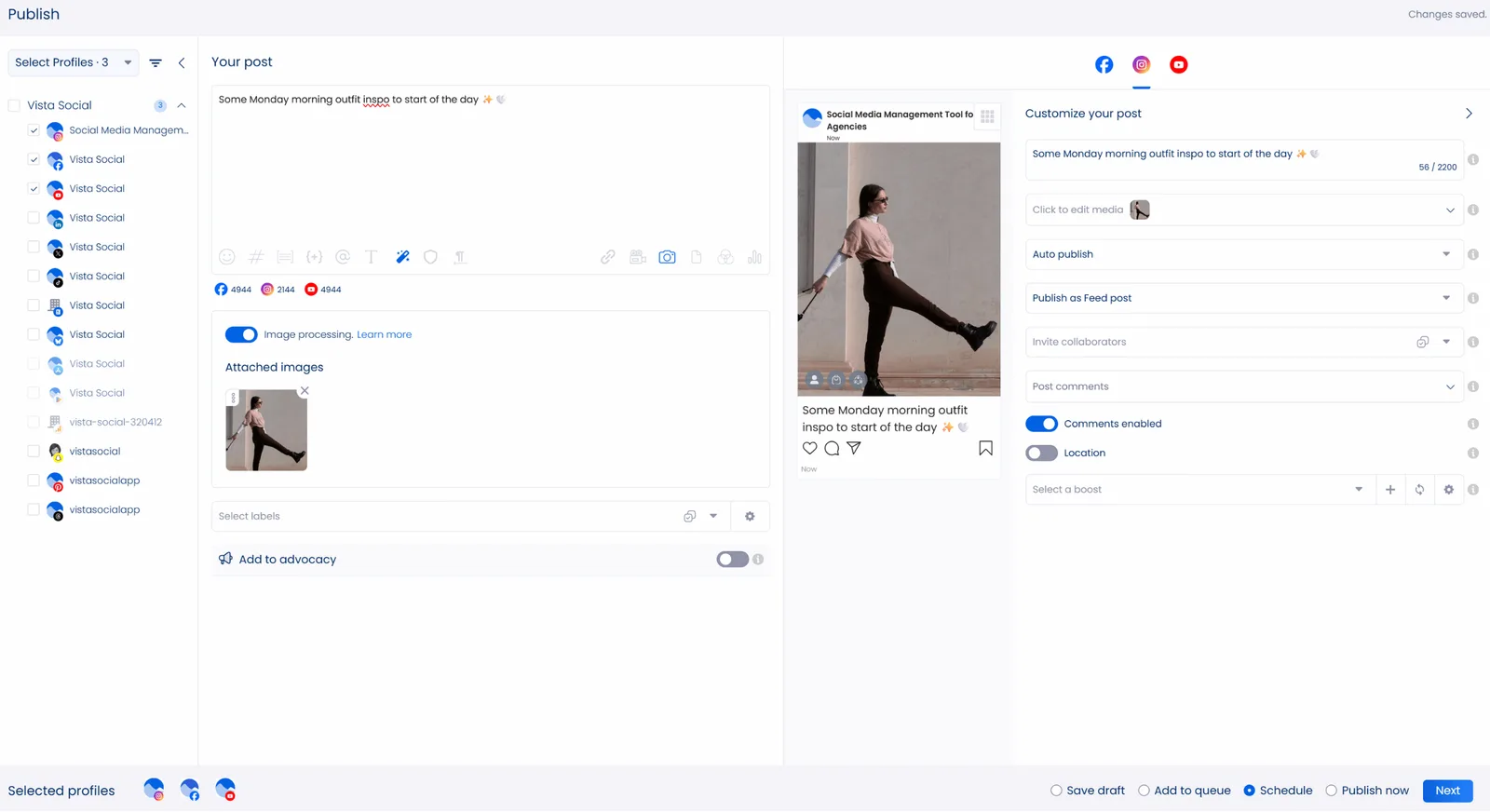
Important note: On Instagram, a carousel post means multiple images in a feed post, not the carousel ads in Instagram Reels.
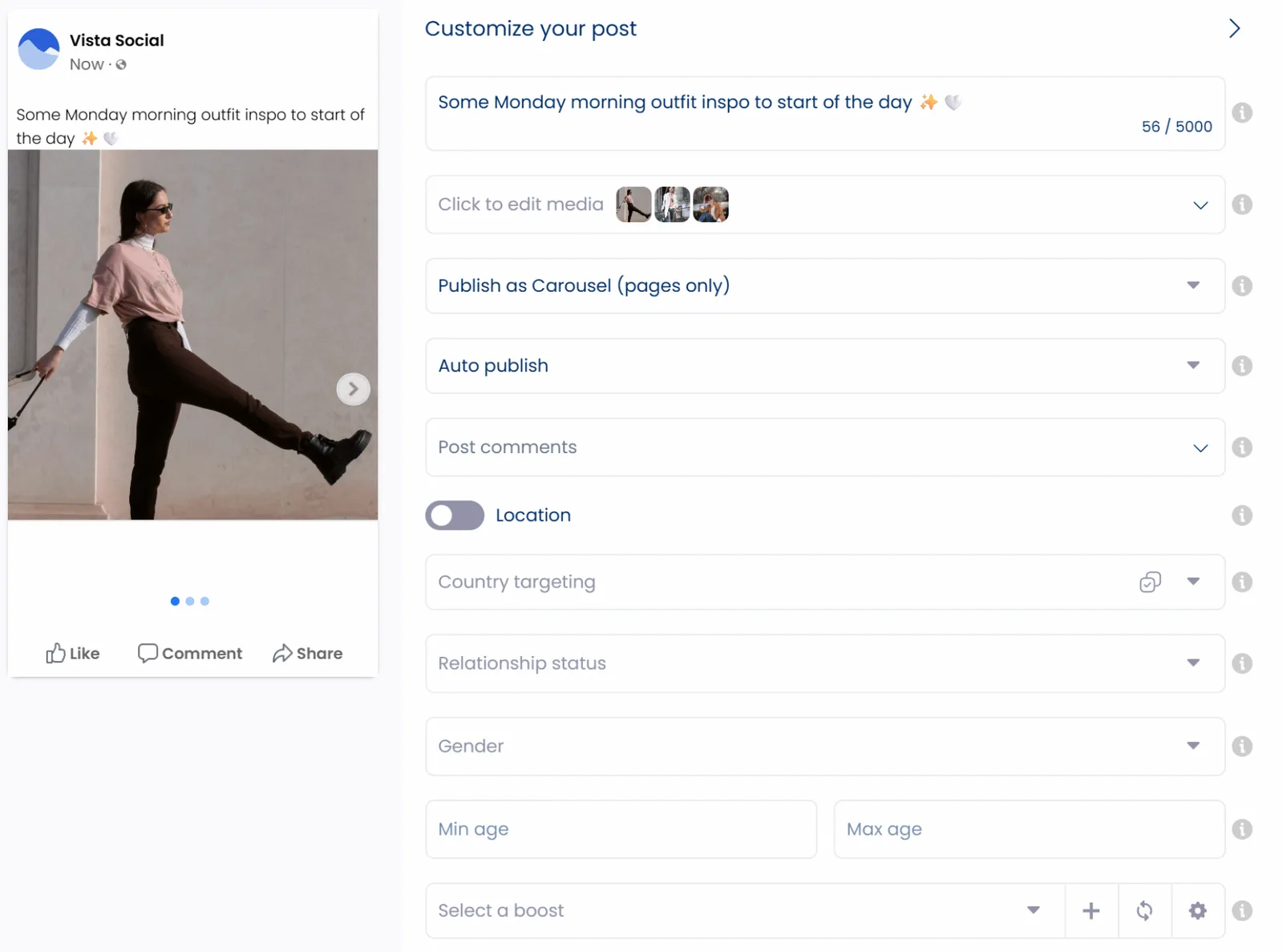
You can also add captions or hashtags, tag users or locations, and choose a specific audience within the same workflow.
The Publisher includes built-in tools that make post creation smoother and faster:
- A centralized media library to store and organize videos, photos, and short-form clips for easy reuse across channels
- Drafts and approval workflows to simplify client reviews
- A hashtag generator that suggests what’s trending for better reach
- A content calendar for easy content planning, development, and management.
Once your posts are ready, schedule them to auto-publish at the exact times you choose. Vista Social even recommends when to post based on engagement patterns. You can also queue or bulk-schedule posts to keep campaigns running without constant oversight. When you’re handling multiple clients, this level of automation makes your day-to-day much easier.
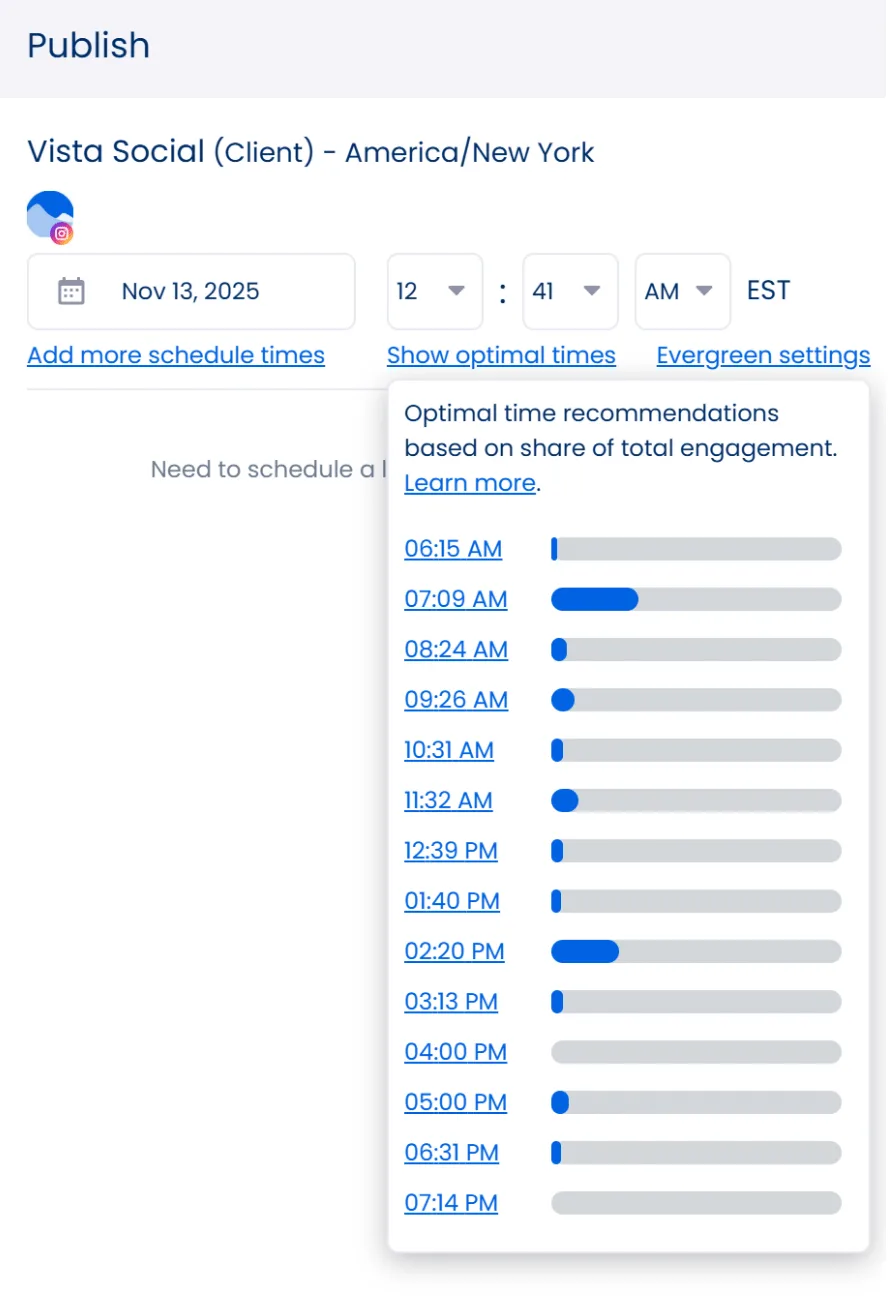
Vista Social’s scheduling and publishing tools save hours of manual work while keeping your process organized. You’ll spend less time juggling schedules and more time refining ideas that drive results.
Audience engagement
People tend to recommend brands that respond quickly and sound human, since timely replies help build trust and make followers feel valued.
Positive brand experiences on social media usually come from how brands interact with their audiences.
Building an engaged audience goes beyond posting clever content or chasing likes. It’s about showing up and making your followers feel heard. Your clients need to interact regularly and connect in ways that feel genuine. That’s how you build engagement that actually lasts.
But let’s be real, logging into every client account, reading through endless comments, and replying one by one isn’t realistic. No one has time for that, which is why you need a smarter solution: a social media management tool that handles engagement in one place.
Vista Social’s engagement tools make this easy. The platform’s unified Social Inbox lets you manage every message, comment, review, and mention in one view. You can handle all of your clients’ interactions without switching between accounts.
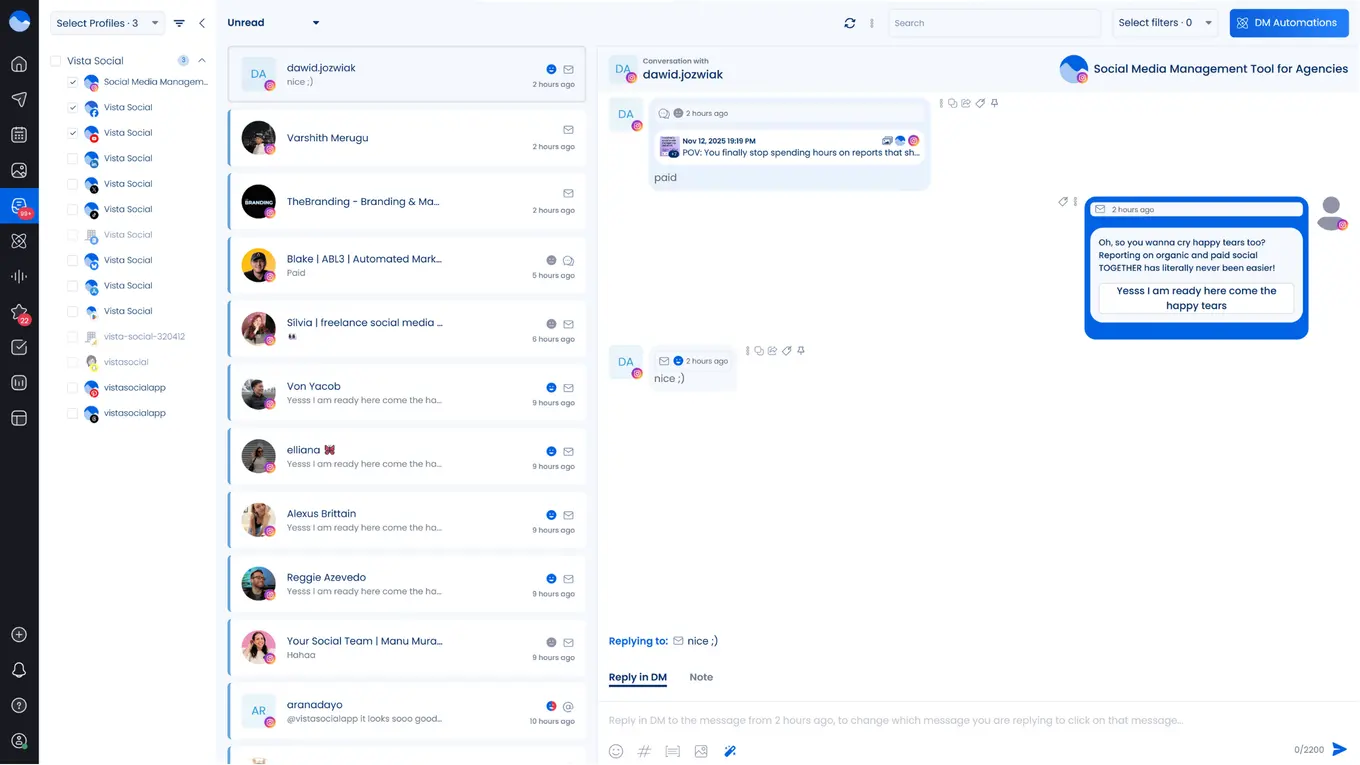
With the Social Inbox, you can see all connected profiles in a single stream. Smart filters and automation keep your replies organized and quick, so engagement stays consistent and effortless.
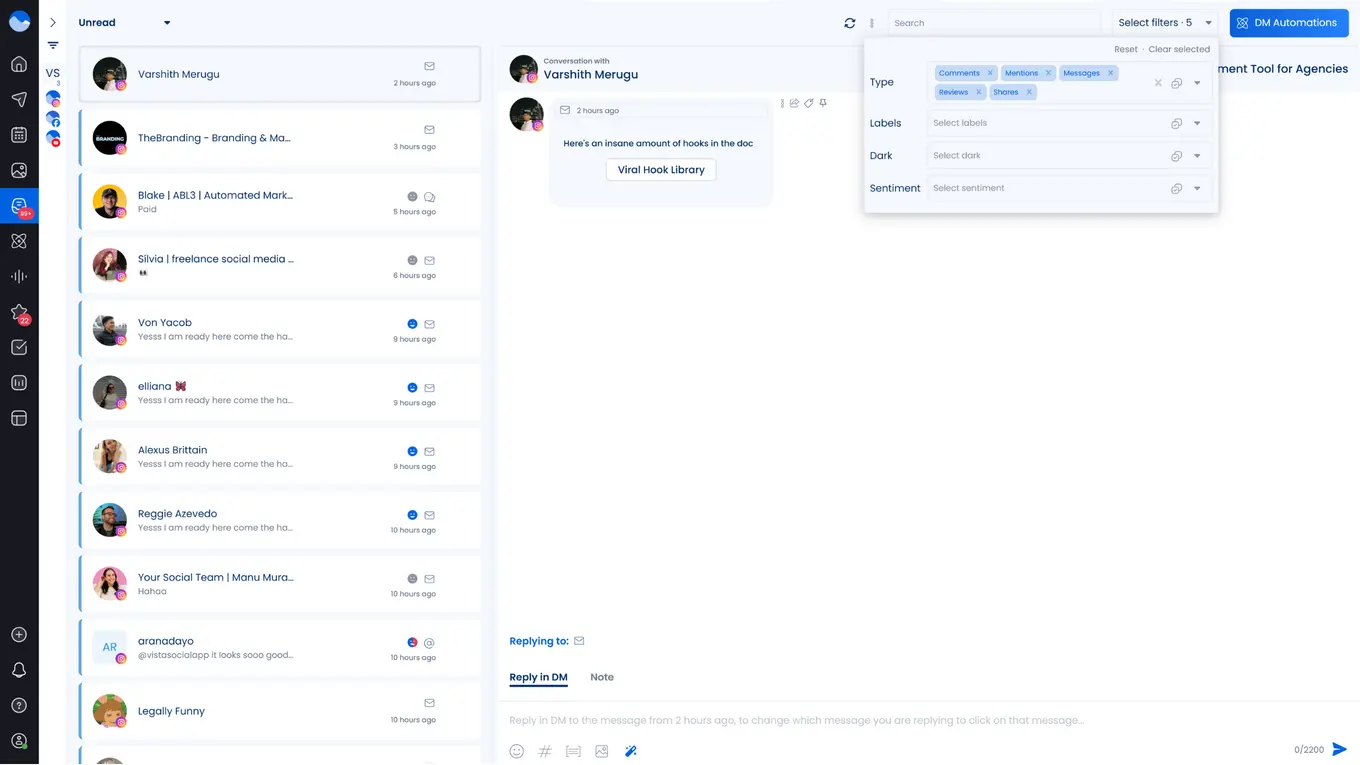
You can manage every interaction directly inside the inbox, like delete, or archive messages, flag spam, or even block users when needed. Managing audience engagement becomes simple when everything happens in one place with Vista Social.
Data analysis and reporting
Understanding how your clients’ content performs is key to knowing what’s working and what needs improvement. As Erik Qualman once said…
“We don’t have a choice on whether we do social media, the question is how well we do it.”
Tracking engagement and analyzing performance are important, but they can also take up your entire day if you don’t have the right system in place. Digging through data from multiple sources and building detailed dashboards takes time, time that could be better spent on strategy and creativity.
The best way to simplify that process is to use reliable social media analytics and reporting tools.
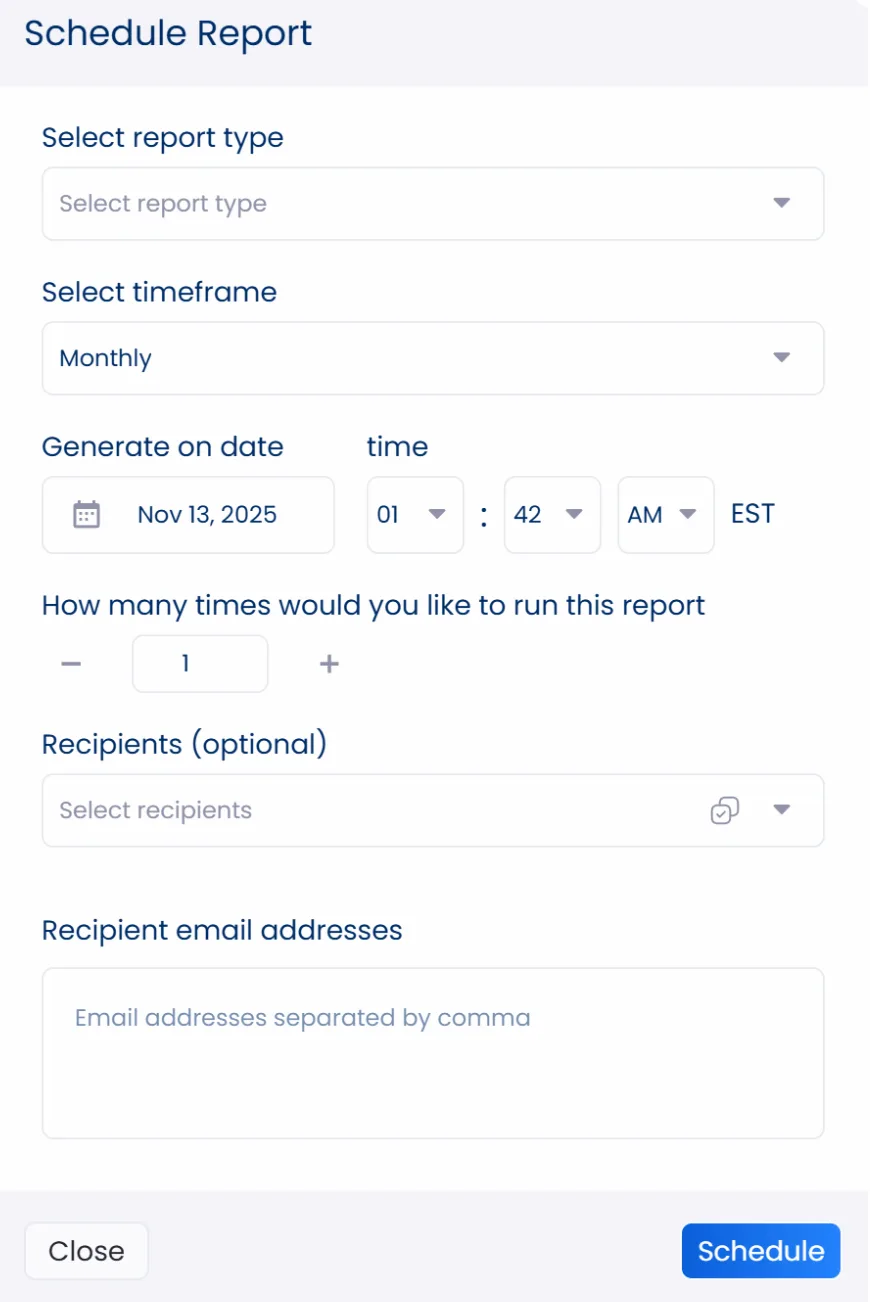
Reporting and analyzing results should be quick, customizable, and automated, and that’s exactly what Vista Social delivers. Vista Social’s analytics feature lets you track results and build professional reports for every client, all from one clean and intuitive dashboard.
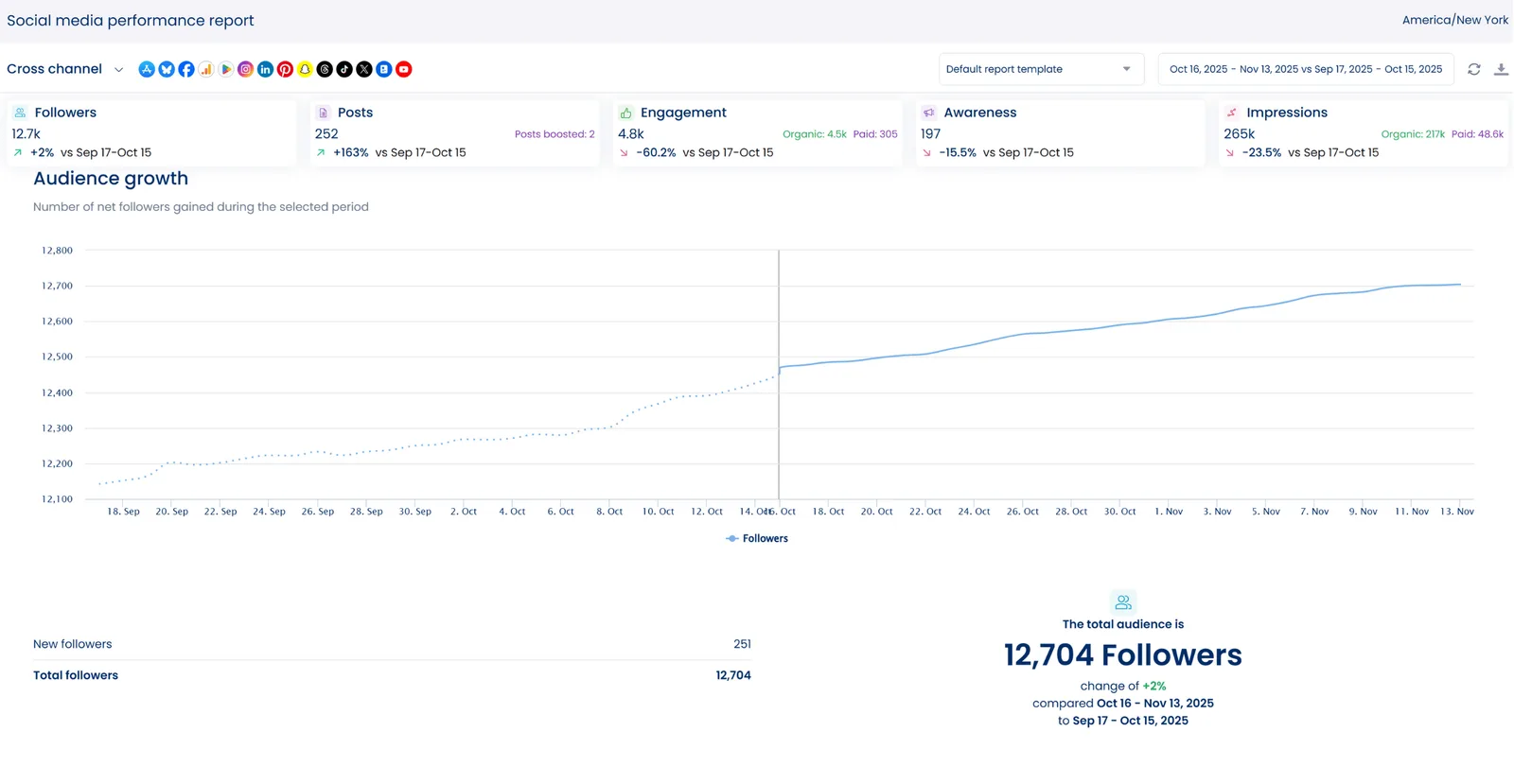
The dashboard gives you a clear view of performance across all profiles with essential social media metrics like audience growth, engagement rate, and impressions. You can design your own templates, export reports as PDFs, and even white-label them with your clients’ logos. You can also schedule automatic reports to keep everyone updated without lifting a finger.
It’s not just about seeing the big picture, Vista Social also lets you dig into individual post performance to see which content resonates best with your audience. After a post goes live, you can open it in the content calendar to check detailed performance stats and engagement insights.
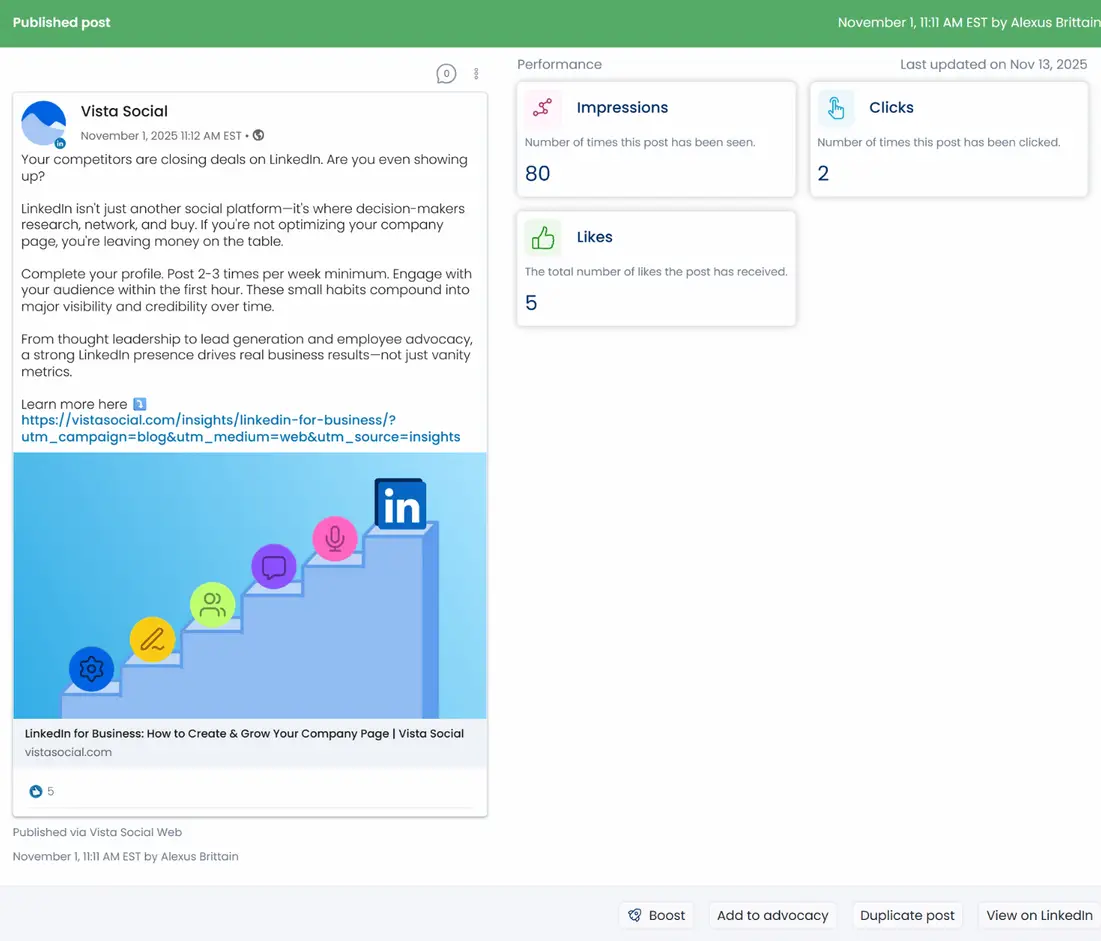
You’ll see performance data such as impressions, reach, saves, and likes, all tailored to the metrics available for each network.
Important note: Post metrics may take a short time to appear. Vista Social keeps analytics synced and refreshed for near real-time accuracy.
With these analytics tools, you’ll save time, create reports in seconds, and uncover insights that help you adjust strategy with confidence. You’ll have the insights you need and the freedom to track and enhance content performance, giving your clients a clearer path to better engagement and measurable growth.
Managing reviews
Customer feedback can shape your clients’ online reputation. A single review can build confidence or push a potential buyer away. That’s why reviews aren’t just comments; they reflect how people truly feel about your clients’ brands.
“Advertising brings in customers, but word-of-mouth brings in the best customers.” That quote from Jonah Berger sums up how powerful genuine feedback can be.
Recent studies show that around 85 percent of shoppers trust online reviews as much as personal recommendations. Reviews remain one of the strongest forms of social proof, helping potential customers decide whether to engage or look elsewhere.
The challenge is keeping up with every review when you’re managing multiple clients. Switching between platforms and trying not to miss a single comment can take hours.
Vista Social’s Review Management feature solves that problem. Once your clients’ reviews and social profiles are connected, you can see every comment and respond from one dashboard. You can also set up alerts by text, email, or in-app message so new reviews never slip through the cracks.
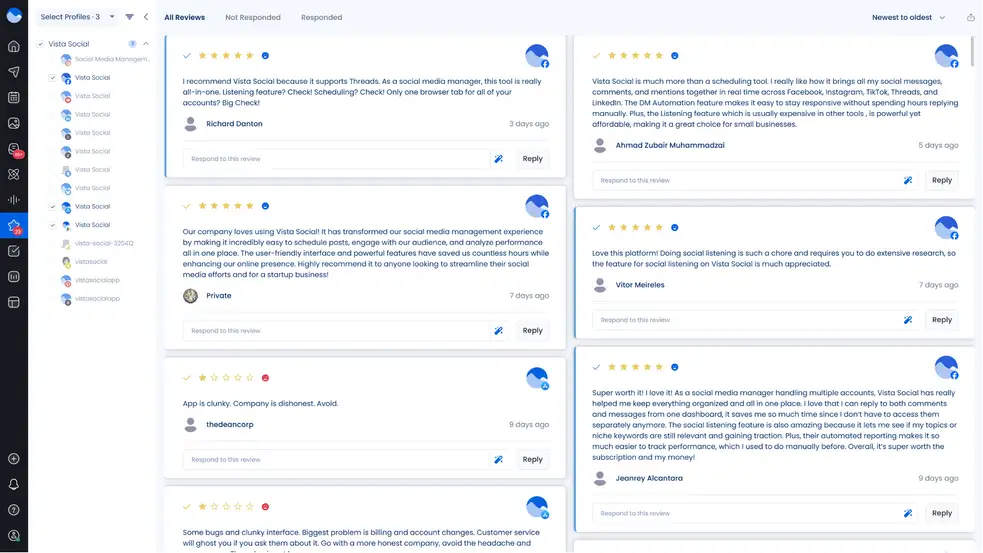
Need to find something specific? Search by keyword, sort reviews by date, and instantly spot those that still need attention. Everything stays organized, so you can focus on the replies that really matter.
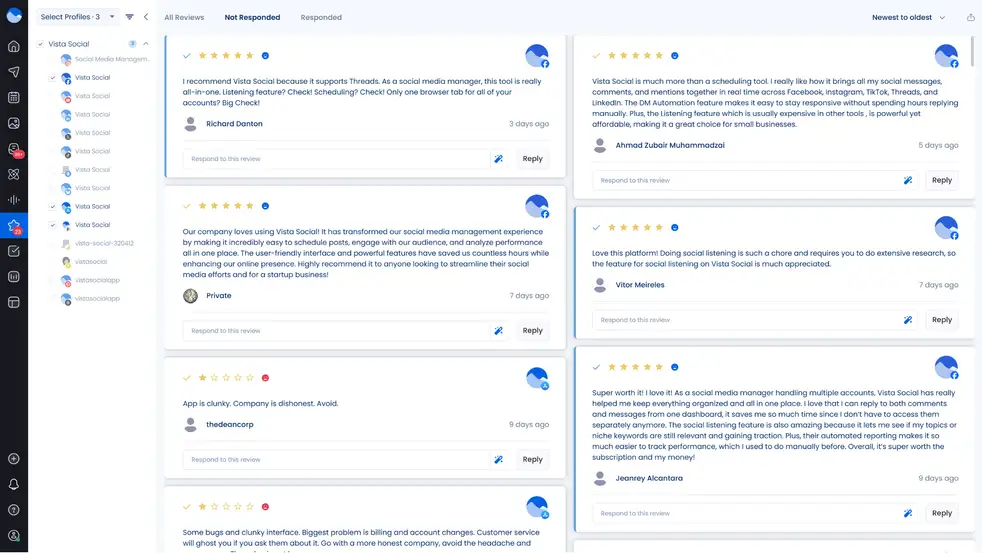
Vista Social also gives you insight into what customers are saying over time. You can track sentiment to understand what customers value most about each brand. These patterns help shape better strategies and keep your clients’ reputation strong.
You can even export review summaries and share them directly with clients. It’s a quick way to spotlight key insights and demonstrate how customer feedback shapes real results.
When managed well, reviews become more than ratings. They build trust and give your clients a way to connect more meaningfully with their audiences..
Generating conversions
Helping your clients turn engagement into action takes time and focus. It’s one of the most important parts of social media marketing because it ties all your work to real results.
That process often means guiding people from a post or profile to a page where they can sign up, learn more, or make a purchase. Vista Social simplifies this with Vista Page, an upgraded version of the usual link-in-bio tool that’s built for conversions.
Vista Page takes things further by letting you create branded pages that work as conversion hubs. You can include features like lead forms or payment links that match each client’s goals. Personalized link-in-bio pages are one of the most effective ways to convert social engagement into measurable results.
You can customize each page easily, adjusting layouts or adding new content whenever you need to.
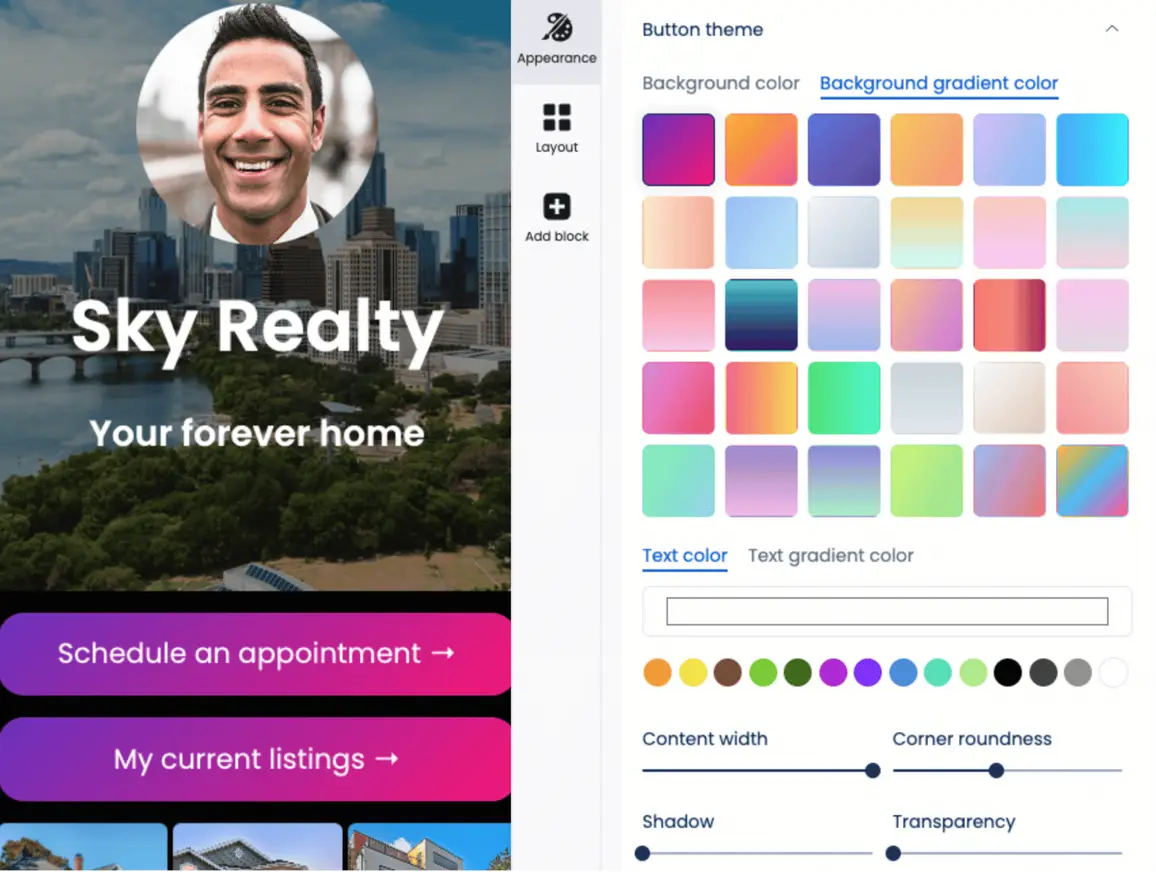
Add sections that highlight what matters most for your clients, such as featured products, event sign-ups, or booking details.
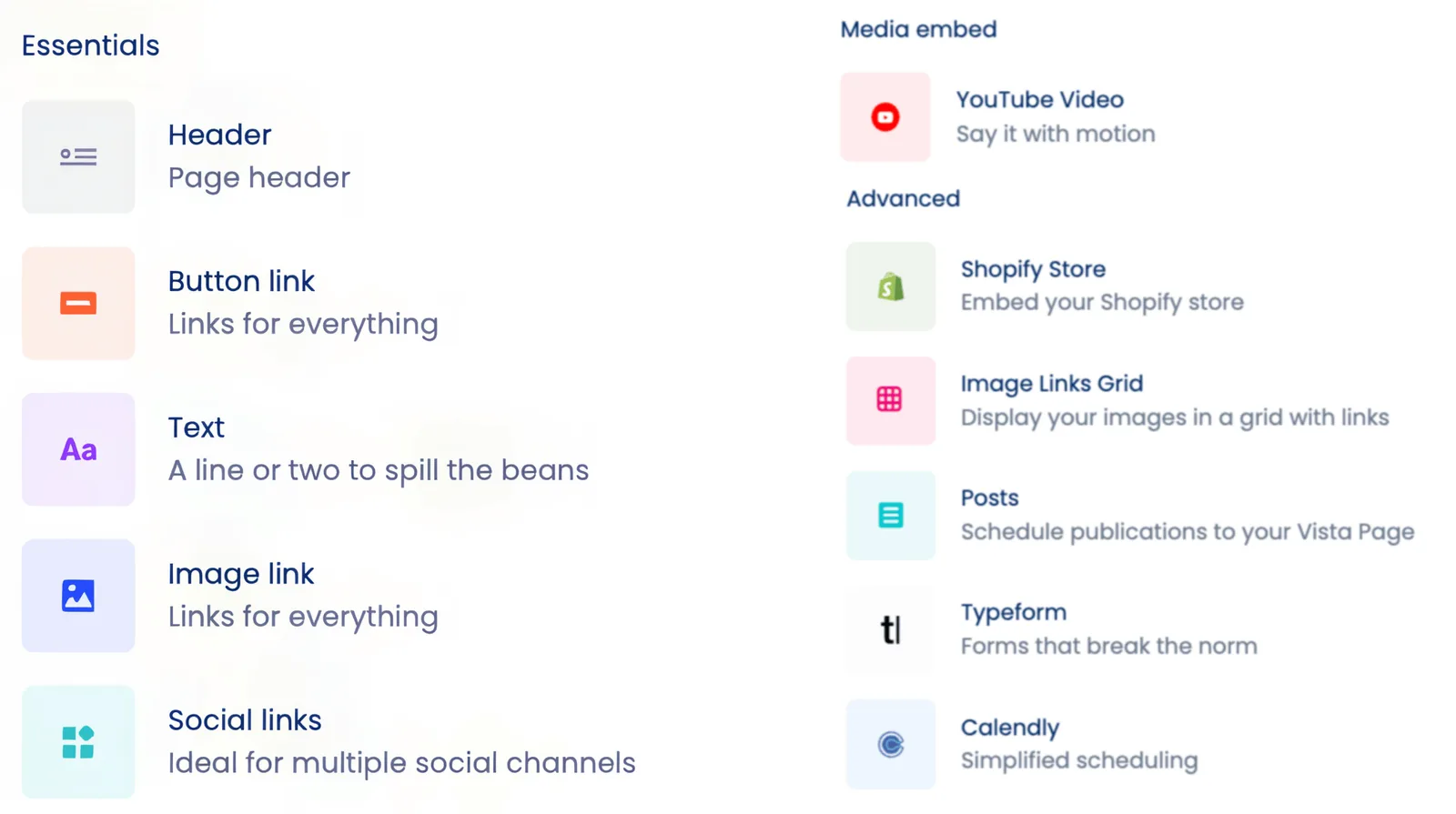
You can also schedule posts to appear automatically on Vista Pages, keeping them fresh without constant updates.
Vista Page brings all your clients’ key links and content into one smooth experience. It helps audiences move naturally from social discovery to action, building momentum that supports real business growth.
Questions You Might Have
1. How do I keep multiple social media accounts organized?
You can stay organized by giving yourself a clear structure you can follow each week. Set up a workflow that shows what needs attention first so you always know where to begin. A steady routine makes it easier to manage updates without feeling overwhelmed.
2. What’s the best way to manage several social profiles without getting lost?
You can avoid getting lost by working inside a platform that keeps your accounts in one clean view. When everything sits in a single workspace, it becomes much easier to track updates and stay on top of your daily flow without moving through different profiles.
3. How do you schedule content for multiple accounts at once?
Plan your content inside a scheduling tool that lets you assign posts to different platforms with a few clicks. This helps you map out your week and adjust timing without restarting your entire plan. Once your calendar is filled, you can stay ahead even during busy weeks.
4. How do you track results when you manage many accounts?
Look at performance from one dashboard so you can see what’s working at a glance. It saves time and helps you catch patterns that are tough to spot when you check each profile separately. A simplified view makes it easier to guide your next steps.
5. How do agencies handle several clients at the same time?
Agencies depend on structured workflows so tasks move in order and nothing falls behind. When you keep priorities clear and use a system that supports consistent updates, you can handle more clients without losing quality.
6. What tool is best for managing multiple social media accounts at once?
The best tool is one that fits the way you manage accounts and supports a steady workflow. Vista Social is a solid option because it brings your planning and engagement into one place so you can stay organized and move through your tasks with more ease.

Try Vista Social for free
A social media management platform that actually helps you grow with easy-to-use content planning, scheduling, engagement and analytics tools.
Get Started NowAbout the Author

Content Writer
Jimmy Rodela is a social media and content marketing consultant with over 9 years of experience, with work appearing on sites such as Business.com, Yahoo, SEMRush, and SearchEnginePeople. He specializes in social media, content marketing, SaaS, small business strategy, marketing automation, and content development.
Loading related tools...




Tools
PublishingAnalyticsEngagementIntegrations
FacebookInstagramLinkedInRedditSnapchatThreadsTikTokX (Twitter)YouTubeBlueskyVista Page (link-in-bio)All IntegrationsCopyright © 2026 Vista Social LLC. All Rights Reserved.
Social listening
Understanding what people say about your clients online gives you valuable insight that can guide better content and stronger engagement.
A 2025 digital marketing report found that over half of global brands now use social listening to monitor mentions and understand audience sentiment. It’s clear that listening to your audience isn’t optional anymore; it’s key to building trust and protecting reputation.
So how do you make sure your social listening is actually working for you?
Vista Social’s social listening feature makes it simple to track conversations that matter. You can set up Listeners for your clients’ profiles and add the keywords or phrases you want to monitor while excluding irrelevant ones to keep your results focused.
You’ll get a full view of every Listener you’ve set up, their activity status, and how many posts include your chosen keywords. Just click a Listener to see those posts directly.
You can search for any topic using keywords and reply to posts right from the dashboard. Social listening helps you spot positive conversations worth amplifying and respond fast if something negative starts to gain traction.
It’s also a powerful tool for crisis management because it gives you real-time visibility into what’s being said. Or as Dave Willis put it,
“Don’t use social media to impress people; use it to impact people.”
Making an impression is nice, but creating a genuine impact helps your clients connect deeply with their audiences and build relationships that last.