

Published on July 2, 2026
10 min to read
Stop Pasting Context Into ChatGPT: Connect Your Tools Instead

Summarize with AI

Table of contents
Summarize with AI

ChatGPT

Claude

Perplexity
Share

Vista Social

X (Twitter)


It’s barely mid-morning and you’ve already got eleven tabs open. A client pings about a comment, so you jump to the inbox. You also need last week’s numbers, so you open analytics.
Then you flip to ChatGPT, type out who the client is and how the brand sounds, wait for a caption, copy it, and switch back to your scheduler to post it.
You do a version of that dance a few more times before lunch. And the whole time, you’re the thing holding it together, running answers from the AI back to the tools by hand because nobody ever showed you how to connect AI to your tools so the two can talk directly.
There’s a name for that role, even if nobody gave it to you. You’re the integration. The link between a smart model and your real accounts.
It’s a real tax, too. Microsoft’s 2025 research found the average worker gets interrupted every two minutes by a message, meeting, or notification, and if you run social media, you live at the high end of that.
The good news is the fix is a shift you can make today. When you connect AI to your tools directly, it works from your live data instead of whatever you remembered to paste.
The short version:
- Pasting context keeps your AI blind: It only knows what you typed, it hands back advice you still have to execute, and you stay the courier moving work between tabs.
- Connecting AI to your tools: An assistant reads your live data and does the task inside the tool, over the open standard called MCP (Model Context Protocol).
- For social connections, it runs two ways in Vista Social: Ask Vista is built in and works from the profiles you’ve connected, and Vista Social’s MCP server lets ChatGPT or Claude reach into your account directly depending on your plan.
- Connected doesn’t mean unsupervised: You set which profiles the AI can touch, and anything that posts, sends, or changes data waits for your sign-off.
Table of contents
Why pasting context is the old way
Copy-paste feels harmless because each paste only costs a few seconds. The trouble is how those seconds stack and what they cost you past the time itself.
Every trip to the AI tab means re-briefing it from scratch, then carrying the answer back by hand. When those trips land every couple of minutes, the morning goes to the switching, not the work.
You know the texture of it. You’re midway through next week’s content when a client pings about a comment, so you jump to the inbox, then to analytics, then back to the AI tab to set up the brand and tone again.
By the time you carry the reply back, you’ve lost your place in the calendar, because none of these tools talk to each other and you’re the one holding every thread.
The cost isn’t only the clock, though. Every time you feed context into a chat by hand, a few things go wrong:
- Accuracy slips: You paste what you remember, not what’s true, so the caption gets written against last month’s numbers because pulling this month’s meant opening yet another tab.
- The AI can only advise: It writes a great caption, then stops, so you still publish it, schedule it, triage the DMs, and pull the report yourself.
- You start from zero every session: Even with memory and saved projects, the model can’t see what changed on your accounts since you last spoke, so you re-explain.
- Nothing compounds: A workflow you nail on Monday doesn’t carry to Tuesday, because it lives in a chat, not in your tools.
None of this is ChatGPT’s fault. It’s doing exactly what a chat window can do, and the limit is the wall between that window and everything it can’t reach.
If you’re tired of being the courier between your AI and your accounts, that’s the first sign it’s time to connect your tools instead of copy-pasting into them. Watch how Vista Social upgrades your workflow and lets the AI use your live data.
What connected AI is
Connected AI is an assistant that plugs straight into the tools where your work lives, so it can read your real data and take real actions without you copying anything across.
The standard that makes this possible has a name you’ll start seeing everywhere: MCP. MCP (Model Context Protocol) is an open standard that lets an AI assistant securely connect to and act inside your other tools. Anthropic introduced it in late 2024, and through 2025 both OpenAI and Google adopted it too, so it’s quickly becoming the common wiring for how AI talks to the software you already use.
The analogy the people who built it use is a good one: MCP is like a USB-C port for AI. Before USB-C, every device needed its own cable. After it, one port fits everything. Connected AI does the same for your assistant, giving it one standard way to plug into your tools instead of you being the adapter in the middle.
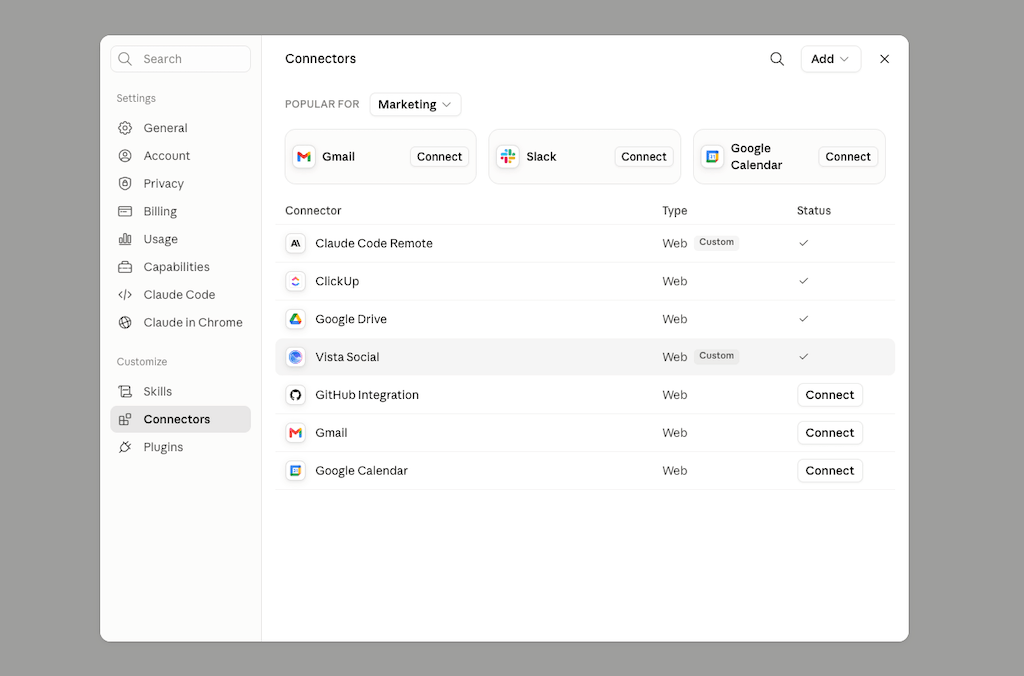
Picture your AI in a sealed room. You slide notes under the door, it writes brilliant answers on its side, and it slides them back for you to carry out. Connected AI hands the assistant a set of keys to the rooms where your work happens, so it can walk in, read what’s there, and get things done, while you decide which doors it’s allowed to open.
You still decide which doors it opens, which is the part worth getting right, and we’ll cover exactly how that works further down.
“AI’s value doesn’t come from individual automations. It comes from how all the pieces connect: your people, data, and processes working together seamlessly.”
Pam Didner, B2B marketing strategist and author, Scaling AI in Marketing
Didner’s point is the whole argument in one line. The gains show up when your model, your data, and your tools work as one connected system.
How connected AI works for a social media manager
For social specifically, connection runs in two directions, and Vista Social was built for both.
Direction one: the AI comes to your accounts
Vista Social has a built-in AI called Ask Vista, and because it lives inside the platform that runs your social profiles, it can reach your data without you pasting it in.
Ask it about your numbers and it pulls the real ones from the profiles you’ve connected to your workspace, so you’re not copying stats out of a dashboard in another tab. Once you’ve set up AI Training & Knowledge, it also drafts in your brand voice instead of you re-describing your tone on every request.
Here’s the same job done both ways, so the difference is easy to see:
| Step | Pasting into ChatGPT/Claude | Connected inside Vista Social |
|---|---|---|
| Give context | Type out that you run three brands and paste last week’s stats from another tab | Nothing to paste; it already reads your connected profiles |
| Get the answer | Ask for a caption idea and wait | Ask which Reels held attention longest this month; it reads the real data and tells you |
| Turn it into work | Copy the caption, switch to your scheduler, post it yourself | It drafts three captions in your brand voice off the winner and queues them to publish |
| Tabs involved | Four or five | One |
Ask Vista is free on every Vista Social plan, and its chat can reach more than 50 tools across publishing, analytics, the inbox, media, tasks, and reporting. It also runs on named AI skills you can trigger like commands, so a repeatable job becomes one prompt.
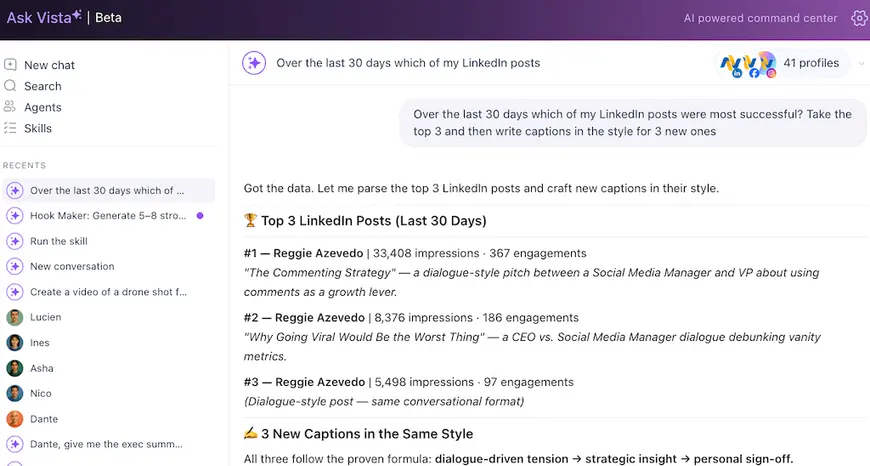
Because it sits inside the same controls you use to publish and report, it carries the task through instead of handing you a suggestion to run yourself.
And because it’s connected, the questions you can ask change shape. Instead of prompts you’d have to answer yourself afterward, you can ask things that need your live data and end in an action:
- “Which posts drove the most saves last month, and draft two follow-ups in that style.”
- “Summarize this week’s inbox and flag anything that reads like a complaint.”
- “Pull my top three LinkedIn posts this quarter and turn each into a carousel outline.”
- “Schedule these drafts across next week at my best posting times.”
Each of those would take four or five tab switches by hand. Connected, they’re one request, because the AI sees the numbers and reaches the controls in one place.
If re-explaining your accounts to a chatbot every morning is wearing thin, this is the fix. See how Ask Vista makes AI easy. No credit card required.
Direction two: your AI assistant plugs into Vista Social
Maybe you live in ChatGPT or Claude and you don’t want to leave. Fair. Vista Social also works the other way, as a connector your existing AI assistant plugs into.
It runs an MCP server, which is the piece that lets an outside AI client connect in. Once it’s set up, your assistant can reach straight into your Vista Social account and do the work from a single typed request:
- Works with: Claude Desktop, ChatGPT, Cursor, and Gemini.
- What it can do: Pull performance data, schedule posts, and manage your inbox without you leaving the chat.
- Setup: Paste one URL from your Vista Social integration settings into your AI client’s connector settings. No code, no developer.
- Plan: Included on the Advanced plan and up.
Say you’re already deep in a Claude conversation planning a campaign. Instead of asking it to write captions and then leaving to go schedule them, you ask how last month’s launch posts performed, and it reads the real numbers straight from your account.
You ask it to build a week of posts off the winners and queue them, and it does, without you opening a new tab.
The chat you were already in becomes the place the work gets done, not the place it gets described so you can go do it elsewhere.
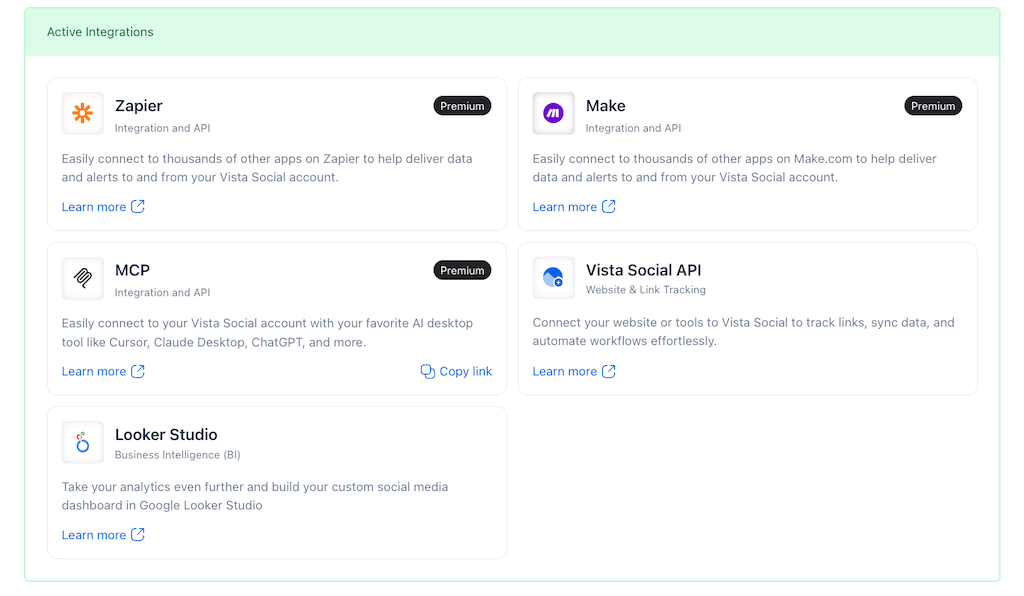
So whichever side you start from, the hand-carrying stops. Either the AI comes to your accounts, or your accounts come to your AI.
This connected pattern isn’t unique to social. Anthropic ships ready-made connectors for tools like Slack, Google Drive, and GitHub, which is why you’re starting to see AI post a summary into a Slack channel or pull a task off a project board on its own. Social is one of the places the shift is landing fastest because the work is so spread across tools to begin with.
Connected does not mean unsupervised
Connecting an AI to your real accounts is exactly the thing that should make you cautious, so here’s how Vista Social keeps you in control. Two rules do the heavy lifting:
- You set the scope: When you point Ask Vista or an agent at your work; you choose which profiles or groups it can touch, and it can’t wander into accounts you didn’t hand it.
- Reading and drafting run freely: Pulling numbers, analyzing performance, and writing drafts all happen on their own.
- Actions wait for your sign-off: Posting, sending a reply, or editing your data all need your approval first, so the assistant asks before it acts.
The sign-off step is what makes a connection safe to lean on. You get an AI that can see everything relevant and prepare the work without it publishing to your feed on a hunch.
If you want the deeper version of how this plays out with scheduled agents, our guide on how AI agents work for social media walks through the read-only-by-default setup.
Once your AI can see your live accounts and act inside them with your say-so, the daily grind of stitching tools together goes away.
Where this leaves the copy-paste workflow
A general chatbot with memory and saved projects is a great thinking partner, and if that’s your setup, keep it for the thinking. What it can’t do is see your live accounts or carry out the work on them, and that gap is exactly what connection closes. For a fuller side-by-side, we broke down where a social-specific AI beats a general chatbot.
If you want a place to start, pick the one task you brief the AI on most. For most social managers that’s performance, because it changes daily and it’s the context you paste over and over. Connect that first, ask a real question about your live numbers, and watch it answer from the data instead of from what you typed.
The mental upgrade is small but total. You step out of the middle and let the model and your tools talk directly. The AI reads what’s true right now, does the part you’d have done by hand, and checks with you before anything goes live.
You can try that shift today. When you connect AI to your tools, the courier job ends: the assistant lives where your work does, reads what’s true, and hands the busywork back to itself. Connect your tools to an AI that already sees your live accounts and create your free Vista Social account to get your afternoons back.
Frequently asked questions
What does it mean to connect AI to your tools?
It means letting your AI assistant plug directly into the software where your work lives, your social accounts, your inbox, your analytics, so it can read your real data and take actions there instead of you copying information back and forth by hand. A connected AI acts on what’s true in your accounts right now, rather than on the context you remembered to paste into a chat.
What is MCP (Model Context Protocol) in simple terms?
MCP is the shared plumbing that lets AI assistants reach into the software you already use and do things there safely. Anthropic released it in late 2024, and OpenAI and Google backed it through 2025, so it’s turning into the default way AI hooks into everyday apps. Think of it as a USB-C port for AI: one standard connection that fits your tools, instead of a custom setup for each.
Why is connected AI better than pasting context into ChatGPT?
Pasting means the AI works off whatever you remembered to type, and it stops at the suggestion, so you’re still the one publishing, scheduling, and pulling reports by hand. Connected AI reads your live data directly and carries out the task inside the tool, which removes the re-explaining and the copy-paste relay. You end up with finished work rather than one more thing to go do yourself.
Can AI take actions in my other tools, like Slack?
Yes. With a connection in place, an AI assistant can do more than talk; it can post a summary to a Slack channel, schedule a post, or pull a task from your board. Anthropic offers ready-made connectors for Slack, Google Drive, and GitHub, and inside social, Vista Social’s Ask Vista can publish, schedule, and manage your inbox once you’ve connected your profiles.
Is it safe to connect AI to my social accounts?
It’s safe when the tool keeps you in control, which Vista Social does two ways. You choose exactly which profiles the AI can touch, so it can’t reach accounts you didn’t assign, and any action that posts, sends, or changes your data needs your approval first. The AI reads and drafts on its own, but it asks before it does anything public.
Does Ask Vista connect to my social accounts automatically?
Ask Vista is built into Vista Social, so it works with the profiles you’ve already connected to your workspace with no extra integration step. You prompt it and it pulls from the connected profiles to answer, rather than reading your account in the background. It drafts in your brand voice once you’ve set up AI Training, acts only within the permissions you set, and is included on every plan.

Try Vista Social for free
A social media management platform that actually helps you grow with easy-to-use content planning, scheduling, engagement and analytics tools.
Get Started NowAbout the Author

Content Writer
Orion loves to write content that refuses to be boring. As part of Vista Social, he helps brands, creators, and agencies stop doom scrolling and start winning with social media. When he's not in front of a keyboard, he's watching films in IMAX with his wife, dissecting football tactics (the European kind), and getting lost in a good book.
Loading related tools...

The most complete social media management platform for teams who demand more.






Tools
PublishingAnalyticsEngagementIntegrations
FacebookInstagramLinkedInRedditSnapchatThreadsTikTokX (Twitter)YouTubeMCPVista Page (link-in-bio)All IntegrationsCopyright © 2026 Vista Social LLC. All Rights Reserved.