

Published on March 2, 2026
11 min to read
How to Automate Social Media Without Sounding Like a Bot

Summarize with AI

Table of contents
Summarize with AI

ChatGPT

Claude

Perplexity
Share

Vista Social

X (Twitter)


You already know you need to automate. Your inbox still has unread DMs from last night, a few comment threads are spiraling, and a customer just left a one-star Google review while your team was asleep.
Your business is at the point where you can’t manually reply to everything anymore, so you set up a few auto-responses and suddenly your brand sounds like it swallowed a corporate FAQ page.
64% of customers would prefer if companies didn’t use AI in customer service at all. More than half said they’d consider leaving for a competitor if they found out a brand was using it. And yet, 78% of marketers agree that social media is consumers’ go-to channel for customer service.
So your audience wants fast answers on social, but they want those answers to feel like a person wrote them. Every social media manager is living in that tension right now.
This guide is your playbook for setting up automation that actually sounds like your brand.
We’re going step by step through what to automate, how to set up triggers that feel natural, how to write messages your audience won’t roll their eyes at, and how to keep everything from going sideways over time. If you’re using Vista Social, you’ll get the exact walkthrough. If you’re not, you’ll still know what good looks like when you see it.
Table of contents
Step 1: Know what to automate (and what to keep human)
The biggest automation mistakes happen before anyone writes a single reply. They happen when brands try to automate conversations that need a real person on the other end.
73% of consumers are comfortable with automation for simple, transactional tasks like checking order status or getting store hours. But only 19% wanted a chatbot handling complex complaints or high-stakes advice. The task itself tells you whether automation helps or hurts.
Safe to automate:
- FAQ replies (shipping timelines, pricing, hours of operation, etc.)
- Keyword-triggered DMs like comment-to-DM flows on Instagram
- Review thank-you responses for 4- and 5-star ratings
- After-hours acknowledgments that set clear response expectations
- Post scheduling and performance reporting
- Lead collection through DM sequences
Keep these human:
- Crisis responses or PR-sensitive moments
- Complex complaints that need context and empathy
- Relationship-building conversations with current and potential customers
- Anything where someone is upset or confused, or a situation requires nuance
Klarna is the cautionary tale every SMM should know.
In early 2024, the company announced its AI chatbot handled 2.3 million customer conversations in its first month and froze hiring. Customer satisfaction tanked. By mid-2025, CEO Sebastian Siemiatkowski reversed course entirely, telling Bloomberg that cost had become too dominant a factor and the quality suffered. They started rehiring human agents.
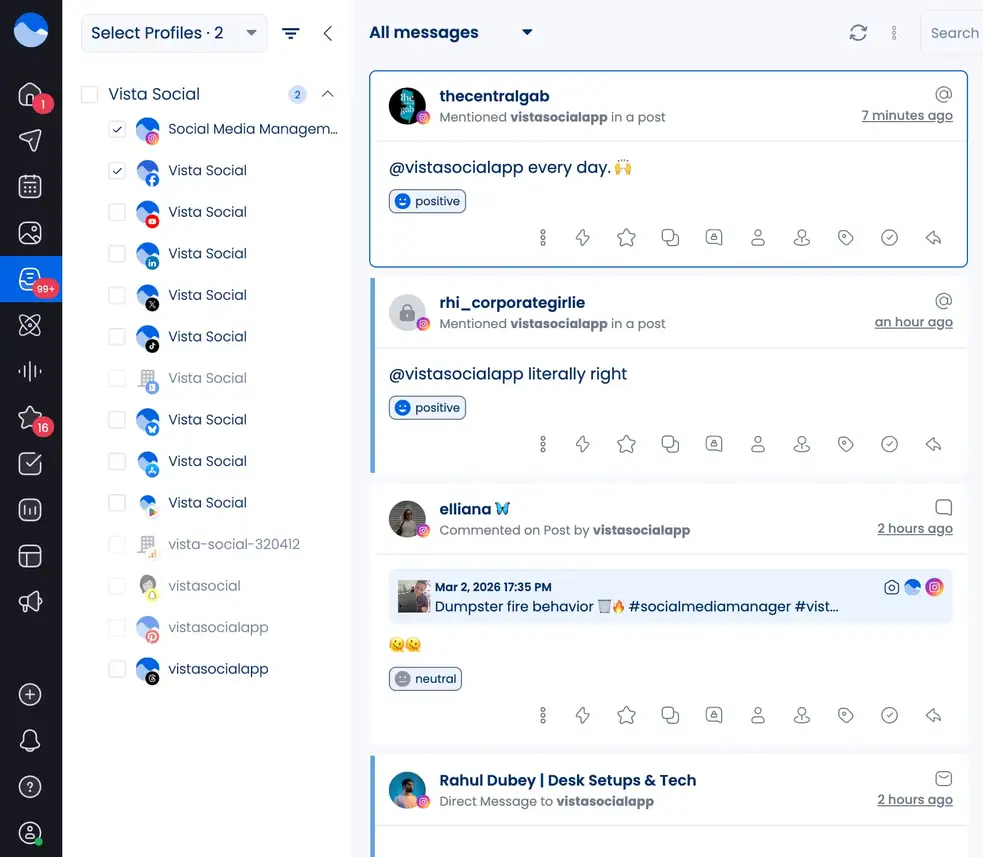
Automation should handle the repetitive stuff so your team has more time for conversations that build loyalty. In Vista Social, sentiment-based tagging in the Social Inbox automatically flags negative messages and routes them to a human while routine questions get handled without anyone lifting a finger.
Here’s how that looks inside the platform. The inbox view below shows sentiment tags on each conversation, so your team immediately sees what needs a personal touch and what automation can cover:
Step 2: Set up automations around triggers that make sense
A great trigger responds to something your audience actually asked for. A bad one fires off a generic response to a DM that doesn’t actually help or offer anything of value.
With Vista Social’s DM automation functionality, every automation starts with a trigger, then chains one or more actions.
The system gives you a few different ways to detect when to fire.
Keyword match
Best for campaigns with a clear call to action. A fitness brand posts a Reel about their new supplement line and tells viewers to comment PROTEIN for the link. Anyone who drops that keyword gets a DM with the product page. They opted in, so it never feels pushy.
Note that you can also exclude certain keywords so that automations won’t fire when specific keywords are mentioned within a message.
AI intent detection
For agencies managing multiple client accounts. Instead of listing every possible keyword variation, AI intent understands what someone means. “How much does this cost?” and “what’s the price on that thing? Both get picked up as pricing inquiries. You don’t have to guess how people phrase things.
Star rating triggers
If you’re managing reviews across Google Business, Yelp, Trustpilot, Facebook Reviews, Apple App Store, or Google Play Store, this one saves serious time. You pick a rating range, and Vista Social takes it from there.
A happy customer leaves a 5-star review? Your automation sends a genuine thank-you, perhaps mentioning your referral program or inviting them to try something new.
Someone leaves a 2-star review describing a bad experience? That gets routed to a real person on your team who can address what went wrong.
Time-based rules (for after-hours automation)
Schedule a specific trigger for when your team is offline. Set it to fire from 6pm to 9am with a message like, “Hey! We’re offline right now, but someone from our team will get back to you first thing tomorrow morning.” Way better than radio silence. You can set active days, time windows, and scheduling rules directly in the automation builder.
The comment-to-DM flow
Instagram doesn’t let brands DM users who haven’t messaged them first. Vista Social works around this with a comment-to-DM sequence:
- A user comments a keyword on your post or Reel (like “LINK” or “INFO”)
- Your automation replies publicly to their comment (“Check your DMs!”)
- It sends an opening DM with a tappable button
- When they tap, it unlocks a full two-way conversation for 24 hours
- Follow-up messages, links, offers, or lead collection kick in from there
Set up your automation workflow
Setting this up takes about five minutes. Go to Create menu > DM Automations > Create automation.
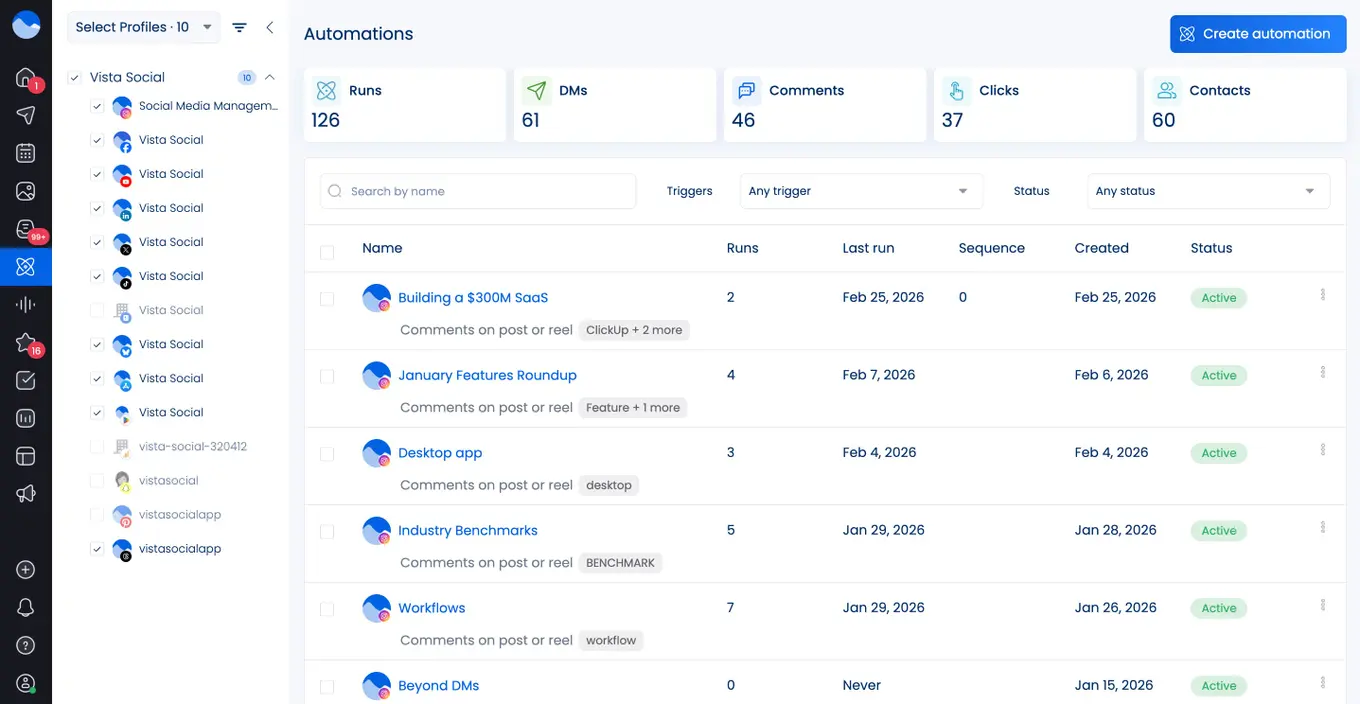
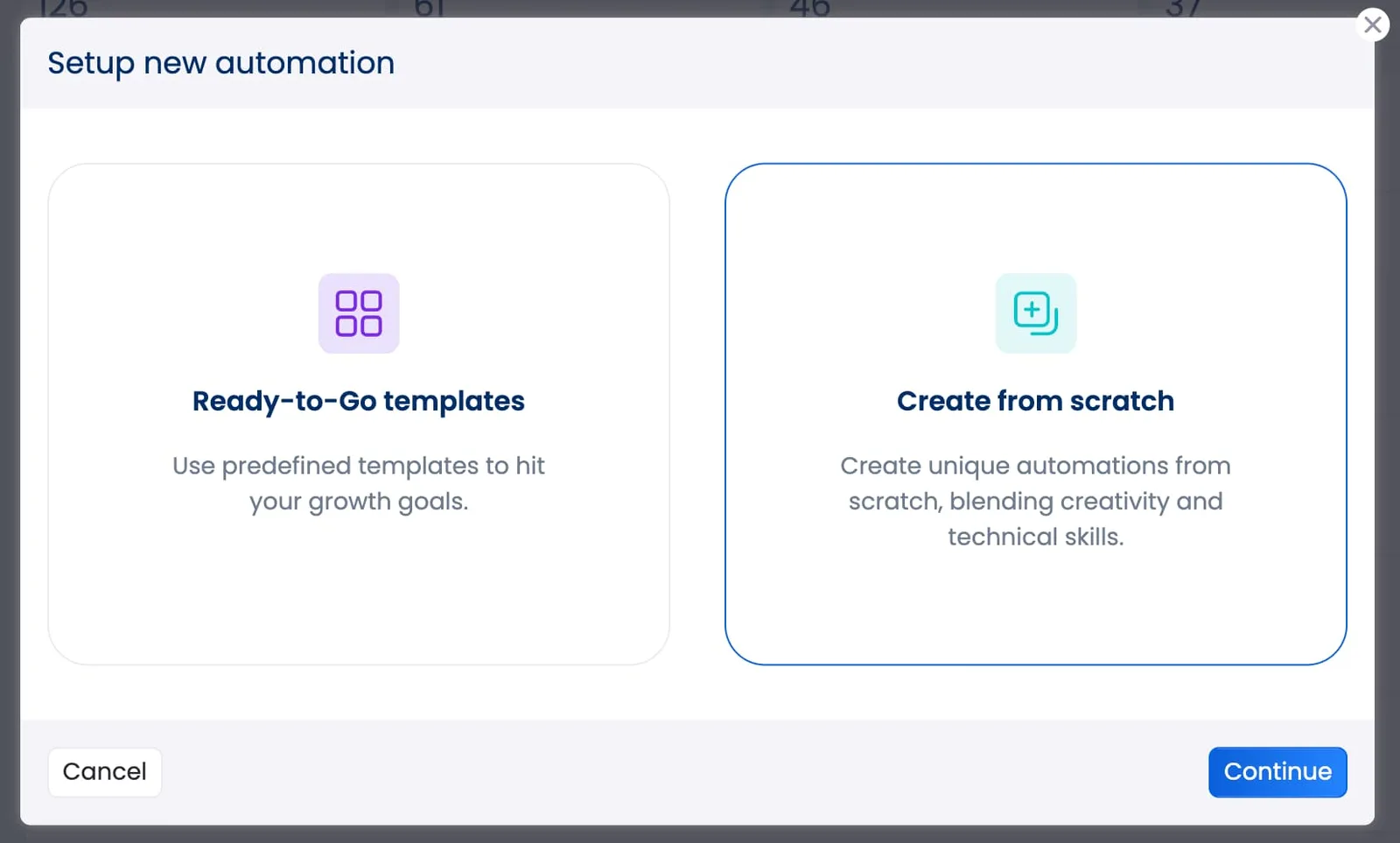
Click Create from scratch from the pop-up that appears.
From there, give your automation a name and select the social profile you want it to run on.
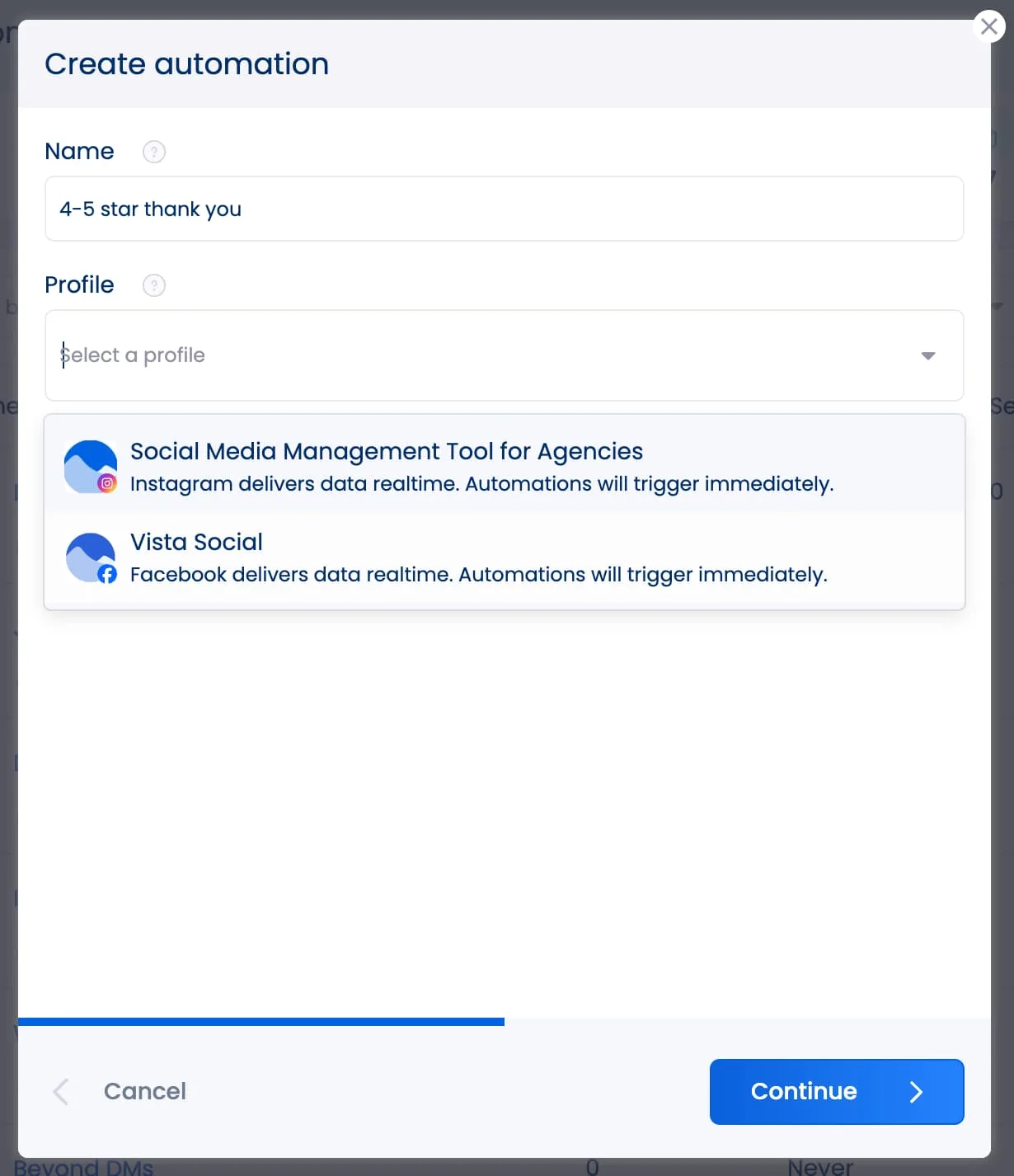
Next, choose your trigger type, set active hours, and add your actions. Here, we’re demonstrating how to set up your Facebook 4-5 star rating action, but you can also choose a keyword match or AI intent detection for comments, DMs, or reviews.
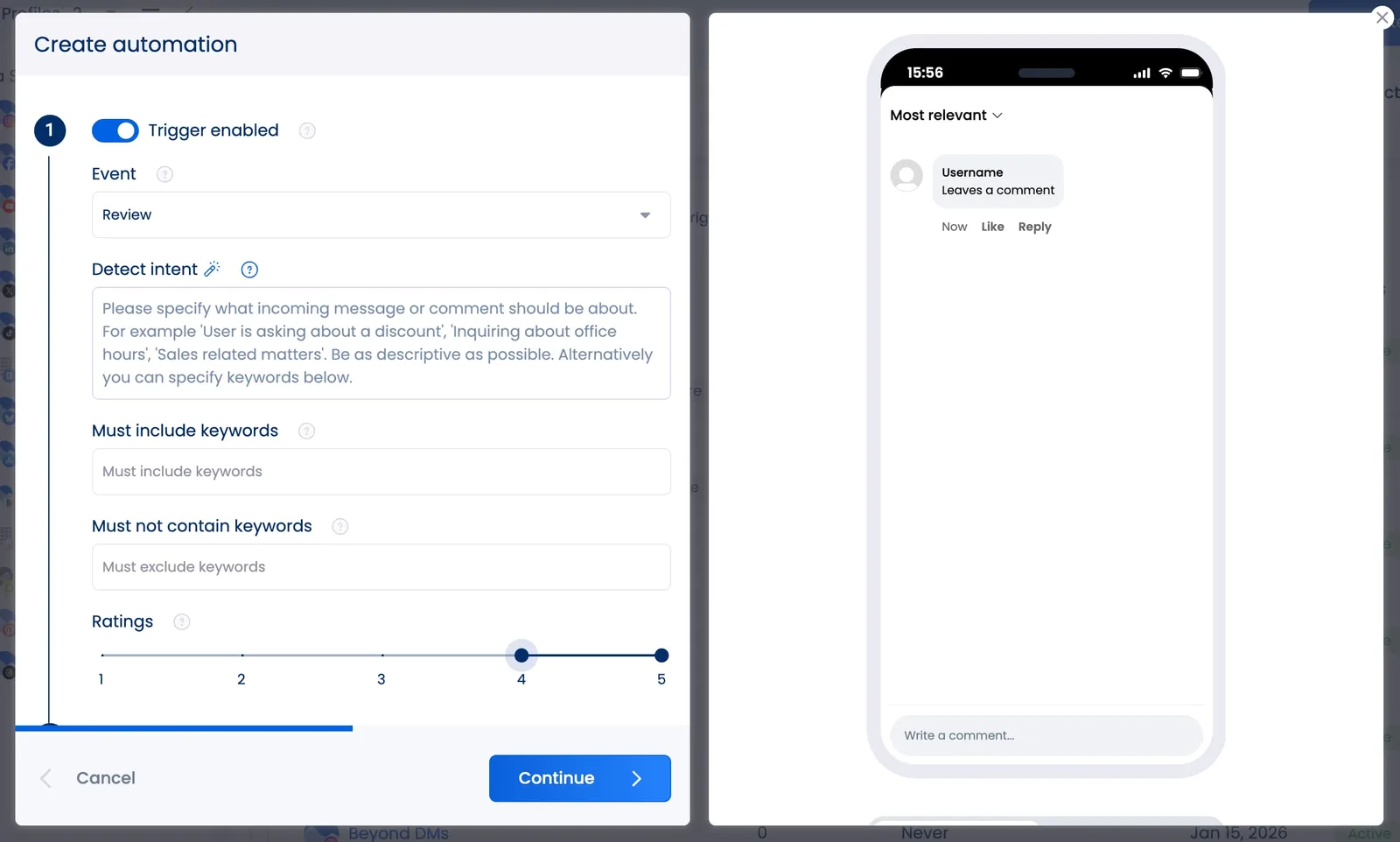
Check out this full interactive demo below, where we show the setup screen to choose between keyword match and AI intent, plus the scheduling controls for active hours:
Step 3: Craft or prompt automated messages that sound like you
This is where most brands might blow it. The trigger is perfect, but then the response reads like a default template from ChatGPT. 71% of consumers expect personalized interactions, and 76% get frustrated when they don’t receive them. Companies that nail personalization drive 40% more revenue from those efforts.
Vista Social gives you multiple approaches, and the best setups usually combine them all.
Dynamic AI reply
You write a custom prompt that tells the AI who it is, how it talks, and what it does. Something like, “You’re a friendly support agent for a sustainable clothing brand. Keep responses under 3 sentences. Be warm but not over-the-top. If someone asks about returns, share the link and mention the process takes 3-5 business days.“
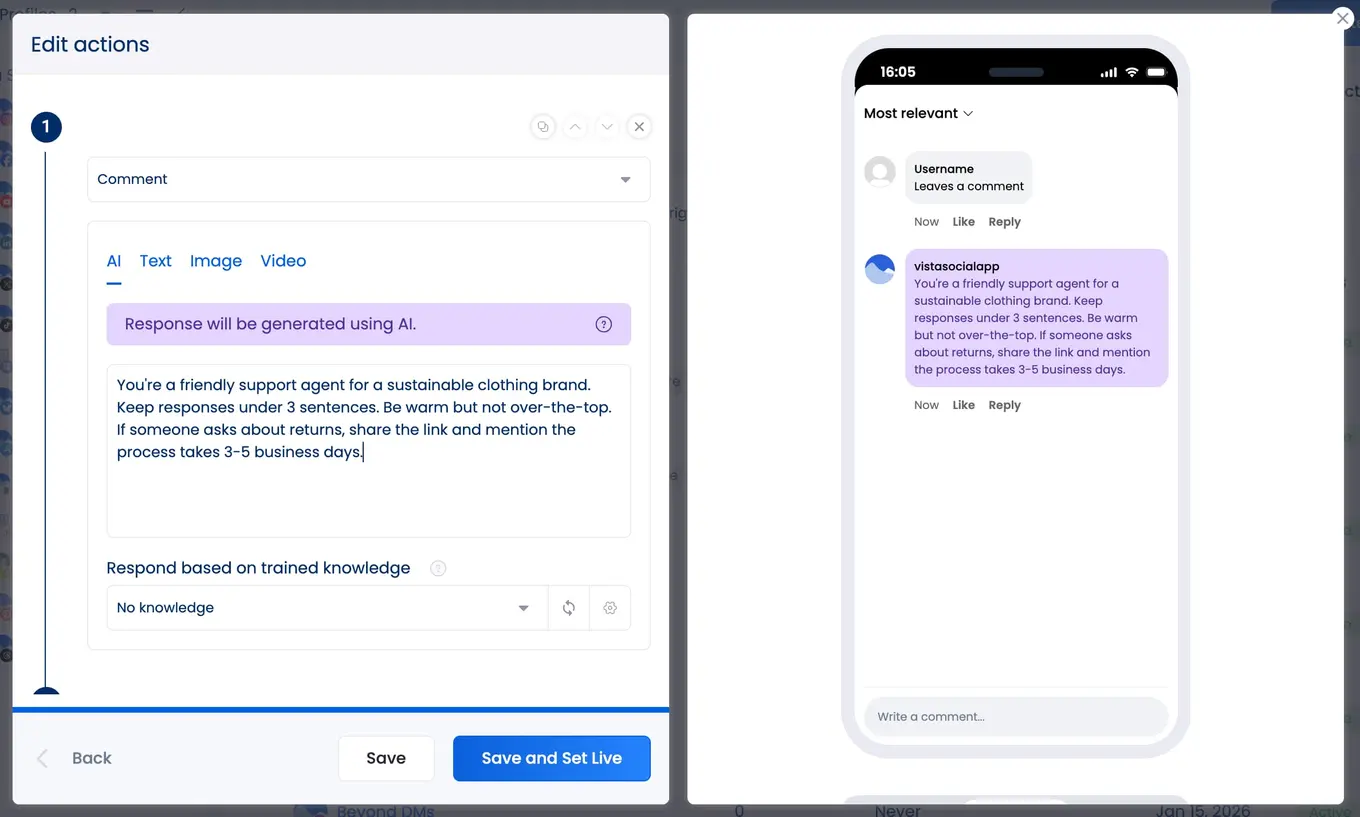
Every reply comes out unique and contextually relevant. This also protects your account because social platforms can flag profiles that send identical text repeatedly. Vista Social’s docs specifically warn about “bot shadowbans” where platforms throttle reach for repetitive messaging.
Plus, with Vista Social’s latest feature addition, we’ve solved one of the biggest frustrations with AI-generated responses.
AI tools don’t know the ins and outs of your business. With AI training and knowledge, you can upload your own documents (product FAQs, return policies, pricing sheets, and brand guidelines), and the AI references that material when generating responses.
So instead of a vague, “Check our website for details,” the AI can say, “Our Classic Tee runs true to size and comes in 8 colors. Returns are free within 30 days.”
It pulls from your actual product info. For agencies managing multiple clients, this means you can upload each client’s knowledge, and the automations stay accurate across every account.
To upload your own, head to Settings > AI Training and Knowledge.
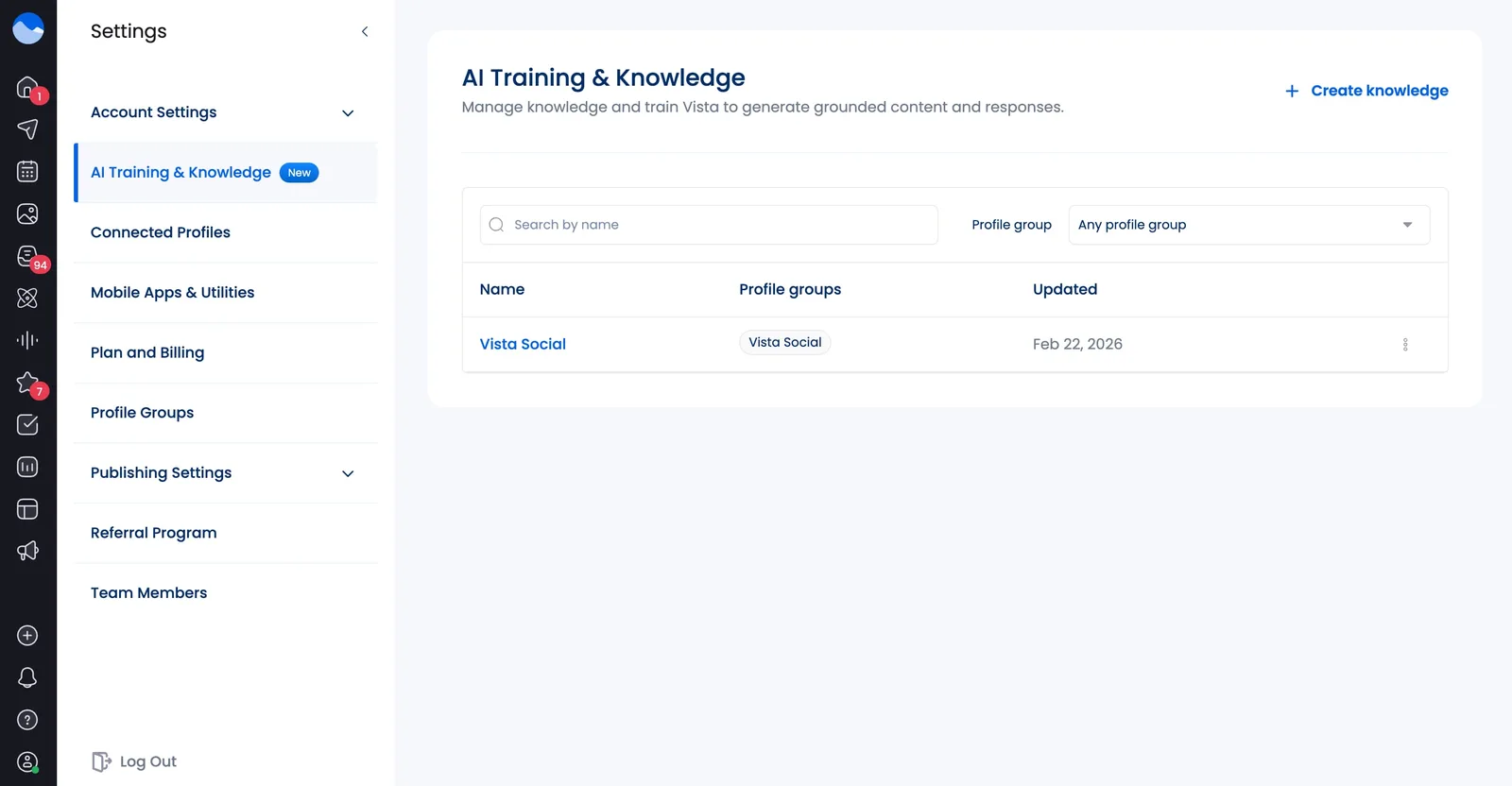
Then click + Create knowledge to start uploading your training details.
Incorporating your brand’s specific voice and training within your AI responses can put you miles away from generic canned replies, helping your automation to feel genuine and actually valuable.
Pros:
- Every response is unique, contextually relevant, and adapts to what the person has said
- Scales across thousands of conversations without sounding repetitive
- Protects against bot shadowbans
- Can incorporate your brand’s actual knowledge base into its responses
Cons:
- Requires a well-written prompt to get the tone right
- Without enough context, the AI can default to generic phrasing
- You need to monitor and adjust your prompt regularly
Pre-set text variations
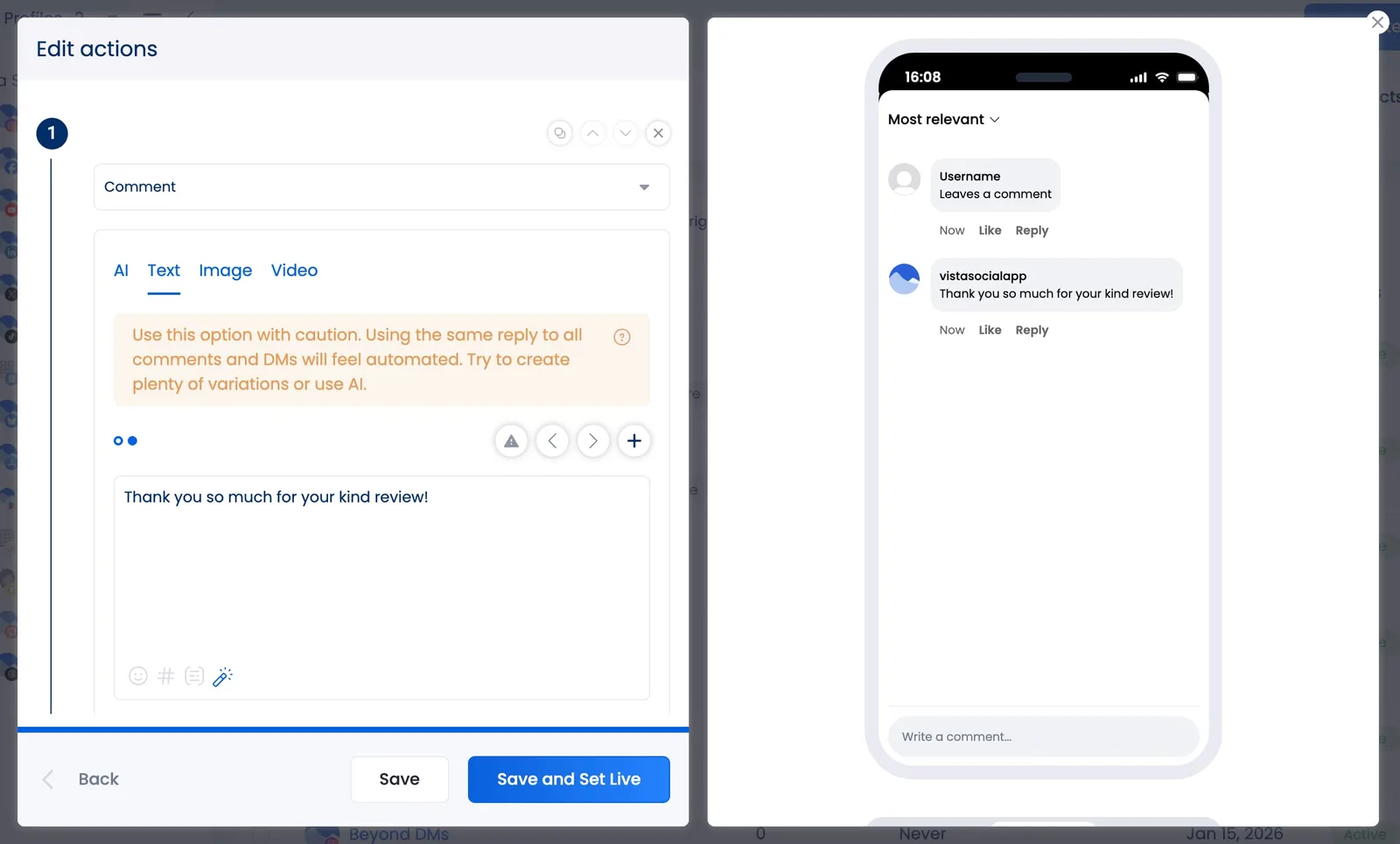
Write 10 or more versions of a reply, and Vista Social rotates through them. Works well for simple interactions like comment replies about one specific thing or review thank-yous where you want full control.
64% of consumers trust AI-driven service more when it shows human-like traits like friendliness and empathy. Good automation doesn’t need to be perfect, it does need to feel like humans were involved.
Pros:
- Complete control over the exact wording
- No risk of off-brand AI responses
- Easy to set up and very predictable
Cons:
- Requires writing enough variations (10+) to avoid sounding repetitive
- Doesn’t adapt to context, so a customer asking about sizing gets the same reply as someone asking about shipping
Before you write a single automated response:
- Pull your best human replies. Go through your DMs and comments from the last few months. Find the ones that got positive reactions or resolved issues fast. Those are your baseline.
- Feed them into your prompt. If you’re using Dynamic AI Reply, paste those real messages as examples so the AI has something concrete to work from.
- Give specific tone instructions. “Friendly” is vague. “Casual, uses contractions, occasionally uses humor, and never uses more than one exclamation point per message” gives the AI guardrails that actually produce good results.
Quick comparison: Robotic vs. human
Robotic: “Thank you for your inquiry. Your request has been received and is being processed. A representative will be in touch within 24-48 business hours.”
Human: “Hey! Got your message. Our team is on it and someone will get back to you by tomorrow morning. If it’s urgent, DM us and we’ll bump you up.”
Robotic: “We appreciate your feedback. Your satisfaction is important to us.”
Human: “That means a lot, seriously. Thanks for leaving a review. We’ll pass this along to the team.”
The difference between the robotic or generic voice and the human one is its contractions, directness, and being able to say something specific instead of something polite but empty.
Step 4: Customize automations by platform
Your brand on TikTok probably doesn’t sound the same as it does on LinkedIn (and if it does, you either need to let loose on TikTok or we’re jealous that you get to have fun on LinkedIn). Your automations should reflect those differences.
First things first, if you’re using Vista Social for your automations, pay attention to the supported actions/triggers for each platform.
And always keep one important detail in mind: Instagram, Facebook, and TikTok messages and comments sync in real-time in Vista Social’s inbox. All other platforms update a few times a day, so instantaneous automation isn’t always possible.
In addition, review responses need a different approach than DMs and comments do. Your automated replies here should be more specific and polished.
Vista Social lets you create custom AI-powered review prompts per platform. A Google prompt might read, “Thank every 5-star reviewer warmly, reference something specific from their review, and invite them back.” A Yelp prompt might focus more on resolution for lower ratings.
Step 5: Regularly audit and review your automations
Setting up an automation is day one. Making sure it keeps working is the part most teams fail to keep consistent.
24,000 consumers across 23 countries told Qualtrics that bad customer experiences put $3.8 trillion in global sales at risk, and 53% said they’d cut spending after a single bad interaction. You don’t want your brand’s automations to cause said bad interaction, especially if they’re meant to be helping you improve social media customer service.
Here’s what a monthly audit looks like in practice:
- Check sentiment trends. Vista Social tags every inbox conversation with sentiment automatically. If negative sentiment is climbing on automated conversations, you’ll see it in the sentiment analysis report. Compare month over month.
- Read your auto-replies out loud. Grab a sample of recent automated responses and read them as if you were the customer. Do they still sound like your brand?
- Add fresh variations. Pre-set text gets stale. Swap in new versions or switch to Dynamic AI Reply for more variety.
- Test edge cases. Send vague or off-script messages to your own accounts. Does the automation handle them well? Does it route to a human when it should?
- Verify escalation paths. Make sure the “assign to team member” action is working and urgent messages reach the right person.
What happens when brands don’t audit
Air Canada’s chatbot promised a customer a bereavement fare refund that didn’t exist in company policy. The airline tried to argue the chatbot was a separate entity. A Canadian tribunal ruled against them and forced the airline to honor the promise.
Making sure your chatbot is 100% accurate is on you, because you’re liable for anything it tells your customers.
Make sure your automation sounds human
You came here because you knew automation was necessary but you didn’t want your brand to start sounding like a vending machine. Here’s what you can do with what you just read today:
- Audit your last 50 DMs and comments. Which ones could automation have handled without losing quality? Which ones absolutely needed a person? That’s your baseline for what to automate.
- Set up one comment-to-DM flow. Pick your best-performing Reel, add a keyword CTA, and build it using Vista Social’s ready-to-go template.
- Write your Dynamic AI Reply prompt. Pull five of your best human replies and paste them as examples. Add specific tone instructions. Test it with three different message types.
- Upload your brand knowledge. Use AI Training and Knowledge to feed in product FAQs, return policies, and brand guidelines so your AI responses reference real information instead of generic filler.
- Schedule an after-hours auto-reply. Fire it from 6pm to 9am with an honest message that sets expectations. This alone eliminates most “why aren’t you answering?” frustrations.
- Put a 30-minute monthly audit on your calendar. Read recent automated responses, check sentiment trends, and test edge cases.
88% of customers say good customer service makes them more likely to buy again. When your automation sounds human, it keeps people coming back because they feel like your brand actually cares, even if it’s 2am on a Tuesday.
You’re not replacing your team with bots, but rather making your team faster and your brand more responsive without sacrificing the voice your audience showed up for.
Ready to up your automation game? Try Vista Social free for 14 days (no credit card required) and set up your first automation using the steps in this guide.
Automate without sounding like a bot FAQs
Can automated DMs get your account flagged or banned?
They can if you send identical text over and over. Instagram and Facebook both watch for this. Vista Social’s Dynamic AI Reply generates unique responses each time, and pre-set text variations rotate through your library to keep things fresh.
How much does social media automation cost with Vista Social?
DM automations start on the Professional plan ($79/month, or $64/month billed annually). AI intent detection requires the Advanced plan ($149/month, or $120/month annually). All paid plans include a 14-day free trial with no credit card required. Full details on Vista Social’s pricing page.
What platforms support DM automation through Vista Social?
Two categories here. For DM automation, Instagram and Facebook are the most fully featured: you can trigger it from comments on posts and Reels, new DMs, story mentions, and story replies.
For review automation, Vista Social covers six platforms: Google Business, Yelp, Trustpilot, Facebook Reviews, Apple App Store, and Google Play Store. All of them support star rating triggers.
Can I use automation on Instagram without violating Meta’s rules?
Yes. Vista Social uses Meta’s official Messenger Platform API. The Opening DM system, where a user taps a button to opt into the conversation, is designed to comply with Meta’s 24-hour messaging window. Messages only go to people who’ve actively engaged.
How do I keep automated responses from sounding generic?
Start by pulling your best human-written replies and using them as a baseline. Upload product docs and FAQs to AI Training Knowledge so the AI references real details. Give specific tone instructions in your prompt, and review everything monthly.

Try Vista Social for free
A social media management platform that actually helps you grow with easy-to-use content planning, scheduling, engagement and analytics tools.
Get Started NowAbout the Author

Content Writer
Orion loves to write content that refuses to be boring. As part of Vista Social, he helps brands, creators, and agencies stop doom scrolling and start winning with social media. When he's not in front of a keyboard, he's watching films in IMAX with his wife, dissecting football tactics (the European kind), and getting lost in a good book.
Loading related tools...




Tools
PublishingAnalyticsEngagementIntegrations
FacebookInstagramLinkedInRedditSnapchatThreadsTikTokX (Twitter)YouTubeBlueskyVista Page (link-in-bio)All IntegrationsCopyright © 2026 Vista Social LLC. All Rights Reserved.