

Published on March 19, 2026
14 min to read
Building an AI-Powered Social Media Command Center with MCP

Summarize with AI

Summarize with AI

ChatGPT

Claude

Perplexity
Share

Vista Social

X (Twitter)


Table of contents
Summarize with AI
ChatGPT
Claude
Perplexity
Share
Vista Social
X (Twitter)
Picture this. It’s 4:47 PM on a Wednesday, and your client just sent you an email asking how their Instagram campaign performed last month versus the month before.
Aaaaaand now you’re working late.
You log into your social media management platform, find the right client Instagram profile, set the date range, grab the numbers, and format it all into a client-facing report—and that’s before writing your actual reply and trying to explain what these numbers mean.
Did you know there’s an easier way? (If you guessed we’re going to say AI, you’re right.)
Yes, AI can help, but not in the traditional sense. Hear us out.
SMMs using AI to help with this would typically have a window open with their report and another open with ChatGPT (or their chatbot of choice). You’d paste in your numbers and ask the AI tool to either format the report for you or help you compose a summary of what the data means.
But this approach is fragmented.
Instead of using separate tools for separate jobs, building an AI-powered social media command center can completely revamp the way you manage social media.
With this method, the AI tab isn’t one of many. It’s connected directly to your social media platform so that scheduling content, pulling analytics, reviewing your content queue, and building reports all happen in the same conversation where you’re already working.
That’s what this guide covers. What the setup looks like, what you can do with it today through a magical little AI connector called MCP, and why the teams who figure this out first are going to run a noticeably tighter operation than the ones who don’t right now.
Table of contents
What is an AI social media command center?
The phrase sounds technical, but the underlying idea is pretty simple once you take it apart.
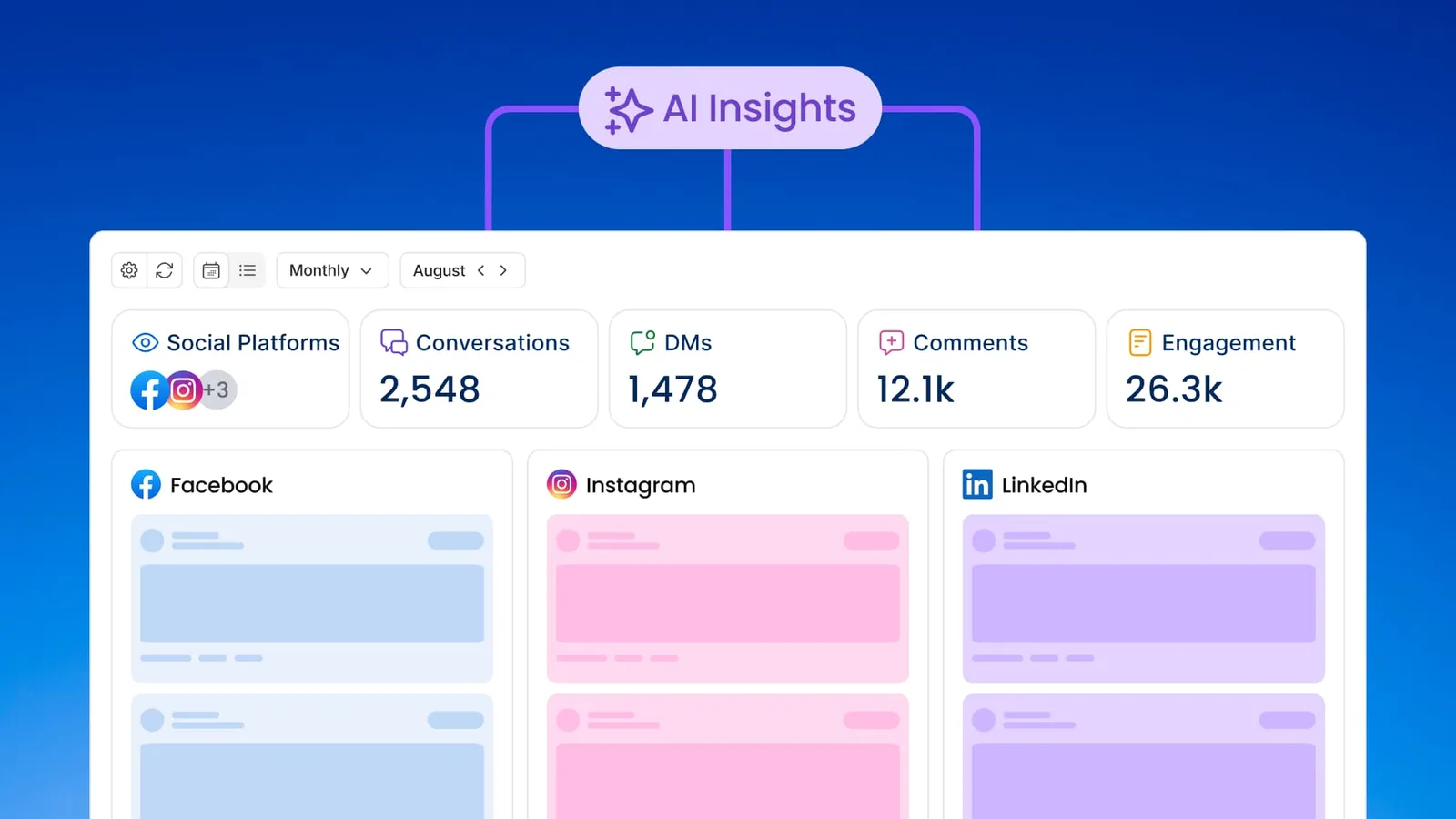
An AI social media command center is a setup where your AI assistant has a live connection to your social media platform so that instead of switching between tools to find what you need, you can ask your AI directly and get an answer based on your real, current account data. Performance stats, scheduled posts, inbox trends, and profile analytics. All of it becomes queryable through natural conversation inside the same interface you already have open.
Social media management has traditionally worked in the opposite direction. You log into your social media tool, navigate to the right section, find the data, and carry it somewhere else to use it.
The command center approach reverses the flow.
Your tools respond to you right inside the workspace (i.e., ChatGPT or Claude) where you’re already thinking. This means fewer decisions about where to go, less time reorienting between systems, and more cognitive bandwidth for the parts of the job that actually need it.
That shift becomes possible because of an underlying technology called the Model Context Protocol, and understanding what it is makes the rest of this guide a lot clearer.
(Vista Social also has a dedicated MCP explainer if you want to go deeper on the technical side before we get into the practical applications.)
But without getting too technical (we’ll dive deeper in the next section), MCP is a fancy term for a direct AI connector.
What is MCP and why does it matter for social media managers?
MCP stands for Model Context Protocol, an open standard that Anthropic introduced in late 2024 to define how AI assistants connect to and interact with external tools and data sources.
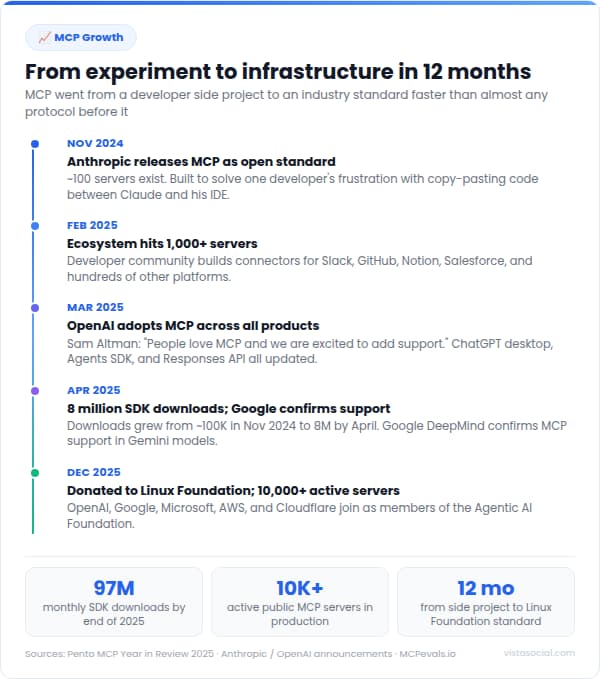
Before it existed, every integration between an AI tool and another piece of software required a custom-built pipeline, meaning slow adoption, unpredictable behavior, and most platforms staying siloed from AI entirely.
MCP created a shared language so that any compatible AI and any connected platform can communicate in a standardized way, rather than everyone building their own version of the same connection.
Adoption across the broader tech industry happened fast.
By March 2025, OpenAI had integrated MCP across its Agents SDK and the ChatGPT desktop app. By December 2025, Anthropic had donated the protocol to the Agentic AI Foundation under the Linux Foundation, with Google, Microsoft, AWS, and Cloudflare joining as supporting members.
The protocol went from an internal experiment to critical infrastructure in roughly twelve months, and it now has over 10,000 active servers being maintained by companies across every major software category.
For social media managers, that adoption context matters for a practical reason. The connection between your AI chat and your social media platform is now a maintained, standard integration, not a workaround someone bolted together.
Vista Social built its MCP server on this foundation, which means that as both AI tools and the Vista Social platform continue to develop, the connection between them develops alongside them.
How Vista Social becomes your AI social media command center
Getting Vista Social’s MCP integration running takes about ten minutes and zero technical knowledge. Here’s the full setup, step by step.
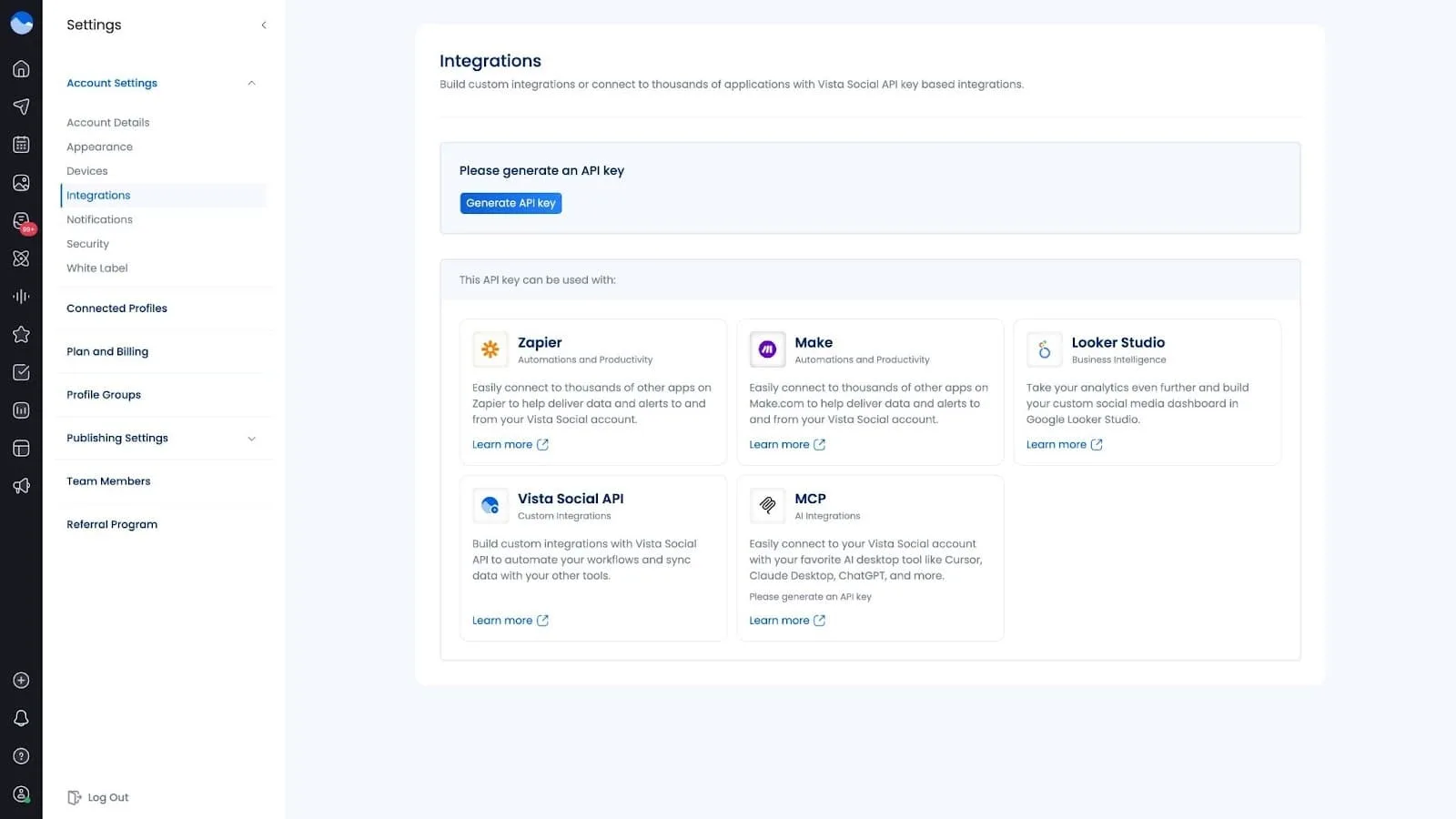
Step 1: Copy your MCP URL from Vista Social
In your Vista Social dashboard, go to Settings, then Account Settings, then Integrations. Scroll to the MCP section.
If this is your first time, click Generate API key. Once you have a key, click “Copy link” next to the MCP Server field. That URL has your API key already embedded, so you won’t need to set up authentication separately.
Step 2: Connect to Claude or ChatGPT
If you’re using Claude in-browser:
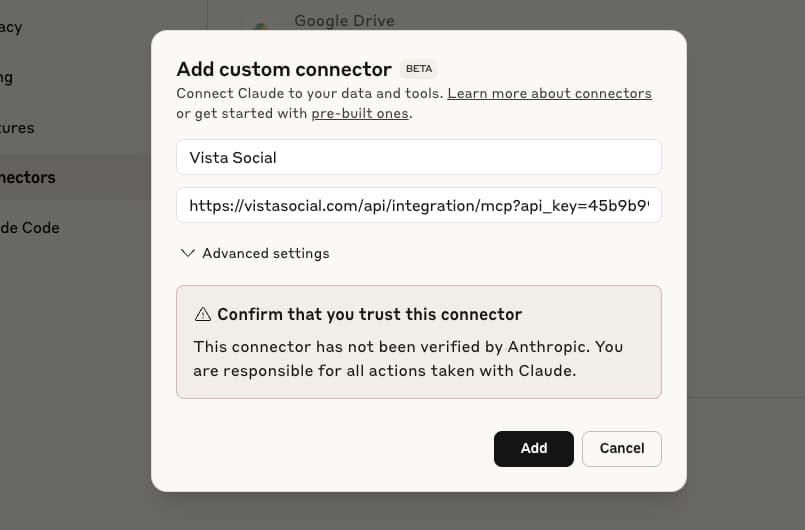
Click the + under the chat box and go to Connectors > Manage connectors.
Click the + in the top of the page that loads, then click Add custom connector. Give it a name (“Vista Social” is straightforward enough), paste your MCP URL into the Remote MCP server URL field, and click Add.
If you’re using Claude Desktop:
Click the Search and tools icon in the sidebar, then select Add connectors > Manage connectors > Add custom connector. Give it a name (again, “Vista Social” works well), paste your MCP URL into the Remote MCP server URL field, select No authentication since the API key is already in the URL, and click Add.
If you’re using ChatGPT:
Go to Settings > Apps & Connectors. Scroll down to Advanced settings and toggle Developer mode on. Head back to Apps & Connectors and click Create. Name the connector, paste your MCP URL, and click Create.
Step 3: Start using it
Head back to your AI chat window and confirm the Vista Social connector is enabled. From here, the connection is live.
For Claude: Add “Using Vista Social” at the beginning of each prompt to tell Claude to route the request through your account. For example: “Using Vista Social, how did my Instagram posts perform this week?”
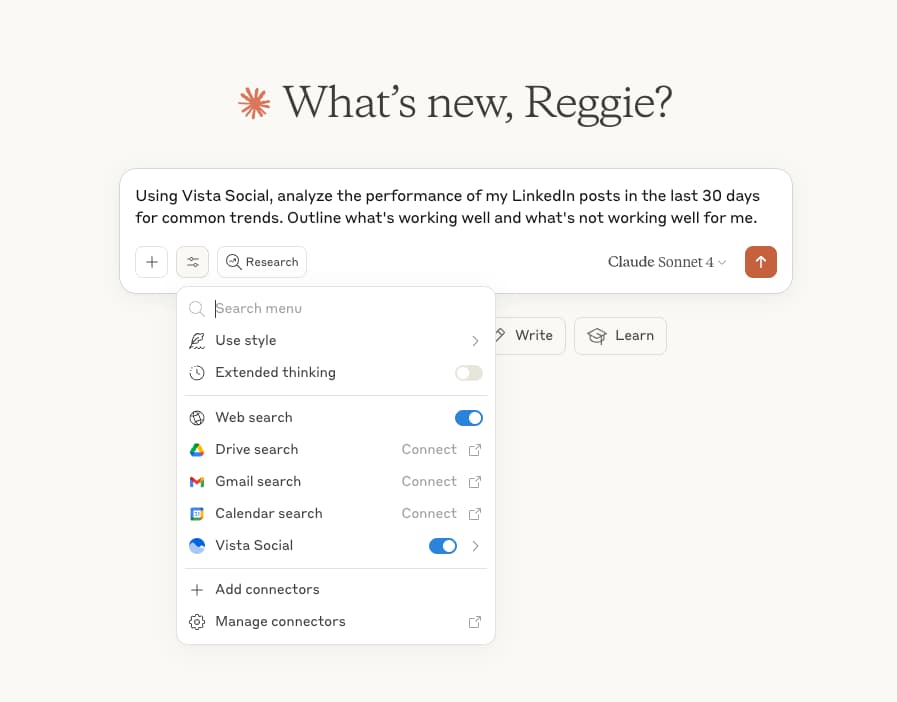
For ChatGPT: Make sure to select Vista Social from your list of connectors before submitting any prompts so ChatGPT knows where to pull information from.
The difference from regular AI use shows up immediately. The AI is no longer working from general knowledge about social media. It’s working from your specific account data, in real time, which changes what it can actually do for you.
What you can actually do with your new AI social media command center
The best way to make this concrete is to describe the actual capabilities available once you’re connected, because the phrase “manage social media through AI chat” can sound broader or narrower than it is depending on what you’re picturing.
Before we dive deeper into a few specific use cases, let’s cover a few things you can start testing:
- Pull performance data by platform, profile, or date range: Ask for your top-performing posts from the past month, compare engagement across your connected accounts, or get a breakdown of metrics for a specific profile without touching a single dashboard filter.
- Review your content calendar: Check what’s scheduled across your profiles for the coming week, confirm what’s queued for a specific date, or get a summary of upcoming content without opening the publisher.
- Schedule new posts through conversation: Describe what you want to post, which platforms you want to publish to, what tone you’re going for, and when it should go out, and the AI drafts and schedules it inside Vista Social from within the same chat.
- Query your inbox activity: Get a summary of recent engagement trends, check comment or message volumes across accounts, and review what’s been coming in across your connected profiles.
- Confirm account details on the fly: Check which profiles are connected, verify post status, or confirm scheduling details without navigating through the dashboard to find the information.
There are endless MCP prompts you can try, but let’s cover a few more specific instances to help you get started.
Check your analytics without opening a dashboard
Here’s the simplest way to understand what the connection actually does: your AI no longer needs you to go get information for it. You ask the question, and it goes and gets the answer from your Vista Social account directly.
So instead of opening a new tab, logging in, navigating to analytics, choosing your profile, setting your date range, and waiting for the data to load, you just open your AI chat and type something like “How did my Instagram posts perform this week, compared to last week?” The AI reaches into your connected Vista Social account, retrieves your actual performance numbers, and returns a plain-language answer in seconds.
Same data. Same accuracy. Zero tab-switching. That’s the core shift.
Ask questions about your performance instead of hunting for answers
A dashboard is designed around a standard set of metrics and date ranges, which means it shows you what it was configured to show, regardless of what you actually want to know right now. A conversational interface is designed around your questions, which opens up a different kind of inquiry.
Instead of navigating to a pre-built view and interpreting whatever data appears there, you can ask layered, specific questions about your accounts and get answers shaped around what you actually need. Some examples of what that looks like through your new AI social media command center:
- “Look at my inbox activity from the last 30 days and tell me which content topics drove the most positive sentiment in the comments, then suggest 3 content ideas that expand on those exact themes.”
- “Based on my posting frequency and engagement rate across all my connected profiles this month, which platform is giving me the best return per post, and should I be posting there more or less?”
- “Compare my engagement rate on posts I published on weekdays versus weekends for the last 60 days and tell me whether there’s a meaningful difference I should be scheduling around.”
- “Pull my top 5 posts from the last 90 days by shares, identify what they have in common in terms of format, topic, or timing, and draft 3 new posts that follow the same pattern.”
- “From this month’s inbox, flag any negative sentiment patterns that appeared more than once and draft a suggested response I can turn into a pinned comment or auto-reply template.”
- “Give me a full content audit for [profile] over the last quarter: what formats I used, which performed above average, which underperformed, and one concrete recommendation for next month.”
- “Look at my listener data from the last 14 days and tell me which topics in my industry are generating the most conversation, then suggest 2 posts I could publish this week that tap into those conversations.”
- “Which 5 posts from the last 6 months have the highest engagement-to-reach ratio across all my connected profiles, and would any of them be strong enough to schedule again as evergreen content?”
- “Summarize the inbox conversation sentiment for [client profile] over the last 7 days and draft 3 bullet points I can use to open tomorrow’s client call.”
- “Across all my connected profiles, flag content gaps: topics I haven’t posted about in more than 3 weeks that previously performed above my average engagement rate.”
The questions you think to ask in conversation are often more specific and more useful than the questions a pre-built report was designed to answer, because they’re shaped by the actual decisions you’re trying to make rather than a generic analytics framework.
Manage your social media without switching tools
According to a 2025 survey by Lokalise of 1,000 US knowledge workers across 11 industries, the average employee loses 51 minutes per week to tool fatigue alone, with 22% losing more than two hours per week.
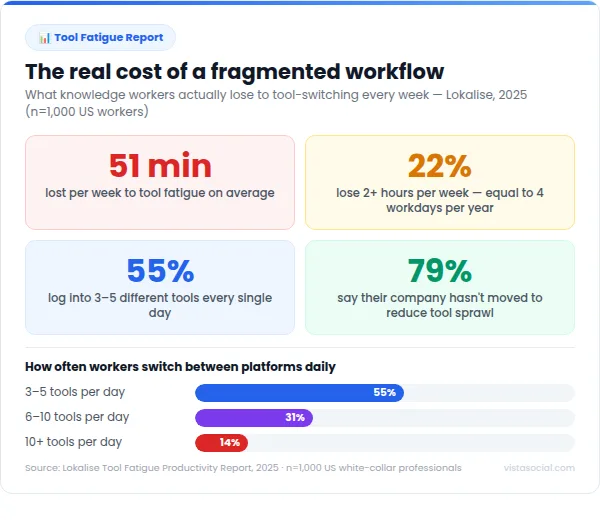
The survey found that 55% of workers log into three to five tools daily, and 31% are navigating six to ten.
For social media managers handling multiple platforms and clients, those numbers skew upward because every additional account or brand adds another layer of context to maintain and another set of interfaces to load.
Building out your AI command center with Vista Social’s MCP connection doesn’t consolidate every tool in your stack, but it does consolidate the parts of the workflow that generate the most switching:
- Analytics
- Scheduling
- Content queue management
- Performance summaries
- Asset organization
- Content ideation/creation
When those tasks move into a single conversational interface, the cumulative time saved per week adds up quickly, and more importantly, the cognitive overhead of knowing which tab to check next disappears from the equation entirely.
Why this changes things for agencies and brand managers
The social media managers who may have the most to gain from the command center setup are agencies managing multiple clients and in-house managers who spend a meaningful chunk of their week on reporting and data retrieval.
The reason isn’t that they do the most interesting work in social media; it’s that they have the highest concentration of tasks that involve moving information between systems rather than actually using it.
Data lives in the platform, the client’s question is in an email, and the report needs to be built in a separate document. Each step individually is straightforward, but strung together across a full week, those transitions add up to a significant slice of available working hours, and they’re the least strategic part of what AI in social media is genuinely good at handling.
Take a typical agency social media manager running eight client accounts. Call her Maya. By 10am on any given Monday, Maya has already logged into eight different platforms, checked four client dashboards, and started a report she won’t finish until Thursday.
She’s good at her job, but a meaningful chunk of her week goes to retrieval work. Finding numbers, moving them, and formatting them for people who will spend 30 seconds reading them.
The strategy work, the creative thinking, and the proactive recommendations that actually grow her clients’ accounts get squeezed into whatever focus time is left. That’s the cost nobody talks about. The cost is the 10 hours a week that Maya spends being a courier between systems instead of a strategist. MCP is what changes that equation.
1. Less time spent pulling reports
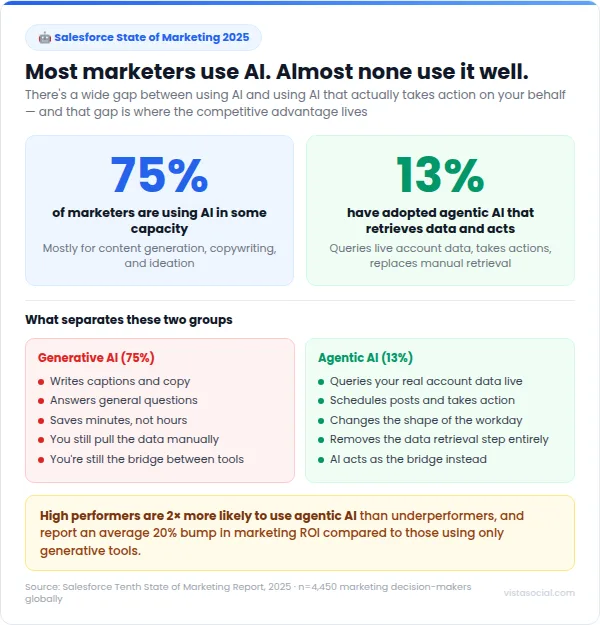
According to Salesforce’s State of Marketing report, which surveyed 4,450 marketing professionals in late 2025, 75% of marketers are now using AI in some capacity, but only 13% are using it the way Vista Social’s MCP integration works. Like by querying real account data and taking actions, not just generating text.
That gap matters because those two uses of AI produce completely different outcomes. Generating text saves you minutes. Having AI that can pull live performance data and act on it on your behalf changes the shape of your workday.
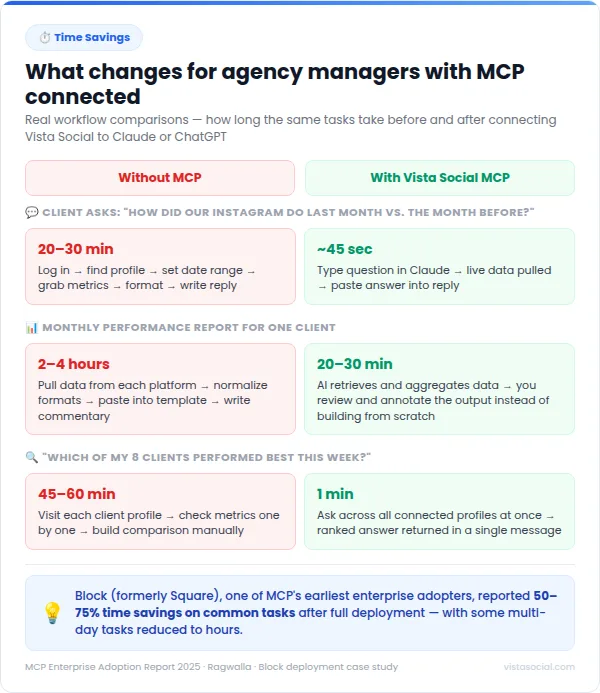
When your AI can pull a client’s performance data on demand, a monthly report stops being a build-from-scratch exercise and becomes a review-and-annotate exercise instead. The data retrieval happens in a conversation. You arrive at the analysis stage with focused attention rather than arriving there exhausted after an hour of copy-pasting numbers between tabs.
2. Answer client questions in real time
Back to Maya. It’s that Wednesday afternoon, and the client email just landed. “Hey, can you pull last month’s Instagram numbers and compare them to the month before?” Six months ago, that email meant 25 minutes of tab-switching.
Now Maya opens her Claude chat, types the question with “Using Vista Social” at the front, and has the answer in 45 seconds. She pastes it into a reply, adds a single line of context, and sends it before the client has even refreshed their inbox.
With Vista Social connected to your AI chat, you type the question, get a real-time answer drawn from your live account data, and respond to the client in a few minutes.
The data is current because it’s pulled directly from your Vista Social account at the moment you ask, not from whatever export you last ran. For agencies, that speed creates a qualitatively different kind of client relationship, where questions get answered while the conversation is still happening rather than at the end of the week.
3. Manage multiple accounts without the tab chaos
Every social media manager working with more than two or three clients knows the cognitive cost of maintaining context across multiple accounts, multiple platforms, and multiple dashboards.
There’s the tab for each client, the view for each platform, and somewhere in the middle of switching between them the thread of what you were analyzing gets lost to a notification or an inbox update.
Vista Social’s multi-profile management already consolidates your accounts into a single platform, and the MCP integration adds a conversational query layer on top of that foundation.
Instead of navigating to each client profile individually to check performance, you can ask across all connected accounts in a single message: “Which of my clients had the best engagement rate this week?” becomes one question with one answer, rather than a series of dashboard visits that you then need to compare manually. For managers juggling five or more brands, that difference compounds quickly across a full work week.
Build your command center with Vista Social
Think back to that Wednesday afternoon email. Being stuck working late on a task you should be able to quickly check off.
That’s not a productivity problem you can solve by working faster or starting earlier. It’s more of a structural problem, and it only gets solved when the tools you use stop requiring you to act as the bridge between them.
There’s something worth saying about where this sits in the arc of how social media management evolves as a practice. The tools that fundamentally change how work gets done rarely announce themselves clearly at first.
They start as something a small number of early adopters experiment with, and then they become the default way everyone operates, and by the time most people realize the shift happened, the people who understood it early have already built their workflows around it.
Maya didn’t change how she thinks about social media strategy. She didn’t learn new skills or hire more help. She connected Vista Social to Claude, spent ten minutes on setup, and reclaimed the part of her week that was never really hers to spend on retrieval work in the first place.
MCP and the integrations built on it are in the early part of that arc right now, and Vista Social’s implementation connects the platform for LinkedIn workflows and for Instagram strategies that social media managers are already running, bringing them all into a single conversational interface where the AI can query, schedule, and report across every connected account at once.
The setup is available today on Advanced, Scale, and Enterprise plans, takes about ten minutes to configure, and gives you a working AI social media command center using the AI tools you’re already running every day. Get started with Vista Social’s MCP integration, and try it free for 14 days.
AI social media command center FAQs
Here are the questions that come up most often when social media managers start exploring the MCP setup for the first time.
Do I need to be technical to use Vista Social’s MCP integration?
You don’t. The setup involves copying a URL from your Vista Social integrations settings and pasting it into the connector settings of Claude Desktop or ChatGPT, and that’s genuinely the whole process. No developer support, no API configuration, no code. Once it’s connected, you interact with it through normal conversation the same way you’d use any AI chat tool.
Which AI tools work with Vista Social’s MCP integration?
Vista Social’s MCP server works with Claude (from Anthropic) and ChatGPT (from OpenAI). For Claude, start each prompt with “Using Vista Social” to route the request through the MCP connection. For ChatGPT, select Vista Social from your connected apps list before typing your prompt.
Is an AI-powered command center better than a traditional social media dashboard?
They serve different purposes and work best together. A traditional dashboard gives you a structured, visual overview of your performance data across a period of time, which is useful for spotting trends and preparing for reviews. An AI command center gives you answers to specific questions in real time, handles tasks through conversation, and removes the navigation overhead between having a question and finding the answer.
What data can I access through Vista Social’s MCP connection?
You can access post performance data by platform and date range, profile-level analytics, your publishing queue and content calendar, connected social profile details, and inbox activity, all live from your Vista Social account at the time you ask. The AI pulls current data rather than working from a previous export, which means the answers you get reflect what’s actually happening in your accounts right now.

Try Vista Social for free
A social media management platform that actually helps you grow with easy-to-use content planning, scheduling, engagement and analytics tools.
Get Started NowAbout the Author

Content Writer
Orion loves to write content that refuses to be boring. As part of Vista Social, he helps brands, creators, and agencies stop doom scrolling and start winning with social media. When he's not in front of a keyboard, he's watching films in IMAX with his wife, dissecting football tactics (the European kind), and getting lost in a good book.
Read with AI
Save time reading this article using your favorite AI tool
Summarize with AI
Never Miss a Trend
Our newsletter is packed with the hottest posts and latest news in social media.


You have many things to do.
Let us help you with social media.
Use our free plan to build momentum for your social media presence.
Or skip ahead and try our paid plan to scale your social media efforts.
P.S. It will be a piece of cake 🍰 with Vista Social
Subscribe to our Newsletter!
To stay updated on the latest and greatest Social Media news. We promise not to spam you!
Enjoyed the Blog?
Hear More on Our Podcast!
Dive deeper into the conversation with industry insights & real stories.




Tools
PublishingAnalyticsEngagementIntegrations
FacebookInstagramLinkedInRedditSnapchatThreadsTikTokX (Twitter)YouTubeBlueskyVista Page (link-in-bio)All IntegrationsCopyright © 2026 Vista Social LLC. All Rights Reserved.