

Published on May 21, 2024
13 min to read
Most Affordable Social Media Scheduler [2026 Comparison]

Summarize with AI

![Most Affordable Social Media Scheduler [2026 Comparison]](/static/8deeacb365308abfde97e18e602b4dce/852e6/Most-Affordable-Social-Media-Scheduler1-Featured.png "Most Affordable Social Media Scheduler [2026 Comparison]")
Table of contents
Summarize with AI

ChatGPT

Claude

Perplexity
Share

Vista Social

X (Twitter)


If you’re not using a reliable scheduler tool, it’ll take you f-o-r-e-v-e-r to publish your social media posts.
You’ll need to log in to each social media site, upload your graphics or videos, write captions, and add background music.
It’s pretty intense, huh?
Now imagine handling multiple social media profiles… 😨
Sigh…
This is precisely the reason why you need a reliable social media scheduler.
With an affordable and effective social media scheduling tool, you can prepare your posts and set them to go live at your preferred time, all from a single central place.
With the right tool, what would take you several hours to post and schedule, can be accomplished in just a few minutes.
Do you like what you’re reading so far?
If you answered ‘yes,’ you’ll love the tools we share in this guide.
Table of contents
1. Vista Social
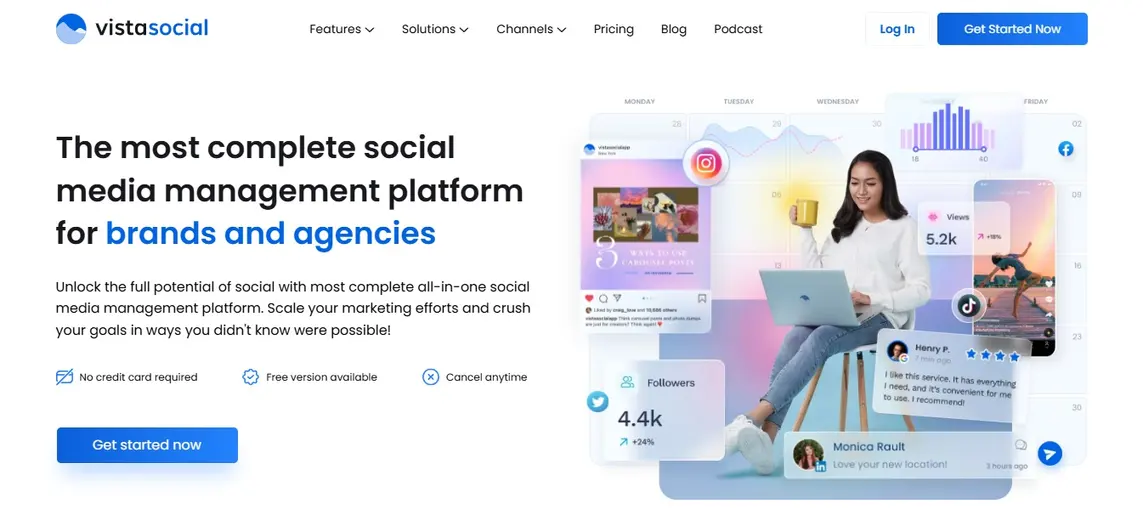
Vista Social is a unified social media management tool for all your social media management needs.The platform’s social media publishing features offer more than simple content scheduling.
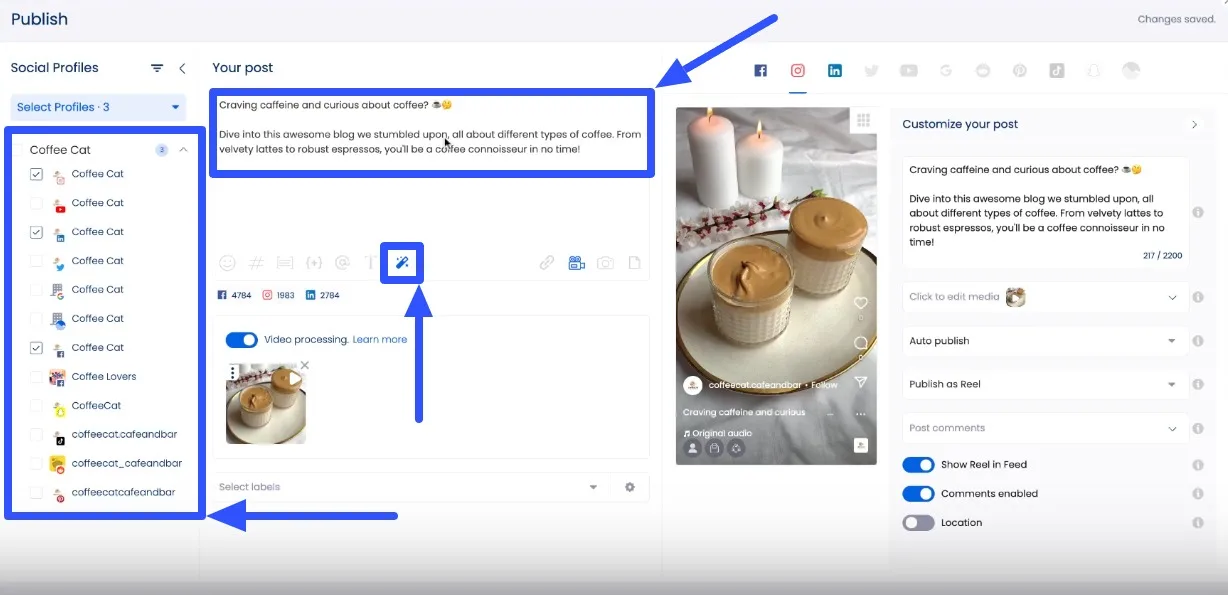
After connecting your clients’ social profiles, you can create and customize the posts easily. For instance, you can instantly generate photo dump captions, post taglines, and video descriptions with the AI Assistant.
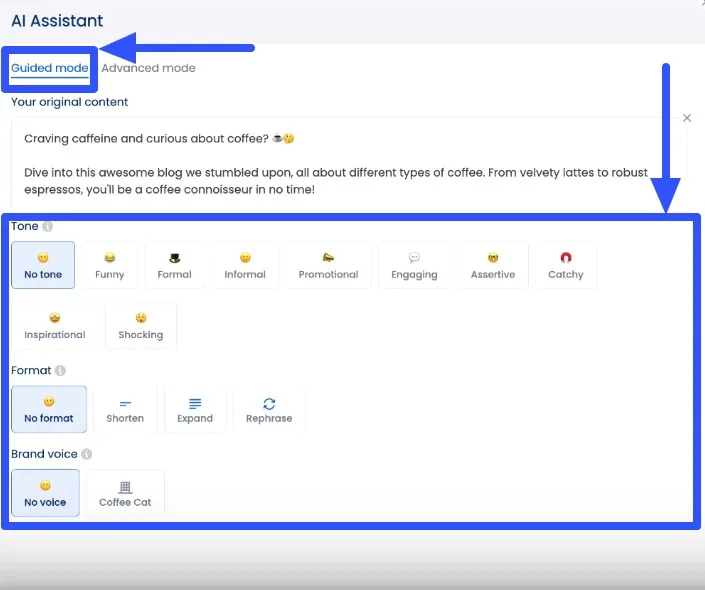
Data shows that 25% of consumers use AI to write a social media post—and you can do this with Vista Social’s AI Assistant. Use the AI Assistant in Guided Mode to improve your post’s captions. You can set the tone, format, and brand voice to tailor your generated content accordingly.
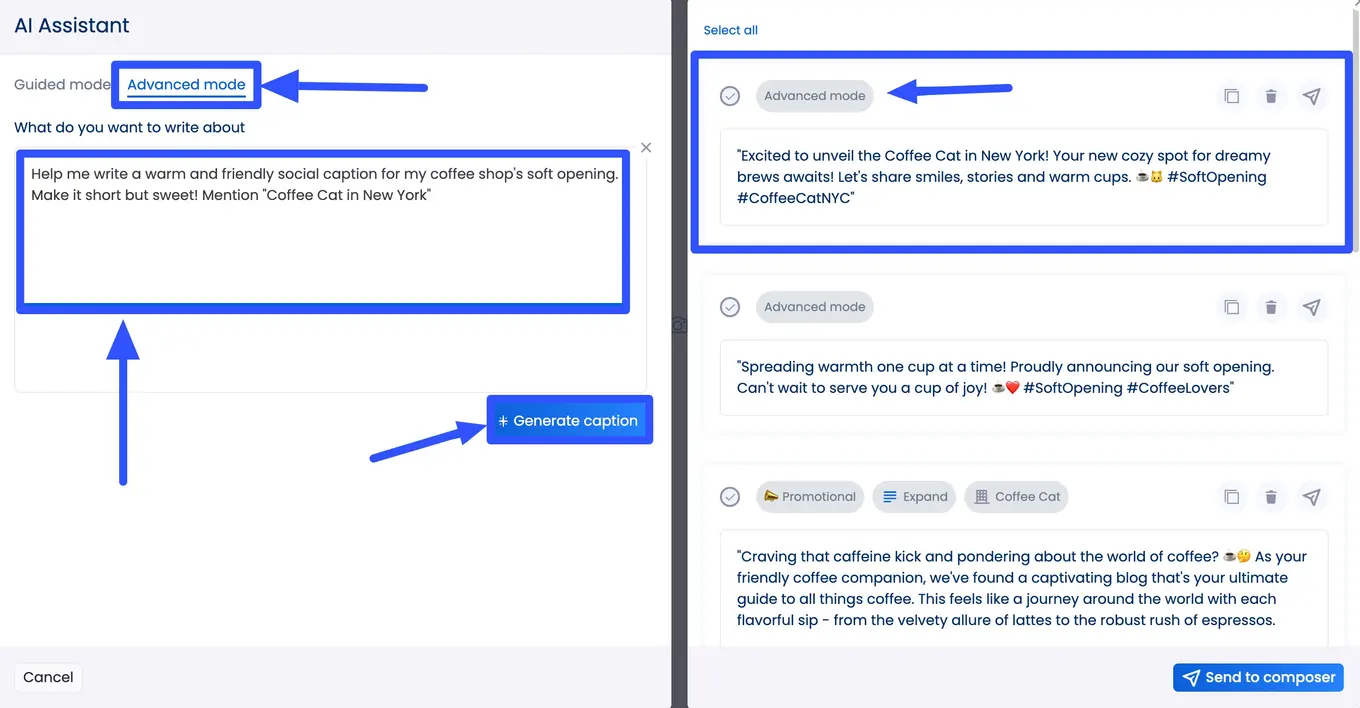
You can also use the AI Assistant in Advance mode to instantly generate content based on your prompt, like asking the assistant to write a catchy promotional blurb for your event.
The Publisher feature also includes:
- A media library to store, organize, and access all your clients’ videos and images in one place
- An option to search User-Generated Content (UGC) that you can add to your media library and share with your clients’ posts
- A built-in Canva integration for quick and easy video and photo editing without leaving Vista Social
- Collaboration tools such as drafts and approvals for seamless content review and approval by your clients.
If you’re publishing Instagram posts, you can customize them further by:
- Tagging Instagram users with public profiles
- Tagging products from your clients’ Instagram shops
- Automatically adding a first comment to the post after it’s published
- Adding a location to the post
- Enabling or disabling comments on the post
[Must read: How to Make a Reel with Photos on Instagram [2024]]
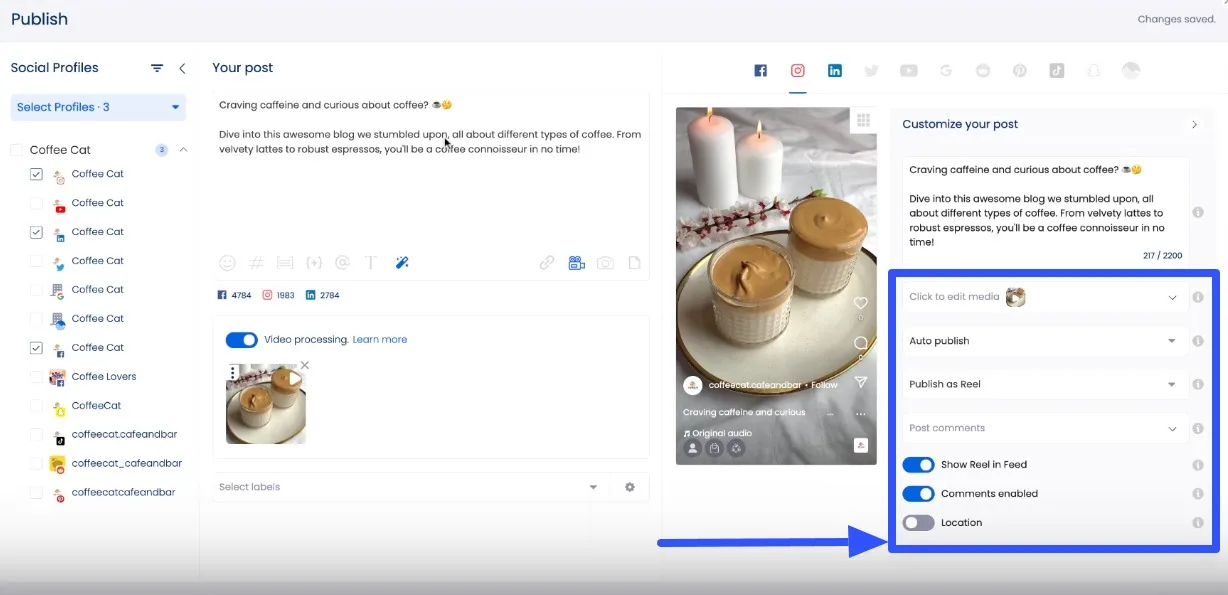
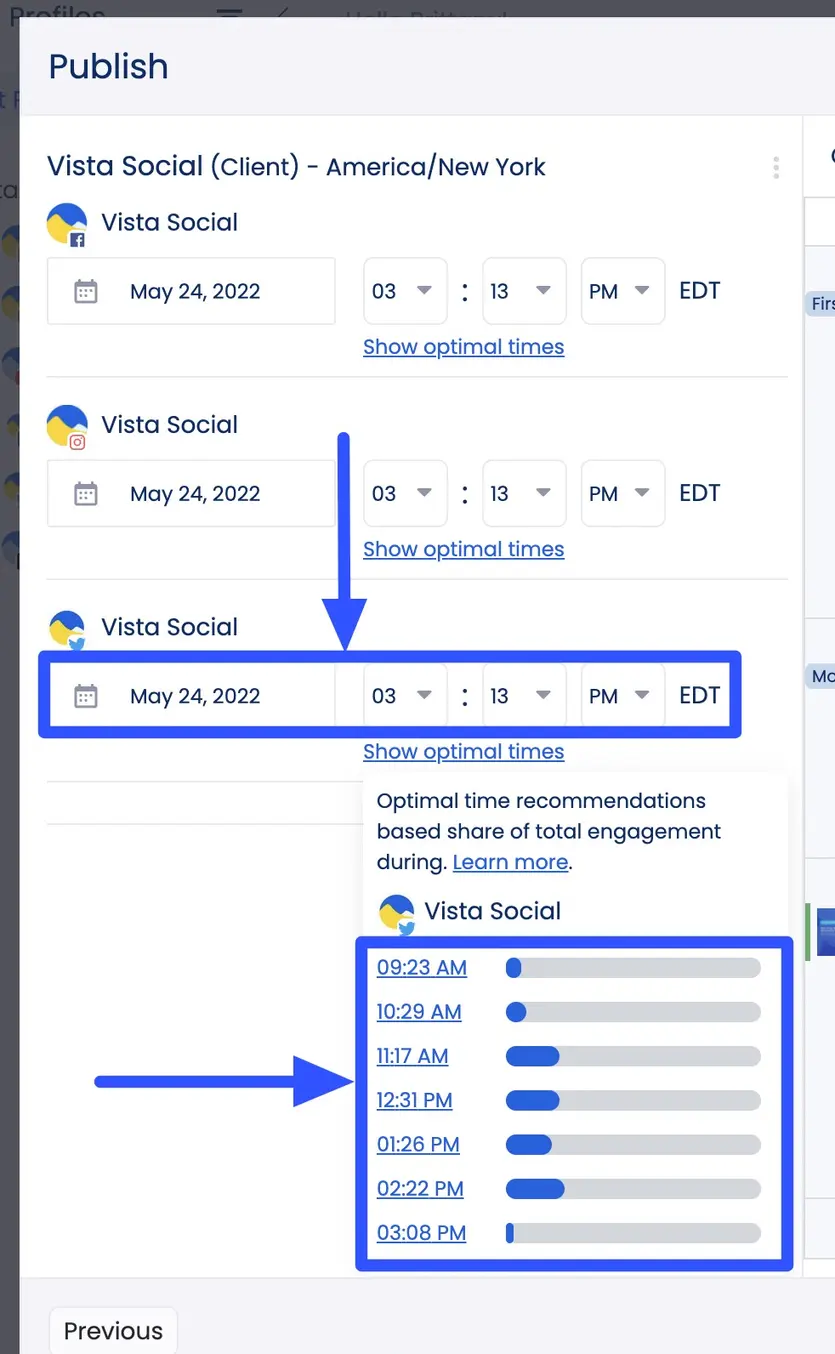
Once you’ve created and customized your posts, you can set a time and date to auto-publish them. Vista Social will even recommend optimal posting times based on engagement data.
Vista Social’s other key features include:
- A link in bio tool with customizable landing pages called Vista Page to help boost lead generation and conversions. You can also schedule Vista Page content to auto-publish via the platform’s Publisher
- Engagement management tools through a unified Social Inbox to centralize all social messages, comments, and reviews
- Social media analytics and reports to track and measure your clients’ social media content performance and audience engagement rates
- A social listening tool to monitor what audiences say about your clients’ brands and tailor content accordingly
- A Reviews management feature to organize and reply to user reviews from one place
Pros
- Easy and intuitive social media content scheduling interface and features
- Includes an AI Assistant for instant content generation and refining
- Offers optimal publishing times to ensure maximum engagement for scheduled posts
- More customization options for scheduled posts, including bulk scheduling and queueing
- Cost-effective for the extent of its features
- Supports many social media platforms, including Instagram, Facebook, TikTok, Snapchat, LinkedIn, Pinterest, YouTube, and more
[Must read: YouTube Shorts Dimensions | The ULTIMATE Guide [2024]]
Cons
- The free trial is only for 14 days
Pricing
Vista Social’s pricing plans include:
- Standard: $39/month
- Professional: $79/month
- Advanced: $149/month
- Enterprise: $379/month
All plans include a 14-day free trial with no credit card information required.
2. Planable
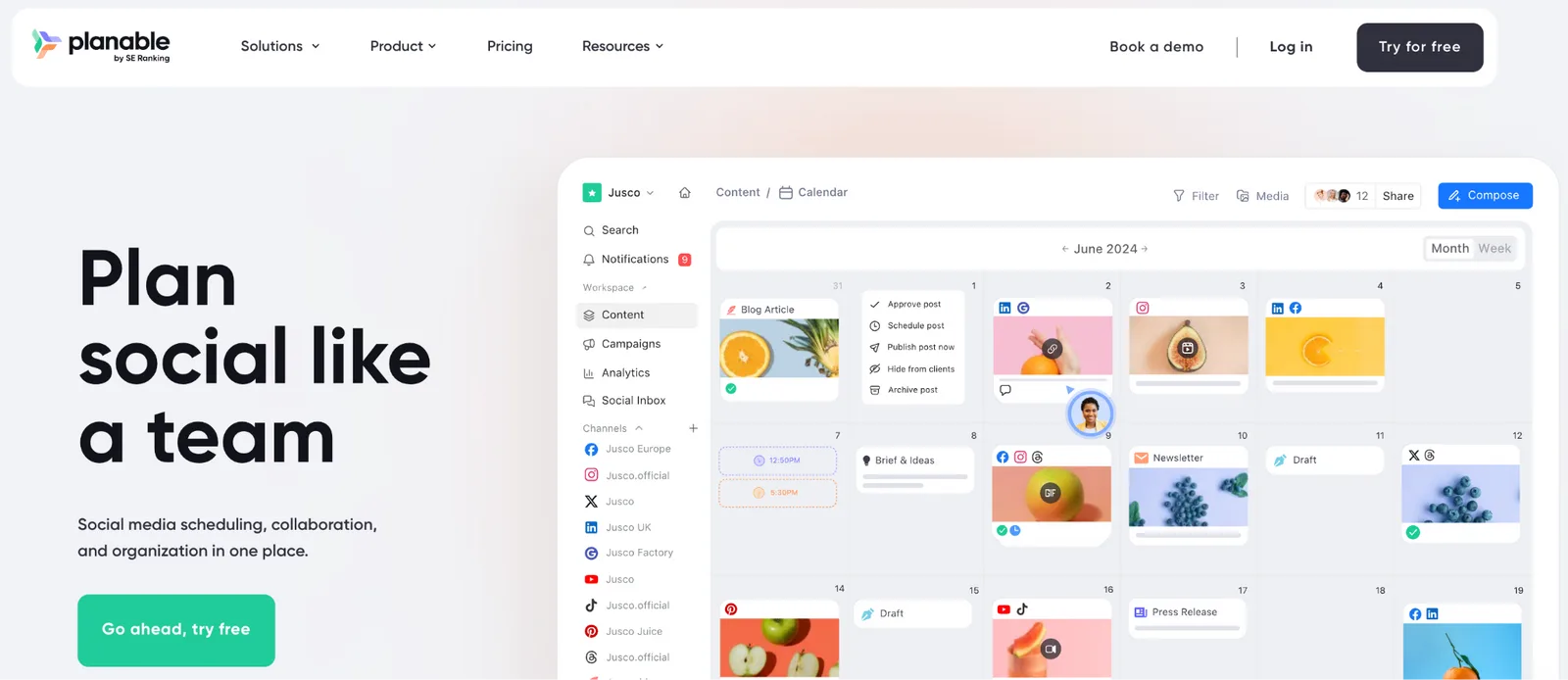
Image source: planable.io
Planable is a social media management tool for agencies and marketing teams that puts collaboration and client approvals at the center of the workflow.
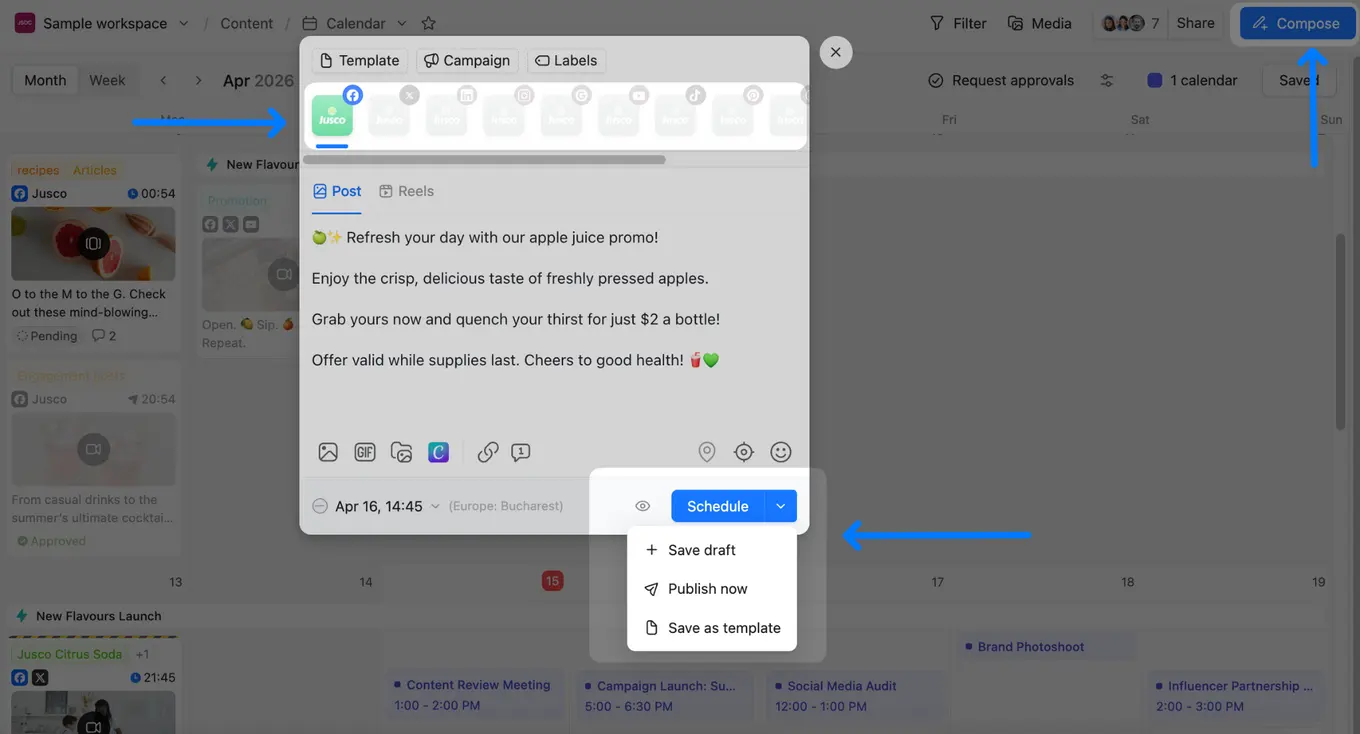
After connecting your clients’ social profiles, you can create and schedule posts across nine platforms (Instagram, Facebook, LinkedIn, TikTok, YouTube, X (Twitter), Pinterest, Threads, and Google Business Profile) all from one dashboard. Pixel-perfect post previews show exactly how content will look on each platform before it goes live, so there are no surprises once you hit publish.
One of Planable’s biggest strengths is how it handles the content creation process itself. Use Planable AI to generate captions, rewrite copy, get fresh post ideas, or draft replies to comments, cutting down the time your team spends staring at a blank composer.
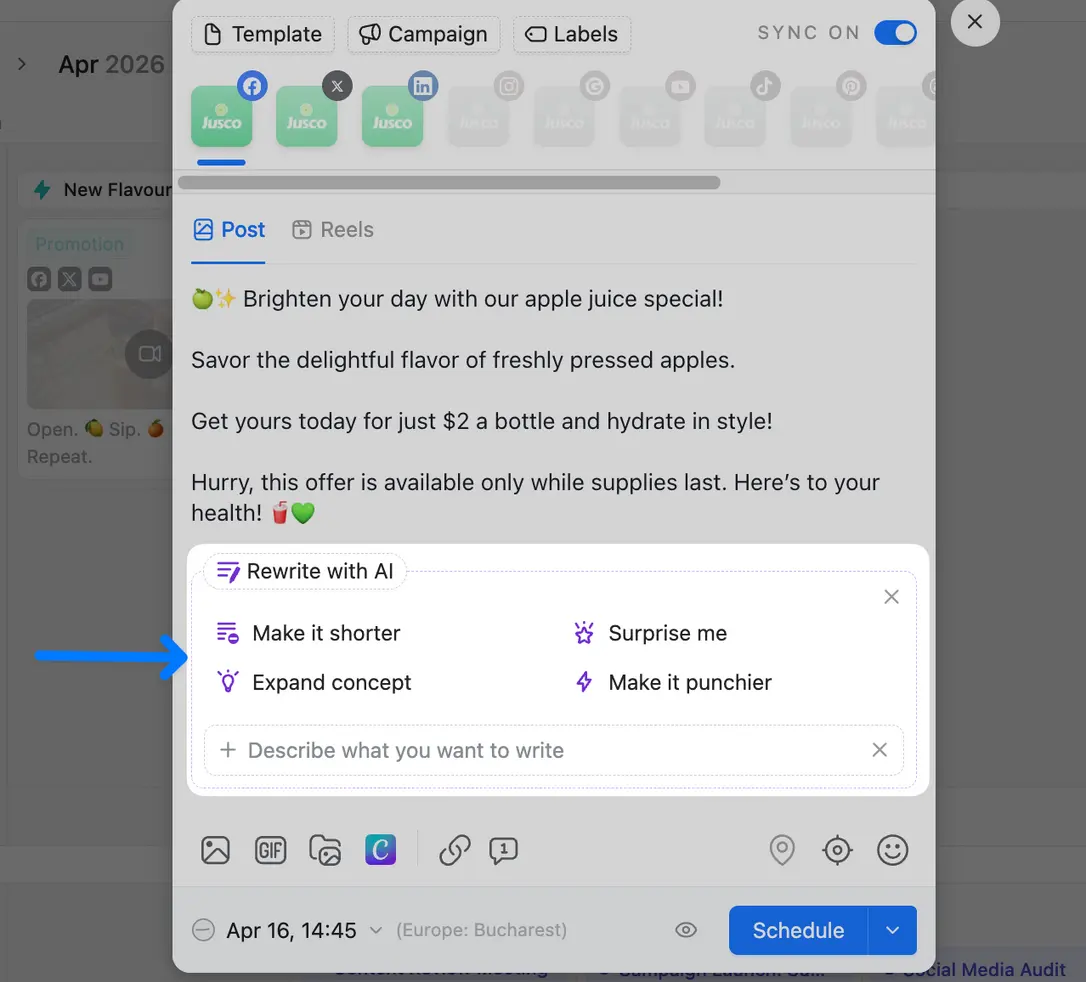
Where Planable really earns its place in an agency stack is the approval layer. You can configure custom approval workflows per workspace (optional, mandatory, or multi-step) routing content through internal reviewers, account managers, and clients in sequence.
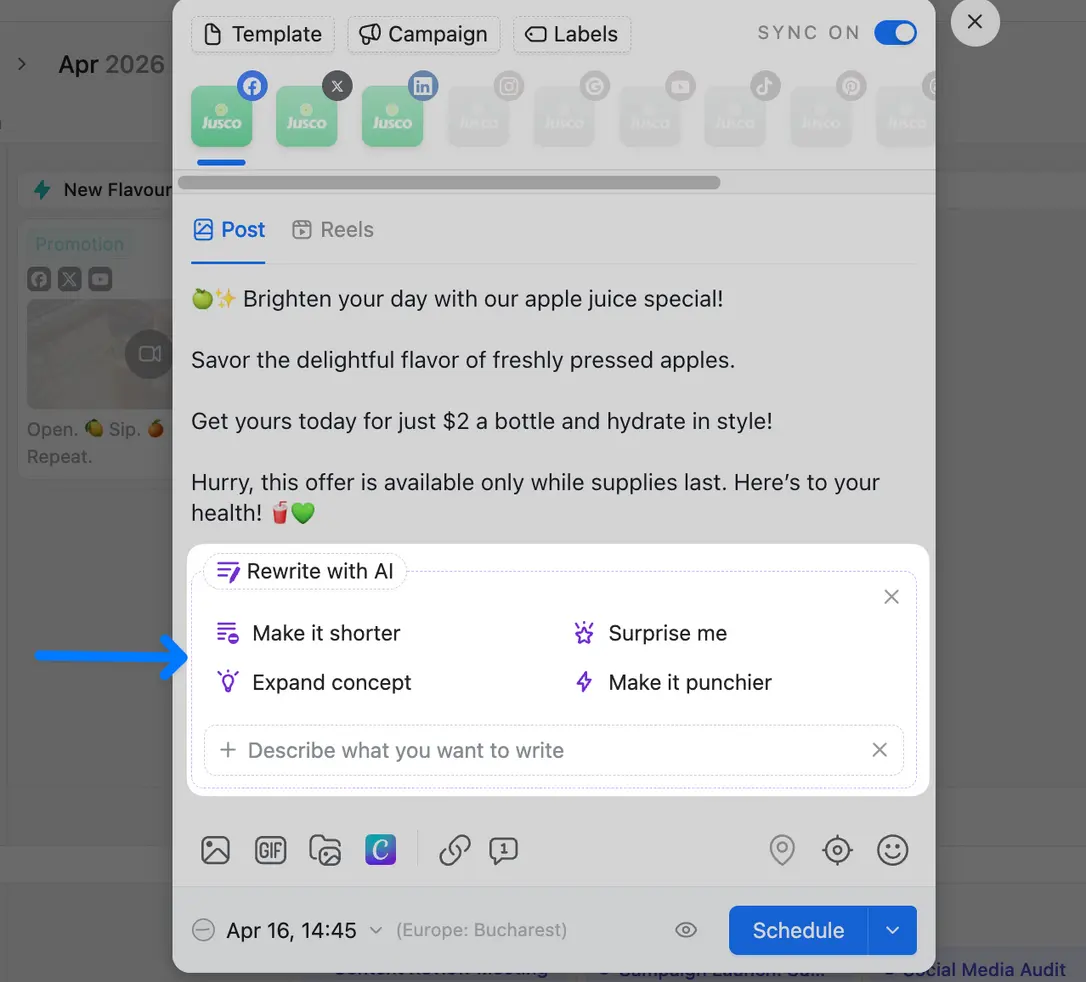
Posts can stay internal until they’re polished enough for client eyes, and your team can leave internal-only comments that clients will never see. When it’s time for review, a shareable guest link gives clients access to a post or the full content plan, no logins, no onboarding conversation required.
Planable’s other key features include:
- A unified marketing calendar with four content views (feed, grid, calendar, and list) so you can plan ahead, spot scheduling gaps, and bulk-approve content from the list view
- Dedicated workspaces per client or brand, each with its own campaigns, colour-coded labels, media library, and preferred posting times
- A Canva integration to pull polished visuals straight into the post composer without switching tabs
- A Zapier integration to connect Planable with the other tools in your stack and automate repetitive tasks across your workflow
- A Social Inbox (add-on) for managing comments and DMs, with sentiment grouping and AI-assisted replies
- Analytics (add-on) with cross-channel performance data, top-performing posts, audience insights, and shareable reports via download or link
Pros
- Purpose-built for agency workflows, with client collaboration and approvals baked into every step
- Pixel-perfect post previews for every platform before content goes live
- Unlimited users on all plans; no per-seat costs as your team or client list grows
- Guest view links let clients review and approve content without needing a Planable account
- Internal comments keep team conversations hidden from clients
Cons
- No social listening or monitoring features
- No CMS integrations for direct website or blog publishing
- Analytics and Engagement are add-ons, not included by default
Pricing
Planable’s pricing plans include:
- Free trial: Up to 50 posts total (no time limit, no credit card required)
- Basic: $33/workspace/month
- Pro: $59/workspace/month
- Enterprise: custom pricing based on number of workspaces and features needed
3. SocialBee
Image source: Socialbee.com
SocialBee is a social media management tool that lets you share content across multiple social networks from one place.
Scheduling a post on SocialBee is pretty straightforward. Start by creating a post, selecting the profile where you want to publish the post, uploading the video or photo, customizing the post, and setting a posting schedule.
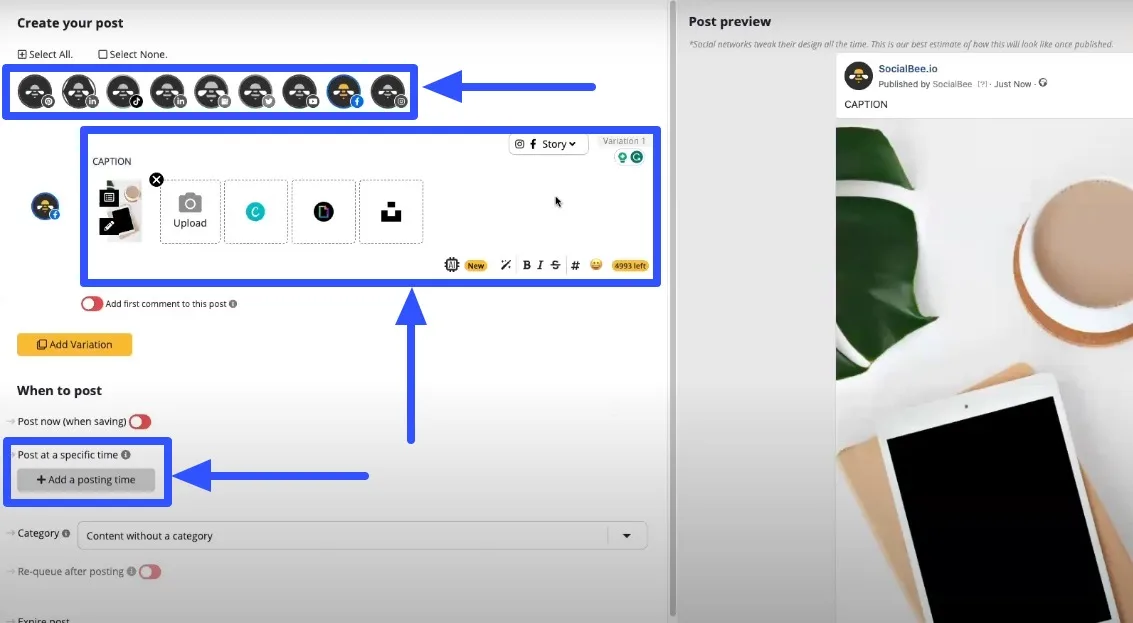
The tool’s scheduling system works on a category basis. You assign each post a category and schedule it for auto-posting.
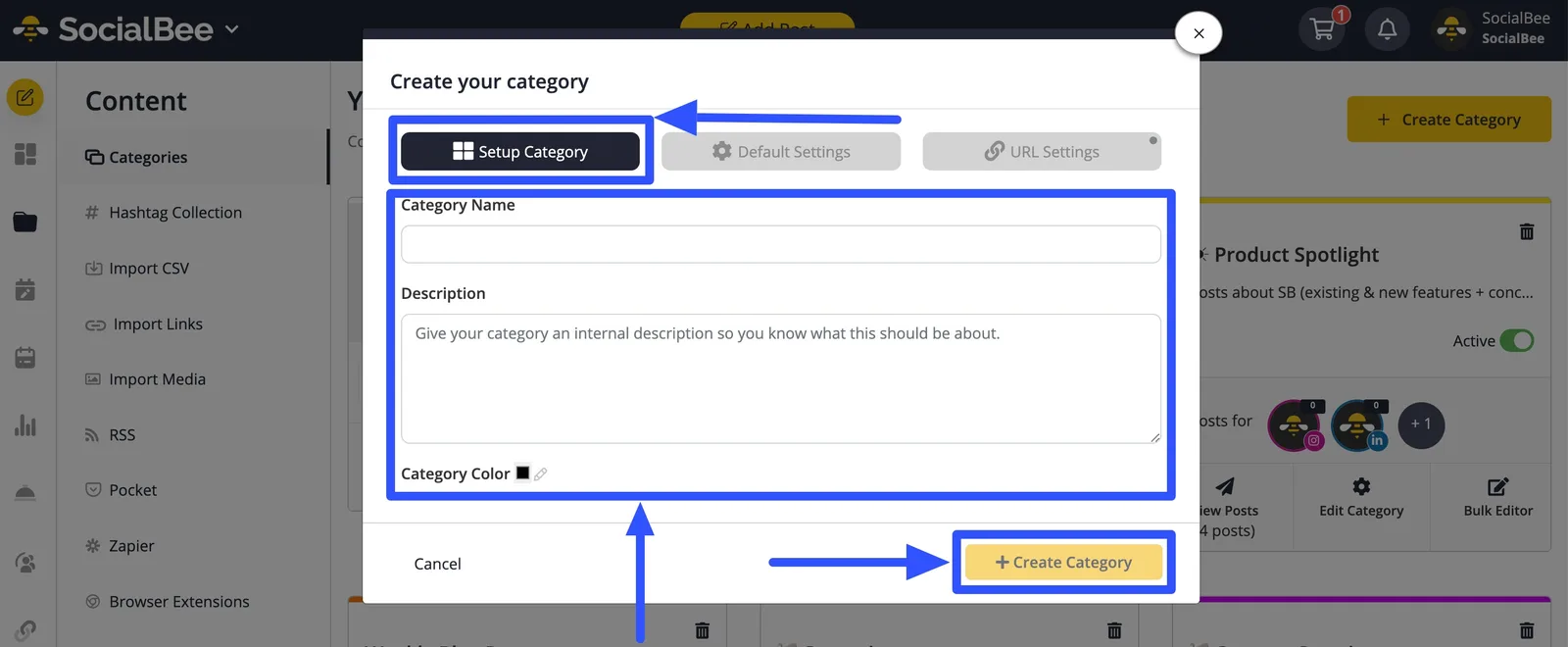
You can also edit posts in bulk and re-queue them, which is a huge time-saver, especially when publishing a lot of content for multiple clients. The platform’s scheduler includes an AI feature that can generate captions and images for your clients’ posts. This way, you can easily create and publish engaging posts that draw more eyeballs and engagement.
Take it from American author David Meerman Scott, who said…
“Think like a publisher, not a marketer.”
The AI can also build a post plan for you, from the categories to content ideas, streamlining your content creation. You can also leverage the post-recycling option to repost content from your library to various platforms at specific times.
Other SocialBee features include:
- A Canva integration for easy photo and video editing and content creation
- Location tagging in your clients’ posts
- Best posting time recommendations
- Content calendar overview
- Social media analytics
- Engagement tools, including a social inbox
- Integrations with major social media platforms and other apps, such as Zapier and URL shorteners
Pros
- Offers a re-queuing feature for seamless reposting
- Streamlines post planning and development with an AI Co-pilot tool
- Includes other handy features such as RSS feed post-generation and content recycling
- Built-in Canva integration and an AI writer for content generation
Cons
- No social listening feature.
- Social network integrations are limited.
- The content calendar view can get overwhelming, especially when you have a lot of scheduled posts. You can only view one profile at a time.
Pricing
SocialBee offers two pricing tiers for standard users and agencies. The Standard plans include a 14-day free trial with the following fees:
- Bootstrap: $24/month
- Accelerate: $40/month
- Pro: $82/month
The Agency plans are broken down into the following:
- Pro50: $149/month
- Pro100: $274/month
- Pro150: $374/month
4. Sendible
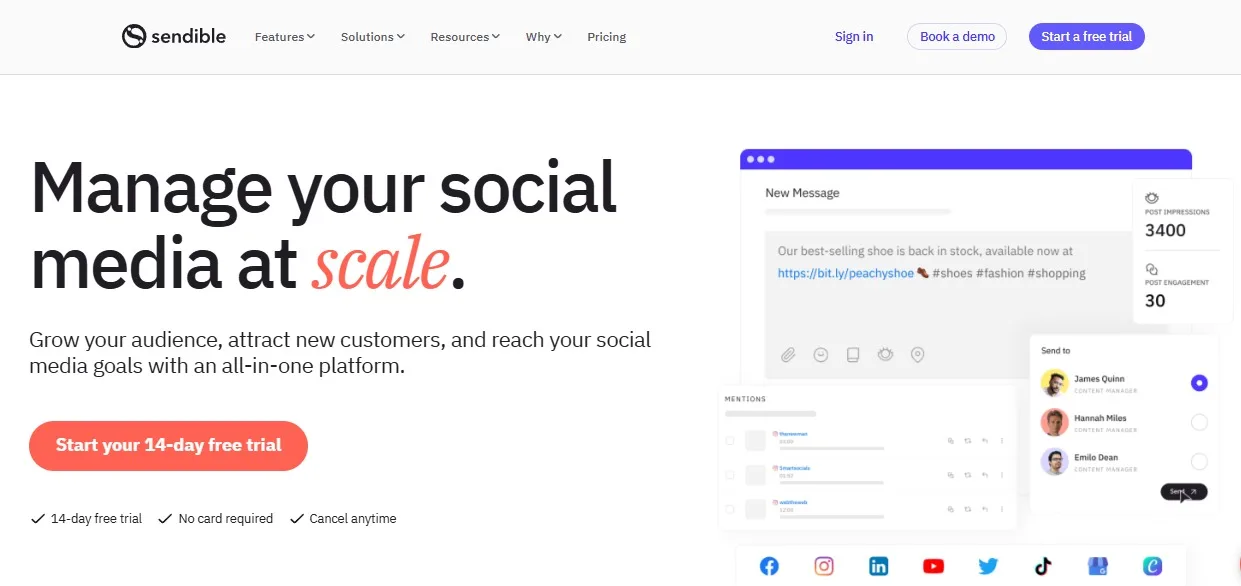
Image source: Sendible.com
Sendible provides a social media management tool with an easy-to-use post scheduling feature.
After uploading the photo or video and adding all the post’s details, click the date option to set an auto-posting schedule.
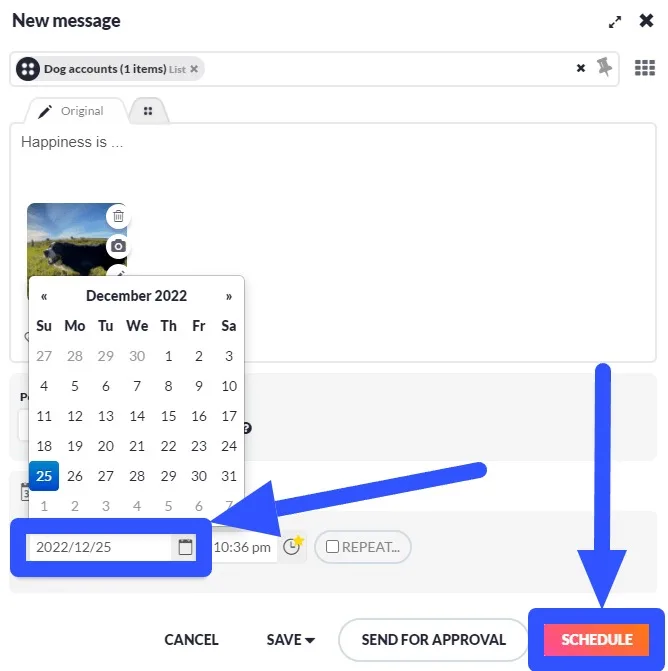
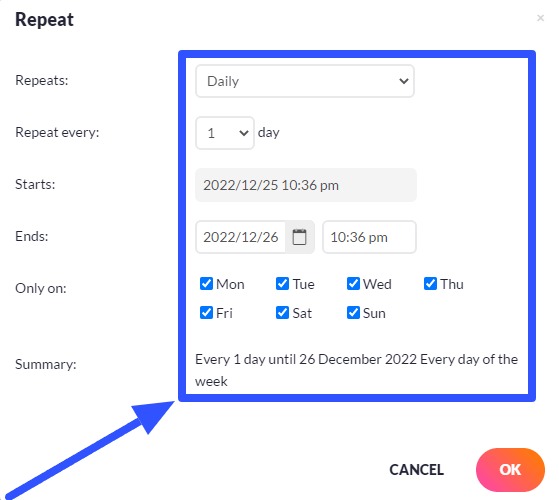
You can also enable the Repeat option to keep posting the content on a specific schedule.
The tool lets you schedule and publish posts individually or in bulk and create post queues. Sendible also offers content curation and an RSS scheduling feature to simplify filling your clients’ social media feeds with content.
Sendible’s other key features include:
- A brandable dashboard for viewing and managing DMs and comments in your clients’ social feeds. It includes an inbox containing all incoming engagements.
- Team collaboration tools, including shared content, hashtags, and other asset libraries.
- An option to send posts to clients for review and approval before they go live.
- Social media analytics and reporting tools, including a drag-and-drop report builder and an option to automatically send reports to clients.
Analytics and reporting tools are vital to social media management. They give insights into audience behaviors and interests, which inform and shape your clients’ content strategies.
Digital Analyst and anthropologist Brian Solis nailed the importance of understanding social media audience psychology when he said…
“Social media is about sociology and psychology more than technology.”
Pros
- Straightforward social media post scheduling features
- Offers smart queues to ensure a seamless flow of evergreen content
- Centralized dashboard and tools for managing social engagement
- iPhone app integration
- Optimal posting time recommendations
- Integrations with major social networks and other business apps
- Built-in image editor
Cons
- The tool’s pricing is steeper than those of similar social media management platforms
- The tool offers a good selection of social network integrations, but similar platforms offer integrations to more channels, such as Snapchat and Pinterest
- Sharing, saving, and printing reports are only available with the White Label plan
Pricing
Sendible offers the following pricing plans:
- Creator: $29/month with a 14-day free trial
- Traction: $89/month with a 14-day free trial
- White Label: $240/month
- White Label+: $750/month
5. SocialBu
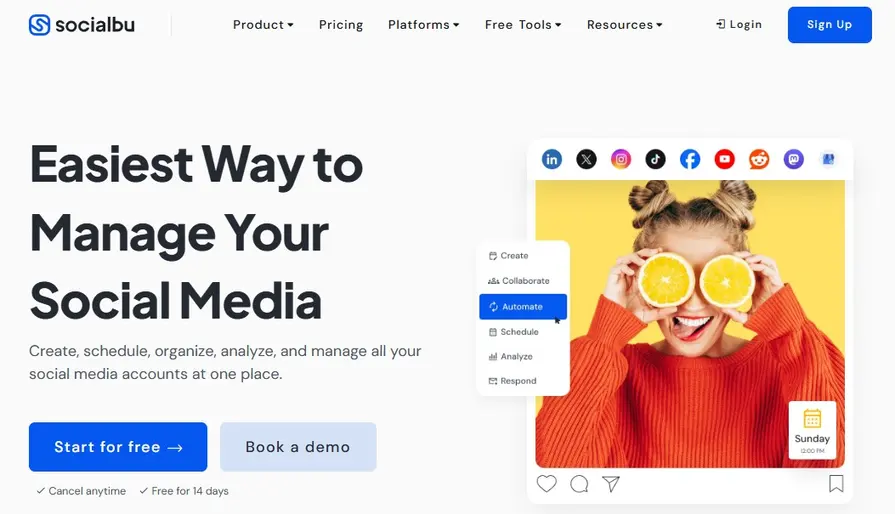
Image source: Socialbu.com
SocialBu is a social media management and automation platform. The platform’s publishing tool is simple and intuitive. Link and select the social profile you want to publish your client’s content to and add captions, hashtags, emojis, and media such as photos and videos.
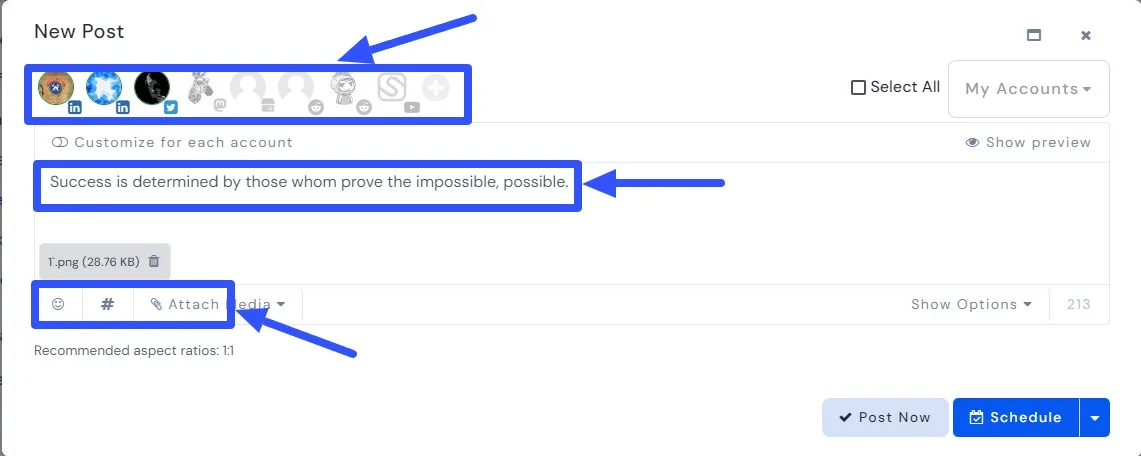
Next, set a schedule to auto-publish the post.
You can also edit your scheduled posts before they go live.
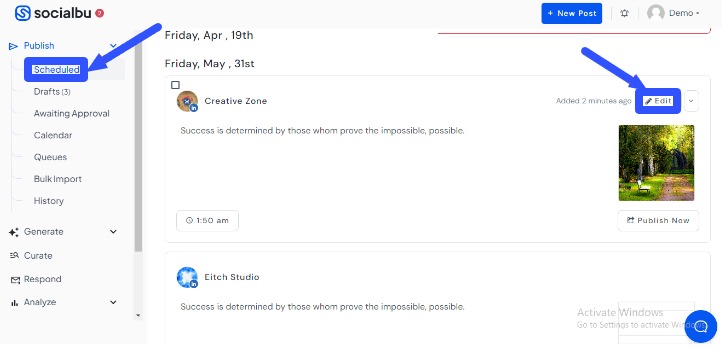
SocialBu’s publishing feature includes the following:
- A social media calendar
- Post recycling by scheduling evergreen content to auto-publish based on your custom time slots and settings
- Bulk schedule posts by uploading your CSV file
- Plan and schedule various social media content formats, including Instagram Stories and Reels
[Must read: Instagram Story Size & Dimensions: Ultimate Guide (2024)]
The platform also offers these other core features:
- Content curation tools
- A centralized inbox to manage all your clients’ social media conversations
- An AI Assistant that can generate, suggest, and improve post captions and content
- Social media monitoring of keywords, hashtags, and mentions of your clients’ brands
- Task automation, such as automatically posting content from RSS feeds and responding to follower messages and comments
- Social media analytics and reports
Pros
- It offers a 14-day free trial
- The platform lets you create dynamic automation rules to streamline social media workflows and reduce repetitive tasks
- Offers AI tools for generating content, images, and quotes
Cons
- The platform supports only a few social networks, excluding Snapchat and Pinterest, which can be a bummer since Pinterest has over 518 million monthly active users
- The analytics feature can be too basic for some users who want more in-depth social media content performance and engagement analysis and reporting
- The tool can be pricey since other social media management platforms offer more integrations at a similar price point
Pricing
SocialBu’s pricing plan is pretty simple:
- Standard: $19/month
- Super: $59/month
- Supreme: $199/month
6. Social Champ
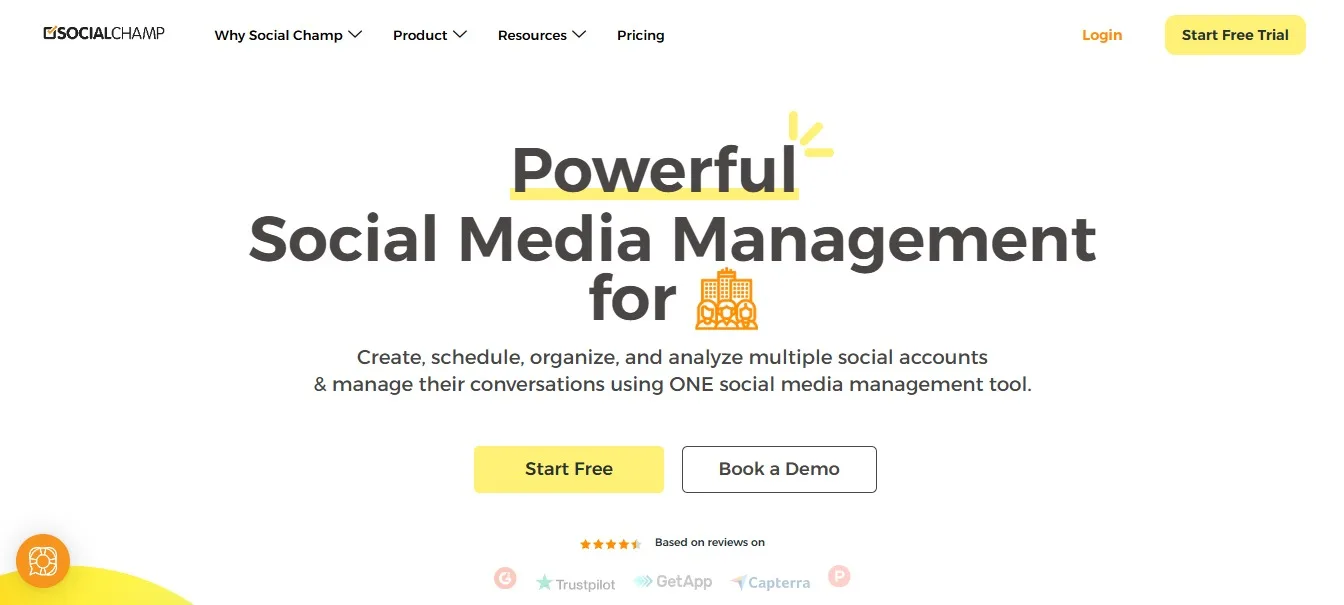
Image source: Socialchamp.io
Social Champ allows you to create, schedule, sort, and analyze multiple social media accounts and manage conversations in a unified platform.
Scheduling a post on Social Champ is quick and easy.
You know the drill: choose the social media profile and create the post by uploading the image or video and adding captions, hashtags, emojis, etc.
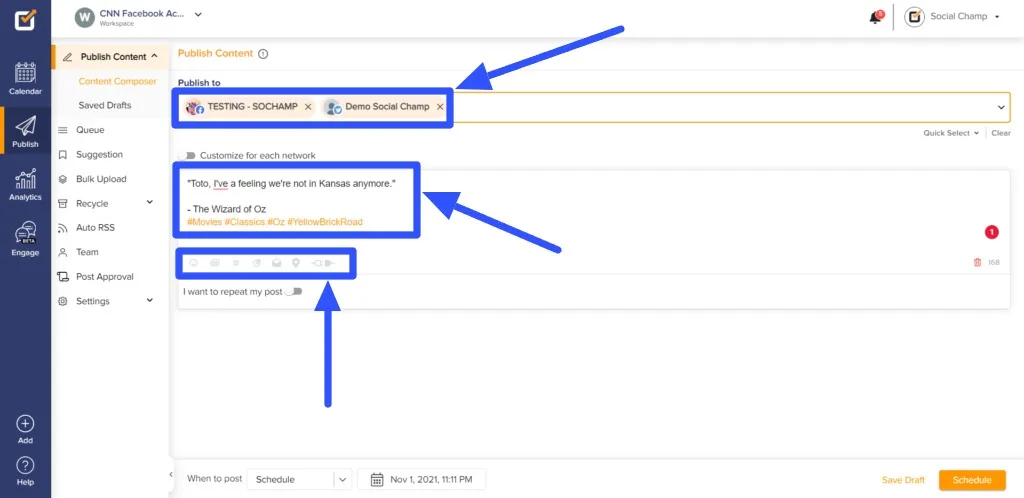
You can use Social Champ’s Sentiment Analysis tool to analyze your caption or content’s emotional tone to audiences before the post goes live. It helps you assess whether to tweak your content’s tone to appeal to audiences and align with your clients’ branding.
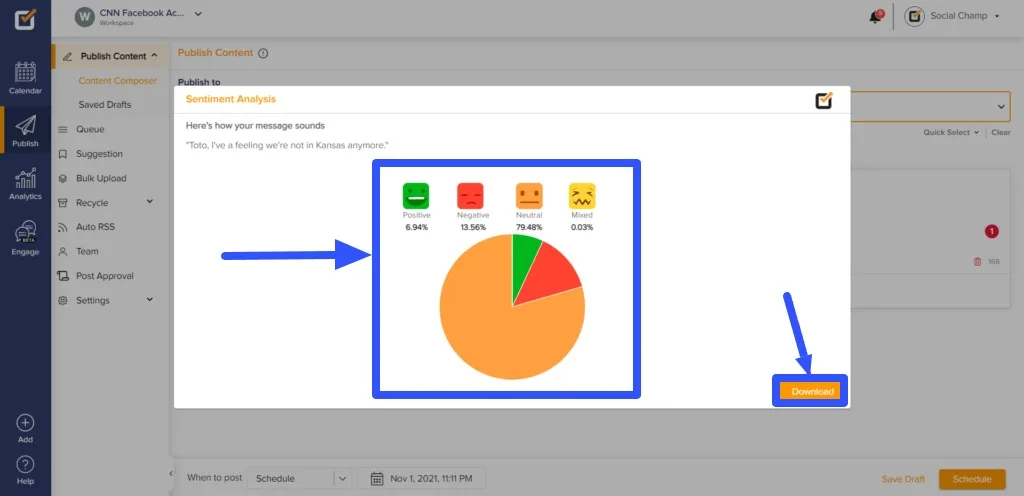
You can set an auto-posting schedule once you’re done creating and customizing your post.
Additionally, Social Champ provides these features:
- Built-in image editor
- Social media analytics and reports, including white-labeled PDF reports
- Smart automation options, including bulk scheduling content via CSV files and RSS feeds and content recycling
- An option to connect Bitly to track your clients’ social media content performance
- An all-in-one social media content calendar that includes a drag-and-drop tool to rearrange scheduled posts easily
- Collaboration tools include access sharing and the authority of other users to approve or decline posts
- A social inbox to easily monitor and manage all incoming messages across multiple social profiles
- Engagement tools such as pre-created saved replies to streamline responding to follower comments and messages
Pros
- Integrates with major social media platforms such as Facebook, Instagram, YouTube, LinkedIn, TikTok, and Pinterest
- Offers competitive pricing for its features
- User-friendly tool with an intuitive interface
- Offers essential social media scheduling features
[Must read: Instagram Following List Order Algorithm Explained [2024]]
Cons
- The mobile app version could be improved since it’s not as user-friendly for users who primarily use smartphones for social media publishing and other management tasks.
- The free tier offers limited analytics features, offering only two weeks’ worth of data.
- The platform’s UI and UX can look a bit dated with its current style and color scheme.
- The platform doesn’t support publishing and scheduling content for Snapchat and Threads.
Pricing
Social Champ’s pricing plans include:
- Free: Includes three social accounts, 15 scheduled posts per social account, and one user.
- Champion: $26/month with a seven-day free trial
- Business: $89/month with a seven-day free trial
- Agency: Contact Social Champ to get a custom quote
7. OneUp
Image source: Oneupapp.io
OneUp promises a simple way to schedule and automatically repeat posts on Instagram, Facebook, LinkedIn, X (Twitter), Pinterest, TikTok, Google My Business, YouTube, and Threads. The platform lets you schedule images to auto-post on your clients’ social media pages via the Chrome extension.
Scheduling posts with OneUp starts with selecting the connected social media accounts and creating your post by adding captions.
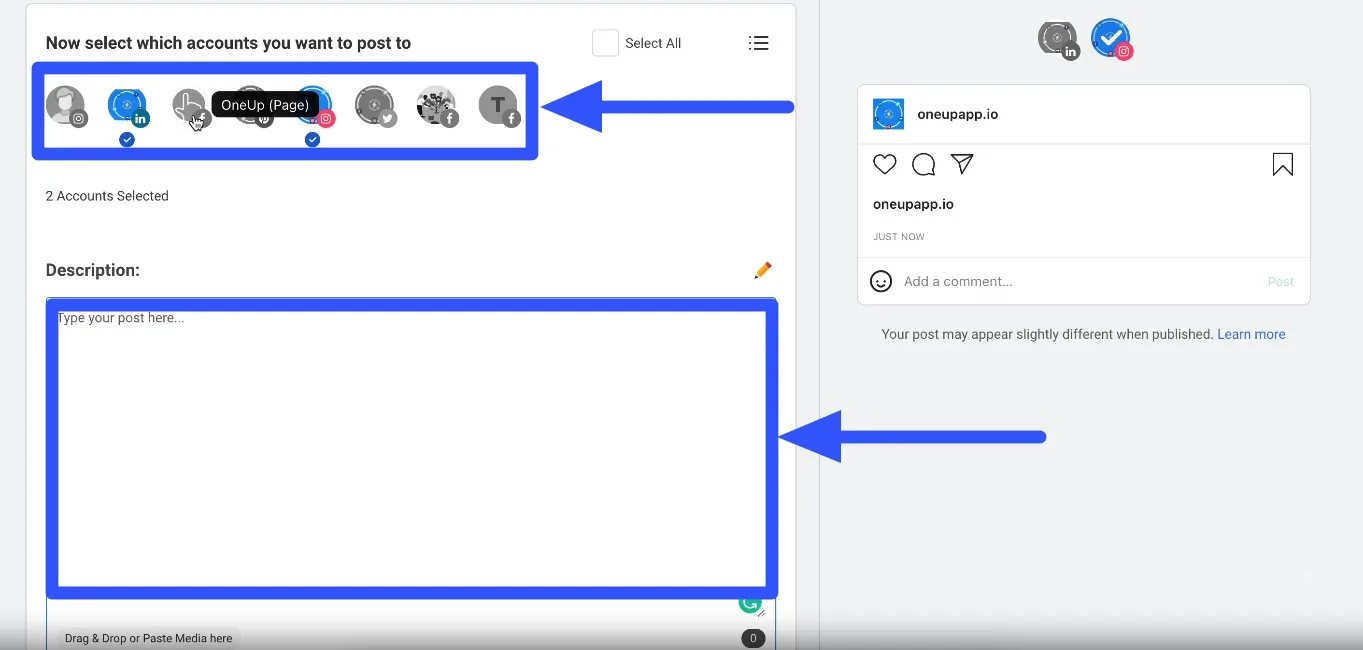
Then, upload the image, video, and other media and include other details such as hashtags and emojis.
The tool allows you to get images from Unsplash, Pexels, Pixabay, and Pinterest or edit images and videos via the Canva integration. After creating your post, select whether to post it once or automatically recycle it at your preferred interval and frequency. You can also add a location tag and enable a first comment. When you’re done, schedule a time to auto-publish the content.
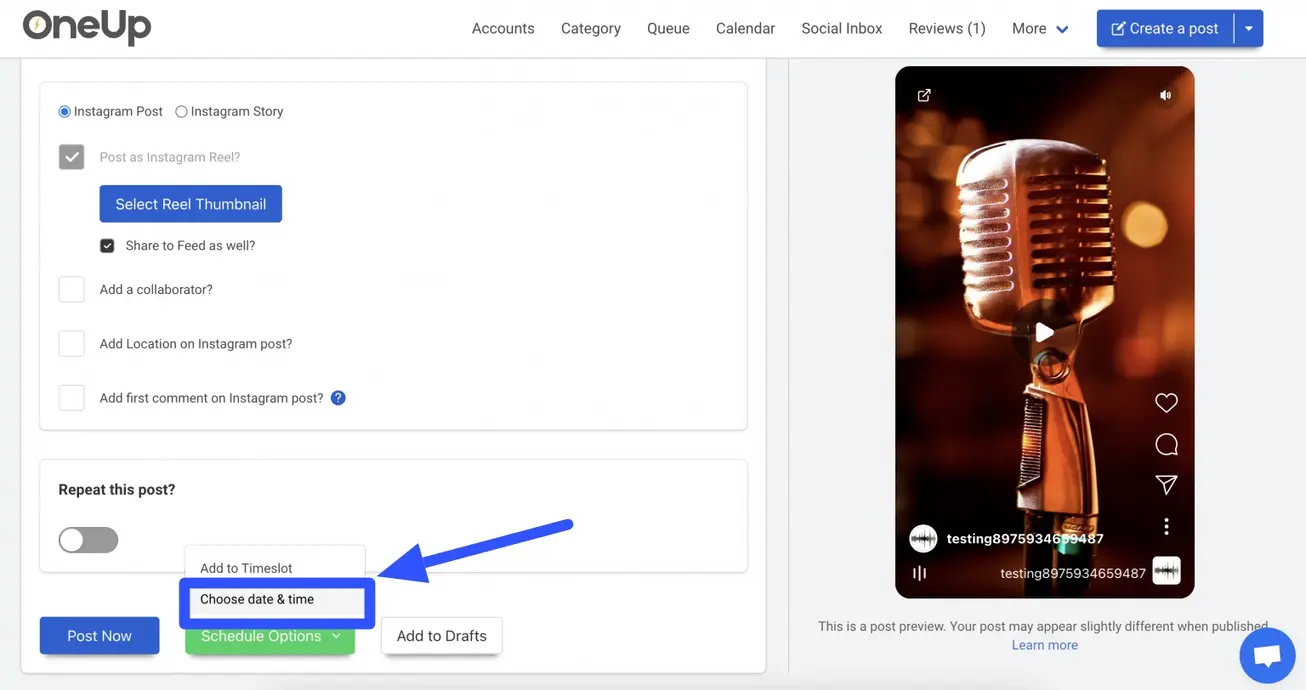
You can add the post to your Drafts if it needs reviewing and client approval before going live.
OneUp’s other features help you:
- Create categories to sort your clients’ social media accounts together or separately for easy access and management
- Manage all your clients’ posts visually with the Calendar View. The feature lets you see an overview of your published and scheduled posts, drag-and-drop them to change the order, and edit them
- Auto-generate captions for social media posts with the AI feature. You can always tweak and improve the auto-generated content before scheduling or publishing the posts
- Monitor and analyze social media content performance with OneUp’s analytics and reports
- Create hashtag groups to add them to similar posts or content easily
- Upload and schedule posts in bulk via Dropbox, Google Drive, CSV, or your local drive
- Preview posts before they go live so you can edit them accordingly before publishing
- Reply to Google Business Profile reviews without leaving OneUp
- Automate posting across platforms and from RSS feeds
- Create AI-generated images and add them directly to your clients’ posts
Pros
- Simple and intuitive UI.
- Offers automation features.
- Includes profile categories for seamless social media account management, especially for users with multiple clients.
- The pricing plans include access to most of the platform’s features.
- Offers a free trial.
Cons
- The analytics and reports feature is not included in all pricing plans. Lower-tier plans require additional fees to access the features
- The AI feature is not as advanced as those in similar social media management tools.
- The free trial is only for seven days, which may not be enough for users who want to explore the tool more before committing to a plan
- It doesn’t offer as many integrations with social networks and other apps compared to similar social media management platforms
Pricing
The OneUp pricing plans (billed annually) are:
- Starter: $12/month
- Intermediate: $48/month
- Growth: $84/month
- Business: $240/month
8. Pally
Image source: Pallyy.com
Social media scheduling tool Pallyy is designed to make it as quick as possible to plan, schedule, and auto-publish posts. The tool excels in content planning, which is essential for your clients’ strategies and campaigns.
Like what American writer Felicia Lin said…
“Social media is just a buzzword until you come up with a plan.”
The tool lets you auto-publish posts to Facebook, LinkedIn, X (Twitter), TikTok, Google My Business, and Instagram.
Select the social profile, upload your media, and specify whether to auto-publish the post on a schedule or set up Push Notifications to remind you when to publish the content.
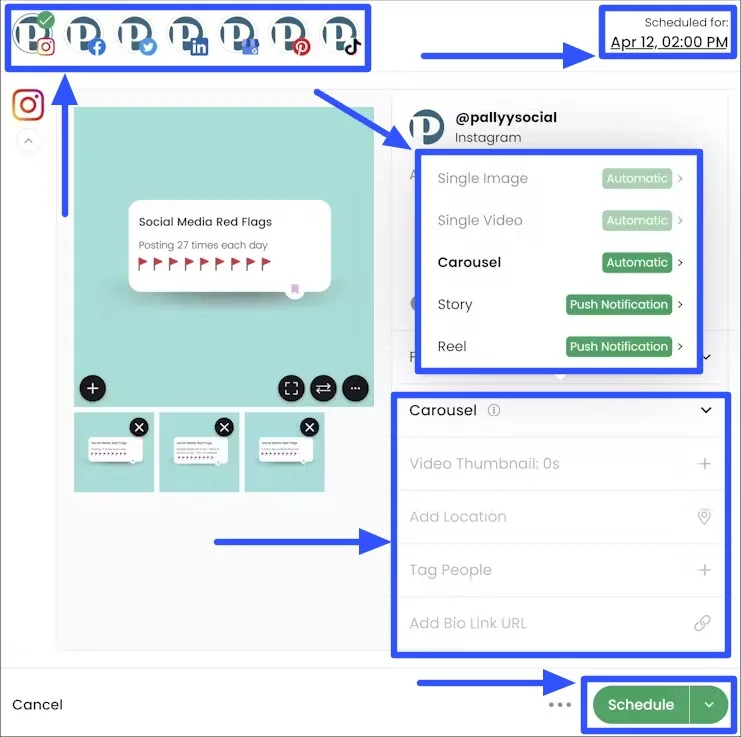
You can add a video thumbnail, tag locations and other users, and add a bio link URL.
[Must read: How to Find Instagram URL for Profile, Photos, Videos, etc.]
Once you’re set, choose a date and time to auto-publish your client’s post. The tool recommends the best time to post for maximum engagement.
The tool empowers you to store and organize all your media in folders for effortless access and sorting, facilitating easy asset retrieval through its search function. You can save the posts as drafts if you need to review them before they go live, edit them later, or send them off for client approval.
[Must read: Instagram Drafts: How to Save/Find/Delete Drafts on IG]
Pallyy also lets you share your content calendar to keep your clients in the loop. Your clients can add notes, leave notes, and approve posts via the calendar.
Pallyy’s other core features include the following:
- A reports builder for creating, sharing, and exporting custom social media content performance reports
- A social media inbox to centralize and streamline replying to and managing comments, mentions, DMs, and reviews. It includes bulk actions such as assigning, labeling, deleting, achieving, and marking messages read and resolved with a few clicks
- Approval workflows, including post status tracking and management by labeling posts as denied, pending, or approved
Pros
- Beginner-friendly interface
- Includes built-in analytics and reports features
- Unlimited post scheduling for the Premium plan
- Offers a free plan and a 14-day free trial for the Premium plan
- Offers an AI Instagram caption generator
[Must read: Instagram Reels vs Story: What’s The Difference]
Cons
- The free plan only offers basic and limited features
- Unlike similar social media management platforms, the AI caption generator isn’t built into the publisher or scheduler
- Pallyy doesn’t offer content queuing
- The platform’s Premium plan includes one social set, and each additional set costs additional fees. The costs can quickly add up, especially if you manage a lot of client profiles
- No white labeling features
- The analytics features focus more on Instagram, which can be a big deal for users who want the same depth of analytics and reports for other social media platforms
[Must read: Instagram Reels Dimensions 2024: Sizes, Specs, Ratio, & More]
Pricing
Pallyy’s pricing is pretty simple:
- Free: $0 with 15 scheduled posts per month for a single brand.
- Premium: $18/month with a 14-day free trial
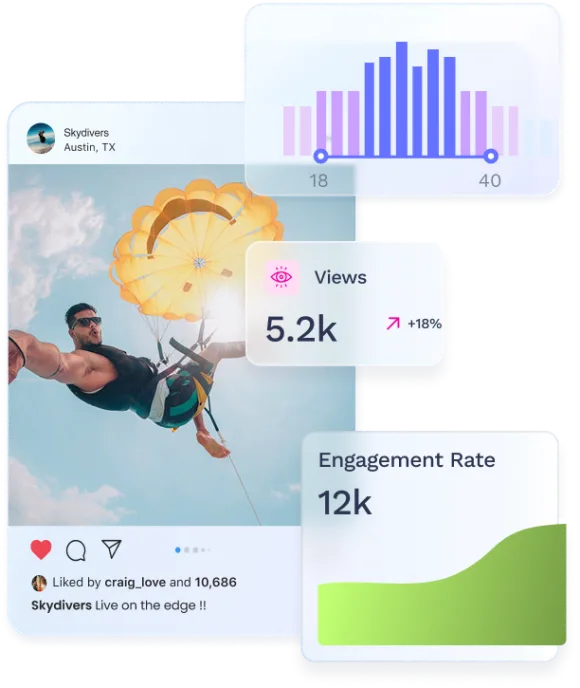
Try Vista Social for free
A social media management platform that actually helps you grow with easy-to-use content planning, scheduling, engagement and analytics tools.
Get Started NowAbout the Author

Content Writer
Jimmy Rodela is a social media and content marketing consultant with over 9 years of experience, with work appearing on sites such as Business.com, Yahoo, SEMRush, and SearchEnginePeople. He specializes in social media, content marketing, SaaS, small business strategy, marketing automation, and content development.
Loading related tools...

The most complete social media management platform for teams who demand more.




Tools
PublishingAnalyticsEngagementIntegrations
FacebookInstagramLinkedInRedditSnapchatThreadsTikTokX (Twitter)YouTubeMCPVista Page (link-in-bio)All IntegrationsCopyright © 2026 Vista Social LLC. All Rights Reserved.